Insufficient space on destination drive


jimhow4545

Well-known member
Member
Local time
1:16 PM
Posts
169
OS
Wind 11 Pro 24H2 (Dev Channel)/23H2Beta (offline)
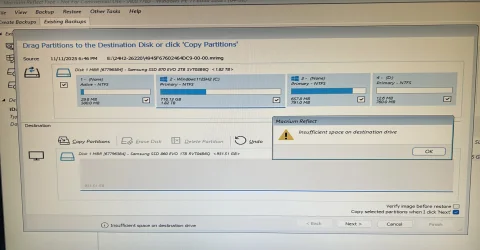
I can’t restore from an image file because of this. Warning:

Insufficient space on destination drive

What am I doing wrong here?
 

Attachments

  • IMG_4731.webp
    IMG_4731.webp
    1 MB · Views: 2

My Computer

System One

  • OS
    Wind 11 Pro 24H2 (Dev Channel)/23H2Beta (offline)
    Computer type
    PC/Desktop
    Manufacturer/Model
    DELL T7500
    CPU
    2 Intel Xeon 5680
    Memory
    120 Gb
    Graphics Card(s)
    MSI(Nvidia) GeForce GTX 970
    Monitor(s) Displays
    Dell S2719DGF
    Screen Resolution
    2560 x 1440 (155Hz)
    Hard Drives
    Samsung 2TB 870 (24H2 Device)
    Samsung 1TB 860 (23H2 Beta)
    PSU
    Dell 1100W
    Antivirus
    Premium Malwarebyte, AdwCleaner (Malwarebyte)
You are trying to copy a 1.82TB partition onto a <1TB partition.
Some imaging utilities have special capabilities that allow them to do just that as long as the occupied space of the image is smaller than the destination.
I suggest that you look in the Help for that utility to find out the procedure required for such circumstances.
e.g.
Restore Partitions with Resize and Reorder - Macrium Software
and there might be useful guidance in
Macrium: image and restore to smaller drive - Ten Forums

I cannot remember if you first need to copy the system partition across to the target or not. It's ages since I've worked with MBR disks.


Denis
 
Last edited:

My Computer

System One

  • OS
    Windows 11 Home x64 Version 25H2 Build 26200.8037
You are trying to copy a 1.82TB partition onto a <1TB partition.
Some imaging utilities have special capabilities that allow them to do just that as long as the occupied space of the image is smaller than the destination.
I suggest that you look in the Help for that utility to find out the procedure required for such circumstances.
e.g.
Restore Partitions with Resize and Reorder - Macrium Software
and there might be useful guidance in
Macrium: image and restore to smaller drive - Ten Forums

I cannot remember if you first need to copy the system partition across to the target or not. It's ages since I've worked with MBR disks.


Denis
1. I made an image backup (McCrium free version 8.0) from Samsung 2TB SSD and stored it on 1TB drive. The image file is less than 750 GB.

2. I shutdown down the computer and and disconnected the 2TB SSD offline and connected the Samsung 1TB SSD and the hard drive that contains the backup image file.

3. I plugged the usb memory stick that contains McCrium Rescue Media Bootup and powered up the computer.

4. I followed The McCrium screen after the bootup to try the restore and got that warning.
 

My Computer

System One

  • OS
    Wind 11 Pro 24H2 (Dev Channel)/23H2Beta (offline)
    Computer type
    PC/Desktop
    Manufacturer/Model
    DELL T7500
    CPU
    2 Intel Xeon 5680
    Memory
    120 Gb
    Graphics Card(s)
    MSI(Nvidia) GeForce GTX 970
    Monitor(s) Displays
    Dell S2719DGF
    Screen Resolution
    2560 x 1440 (155Hz)
    Hard Drives
    Samsung 2TB 870 (24H2 Device)
    Samsung 1TB 860 (23H2 Beta)
    PSU
    Dell 1100W
    Antivirus
    Premium Malwarebyte, AdwCleaner (Malwarebyte)
I know.
The fact remains that:-
You are trying to copy a 1.82TB partition onto a <1TB partition.
It's the partition size not the image size that is relevant.

You will need to follow their instructions for such a case.


Denis
 
Last edited:

My Computer

System One

  • OS
    Windows 11 Home x64 Version 25H2 Build 26200.8037
It's the partition size not the image size that is relevant.
 

My Computer

System One

  • OS
    Windows 11 Home x64 Version 25H2 Build 26200.8037
I had to drag and drop to the destination and fiddling with Auto Size. Now it’s restoring.

Last time I had no issue with this because I made an image file from 1TB SSD and restored to another 1TB SSD. Now I know what is going.
 

My Computer

System One

  • OS
    Wind 11 Pro 24H2 (Dev Channel)/23H2Beta (offline)
    Computer type
    PC/Desktop
    Manufacturer/Model
    DELL T7500
    CPU
    2 Intel Xeon 5680
    Memory
    120 Gb
    Graphics Card(s)
    MSI(Nvidia) GeForce GTX 970
    Monitor(s) Displays
    Dell S2719DGF
    Screen Resolution
    2560 x 1440 (155Hz)
    Hard Drives
    Samsung 2TB 870 (24H2 Device)
    Samsung 1TB 860 (23H2 Beta)
    PSU
    Dell 1100W
    Antivirus
    Premium Malwarebyte, AdwCleaner (Malwarebyte)

Latest Support Threads

Back
Top Bottom