Solved Intel 13th gen CPUs: How to get CPU core temperatures instantly via command-line?


MKANET

Member
Local time
10:53 PM
Posts
51
OS
Windows 11
I can't seem to find any way to access CPU core temperatures via Windows 11 command-line, certainly not natively. Below are all the failed solutions I've tried so far:
I'm just looking for a solution that can return CPU core temps instantly to command-line after a query. I'm willing to try any reasonable solution.
 
Windows Build/Version
Windows 11 Version 22H2 OS Build 22621.1848
Last edited:

My Computer

System One

  • OS
    Windows 11
There is this thread over at Stack Overflow that might be of interest to you.


or


My Computers

System One System Two

  • OS
    Windows 11 Pro 25H2
    Computer type
    PC/Desktop
    Manufacturer/Model
    Homebuilt
    CPU
    Intel Core i9 13900K
    Motherboard
    Asus ProArt Z790 Creator WiFi - Bios 3107
    Memory
    Corsair Dominator Platinum 64gb 5600MT/s DDR5 Dual Channel
    Graphics Card(s)
    Sapphire NITRO+ AMD Radeon RX 7900 XTX Vapor-X 24GB
    Sound Card
    External DAC: Cambridge Audio DACMagic200M - Headphone Amp: Topping L50
    Monitor(s) Displays
    Panasonic MX950 Mini LED 55" TV 120hz
    Screen Resolution
    3840 x 2160 120hz
    Hard Drives
    Samsung 980 Pro 2TB (OS)
    Samsung 980 Pro 1TB (Files)
    Lexar NZ790 4TB
    LaCie d2 Professional 6TB external - USB 3.1
    Seagate Expansion 16TB external - USB 3.2
    Seagate One Touch 18TB external HD - USB 3.0
    PSU
    Corsair RM1200x Shift
    Case
    Corsair RGB Smart Case 5000x (white)
    Cooling
    Corsair iCue H150i Elite Capellix XT
    Keyboard
    Incase Ergonomic USB (Microsoft clone)
    Mouse
    Logitech MX Master 3S
    Internet Speed
    Fibre 900/500 Mbps
    Browser
    Microsoft Edge Chromium
    Antivirus
    Bitdefender Total Security
    Other Info
    AMD Radeon Software & Drivers 26.1.1
    Hasleo Backup Suite
    Dashlane password manager
    Kensington Verimark fingerprint reader
    Logitech Brio 4K webcam
    Orico 10-port powered USB 3.0 hub
  • Operating System
    Windows 11 Pro 25H2
    Computer type
    Laptop
    Manufacturer/Model
    Asus Vivobook X1605VA
    CPU
    Intel® Core™ i9-13900H
    Motherboard
    Asus X1605VA bios 309
    Memory
    32GB DDR4-3200 Dual channel
    Graphics card(s)
    *Intel Iris Xᵉ Graphics G7
    Sound Card
    Realtek | Intel SST Bluetooth & USB
    Monitor(s) Displays
    16.0-inch, WUXGA 16:10 aspect ratio, IPS-level Panel
    Screen Resolution
    1920 x 1200 60hz
    Hard Drives
    512GB M.2 NVMe™ PCIe® 3.0 SSD
    Mouse
    Logitech MX Ergo Trackball
    Antivirus
    Bitdefender Total Security
    Other Info
    720p Webcam
    WiFi & USB to ethernet
There is this thread over at Stack Overflow that might be of interest to you.


or


Thank; but, wmic doesn't return cpu core temps; only the general motherboard temperature. I'll update my OP to include wmic as another one of my failed attempts.
 

My Computer

System One

  • OS
    Windows 11
Good luck finding someone who knows the answer to this. I have a Intel 13th gen CPU but have no need to read the temps from the command line.

Perhaps someone on a specialist programming\scripting forum may know the answer.
 

My Computers

System One System Two

  • OS
    Windows 11 Pro 25H2
    Computer type
    PC/Desktop
    Manufacturer/Model
    Homebuilt
    CPU
    Intel Core i9 13900K
    Motherboard
    Asus ProArt Z790 Creator WiFi - Bios 3107
    Memory
    Corsair Dominator Platinum 64gb 5600MT/s DDR5 Dual Channel
    Graphics Card(s)
    Sapphire NITRO+ AMD Radeon RX 7900 XTX Vapor-X 24GB
    Sound Card
    External DAC: Cambridge Audio DACMagic200M - Headphone Amp: Topping L50
    Monitor(s) Displays
    Panasonic MX950 Mini LED 55" TV 120hz
    Screen Resolution
    3840 x 2160 120hz
    Hard Drives
    Samsung 980 Pro 2TB (OS)
    Samsung 980 Pro 1TB (Files)
    Lexar NZ790 4TB
    LaCie d2 Professional 6TB external - USB 3.1
    Seagate Expansion 16TB external - USB 3.2
    Seagate One Touch 18TB external HD - USB 3.0
    PSU
    Corsair RM1200x Shift
    Case
    Corsair RGB Smart Case 5000x (white)
    Cooling
    Corsair iCue H150i Elite Capellix XT
    Keyboard
    Incase Ergonomic USB (Microsoft clone)
    Mouse
    Logitech MX Master 3S
    Internet Speed
    Fibre 900/500 Mbps
    Browser
    Microsoft Edge Chromium
    Antivirus
    Bitdefender Total Security
    Other Info
    AMD Radeon Software & Drivers 26.1.1
    Hasleo Backup Suite
    Dashlane password manager
    Kensington Verimark fingerprint reader
    Logitech Brio 4K webcam
    Orico 10-port powered USB 3.0 hub
  • Operating System
    Windows 11 Pro 25H2
    Computer type
    Laptop
    Manufacturer/Model
    Asus Vivobook X1605VA
    CPU
    Intel® Core™ i9-13900H
    Motherboard
    Asus X1605VA bios 309
    Memory
    32GB DDR4-3200 Dual channel
    Graphics card(s)
    *Intel Iris Xᵉ Graphics G7
    Sound Card
    Realtek | Intel SST Bluetooth & USB
    Monitor(s) Displays
    16.0-inch, WUXGA 16:10 aspect ratio, IPS-level Panel
    Screen Resolution
    1920 x 1200 60hz
    Hard Drives
    512GB M.2 NVMe™ PCIe® 3.0 SSD
    Mouse
    Logitech MX Ergo Trackball
    Antivirus
    Bitdefender Total Security
    Other Info
    720p Webcam
    WiFi & USB to ethernet
Good luck finding someone who knows the answer to this. I have a Intel 13th gen CPU but have no need to read the temps from the command line.

Perhaps someone on a specialist programming\scripting forum may know the answer.
I think you're right. Every single google search result points me to other people asking the same question without a solution. It used to be possible with my older PC; just not my new one.
 

My Computer

System One

  • OS
    Windows 11
I think you're right. Every single google search result points me to other people asking the same question without a solution. It used to be possible with my older PC; just not my new one.
Out of curiosity...why dyou wanna do this via the command line? No fuss just curious is all
 

My Computer

System One

  • OS
    11
    Computer type
    PC/Desktop
    Manufacturer/Model
    Custom
    CPU
    [email protected]
    Motherboard
    Gigabyte Gaming X Z490
    Memory
    Viper Steelseries 32gb@ 3600mhz
    Graphics Card(s)
    Gigabyte 2070 Super 8GB, +200 core + 600 memory
    Monitor(s) Displays
    ASUS 4k HDR, Two 1080p Benq and Samsung
    Screen Resolution
    3840x2160/2560x1440/1920x1080
    Hard Drives
    Adata XPG SX8200 PRO 1tb
    Samsung EVO 870 500GB
    PSU
    Corsair RX 650
    Case
    NZXT h510
    Cooling
    CM HYPER 212 RGB
    Keyboard
    Razer Ornata Chroma
    Mouse
    Steelseries Rival 710
I think you're right. Every single google search result points me to other people asking the same question without a solution. It used to be possible with my older PC; just not my new one.

Have you tried here? Perhaps a guru on things Intel might know...

https://community.intel.com/
 

My Computers

System One System Two

  • OS
    Windows 11 Pro 25H2
    Computer type
    PC/Desktop
    Manufacturer/Model
    Homebuilt
    CPU
    Intel Core i9 13900K
    Motherboard
    Asus ProArt Z790 Creator WiFi - Bios 3107
    Memory
    Corsair Dominator Platinum 64gb 5600MT/s DDR5 Dual Channel
    Graphics Card(s)
    Sapphire NITRO+ AMD Radeon RX 7900 XTX Vapor-X 24GB
    Sound Card
    External DAC: Cambridge Audio DACMagic200M - Headphone Amp: Topping L50
    Monitor(s) Displays
    Panasonic MX950 Mini LED 55" TV 120hz
    Screen Resolution
    3840 x 2160 120hz
    Hard Drives
    Samsung 980 Pro 2TB (OS)
    Samsung 980 Pro 1TB (Files)
    Lexar NZ790 4TB
    LaCie d2 Professional 6TB external - USB 3.1
    Seagate Expansion 16TB external - USB 3.2
    Seagate One Touch 18TB external HD - USB 3.0
    PSU
    Corsair RM1200x Shift
    Case
    Corsair RGB Smart Case 5000x (white)
    Cooling
    Corsair iCue H150i Elite Capellix XT
    Keyboard
    Incase Ergonomic USB (Microsoft clone)
    Mouse
    Logitech MX Master 3S
    Internet Speed
    Fibre 900/500 Mbps
    Browser
    Microsoft Edge Chromium
    Antivirus
    Bitdefender Total Security
    Other Info
    AMD Radeon Software & Drivers 26.1.1
    Hasleo Backup Suite
    Dashlane password manager
    Kensington Verimark fingerprint reader
    Logitech Brio 4K webcam
    Orico 10-port powered USB 3.0 hub
  • Operating System
    Windows 11 Pro 25H2
    Computer type
    Laptop
    Manufacturer/Model
    Asus Vivobook X1605VA
    CPU
    Intel® Core™ i9-13900H
    Motherboard
    Asus X1605VA bios 309
    Memory
    32GB DDR4-3200 Dual channel
    Graphics card(s)
    *Intel Iris Xᵉ Graphics G7
    Sound Card
    Realtek | Intel SST Bluetooth & USB
    Monitor(s) Displays
    16.0-inch, WUXGA 16:10 aspect ratio, IPS-level Panel
    Screen Resolution
    1920 x 1200 60hz
    Hard Drives
    512GB M.2 NVMe™ PCIe® 3.0 SSD
    Mouse
    Logitech MX Ergo Trackball
    Antivirus
    Bitdefender Total Security
    Other Info
    720p Webcam
    WiFi & USB to ethernet
Out of curiosity...why dyou wanna do this via the command line? No fuss just curious is all
I'm glad you asked! Home Assistant. Besides, its ability to control any smarthome device, it can also display information/status from any system with an API or command-line in a highly customizable interface. It's particularly useful for people who host (and monitor) several different unlike systems.
 

My Computer

System One

  • OS
    Windows 11
- note that the sensor data is accessed directly and not using Rainmeter

Code:
reg query HKEY_CURRENT_USER\SOFTWARE\HWiNFO64\VSB > c:\Temp\HWINFO.TXT
$file_data = Get-Content c:\Temp\HWINFO.TXT
$a = "<"
$b = ">"
$d = $a+$file_data[5]+$b
$e = $a+$file_data[20]+$b
$d = ($d).Replace("    ValueRaw","s")
$e = ($e).Replace("    ValueRaw","s")
$d
<s0    REG_SZ    35>
$e
<s3    REG_SZ    975>
$port= new-Object System.IO.Ports.SerialPort COM6,9600,None,8,one
$port.open()
$port.Write($d)
$port.Write($e)
$port.Close()
 

Attachments

  • PowerShellSession.jpg
    PowerShellSession.jpg
    77.8 KB · Views: 3

My Computers

System One System Two

  • OS
    Win 10 > Win 11 > Linux Mint 22.3
    Computer type
    PC/Desktop
    Manufacturer/Model
    Custom
    CPU
    i5-11400
    Motherboard
    Gigabyte B560M DS3H
    Memory
    64GB Crucial RAM DDR4
    Graphics Card(s)
    none
    Sound Card
    Custom USB 24-bit 96kHz DAC (PCM5102A + STM32F411)
    Monitor(s) Displays
    31.5" LG 1440p
    Screen Resolution
    2560x1440
    Hard Drives
    4 TB WD HDD
    1 TB WD SSD
    500 GB WD NVME
    500 GB Crucial P5 (main OS Win10)
    PSU
    Corsair 550W
    Case
    ATX
    Cooling
    Fan
    Keyboard
    Genius
    Mouse
    Logitech
    Internet Speed
    4G/5G
    Browser
    Firefox
    Antivirus
    Defender
  • Operating System
    Win 10 more than Win 11 more than Linux Mint 22.1
    Computer type
    PC/Desktop
    Manufacturer/Model
    Home
    CPU
    i5-14400
    Motherboard
    Gigabyte B760M D3H
    Memory
    48 GB DDR5
    Graphics card(s)
    none
    Sound Card
    Custom USB 24-bit 96kHz DAC (PCM5102A + STM32F411)
    Monitor(s) Displays
    27" FHD Gaming IPS LCD 144Hz
    Screen Resolution
    1920x1080
    Hard Drives
    4 TB WD HDD
    1TB + 2TB WD NVME
    PSU
    Corsair 550W
    Case
    Cooler Master
    Cooling
    Fan
    Keyboard
    Genius
    Mouse
    Logitec
    Internet Speed
    4G/5G
    Browser
    Firefox
    Antivirus
    Defender
- note that the sensor data is accessed directly and not using Rainmeter

Code:
reg query HKEY_CURRENT_USER\SOFTWARE\HWiNFO64\VSB > c:\Temp\HWINFO.TXT
$file_data = Get-Content c:\Temp\HWINFO.TXT
$a = "<"
$b = ">"
$d = $a+$file_data[5]+$b
$e = $a+$file_data[20]+$b
$d = ($d).Replace("    ValueRaw","s")
$e = ($e).Replace("    ValueRaw","s")
$d
<s0    REG_SZ    35>
$e
<s3    REG_SZ    975>
$port= new-Object System.IO.Ports.SerialPort COM6,9600,None,8,one
$port.open()
$port.Write($d)
$port.Write($e)
$port.Close()
Thank you. At least there is A solution. However, I'm hoping to find a solution that doesn't involve writing to disk unnecessarily 24/7 just to be able to read this data. HWInfo had a RESTful API webserver which would have been perfect if it still worked.
 

My Computer

System One

  • OS
    Windows 11
Try this code in batch file not sure it gets the correct temperature.

Code:
for /f "skip=1 tokens=2 delims==" %%A in ('wmic /namespace:\\root\wmi PATH MSAcpi_ThermalZoneTemperature get CurrentTemperature /value') do set /a "HunDegCel=(%%~A*10)-27315"
echo CPU Temperature %HunDegCel:~0,-2%.%HunDegCel:~-2% Degrees Celsius
 

My Computer

System One

  • OS
    Windows 11
    Computer type
    PC/Desktop
    Manufacturer/Model
    HP Pavilion
    CPU
    AMD Ryzen 7 5700G
    Motherboard
    Erica6
    Memory
    Micron Technology DDR4-3200 16GB
    Graphics Card(s)
    NVIDIA GeForce RTX 3060
    Sound Card
    Realtek ALC671
    Monitor(s) Displays
    Samsung SyncMaster U28E590
    Screen Resolution
    3840 x 2160
    Hard Drives
    SAMSUNG MZVLQ1T0HALB-000H1
Try this code in batch file not sure it gets the correct temperature.

Code:
for /f "skip=1 tokens=2 delims==" %%A in ('wmic /namespace:\\root\wmi PATH MSAcpi_ThermalZoneTemperature get CurrentTemperature /value') do set /a "HunDegCel=(%%~A*10)-27315"
echo CPU Temperature %HunDegCel:~0,-2%.%HunDegCel:~-2% Degrees Celsius
[/QUOTE]
Thanks, but wmic doesn't have access to the CPU core temps, only a general motherboard temp sensor.
 

My Computer

System One

  • OS
    Windows 11
Thank you. At least there is A solution. However, I'm hoping to find a solution that doesn't involve writing to disk unnecessarily 24/7 just to be able to read this data. HWInfo had a RESTful API webserver which would have been perfect if it still worked.
- note that the sensor data is accessed directly and not using Rainmeter

Code:
reg query HKEY_CURRENT_USER\SOFTWARE\HWiNFO64\VSB > c:\Temp\HWINFO.TXT
$file_data = Get-Content c:\Temp\HWINFO.TXT
$a = "<"
$b = ">"
$d = $a+$file_data[5]+$b
$e = $a+$file_data[20]+$b
$d = ($d).Replace("    ValueRaw","s")
$e = ($e).Replace("    ValueRaw","s")
$d
<s0    REG_SZ    35>
$e
<s3    REG_SZ    975>
$port= new-Object System.IO.Ports.SerialPort COM6,9600,None,8,one
$port.open()
$port.Write($d)
$port.Write($e)
$port.Close()

I finally figured out a great solution! I initially thought that HWInfo Restful web server was obsolete. I didn't bother trying it since it was developed back in 2013. It works great; and, doesn't require writing unnecessarily to the disk/windows registry. It's all done cleanly in memory. It also supports other utilities too.
 

Attachments

  • RemoteSensorMonitor.png
    RemoteSensorMonitor.png
    75.7 KB · Views: 10

My Computer

System One

  • OS
    Windows 11
I finally figured out a great solution! I initially thought that HWInfo Restful web server was obsolete. I didn't bother trying it since it was developed back in 2013. It works great; and, doesn't require writing unnecessarily to the disk/windows registry. It's all done cleanly in memory. It also supports other utilities too.
Nice one. I was in the same boat for a while now. But your comment made me write some code in c# to access HWinfo Shared Memory directly without the server. It is written in C# though, but you get he gist (ps. to access shared memory you need to elevate privilidge while running of course)

Struct goes first.

Code:
[StructLayout(LayoutKind.Sequential, Pack = 1, CharSet = CharSet.Ansi)]
public struct HWiNFOEntry
{
    public uint Type;
    public uint SensorIndex;
    public uint Id;

    [MarshalAs(UnmanagedType.ByValTStr, SizeConst = 128)]
    public string NameOriginal;

    [MarshalAs(UnmanagedType.ByValTStr, SizeConst = 128)]
    public string NameUser;

    [MarshalAs(UnmanagedType.ByValTStr, SizeConst = 16)]
    public string Unit;

    public double Value;
    public double ValueMin;
    public double ValueMax;
    public double ValueAvg;
}

Then we have the the helper method - ReadStruct and class which returns my cpu temperature information.

Code:
private static T ReadStruct<T>(MemoryMappedViewAccessor accessor, long position)
{
    int size = Marshal.SizeOf<T>();
    byte[] buffer = new byte[size];

    accessor.ReadArray(position, buffer, 0, size);

    GCHandle handle = GCHandle.Alloc(buffer, GCHandleType.Pinned);
    try
    {
        return Marshal.PtrToStructure<T>(handle.AddrOfPinnedObject());
    }
    finally
    {
        handle.Free();
    }
}

private float GetCpuTemp()
{
    Mutex mutex = null;
    try
    {
        if (!Mutex.TryOpenExisting("Global\\HWiNFO_SM2_MUTEX", out mutex))
        {
            System.Diagnostics.Debug.WriteLine("HWiNFO mutex not found");
            return -1;
        }

        if (!mutex.WaitOne(500))
        {
            System.Diagnostics.Debug.WriteLine("Timeout waiting for HWiNFO mutex");
            return -1;
        }

        using var mmf = MemoryMappedFile.OpenExisting("Global\\HWiNFO_SENS_SM2");
        using var accessor = mmf.CreateViewAccessor();

        var header = ReadStruct<HWiNFOHeader>(accessor, 0);

        uint magic = header.Magic;
        if (magic == 0x53695748) // 'HWiS' reversed
        {
            magic = SwapEndianness(magic);
        }

        if (magic != 0x48576953) // 'SiWH'
        {
            System.Diagnostics.Debug.WriteLine($"HWiNFO magic mismatch: 0x{header.Magic:X8}");
            return -1;
        }

        float bestTemp = -1f;

        for (uint i = 0; i < header.EntryElementCount; i++)
        {
            long offset = header.EntrySectionOffset + (long)i * header.EntryElementSize;
            var reading = ReadStruct<HWiNFOEntry>(accessor, offset);

            if (reading.Unit.Contains("C") &&
                reading.NameOriginal.IndexOf("CPU Package", StringComparison.OrdinalIgnoreCase) >= 0)
            {
                float value = (float)reading.Value;
                if (value > bestTemp)
                    bestTemp = value;
            }
        }

        return bestTemp;
    }
    catch (Exception ex)
    {
        System.Diagnostics.Debug.WriteLine($"HWiNFO CPU temp error: {ex.Message}");
        return -1f;
    }
    finally
    {
        mutex?.ReleaseMutex();
        mutex?.Dispose();
    }
}

// Helper method
private static uint SwapEndianness(uint value)
{
    return ((value & 0xFF000000) >> 24) |
           ((value & 0x00FF0000) >> 8) |
           ((value & 0x0000FF00) << 8) |
           ((value & 0x000000FF) << 24);
}

Happy days :)
 

My Computer

System One

  • OS
    Linux, Windows
    Computer type
    PC/Desktop
    CPU
    Intel Core Ultra 5 235
    Motherboard
    Gigabyte Eagle B860
    Memory
    96GB DDR5
    Graphics Card(s)
    RTX 5070ti
    Monitor(s) Displays
    Gigabyte G34WQCP
    Screen Resolution
    3440x1440
    Hard Drives
    2TB
    Internet Speed
    1Gbps
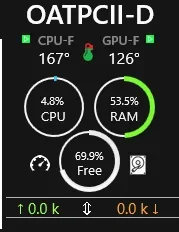
I use OpenHardwareMonitor; also but to have the desktop gadget for temps on my gpu rtx5070ti and processor Intel® Core™ Ultra 9 275HX
it does not show cpu temp which is a pain
 

My Computer

System One

  • OS
    windows 11
    Computer type
    Laptop
    Manufacturer/Model
    predator 17
I use OpenHardwareMonitor; also but to have the desktop gadget for temps on my gpu rtx5070ti and processor Intel® Core™ Ultra 9 275HX
it does not show cpu temp which is a pain
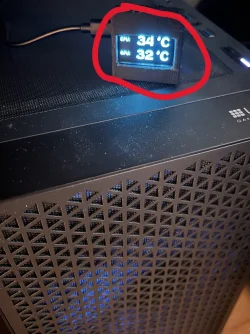
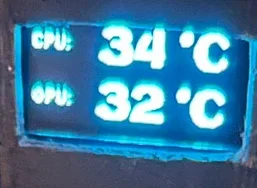
I feel your pain as do own same GPU but slighltly different CPU - Intel Core Ultra on Arrow Lake arch. The same rules apply to us both like no access to CPU core temps apart of BIOS or paid for software. That is why I was forced to write my own code for a tiny temp display (pic attached ps. i have a crap 3d printer so my box looks terrible, need to print it again sometime). I use HWInfo Shared Memory component, which you can enable on a free version for 12 hours straight and then all needs to be done is re-enabling that feature to continue using without spending dosh on subscription. I have spent countless nights trying to figure something out and OpnenHardwareMonitor or WMI will not have access to DTS sensors.
My final thoughts for the future of monitoring software for DTS sensors are: develop open-source PECI (Platform Environment Control Interface) driver for Windows. Then and only then, we can be liberated....
 

Attachments

  • Image2.webp
    Image2.webp
    189.3 KB · Views: 1

My Computer

System One

  • OS
    Linux, Windows
    Computer type
    PC/Desktop
    CPU
    Intel Core Ultra 5 235
    Motherboard
    Gigabyte Eagle B860
    Memory
    96GB DDR5
    Graphics Card(s)
    RTX 5070ti
    Monitor(s) Displays
    Gigabyte G34WQCP
    Screen Resolution
    3440x1440
    Hard Drives
    2TB
    Internet Speed
    1Gbps
Not using the command line, even though I have not tried, I capture it as already mentioned above in Rainmeter by using SpeedFan.

cpu.webp
 

My Computers

System One System Two

  • OS
    All Branches but Release
    Computer type
    Laptop
    Manufacturer/Model
    Acer Nitro ANV15-51
    CPU
    AMD Ryzen 7 7735HS 3200-4500 Mhz 8 cores x 2
    Motherboard
    Sportage_RBH
    Memory
    32 GB DDR5
    Graphics Card(s)
    Radeon Graphic / NVIDIA GeForce RTX 4060 8 GB GDDR6
    Sound Card
    AMD/Realtek(R) Audio
    Monitor(s) Displays
    Integrated Monitor (15.3"vis)
    Screen Resolution
    FHD 1920X1080 16:9 144Hz
    Hard Drives
    KINGSTON OM8SEP4512Q-AA 1TB
    Western Digital 256GB
    PSU
    19V DC 6.32 A 120 W
    Cooling
    Dual Fans
    Mouse
    MS Bluetooth
    Internet Speed
    Fiber 1GB Cox -us & 1GB Orange-fr
    Browser
    Edge Canary- Firefox Nightly-Chrome Dev-Chrome Dev
    Antivirus
    Windows Defender
  • Operating System
    Windows 11 Beta
    Computer type
    Laptop
    Manufacturer/Model
    Asus X751BP
    CPU
    AMD A9-9420
    Memory
    8 GB of DDR4
    Graphics card(s)
    AMD Radeon R5
    Screen Resolution
    1600x900
    Hard Drives
    Seagate 1 TB
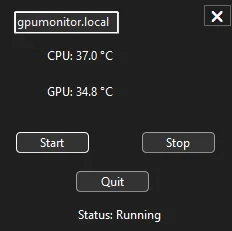
Nor do I, I have built a small app to help me manage it. My priority was to get it all working over wifi, coz I am driving that display with ESP32C3. My project was to build a clone of temp monitors you can purchase online, but temp monitor that is compatible with latest gen cpus. Happy to report, it is all working fine. Shared code should help anyone trying to achieve similar thing, coz there is a scarce of info online related to that specific topic. Good luck.
 

Attachments

  • Screenshot 2026-04-30 205635.webp
    Screenshot 2026-04-30 205635.webp
    4.4 KB · Views: 1
  • temp_monit.webp
    temp_monit.webp
    9.8 KB · Views: 1

My Computer

System One

  • OS
    Linux, Windows
    Computer type
    PC/Desktop
    CPU
    Intel Core Ultra 5 235
    Motherboard
    Gigabyte Eagle B860
    Memory
    96GB DDR5
    Graphics Card(s)
    RTX 5070ti
    Monitor(s) Displays
    Gigabyte G34WQCP
    Screen Resolution
    3440x1440
    Hard Drives
    2TB
    Internet Speed
    1Gbps

Latest Support Threads

Back
Top Bottom