Introducing Sudo for Windows 11


 Windows Command Line Bog:

We’re excited to announce the release of Sudo for Windows in Windows 11 Insider Preview Build 26052! Sudo for Windows is a new way for users to run elevated commands directly from an unelevated console session. It is an ergonomic and familiar solution for users who want to elevate a command without having to first open a new elevated console.

We are also excited to announce that we are open-sourcing this project here on GitHub! We’re working hard to add more information about the project in the GitHub repo and will be sharing more details about our plans in the coming months! If you’re looking for additional functionality that Sudo for Windows does not provide, check out Gerardo Grignoli’s gsudo which has a number of additional features and configuration options.

How to enable Sudo for Windows​

To enable Sudo for Windows, navigate to the Settings > For Developers page in Windows Settings and toggle on the “Enable Sudo” option:


For Developer Settings

You can alternatively enable Sudo for Windows by running the following command in an elevated console session:

sudo config --enable <configuration_option>
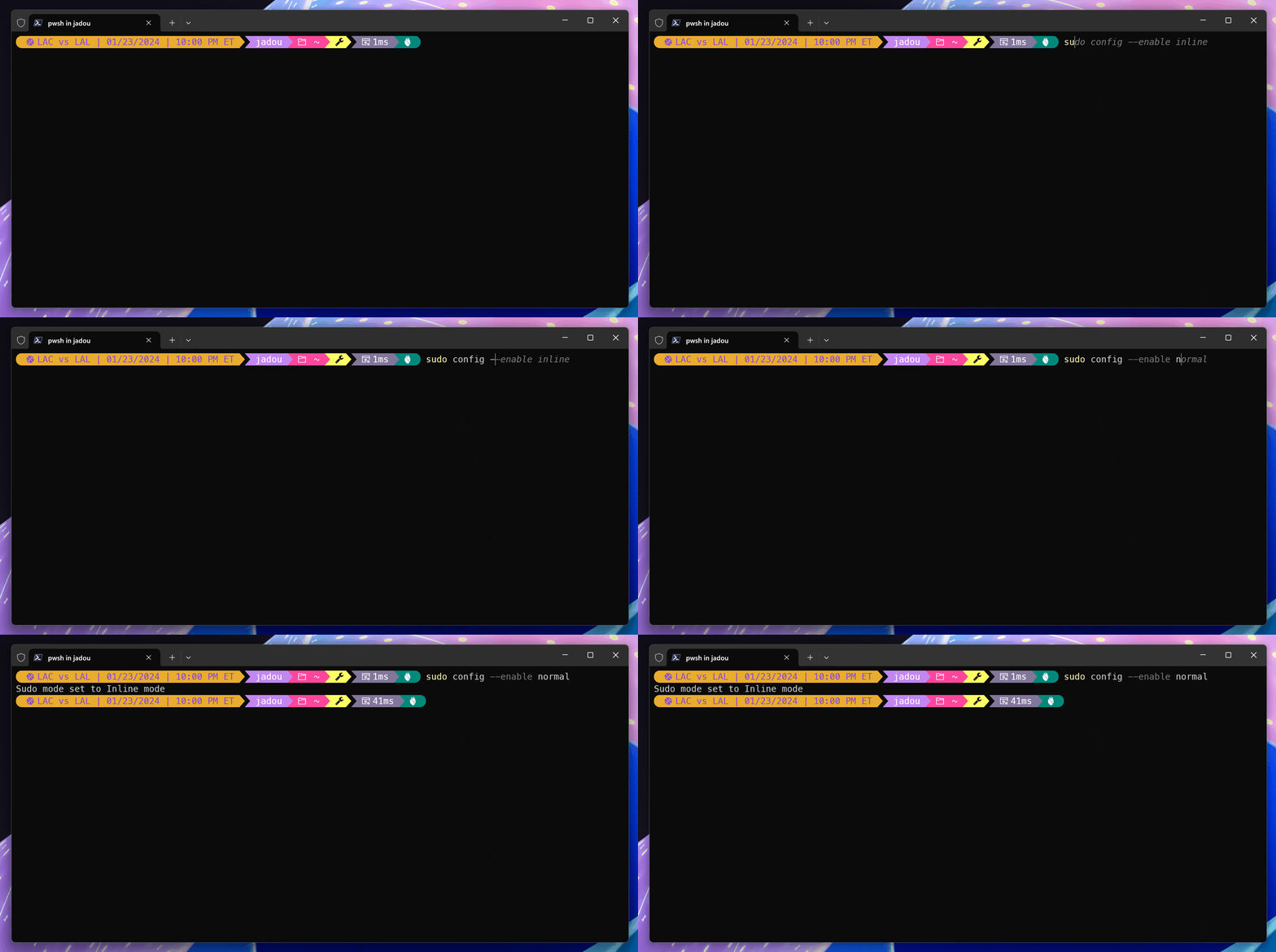
sudo-config.gif


How to configure Sudo for Windows​

Sudo for Windows currently supports three different configuration options:
  1. In a new window (forceNewWindow)
  2. Input closed (disableInput)
  3. Inline (normal)
To change the configuration option, use the drop-down menu in the Settings > For Developers page in Windows Settings:

For Developers - Sudo Configurations

You can alternatively change the configuration option by running the following command in an elevated console session:

sudo config --enable <configuration_option>

Configuration Option 1: In a New Window​

In this configuration, Sudo for Windows will open a new elevated console window and run the command in that window. This is the default configuration option when sudo is enabled. For example, if you run:

sudo netstat -ab

A new window will open and the command will be run in that window:
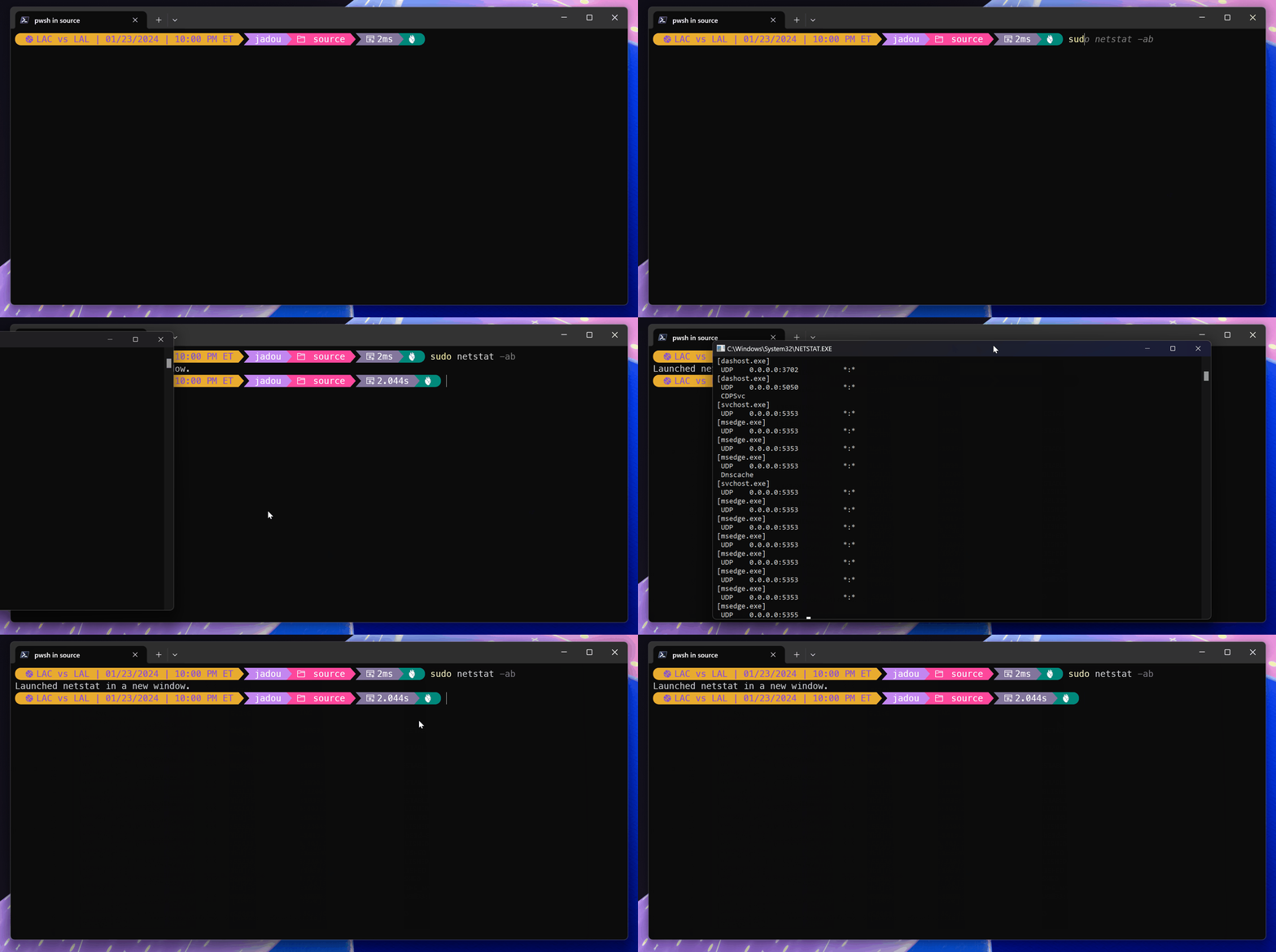
force-new-window.gif


Configuration Option 2: Input Closed​

In this configuration, Sudo for Windows will run the elevated process in the current window, but the new process will be spawned with its stdin closed. This means that the new process will not accept any user input, so this configuration will not work for processes that require further user input after elevation.

Configuration Option 3: Inline​

This configuration is most similar to the behavior of sudo on other operating systems. In this configuration, Sudo for Windows will run the elevated process with its stdin, stdout, and stderr all connected to the current window. This means the new elevated process can take in input and route output to the current window.

How does it work?​

When elevating a process from the command-line with sudo, a UAC dialog will appear asking the user to confirm the elevation:

UAC Dialog

Once the user confirms the elevation, the process will be elevated based on the configuration option selected by the user.

You can check out the optional parameters for the sudo command by running sudo -h in your console.

Once the user confirms the elevation, the process will be elevated based on the configuration option selected by the user.

You can check out the optional parameters for the sudo command by running sudo -h in your console.

In a New Window​

In this configuration, sudo.exe will launch a new elevated console window and run the command in that window. The new window will be launched with the same working directory as the current window. The new window will also be launched with the same environment variables as the current window. This configuration has a similar flow to the runas command.

Input Closed and Inline​

In these configurations, sudo.exe will launch a new elevated process, an elevated sudo.exe process, and the original unelevated sudo.exe will establish an RPC connection with the new elevated process. In other words, information is passed from the unelevated sudo instance to the elevated one. Specifically, the console handles from the unelevated process are passed to the elevated process which allows the elevated process to read input from the unelevated process and write output to the unelevated process. However, when sudo is configured in the “Input Closed” configuration, the elevated process will essentially not be passed the console’s input handle, so it will not be able to read input from the user.

Here is a diagram of how the process hierarchy looks:

sudo diagram

It is important when running sudo in the “Inline” or “Input Closed” configurations to be aware of the security implications. It is possible that a medium integrity process can drive the elevated process. This risk is mitigated in the “Input Closed” configuration because the elevated process will not be able to read input from the user.

Over the coming months we will be working on expanding documentation for Sudo for Windows and will be sharing more details about the security implications of running sudo in the “Inline” configuration.

What’s next?​

Our team is working on open-sourcing Sudo for Windows and we’re excited to share more details about our plans in the coming months. In the meantime, we’d love to hear your feedback! Please share your feedback directly in the GitHub repository.


 Source:

 
Last edited:
Sudo...... the command in Linux that is like 'Run as Administrator' in Windows.

Sudo = Super User do

Awesome that Windows is doing that.
 

My Computer My Computer

At a glance

Windows 11/Linux MintIntel Core 2 Duo CPU E8400 @ 3.00 GHz x 28 GBIntel 4 Series Chipset Integrated Graphics Co...
OS
Windows 11/Linux Mint
Computer type
PC/Desktop
Manufacturer/Model
Dell Optiplex 960
CPU
Intel Core 2 Duo CPU E8400 @ 3.00 GHz x 2
Memory
8 GB
Graphics Card(s)
Intel 4 Series Chipset Integrated Graphics Controller
Monitor(s) Displays
HP x22LED
Hard Drives
Crucial 250 GB SSD, HD 1Tb

My Computer My Computer

At a glance

Windows 11/Linux MintIntel Core 2 Duo CPU E8400 @ 3.00 GHz x 28 GBIntel 4 Series Chipset Integrated Graphics Co...
OS
Windows 11/Linux Mint
Computer type
PC/Desktop
Manufacturer/Model
Dell Optiplex 960
CPU
Intel Core 2 Duo CPU E8400 @ 3.00 GHz x 2
Memory
8 GB
Graphics Card(s)
Intel 4 Series Chipset Integrated Graphics Controller
Monitor(s) Displays
HP x22LED
Hard Drives
Crucial 250 GB SSD, HD 1Tb
I know this is old, but i just saw this...

Sudo to make things more secure. (y)
Sudo without a password. (n)
Dont you just love windows user-friendliness policy idiocy. 😅
 

My Computers My Computers

  • At a glance

    Linux: Debian, Kali-linux, Alma, Win:7,10IoT,...i3, i5 and i7 From 2gen to 9th gen... Server ...
    OS
    Linux: Debian, Kali-linux, Alma, Win:7,10IoT,2012R
    Manufacturer/Model
    HP Elitebook 840, AsusX53, Aspire E1-572. AsusUX32A, HP Pro3130mt+3010mt, HP Proliant ML150, 3xCustom-PC, i3, i5, i7
    CPU
    i3, i5 and i7 From 2gen to 9th gen... Server dual Xenon
    Hard Drives
    Sata, M.2, SAS
  • At a glance

    Retro: 2003server.XPpro, Win2000, Win98SE, Wi...Oldest intel 8088 up to P4 dual core
    Operating System
    Retro: 2003server.XPpro, Win2000, Win98SE, Win95, Win3.11, MS-DOS, IBM-DOS
    Manufacturer/Model
    Commodore, AST, Fujitsu, Compaq, etc etc. etc Around 15 desktops and 20 laptops in the collection
    CPU
    Oldest intel 8088 up to P4 dual core
    Hard Drives
    MFM, IDE, SCSI
Ah, the good old days... 😅


_
 

My Computers My Computers

  • At a glance

    Windows 11 Pro 25H2 build: (26200.7623)32GB
    OS
    Windows 11 Pro 25H2 build: (26200.7623)
    Computer type
    Laptop
    Manufacturer/Model
    Microsoft Surface Pro
    Memory
    32GB
  • At a glance

    Microsoft 25H2 ProIntel Core Ultra 764GBIntel Integrated Graphics
    Operating System
    Microsoft 25H2 Pro
    Computer type
    Laptop
    Manufacturer/Model
    Dell Pro 14 - PC14250
    CPU
    Intel Core Ultra 7
    Memory
    64GB
    Graphics card(s)
    Intel Integrated Graphics
    Hard Drives
    Micron 1TB SSD
Ah, the good old days... 😅


_
Interesting.. I didn't know about the Halloween documents. :-)
sadly I'm still waiting for them to mess up Github..

But think if Microsoft did with Windows as it is in Linux.. a user account and sudo...... oh, with password of course. ;-)
That would make windows way more secure. :-)
as it is easy to just click OK on UAC popup.. but its not easy to enter a password if you dont know it. (I'm thinking of remote scams, some malware etc.)
 

My Computers My Computers

  • At a glance

    Linux: Debian, Kali-linux, Alma, Win:7,10IoT,...i3, i5 and i7 From 2gen to 9th gen... Server ...
    OS
    Linux: Debian, Kali-linux, Alma, Win:7,10IoT,2012R
    Manufacturer/Model
    HP Elitebook 840, AsusX53, Aspire E1-572. AsusUX32A, HP Pro3130mt+3010mt, HP Proliant ML150, 3xCustom-PC, i3, i5, i7
    CPU
    i3, i5 and i7 From 2gen to 9th gen... Server dual Xenon
    Hard Drives
    Sata, M.2, SAS
  • At a glance

    Retro: 2003server.XPpro, Win2000, Win98SE, Wi...Oldest intel 8088 up to P4 dual core
    Operating System
    Retro: 2003server.XPpro, Win2000, Win98SE, Win95, Win3.11, MS-DOS, IBM-DOS
    Manufacturer/Model
    Commodore, AST, Fujitsu, Compaq, etc etc. etc Around 15 desktops and 20 laptops in the collection
    CPU
    Oldest intel 8088 up to P4 dual core
    Hard Drives
    MFM, IDE, SCSI
But think if Microsoft did with Windows as it is in Linux.. a user account and sudo...... oh, with password of course. ;-)

They're locked into NTFS so they'll never go full Linux, but Linux is all around them. It even drives their cloud.


Sorry Ballmer, but you lost. Linux is 'cancer-free' :wink:
 

My Computers My Computers

  • At a glance

    Windows 11 Pro 25H2 build: (26200.7623)32GB
    OS
    Windows 11 Pro 25H2 build: (26200.7623)
    Computer type
    Laptop
    Manufacturer/Model
    Microsoft Surface Pro
    Memory
    32GB
  • At a glance

    Microsoft 25H2 ProIntel Core Ultra 764GBIntel Integrated Graphics
    Operating System
    Microsoft 25H2 Pro
    Computer type
    Laptop
    Manufacturer/Model
    Dell Pro 14 - PC14250
    CPU
    Intel Core Ultra 7
    Memory
    64GB
    Graphics card(s)
    Intel Integrated Graphics
    Hard Drives
    Micron 1TB SSD
They're locked into NTFS so they'll never go full Linux, but Linux is all around them. It even drives their cloud.


Sorry Ballmer, but you lost. Linux is 'cancer-free' :wink:
They dont need to go full Linux.. I like windows (not 10/11 home/pro but the LTSC versions and win7) But the idiocy of having only a click prompt to modify system settings etc...... that is just poor security thinking....
 

My Computers My Computers

  • At a glance

    Linux: Debian, Kali-linux, Alma, Win:7,10IoT,...i3, i5 and i7 From 2gen to 9th gen... Server ...
    OS
    Linux: Debian, Kali-linux, Alma, Win:7,10IoT,2012R
    Manufacturer/Model
    HP Elitebook 840, AsusX53, Aspire E1-572. AsusUX32A, HP Pro3130mt+3010mt, HP Proliant ML150, 3xCustom-PC, i3, i5, i7
    CPU
    i3, i5 and i7 From 2gen to 9th gen... Server dual Xenon
    Hard Drives
    Sata, M.2, SAS
  • At a glance

    Retro: 2003server.XPpro, Win2000, Win98SE, Wi...Oldest intel 8088 up to P4 dual core
    Operating System
    Retro: 2003server.XPpro, Win2000, Win98SE, Win95, Win3.11, MS-DOS, IBM-DOS
    Manufacturer/Model
    Commodore, AST, Fujitsu, Compaq, etc etc. etc Around 15 desktops and 20 laptops in the collection
    CPU
    Oldest intel 8088 up to P4 dual core
    Hard Drives
    MFM, IDE, SCSI
😁 i see you @Brink 😁
are you keeping an eye on me so i dont post anything evil. ;-) i promise i will be a good girl and dont say anything evil. :-)(y)

(I'm just kidding with the keeping an eye on me.) ;-)
 

My Computers My Computers

  • At a glance

    Linux: Debian, Kali-linux, Alma, Win:7,10IoT,...i3, i5 and i7 From 2gen to 9th gen... Server ...
    OS
    Linux: Debian, Kali-linux, Alma, Win:7,10IoT,2012R
    Manufacturer/Model
    HP Elitebook 840, AsusX53, Aspire E1-572. AsusUX32A, HP Pro3130mt+3010mt, HP Proliant ML150, 3xCustom-PC, i3, i5, i7
    CPU
    i3, i5 and i7 From 2gen to 9th gen... Server dual Xenon
    Hard Drives
    Sata, M.2, SAS
  • At a glance

    Retro: 2003server.XPpro, Win2000, Win98SE, Wi...Oldest intel 8088 up to P4 dual core
    Operating System
    Retro: 2003server.XPpro, Win2000, Win98SE, Win95, Win3.11, MS-DOS, IBM-DOS
    Manufacturer/Model
    Commodore, AST, Fujitsu, Compaq, etc etc. etc Around 15 desktops and 20 laptops in the collection
    CPU
    Oldest intel 8088 up to P4 dual core
    Hard Drives
    MFM, IDE, SCSI

Latest Support Threads

Back
Top Bottom