iPhotron — a local photo manager with non-destructive editing and map view (Windows, offline)


GitHub-banner-new.webp

Release​

I’ve just released iPhotron, a desktop photo manager that brings a macOS Photos–like experience to Windows—focused on local libraries, non-destructive editing, and long-term photo ownership.

iPhoto is built for people who want to browse, organize, and edit their photos locally, without cloud services, subscriptions, or accounts.

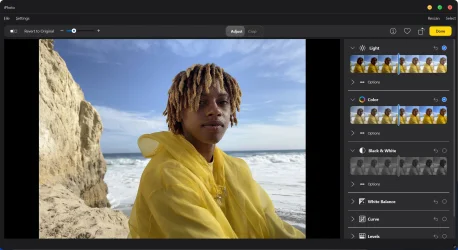
This release improves overall responsiveness and completes a more coherent workflow across browsing, editing, and location-based exploration—while always keeping your original files untouched.

mainview.webpeditview.webp

What the app does​

  • Browses photos directly from your existing folders (no import step)
  • Non-destructive photo editing (all edits are reversible, originals stay unchanged)
  • Map view that shows where photos were taken using GPS metadata
  • Smart library views like All Photos, Videos, and Favorites
  • Supports paired photo/video assets (e.g. Live Photo–style files)
Everything runs fully offline:

  • No AI
  • No cloud services
  • No accounts or telemetry

Platforms​

  • Windows: ready to use
  • Linux: supported, but currently requires manual build
The project is open source, free to use, and still evolving.

I’d love feedback from people who want a local alternative to cloud photo apps, especially those who care about editing, organization, and long-term photo storage.

Links​

GitHub:
GitHub - OliverZhaohaibin/iPhotron-LocalPhotoAlbumManager: A macOS Photos–style photo manager for Windows — folder-native, non-destructive, with HEIC/MOV Live Photo, map view, and GPU-accelerated browsing.
 
Windows Build/Version
Windows11
@OliverZhao I've already given you leaway allowing this, if you start multiple threads on it again you will be banned for spam.
 

My Computers My Computers

  • At a glance

    Windows 11 WorkstationRyzen 9 5950XCorsair Vengeance RGB PRO Black 64GB (4x16GB)...ASUS AMD Radeon RX 6900 XT 16GB ROG Strix LC OC
    OS
    Windows 11 Workstation
    Computer type
    PC/Desktop
    Manufacturer/Model
    doofenshmirtz evil incorporated
    CPU
    Ryzen 9 5950X
    Motherboard
    Asus ROG Crosshair VIII Formula
    Memory
    Corsair Vengeance RGB PRO Black 64GB (4x16GB) 3600MHz AMD Ryzen Tuned DDR4
    Graphics Card(s)
    ASUS AMD Radeon RX 6900 XT 16GB ROG Strix LC OC
    Sound Card
    Sound BlasterX Katana
    Monitor(s) Displays
    3 x27" Dell U2724D & 1 x 34" Dell U3415W
    Hard Drives
    Samsung 980 Pro 1TB M.2 2280 PCI-e 4.0 x4 NVMe Solid State
    Drive
    PSU
    ASUS ROG THOR 850W 80 Plus Platinum
    Case
    ASUS ROG Strix Helios Midi-Tower ARGB Gaming Case
    Cooling
    ASUS ROG Strix LC Performance RGB AIO CPU Liquid Cooler - 360mm
    Keyboard
    Logi Ergo
    Mouse
    Logitech MX Vertical
    Internet Speed
    1000/200 Mbps
    Browser
    Chrome
    Antivirus
    Windows Defender, Malwarebytes Pro
    Other Info
    HP M281 Printer
    Logitech Brio Stream webcam
    Logitech G Yeti orb mic
  • At a glance

    Windows 11 ProSnapdragon X2 Plus64GB
    Operating System
    Windows 11 Pro
    Computer type
    Laptop
    Manufacturer/Model
    Surface Laptop
    CPU
    Snapdragon X2 Plus
    Memory
    64GB
    Monitor(s) Displays
    15"
  • Nothing to see here.
@OliverZhao I've already given you leaway allowing this, if you start multiple threads on it again you will be banned for spam.
I’ve taken note of the rules. Thank you for reminding me; I won’t post separate threads again. Thank you once more.
 

My Computer My Computer

At a glance

Windows 1113900H64 GRTX 4000 laptop 12g
OS
Windows 11
Computer type
Laptop
Manufacturer/Model
Dell
CPU
13900H
Memory
64 G
Graphics Card(s)
RTX 4000 laptop 12g
The software has now been renamed iphotron; the name change took place several versions ago.
That only concerns the name how it's presented on the Github site.
In the real app the title still is iPhoto everywhere.

I did a short test on my VirtualBox test system, but did not like the Apple like interface on the right upper side. I.m.h.o. if you build an app for Windows, you should make the UI in such a way, that it fits the UI that Windows users are used to. Besides that I could not see any photo in detail, but may be that's caused by something in the system for libraries (which I don't like at all).

I did not see any advantage above the app I am using for viewing and simple editing images for a long time now: Faststone Image Viewer. So did not do any further tests.
 

My Computer My Computer

At a glance

Windows 11 Pro 25H2AMD Ryzen 7 5700GKingston FURY Beast 2x16GB DIMM DDR4 2666 CL16MSI GeForce GT 730 2GB LP V1
OS
Windows 11 Pro 25H2
Computer type
PC/Desktop
Manufacturer/Model
Build by vendor to my specs
CPU
AMD Ryzen 7 5700G
Motherboard
MSI PRO B550M-P Gen3
Memory
Kingston FURY Beast 2x16GB DIMM DDR4 2666 CL16
Graphics Card(s)
MSI GeForce GT 730 2GB LP V1
Sound Card
Creative Sound Blaster Audigy FX
Monitor(s) Displays
Samsung S24E450F 24"
Screen Resolution
1920 x 1080
Hard Drives
1. SSD Crucial P5 Plus 500GB PCIe M.2
2. SSD-SATA Crucial MX500-2TB
PSU
Corsair CV650W
Case
Cooler Master Silencio S400
Cooling
Cooler Master Hyper H412R with Be Quiet Pure Wings 2 PWM BL038 fan
Keyboard
Cherry Stream (wired, scissor keys)
Mouse
Asus WT465 (wireless)
Internet Speed
70 Mbps down / 80 Mbps up
Browser
Firefox 130.0
Antivirus
F-Secure (Internetprovider version)
Other Info
Router: FRITZBox 7490
Oracle VirtualBox 7 for testing software on Win 10 or 11
That only concerns the name how it's presented on the Github site.
In the real app the title still is iPhoto everywhere.

I did a short test on my VirtualBox test system, but did not like the Apple like interface on the right upper side. I.m.h.o. if you build an app for Windows, you should make the UI in such a way, that it fits the UI that Windows users are used to. Besides that I could not see any photo in detail, but may be that's caused by something in the system for libraries (which I don't like at all).

I did not see any advantage above the app I am using for viewing and simple editing images for a long time now: Faststone Image Viewer. So did not do any further tests.
Right, thank you for your report. I’ll carry out a thorough review of my codebase, making changes one by one to update all UI elements to the new names. As for Faststone, which you recommended, I’ll give it a try as well.
 

My Computer My Computer

At a glance

Windows 1113900H64 GRTX 4000 laptop 12g
OS
Windows 11
Computer type
Laptop
Manufacturer/Model
Dell
CPU
13900H
Memory
64 G
Graphics Card(s)
RTX 4000 laptop 12g
Back
Top Bottom