Solved Is it possible to recover the boot files after the EFI system partition was formatted?


Matthew Wai

Well-known member
Member
VIP
Local time
4:21 PM
Posts
153
Location
China
OS
Windows 10
On a Chinese forum, a member named Mr. Zhang formatted the EFI system partition and created a new one without knowing the consequences.
Now he cannot start Windows 11 because Windows Boot Manager is absent from the boot menu.
He can still access drive C and Windows files because Linux has been installed on the same system drive.
So, is it possible to recover the boot files from drive C or a Windows ISO file?
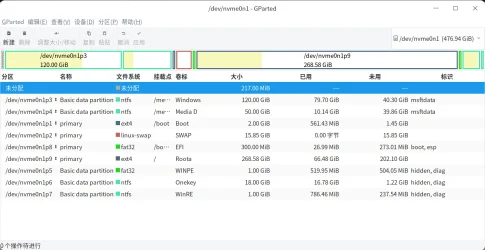
The following screenshot shows the partitions on his system drive.
partitions.webp

.
 

My Computer

System One

  • OS
    Windows 10
Have you made backups?
 

My Computers

System One System Two

  • OS
    Windows 11 Pro x64
    Computer type
    PC/Desktop
    Manufacturer/Model
    📷🔈🎧 🪛 DIY Photoshop/Audio/Game/tinker
    CPU
    i9 14900K P/E 5.8/4.5 GHz, cache 5.0 GHz
    Motherboard
    Asus ROG Maximus Z790 Dark Hero
    Memory
    🐏 96GB (2x48) G.skill Ripjaws 6800 MT/s
    Graphics Card(s)
    Asus ROG Strix 4070 Ti OC
    Sound Card
    🔊Bowers & Wilkins 606 S3 speakers; Audiolabs 7000a integrated amp; RSL 10S Mk2 sub; Creative Pebble Pro Minimilist
    Monitor(s) Displays
    🖥️🖥️ Eizo CG2730 ColorEdge, ViewSonic VP2768
    Screen Resolution
    🖥️🖥️ 2560 x 1440p x 2
    Hard Drives
    💾 WDC SN850X 4TB nvme, SN850 1TB nvme, SK-Hynix 2 TB P41 nvme,. Sabrent USB-C DS-SC5B 5-bay docking station: 6TB WDC Black, 6TB Ironwolf Pro; 2x 2TB WDC Black HDD
    PSU
    ⚡️ 850W Seasonic Vertex PX-850 ATX 3.0/PCI-E 5.0
    Case
    Fractal Design North XL Mesh, Black Walnut
    Cooling
    ❄️ EK Nucleus black 360 AIO w/Phanteks T30-120 fans, 2 Noctua NF-A14 Chromax case fan, 1 T30-120 fan cooling memory
    Keyboard
    ⌨️ Keychron Q3 Max TKL with custom GMK Redsuns Red Samuri keycaps, TX Stabs
    Mouse
    🖱️ Logitech G305 wireless gaming
    Internet Speed
    ⬇️ 500 Mb/s ⬆️ 12 Mb/s
    Browser
    🔥🦊 Firefox
    Antivirus
    🦺 Defender, Macrium Reflect X 🏆
    Other Info
    Phangkey Amaterasu V2 Desk Mat
  • Computer type
    Laptop
    Manufacturer/Model
    💻 Apple 13" Macbook Pro 2020 (m1)
    CPU
    Apple M1
    Screen Resolution
    2560x1600
    Browser
    Firefox
See what happens booting to Windows 11 MCT (Windows 11 iso) > troubleshoot > command prompt > startup repair
 

My Computer

System One

  • OS
    Windows 10
    Computer type
    Laptop
    Manufacturer/Model
    HP
    CPU
    Intel(R) Core(TM) i7-4800MQ CPU @ 2.70GHz
    Motherboard
    Product : 190A Version : KBC Version 94.56
    Memory
    16 GB Total: Manufacturer : Samsung MemoryType : DDR3 FormFactor : SODIMM Capacity : 8GB Speed : 1600
    Graphics Card(s)
    NVIDIA Quadro K3100M; Intel(R) HD Graphics 4600
    Sound Card
    IDT High Definition Audio CODEC; PNP Device ID HDAUDIO\FUNC_01&VEN_111D&DEV_76E0
    Hard Drives
    Model Hitachi HTS727575A9E364
    Antivirus
    Microsoft Defender
    Other Info
    Mobile Workstation
In this video, i will show you how to create EFI partition from within Windows Recovery Environment.


My Computer

System One

  • OS
    Windows 11
    Computer type
    PC/Desktop
    Manufacturer/Model
    HP Pavilion
    CPU
    AMD Ryzen 7 5700G
    Motherboard
    Erica6
    Memory
    Micron Technology DDR4-3200 16GB
    Graphics Card(s)
    NVIDIA GeForce RTX 3060
    Sound Card
    Realtek ALC671
    Monitor(s) Displays
    Samsung SyncMaster U28E590
    Screen Resolution
    3840 x 2160
    Hard Drives
    SAMSUNG MZVLQ1T0HALB-000H1
On another pc, install Macrium Reflect (trial version is fine).

Create a usb rescue drive.

Boot from it on friend's pc and select "fix windows boot problems" link.

This will rebuild the boot files.
 

My Computer

System One

  • OS
    Windows 11 Pro + Win11 Canary VM.
    Computer type
    Laptop
    Manufacturer/Model
    ASUS Zenbook 14
    CPU
    I9 13th gen i9-13900H 2.60 GHZ
    Motherboard
    Yep, Laptop has one.
    Memory
    16 GB soldered
    Graphics Card(s)
    Integrated Intel Iris XE
    Sound Card
    Realtek built in
    Monitor(s) Displays
    laptop OLED screen
    Screen Resolution
    2880x1800 touchscreen
    Hard Drives
    1 TB NVME SSD (only weakness is only one slot)
    PSU
    Internal + 65W thunderbolt USB4 charger
    Case
    Yep, got one
    Cooling
    Stella Artois (UK pint cans - 568 ml) - extra cost.
    Keyboard
    Built in UK keybd
    Mouse
    Bluetooth , wireless dongled, wired
    Internet Speed
    900 mbs (ethernet), wifi 6 typical 350-450 mb/s both up and down
    Browser
    Edge
    Antivirus
    Defender
    Other Info
    TPM 2.0, 2xUSB4 thunderbolt, 1xUsb3 (usb a), 1xUsb-c, hdmi out, 3.5 mm audio out/in combo, ASUS backlit trackpad (inc. switchable number pad)

    Macrium Reflect Home V8
    Office 365 Family (6 users each 1TB onedrive space)
    Hyper-V (a vm runs almost as fast as my older laptop)
Surely, there are billions of locals who could help him?
 

My Computers

System One System Two

  • OS
    Windows 11 Pro 25H2 26200.8524
    Computer type
    Laptop
    Manufacturer/Model
    Acemagic LX15PRO
    CPU
    AMD Ryzen 7 5825U with Radeon Graphics
    Memory
    16GB
    Screen Resolution
    1920 x 1080
    Hard Drives
    SSD 2TB
    Internet Speed
    30 Mbps
    Browser
    Brave
    Antivirus
    Webroot Secure Anywhere
    Other Info
    System 3

    Acer Swift SF114-34 laptop
    OS Windows 11 Pro 26200.8524
    CPU Pentium Silver N6000
    RAM 4GB
    SSD Samsung 970 EVO Plus SSD 2TB (an upgrade)
  • Operating System
    Windows 11 Pro 23H2 22631.2506
    Computer type
    Laptop
    Manufacturer/Model
    HP Mini 210-1090NR PC (bought in late 2009!)
    CPU
    Atom N450 1.66GHz
    Memory
    2GB
    Browser
    Brave
    Antivirus
    Webroot
See what happens booting to Windows 11 MCT (Windows 11 iso) > troubleshoot > command prompt > startup repair
Do you mean booting the PC from a Windows 11 ISO file?
If so, can you post a download link to the ISO file?
 

My Computer

System One

  • OS
    Windows 10
Can he boot the PC from a Windows ISO file into "Advanced options"?
Yes, bootable Windows 11 USB media can be used to boot Windows into recovery options.
 

My Computer

System One

  • OS
    Windows 11
    Computer type
    PC/Desktop
    Manufacturer/Model
    HP Pavilion
    CPU
    AMD Ryzen 7 5700G
    Motherboard
    Erica6
    Memory
    Micron Technology DDR4-3200 16GB
    Graphics Card(s)
    NVIDIA GeForce RTX 3060
    Sound Card
    Realtek ALC671
    Monitor(s) Displays
    Samsung SyncMaster U28E590
    Screen Resolution
    3840 x 2160
    Hard Drives
    SAMSUNG MZVLQ1T0HALB-000H1

My Computer

System One

  • OS
    Windows 11 Pro + Win11 Canary VM.
    Computer type
    Laptop
    Manufacturer/Model
    ASUS Zenbook 14
    CPU
    I9 13th gen i9-13900H 2.60 GHZ
    Motherboard
    Yep, Laptop has one.
    Memory
    16 GB soldered
    Graphics Card(s)
    Integrated Intel Iris XE
    Sound Card
    Realtek built in
    Monitor(s) Displays
    laptop OLED screen
    Screen Resolution
    2880x1800 touchscreen
    Hard Drives
    1 TB NVME SSD (only weakness is only one slot)
    PSU
    Internal + 65W thunderbolt USB4 charger
    Case
    Yep, got one
    Cooling
    Stella Artois (UK pint cans - 568 ml) - extra cost.
    Keyboard
    Built in UK keybd
    Mouse
    Bluetooth , wireless dongled, wired
    Internet Speed
    900 mbs (ethernet), wifi 6 typical 350-450 mb/s both up and down
    Browser
    Edge
    Antivirus
    Defender
    Other Info
    TPM 2.0, 2xUSB4 thunderbolt, 1xUsb3 (usb a), 1xUsb-c, hdmi out, 3.5 mm audio out/in combo, ASUS backlit trackpad (inc. switchable number pad)

    Macrium Reflect Home V8
    Office 365 Family (6 users each 1TB onedrive space)
    Hyper-V (a vm runs almost as fast as my older laptop)
Thanks a lot to everyone here. I am this Mr. Zhang.
Well um.. I will try these solutions above in a few days. THANK YOU All.

Wow, first time here.
 

My Computer

System One

  • OS
    Linux UOS Professional
    Computer type
    Laptop
    Manufacturer/Model
    HUAWEI Matebook 13s
How did he post then?
The thing is ... A few days ago, my computer has installed system A and windows 11. I can boot into either of them. the efi patition is correct.

Then, I don't want to use system A any more. I want to switch system A into system B. So, I installed system B. and I want my computer to have system B and windows 11 together. And I couild boot into either of them.

But this time, when I am installing, I made the mistake. I formatted the efi patition, and build a new efi patition.

Now, the efi patition only records system B.

Although I have all the windows files (C:/ D:/) in my computer, I cannot boot into windows, since the new efi patition have no records of windows 11.
 

My Computer

System One

  • OS
    Linux UOS Professional
    Computer type
    Laptop
    Manufacturer/Model
    HUAWEI Matebook 13s
On a Chinese forum, a member named Mr. Zhang formatted the EFI system partition and created a new one without knowing the consequences.
Now he cannot start Windows 11 because Windows Boot Manager is absent from the boot menu.
He can still access drive C and Windows files because Linux has been installed on the same system drive.
So, is it possible to recover the boot files from drive C or a Windows ISO file?
The following screenshot shows the partitions on his system drive.

View attachment 118261

.
Thank you WAI
 

My Computer

System One

  • OS
    Linux UOS Professional
    Computer type
    Laptop
    Manufacturer/Model
    HUAWEI Matebook 13s
Do you mean booting the PC from a Windows 11 ISO file?
If so, can you post a download link to the ISO file?


These are links for the bootable Windows 11 Media Creation Tool (MCT) (Windows 11 iso)


Links that may be useful:


My Computer

System One

  • OS
    Windows 10
    Computer type
    Laptop
    Manufacturer/Model
    HP
    CPU
    Intel(R) Core(TM) i7-4800MQ CPU @ 2.70GHz
    Motherboard
    Product : 190A Version : KBC Version 94.56
    Memory
    16 GB Total: Manufacturer : Samsung MemoryType : DDR3 FormFactor : SODIMM Capacity : 8GB Speed : 1600
    Graphics Card(s)
    NVIDIA Quadro K3100M; Intel(R) HD Graphics 4600
    Sound Card
    IDT High Definition Audio CODEC; PNP Device ID HDAUDIO\FUNC_01&VEN_111D&DEV_76E0
    Hard Drives
    Model Hitachi HTS727575A9E364
    Antivirus
    Microsoft Defender
    Other Info
    Mobile Workstation
Sounds like you might be using linux grub.There is a bootable tool that should be able to add your windows partition to the boot menu.

It is years since I was dual booting windows and linux. This worked well then, it is more recent version now obviously. Worth a try.

 
Last edited:

My Computers

System One System Two

  • OS
    Win7,Win11
    Computer type
    PC/Desktop
    CPU
    i7-9700
    Motherboard
    gigabyte b365m ds3h
    Memory
    2x16gb 3600mhz
    Monitor(s) Displays
    benq gw2480
    PSU
    bequiet pure power 11 400CM
    Cooling
    cryorig m9i
  • Operating System
    win7,win11
    Computer type
    PC/Desktop
    CPU
    i5-8400
    Motherboard
    gigabyte b365m ds3h
    Memory
    2x8gb 3200
    PSU
    xfx pro 450
I think this is not an easy task and you'd better seek help from professionals!
I think there are quite a few professionals on these forums.
 

My Computer

System One

  • OS
    Windows 11 pro
    Computer type
    PC/Desktop
    Manufacturer/Model
    custom build
    CPU
    AMD Ryzen 7 5700X
    Motherboard
    AMD ROG STRIX B550-F
    Memory
    G.SKILL Ripjaws V Series (Intel XMP) DDR4 RAM 32GB (2x16GB)
    Graphics Card(s)
    ASUS Dual GeForce RTX™ 4060 White Edition
    Sound Card
    on-board
    Monitor(s) Displays
    SAMSUNG 32-Inch Odyssey G50D Series
    Screen Resolution
    2560 x 1440
    Hard Drives
    Samsung 990 EVO Plus 1TB, ssd INTEL SSD 730 series 240 GB, and Samsung 840 Evo ssd 500 GB.
    PSU
    CORSAIR - RMe Series 1000W 80 PLUS Gold Fully Modular ATX Power Supply
    Case
    Antec 900 Nine Hundred ATX Mid Tower Computer Gaming Case
    Cooling
    ID-COOLING SE-214-XT Black CPU Cooler All-Black Layout
    Keyboard
    Logitech 520
    Mouse
    Logitech 310
    Browser
    Google Chrome
    Antivirus
    Windows Defender
Back
Top Bottom