is it safe to disable Windows 11 services between 200 or 180


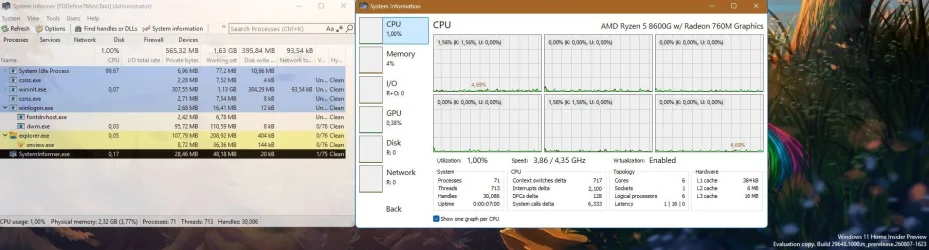
I will try fix it yes it happened just with the Genshin Impack because it is heavy long game i will record it you see the lag the stutter is gone everytime i record the microstutter is gone when record is stop the stutter is back what is this ?
Sadly, devs have abandoned this game, thus I have abandoned the game recently.
You can try to disable motion blur, DOF and other features, but it is badly optimized.

I always try to peak performance, but this game just does not care and each version makes it worse.
 

Attachments
  • capture-08212026-182420.webp
    capture-08212026-182420.webp
    130.8 KB · Views: 1

My Computer My Computer

At a glance

Home2FH2CanAMD Ryzen 5 8600G (07/24)2x32GB Kingston FURY DDR5 5600 MHz CL36 @5200...ASROCK Radeon RX 6600 Challenger D 8G @48FPS ...
OS
Home2FH2Can
Computer type
PC/Desktop
CPU
AMD Ryzen 5 8600G (07/24)
Motherboard
ASROCK B650M-HDV/M.2 (07/24) BIOS 4.43 AGESA ComboAM5 1.3.0.1b Patch A (07/26)
Memory
2x32GB Kingston FURY DDR5 5600 MHz CL36 @5200 CL36 (07/24)
Graphics Card(s)
ASROCK Radeon RX 6600 Challenger D 8G @48FPS (08/24)
Sound Card
Creative Sound BlasterX AE-5 Plus (05/24)
Monitor(s) Displays
24" Philips 24M1N3200ZS/00 (05/24)
Screen Resolution
1920×1080@165Hz via DP1.4
Hard Drives
Kingston KC3000 NVMe 2TB (05/24)
ADATA XPG GAMMIX S11 Pro 512GB (07/19)
PSU
Seasonic Core GM 550 Gold (04/24)
Case
Fractal Design Define 7 Mini with 3x Noctua NF-P14s/12@555rpm (04/24)
Cooling
Noctua NH-U12S with Noctua NF-P12 (04/24)
Keyboard
HP Pavilion Wired Keyboard 300 (07/24) + Rabalux 76017 Parker (01/24)
Mouse
Logitech M330 Silent Plus (07/26)
Internet Speed
500/100 Mbps via RouterOS (05/21) & TCP Optimizer
Browser
Edge, Brave for YouTube, LibreWolf for FB
Antivirus
NextDNS blocking 1/3 Traffic
Other Info
Phone: Motorola Moto G86 (02/26)
Backup: Hasleo Backup Suite (PreOS)
Headphones: Sennheiser RS170 (09/10)
Chair: Huzaro Force 4.4 Grey Mesh (05/24)
Notifier: Xiaomi Mi Band 9 Milanese (10/24)
FlexCore USB-C 3.2 Gen 1 (M) to LAN (F) (08/25)
What do I need to change to fix this setting so I can play games normally without stuttering?
What video card do you have?
 

My Computer My Computer

At a glance

Windows 11 Pro
OS
Windows 11 Pro

My Computer My Computer

At a glance

windows 11Intel Core i9-1290032 GBNVIDIA GeForce (Dedicated GPU)
OS
windows 11
Computer type
PC/Desktop
Manufacturer/Model
`Gigabyte B760 GAMING X AX`
CPU
Intel Core i9-12900
Motherboard
`Gigabyte Technology Co., Ltd. B760 GAMING X AX`
Memory
32 GB
Graphics Card(s)
NVIDIA GeForce (Dedicated GPU)
Sound Card
Integrated Realtek Audio
Monitor(s) Displays
Standard Monitor
Screen Resolution
1920 x 1080 (or Not Specified)
Hard Drives
NVMe SSD / Hard Drive
PSU
Standard PSU
Case
Standard ATX Case
Cooling
Standard CPU Cooler
Keyboard
mechenical keyboard
Mouse
steelserie mouse
Internet Speed
Internet Speed: Not Specified
Browser
Browser: Google Chrome
Antivirus
Antivirus: Windows Defender
Other Info
Other Info: Windows 11 Pro Build 26200
Sadly, devs have abandoned this game, thus I have abandoned the game recently.
You can try to disable motion blur, DOF and other features, but it is badly optimized.

I always try to peak performance, but this game just does not care and each version makes it worse.
Thank you for the replay. I will optimize my settings to make the game smoother. I still enjoy the game and story, and I don't care if he abandoned us or not. I play for myself, not for YouTube clicks.
 

My Computer My Computer

At a glance

windows 11Intel Core i9-1290032 GBNVIDIA GeForce (Dedicated GPU)
OS
windows 11
Computer type
PC/Desktop
Manufacturer/Model
`Gigabyte B760 GAMING X AX`
CPU
Intel Core i9-12900
Motherboard
`Gigabyte Technology Co., Ltd. B760 GAMING X AX`
Memory
32 GB
Graphics Card(s)
NVIDIA GeForce (Dedicated GPU)
Sound Card
Integrated Realtek Audio
Monitor(s) Displays
Standard Monitor
Screen Resolution
1920 x 1080 (or Not Specified)
Hard Drives
NVMe SSD / Hard Drive
PSU
Standard PSU
Case
Standard ATX Case
Cooling
Standard CPU Cooler
Keyboard
mechenical keyboard
Mouse
steelserie mouse
Internet Speed
Internet Speed: Not Specified
Browser
Browser: Google Chrome
Antivirus
Antivirus: Windows Defender
Other Info
Other Info: Windows 11 Pro Build 26200
I don't use any BitLocker or printer. I use Bluetooth for my headset. I don't use any wired headset. I can't disable that. How about Nvidia? Another one. I have really high dpc when it comes to the Nvidia kernel. I let it run for like 7 hour and I get this as a result, which is too high for my game pc it should not have that high latency at all i am just lost i did all basic setting to fix it but still endup with this bar it wont go green or stay stable
It keeps skyrocketing

View attachment 180510
View attachment 180509
Not this again....:confused:
 

My Computer My Computer

At a glance

Windows 11 25H2Broadwell-e 6850K 4.5ghz @1.36v32GB Corsair LPM 3600 C16EVGA RTX 3080Ti FTW
OS
Windows 11 25H2
Computer type
PC/Desktop
Manufacturer/Model
EVGA home brew
CPU
Broadwell-e 6850K 4.5ghz @1.36v
Motherboard
EVGA X99 FTW K
Memory
32GB Corsair LPM 3600 C16
Graphics Card(s)
EVGA RTX 3080Ti FTW
Sound Card
Asus Centurion true 7.1 headset. (5 speakers in each earpeice)
Monitor(s) Displays
LG C4 55"
Screen Resolution
4K 144hz
Hard Drives
Various models of SSDs ~10TB No HDDs installed.
PSU
be quiet! BN516 Straight Power 12-1000w 80 Plus Platinum
Case
Corsair 780T modified to dual 200mm intake fans
Cooling
Corsair H110i
Keyboard
Corsair K95 Platinum
Mouse
Corsair M65 RGB Elite
Internet Speed
50Mbs
Not this again....:confused:
The problem is never solved, but I never give up and will continue to search, ask, and repeat until I find a solution.
 

My Computer My Computer

At a glance

windows 11Intel Core i9-1290032 GBNVIDIA GeForce (Dedicated GPU)
OS
windows 11
Computer type
PC/Desktop
Manufacturer/Model
`Gigabyte B760 GAMING X AX`
CPU
Intel Core i9-12900
Motherboard
`Gigabyte Technology Co., Ltd. B760 GAMING X AX`
Memory
32 GB
Graphics Card(s)
NVIDIA GeForce (Dedicated GPU)
Sound Card
Integrated Realtek Audio
Monitor(s) Displays
Standard Monitor
Screen Resolution
1920 x 1080 (or Not Specified)
Hard Drives
NVMe SSD / Hard Drive
PSU
Standard PSU
Case
Standard ATX Case
Cooling
Standard CPU Cooler
Keyboard
mechenical keyboard
Mouse
steelserie mouse
Internet Speed
Internet Speed: Not Specified
Browser
Browser: Google Chrome
Antivirus
Antivirus: Windows Defender
Other Info
Other Info: Windows 11 Pro Build 26200
I wish someone could remote control my PC and solve this nonsense with magic, but I am afraid that if I let someone control my PC, he will either install a virus or spyware, so if I have no other option, I will let someone remote control it. At this point, I don't give a damn!
 

My Computer My Computer

At a glance

windows 11Intel Core i9-1290032 GBNVIDIA GeForce (Dedicated GPU)
OS
windows 11
Computer type
PC/Desktop
Manufacturer/Model
`Gigabyte B760 GAMING X AX`
CPU
Intel Core i9-12900
Motherboard
`Gigabyte Technology Co., Ltd. B760 GAMING X AX`
Memory
32 GB
Graphics Card(s)
NVIDIA GeForce (Dedicated GPU)
Sound Card
Integrated Realtek Audio
Monitor(s) Displays
Standard Monitor
Screen Resolution
1920 x 1080 (or Not Specified)
Hard Drives
NVMe SSD / Hard Drive
PSU
Standard PSU
Case
Standard ATX Case
Cooling
Standard CPU Cooler
Keyboard
mechenical keyboard
Mouse
steelserie mouse
Internet Speed
Internet Speed: Not Specified
Browser
Browser: Google Chrome
Antivirus
Antivirus: Windows Defender
Other Info
Other Info: Windows 11 Pro Build 26200
this my video card

Right now about the most stable driver for the 50 series is 576.80 or you could go with 591.86 if you don't want to go that far back.

Use DDU in safe mode to remove current driver but before you start disable internet adapter in device manager and leave it disabled until after you install the new driver.
 

My Computer My Computer

At a glance

Windows 11 Pro
OS
Windows 11 Pro
Right now about the most stable driver for the 50 series is 576.80

Use DDU in safe mode to remove current driver but before you start disable internet adapter in device manager and leave it disabled until after you install the new driver.
I will try the DDU one more time to resolve the issue. I purchased the computer from an online marketplace without fully investigating the missing parts, which resulted in a scam. I learned a valuable lesson not to buy from marketplaces or Facebook. I paid 1,500 for this stupid pc i feel like i am just bad luck with picking pc at this point lol
 

My Computer My Computer

At a glance

windows 11Intel Core i9-1290032 GBNVIDIA GeForce (Dedicated GPU)
OS
windows 11
Computer type
PC/Desktop
Manufacturer/Model
`Gigabyte B760 GAMING X AX`
CPU
Intel Core i9-12900
Motherboard
`Gigabyte Technology Co., Ltd. B760 GAMING X AX`
Memory
32 GB
Graphics Card(s)
NVIDIA GeForce (Dedicated GPU)
Sound Card
Integrated Realtek Audio
Monitor(s) Displays
Standard Monitor
Screen Resolution
1920 x 1080 (or Not Specified)
Hard Drives
NVMe SSD / Hard Drive
PSU
Standard PSU
Case
Standard ATX Case
Cooling
Standard CPU Cooler
Keyboard
mechenical keyboard
Mouse
steelserie mouse
Internet Speed
Internet Speed: Not Specified
Browser
Browser: Google Chrome
Antivirus
Antivirus: Windows Defender
Other Info
Other Info: Windows 11 Pro Build 26200

Latest Support Threads

Back
Top Bottom