is it safe to disable Windows 11 services between 200 or 180


Trekkor

Member
Member
Local time
1:17 AM
Posts
29
OS
windows 11
I'd like to disable some unnecessary background services that consume a lot of CPU and latency. Could you please provide me with a list of around 80-100 unnecessary services? This will help me optimize my PC.
 

My Computer My Computer

At a glance

windows 11Intel Core i9-1290032 GBNVIDIA GeForce (Dedicated GPU)
OS
windows 11
Computer type
PC/Desktop
Manufacturer/Model
`Gigabyte B760 GAMING X AX`
CPU
Intel Core i9-12900
Motherboard
`Gigabyte Technology Co., Ltd. B760 GAMING X AX`
Memory
32 GB
Graphics Card(s)
NVIDIA GeForce (Dedicated GPU)
Sound Card
Integrated Realtek Audio
Monitor(s) Displays
Standard Monitor
Screen Resolution
1920 x 1080 (or Not Specified)
Hard Drives
NVMe SSD / Hard Drive
PSU
Standard PSU
Case
Standard ATX Case
Cooling
Standard CPU Cooler
Keyboard
mechenical keyboard
Mouse
steelserie mouse
Internet Speed
Internet Speed: Not Specified
Browser
Browser: Google Chrome
Antivirus
Antivirus: Windows Defender
Other Info
Other Info: Windows 11 Pro Build 26200
Windows 11 services carries real risks. It can break core features, stop hardware from working, block vital security updates, and offer almost no noticeable speed boost on modern PCs.
 

My Computer My Computer

At a glance

Windows 11AMD Ryzen 7 5700GMicron Technology DDR4-3200 16GBNVIDIA GeForce RTX 3060
OS
Windows 11
Computer type
PC/Desktop
Manufacturer/Model
HP Pavilion
CPU
AMD Ryzen 7 5700G
Motherboard
Erica6
Memory
Micron Technology DDR4-3200 16GB
Graphics Card(s)
NVIDIA GeForce RTX 3060
Sound Card
Realtek ALC671
Monitor(s) Displays
Samsung SyncMaster U28E590
Screen Resolution
3840 x 2160
Hard Drives
SAMSUNG MZVLQ1T0HALB-000H1
Windows 11 services carries real risks. It can break core features, stop hardware from working, block vital security updates, and offer almost no noticeable speed boost on moderoh
"Thanks, I should really be cautious about what to disable before risking making things even worse. I'm just asking what the safest choices are to avoid breaking my PC. I will definitely make a backup before doing something I'll regret later, because these changes can conflict with other settings and make the crackling maybe even worse, and some settings might even stop responding if I just blindly disable things without knowledge."
 

My Computer My Computer

At a glance

windows 11Intel Core i9-1290032 GBNVIDIA GeForce (Dedicated GPU)
OS
windows 11
Computer type
PC/Desktop
Manufacturer/Model
`Gigabyte B760 GAMING X AX`
CPU
Intel Core i9-12900
Motherboard
`Gigabyte Technology Co., Ltd. B760 GAMING X AX`
Memory
32 GB
Graphics Card(s)
NVIDIA GeForce (Dedicated GPU)
Sound Card
Integrated Realtek Audio
Monitor(s) Displays
Standard Monitor
Screen Resolution
1920 x 1080 (or Not Specified)
Hard Drives
NVMe SSD / Hard Drive
PSU
Standard PSU
Case
Standard ATX Case
Cooling
Standard CPU Cooler
Keyboard
mechenical keyboard
Mouse
steelserie mouse
Internet Speed
Internet Speed: Not Specified
Browser
Browser: Google Chrome
Antivirus
Antivirus: Windows Defender
Other Info
Other Info: Windows 11 Pro Build 26200
you can use WinUtil by Chris Titus that will set all non essential services to manual
then from there you can disable unwanted services one by one to suit your own requirements

i used WinUtil to set everything to manual then disabled a total of 72 services
and my and the wifes systems are running just fine.

if you are unsure about a particular service to disable please post back the service in question
i will give you my view and link to details regarding that service.

best of luck Steve ..
 

My Computers My Computers

  • At a glance

    Windows 11 HomeRyzen 7 5825u64GB DDR4 3200Ryzen 7 5825u
    OS
    Windows 11 Home
    Computer type
    PC/Desktop
    Manufacturer/Model
    HP 24" AiO
    CPU
    Ryzen 7 5825u
    Motherboard
    HP
    Memory
    64GB DDR4 3200
    Graphics Card(s)
    Ryzen 7 5825u
    Sound Card
    RealTek
    Monitor(s) Displays
    24" HP AiO
    Screen Resolution
    1920 x 1080 @60 Hz
    Hard Drives
    1TB WD Blue SN580 M2 SSD Partitioned.
    2x 1TB USB HDD External Backup/Storage.
    PSU
    90W external power brick
    Case
    24" All in One
    Cooling
    Default Air Cooling
    Keyboard
    HP WiFi UK extended
    Mouse
    HP WiFi 3 Button
    Internet Speed
    1GB full fibre
    Browser
    Edge & Firefox
    Antivirus
    AVG Internet Security/Windows Defender
    Other Info
    Mainly Open Source Software
  • At a glance

    Ubuntu 22.04.5 LTSi5 7200u16GB DDR4Intel
    Operating System
    Ubuntu 22.04.5 LTS
    Computer type
    Laptop
    Manufacturer/Model
    Dell 13" Latitude 2017
    CPU
    i5 7200u
    Motherboard
    Dell
    Memory
    16GB DDR4
    Graphics card(s)
    Intel
    Sound Card
    Intel
    Monitor(s) Displays
    13" Dell Laptop
    Hard Drives
    250GB Crucial 2.5" SSD
    Mouse
    Generic WiFi 3 button
    Internet Speed
    WiFi only
    Browser
    Firefox
    Antivirus
    ClamAV TK
    Other Info
    Mainly Open Source Software
Not a good idea at all
 

My Computer My Computer

At a glance

Windows 11 Pro 25H2 (RP channel)AMD Ryzen 7 9800X3D 8-core64GB Corsair Titanium 6000/CL30MSI Suprim 5080 SOC
OS
Windows 11 Pro 25H2 (RP channel)
Computer type
PC/Desktop
Manufacturer/Model
MSI
CPU
AMD Ryzen 7 9800X3D 8-core
Motherboard
MEG X870E Godlike
Memory
64GB Corsair Titanium 6000/CL30
Graphics Card(s)
MSI Suprim 5080 SOC
Sound Card
Soundblaster AE-9
Monitor(s) Displays
ASUS TUF Gaming VG289Q
Screen Resolution
3840x2160
Hard Drives
Samsung 9100 Pro 4TB (gen 5 x4, system drive/games)
Samsung 990 Pro 2TB
Samsung 980 Pro 2TB
Samsung 870 Evo 4TB
Samsung 870 Evo 2TB
Samsung T9 4TB
PSU
Seasonic PX-2200
Case
Bequiet! Dark Base Pro 901
Cooling
Noctua NH-D15S Chromax black
Keyboard
Logitech G915 X (wired)
Mouse
Logitech G903 with PowerPlay charger
Internet Speed
900Mb/sec
Browser
Microsoft Edge
Antivirus
Windows Defender
If you don't use Bitlocker, Bluetooth or Printers... you can safely disable those.
Otherwise it's best to leave them alone.

And that's from someone who loves disabling Services.
 

My Computers My Computers

  • At a glance

    Win 11 Home ♦♦♦26200.9168 ♦♦♦♦♦♦♦25H2AMD Ryzen 7 3700XG.Skill (F4-3200C14D-16GTZKW)EVGA RTX 2070 (08G-P4-2171-KR)
    OS
    Win 11 Home ♦♦♦26200.9168 ♦♦♦♦♦♦♦25H2
    Computer type
    PC/Desktop
    Manufacturer/Model
    Built by Ghot® [May 2020]
    CPU
    AMD Ryzen 7 3700X
    Motherboard
    Asus Pro WS X570-ACE (BIOS 5302)
    Memory
    G.Skill (F4-3200C14D-16GTZKW)
    Graphics Card(s)
    EVGA RTX 2070 (08G-P4-2171-KR)
    Sound Card
    Realtek ALC1220P / ALC S1220A
    Monitor(s) Displays
    Dell U3011 30"
    Screen Resolution
    2560 x 1600
    Hard Drives
    2x Samsung 860 EVO 500GB,
    WD 4TB Black FZBX - SATA III,
    WD 8TB Black FZBX - SATA III,
    DRW-24B1ST CD/DVD Burner
    PSU
    PC Power & Cooling 750W Quad EPS12V
    Case
    Cooler Master ATCS 840 Tower
    Cooling
    CM Hyper 212 EVO (push/pull)
    Keyboard
    Ducky DK9008 Shine II Blue LED
    Mouse
    Logitech Optical M-100
    Internet Speed
    300/300
    Browser
    Firefox (latest)
    Antivirus
    Bitdefender Total Security
    Other Info
    Speakers: Klipsch Pro Media 2.1
  • At a glance

    Windows XP Pro 32bit w/SP3AMD Athlon 64 X2 5000+ (OC'd @ 3.2Ghz)TWIN2X2048-6400C4DHX (2 x 1GB, DDR2 800)EVGA 256-P2-N758-TR GeForce 8600GT SSC
    Operating System
    Windows XP Pro 32bit w/SP3
    Computer type
    PC/Desktop
    Manufacturer/Model
    Built by Ghot® (not in use)
    CPU
    AMD Athlon 64 X2 5000+ (OC'd @ 3.2Ghz)
    Motherboard
    ASUS M2N32-SLI Deluxe Wireless Edition
    Memory
    TWIN2X2048-6400C4DHX (2 x 1GB, DDR2 800)
    Graphics card(s)
    EVGA 256-P2-N758-TR GeForce 8600GT SSC
    Sound Card
    Onboard
    Monitor(s) Displays
    ViewSonic G90FB Black 19" Professional (CRT)
    Screen Resolution
    up to 2048 x 1536
    Hard Drives
    WD 36GB 10,000rpm Raptor SATA
    Seagate 80GB 7200rpm SATA
    Lite-On LTR-52246S CD/RW
    Lite-On LH-18A1P CD/DVD Burner
    PSU
    PC Power & Cooling Silencer 750 Quad EPS12V
    Case
    Generic Beige case, 80mm fans
    Cooling
    ZALMAN 9500A 92mm CPU Cooler
    Keyboard
    Logitech Classic Keybooard 200
    Mouse
    Logitech Optical M-BT96a
    Internet Speed
    300/300
    Browser
    Firefox 3.x ??
    Antivirus
    Symantec (Norton)
    Other Info
    Still assembled, still runs. Haven't turned it on for 15 years?
If you don't use Bitlocker, Bluetooth or Printers... you can safely disable those.
Otherwise it's best to leave them alone.

And that's from someone who loves disabling Services.
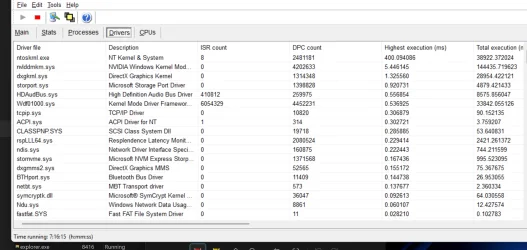
I don't use any BitLocker or printer. I use Bluetooth for my headset. I don't use any wired headset. I can't disable that. How about Nvidia? Another one. I have really high dpc when it comes to the Nvidia kernel. I let it run for like 7 hour and I get this as a result, which is too high for my game pc it should not have that high latency at all i am just lost i did all basic setting to fix it but still endup with this bar it wont go green or stay stable
It keeps skyrocketing

1787326972925.webp
1787326858110.webp
 

My Computer My Computer

At a glance

windows 11Intel Core i9-1290032 GBNVIDIA GeForce (Dedicated GPU)
OS
windows 11
Computer type
PC/Desktop
Manufacturer/Model
`Gigabyte B760 GAMING X AX`
CPU
Intel Core i9-12900
Motherboard
`Gigabyte Technology Co., Ltd. B760 GAMING X AX`
Memory
32 GB
Graphics Card(s)
NVIDIA GeForce (Dedicated GPU)
Sound Card
Integrated Realtek Audio
Monitor(s) Displays
Standard Monitor
Screen Resolution
1920 x 1080 (or Not Specified)
Hard Drives
NVMe SSD / Hard Drive
PSU
Standard PSU
Case
Standard ATX Case
Cooling
Standard CPU Cooler
Keyboard
mechenical keyboard
Mouse
steelserie mouse
Internet Speed
Internet Speed: Not Specified
Browser
Browser: Google Chrome
Antivirus
Antivirus: Windows Defender
Other Info
Other Info: Windows 11 Pro Build 26200
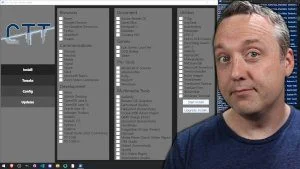
you can use WinUtil by Chris Titus that will set all non essential services to manual
then from there you can disable unwanted services one by one to suit your own requirements

i used WinUtil to set everything to manual then disabled a total of 72 services
and my and the wifes systems are running just fine.

if you are unsure about a particular service to disable please post back the service in question
i will give you my view and link to details regarding that service.

best of luck Steve ..
I did this tweak already, the result is the same and does not work, but I did not disable all the 72 services. Sounds risky.
 

My Computer My Computer

At a glance

windows 11Intel Core i9-1290032 GBNVIDIA GeForce (Dedicated GPU)
OS
windows 11
Computer type
PC/Desktop
Manufacturer/Model
`Gigabyte B760 GAMING X AX`
CPU
Intel Core i9-12900
Motherboard
`Gigabyte Technology Co., Ltd. B760 GAMING X AX`
Memory
32 GB
Graphics Card(s)
NVIDIA GeForce (Dedicated GPU)
Sound Card
Integrated Realtek Audio
Monitor(s) Displays
Standard Monitor
Screen Resolution
1920 x 1080 (or Not Specified)
Hard Drives
NVMe SSD / Hard Drive
PSU
Standard PSU
Case
Standard ATX Case
Cooling
Standard CPU Cooler
Keyboard
mechenical keyboard
Mouse
steelserie mouse
Internet Speed
Internet Speed: Not Specified
Browser
Browser: Google Chrome
Antivirus
Antivirus: Windows Defender
Other Info
Other Info: Windows 11 Pro Build 26200
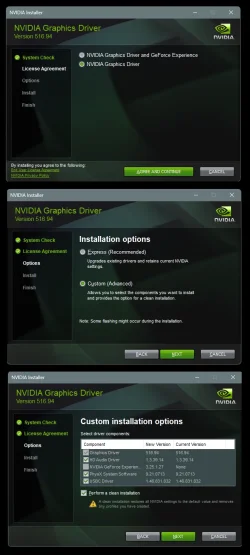
How about Nvidia?


Leave Nvidia alone!

There's a program called NVCleanstall, which will let you remove things from the Nvidia driver before you install it.
Use it carefully.

You NEED these things in the Nvidia driver... (bottom-most pic)...

Image3.webp
 

My Computers My Computers

  • At a glance

    Win 11 Home ♦♦♦26200.9168 ♦♦♦♦♦♦♦25H2AMD Ryzen 7 3700XG.Skill (F4-3200C14D-16GTZKW)EVGA RTX 2070 (08G-P4-2171-KR)
    OS
    Win 11 Home ♦♦♦26200.9168 ♦♦♦♦♦♦♦25H2
    Computer type
    PC/Desktop
    Manufacturer/Model
    Built by Ghot® [May 2020]
    CPU
    AMD Ryzen 7 3700X
    Motherboard
    Asus Pro WS X570-ACE (BIOS 5302)
    Memory
    G.Skill (F4-3200C14D-16GTZKW)
    Graphics Card(s)
    EVGA RTX 2070 (08G-P4-2171-KR)
    Sound Card
    Realtek ALC1220P / ALC S1220A
    Monitor(s) Displays
    Dell U3011 30"
    Screen Resolution
    2560 x 1600
    Hard Drives
    2x Samsung 860 EVO 500GB,
    WD 4TB Black FZBX - SATA III,
    WD 8TB Black FZBX - SATA III,
    DRW-24B1ST CD/DVD Burner
    PSU
    PC Power & Cooling 750W Quad EPS12V
    Case
    Cooler Master ATCS 840 Tower
    Cooling
    CM Hyper 212 EVO (push/pull)
    Keyboard
    Ducky DK9008 Shine II Blue LED
    Mouse
    Logitech Optical M-100
    Internet Speed
    300/300
    Browser
    Firefox (latest)
    Antivirus
    Bitdefender Total Security
    Other Info
    Speakers: Klipsch Pro Media 2.1
  • At a glance

    Windows XP Pro 32bit w/SP3AMD Athlon 64 X2 5000+ (OC'd @ 3.2Ghz)TWIN2X2048-6400C4DHX (2 x 1GB, DDR2 800)EVGA 256-P2-N758-TR GeForce 8600GT SSC
    Operating System
    Windows XP Pro 32bit w/SP3
    Computer type
    PC/Desktop
    Manufacturer/Model
    Built by Ghot® (not in use)
    CPU
    AMD Athlon 64 X2 5000+ (OC'd @ 3.2Ghz)
    Motherboard
    ASUS M2N32-SLI Deluxe Wireless Edition
    Memory
    TWIN2X2048-6400C4DHX (2 x 1GB, DDR2 800)
    Graphics card(s)
    EVGA 256-P2-N758-TR GeForce 8600GT SSC
    Sound Card
    Onboard
    Monitor(s) Displays
    ViewSonic G90FB Black 19" Professional (CRT)
    Screen Resolution
    up to 2048 x 1536
    Hard Drives
    WD 36GB 10,000rpm Raptor SATA
    Seagate 80GB 7200rpm SATA
    Lite-On LTR-52246S CD/RW
    Lite-On LH-18A1P CD/DVD Burner
    PSU
    PC Power & Cooling Silencer 750 Quad EPS12V
    Case
    Generic Beige case, 80mm fans
    Cooling
    ZALMAN 9500A 92mm CPU Cooler
    Keyboard
    Logitech Classic Keybooard 200
    Mouse
    Logitech Optical M-BT96a
    Internet Speed
    300/300
    Browser
    Firefox 3.x ??
    Antivirus
    Symantec (Norton)
    Other Info
    Still assembled, still runs. Haven't turned it on for 15 years?
Leave Nvidia alone!

There's a program called NVCleanstall, which will let you remove things from the Nvidia driver before you install it.
Use it carefully.

You NEED these things in the Nvidia driver... (bottom-most pic)...

View attachment 180512
thank bro i have done that too same result :((((. I have no idea where it comes from, so it is so difficult to figure out the solution what cause is i am overwhlemed with it
 

My Computer My Computer

At a glance

windows 11Intel Core i9-1290032 GBNVIDIA GeForce (Dedicated GPU)
OS
windows 11
Computer type
PC/Desktop
Manufacturer/Model
`Gigabyte B760 GAMING X AX`
CPU
Intel Core i9-12900
Motherboard
`Gigabyte Technology Co., Ltd. B760 GAMING X AX`
Memory
32 GB
Graphics Card(s)
NVIDIA GeForce (Dedicated GPU)
Sound Card
Integrated Realtek Audio
Monitor(s) Displays
Standard Monitor
Screen Resolution
1920 x 1080 (or Not Specified)
Hard Drives
NVMe SSD / Hard Drive
PSU
Standard PSU
Case
Standard ATX Case
Cooling
Standard CPU Cooler
Keyboard
mechenical keyboard
Mouse
steelserie mouse
Internet Speed
Internet Speed: Not Specified
Browser
Browser: Google Chrome
Antivirus
Antivirus: Windows Defender
Other Info
Other Info: Windows 11 Pro Build 26200
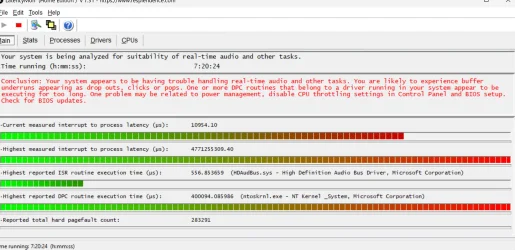
This issue is so annoying that I want to pull my hair out. I know it's just a little crackling, but I can't play the game normally because it lags and pauses whenever I move. I love the game, but it's not enjoyable to play with this issue.
 

My Computer My Computer

At a glance

windows 11Intel Core i9-1290032 GBNVIDIA GeForce (Dedicated GPU)
OS
windows 11
Computer type
PC/Desktop
Manufacturer/Model
`Gigabyte B760 GAMING X AX`
CPU
Intel Core i9-12900
Motherboard
`Gigabyte Technology Co., Ltd. B760 GAMING X AX`
Memory
32 GB
Graphics Card(s)
NVIDIA GeForce (Dedicated GPU)
Sound Card
Integrated Realtek Audio
Monitor(s) Displays
Standard Monitor
Screen Resolution
1920 x 1080 (or Not Specified)
Hard Drives
NVMe SSD / Hard Drive
PSU
Standard PSU
Case
Standard ATX Case
Cooling
Standard CPU Cooler
Keyboard
mechenical keyboard
Mouse
steelserie mouse
Internet Speed
Internet Speed: Not Specified
Browser
Browser: Google Chrome
Antivirus
Antivirus: Windows Defender
Other Info
Other Info: Windows 11 Pro Build 26200
i used WinUtil to set everything to manual then disabled a total of 72 services
What has been the effect on performance?


Denis
 

My Computer My Computer

At a glance

Windows 11 Home x64 Version 25H2 Build 26200....
OS
Windows 11 Home x64 Version 25H2 Build 26200.9168
This issue is so annoying that I want to pull my hair out. I know it's just a little crackling, but I can't play the game normally because it lags and pauses whenever I move. I love the game, but it's not enjoyable to play with this issue.


Does it happen on ALL games?

If not... might be the game itself.
Check the game's forums for similar complaints.

IF it happens on all games then you need to check... Windows, drivers and hardware (connections included).
 

My Computers My Computers

  • At a glance

    Win 11 Home ♦♦♦26200.9168 ♦♦♦♦♦♦♦25H2AMD Ryzen 7 3700XG.Skill (F4-3200C14D-16GTZKW)EVGA RTX 2070 (08G-P4-2171-KR)
    OS
    Win 11 Home ♦♦♦26200.9168 ♦♦♦♦♦♦♦25H2
    Computer type
    PC/Desktop
    Manufacturer/Model
    Built by Ghot® [May 2020]
    CPU
    AMD Ryzen 7 3700X
    Motherboard
    Asus Pro WS X570-ACE (BIOS 5302)
    Memory
    G.Skill (F4-3200C14D-16GTZKW)
    Graphics Card(s)
    EVGA RTX 2070 (08G-P4-2171-KR)
    Sound Card
    Realtek ALC1220P / ALC S1220A
    Monitor(s) Displays
    Dell U3011 30"
    Screen Resolution
    2560 x 1600
    Hard Drives
    2x Samsung 860 EVO 500GB,
    WD 4TB Black FZBX - SATA III,
    WD 8TB Black FZBX - SATA III,
    DRW-24B1ST CD/DVD Burner
    PSU
    PC Power & Cooling 750W Quad EPS12V
    Case
    Cooler Master ATCS 840 Tower
    Cooling
    CM Hyper 212 EVO (push/pull)
    Keyboard
    Ducky DK9008 Shine II Blue LED
    Mouse
    Logitech Optical M-100
    Internet Speed
    300/300
    Browser
    Firefox (latest)
    Antivirus
    Bitdefender Total Security
    Other Info
    Speakers: Klipsch Pro Media 2.1
  • At a glance

    Windows XP Pro 32bit w/SP3AMD Athlon 64 X2 5000+ (OC'd @ 3.2Ghz)TWIN2X2048-6400C4DHX (2 x 1GB, DDR2 800)EVGA 256-P2-N758-TR GeForce 8600GT SSC
    Operating System
    Windows XP Pro 32bit w/SP3
    Computer type
    PC/Desktop
    Manufacturer/Model
    Built by Ghot® (not in use)
    CPU
    AMD Athlon 64 X2 5000+ (OC'd @ 3.2Ghz)
    Motherboard
    ASUS M2N32-SLI Deluxe Wireless Edition
    Memory
    TWIN2X2048-6400C4DHX (2 x 1GB, DDR2 800)
    Graphics card(s)
    EVGA 256-P2-N758-TR GeForce 8600GT SSC
    Sound Card
    Onboard
    Monitor(s) Displays
    ViewSonic G90FB Black 19" Professional (CRT)
    Screen Resolution
    up to 2048 x 1536
    Hard Drives
    WD 36GB 10,000rpm Raptor SATA
    Seagate 80GB 7200rpm SATA
    Lite-On LTR-52246S CD/RW
    Lite-On LH-18A1P CD/DVD Burner
    PSU
    PC Power & Cooling Silencer 750 Quad EPS12V
    Case
    Generic Beige case, 80mm fans
    Cooling
    ZALMAN 9500A 92mm CPU Cooler
    Keyboard
    Logitech Classic Keybooard 200
    Mouse
    Logitech Optical M-BT96a
    Internet Speed
    300/300
    Browser
    Firefox 3.x ??
    Antivirus
    Symantec (Norton)
    Other Info
    Still assembled, still runs. Haven't turned it on for 15 years?
What has been the effect on performance?


Denis
pretty good for both systems
they are 24" all in ones both are made with laptop components and laptop CPU/GPU's

so just trying to lighten the load and both systems are running very smoothly with no issues
best of luck Steve ..
 

My Computers My Computers

  • At a glance

    Windows 11 HomeRyzen 7 5825u64GB DDR4 3200Ryzen 7 5825u
    OS
    Windows 11 Home
    Computer type
    PC/Desktop
    Manufacturer/Model
    HP 24" AiO
    CPU
    Ryzen 7 5825u
    Motherboard
    HP
    Memory
    64GB DDR4 3200
    Graphics Card(s)
    Ryzen 7 5825u
    Sound Card
    RealTek
    Monitor(s) Displays
    24" HP AiO
    Screen Resolution
    1920 x 1080 @60 Hz
    Hard Drives
    1TB WD Blue SN580 M2 SSD Partitioned.
    2x 1TB USB HDD External Backup/Storage.
    PSU
    90W external power brick
    Case
    24" All in One
    Cooling
    Default Air Cooling
    Keyboard
    HP WiFi UK extended
    Mouse
    HP WiFi 3 Button
    Internet Speed
    1GB full fibre
    Browser
    Edge & Firefox
    Antivirus
    AVG Internet Security/Windows Defender
    Other Info
    Mainly Open Source Software
  • At a glance

    Ubuntu 22.04.5 LTSi5 7200u16GB DDR4Intel
    Operating System
    Ubuntu 22.04.5 LTS
    Computer type
    Laptop
    Manufacturer/Model
    Dell 13" Latitude 2017
    CPU
    i5 7200u
    Motherboard
    Dell
    Memory
    16GB DDR4
    Graphics card(s)
    Intel
    Sound Card
    Intel
    Monitor(s) Displays
    13" Dell Laptop
    Hard Drives
    250GB Crucial 2.5" SSD
    Mouse
    Generic WiFi 3 button
    Internet Speed
    WiFi only
    Browser
    Firefox
    Antivirus
    ClamAV TK
    Other Info
    Mainly Open Source Software
I will try fix it yes it happened just with the Genshin Impack because it is heavy long game i will record it you see the lag the stutter is gone everytime i record the microstutter is gone when record is stop the stutter is back what is this ?
 

My Computer My Computer

At a glance

windows 11Intel Core i9-1290032 GBNVIDIA GeForce (Dedicated GPU)
OS
windows 11
Computer type
PC/Desktop
Manufacturer/Model
`Gigabyte B760 GAMING X AX`
CPU
Intel Core i9-12900
Motherboard
`Gigabyte Technology Co., Ltd. B760 GAMING X AX`
Memory
32 GB
Graphics Card(s)
NVIDIA GeForce (Dedicated GPU)
Sound Card
Integrated Realtek Audio
Monitor(s) Displays
Standard Monitor
Screen Resolution
1920 x 1080 (or Not Specified)
Hard Drives
NVMe SSD / Hard Drive
PSU
Standard PSU
Case
Standard ATX Case
Cooling
Standard CPU Cooler
Keyboard
mechenical keyboard
Mouse
steelserie mouse
Internet Speed
Internet Speed: Not Specified
Browser
Browser: Google Chrome
Antivirus
Antivirus: Windows Defender
Other Info
Other Info: Windows 11 Pro Build 26200
OS Name Microsoft Windows 11 Pro
Version 10.0.26200 Build 26200
Other OS Description Not Available
OS Manufacturer Microsoft Corporation
System Name CHOUKRI
System Manufacturer Gigabyte Technology Co., Ltd.
System Model B760 GAMING X AX
System Type x64-based PC
System SKU Default string
Processor 12th Gen Intel(R) Core(TM) i9-12900, 2419 Mhz, 16 Core(s), 24 Logical Processor(s)
BIOS Version/Date American Megatrends International, LLC. F17, 6/12/2026
SMBIOS Version 3.6
Embedded Controller Version 255.255
BIOS Mode UEFI
BaseBoard Manufacturer Gigabyte Technology Co., Ltd.
BaseBoard Product B760 GAMING X AX
BaseBoard Version x.x
Platform Role Desktop
Secure Boot State On
PCR7 Configuration Elevation Required to View
Windows Directory C:\WINDOWS
System Directory C:\WINDOWS\system32
Boot Device \Device\HarddiskVolume1
Locale United States
Hardware Abstraction Layer Version = "10.0.26100.1"
User Name choukri\basen
Time Zone W. Europe Daylight Time
Installed Physical Memory (RAM) 32.0 GB
Total Physical Memory 31.8 GB
Available Physical Memory 20.4 GB
Total Virtual Memory 36.8 GB
Available Virtual Memory 21.5 GB
Page File Space 5.00 GB
Page File C:\pagefile.sys
Kernel DMA Protection Off
Virtualization-based security Not enabled
App Control for Business policy Audit
App Control for Business user mode policy Audit
Automatic Device Encryption Support Elevation Required to View
Hyper-V - VM Monitor Mode Extensions Yes
Hyper-V - Second Level Address Translation Extensions Yes
Hyper-V - Virtualization Enabled in Firmware Yes
Hyper-V - Data Execution Protection Yes
this my full information
 

My Computer My Computer

At a glance

windows 11Intel Core i9-1290032 GBNVIDIA GeForce (Dedicated GPU)
OS
windows 11
Computer type
PC/Desktop
Manufacturer/Model
`Gigabyte B760 GAMING X AX`
CPU
Intel Core i9-12900
Motherboard
`Gigabyte Technology Co., Ltd. B760 GAMING X AX`
Memory
32 GB
Graphics Card(s)
NVIDIA GeForce (Dedicated GPU)
Sound Card
Integrated Realtek Audio
Monitor(s) Displays
Standard Monitor
Screen Resolution
1920 x 1080 (or Not Specified)
Hard Drives
NVMe SSD / Hard Drive
PSU
Standard PSU
Case
Standard ATX Case
Cooling
Standard CPU Cooler
Keyboard
mechenical keyboard
Mouse
steelserie mouse
Internet Speed
Internet Speed: Not Specified
Browser
Browser: Google Chrome
Antivirus
Antivirus: Windows Defender
Other Info
Other Info: Windows 11 Pro Build 26200

My Computer My Computer

At a glance

windows 11Intel Core i9-1290032 GBNVIDIA GeForce (Dedicated GPU)
OS
windows 11
Computer type
PC/Desktop
Manufacturer/Model
`Gigabyte B760 GAMING X AX`
CPU
Intel Core i9-12900
Motherboard
`Gigabyte Technology Co., Ltd. B760 GAMING X AX`
Memory
32 GB
Graphics Card(s)
NVIDIA GeForce (Dedicated GPU)
Sound Card
Integrated Realtek Audio
Monitor(s) Displays
Standard Monitor
Screen Resolution
1920 x 1080 (or Not Specified)
Hard Drives
NVMe SSD / Hard Drive
PSU
Standard PSU
Case
Standard ATX Case
Cooling
Standard CPU Cooler
Keyboard
mechenical keyboard
Mouse
steelserie mouse
Internet Speed
Internet Speed: Not Specified
Browser
Browser: Google Chrome
Antivirus
Antivirus: Windows Defender
Other Info
Other Info: Windows 11 Pro Build 26200
You NEED these things in the Nvidia driver

You do not need to install the HD audio driver unless you have/use the speakers in your monitor.

The USB-C driver was only needed for cards that had a USB-C port which was GeForce RTX 20-series and some Quadro cards.

Nvidia dropped the USB-C port starting with the RTX 30-series plus all later Nvida cards no longer have USB-C ports.
 

My Computer My Computer

At a glance

Windows 11 Pro
OS
Windows 11 Pro
You do not need to install the HD audio driver unless you have/use the speakers in your monitor.

The USB-C driver was only needed for cards that had a USB-C port which was GeForce RTX 20-series and some Quadro cards.

Nvidia dropped the USB-C port starting with the RTX 30-series plus all later Nvida cards no longer have USB-C ports.
What do I need to change to fix this setting so I can play games normally without stuttering? You saw that the video lag was insane and annoying.
 

My Computer My Computer

At a glance

windows 11Intel Core i9-1290032 GBNVIDIA GeForce (Dedicated GPU)
OS
windows 11
Computer type
PC/Desktop
Manufacturer/Model
`Gigabyte B760 GAMING X AX`
CPU
Intel Core i9-12900
Motherboard
`Gigabyte Technology Co., Ltd. B760 GAMING X AX`
Memory
32 GB
Graphics Card(s)
NVIDIA GeForce (Dedicated GPU)
Sound Card
Integrated Realtek Audio
Monitor(s) Displays
Standard Monitor
Screen Resolution
1920 x 1080 (or Not Specified)
Hard Drives
NVMe SSD / Hard Drive
PSU
Standard PSU
Case
Standard ATX Case
Cooling
Standard CPU Cooler
Keyboard
mechenical keyboard
Mouse
steelserie mouse
Internet Speed
Internet Speed: Not Specified
Browser
Browser: Google Chrome
Antivirus
Antivirus: Windows Defender
Other Info
Other Info: Windows 11 Pro Build 26200
You do not need to install the HD audio driver unless you have/use the speakers in your monitor.

The USB-C driver was only needed for cards that had a USB-C port which was GeForce RTX 20-series and some Quadro cards.

Nvidia dropped the USB-C port starting with the RTX 30-series plus all later Nvida cards no longer have USB-C ports.
Can you show me a picture of setting what I need to change is hard for me to understand? I have a bit of dyslexia, sorry.
 

My Computer My Computer

At a glance

windows 11Intel Core i9-1290032 GBNVIDIA GeForce (Dedicated GPU)
OS
windows 11
Computer type
PC/Desktop
Manufacturer/Model
`Gigabyte B760 GAMING X AX`
CPU
Intel Core i9-12900
Motherboard
`Gigabyte Technology Co., Ltd. B760 GAMING X AX`
Memory
32 GB
Graphics Card(s)
NVIDIA GeForce (Dedicated GPU)
Sound Card
Integrated Realtek Audio
Monitor(s) Displays
Standard Monitor
Screen Resolution
1920 x 1080 (or Not Specified)
Hard Drives
NVMe SSD / Hard Drive
PSU
Standard PSU
Case
Standard ATX Case
Cooling
Standard CPU Cooler
Keyboard
mechenical keyboard
Mouse
steelserie mouse
Internet Speed
Internet Speed: Not Specified
Browser
Browser: Google Chrome
Antivirus
Antivirus: Windows Defender
Other Info
Other Info: Windows 11 Pro Build 26200

Latest Support Threads

Back
Top Bottom