Is LSA no longer enabled by default?


Local time
9:42 AM
Posts
43
OS
Windows 11
So, I have recently installed new out of the box computers at work. After getting the latest Windows updates some of the problems that other people have described here have started. Broken Windows Security UI with Randomly dissapearing TPM and LSA warning messages.
What's the deal with LSA now? Should it be enabled by default even though the setting for turning it on is now missing from Windows Security?

Going to Event viewer to confirm if it's running or not and I find no instance of LSA running as a protected process.
I go to Windows logs -> System -> Filter -> Wininit and all I find are:
VBS Key Isolation and Credential guard. So what's the deal?
Kernel Mode Hardware Enfored Stack Protection got removed from Windows Security aswell as the option to enable LSA.
Should it be enabled by default?
 

My Computer My Computer

At a glance

Windows 11
OS
Windows 11
Correction, looks like it's enabled by default now.
 

My Computer My Computer

At a glance

Linux Mint
OS
Linux Mint
Computer type
Laptop
Manufacturer/Model
System76 Lemur Pro

My Computers My Computers

  • At a glance

    Win 11 Pro 25H2 26200.8655Intel® Core™ i7-14700KG.SKILL Ripjaws S5 Series 64GB (2 x 32GB) DDR5ASUS GeForce RTX 4070 Super 12GB
    OS
    Win 11 Pro 25H2 26200.8655
    Computer type
    PC/Desktop
    Manufacturer/Model
    Self Built
    CPU
    Intel® Core™ i7-14700K
    Motherboard
    ASUS TUF Z690-PLUS WIFI BIOS 4505 11/29/25
    Memory
    G.SKILL Ripjaws S5 Series 64GB (2 x 32GB) DDR5
    Graphics Card(s)
    ASUS GeForce RTX 4070 Super 12GB
    Sound Card
    Sound Blaster AE-5 Plus
    Monitor(s) Displays
    ASUS TUF Gaming 27" 2K HDR Gaming
    Screen Resolution
    2560 x 1440
    Hard Drives
    Samsung 990 Pro 1TB NVMe (Win 11 25H2)
    SK hynix P41 500GB NVMe 25H2 DEV/Games
    SK hynix P41 2TB NVMe (x3)
    Crucial P3 Plus 4TB
    PSU
    Corsair RM850x Shift
    Case
    Antec Dark Phantom DP502 FLUX
    Cooling
    Corsair Nautilus 360 RS AIO
    Keyboard
    Logitech MK 320
    Mouse
    Razer Basilisk V3
    Internet Speed
    750Mbs
    Browser
    Firefox
    Antivirus
    Winows Security
    Other Info
    MR 8.1 Home
  • At a glance

    Win 11 Pro 25H2 26200.8655Intel Core i7-11700F64 GB DDR4MSI GeForce RTX 3060 Ventus 2X 12GB
    Operating System
    Win 11 Pro 25H2 26200.8655
    Computer type
    PC/Desktop
    Manufacturer/Model
    Self Built
    CPU
    Intel Core i7-11700F
    Motherboard
    Asus TUF Gaming Z590 Plus WiFi (BIOS 2803)
    Memory
    64 GB DDR4
    Graphics card(s)
    MSI GeForce RTX 3060 Ventus 2X 12GB
    Sound Card
    SoundBlaster Audigy Fx V2
    Monitor(s) Displays
    Samsung F27T350
    Screen Resolution
    1920x1080
    Hard Drives
    Samsung 980 Pro 1TB
    Samsung 970 EVO Plus 2TB
    Samsung 870 EVO 500GB SSD
    PSU
    Corsair HX750
    Case
    Cougar MX330-G Window
    Cooling
    Thermalright Frozen Edge 240 Black AIO
    Internet Speed
    350Mbps
    Browser
    Firefox
    Antivirus
    Windows Security
  • System Three
    Win 11 Pro 25H2 26200.8655
    ASUS PRIME Z370-P II BIOS 3004 7/12/21
    Intel Core i7-8700 CPU @ 3.20GHz
    32GB DDR4 RAM (4x8)
    iGPU Intel UHD Graphics 630
    Mid-Tower Desktop
Correction, looks like it's enabled by default now.
That’s the problem, because it’s not enabled by default. I see nothing about LSA in event viewer. I was going to verify that it was running as a secured process but I find nothing.

Have verified this on several new installations. Does Microsoft think that we should enable this in regedit?
 

My Computer My Computer

At a glance

Windows 11
OS
Windows 11
You can check the status in settings / privacy and security / windows security / device security / core isolation and then click on core isolation details.

All my systems show LSA enabled.
 

My Computers My Computers

  • At a glance

    Windows 11 Home 24H2 RPIntel I3-1010016 GBNvidia GT 1030
    OS
    Windows 11 Home 24H2 RP
    Computer type
    PC/Desktop
    Manufacturer/Model
    Self-build
    CPU
    Intel I3-10100
    Motherboard
    MSI H410M-PRO
    Memory
    16 GB
    Graphics Card(s)
    Nvidia GT 1030
    Sound Card
    Motherboard default
    Monitor(s) Displays
    Philips 27 inch
    Screen Resolution
    1920x1080
    Hard Drives
    Samsung EVO 970 NVMe SSD 256 Gb
    Samsung QVO 870 SATA SSD 2 Tb
    PSU
    ATX 450W
    Keyboard
    Logitech
    Mouse
    Logitech Wireless
    Internet Speed
    930 Mb down / 120 Mb up
    Browser
    Edge
    Antivirus
    Windows Defender
    Other Info
    Microsoft Office 2021 Plus
  • At a glance

    Windows 11 HomeIntel i3-810016 GbNvidia GT 720
    Operating System
    Windows 11 Home
    Computer type
    PC/Desktop
    Manufacturer/Model
    Self-build
    CPU
    Intel i3-8100
    Motherboard
    Gigabyte Z370 D3
    Memory
    16 Gb
    Graphics card(s)
    Nvidia GT 720
    Sound Card
    Motherboard default
    Monitor(s) Displays
    Philips 27-inch
    Screen Resolution
    1920x1080
    Hard Drives
    Samsung 960 NVMe SSD 256 Gb
    Seagate 2 Tb HDD
    PSU
    ATX 450W
    Keyboard
    Microsoft
    Mouse
    Logitech Wireless
    Internet Speed
    930 Mb down / 120 Mb up
    Browser
    Edge
    Antivirus
    Windows Defender
You can check the status in settings / privacy and security / windows security / device security / core isolation and then click on core isolation details.

All my systems show LSA enabled.
Not on these new devices. LSA first got replaced with Kernel Mode Hardware Enforced Stack Protection, just to get replaced by LSA again, until recently when Microsoft removed the option enable LSA in the latest update.
More information here: LSA option missing completely

Did you manually enable LSA through regedit before?
 

My Computer My Computer

At a glance

Windows 11
OS
Windows 11
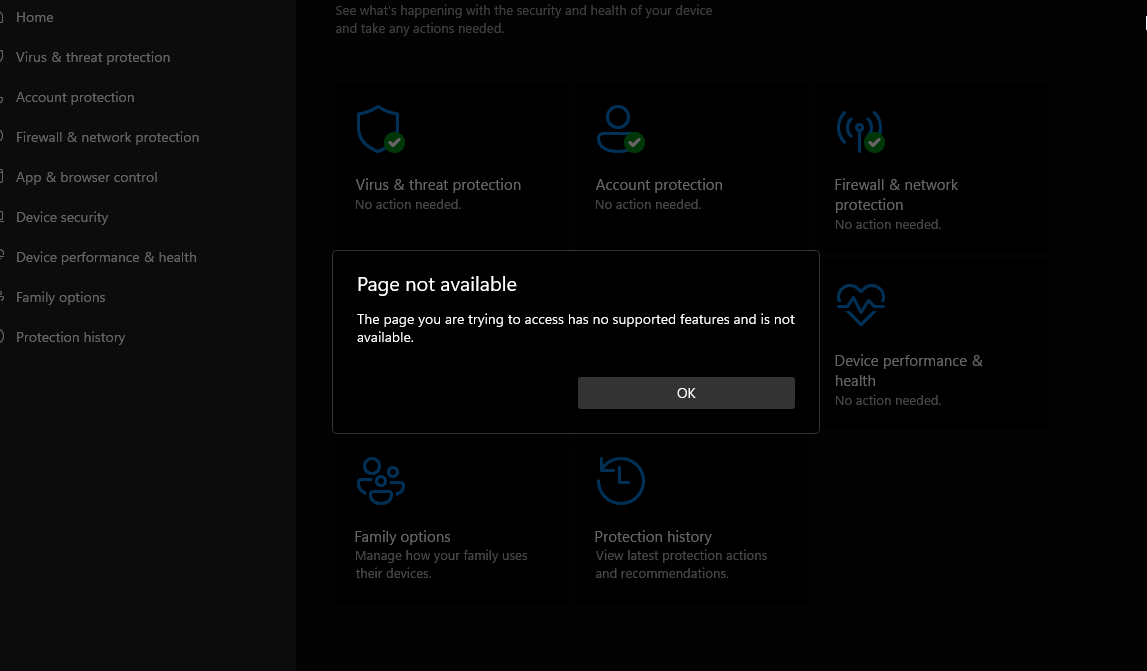
Hello, just want to check in on this... I noticed that I don't have LSA enabled and when i press Core isolation it just gives me this ->
Lv7F5BZ.png


I tried to enable LSA protection Manually via syshardener but didn't work.
I have an i9 9900k, with windows 11 22h version.. should i be able to enable it? Why couldn't i? Why can't i see the page even?

Thanks in advance
 

My Computer My Computer

At a glance

windows 11
OS
windows 11

Latest Support Threads

Back
Top Bottom