
Navigation
Install the app
How to install the app on iOS
Follow along with the video below to see how to install our site as a web app on your home screen.
Note: This feature may not be available in some browsers.
More options
Style variation
System
Light
Dark
You are using an out of date browser. It may not display this or other websites correctly.
You should upgrade or use an alternative browser.
You should upgrade or use an alternative browser.
Is Macrium Reflect Free works good with latest Windows 11 update 23h2
- Thread starter laranana
- Start date

Yes, I have it working.
My Computer
At a glance
Windows 11 Pro 25H2 26200.9550Ryzen 5 760032 Gb DDR5 6000Hz Corsair VengeanceSapphire Pulse RX 7600
- OS
- Windows 11 Pro 25H2 26200.9550
- Computer type
- PC/Desktop
- Manufacturer/Model
- Home built
- CPU
- Ryzen 5 7600
- Motherboard
- Gigabyte B650M Aorus Elite AX Ice
- Memory
- 32 Gb DDR5 6000Hz Corsair Vengeance
- Graphics Card(s)
- Sapphire Pulse RX 7600
- Sound Card
- Internal Realtek
- Monitor(s) Displays
- Samsung 32" Odyssey G5 G50D QHD
- Screen Resolution
- 2560 x 1440
- Hard Drives
- WD Black SN 770 1Tb; SanDisk SDSSDA240G ; Seagate 2Tb HDD
- PSU
- MSI MAG A750GL
- Case
- Enermax Marbleshell MS21
- Cooling
- Thermaltake Peerless Assassin 120 White ARGB, 3 x 120 intake, 1 x 120 exhaust
- Keyboard
- Aukey KM-G12
- Mouse
- Razer Basilisk v3 Pro 35K
- Internet Speed
- 1 Gb/s up & 800 Mb/s down
- Browser
- Brave / Edge
- Antivirus
- Windows / Malwarebytes
Thanks , What is the latest Free version of Macrium ? is it v8.0.7783 ?Yes, I have it working.
My Computer
At a glance
Windows 11 22h2
- OS
- Windows 11 22h2

Macrium Reflect Free 8.0.7783Thanks , What is the latest Free version of Macrium ? is it v8.0.7783 ?
My Computers
-
At a glance
Windows 11 ProIntel Core Ultra 9 386HSamsung 32GB LPDDR5X 8533 RAMGeForce RTX 5070 Ti 12GB GDDR7- OS
- Windows 11 Pro
- Computer type
- Laptop
- Manufacturer/Model
- ASUS ROG Zephyrus G14 GU405AR
- CPU
- Intel Core Ultra 9 386H
- Motherboard
- ASUS
- Memory
- Samsung 32GB LPDDR5X 8533 RAM
- Graphics Card(s)
- GeForce RTX 5070 Ti 12GB GDDR7
- Sound Card
- 4-speaker (dual-force woofer) system with Smart Amplifier Technology, 2 Tweeters
- Monitor(s) Displays
- INNOCN GA27T1M 27' 1440p 320Hz Mini-LED Monitor
- Screen Resolution
- QHD (2560x1440)
- Hard Drives
- Samsung 990 Pro 4TB SSD
- PSU
- Rectangle Conn, 250W AC Adapter
- Cooling
- Thermal Grizzly Conductonaut + IETS GT600 Cooling Pad
- Keyboard
- ROG Strix Scope II 96 RX Wireless
- Mouse
- ROG Chakram X Origin
- Internet Speed
- 1 GBPS Down / 921 MBPS Up
- Browser
- Google Chrome
-
At a glance
Windows 11 EducationAMD Ryzen 9 27016GB LPDDR5X 7500 RAMnVIDIA GeForce RTX 5050 8GB GDDR7- Operating System
- Windows 11 Education
- Computer type
- Laptop
- Manufacturer/Model
- ASUS ROG Zephyrus G14 GA403UH
- CPU
- AMD Ryzen 9 270
- Memory
- 16GB LPDDR5X 7500 RAM
- Graphics card(s)
- nVIDIA GeForce RTX 5050 8GB GDDR7
- Sound Card
- Realtek
- Monitor(s) Displays
- 14' ROG Nebula Display 3K OLED 120Hz
- Screen Resolution
- 2880 x 1800
- Hard Drives
- Samsung 990 PRO 4TB SSD
- PSU
- Rectangle Conn, 200W AC Adapter
- Cooling
- Thermal Grizzly Conductonaut
- Mouse
- ASUS ROG Chakram X Origin Gaming Mouse
- Internet Speed
- 1 GBPS Down / 875 MBPS Up
- Browser
- Google Chrome
- Antivirus
- AVG Internet Security

Yes, see the bottom half of post #1 here:What is the latest Free version of Macrium ? is it v8.0.7783 ?

Latest Macrium Reflect 8 updates
Latest Update(s) v8.1.8853 - 13th April 2026 This update contains no new fixes. Release notes: Macrium Reflect Patch Details v8.1.8631 - 7th August 2025 Release notes: Macrium Reflect Patch Details Reflect v8 reached the end of Extended Support on 8th October 2025. No further updates...
 www.elevenforum.com
My Computers
-
At a glance
Windows 11 HomeAMD Athlon Silver 3050U8GBRadeon Graphics- OS
- Windows 11 Home
- Computer type
- Laptop
- Manufacturer/Model
- Acer Aspire 3 A315-23-R9VY
- CPU
- AMD Athlon Silver 3050U
- Memory
- 8GB
- Graphics Card(s)
- Radeon Graphics
- Monitor(s) Displays
- laptop screen
- Screen Resolution
- 1366x768 native resolution, up to 2560x1440 with Radeon Virtual Super Resolution
- Hard Drives
- 1TB Samsung EVO 870 SSD (from April 2026: 250GB EVO 850)
- Internet Speed
- 150 Mbps
- Browser
- Edge, Firefox
- Antivirus
- Defender
- Other Info
- UPDATE - 11 April 2026: due to lid hinges starting to break up this laptop has been retired from active duty. The OS with all software and files has been migrated to my System Seven in 'Other systems' to carry on as my general purpose 'main machine'.
I've now clean installed 25H2 and used Garlin's scripts to update Secure Boot to CA 2023 and revoke the PCA 2011 certificates. It's new role is to test secure boot issues.
Info for 2021-2026:
fully 'Windows 11 ready' laptop. Windows 10 C: partition migrated from my old unsupported 'main machine' then upgraded to 11. A test migration ran Insider builds for 2 months. When 11 was released on 5th October 2021 it was re-imaged back to 10 and was offered the upgrade in Windows Update on 20th October. Windows Update offered the 22H2 Feature Update on 20th September 2022. It got the 23H2 Feature Update on 4th November 2023 through Windows Update, 24H2 on 3rd October 2024 through Windows Update by setting the Target Release Version for 24H2, and 25H2 on 30th September 2025 through Windows Update by setting the Target Release Version for 25H2.
-
At a glance
Windows 11 ProIntel® Core™ i5-520M8GB(integrated graphics) Intel HD Graphics- Operating System
- Windows 11 Pro
- Computer type
- Laptop
- Manufacturer/Model
- Dell Latitude E4310
- CPU
- Intel® Core™ i5-520M
- Motherboard
- 0T6M8G
- Memory
- 8GB
- Graphics card(s)
- (integrated graphics) Intel HD Graphics
- Screen Resolution
- 1366x768
- Hard Drives
- 500GB Crucial MX500 SSD
- Browser
- Firefox, Edge
- Antivirus
- Defender
- Other Info
- unsupported machine: Legacy bios, MBR, TPM 1.2, upgraded from W10 to W11 using W10/W11 hybrid install media workaround.
In-place upgrade to 22H2 using ISO and a workaround.
Feature Update to 23H2 by manually installing the Enablement Package.
In-place upgrade to 24H2 using hybrid 23H2/24H2 install media.
Upgraded to 25H2 by Enablement Package.
Also running Insider Experimental 263xx and 29xxx builds and Windows 10 as native boot .vhdx.
-
My SYSTEM THREE is a Dell Latitude 5410, i7-10610U, 32GB RAM, 512GB NVMe ssd, supported device running Windows 11 Pro.
My SYSTEM FOUR was a 2-in-1 convertible Lenovo Yoga 11e (1st gen) type 20DA, Celeron N2930, 8GB RAM, 256GB ssd. Unsupported device. This has now been sold. It has been replaced by my System Eight.
My SYSTEM FIVE is a Dell Latitude 3190 2-in-1, Pentium Silver N5030, 8GB RAM, 1TB NVMe ssd, supported device running Windows 11 Pro, plus Insider Beta, Experimental 263xx and 29xxx builds (and a few others) as a native boot .vhdx.
My SYSTEM SIX is a Dell Latitude 5550, Core Ultra 7 165H, 64GB RAM, 1TB NVMe SSD, supported device, Windows 11 Pro, Hyper-V host machine. Updated to 25H2 on 30th September 2025.
My SYSTEM SEVEN is a Lenovo Thinkpad T580, 1920x1080 touchscreen, Intel Core i7-8650U, 16GB RAM, 512GB NVMe SSD + 2nd 512GB NVMe SSD, a supported device for Windows 11. This is my current general purpose 'main machine'. The installed Windows 11 Home from my System One has been migrated to this machine. As its new home has an existing digital licence for Pro I've been able to upgrade the migrated OS from Home to Pro.
My SYSTEM EIGHT is a 2-in-1 convertible Lenovo Yoga 11e (5th gen) type 20LN, Celeron N4120, 8GB RAM, 512GB NVMe ssd, a supported device for Windows 11. Currently running Windows 11 Pro, plus Insider Beta, Experimental 263xx and 29xxx builds as native boot vhdx.

Macrium 8.1.7847 is the best software I ever had !
Never failed , always fast and secure.............
Never failed , always fast and secure.............
My Computers
-
At a glance
Windows11 Pro 25H2i732GBnVidia- OS
- Windows11 Pro 25H2
- Computer type
- PC/Desktop
- Manufacturer/Model
- Asus
- CPU
- i7
- Motherboard
- z97k
- Memory
- 32GB
- Graphics Card(s)
- nVidia
- Sound Card
- Realtek
- Hard Drives
- 3
- Cooling
- air
- Browser
- Edge
- Antivirus
- ESET
-
At a glance
Windows11 ProIntel i516GBIntel- Operating System
- Windows11 Pro
- Computer type
- PC/Desktop
- Manufacturer/Model
- ASUS
- CPU
- Intel i5
- Motherboard
- ASUS Basic
- Memory
- 16GB
- Graphics card(s)
- Intel
- Sound Card
- Realtek
- Monitor(s) Displays
- Samsung
- Hard Drives
- one intern , 0ne extern, OS on SSD
- Cooling
- air
- Keyboard
- wireless Logitech
- Mouse
- wireless Logitech
- Internet Speed
- 1GB
- Browser
- Edge
- Antivirus
- ESET
I agree, but that's Reflect Home and the OP was asking about Reflect Free which was retired at v8.0.7783.Macrium 8.1.7847 is the best software I ever had !
Never failed , always fast and secure.............
I use both, Home on 4 machines and Free on the rest. Neither has ever failed me.....
My Computers
-
At a glance
Windows 11 HomeAMD Athlon Silver 3050U8GBRadeon Graphics- OS
- Windows 11 Home
- Computer type
- Laptop
- Manufacturer/Model
- Acer Aspire 3 A315-23-R9VY
- CPU
- AMD Athlon Silver 3050U
- Memory
- 8GB
- Graphics Card(s)
- Radeon Graphics
- Monitor(s) Displays
- laptop screen
- Screen Resolution
- 1366x768 native resolution, up to 2560x1440 with Radeon Virtual Super Resolution
- Hard Drives
- 1TB Samsung EVO 870 SSD (from April 2026: 250GB EVO 850)
- Internet Speed
- 150 Mbps
- Browser
- Edge, Firefox
- Antivirus
- Defender
- Other Info
- UPDATE - 11 April 2026: due to lid hinges starting to break up this laptop has been retired from active duty. The OS with all software and files has been migrated to my System Seven in 'Other systems' to carry on as my general purpose 'main machine'.
I've now clean installed 25H2 and used Garlin's scripts to update Secure Boot to CA 2023 and revoke the PCA 2011 certificates. It's new role is to test secure boot issues.
Info for 2021-2026:
fully 'Windows 11 ready' laptop. Windows 10 C: partition migrated from my old unsupported 'main machine' then upgraded to 11. A test migration ran Insider builds for 2 months. When 11 was released on 5th October 2021 it was re-imaged back to 10 and was offered the upgrade in Windows Update on 20th October. Windows Update offered the 22H2 Feature Update on 20th September 2022. It got the 23H2 Feature Update on 4th November 2023 through Windows Update, 24H2 on 3rd October 2024 through Windows Update by setting the Target Release Version for 24H2, and 25H2 on 30th September 2025 through Windows Update by setting the Target Release Version for 25H2.
-
At a glance
Windows 11 ProIntel® Core™ i5-520M8GB(integrated graphics) Intel HD Graphics- Operating System
- Windows 11 Pro
- Computer type
- Laptop
- Manufacturer/Model
- Dell Latitude E4310
- CPU
- Intel® Core™ i5-520M
- Motherboard
- 0T6M8G
- Memory
- 8GB
- Graphics card(s)
- (integrated graphics) Intel HD Graphics
- Screen Resolution
- 1366x768
- Hard Drives
- 500GB Crucial MX500 SSD
- Browser
- Firefox, Edge
- Antivirus
- Defender
- Other Info
- unsupported machine: Legacy bios, MBR, TPM 1.2, upgraded from W10 to W11 using W10/W11 hybrid install media workaround.
In-place upgrade to 22H2 using ISO and a workaround.
Feature Update to 23H2 by manually installing the Enablement Package.
In-place upgrade to 24H2 using hybrid 23H2/24H2 install media.
Upgraded to 25H2 by Enablement Package.
Also running Insider Experimental 263xx and 29xxx builds and Windows 10 as native boot .vhdx.
-
My SYSTEM THREE is a Dell Latitude 5410, i7-10610U, 32GB RAM, 512GB NVMe ssd, supported device running Windows 11 Pro.
My SYSTEM FOUR was a 2-in-1 convertible Lenovo Yoga 11e (1st gen) type 20DA, Celeron N2930, 8GB RAM, 256GB ssd. Unsupported device. This has now been sold. It has been replaced by my System Eight.
My SYSTEM FIVE is a Dell Latitude 3190 2-in-1, Pentium Silver N5030, 8GB RAM, 1TB NVMe ssd, supported device running Windows 11 Pro, plus Insider Beta, Experimental 263xx and 29xxx builds (and a few others) as a native boot .vhdx.
My SYSTEM SIX is a Dell Latitude 5550, Core Ultra 7 165H, 64GB RAM, 1TB NVMe SSD, supported device, Windows 11 Pro, Hyper-V host machine. Updated to 25H2 on 30th September 2025.
My SYSTEM SEVEN is a Lenovo Thinkpad T580, 1920x1080 touchscreen, Intel Core i7-8650U, 16GB RAM, 512GB NVMe SSD + 2nd 512GB NVMe SSD, a supported device for Windows 11. This is my current general purpose 'main machine'. The installed Windows 11 Home from my System One has been migrated to this machine. As its new home has an existing digital licence for Pro I've been able to upgrade the migrated OS from Home to Pro.
My SYSTEM EIGHT is a 2-in-1 convertible Lenovo Yoga 11e (5th gen) type 20LN, Celeron N4120, 8GB RAM, 512GB NVMe ssd, a supported device for Windows 11. Currently running Windows 11 Pro, plus Insider Beta, Experimental 263xx and 29xxx builds as native boot vhdx.
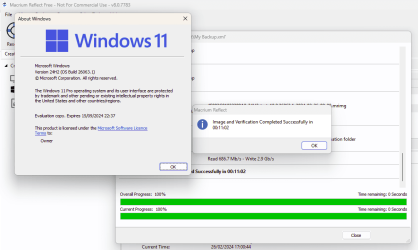
Seems it will work in 24H2 too. Just installed and tested it in the latest Insider build 24H2 26063.1.....will it work good with latest Windows 11 23h2
My Computers
-
At a glance
Windows 11 HomeAMD Athlon Silver 3050U8GBRadeon Graphics- OS
- Windows 11 Home
- Computer type
- Laptop
- Manufacturer/Model
- Acer Aspire 3 A315-23-R9VY
- CPU
- AMD Athlon Silver 3050U
- Memory
- 8GB
- Graphics Card(s)
- Radeon Graphics
- Monitor(s) Displays
- laptop screen
- Screen Resolution
- 1366x768 native resolution, up to 2560x1440 with Radeon Virtual Super Resolution
- Hard Drives
- 1TB Samsung EVO 870 SSD (from April 2026: 250GB EVO 850)
- Internet Speed
- 150 Mbps
- Browser
- Edge, Firefox
- Antivirus
- Defender
- Other Info
- UPDATE - 11 April 2026: due to lid hinges starting to break up this laptop has been retired from active duty. The OS with all software and files has been migrated to my System Seven in 'Other systems' to carry on as my general purpose 'main machine'.
I've now clean installed 25H2 and used Garlin's scripts to update Secure Boot to CA 2023 and revoke the PCA 2011 certificates. It's new role is to test secure boot issues.
Info for 2021-2026:
fully 'Windows 11 ready' laptop. Windows 10 C: partition migrated from my old unsupported 'main machine' then upgraded to 11. A test migration ran Insider builds for 2 months. When 11 was released on 5th October 2021 it was re-imaged back to 10 and was offered the upgrade in Windows Update on 20th October. Windows Update offered the 22H2 Feature Update on 20th September 2022. It got the 23H2 Feature Update on 4th November 2023 through Windows Update, 24H2 on 3rd October 2024 through Windows Update by setting the Target Release Version for 24H2, and 25H2 on 30th September 2025 through Windows Update by setting the Target Release Version for 25H2.
-
At a glance
Windows 11 ProIntel® Core™ i5-520M8GB(integrated graphics) Intel HD Graphics- Operating System
- Windows 11 Pro
- Computer type
- Laptop
- Manufacturer/Model
- Dell Latitude E4310
- CPU
- Intel® Core™ i5-520M
- Motherboard
- 0T6M8G
- Memory
- 8GB
- Graphics card(s)
- (integrated graphics) Intel HD Graphics
- Screen Resolution
- 1366x768
- Hard Drives
- 500GB Crucial MX500 SSD
- Browser
- Firefox, Edge
- Antivirus
- Defender
- Other Info
- unsupported machine: Legacy bios, MBR, TPM 1.2, upgraded from W10 to W11 using W10/W11 hybrid install media workaround.
In-place upgrade to 22H2 using ISO and a workaround.
Feature Update to 23H2 by manually installing the Enablement Package.
In-place upgrade to 24H2 using hybrid 23H2/24H2 install media.
Upgraded to 25H2 by Enablement Package.
Also running Insider Experimental 263xx and 29xxx builds and Windows 10 as native boot .vhdx.
-
My SYSTEM THREE is a Dell Latitude 5410, i7-10610U, 32GB RAM, 512GB NVMe ssd, supported device running Windows 11 Pro.
My SYSTEM FOUR was a 2-in-1 convertible Lenovo Yoga 11e (1st gen) type 20DA, Celeron N2930, 8GB RAM, 256GB ssd. Unsupported device. This has now been sold. It has been replaced by my System Eight.
My SYSTEM FIVE is a Dell Latitude 3190 2-in-1, Pentium Silver N5030, 8GB RAM, 1TB NVMe ssd, supported device running Windows 11 Pro, plus Insider Beta, Experimental 263xx and 29xxx builds (and a few others) as a native boot .vhdx.
My SYSTEM SIX is a Dell Latitude 5550, Core Ultra 7 165H, 64GB RAM, 1TB NVMe SSD, supported device, Windows 11 Pro, Hyper-V host machine. Updated to 25H2 on 30th September 2025.
My SYSTEM SEVEN is a Lenovo Thinkpad T580, 1920x1080 touchscreen, Intel Core i7-8650U, 16GB RAM, 512GB NVMe SSD + 2nd 512GB NVMe SSD, a supported device for Windows 11. This is my current general purpose 'main machine'. The installed Windows 11 Home from my System One has been migrated to this machine. As its new home has an existing digital licence for Pro I've been able to upgrade the migrated OS from Home to Pro.
My SYSTEM EIGHT is a 2-in-1 convertible Lenovo Yoga 11e (5th gen) type 20LN, Celeron N4120, 8GB RAM, 512GB NVMe ssd, a supported device for Windows 11. Currently running Windows 11 Pro, plus Insider Beta, Experimental 263xx and 29xxx builds as native boot vhdx.

- Local time
- 11:03 AM
- Posts
- 12,364
- Location
- The Lone Star State of Texas
- OS
- Windows 11 Pro 25H2 26200.9457
There's a lot of misunderstanding about this so make yourself knowledgeable about the ramifications involved in using Macrium Free and its recovery media.
AFIK, (others please correct me if I'm wrong,) if one has secure boot turned on, once secure boot revocations are either manually applied by the user OR automatically applied by MS, one cannot recover using old WINPE recovery media. Workable WINPE recovery media must be created using the latest WINPE build. Free versions of Macrium can not create the new WINPE media using this new PE build.
Only new WINRE recovery media created using RE Build 22621, or later in the FREE version will continue to work after the revocations are applied or if one has added Macrium Recovery to his boot menu. This thread should be of interest.
 www.elevenforum.com
as well as this one from our own @Bree in a lengthy thread on the Macrium forum.
AFIK, (others please correct me if I'm wrong,) if one has secure boot turned on, once secure boot revocations are either manually applied by the user OR automatically applied by MS, one cannot recover using old WINPE recovery media. Workable WINPE recovery media must be created using the latest WINPE build. Free versions of Macrium can not create the new WINPE media using this new PE build.
Only new WINRE recovery media created using RE Build 22621, or later in the FREE version will continue to work after the revocations are applied or if one has added Macrium Recovery to his boot menu. This thread should be of interest.
Macrium finally releases info how to create boot media that will work in secure boot systems after Black Lotus revocations are applied
This applies to paid versions of Macrium. Someone else may have posted this but I haven't seen it. It is my understanding one has to be running Macrium 8.1.7544 or later to be able to create this new recovery media. Once created, the recovery media will work in secure boot systems after the...
www.elevenforum.com
as well as this one from our own @Bree in a lengthy thread on the Macrium forum.
My Computers
-
At a glance
Windows 11 Pro 25H2 26200.9457i9-10900 10 core 20 threads32 gbnone-Intel UHD Graphics 630- OS
- Windows 11 Pro 25H2 26200.9457
- Computer type
- PC/Desktop
- Manufacturer/Model
- Dell Optiplex 7080
- CPU
- i9-10900 10 core 20 threads
- Motherboard
- DELL 0J37VM
- Memory
- 32 gb
- Graphics Card(s)
- none-Intel UHD Graphics 630
- Sound Card
- Integrated Realtek
- Monitor(s) Displays
- Benq 27
- Screen Resolution
- 2560x1440
- Hard Drives
- 2x1tb Solidigm m.2 nvme /External drives 512gb Samsung m.2 sata+2tb Kingston m2.nvme
- PSU
- 500w
- Case
- MT
- Cooling
- Dell Premium
- Keyboard
- Logitech wired
- Mouse
- Logitech wireless
- Internet Speed
- so slow I'm too embarrassed to tell
- Browser
- #1 Edge #2 Firefox
- Antivirus
- Defender+MWB Premium
-
At a glance
Windows 11 Pro 24H2 26200.9457AMD Ryzen 7 6800U32 gbintegrated- Operating System
- Windows 11 Pro 24H2 26200.9457
- Computer type
- PC/Desktop
- Manufacturer/Model
- Beelink Mini PC SER5
- CPU
- AMD Ryzen 7 6800U
- Memory
- 32 gb
- Graphics card(s)
- integrated
- Sound Card
- integrated
- Monitor(s) Displays
- Benq 27
- Screen Resolution
- 2560x1440
- Hard Drives
- 1TB Crucial nvme
- Keyboard
- Logitech wired
- Mouse
- Logitech wireless
- Internet Speed
- still too embarrassed to tell
- Browser
- Firefox
- Antivirus
- Defender
-
System 3 is non compliant Dell 9020 i7-4770/24gb ram Win11 PRO 26200.9457
That applies to old Windows install boot USBs too, they won't boot either. Well, you can but you have to temporarily turn off Secure Boot in order to boot from old media.....AFIK, (others please correct me if I'm wrong,) if one has secure boot turned on, once secure boot revocations are either manually applied by the user OR automatically applied by MS, one cannot recover using old WINPE recovery media.
I don't think this is quite correct. It's true that the Rescue Media Builder won't recognise that the WinRE has been updated after revocations have been applied, so it won't offer to rebuild the media. But you can force a rebuild as I showed in my Macrium Forum post you gave a link for. Reflect Free certainly manage to build the WIN with the 24H2 WinRE build 26063 when I tested it.Workable WINPE recovery media must be created using the latest WINPE build. Free versions of Macrium can not create the new WINPE media using this new PE build.

Edit: I have a test machine with the revovations already applied. With Secure Boot turned on I can confirm that it boots sucessfully from a rescue USB made by Reflect Free with the 24H2 26063 WinRE.
Last edited:
My Computers
-
At a glance
Windows 11 HomeAMD Athlon Silver 3050U8GBRadeon Graphics- OS
- Windows 11 Home
- Computer type
- Laptop
- Manufacturer/Model
- Acer Aspire 3 A315-23-R9VY
- CPU
- AMD Athlon Silver 3050U
- Memory
- 8GB
- Graphics Card(s)
- Radeon Graphics
- Monitor(s) Displays
- laptop screen
- Screen Resolution
- 1366x768 native resolution, up to 2560x1440 with Radeon Virtual Super Resolution
- Hard Drives
- 1TB Samsung EVO 870 SSD (from April 2026: 250GB EVO 850)
- Internet Speed
- 150 Mbps
- Browser
- Edge, Firefox
- Antivirus
- Defender
- Other Info
- UPDATE - 11 April 2026: due to lid hinges starting to break up this laptop has been retired from active duty. The OS with all software and files has been migrated to my System Seven in 'Other systems' to carry on as my general purpose 'main machine'.
I've now clean installed 25H2 and used Garlin's scripts to update Secure Boot to CA 2023 and revoke the PCA 2011 certificates. It's new role is to test secure boot issues.
Info for 2021-2026:
fully 'Windows 11 ready' laptop. Windows 10 C: partition migrated from my old unsupported 'main machine' then upgraded to 11. A test migration ran Insider builds for 2 months. When 11 was released on 5th October 2021 it was re-imaged back to 10 and was offered the upgrade in Windows Update on 20th October. Windows Update offered the 22H2 Feature Update on 20th September 2022. It got the 23H2 Feature Update on 4th November 2023 through Windows Update, 24H2 on 3rd October 2024 through Windows Update by setting the Target Release Version for 24H2, and 25H2 on 30th September 2025 through Windows Update by setting the Target Release Version for 25H2.
-
At a glance
Windows 11 ProIntel® Core™ i5-520M8GB(integrated graphics) Intel HD Graphics- Operating System
- Windows 11 Pro
- Computer type
- Laptop
- Manufacturer/Model
- Dell Latitude E4310
- CPU
- Intel® Core™ i5-520M
- Motherboard
- 0T6M8G
- Memory
- 8GB
- Graphics card(s)
- (integrated graphics) Intel HD Graphics
- Screen Resolution
- 1366x768
- Hard Drives
- 500GB Crucial MX500 SSD
- Browser
- Firefox, Edge
- Antivirus
- Defender
- Other Info
- unsupported machine: Legacy bios, MBR, TPM 1.2, upgraded from W10 to W11 using W10/W11 hybrid install media workaround.
In-place upgrade to 22H2 using ISO and a workaround.
Feature Update to 23H2 by manually installing the Enablement Package.
In-place upgrade to 24H2 using hybrid 23H2/24H2 install media.
Upgraded to 25H2 by Enablement Package.
Also running Insider Experimental 263xx and 29xxx builds and Windows 10 as native boot .vhdx.
-
My SYSTEM THREE is a Dell Latitude 5410, i7-10610U, 32GB RAM, 512GB NVMe ssd, supported device running Windows 11 Pro.
My SYSTEM FOUR was a 2-in-1 convertible Lenovo Yoga 11e (1st gen) type 20DA, Celeron N2930, 8GB RAM, 256GB ssd. Unsupported device. This has now been sold. It has been replaced by my System Eight.
My SYSTEM FIVE is a Dell Latitude 3190 2-in-1, Pentium Silver N5030, 8GB RAM, 1TB NVMe ssd, supported device running Windows 11 Pro, plus Insider Beta, Experimental 263xx and 29xxx builds (and a few others) as a native boot .vhdx.
My SYSTEM SIX is a Dell Latitude 5550, Core Ultra 7 165H, 64GB RAM, 1TB NVMe SSD, supported device, Windows 11 Pro, Hyper-V host machine. Updated to 25H2 on 30th September 2025.
My SYSTEM SEVEN is a Lenovo Thinkpad T580, 1920x1080 touchscreen, Intel Core i7-8650U, 16GB RAM, 512GB NVMe SSD + 2nd 512GB NVMe SSD, a supported device for Windows 11. This is my current general purpose 'main machine'. The installed Windows 11 Home from my System One has been migrated to this machine. As its new home has an existing digital licence for Pro I've been able to upgrade the migrated OS from Home to Pro.
My SYSTEM EIGHT is a 2-in-1 convertible Lenovo Yoga 11e (5th gen) type 20LN, Celeron N4120, 8GB RAM, 512GB NVMe ssd, a supported device for Windows 11. Currently running Windows 11 Pro, plus Insider Beta, Experimental 263xx and 29xxx builds as native boot vhdx.

If this is what you're referring to, Macrium v8.1.7847 just offered to update the Windows RE on my desktop that has the revocation applied.t's true that the Rescue Media Builder won't recognise that the WinRE has been updated after revocations have been applied, so it won't offer to rebuild the media.

My Computers
-
At a glance
Windows 11 Pro 25H2Intel Core i7-10700K16GB (8GB PC4-19200 DDR4 SDRAM x2)NVIDIA GeForce GTX 1050 TI- OS
- Windows 11 Pro 25H2
- Computer type
- PC/Desktop
- Manufacturer/Model
- PowerSpec B746
- CPU
- Intel Core i7-10700K
- Motherboard
- ASRock Z490 Phantom Gaming 4/ax
- Memory
- 16GB (8GB PC4-19200 DDR4 SDRAM x2)
- Graphics Card(s)
- NVIDIA GeForce GTX 1050 TI
- Sound Card
- Realtek Audio
- Monitor(s) Displays
- #1. LG ULTRAWIDE 34" #2. AOC Q32G2WG3 32"
- Screen Resolution
- #1. 3440 X 1440 #2. 1920 x 1080
- Hard Drives
- NVMe WDC WDS100T2B0C-00PXH0 1TB
Samsung SSD 860 EVO 1TB
- PSU
- 750 Watts (62.5A)
- Case
- PowerSpec/Lian Li ATX 205
- Keyboard
- Logitech K270
- Mouse
- Logitech M185
- Browser
- Microsoft Edge and Firefox
- Antivirus
- Webroot SecureAnywhere CE 26.1
-
At a glance
Windows 11 Canary ChannelIntel Core i5-8400 CPU @ 2.80GHz16 MB DDR 4-2666- Operating System
- Windows 11 Canary Channel
- Computer type
- PC/Desktop
- Manufacturer/Model
- PowerSpec G156
- CPU
- Intel Core i5-8400 CPU @ 2.80GHz
- Motherboard
- AsusTeK Prime B360M-A
- Memory
- 16 MB DDR 4-2666
- Monitor(s) Displays
- 23" Speptre HDMI 75Hz
- Screen Resolution
- 1920x1080
- Hard Drives
- Samsung 970 EVO 500GB NVMe
- Keyboard
- Logitek K270
- Mouse
- Logitek M185
- Browser
- Firefox, Edge and Edge Canary
- Antivirus
- Windows Defender
No, yours is an Insider (dev?) build that has recently been updated to 26058 (from 26052?) some time after Reflect last built your boot menu. That sort of change Reflect will always detect.If this is what you're referring to, Macrium v8.1.7847 just offered to update the Windows RE on my desktop that has the revocation applied.
I'm talking about the various mitigation updates that have updated just the WinRE.wim in the recovery environment to meet the new secure boot requirements that will be needed after the revocations are applied. Those would not trigger Reflect to ask for a rebuild as they don't change the Windows build number, and would need a forced rebuild to make a rescue usb that could boot with secure boot enabled.
My Computers
-
At a glance
Windows 11 HomeAMD Athlon Silver 3050U8GBRadeon Graphics- OS
- Windows 11 Home
- Computer type
- Laptop
- Manufacturer/Model
- Acer Aspire 3 A315-23-R9VY
- CPU
- AMD Athlon Silver 3050U
- Memory
- 8GB
- Graphics Card(s)
- Radeon Graphics
- Monitor(s) Displays
- laptop screen
- Screen Resolution
- 1366x768 native resolution, up to 2560x1440 with Radeon Virtual Super Resolution
- Hard Drives
- 1TB Samsung EVO 870 SSD (from April 2026: 250GB EVO 850)
- Internet Speed
- 150 Mbps
- Browser
- Edge, Firefox
- Antivirus
- Defender
- Other Info
- UPDATE - 11 April 2026: due to lid hinges starting to break up this laptop has been retired from active duty. The OS with all software and files has been migrated to my System Seven in 'Other systems' to carry on as my general purpose 'main machine'.
I've now clean installed 25H2 and used Garlin's scripts to update Secure Boot to CA 2023 and revoke the PCA 2011 certificates. It's new role is to test secure boot issues.
Info for 2021-2026:
fully 'Windows 11 ready' laptop. Windows 10 C: partition migrated from my old unsupported 'main machine' then upgraded to 11. A test migration ran Insider builds for 2 months. When 11 was released on 5th October 2021 it was re-imaged back to 10 and was offered the upgrade in Windows Update on 20th October. Windows Update offered the 22H2 Feature Update on 20th September 2022. It got the 23H2 Feature Update on 4th November 2023 through Windows Update, 24H2 on 3rd October 2024 through Windows Update by setting the Target Release Version for 24H2, and 25H2 on 30th September 2025 through Windows Update by setting the Target Release Version for 25H2.
-
At a glance
Windows 11 ProIntel® Core™ i5-520M8GB(integrated graphics) Intel HD Graphics- Operating System
- Windows 11 Pro
- Computer type
- Laptop
- Manufacturer/Model
- Dell Latitude E4310
- CPU
- Intel® Core™ i5-520M
- Motherboard
- 0T6M8G
- Memory
- 8GB
- Graphics card(s)
- (integrated graphics) Intel HD Graphics
- Screen Resolution
- 1366x768
- Hard Drives
- 500GB Crucial MX500 SSD
- Browser
- Firefox, Edge
- Antivirus
- Defender
- Other Info
- unsupported machine: Legacy bios, MBR, TPM 1.2, upgraded from W10 to W11 using W10/W11 hybrid install media workaround.
In-place upgrade to 22H2 using ISO and a workaround.
Feature Update to 23H2 by manually installing the Enablement Package.
In-place upgrade to 24H2 using hybrid 23H2/24H2 install media.
Upgraded to 25H2 by Enablement Package.
Also running Insider Experimental 263xx and 29xxx builds and Windows 10 as native boot .vhdx.
-
My SYSTEM THREE is a Dell Latitude 5410, i7-10610U, 32GB RAM, 512GB NVMe ssd, supported device running Windows 11 Pro.
My SYSTEM FOUR was a 2-in-1 convertible Lenovo Yoga 11e (1st gen) type 20DA, Celeron N2930, 8GB RAM, 256GB ssd. Unsupported device. This has now been sold. It has been replaced by my System Eight.
My SYSTEM FIVE is a Dell Latitude 3190 2-in-1, Pentium Silver N5030, 8GB RAM, 1TB NVMe ssd, supported device running Windows 11 Pro, plus Insider Beta, Experimental 263xx and 29xxx builds (and a few others) as a native boot .vhdx.
My SYSTEM SIX is a Dell Latitude 5550, Core Ultra 7 165H, 64GB RAM, 1TB NVMe SSD, supported device, Windows 11 Pro, Hyper-V host machine. Updated to 25H2 on 30th September 2025.
My SYSTEM SEVEN is a Lenovo Thinkpad T580, 1920x1080 touchscreen, Intel Core i7-8650U, 16GB RAM, 512GB NVMe SSD + 2nd 512GB NVMe SSD, a supported device for Windows 11. This is my current general purpose 'main machine'. The installed Windows 11 Home from my System One has been migrated to this machine. As its new home has an existing digital licence for Pro I've been able to upgrade the migrated OS from Home to Pro.
My SYSTEM EIGHT is a 2-in-1 convertible Lenovo Yoga 11e (5th gen) type 20LN, Celeron N4120, 8GB RAM, 512GB NVMe ssd, a supported device for Windows 11. Currently running Windows 11 Pro, plus Insider Beta, Experimental 263xx and 29xxx builds as native boot vhdx.
I have been thinking about that. I'm not saying that isn't true but If Macrium is up to date and it doesn't automatically check to see if there is a newer version of Windows RE that would be in line of as the saying goes shooting themselves in the foot. When MS automatically activates the revocations and a user doesn't know how to update the Windows RE they are going to blame Macrium when they can't use their USB Rescue Disk.Those would not trigger Reflect to ask for a rebuild as they don't change the Windows build number, and would need a forced rebuild to make a rescue usb that could boot with secure boot enabled.
My Computers
-
At a glance
Windows 11 Pro 25H2Intel Core i7-10700K16GB (8GB PC4-19200 DDR4 SDRAM x2)NVIDIA GeForce GTX 1050 TI- OS
- Windows 11 Pro 25H2
- Computer type
- PC/Desktop
- Manufacturer/Model
- PowerSpec B746
- CPU
- Intel Core i7-10700K
- Motherboard
- ASRock Z490 Phantom Gaming 4/ax
- Memory
- 16GB (8GB PC4-19200 DDR4 SDRAM x2)
- Graphics Card(s)
- NVIDIA GeForce GTX 1050 TI
- Sound Card
- Realtek Audio
- Monitor(s) Displays
- #1. LG ULTRAWIDE 34" #2. AOC Q32G2WG3 32"
- Screen Resolution
- #1. 3440 X 1440 #2. 1920 x 1080
- Hard Drives
- NVMe WDC WDS100T2B0C-00PXH0 1TB
Samsung SSD 860 EVO 1TB
- PSU
- 750 Watts (62.5A)
- Case
- PowerSpec/Lian Li ATX 205
- Keyboard
- Logitech K270
- Mouse
- Logitech M185
- Browser
- Microsoft Edge and Firefox
- Antivirus
- Webroot SecureAnywhere CE 26.1
-
At a glance
Windows 11 Canary ChannelIntel Core i5-8400 CPU @ 2.80GHz16 MB DDR 4-2666- Operating System
- Windows 11 Canary Channel
- Computer type
- PC/Desktop
- Manufacturer/Model
- PowerSpec G156
- CPU
- Intel Core i5-8400 CPU @ 2.80GHz
- Motherboard
- AsusTeK Prime B360M-A
- Memory
- 16 MB DDR 4-2666
- Monitor(s) Displays
- 23" Speptre HDMI 75Hz
- Screen Resolution
- 1920x1080
- Hard Drives
- Samsung 970 EVO 500GB NVMe
- Keyboard
- Logitek K270
- Mouse
- Logitek M185
- Browser
- Firefox, Edge and Edge Canary
- Antivirus
- Windows Defender
MS are sensibly taking a very slow approach to this. By the time the revocations are enforced the mitigations (eg. updated WinRE) will have been in place for some time. Almost everyone with Reflect would have had OS updates and rebuilt their rescue media well before the revocations became permanent. If all goes as planned I don't think anyone is going to notice.When MS automatically activates the revocations and a user doesn't know how to update the Windows RE they are going to blame Macrium when they can't use their USB Rescue Disk.
Enforcement The final enforcement phase that will make the mitigations permanent. This phase will start no sooner than October 8, 2024.

My Computers
-
At a glance
Windows 11 HomeAMD Athlon Silver 3050U8GBRadeon Graphics- OS
- Windows 11 Home
- Computer type
- Laptop
- Manufacturer/Model
- Acer Aspire 3 A315-23-R9VY
- CPU
- AMD Athlon Silver 3050U
- Memory
- 8GB
- Graphics Card(s)
- Radeon Graphics
- Monitor(s) Displays
- laptop screen
- Screen Resolution
- 1366x768 native resolution, up to 2560x1440 with Radeon Virtual Super Resolution
- Hard Drives
- 1TB Samsung EVO 870 SSD (from April 2026: 250GB EVO 850)
- Internet Speed
- 150 Mbps
- Browser
- Edge, Firefox
- Antivirus
- Defender
- Other Info
- UPDATE - 11 April 2026: due to lid hinges starting to break up this laptop has been retired from active duty. The OS with all software and files has been migrated to my System Seven in 'Other systems' to carry on as my general purpose 'main machine'.
I've now clean installed 25H2 and used Garlin's scripts to update Secure Boot to CA 2023 and revoke the PCA 2011 certificates. It's new role is to test secure boot issues.
Info for 2021-2026:
fully 'Windows 11 ready' laptop. Windows 10 C: partition migrated from my old unsupported 'main machine' then upgraded to 11. A test migration ran Insider builds for 2 months. When 11 was released on 5th October 2021 it was re-imaged back to 10 and was offered the upgrade in Windows Update on 20th October. Windows Update offered the 22H2 Feature Update on 20th September 2022. It got the 23H2 Feature Update on 4th November 2023 through Windows Update, 24H2 on 3rd October 2024 through Windows Update by setting the Target Release Version for 24H2, and 25H2 on 30th September 2025 through Windows Update by setting the Target Release Version for 25H2.
-
At a glance
Windows 11 ProIntel® Core™ i5-520M8GB(integrated graphics) Intel HD Graphics- Operating System
- Windows 11 Pro
- Computer type
- Laptop
- Manufacturer/Model
- Dell Latitude E4310
- CPU
- Intel® Core™ i5-520M
- Motherboard
- 0T6M8G
- Memory
- 8GB
- Graphics card(s)
- (integrated graphics) Intel HD Graphics
- Screen Resolution
- 1366x768
- Hard Drives
- 500GB Crucial MX500 SSD
- Browser
- Firefox, Edge
- Antivirus
- Defender
- Other Info
- unsupported machine: Legacy bios, MBR, TPM 1.2, upgraded from W10 to W11 using W10/W11 hybrid install media workaround.
In-place upgrade to 22H2 using ISO and a workaround.
Feature Update to 23H2 by manually installing the Enablement Package.
In-place upgrade to 24H2 using hybrid 23H2/24H2 install media.
Upgraded to 25H2 by Enablement Package.
Also running Insider Experimental 263xx and 29xxx builds and Windows 10 as native boot .vhdx.
-
My SYSTEM THREE is a Dell Latitude 5410, i7-10610U, 32GB RAM, 512GB NVMe ssd, supported device running Windows 11 Pro.
My SYSTEM FOUR was a 2-in-1 convertible Lenovo Yoga 11e (1st gen) type 20DA, Celeron N2930, 8GB RAM, 256GB ssd. Unsupported device. This has now been sold. It has been replaced by my System Eight.
My SYSTEM FIVE is a Dell Latitude 3190 2-in-1, Pentium Silver N5030, 8GB RAM, 1TB NVMe ssd, supported device running Windows 11 Pro, plus Insider Beta, Experimental 263xx and 29xxx builds (and a few others) as a native boot .vhdx.
My SYSTEM SIX is a Dell Latitude 5550, Core Ultra 7 165H, 64GB RAM, 1TB NVMe SSD, supported device, Windows 11 Pro, Hyper-V host machine. Updated to 25H2 on 30th September 2025.
My SYSTEM SEVEN is a Lenovo Thinkpad T580, 1920x1080 touchscreen, Intel Core i7-8650U, 16GB RAM, 512GB NVMe SSD + 2nd 512GB NVMe SSD, a supported device for Windows 11. This is my current general purpose 'main machine'. The installed Windows 11 Home from my System One has been migrated to this machine. As its new home has an existing digital licence for Pro I've been able to upgrade the migrated OS from Home to Pro.
My SYSTEM EIGHT is a 2-in-1 convertible Lenovo Yoga 11e (5th gen) type 20LN, Celeron N4120, 8GB RAM, 512GB NVMe ssd, a supported device for Windows 11. Currently running Windows 11 Pro, plus Insider Beta, Experimental 263xx and 29xxx builds as native boot vhdx.
Does anything ever go as planned?If all goes as planned I don't think anyone is going to notice.

My Computers
-
At a glance
Windows 11 Pro 25H2Intel Core i7-10700K16GB (8GB PC4-19200 DDR4 SDRAM x2)NVIDIA GeForce GTX 1050 TI- OS
- Windows 11 Pro 25H2
- Computer type
- PC/Desktop
- Manufacturer/Model
- PowerSpec B746
- CPU
- Intel Core i7-10700K
- Motherboard
- ASRock Z490 Phantom Gaming 4/ax
- Memory
- 16GB (8GB PC4-19200 DDR4 SDRAM x2)
- Graphics Card(s)
- NVIDIA GeForce GTX 1050 TI
- Sound Card
- Realtek Audio
- Monitor(s) Displays
- #1. LG ULTRAWIDE 34" #2. AOC Q32G2WG3 32"
- Screen Resolution
- #1. 3440 X 1440 #2. 1920 x 1080
- Hard Drives
- NVMe WDC WDS100T2B0C-00PXH0 1TB
Samsung SSD 860 EVO 1TB
- PSU
- 750 Watts (62.5A)
- Case
- PowerSpec/Lian Li ATX 205
- Keyboard
- Logitech K270
- Mouse
- Logitech M185
- Browser
- Microsoft Edge and Firefox
- Antivirus
- Webroot SecureAnywhere CE 26.1
-
At a glance
Windows 11 Canary ChannelIntel Core i5-8400 CPU @ 2.80GHz16 MB DDR 4-2666- Operating System
- Windows 11 Canary Channel
- Computer type
- PC/Desktop
- Manufacturer/Model
- PowerSpec G156
- CPU
- Intel Core i5-8400 CPU @ 2.80GHz
- Motherboard
- AsusTeK Prime B360M-A
- Memory
- 16 MB DDR 4-2666
- Monitor(s) Displays
- 23" Speptre HDMI 75Hz
- Screen Resolution
- 1920x1080
- Hard Drives
- Samsung 970 EVO 500GB NVMe
- Keyboard
- Logitek K270
- Mouse
- Logitek M185
- Browser
- Firefox, Edge and Edge Canary
- Antivirus
- Windows Defender
This one has a good chance. MS seem to be taking it really slow and carefully, having pushed back the timing several times now.Does anything ever go as planned?
My Computers
-
At a glance
Windows 11 HomeAMD Athlon Silver 3050U8GBRadeon Graphics- OS
- Windows 11 Home
- Computer type
- Laptop
- Manufacturer/Model
- Acer Aspire 3 A315-23-R9VY
- CPU
- AMD Athlon Silver 3050U
- Memory
- 8GB
- Graphics Card(s)
- Radeon Graphics
- Monitor(s) Displays
- laptop screen
- Screen Resolution
- 1366x768 native resolution, up to 2560x1440 with Radeon Virtual Super Resolution
- Hard Drives
- 1TB Samsung EVO 870 SSD (from April 2026: 250GB EVO 850)
- Internet Speed
- 150 Mbps
- Browser
- Edge, Firefox
- Antivirus
- Defender
- Other Info
- UPDATE - 11 April 2026: due to lid hinges starting to break up this laptop has been retired from active duty. The OS with all software and files has been migrated to my System Seven in 'Other systems' to carry on as my general purpose 'main machine'.
I've now clean installed 25H2 and used Garlin's scripts to update Secure Boot to CA 2023 and revoke the PCA 2011 certificates. It's new role is to test secure boot issues.
Info for 2021-2026:
fully 'Windows 11 ready' laptop. Windows 10 C: partition migrated from my old unsupported 'main machine' then upgraded to 11. A test migration ran Insider builds for 2 months. When 11 was released on 5th October 2021 it was re-imaged back to 10 and was offered the upgrade in Windows Update on 20th October. Windows Update offered the 22H2 Feature Update on 20th September 2022. It got the 23H2 Feature Update on 4th November 2023 through Windows Update, 24H2 on 3rd October 2024 through Windows Update by setting the Target Release Version for 24H2, and 25H2 on 30th September 2025 through Windows Update by setting the Target Release Version for 25H2.
-
At a glance
Windows 11 ProIntel® Core™ i5-520M8GB(integrated graphics) Intel HD Graphics- Operating System
- Windows 11 Pro
- Computer type
- Laptop
- Manufacturer/Model
- Dell Latitude E4310
- CPU
- Intel® Core™ i5-520M
- Motherboard
- 0T6M8G
- Memory
- 8GB
- Graphics card(s)
- (integrated graphics) Intel HD Graphics
- Screen Resolution
- 1366x768
- Hard Drives
- 500GB Crucial MX500 SSD
- Browser
- Firefox, Edge
- Antivirus
- Defender
- Other Info
- unsupported machine: Legacy bios, MBR, TPM 1.2, upgraded from W10 to W11 using W10/W11 hybrid install media workaround.
In-place upgrade to 22H2 using ISO and a workaround.
Feature Update to 23H2 by manually installing the Enablement Package.
In-place upgrade to 24H2 using hybrid 23H2/24H2 install media.
Upgraded to 25H2 by Enablement Package.
Also running Insider Experimental 263xx and 29xxx builds and Windows 10 as native boot .vhdx.
-
My SYSTEM THREE is a Dell Latitude 5410, i7-10610U, 32GB RAM, 512GB NVMe ssd, supported device running Windows 11 Pro.
My SYSTEM FOUR was a 2-in-1 convertible Lenovo Yoga 11e (1st gen) type 20DA, Celeron N2930, 8GB RAM, 256GB ssd. Unsupported device. This has now been sold. It has been replaced by my System Eight.
My SYSTEM FIVE is a Dell Latitude 3190 2-in-1, Pentium Silver N5030, 8GB RAM, 1TB NVMe ssd, supported device running Windows 11 Pro, plus Insider Beta, Experimental 263xx and 29xxx builds (and a few others) as a native boot .vhdx.
My SYSTEM SIX is a Dell Latitude 5550, Core Ultra 7 165H, 64GB RAM, 1TB NVMe SSD, supported device, Windows 11 Pro, Hyper-V host machine. Updated to 25H2 on 30th September 2025.
My SYSTEM SEVEN is a Lenovo Thinkpad T580, 1920x1080 touchscreen, Intel Core i7-8650U, 16GB RAM, 512GB NVMe SSD + 2nd 512GB NVMe SSD, a supported device for Windows 11. This is my current general purpose 'main machine'. The installed Windows 11 Home from my System One has been migrated to this machine. As its new home has an existing digital licence for Pro I've been able to upgrade the migrated OS from Home to Pro.
My SYSTEM EIGHT is a 2-in-1 convertible Lenovo Yoga 11e (5th gen) type 20LN, Celeron N4120, 8GB RAM, 512GB NVMe ssd, a supported device for Windows 11. Currently running Windows 11 Pro, plus Insider Beta, Experimental 263xx and 29xxx builds as native boot vhdx.
With so many different systems It's going to be hard.This one has a good chance. MS seem to be taking it really slow and carefully, having pushed back the timing several times now.
My Computers
-
At a glance
Windows 11 Pro 25H2Intel Core i7-10700K16GB (8GB PC4-19200 DDR4 SDRAM x2)NVIDIA GeForce GTX 1050 TI- OS
- Windows 11 Pro 25H2
- Computer type
- PC/Desktop
- Manufacturer/Model
- PowerSpec B746
- CPU
- Intel Core i7-10700K
- Motherboard
- ASRock Z490 Phantom Gaming 4/ax
- Memory
- 16GB (8GB PC4-19200 DDR4 SDRAM x2)
- Graphics Card(s)
- NVIDIA GeForce GTX 1050 TI
- Sound Card
- Realtek Audio
- Monitor(s) Displays
- #1. LG ULTRAWIDE 34" #2. AOC Q32G2WG3 32"
- Screen Resolution
- #1. 3440 X 1440 #2. 1920 x 1080
- Hard Drives
- NVMe WDC WDS100T2B0C-00PXH0 1TB
Samsung SSD 860 EVO 1TB
- PSU
- 750 Watts (62.5A)
- Case
- PowerSpec/Lian Li ATX 205
- Keyboard
- Logitech K270
- Mouse
- Logitech M185
- Browser
- Microsoft Edge and Firefox
- Antivirus
- Webroot SecureAnywhere CE 26.1
-
At a glance
Windows 11 Canary ChannelIntel Core i5-8400 CPU @ 2.80GHz16 MB DDR 4-2666- Operating System
- Windows 11 Canary Channel
- Computer type
- PC/Desktop
- Manufacturer/Model
- PowerSpec G156
- CPU
- Intel Core i5-8400 CPU @ 2.80GHz
- Motherboard
- AsusTeK Prime B360M-A
- Memory
- 16 MB DDR 4-2666
- Monitor(s) Displays
- 23" Speptre HDMI 75Hz
- Screen Resolution
- 1920x1080
- Hard Drives
- Samsung 970 EVO 500GB NVMe
- Keyboard
- Logitek K270
- Mouse
- Logitek M185
- Browser
- Firefox, Edge and Edge Canary
- Antivirus
- Windows Defender
Similar threads

- Replies
- 54
- Views
- 14K

- Replies
- 12
- Views
- 5K

- Article
- Replies
- 7
- Views
- 2K


- Article
- Replies
- 170
- Views
- 42K

Latest Support Threads
-
-
Xbox Microsoft Store game not visible in Windows Explorer
- Started by hispanico
- Replies: 0
-

-
Is the Administrator protection FINALLY has been rolled out? Take a look from the images.
- Started by win11freak
- Replies: 5
-
First look at 26H2: MS broke Win32k.sys, quality continues to degrade
- Started by Anixx
- Replies: 6

Latest Tutorials
-
 Accessibility Enable or Disable Auto Zoom Out for Narrator Math Reading Navigation in Windows 11
- Started by Brink
- Replies: 0
-
 Accessibility Change Narrator Math Reading Navigation Verbosity in Windows 11
- Started by Brink
- Replies: 0
-
 Accessibility Change Narrator Math Reading Navigation Mode in Windows 11
- Started by Brink
- Replies: 0
-
 Accessibility Change Narrator Math Reading Pause Factor in Windows 11
- Started by Brink
- Replies: 0
-
 Accessibility Change Narrator Math Reading Speech Rate in Windows 11
- Started by Brink
- Replies: 0