
Solved Is the Administrator protection FINALLY has been rolled out? Take a look from the images.


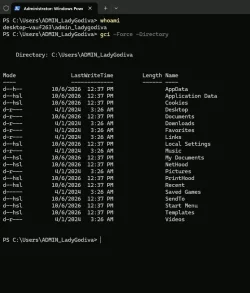
ADMIN_username profile
ADMIN_username account exists temporarily only whilst the relevant elevated task is running.
It is separate from your username account.
So it won't contain the folders-files of your username account or respond to your username account password.


Denis
 
Last edited:

My Computer My Computer

At a glance

Windows 11 Home x64 Version 26H2 Build 26300....
OS
Windows 11 Home x64 Version 26H2 Build 26300.9457
I am running with my local Admin account and what would happen if I open the ADMIN_username profile folder using my Admin Protection credentials? Because when I try to open the ADMIN_username profile folder, it says that I currently do not have Permission to open it unless of course I enter my credentials.

Would I see the same folder and file structure the same way as with my own local Admin User profile folder?

You can browse the contents of the ADMIN_ profile if you want, but it's a regular user profile, just like your real user account's profile. It would almost have to be a normal profile by necessity, so that any processes running under that account would have access to a Desktop, Documents, temp, etc. For example, if some process running under that account says, "I want to write a file to %TEMP%," it goes in the ADMIN_ account's profile, not yours.

It does still exist after the process closes, but there's nothing Earth-shattering in there.

Untitled.webp
 

My Computer My Computer

At a glance

Win11 Ent. 25H2
OS
Win11 Ent. 25H2
So would it be fine to open the ADMIN_user profile folder without causing any security related issues to the Admin Protection feature?
 

My Computer My Computer

At a glance

Windows 11 Pro 22H2
OS
Windows 11 Pro 22H2
What's with the obsession? It's a "dummy account" created purely for sandboxing the token granting process, so it's distinct from your normal identity.

While MS could have created the absolute minimum of folders (like skipping "Music", etc.), it's easier to re-use existing Windows code to create a normal user profile instead of the security team writing their own from scratch.
 

My Computer My Computer

At a glance

Windows 7
OS
Windows 7
So would it be fine to open the ADMIN_user profile folder without causing any security related issues to the Admin Protection feature?

Yeah, if you want to, but I don’t know why you would unless you were looking for a file that got saved there or something.
 

My Computer My Computer

At a glance

Win11 Ent. 25H2
OS
Win11 Ent. 25H2
Yeah, if you want to, but I don’t know why you would unless you were looking for a file that got saved there or something.
If files are actually getting saved there, I don't think its a wise idea. Because the whole point I would think that this ADMIN profile folder can't be touched by malware or even a legitimate file. Because what if malware gets into this ADMIN profile folder then this Administrator Protection wouldn't do no protecting at all. No files should be added in there manually or automatically in that folder.

I thought the whole point of the Administrator Protection was that when a local Admin user account elevates when making system changes or installing applications, then the Administrator Protection creates a temporary Admin token and that temporary Admin token then gets destroyed after the elevation ends along with the ADMIN profile folder.
 
Last edited:

My Computer My Computer

At a glance

Windows 11 Pro 22H2
OS
Windows 11 Pro 22H2
If files are actually getting saved there, I don't think its a wise idea. Because the whole point I would think that this ADMIN profile folder can't be touched by malware or even a legitimate file. Because what if malware gets into this ADMIN profile folder then this Administrator Protection wouldn't do no protecting at all. No files should be added in there manually or automatically in that folder.

I thought the whole point was that when a local Admin user account elevates when making system changes or installing applications, then the Administrator Protection creates a temporary Admin token and that temporary Admin token then gets destroyed after the elevation ends along with the ADMIN profile folder.
Sure, no files should be saved there. But you might have some dumb app that automatically saves to the Documents folder, without asking, for example. That's why this stuff needs to be thoroughly tested in whatever your environment is. You don't see that much anymore like we did in the 90's and 00's, but it still happens.

But no, the admin token goes away, but the profile remains. It should be protected such that only an admin account can get in there, so that's good. I actually haven't checked the ACLs on the ADMIN_ account's folder though.

Edit: Yep, the ACLs say System, Administrators, and the ADMIN_ account itself have full control.
 
Last edited:

My Computer My Computer

At a glance

Win11 Ent. 25H2
OS
Win11 Ent. 25H2
Sure, no files should be saved there. But you might have some dumb app that automatically saves to the Documents folder, without asking, for example. That's why this stuff needs to be thoroughly tested in whatever your environment is. You don't see that much anymore like we did in the 90's and 00's, but it still happens.

But no, the admin token goes away, but the profile remains. It should be protected such that only an admin account can get in there, so that's good. I actually haven't checked the ACLs on the ADMIN_ account's folder though.

Edit: Yep, the ACLs say System, Administrators, and the ADMIN_ account itself have full control.
I checked the ACLs using this PowerShell Command below for the ADMIN_Profile folder and my output was the same:

(Get-Acl -Path "C:\Users\YourUsername").Access | Format-Table IdentityReference, FileSystemRights, AccessControlType, IsInherited -AutoSize

NT AUTHORITY\SYSTEM
BUILTIN\Administrators
PC Name\ADMIN_account
Account Unknown S-1-15-3-


What is this Account Unknown used for?
Should I remove it?
 
Last edited:

My Computer My Computer

At a glance

Windows 11 Pro 22H2
OS
Windows 11 Pro 22H2
Well, it's simple.
Microsludge don't want people messing with Windows, because every problem the user creates becomes one the community gets pestered about and has to (attempt to) solve. Sludge doesn't have the time, resources and staff to devote to fixing problems that wouldn't exist if people didn't mess with the OS.
They're going down the Mac path - just use it, you don't need to know how it works and you don't need to mess with it.
The whole point of an administrator is to appoint someone with the expertise who's competent to make changes. Admin protection just insults said admins.
 

My Computer My Computer

At a glance

Windows 11 Pro 24H2i7 Ultra16GBIntel
OS
Windows 11 Pro 24H2
Computer type
Laptop
Manufacturer/Model
LG
CPU
i7 Ultra
Memory
16GB
Graphics Card(s)
Intel
Sound Card
Intel Realtek
Monitor(s) Displays
Laptop 17" & TB4 Dell 27" QHD Ultrasharp w/integral TB4 hub
Screen Resolution
2560x1600
Hard Drives
1TB SSD, 5 external WDs
Mouse
Logitech Master MX 3S
Browser
Vivaldi
Antivirus
Kaspersky Premium Suite

My Computer My Computer

At a glance

Win11 Ent. 25H2
OS
Win11 Ent. 25H2

My Computer My Computer

At a glance

Windows 11 Home x64 Version 26H2 Build 26300....
OS
Windows 11 Home x64 Version 26H2 Build 26300.9457
I can't leave well enough alone, so I enabled administrator protection. I didn't see any smoke yet and it just asks me to input my PIN, instead of click yes. Next up - try sudo.
 

My Computers My Computers

  • At a glance

    Win 11 ProIntel(R) Core(TM) i5-10400F CPU @ 2.90GHzTotal 48GB (Corsair VENGEANCE® LPX 32GB (2 x ...MSI NVIDIA GeForce RTX 3060 Ti
    OS
    Win 11 Pro
    Computer type
    PC/Desktop
    Manufacturer/Model
    ABS (Newegg)
    CPU
    Intel(R) Core(TM) i5-10400F CPU @ 2.90GHz
    Motherboard
    ASUSTeK COMPUTER INC. PRIME B560M-A AC Rev 1.xx
    Memory
    Total 48GB (Corsair VENGEANCE® LPX 32GB (2 x 16GB) DDR4 DRAM 3600MHz + (2x8GB) DDR4 DRAM 3000MHz)
    Graphics Card(s)
    MSI NVIDIA GeForce RTX 3060 Ti
    Sound Card
    Realtek Digital Output (Realtek(R) Audio)
    Monitor(s) Displays
    Viewsonic VS 2725 -2k 27"
    Screen Resolution
    2560x1440 100hz
    Hard Drives
    T-FORCE TM8FP800 1TB + a couple SATA SSDs
    PSU
    Gigabyte P650E
    Case
    DeepCool Matrexx 50 mid-tower
    Cooling
    Assassin X 120 Refined SE and 5 Thermalright TL-C12C case fans
    Keyboard
    Redragon K655 or K720
    Mouse
    CoolerMaster MM711 or Redragon M612
    Internet Speed
    Starlink: speed varies
    Browser
    Brave (default), Chrome (for ATG), Edge (for ATMS)
    Antivirus
    MalwareBytes + Windows Defender
    Other Info
    An assortment of "land fill, obsolete" computers all running Linux Mint 22 (at the moment).
  • At a glance

    Linux Mint 22.2 Cinnamoni5 459016 GBIntel(R) HD Graphics 4600
    Operating System
    Linux Mint 22.2 Cinnamon
    Computer type
    PC/Desktop
    Manufacturer/Model
    Hewlett-Packard HP ProDesk 600 G1 SFF
    CPU
    i5 4590
    Motherboard
    HP
    Memory
    16 GB
    Graphics card(s)
    Intel(R) HD Graphics 4600
    Sound Card
    Realtek High Definition Audio
    Monitor(s) Displays
    Generic 24"
    Hard Drives
    Samsung SSD 860 EVO 500GB
    Hitachi HUA722010CLA330
    WDC WD40EZAZ-19SF3B0
    PSU
    Factory 240 watt
    Case
    Low Profile Desktop
    Cooling
    Factory cooling
    Keyboard
    HP
    Mouse
    HP
    Internet Speed
    Starlink
    Browser
    Brave
    Antivirus
    ?
    Other Info
    This is my media server
Since I am running as a local Admin account and need to install or make system changes when Administrator Protection is turned on, do I still need to right click and select Run as Administrator?
 

My Computer My Computer

At a glance

Windows 11 Pro 22H2
OS
Windows 11 Pro 22H2
Yes, if you want the thing to run as administrator, unless the executable is marked to require admin rights (with the little UAC shield).

1791571748434.webp


For executables not marked this way, for example PowerShell, if you want it to have admin rights, you need to run it that way. If you want it to run as a normal user, no.
 

My Computer My Computer

At a glance

Win11 Ent. 25H2
OS
Win11 Ent. 25H2
Yes, if you want the thing to run as administrator, unless the executable is marked to require admin rights (with the little UAC shield).

View attachment 186050

For executables not marked this way, for example PowerShell, if you want it to have admin rights, you need to run it that way. If you want it to run as a normal user, no.
I did not know this.

So for example, if I need to make changes to a Group Policy setting even if Administrator Protection is turned on, then I need to right click on GPEDIT.MSC and select RunAs Administrator?

Don't seem to make much sense because despite opening GPEDIT.MSC without using the RunAs Administrator option, it still does require me to enter my Admin Windows Hello PIN or my password.

Really confusing.
 
Last edited:

My Computer My Computer

At a glance

Windows 11 Pro 22H2
OS
Windows 11 Pro 22H2
Back
Top Bottom




