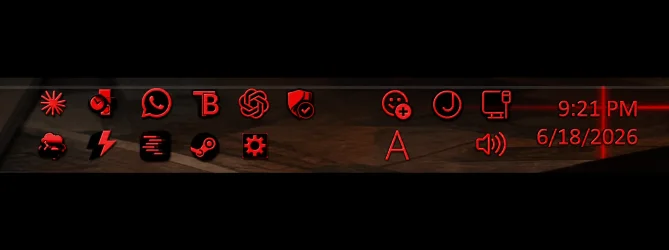
Solved is their anyway to force the system tray icons to a 2nd row instead of the steam icon hanging partly off the screen?


hioolpu

Active member
Local time
2:06 PM
Posts
11
OS
Windows 11 Home
is their anyway to force the system tray icons to a 2nd row instead of the steam icon hanging partly off the screen?


1721168141663.png
 

My Computer My Computer

At a glance

Windows 11 Home
OS
Windows 11 Home
Computer type
PC/Desktop
Antivirus
Windows Security
is their anyway to force the system tray icons to a 2nd row instead of the steam icon hanging partly off the screen?
Add more icons...,? 🤷‍♂️ Just guessing...

0007188.jpg
 

My Computers My Computers

  • At a glance

    Windows 11 Pro
    OS
    Windows 11 Pro
    Computer type
    PC/Desktop
    Manufacturer/Model
    ASUS ROG Strix
  • At a glance

    Windows 11 Pro
    Operating System
    Windows 11 Pro
    Computer type
    Laptop
    Manufacturer/Model
    ASUS VivoBook
  • ASUS VivoBook 'Lite' ~ Windows 11 Home
... the steam icon hanging partly off the screen
Have you disabled the Clock? Maybe that's why the Steam icon is falling off the screen.
 

My Computers My Computers

  • At a glance

    Windows 11 Pro
    OS
    Windows 11 Pro
    Computer type
    PC/Desktop
    Manufacturer/Model
    ASUS ROG Strix
  • At a glance

    Windows 11 Pro
    Operating System
    Windows 11 Pro
    Computer type
    Laptop
    Manufacturer/Model
    ASUS VivoBook
  • ASUS VivoBook 'Lite' ~ Windows 11 Home
You could decide to keep all systray icons always visible on the taskbar. There is a checkbox for this, it's at the bottom of the window that opens when you run the following command:
explorer shell:::{05d7b0f4-2121-4eff-bf6b-ed3f69b894d9}
Only problem, this checkbox doesn't seem to work on Windows 11. To fix that problem, you can apply this registry edit:
reg add HKCU\SOFTWARE\Microsoft\Windows\CurrentVersion\Explorer /v EnableAutoTray /t REG_DWORD /d 1 /f
 

My Computers My Computers

  • At a glance

    11 Homei7 13650HX16GB DDR5GeForce RTX 4060 Mobile
    OS
    11 Home
    Computer type
    Laptop
    Manufacturer/Model
    Asus TUF Gaming F16 (2024)
    CPU
    i7 13650HX
    Memory
    16GB DDR5
    Graphics Card(s)
    GeForce RTX 4060 Mobile
    Sound Card
    Eastern Electric MiniMax DAC Supreme; Emotiva UMC-200; Astell & Kern AK240
    Monitor(s) Displays
    Sony Bravia XR-55X90J
    Screen Resolution
    3840×2160
    Hard Drives
    512GB SSD internal
    37TB external
    PSU
    Li-ion
    Cooling
    2× Arc Flow Fans, 4× exhaust vents, 5× heatpipes
    Keyboard
    Logitech K800
    Mouse
    Logitech G402
    Internet Speed
    30Mbit/s up, 500Mbit/s down
    Browser
    FF
    Antivirus
    What's an antivirus?
  • At a glance

    11 Homei5 1135G716GB DDR4Intel Iris Xe
    Operating System
    11 Home
    Computer type
    Laptop
    Manufacturer/Model
    Medion S15450
    CPU
    i5 1135G7
    Memory
    16GB DDR4
    Graphics card(s)
    Intel Iris Xe
    Sound Card
    Eastern Electric MiniMax DAC Supreme; Emotiva UMC-200; Astell & Kern AK240
    Monitor(s) Displays
    Sony Bravia XR-55X90J
    Screen Resolution
    3840×2160
    Hard Drives
    2TB SSD internal
    37TB external
    PSU
    Li-ion
    Keyboard
    Logitech K800
    Mouse
    Logitech G402
    Internet Speed
    30Mbit/s up, 500Mbit/s down
    Browser
    FF
You could decide to keep all systray icons always visible on the taskbar. There is a checkbox for this, it's at the bottom of the window that opens when you run the following command:
explorer shell:::{05d7b0f4-2121-4eff-bf6b-ed3f69b894d9}
Only problem, this checkbox doesn't seem to work on Windows 11. To fix that problem, you can apply this registry edit:
reg add HKCU\SOFTWARE\Microsoft\Windows\CurrentVersion\Explorer /v EnableAutoTray /t REG_DWORD /d 1 /f
2nd option works well for me. Solved. Thank You @hdmi
 

My Computer My Computer

At a glance

Windows 11 Home
OS
Windows 11 Home
Computer type
PC/Desktop
Antivirus
Windows Security
I ran into this same system-tray problem and ended up making a small free utility for it.

Disclosure: I made this.

It is called Systray Wrap Doubler. It makes Windows 11 notification-area/system-tray icons use a compact two-row layout, so visible tray icons can use the vertical space beside the clock/date area instead of staying in one long row or getting pushed awkwardly into overflow.

It has tray-menu commands for:

- Apply 2 Rows
- Revert
- Restart Shell
- Exit

It is not a registry-only tweak; it is a Windows shell customization tool, so only use it if you are comfortable with Explorer/taskbar tweaks. The installer includes the source code and docs, so people can inspect it, fork it, or adapt the approach into something else such as a Windhawk mod.

GitHub/source/download:

If this is not appropriate here, feel free to remove it. I’m posting because it is free, source-included, and directly related to this thread.Systray Wrap Doubler concept preview.webp
 

My Computer My Computer

At a glance

Windows 11Amd ryzen 5 3600 6core processor 3.6G32g 3000mhtz cl16nvidia gefore 1650 super 4g vram
OS
Windows 11
Computer type
PC/Desktop
Manufacturer/Model
Self Picked Parts
CPU
Amd ryzen 5 3600 6core processor 3.6G
Motherboard
aorus b450 mobo
Memory
32g 3000mhtz cl16
Graphics Card(s)
nvidia gefore 1650 super 4g vram
Sound Card
onboard sound
Monitor(s) Displays
LG smart tv 43 inch display
Screen Resolution
1920 x 1080
Hard Drives
1tb m2 nvme ssd drive
PSU
evaga supernova 850 p2 fully modular
Case
V250 TG ARGB Mid-Tower Chassis
Cooling
Stock cooler fans and stock case fans
Keyboard
razer blackwidow with custom double modled keycaps with exposed backlit illumination and isnland keys setup for easy cleanup and maintennace
Mouse
razer death adder essential for it stays clean and i dont need insane dpi to get the job done
Internet Speed
900/40 mb/s
Browser
Brave Browser
Antivirus
Windows Defender
Other Info
I build because I’ve needed things that nobody freely offered.

I’m here to solve problems, share what I can, and help people who are stuck working with limited resources. The purpose is bigger than money: make useful things, pass them forward, and leave something on the table for the next person.

If I can make it useful, I’ll share it.
If not that utility ^, windhawk can
 

My Computer My Computer

At a glance

Windows 11 Pro
OS
Windows 11 Pro
People run out of taskbar space, then you have remove some to keep a coherent look and if you have too many, the overflow gets cut off by a bar. Not a visually good look.
 

My Computers My Computers

  • At a glance

    Windows 11 Education For 25H2Intel® Core i7 5500u8 GBIntel HD Family Graphics 5500 AMD Firepro 4150M
    OS
    Windows 11 Education For 25H2
    Computer type
    Laptop
    Manufacturer/Model
    HP ZBook G2
    CPU
    Intel® Core i7 5500u
    Motherboard
    HP
    Memory
    8 GB
    Graphics Card(s)
    Intel HD Family Graphics 5500 AMD Firepro 4150M
    Sound Card
    Realtek High Audio
    Hard Drives
    1 TB SSD
    Mouse
    HP USB Mouse
    Antivirus
    Windows Defender
  • At a glance

    Windows 11 Pro For Workstations 25H2Xeon 1535m v632 GBAMD Quadro Pro 4100
    Operating System
    Windows 11 Pro For Workstations 25H2
    Computer type
    Laptop
    Manufacturer/Model
    HP Zbook G4
    CPU
    Xeon 1535m v6
    Motherboard
    HP
    Memory
    32 GB
    Graphics card(s)
    AMD Quadro Pro 4100
    Sound Card
    Bang and Olufson Audio
    Hard Drives
    1TB SSD
    Mouse
    HP USB Mouse
    Antivirus
    Windows Defender

My Computers My Computers

  • At a glance

    11 Homei7 13650HX16GB DDR5GeForce RTX 4060 Mobile
    OS
    11 Home
    Computer type
    Laptop
    Manufacturer/Model
    Asus TUF Gaming F16 (2024)
    CPU
    i7 13650HX
    Memory
    16GB DDR5
    Graphics Card(s)
    GeForce RTX 4060 Mobile
    Sound Card
    Eastern Electric MiniMax DAC Supreme; Emotiva UMC-200; Astell & Kern AK240
    Monitor(s) Displays
    Sony Bravia XR-55X90J
    Screen Resolution
    3840×2160
    Hard Drives
    512GB SSD internal
    37TB external
    PSU
    Li-ion
    Cooling
    2× Arc Flow Fans, 4× exhaust vents, 5× heatpipes
    Keyboard
    Logitech K800
    Mouse
    Logitech G402
    Internet Speed
    30Mbit/s up, 500Mbit/s down
    Browser
    FF
    Antivirus
    What's an antivirus?
  • At a glance

    11 Homei5 1135G716GB DDR4Intel Iris Xe
    Operating System
    11 Home
    Computer type
    Laptop
    Manufacturer/Model
    Medion S15450
    CPU
    i5 1135G7
    Memory
    16GB DDR4
    Graphics card(s)
    Intel Iris Xe
    Sound Card
    Eastern Electric MiniMax DAC Supreme; Emotiva UMC-200; Astell & Kern AK240
    Monitor(s) Displays
    Sony Bravia XR-55X90J
    Screen Resolution
    3840×2160
    Hard Drives
    2TB SSD internal
    37TB external
    PSU
    Li-ion
    Keyboard
    Logitech K800
    Mouse
    Logitech G402
    Internet Speed
    30Mbit/s up, 500Mbit/s down
    Browser
    FF
All of which works with .XAML files. The current Windows 10 mode is 32 bit so the tweaks won't show up unless you revert to Windows 11.
 

My Computers My Computers

  • At a glance

    Windows 11 Education For 25H2Intel® Core i7 5500u8 GBIntel HD Family Graphics 5500 AMD Firepro 4150M
    OS
    Windows 11 Education For 25H2
    Computer type
    Laptop
    Manufacturer/Model
    HP ZBook G2
    CPU
    Intel® Core i7 5500u
    Motherboard
    HP
    Memory
    8 GB
    Graphics Card(s)
    Intel HD Family Graphics 5500 AMD Firepro 4150M
    Sound Card
    Realtek High Audio
    Hard Drives
    1 TB SSD
    Mouse
    HP USB Mouse
    Antivirus
    Windows Defender
  • At a glance

    Windows 11 Pro For Workstations 25H2Xeon 1535m v632 GBAMD Quadro Pro 4100
    Operating System
    Windows 11 Pro For Workstations 25H2
    Computer type
    Laptop
    Manufacturer/Model
    HP Zbook G4
    CPU
    Xeon 1535m v6
    Motherboard
    HP
    Memory
    32 GB
    Graphics card(s)
    AMD Quadro Pro 4100
    Sound Card
    Bang and Olufson Audio
    Hard Drives
    1TB SSD
    Mouse
    HP USB Mouse
    Antivirus
    Windows Defender
the steam icon hanging partly off the screen
I suspect you have a display problem rather than a system tray problem.
Do you have any unusual display settings / utilities?

Personally, I'd reinstall the display driver before going any further just in case it has become corrupted during use.


Denis
 

My Computer My Computer

At a glance

Windows 11 Home x64 Version 25H2 Build 26200....
OS
Windows 11 Home x64 Version 25H2 Build 26200.8037

Latest Support Threads

Back
Top Bottom