Is there a solution to "we're having trouble determining if your PC can run win 11" while actually running Win 11?


Placebo

Well-known member
Member
Local time
10:14 PM
Posts
41
OS
11
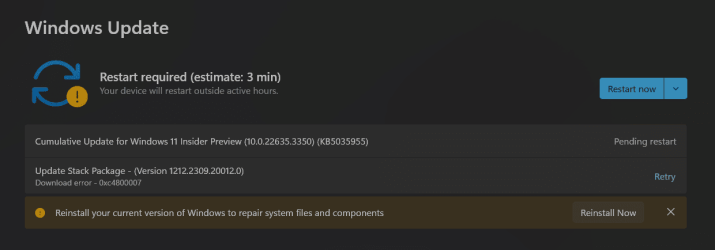
Been having various issues over the last 6-12 months, haven't been able to resolve them and it's reaching the point where I need to reinstall, even windows update has given up on me!
1710661455582.png


And is telling me to reinstall!

I've tried all the various fixes to repair corruption but nothing works.


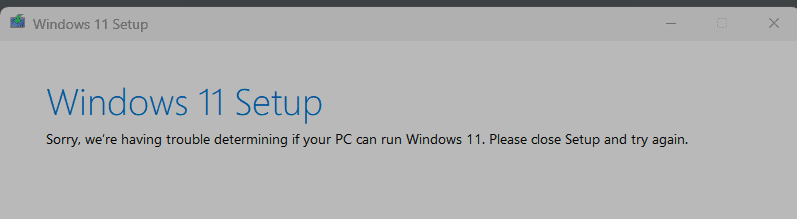
Really don't want to have to install from scratch so hoping to do an inplace reinstall but when I download the Win 11 iso, mount it, run setup it shows:
1710661529452.png

Hoping for a clever person to tell me how I can fix this and do an inplace reinstall and keep all my installed apps, please and thank you! :)
1710661584050.png
 

My Computer

System One

  • OS
    11
    Computer type
    PC/Desktop
    CPU
    Intel Core i9-13900KF
    Motherboard
    Asus ROG Strix B660-F Gaming WiFi
    Memory
    32gb DDR5
    Graphics Card(s)
    Nvidia RTX 3070ti
    Monitor(s) Displays
    Samsung 32” Odyssey G5
    Screen Resolution
    1440p
    Hard Drives
    Samsung NVME SSD 960 Evo 1tb
    Internet Speed
    Gigabit Up/Down
    Antivirus
    Kaspersky

My Computers

System One System Two

  • OS
    Windows 11 Entreprise
    Computer type
    Laptop
    Manufacturer/Model
    Alienware
    CPU
    Intel Core i5 4690K @ 4.00 GHz
    Motherboard
    Asus B85E-M
    Memory
    16 GB DDR3 1866 MHz
    Graphics Card(s)
    AMD Radeon R7 550 4 GB
    Monitor(s) Displays
    LG Flatron W2053TQ
    Screen Resolution
    1600 x 900
    Hard Drives
    2x SSD Hynix 1 TB Stripped Volume (Windows 11)
    2x SSD Hynix 1 TB Stripped Volume (Swap & Programs)
    1x HDD 4 TB (Data)
    2x HDD 500 GB Mirrored Volume (System Image)
    PSU
    Corsair 500W
    Case
    Generic Mid Tower
    Internet Speed
    1 Gbps
    Other Info
    OLD RIGS ARE BRAVE
  • Operating System
    Windows Server 2016 Standard
    Computer type
    PC/Desktop
    Manufacturer/Model
    DELL
    CPU
    Core 2 Quad Q9550
    Motherboard
    DELL
    Memory
    8 GB DDR3 1333 MHZ
    Graphics card(s)
    Intel G41
    Sound Card
    Onboard HD Audio
    Monitor(s) Displays
    AOC 15"
    Screen Resolution
    1366 x 768
    Hard Drives
    1x SSD 1 TB (System)
    1x SSD 240GB (Swap)
    1x HDD 8 TB (Storage)
    PSU
    DELL 320 W
    Case
    Slim
    Cooling
    Stock
    Internet Speed
    1 Gbps
    Other Info
    OLD RIGS ARE BRAVE
Might be simplier: download this reg file, double click to merge to the registry then run setup again.
 

Attachments

My Computers

System One System Two

  • OS
    Windows 11 Pro 25H2, Linux Mint 21.3
    Computer type
    PC/Desktop
    Manufacturer/Model
    Self Build Feb.2024
    CPU
    Intel Core i9-14900K @5.8GHZ
    Motherboard
    MSI MAG Z790 Tomahawk Max WiFi 7
    Memory
    64GB (2XG Skill F5-6400J3239G32G) @6800
    Graphics Card(s)
    Radeon (TM) RX 480 Graphics (8 GB)
    Sound Card
    Intergrated Realtek
    Monitor(s) Displays
    Samsung
    Screen Resolution
    3840x2160
    Hard Drives
    1 - Crucial 705 1TB GEN5
    1 - Crucial 705 2TB GEN5
    2 - Crucial T500 2TB Gen4
    PSU
    750W EVGA-G3
    Case
    Antec NX410
    Cooling
    H2O Thermalright
    Keyboard
    Logitech K800
    Mouse
    Logitech Master 2S
    Internet Speed
    600 Mbps
    Browser
    Chrome
    Antivirus
    WD
  • Operating System
    Windows 11 Pro & Linux Mint X64
    Computer type
    PC/Desktop
    Manufacturer/Model
    MSI Z77 MPower (MS-7751)
    CPU
    Intel(R) Core(TM) i7-3770K CPU @ 4.20 GHz
    Motherboard
    Z77 MPower (MS-7751)
    Memory
    32.0GB Dual-Channel CMY16GX3M2A1600C9
    Graphics card(s)
    NVIDIA GeForce GT 740
    Monitor(s) Displays
    40" Samsung
    Screen Resolution
    1920X1080
    Hard Drives
    WIN10 - 111GB Samsung SSD 840 Series
    WIN11 - 223GB Crucial CT240BX500SSD
    2X931GB Crucial CT1000BX500SSD1
    PSU
    Antec 850W
    Case
    Antec 900
    Cooling
    H20
    Keyboard
    Logitech K800 Wireless
    Mouse
    Logitech MX Master 2S
    Internet Speed
    100 Mbps
    Browser
    Chrome
    Antivirus
    Windows Defender
I believe I'm not the clever guy you're looking for, and I don't know if it's going to solve your problem, but you could try this:

1) Run AveYo's compatibility bypass file available in the link below:
MediaCreationTool.bat/bypass11/Skip_TPM_Check_on_Dynamic_Update.cmd at main · AveYo/MediaCreationTool.bat

2) Refresh the WU service by running the sequence of commands below:
net stop wuauserv
rd /s /q %systemroot%\SoftwareDistribution
net start wuauserv

Hope it helps!!!

Might be simplier: download this reg file, double click to merge to the registry then run setup again.

Thank you for trying to help but unfortunately none of those removed the "we're having trouble determining if your PC can run win 11" error, thank you anyway it's much appreciated :)
 

My Computer

System One

  • OS
    11
    Computer type
    PC/Desktop
    CPU
    Intel Core i9-13900KF
    Motherboard
    Asus ROG Strix B660-F Gaming WiFi
    Memory
    32gb DDR5
    Graphics Card(s)
    Nvidia RTX 3070ti
    Monitor(s) Displays
    Samsung 32” Odyssey G5
    Screen Resolution
    1440p
    Hard Drives
    Samsung NVME SSD 960 Evo 1tb
    Internet Speed
    Gigabit Up/Down
    Antivirus
    Kaspersky
Been having various issues over the last 6-12 months, haven't been able to resolve them and it's reaching the point where I need to reinstall, even windows update has given up on me!

View attachment 90474


And is telling me to reinstall!

I've tried all the various fixes to repair corruption but nothing works.


Really don't want to have to install from scratch so hoping to do an inplace reinstall but when I download the Win 11 iso, mount it, run setup it shows:

View attachment 90475

Hoping for a clever person to tell me how I can fix this and do an inplace reinstall and keep all my installed apps, please and thank you! :)

View attachment 90476
Hi,
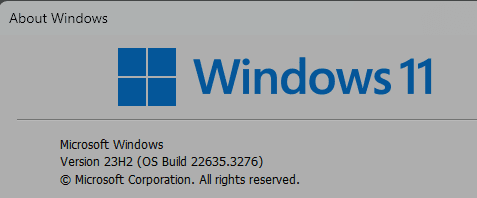
Not sure why you're using an insider preview frankly lol


My Computer

System One

  • OS
    Win-7-10-11Pro's
    Computer type
    PC/Desktop
    Manufacturer/Model
    Acer 17" Nitro 7840sn/ 2x16gb 5600c40/ 4060/ stock 1tb-os/ 4tb sn850x
    CPU
    10900k & 9940x & 5930k
    Motherboard
    z490-Apex & x299-Apex & x99-Sabertooth
    Memory
    Trident-Z Royal 4000c16 2x16gb & Trident-Z 3600c16 4x8gb & 3200c14 4x8gb
    Graphics Card(s)
    Titan Xp & 1080ti FTW3 & evga 980ti gaming
    Sound Card
    Onboard Realtek x3
    Monitor(s) Displays
    1-AOC G2460PG 24"G-Sync 144Hz/ 2nd 1-ASUS VG248QE 24"/ 3rd LG 43" series
    Screen Resolution
    1920-1080 not sure what the t.v is besides 43" class scales from 1920-1080 perfectly
    Hard Drives
    2-WD-sn850x 4tb/ 970evo+500gb/ 980 pro 2tb.
    PSU
    1000p2 & 1200p2 & 850p2
    Case
    D450 x2 & 1 Test bench in cherry Entertainment center
    Cooling
    Custom water loops x3 with 2x mora 360mm rads only 980ti gaming air cooled
    Keyboard
    G710+x3
    Mouse
    Redragon x3
    Internet Speed
    xfinity gigabyte
    Browser
    Firefox
    Antivirus
    mbam pro
Been having various issues over the last 6-12 months, haven't been able to resolve them and it's reaching the point where I need to reinstall, even windows update has given up on me!

View attachment 90474


And is telling me to reinstall!

I've tried all the various fixes to repair corruption but nothing works.


Really don't want to have to install from scratch so hoping to do an inplace reinstall but when I download the Win 11 iso, mount it, run setup it shows:

View attachment 90475

Hoping for a clever person to tell me how I can fix this and do an inplace reinstall and keep all my installed apps, please and thank you! :

You'll need to do a clean install. Install AveYo's bypass first and then install Windows. Be sure to back up all your data first. An inplace reinstall won't work since you've tried everything to get it to run with no luck.
 

My Computers

System One System Two

  • OS
    Windows 11 Education For 25H2
    Computer type
    Laptop
    Manufacturer/Model
    HP ZBook G2
    CPU
    Intel® Core i7 5500u
    Motherboard
    HP
    Memory
    8 GB
    Graphics Card(s)
    Intel HD Family Graphics 5500 AMD Firepro 4150M
    Sound Card
    Realtek High Audio
    Hard Drives
    1 TB SSD
    Mouse
    HP USB Mouse
    Antivirus
    Windows Defender
  • Operating System
    Windows 11 Pro For Workstations 25H2
    Computer type
    Laptop
    Manufacturer/Model
    HP Zbook G4
    CPU
    Xeon 1535m v6
    Motherboard
    HP
    Memory
    32 GB
    Graphics card(s)
    AMD Quadro Pro 4100
    Sound Card
    Bang and Olufson Audio
    Hard Drives
    1TB SSD
    Mouse
    HP USB Mouse
    Antivirus
    Windows Defender

My Computers

System One System Two

  • OS
    Windows 11 26200.8116
    Computer type
    PC/Desktop
    Manufacturer/Model
    homebuilt
    CPU
    Amd Threadripper 7970X
    Motherboard
    Gigabyte TRX50 Aero D Rev. 1.0
    Memory
    128GB (4 X 32) G.Skill DDR5 6400 (RDIMM)
    Graphics Card(s)
    Gigabyte RTX 4090 OC
    Sound Card
    none (USB to speakers), Realtek
    Monitor(s) Displays
    Innocn 32" OLED
    Screen Resolution
    3840 X 2160 @ 60Hz
    Hard Drives
    Crucial T700 2TB M.2 NVME SSD
    WD 4TB Blue SATA SSD
    Seagate 18TB IronWolf Pro
    PSU
    BeQuiet! Straight Power 12 1500W
    Case
    Lian Li 011 Dynamic Evo XL
    Cooling
    SilverStone Technology XE360-TR5, with 3 Phanteks T30 fans
    Keyboard
    Cherry KC 500 MX LP (mechanical)
    Mouse
    Logitech M500s (wired)
    Internet Speed
    2000/250 Mbps (down/up)
    Other Info
    xFinity gateway
  • Operating System
    windows 11 26200.8116
    Computer type
    PC/Desktop
    Manufacturer/Model
    homebuilt
    CPU
    Intel I9-13900K
    Motherboard
    Asus RoG Strix Z690-E
    Memory
    64GB G.Skill DDR5-6000
    Graphics card(s)
    Gigabyte RTX 3090 ti
    Sound Card
    built in Realtek
    Monitor(s) Displays
    Philips 27E1N8900 27" OLED
    Screen Resolution
    3840 X 2160 @60Hz
    Hard Drives
    WDC SN850 1TB
    8TB Seagate Ironwolf
    4TB Seagate Ironwolf
    PSU
    eVGA SuperNOVA 1300 GT
    Case
    Lian Li 011 Dynamic Evo
    Cooling
    Corsair iCUE H150i ELITE CAPELLIX Liquid CPU Cooler
    Keyboard
    Cherry Streaming (wired)
    Mouse
    Logitech M500s (wired)
Hi,
Not sure why you're using an insider preview frankly lol


1710695575070.png

A semi-random suggestion:

Run the Windows System File Checker.

(Open a command line window with administrator privileges. Run "sfc /scannow" without the quotes.)

If it finds errors that it can't fix, use the DISM tool. Is there a solution to "we're having trouble determining if your PC can run win 11" while actually running Win 11?

Then run SFC again.

Good luck.

1710697710658.png

Makes it a little hard to fathom ;)
 

My Computer

System One

  • OS
    11
    Computer type
    PC/Desktop
    CPU
    Intel Core i9-13900KF
    Motherboard
    Asus ROG Strix B660-F Gaming WiFi
    Memory
    32gb DDR5
    Graphics Card(s)
    Nvidia RTX 3070ti
    Monitor(s) Displays
    Samsung 32” Odyssey G5
    Screen Resolution
    1440p
    Hard Drives
    Samsung NVME SSD 960 Evo 1tb
    Internet Speed
    Gigabit Up/Down
    Antivirus
    Kaspersky
Hi,
Switch off the silly preview to public release lol
 

My Computer

System One

  • OS
    Win-7-10-11Pro's
    Computer type
    PC/Desktop
    Manufacturer/Model
    Acer 17" Nitro 7840sn/ 2x16gb 5600c40/ 4060/ stock 1tb-os/ 4tb sn850x
    CPU
    10900k & 9940x & 5930k
    Motherboard
    z490-Apex & x299-Apex & x99-Sabertooth
    Memory
    Trident-Z Royal 4000c16 2x16gb & Trident-Z 3600c16 4x8gb & 3200c14 4x8gb
    Graphics Card(s)
    Titan Xp & 1080ti FTW3 & evga 980ti gaming
    Sound Card
    Onboard Realtek x3
    Monitor(s) Displays
    1-AOC G2460PG 24"G-Sync 144Hz/ 2nd 1-ASUS VG248QE 24"/ 3rd LG 43" series
    Screen Resolution
    1920-1080 not sure what the t.v is besides 43" class scales from 1920-1080 perfectly
    Hard Drives
    2-WD-sn850x 4tb/ 970evo+500gb/ 980 pro 2tb.
    PSU
    1000p2 & 1200p2 & 850p2
    Case
    D450 x2 & 1 Test bench in cherry Entertainment center
    Cooling
    Custom water loops x3 with 2x mora 360mm rads only 980ti gaming air cooled
    Keyboard
    G710+x3
    Mouse
    Redragon x3
    Internet Speed
    xfinity gigabyte
    Browser
    Firefox
    Antivirus
    mbam pro

My Computer

System One

  • OS
    11
    Computer type
    PC/Desktop
    CPU
    Intel Core i9-13900KF
    Motherboard
    Asus ROG Strix B660-F Gaming WiFi
    Memory
    32gb DDR5
    Graphics Card(s)
    Nvidia RTX 3070ti
    Monitor(s) Displays
    Samsung 32” Odyssey G5
    Screen Resolution
    1440p
    Hard Drives
    Samsung NVME SSD 960 Evo 1tb
    Internet Speed
    Gigabit Up/Down
    Antivirus
    Kaspersky
1710661455582-png.90474
And is telling me to reinstall!

I've tried all the various fixes to repair corruption but nothing works.


Really don't want to have to install from scratch so hoping to do an inplace reinstall but when I download the Win 11 iso, mount it, run setup it shows:

1710661529452.png


Hoping for a clever person to tell me how I can fix this and do an inplace reinstall and keep all my installed apps, please and thank you! :)
You are running the Insider Beta build. It's actually offering to do the in-place reinstall for you through Windows Update, no need for you to download an ISO.

1710699409145.png

See Option One in this tutorial.

This option is only available starting with Windows 11 build 25905 (Canary), build 23601 (Dev), and build 22635.2915 (Beta).

This will download and install a repair version of the OS. This operation reinstalls the OS that you have and will not remove any files, settings, or apps.


My Computers

System One System Two

  • OS
    Windows 11 Home
    Computer type
    Laptop
    Manufacturer/Model
    Acer Aspire 3 A315-23-R9VY
    CPU
    AMD Athlon Silver 3050U
    Memory
    8GB
    Graphics Card(s)
    Radeon Graphics
    Monitor(s) Displays
    laptop screen
    Screen Resolution
    1366x768 native resolution, up to 2560x1440 with Radeon Virtual Super Resolution
    Hard Drives
    1TB Samsung EVO 870 SSD (from April 2026: 250GB EVO 850)
    Internet Speed
    150 Mbps
    Browser
    Edge, Firefox
    Antivirus
    Defender
    Other Info
    fully 'Windows 11 ready' laptop. Windows 10 C: partition migrated from my old unsupported 'main machine' then upgraded to 11. A test migration ran Insider builds for 2 months. When 11 was released on 5th October 2021 it was re-imaged back to 10 and was offered the upgrade in Windows Update on 20th October. Windows Update offered the 22H2 Feature Update on 20th September 2022. It got the 23H2 Feature Update on 4th November 2023 through Windows Update, 24H2 on 3rd October 2024 through Windows Update by setting the Target Release Version for 24H2, and 25H2 on 30th September 2025 through Windows Update by setting the Target Release Version for 25H2.

    UPDATE - 11 April 2026: due to mechanical deterioration this PC has been retired from active duty. The OS with all software and files has been migrated to my System Seven below to carry on as my general purpose 'main machine'.

    My SYSTEM THREE is a Dell Latitude 5410, i7-10610U, 32GB RAM, 512GB NVMe ssd, supported device running Windows 11 Pro.

    My SYSTEM FOUR is a 2-in-1 convertible Lenovo Yoga 11e 20DA, Celeron N2930, 8GB RAM, 256GB ssd. Unsupported device: currently running Win10 Pro, plus Win11 Pro RTM and Insider Dev, Beta, and RP 24H2 as native boot vhdx.

    My SYSTEM FIVE is a Dell Latitude 3190 2-in-1, Pentium Silver N5030, 8GB RAM, 1TB NVMe ssd, supported device running Windows 11 Pro, plus Insider Beta, Dev, and Canary builds (and a few others) as a native boot .vhdx.

    My SYSTEM SIX is a Dell Latitude 5550, Core Ultra 7 165H, 64GB RAM, 1TB NVMe SSD, supported device, Windows 11 Pro 24H2, Hyper-V host machine. Updated to 25H2 on 30th September 2025.

    My SYSTEM SEVEN is a Lenovo Thinkpad T580, Intel Core i7-8650U, 16GB RAM, 512GB NVMe SSD + 2nd 512GB NVMe SSD, a supported device for Windows 11. This is my current general purpose 'main machine'. The installed Windows 11 Home from my System One has been migrated to this machine.
  • Operating System
    Windows 11 Pro
    Computer type
    Laptop
    Manufacturer/Model
    Dell Latitude E4310
    CPU
    Intel® Core™ i5-520M
    Motherboard
    0T6M8G
    Memory
    8GB
    Graphics card(s)
    (integrated graphics) Intel HD Graphics
    Screen Resolution
    1366x768
    Hard Drives
    500GB Crucial MX500 SSD
    Browser
    Firefox, Edge
    Antivirus
    Defender
    Other Info
    unsupported machine: Legacy bios, MBR, TPM 1.2, upgraded from W10 to W11 using W10/W11 hybrid install media workaround. In-place upgrade to 22H2 using ISO and a workaround. Feature Update to 23H2 by manually installing the Enablement Package. In-place upgrade to 24H2 using hybrid 23H2/24H2 install media. Upgraded to 25H2 by Enablement Package. Also running Insider Dev, and Canary builds and Windows 10 as native boot .vhdx.

    My SYSTEM THREE is a Dell Latitude 5410, i7-10610U, 32GB RAM, 512GB NVMe ssd, supported device running Windows 11 Pro.

    My SYSTEM FOUR is a 2-in-1 convertible Lenovo Yoga 11e 20DA, Celeron N2930, 8GB RAM, 256GB ssd. Unsupported device: currently running Win10 Pro, plus Win11 Pro RTM and Insider Dev, Beta, and RP 24H2 as native boot vhdx.

    My SYSTEM FIVE is a Dell Latitude 3190 2-in-1, Pentium Silver N5030, 8GB RAM, 1TB NVMe ssd, supported device running Windows 11 Pro, plus Insider Beta, Dev, and Canary builds (and a few others) as a native boot .vhdx.

    My SYSTEM SIX is a Dell Latitude 5550, Core Ultra 7 165H, 64GB RAM, 1TB NVMe SSD, supported device, Windows 11 Pro 24H2, Hyper-V host machine. Updated to 25H2 on 30th September 2025.

    My SYSTEM SEVEN is a Lenovo Thinkpad T580, Intel Core i7-8650U, 16GB RAM, 512GB NVMe SSD + 2nd 512GB NVMe SSD, a supported device for Windows 11. This is my current general purpose 'main machine'. The installed Windows 11 Home from my System One has been migrated to this machine.
Have you tried running the Windows Update Troubleshooter?
Settings > System > Troubleshoot > Other troubleshooters > Windows Update

WU may have got itself mixed up and sending a false message.
 
Last edited:

My Computers

System One System Two

  • OS
    Windows 11 Pro 25H2
    Computer type
    PC/Desktop
    Manufacturer/Model
    Homebuilt
    CPU
    Intel Core i9 13900K
    Motherboard
    Asus ProArt Z790 Creator WiFi - Bios 3107
    Memory
    Corsair Dominator Platinum 64gb 5600MT/s DDR5 Dual Channel
    Graphics Card(s)
    Sapphire NITRO+ AMD Radeon RX 7900 XTX Vapor-X 24GB
    Sound Card
    External DAC: Cambridge Audio DACMagic200M - Headphone Amp: Topping L50
    Monitor(s) Displays
    Panasonic MX950 Mini LED 55" TV 120hz
    Screen Resolution
    3840 x 2160 120hz
    Hard Drives
    Samsung 980 Pro 2TB (OS)
    Samsung 980 Pro 1TB (Files)
    Lexar NZ790 4TB
    LaCie d2 Professional 6TB external - USB 3.1
    Seagate Expansion 16TB external - USB 3.2
    Seagate One Touch 18TB external HD - USB 3.0
    PSU
    Corsair RM1200x Shift
    Case
    Corsair RGB Smart Case 5000x (white)
    Cooling
    Corsair iCue H150i Elite Capellix XT
    Keyboard
    Incase Ergonomic USB (Microsoft clone)
    Mouse
    Logitech MX Master 3S
    Internet Speed
    Fibre 900/500 Mbps
    Browser
    Microsoft Edge Chromium
    Antivirus
    Bitdefender Total Security
    Other Info
    AMD Radeon Software & Drivers 26.1.1
    Hasleo Backup Suite
    Dashlane password manager
    Kensington Verimark fingerprint reader
    Logitech Brio 4K webcam
    Orico 10-port powered USB 3.0 hub
  • Operating System
    Windows 11 Pro 25H2
    Computer type
    Laptop
    Manufacturer/Model
    Asus Vivobook X1605VA
    CPU
    Intel® Core™ i9-13900H
    Motherboard
    Asus X1605VA bios 309
    Memory
    32GB DDR4-3200 Dual channel
    Graphics card(s)
    *Intel Iris Xᵉ Graphics G7
    Sound Card
    Realtek | Intel SST Bluetooth & USB
    Monitor(s) Displays
    16.0-inch, WUXGA 16:10 aspect ratio, IPS-level Panel
    Screen Resolution
    1920 x 1200 60hz
    Hard Drives
    512GB M.2 NVMe™ PCIe® 3.0 SSD
    Mouse
    Logitech MX Ergo Trackball
    Antivirus
    Bitdefender Total Security
    Other Info
    720p Webcam
    WiFi & USB to ethernet
Thank you to everyone that tried to help, bit the bullet and finally did a fresh install of Windows 11 :)
 

My Computer

System One

  • OS
    11
    Computer type
    PC/Desktop
    CPU
    Intel Core i9-13900KF
    Motherboard
    Asus ROG Strix B660-F Gaming WiFi
    Memory
    32gb DDR5
    Graphics Card(s)
    Nvidia RTX 3070ti
    Monitor(s) Displays
    Samsung 32” Odyssey G5
    Screen Resolution
    1440p
    Hard Drives
    Samsung NVME SSD 960 Evo 1tb
    Internet Speed
    Gigabit Up/Down
    Antivirus
    Kaspersky
Back
Top Bottom