Is there a way to increase "menu" fonts to a larger size?


bhs67

New member
Local time
10:11 AM
Posts
14
OS
Windows 11
Version 23H2 (OS Build 22631.3447)

I just installed Win11 on two laptops. It seems that the font size on the "menus", etc. => such as File Explorer and Settings => are smaller. Many of us are no longer 20 years old. Is there a way to increase these types of fonts to a larger size?
 
Last edited:

My Computer My Computer

At a glance

Windows 11
OS
Windows 11
Computer type
Laptop
Manufacturer/Model
ASUS
Hi!
Try this to see if it enhances the font to your liking:
Start / Settings / Accessibility / Text Size

1712772894215.png

Some text size are not or will not be able to follow the size you have chosen.

You can also increase the size of the font in Notepad by clicking on the Gear Icon on the upper right
and choose the size. You can look at the sentence below to see by how the font has changed:

1712773249273.png

1712773267681.png
 

My Computers My Computers

  • At a glance

    windows 11 22631.5039Core i9 12th gen 12900HK 2.9 MHz (overcloked:...32 Gigs DDR5-4800nVidia RTX 3070 Ti / 8 Gigs DDR6
    OS
    windows 11 22631.5039
    Computer type
    Laptop
    Manufacturer/Model
    MSI Raider GE76
    CPU
    Core i9 12th gen 12900HK 2.9 MHz (overcloked: 3890.48)
    Motherboard
    MSI
    Memory
    32 Gigs DDR5-4800
    Graphics Card(s)
    nVidia RTX 3070 Ti / 8 Gigs DDR6
    Sound Card
    DYNAUDIO - Steelsries Arena 7- Sound Effects by Nahimic 3
    Monitor(s) Displays
    17.3" 1920 x 1080 360 Hz 3 ms, IPS / Connected to MSI 32 inch curved @ 165 Hz
    Screen Resolution
    1920 x 1080 / Both
    Hard Drives
    Samsung 990 Pro 2TB (OS) - Solidigm P41 2TB (Storage)
    PSU
    280 watts
    Case
    MSI GE series
    Cooling
    internal
    Keyboard
    Steelseries
    Mouse
    G903 Lightspeed
    Internet Speed
    1000 Mbps
    Browser
    Firefox / Opera GX- Do not like Edge
    Antivirus
    Malwarebytes'
    Other Info
    just ask.
  • At a glance

    Windows 10 22H2Intel Core i7 7820HK 2.9 Ghz16 Gigs DDR4 2400 MhznVidia 1070 8GB RAM
    Operating System
    Windows 10 22H2
    Computer type
    Laptop
    Manufacturer/Model
    MSI GT73 7RE VR Titan
    CPU
    Intel Core i7 7820HK 2.9 Ghz
    Motherboard
    MSI
    Memory
    16 Gigs DDR4 2400 Mhz
    Graphics card(s)
    nVidia 1070 8GB RAM
    Sound Card
    DYNAUDIO / Nahimic 2
    Monitor(s) Displays
    IPS / 120HZ
    Screen Resolution
    1920x1080P
    Hard Drives
    Samsung NVME EVO 970 1TB / Samsung SSD (SATA) 1TB
    PSU
    240 watts
    Case
    MSI
    Cooling
    Internal
    Keyboard
    Steelseries
    Mouse
    Logitech G903 Lightspeed
    Internet Speed
    1 Gb/s
    Browser
    Firefox / Vivaldi
    Antivirus
    MalwareBytes'
    Other Info
    none.
If some reason, text is small, you can zoom up the default text size and then return it to normal. That usually addresses the issue.
 

My Computers My Computers

  • At a glance

    Windows 11 Education For 25H2Intel® Core i7 5500u8 GBIntel HD Family Graphics 5500 AMD Firepro 4150M
    OS
    Windows 11 Education For 25H2
    Computer type
    Laptop
    Manufacturer/Model
    HP ZBook G2
    CPU
    Intel® Core i7 5500u
    Motherboard
    HP
    Memory
    8 GB
    Graphics Card(s)
    Intel HD Family Graphics 5500 AMD Firepro 4150M
    Sound Card
    Realtek High Audio
    Hard Drives
    1 TB SSD
    Mouse
    HP USB Mouse
    Antivirus
    Windows Defender
  • At a glance

    Windows 11 Pro For Workstations 25H2Xeon 1535m v632 GBAMD Quadro Pro 4100
    Operating System
    Windows 11 Pro For Workstations 25H2
    Computer type
    Laptop
    Manufacturer/Model
    HP Zbook G4
    CPU
    Xeon 1535m v6
    Motherboard
    HP
    Memory
    32 GB
    Graphics card(s)
    AMD Quadro Pro 4100
    Sound Card
    Bang and Olufson Audio
    Hard Drives
    1TB SSD
    Mouse
    HP USB Mouse
    Antivirus
    Windows Defender
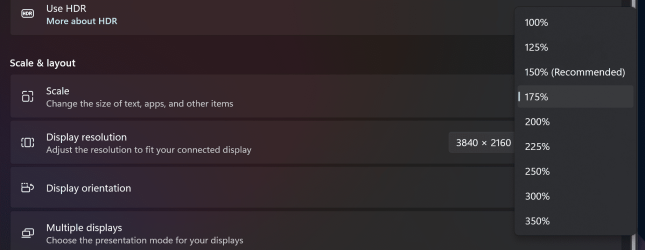
You can always adjust the scaling. I have mine set to 175% now as I find 150% which is the recommended scale too small.

Screenshot 2024-04-10 203740.png
 

My Computer My Computer

At a glance

Windows 11 Pro 25H2 26200.7922Intel Core i9 13900F2 x Kingston Fury 32gb DDR5 5600 BeastGigabyte Eagle (Nvidia) RTX 3060
OS
Windows 11 Pro 25H2 26200.7922
Computer type
PC/Desktop
Manufacturer/Model
Local shop built (KC Computers Ltd)
CPU
Intel Core i9 13900F
Motherboard
Gigabyte Z690 Gaming X (rev. 1.0/1.1) - (BIOS: F32 09 18 2025)
Memory
2 x Kingston Fury 32gb DDR5 5600 Beast
Graphics Card(s)
Gigabyte Eagle (Nvidia) RTX 3060
Sound Card
Chord Async USB 44.1kHz - 384kHz 2Qute DAC
Monitor(s) Displays
Gigabyte AORUS FO32U2 32” OLED Flat Gaming Monitor, 0.03ms, KVM, 250 cd/m2, FreeSync Premium Pro, HDR True Black 400
Screen Resolution
3840 x 2160 (UHD), 240Hz
Hard Drives
1 x KINGSTON NVMe M.2 SSDSKC3000D2048G 2TB
1 x Samsung SSD 870 EVO 250GB
2 x Crucial CT4000MX500SSD1 4TB
2 x Crucial CT2000MX500SSD1 2TB
1 x Crucial CT250MX500SSD1 250.0 GB
PSU
Gigabyte 750w
Case
Fractal Torrent
Cooling
Stock Intel CPU, 2 x Fractal 180mm PWM (front), 3 x Fractal 140mm PWM (bottom)
Keyboard
Logitech MX Mechanical Wireless Illuminated Performance Keyboard
Mouse
Logitech MX Master 3S Wireless Performance Mouse
Internet Speed
900 Mbps/900 Mbps Trooli FTTP
Browser
Firefox
Antivirus
Eset Nod32
Winaero Tweaker has a specific option to change the menu font.
 

My Computer My Computer

At a glance

Windows 11 64-bitIntel Core Ultra 7 265KCorsair DDR5-5200 32GB x 2ASUS RTX 5060 Ti 16GB
OS
Windows 11 64-bit
Computer type
PC/Desktop
Manufacturer/Model
Me
CPU
Intel Core Ultra 7 265K
Motherboard
ASUS ROG STRIX Z890-F
Memory
Corsair DDR5-5200 32GB x 2
Graphics Card(s)
ASUS RTX 5060 Ti 16GB
Sound Card
on board
Monitor(s) Displays
ASUS PB27UQ
Screen Resolution
3840 x 2160
Hard Drives
Samsung SSD 9100 PRO 1TB, Samsung SSD 960 EVO 500GB, Seagate 1TB HDD for backup
PSU
Corsair RM850e - 850W Gold ATX 3.1 Modular PSU
Case
Coolermaster Masterbox HAF 500 Mid Tower (should have gone with Fractal Design!)
Cooling
Noctua NH-D15 Chromax Black
Keyboard
Logitech G915 X
Mouse
Logitech M560 Bluetooth
Internet Speed
750Mb/s
Browser
Firefox 64-bit
Antivirus
ESET
@The Doctor

Yes, I use Winaero Tweaker to pick and choose various fonts from the standard Windows font library.

One of my pet peeves with Win 10 and 11. MS has deliberately chosen to drop the font choice interface while keeping the machinery there. I can't guess why - MS states that it is to reduce overheads, but the lost UI has a tiny footprint, all the basic fonts are still there, as is the underlying code to allow pick and choose - but for us older people, it is really annoying. (I'd add that WinTweak doesn't add or modify any machinery code, just a simple UI to access the Win11 machinery).

Coming from Win 7, which allowed smooth and easy font choices, into Win10: the tiny, tiny, ugly default font from MS caused me instant nausea - I just couldn't read it to see what I was doing from the very first opening screen. No problem, I says, I'll just use the font choice as per Win 7. Silly me - it just wasn't there. Couldn't believe it at first. Some very annoyed hours later, I stumbled across Tweaker and finally had the luxury of reading the various menus and screen choices. While that alone caused me to delete the Win 10 installation immediately, I kept Tweaker. And so Win 11 was much less trouble.
 

My Computer My Computer

At a glance

Windows 11Intel i5 10210U16GbIntel UHD
OS
Windows 11
Computer type
Laptop
Manufacturer/Model
HP 15s_du1xxx
CPU
Intel i5 10210U
Motherboard
85F1
Memory
16Gb
Graphics Card(s)
Intel UHD
Sound Card
Realtek
Screen Resolution
1920 x 1080

My Computer My Computer

At a glance

Windows 11 ProCore i7-13700K64 GB Kingston Fury Beast DDR5Gigabyte GeForce RTX 2060 Super Gaming OC 8G
OS
Windows 11 Pro
Computer type
PC/Desktop
Manufacturer/Model
Self build
CPU
Core i7-13700K
Motherboard
Asus TUF Gaming Plus WiFi Z790
Memory
64 GB Kingston Fury Beast DDR5
Graphics Card(s)
Gigabyte GeForce RTX 2060 Super Gaming OC 8G
Sound Card
Realtek S1200A
Monitor(s) Displays
Viewsonic VP2770 & Dell (secondary)
Screen Resolution
2560 x 1440
Hard Drives
Kingston KC3000 2TB NVME SSD & SATA HDDs & SSD
PSU
EVGA SuperNova G2 850W
Case
Nanoxia Deep Silence 1
Cooling
Noctua NH-D14
Keyboard
Microsoft Digital Media Pro
Mouse
Logitech Wireless
Internet Speed
80 Mb / s
Browser
Chrome
Antivirus
Defender, Malwarebytes Free & AdwCleaner
@The Doctor

Yes, I use Winaero Tweaker to pick and choose various fonts from the standard Windows font library.

One of my pet peeves with Win 10 and 11. MS has deliberately chosen to drop the font choice interface while keeping the machinery there. I can't guess why - MS states that it is to reduce overheads, but the lost UI has a tiny footprint, all the basic fonts are still there, as is the underlying code to allow pick and choose - but for us older people, it is really annoying. (I'd add that WinTweak doesn't add or modify any machinery code, just a simple UI to access the Win11 machinery).

Coming from Win 7, which allowed smooth and easy font choices, into Win10: the tiny, tiny, ugly default font from MS caused me instant nausea - I just couldn't read it to see what I was doing from the very first opening screen. No problem, I says, I'll just use the font choice as per Win 7. Silly me - it just wasn't there. Couldn't believe it at first. Some very annoyed hours later, I stumbled across Tweaker and finally had the luxury of reading the various menus and screen choices. While that alone caused me to delete the Win 10 installation immediately, I kept Tweaker. And so Win 11 was much less trouble.
This is because young MS software engineers have eagle eyesight capable of reading font size 5.
 

My Computer My Computer

At a glance

Windows 11 ProCore i7-13700K64 GB Kingston Fury Beast DDR5Gigabyte GeForce RTX 2060 Super Gaming OC 8G
OS
Windows 11 Pro
Computer type
PC/Desktop
Manufacturer/Model
Self build
CPU
Core i7-13700K
Motherboard
Asus TUF Gaming Plus WiFi Z790
Memory
64 GB Kingston Fury Beast DDR5
Graphics Card(s)
Gigabyte GeForce RTX 2060 Super Gaming OC 8G
Sound Card
Realtek S1200A
Monitor(s) Displays
Viewsonic VP2770 & Dell (secondary)
Screen Resolution
2560 x 1440
Hard Drives
Kingston KC3000 2TB NVME SSD & SATA HDDs & SSD
PSU
EVGA SuperNova G2 850W
Case
Nanoxia Deep Silence 1
Cooling
Noctua NH-D14
Keyboard
Microsoft Digital Media Pro
Mouse
Logitech Wireless
Internet Speed
80 Mb / s
Browser
Chrome
Antivirus
Defender, Malwarebytes Free & AdwCleaner
Microsoft code writers should have ->their Grandma proof read -> before releasing.
 
Last edited:

My Computer My Computer

At a glance

Windows 11
OS
Windows 11
Computer type
Laptop
Manufacturer/Model
ASUS
I find I still use Brinks reg files (which work fine) to customise fonts and that are on TenForums.
Post #1 here, option #2 are the Icon files:


There are similar for all the other settings if you search.


From my notes. The registry key at the end is worth exporting as it contains the default settings which will get altered with the applied changes.

Code:
Currently using:


125% for Scaling. Set from dropdown. Scale affects File Explorer, Edge and the Taskbar. This is default setting.
100% for Text Size. Default setting.


Windows 11 Font Sizes.


Notes.
Icons Size. This will affect the text font size for icons in Address bars, Desktop, File Explorer. Icons will resize according to overall DPI setting.
Title Bars. These are the headers at the top of the page or program that is open.
Menus.      These are top line view in programs such as File/Edit/View etc.


Icons          11 Bold
Title Bars     11 Bold
Message Boxes   9 Bold (currently not applied)
Menus          11 Bold


Notepad Text and Font can be set separately Using font size 11, Consolas, Regular.


Registry Key:
HKEY_CURRENT_USER\Control Panel\Desktop\WindowMetrics

I saved a copy of all the files for future use. You must sign out and back in after applying changes for them to take effect. The bold option I think looks good (to me anyway).

Screenshot 2024-04-11 181514.png

And program headers:

Screenshot 2024-04-11 181645.png
 

My Computer My Computer

At a glance

W11 Pro x64 ongoing Canary 29500 latest buildsIntel i58GbIntel HD Graphics
OS
W11 Pro x64 ongoing Canary 29500 latest builds
Computer type
Laptop
Manufacturer/Model
Dell 7760 Mobile Precision 17"
CPU
Intel i5
Motherboard
Unknown
Memory
8Gb
Graphics Card(s)
Intel HD Graphics
Sound Card
Realtek
Monitor(s) Displays
Internal
Hard Drives
2 x 256Gb SSD
PSU
Dell 240 watt
Mouse
Dell Premier Bluetooth
Internet Speed
50Mbps
Browser
Edge
Antivirus
Default Microsoft Security
Winaero Tweaker has a specific option to change the menu font.
It seems that in 24H2 the settings revert to default after a reboot.
 

My Computer My Computer

At a glance

Windows 11 25H2AMD Ryzen 5 1600 - 6 Core32GBNvidia 1030GT
OS
Windows 11 25H2
Computer type
PC/Desktop
Manufacturer/Model
Custom Build
CPU
AMD Ryzen 5 1600 - 6 Core
Motherboard
Asus
Memory
32GB
Graphics Card(s)
Nvidia 1030GT
Monitor(s) Displays
Iiyama24

My Computer My Computer

At a glance

Windows 11 64-bitIntel Core Ultra 7 265KCorsair DDR5-5200 32GB x 2ASUS RTX 5060 Ti 16GB
OS
Windows 11 64-bit
Computer type
PC/Desktop
Manufacturer/Model
Me
CPU
Intel Core Ultra 7 265K
Motherboard
ASUS ROG STRIX Z890-F
Memory
Corsair DDR5-5200 32GB x 2
Graphics Card(s)
ASUS RTX 5060 Ti 16GB
Sound Card
on board
Monitor(s) Displays
ASUS PB27UQ
Screen Resolution
3840 x 2160
Hard Drives
Samsung SSD 9100 PRO 1TB, Samsung SSD 960 EVO 500GB, Seagate 1TB HDD for backup
PSU
Corsair RM850e - 850W Gold ATX 3.1 Modular PSU
Case
Coolermaster Masterbox HAF 500 Mid Tower (should have gone with Fractal Design!)
Cooling
Noctua NH-D15 Chromax Black
Keyboard
Logitech G915 X
Mouse
Logitech M560 Bluetooth
Internet Speed
750Mb/s
Browser
Firefox 64-bit
Antivirus
ESET
Worth saving the 'Windows Metrics' reg entry so you can reapply all custom settings instantly after any major feature updates etc.

Export this key:

Screenshot 2024-10-23 112518.png
 

My Computer My Computer

At a glance

W11 Pro x64 ongoing Canary 29500 latest buildsIntel i58GbIntel HD Graphics
OS
W11 Pro x64 ongoing Canary 29500 latest builds
Computer type
Laptop
Manufacturer/Model
Dell 7760 Mobile Precision 17"
CPU
Intel i5
Motherboard
Unknown
Memory
8Gb
Graphics Card(s)
Intel HD Graphics
Sound Card
Realtek
Monitor(s) Displays
Internal
Hard Drives
2 x 256Gb SSD
PSU
Dell 240 watt
Mouse
Dell Premier Bluetooth
Internet Speed
50Mbps
Browser
Edge
Antivirus
Default Microsoft Security
Worth saving the 'Windows Metrics' reg entry so you can reapply all custom settings instantly after any major feature updates etc.

Export this key:

View attachment 113661
But it does not stick after reboots (at least not for me).
 

My Computer My Computer

At a glance

Windows 11 25H2AMD Ryzen 5 1600 - 6 Core32GBNvidia 1030GT
OS
Windows 11 25H2
Computer type
PC/Desktop
Manufacturer/Model
Custom Build
CPU
AMD Ryzen 5 1600 - 6 Core
Motherboard
Asus
Memory
32GB
Graphics Card(s)
Nvidia 1030GT
Monitor(s) Displays
Iiyama24
Strange. No issues here with them being lost after reboots (I'm on 24H2 Dev Builds) however the settings were added/updated manually using Brinks reg files and not by using any third party apps like Winaero.
 

My Computer My Computer

At a glance

W11 Pro x64 ongoing Canary 29500 latest buildsIntel i58GbIntel HD Graphics
OS
W11 Pro x64 ongoing Canary 29500 latest builds
Computer type
Laptop
Manufacturer/Model
Dell 7760 Mobile Precision 17"
CPU
Intel i5
Motherboard
Unknown
Memory
8Gb
Graphics Card(s)
Intel HD Graphics
Sound Card
Realtek
Monitor(s) Displays
Internal
Hard Drives
2 x 256Gb SSD
PSU
Dell 240 watt
Mouse
Dell Premier Bluetooth
Internet Speed
50Mbps
Browser
Edge
Antivirus
Default Microsoft Security
Strange. No issues here with them being lost after reboots (I'm on 24H2 Dev Builds) however the settings were added/updated manually using Brinks reg files and not by using any third party apps like Winaero.
Can you post a copy of your files please?
 

My Computer My Computer

At a glance

Windows 11 25H2AMD Ryzen 5 1600 - 6 Core32GBNvidia 1030GT
OS
Windows 11 25H2
Computer type
PC/Desktop
Manufacturer/Model
Custom Build
CPU
AMD Ryzen 5 1600 - 6 Core
Motherboard
Asus
Memory
32GB
Graphics Card(s)
Nvidia 1030GT
Monitor(s) Displays
Iiyama24
Here you go. These are all Brinks files from W10 forums I think but I downloaded all of them ages ago and grouped them. The zipped folder contains five folders with all possible sizes and options. They look like this (attached images). Just pick the one you want and run it and the registry key is set. You need to sign out and back in for it to apply.

These are my notes made a while ago.

I recommend you first export the default settings for this registry key and when you apply any new settings go initially for sizes similar to defaults.

Code:
Windows 11 24H2 Metrics For Dell Precision 7760.

Note: in order for the reg file changes to 'stick' they seem to have to be applied one at a time.

Currently using:

125% for Scaling. Set from dropdown. Scale affects File Explorer, Edge and the Taskbar. This is default setting.
100% for Text Size. Default setting.

Windows 11 Font Sizes.

Notes.
Icons Size. This will affect the text font size for icons in Address bars, Desktop, File Explorer. Icons will resize according to overall DPI setting.
Title Bars. These are the headers at the top of the page or program that is open.
Menus.      These are top line view in programs such as File/Edit/View etc.

Icons          11 Bold
Title Bars     11 Bold
Message Boxes   9 Bold (currently not applied)
Menus          11 Bold

Notepad Text and Font can be set separately Using font size 11, Consolas, Regular.

Registry Key:
HKEY_CURRENT_USER\Control Panel\Desktop\WindowMetrics

Screenshot 2024-10-23 183953.png


Screenshot 2024-10-23 183435.png
 

Attachments

My Computer My Computer

At a glance

W11 Pro x64 ongoing Canary 29500 latest buildsIntel i58GbIntel HD Graphics
OS
W11 Pro x64 ongoing Canary 29500 latest builds
Computer type
Laptop
Manufacturer/Model
Dell 7760 Mobile Precision 17"
CPU
Intel i5
Motherboard
Unknown
Memory
8Gb
Graphics Card(s)
Intel HD Graphics
Sound Card
Realtek
Monitor(s) Displays
Internal
Hard Drives
2 x 256Gb SSD
PSU
Dell 240 watt
Mouse
Dell Premier Bluetooth
Internet Speed
50Mbps
Browser
Edge
Antivirus
Default Microsoft Security
Thank you.

I think the problem might have been that I was changing the settings all at once.
I have now changed each one separately, and signed out each time.
Hopefully they will now stick.

I will come back in a couple of days to let you know how it has gone.
 

My Computer My Computer

At a glance

Windows 11 25H2AMD Ryzen 5 1600 - 6 Core32GBNvidia 1030GT
OS
Windows 11 25H2
Computer type
PC/Desktop
Manufacturer/Model
Custom Build
CPU
AMD Ryzen 5 1600 - 6 Core
Motherboard
Asus
Memory
32GB
Graphics Card(s)
Nvidia 1030GT
Monitor(s) Displays
Iiyama24
Excellent, lets hope they are OK now.

I've had no issues with them altering apart from with a big feature update which reset them to default. Make a reg file of the new metrics and you can apply that in one go in seconds if you need to in the future.
 

My Computer My Computer

At a glance

W11 Pro x64 ongoing Canary 29500 latest buildsIntel i58GbIntel HD Graphics
OS
W11 Pro x64 ongoing Canary 29500 latest builds
Computer type
Laptop
Manufacturer/Model
Dell 7760 Mobile Precision 17"
CPU
Intel i5
Motherboard
Unknown
Memory
8Gb
Graphics Card(s)
Intel HD Graphics
Sound Card
Realtek
Monitor(s) Displays
Internal
Hard Drives
2 x 256Gb SSD
PSU
Dell 240 watt
Mouse
Dell Premier Bluetooth
Internet Speed
50Mbps
Browser
Edge
Antivirus
Default Microsoft Security
Well, when I booted today, everything had been reset, despite me doing each reg change separately yesterday.

Have done it again today, will see how it goes.
 

My Computer My Computer

At a glance

Windows 11 25H2AMD Ryzen 5 1600 - 6 Core32GBNvidia 1030GT
OS
Windows 11 25H2
Computer type
PC/Desktop
Manufacturer/Model
Custom Build
CPU
AMD Ryzen 5 1600 - 6 Core
Motherboard
Asus
Memory
32GB
Graphics Card(s)
Nvidia 1030GT
Monitor(s) Displays
Iiyama24
Back
Top Bottom