
Solved Issue when Explorer or computer is restarted


CompuGeekCasey

Active member
Member
Local time
4:32 PM
Posts
55
OS
Windows 11 Home 25H2 (OS Build: 26200.7849)
Every time Explorer or the computer is restarted all my desktop icon change their location (See attached mage) and I have to put them back. I'm not sure why it is doing it and any help is appreciated!
 
Windows Build/Version
Windows 11 Pro 23H2 (OS Build 22631.4391)

Attachments
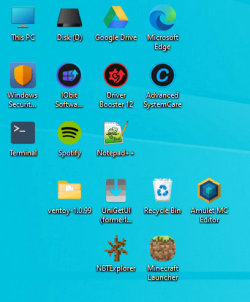
  • Desktop Icon Issue.png
    Desktop Icon Issue.png
    56.4 KB · Views: 1

My Computer My Computer

At a glance

Windows 11 Home 25H2 (OS Build: 26200.7849)AMD Athlon Silver 7120U 2.40 gigahertz8GB with 7.25 Gigabytes Usable Installed Memory512MB ATI AMD Radeon Graphics (HP)
OS
Windows 11 Home 25H2 (OS Build: 26200.7849)
Computer type
Laptop
Manufacturer/Model
HP Laptop 15-fc0xxx
CPU
AMD Athlon Silver 7120U 2.40 gigahertz
Motherboard
HP 8DC9 52.52
Memory
8GB with 7.25 Gigabytes Usable Installed Memory
Graphics Card(s)
512MB ATI AMD Radeon Graphics (HP)
Sound Card
Realtek High Definition Audio
Monitor(s) Displays
Integrated Monitor (15.3"vis, May 2021)
Screen Resolution
1366 X 768
Hard Drives
SAMSUNG MZVL8256HEJD-00BH1 NVMe SSD
Keyboard
Standard PS/2 Keyboard
Mouse
USB HID-compliant mouse
Internet Speed
103.67Mbps (Up) and 11.22 Mbps (Down)
Browser
Microsoft Edge
Antivirus
Windows Security
First thing I would check is to see whether your icons have been set to "Auto Arrange" . If they are, I would uncheck that option and see if that is your issue.
To check this - Right-click on an empty space on your desktop and then Select View.
You will see the options listed there
 

My Computers My Computers

  • At a glance

    Windows 11 Pro 25H2Intel S1200 Core i3 1010532.0 GBMSI GT710 2GB PCIe Video Card
    OS
    Windows 11 Pro 25H2
    Computer type
    PC/Desktop
    Manufacturer/Model
    Home built
    CPU
    Intel S1200 Core i3 10105
    Motherboard
    Gigabyte S1200 MicroATX B560M DS3H DDR4
    Memory
    32.0 GB
    Graphics Card(s)
    MSI GT710 2GB PCIe Video Card
    Sound Card
    Realtek® Audio CODEC
    Monitor(s) Displays
    Dual Acer 24in
    Screen Resolution
    1920 x 1080
    Hard Drives
    500GB Crucial P1 M.2 PCIe SSD
    PSU
    500W
    Case
    Thermaltake ATX Versa H21 Case
    Cooling
    Internal fans by (3)
    Keyboard
    Microsoft Wireless Keyboard 850
    Mouse
    Microsoft Wireless mouse
    Internet Speed
    50Mbps / 20Mbps
    Browser
    Chrome
    Antivirus
    Defender, Malwarebyte
  • At a glance

    Windows 11 Pro 25H2Intel(R) Core(TM) i5-4460 CPU @ 3.20GHz12.0 GBIntegrated Video Card
    Operating System
    Windows 11 Pro 25H2
    Computer type
    PC/Desktop
    Manufacturer/Model
    Home built Test-PC
    CPU
    Intel(R) Core(TM) i5-4460 CPU @ 3.20GHz
    Motherboard
    ASUS S1150 MicroATX B85M-E
    Memory
    12.0 GB
    Graphics card(s)
    Integrated Video Card
    Sound Card
    Integrated Sound Card
    Monitor(s) Displays
    Chimei 22"
    Screen Resolution
    1680 x 1050
    Hard Drives
    120GB WD 2.5" Green SATA 6Gb/s SSD
    1TB WD 3.5" 7200rpm SATA 6Gb/s Caviar Blue
    PSU
    400W
    Case
    Cougar MicroATX MG100 Case Black
    Cooling
    Deepcool 120mm Case Fan
    Keyboard
    Logitech Wireless keyboard
    Mouse
    Logitech Wireless mouse
    Internet Speed
    50Mbps / 20Mbps
    Browser
    Chrome
    Antivirus
    Defender
    Other Info
    Only running Win 11 on this PC for test purposes
First thing I would check is to see whether your icons have been set to "Auto Arrange" . If they are, I would uncheck that option and see if that is your issue.
To check this - Right-click on an empty space on your desktop and then Select View.
You will see the options listed there
Auto arrange is unchecked
 

My Computer My Computer

At a glance

Windows 11 Home 25H2 (OS Build: 26200.7849)AMD Athlon Silver 7120U 2.40 gigahertz8GB with 7.25 Gigabytes Usable Installed Memory512MB ATI AMD Radeon Graphics (HP)
OS
Windows 11 Home 25H2 (OS Build: 26200.7849)
Computer type
Laptop
Manufacturer/Model
HP Laptop 15-fc0xxx
CPU
AMD Athlon Silver 7120U 2.40 gigahertz
Motherboard
HP 8DC9 52.52
Memory
8GB with 7.25 Gigabytes Usable Installed Memory
Graphics Card(s)
512MB ATI AMD Radeon Graphics (HP)
Sound Card
Realtek High Definition Audio
Monitor(s) Displays
Integrated Monitor (15.3"vis, May 2021)
Screen Resolution
1366 X 768
Hard Drives
SAMSUNG MZVL8256HEJD-00BH1 NVMe SSD
Keyboard
Standard PS/2 Keyboard
Mouse
USB HID-compliant mouse
Internet Speed
103.67Mbps (Up) and 11.22 Mbps (Down)
Browser
Microsoft Edge
Antivirus
Windows Security
Just a note, the desktop is not Static like a picture on the wall but Dynamic, always changing/refreshing/redrawing, many functions can cause it to change. Most I've seen is postings about using a third-party software to maintain those shortcuts but I haven't a recommendation.
 

My Computers My Computers

  • At a glance

    Win11 Pro RTM Version 24H2 Build 26100.4202Intel Core i5 11th Gen. 2.40GHz12GB
    OS
    Win11 Pro RTM Version 24H2 Build 26100.4202
    Computer type
    Laptop
    Manufacturer/Model
    Dell Vostro 3400
    CPU
    Intel Core i5 11th Gen. 2.40GHz
    Memory
    12GB
    Hard Drives
    256GB SSD NVMe M.2
  • At a glance

    Win11 Pro RTM Version 24H2 Build 26100.4202Intel Core i5 10th Gen. 2.90GHz16GBOnboard, no VGA, using a DisplayPort-to-VGA a...
    Operating System
    Win11 Pro RTM Version 24H2 Build 26100.4202
    Computer type
    PC/Desktop
    Manufacturer/Model
    Dell Vostro 5890
    CPU
    Intel Core i5 10th Gen. 2.90GHz
    Memory
    16GB
    Graphics card(s)
    Onboard, no VGA, using a DisplayPort-to-VGA adapter
    Monitor(s) Displays
    24" Dell
    Hard Drives
    512GB SSD NVMe, 4TB Seagate HDD
    Browser
    Firefox, Edge
    Antivirus
    Windows Defender/Microsoft Security
Just a note, the desktop is not Static like a picture on the wall but Dynamic, always changing/refreshing/redrawing, many functions can cause it to change. Most I've seen is postings about using a third-party software to maintain those shortcuts but I haven't a recommendation.
I have never had the issue I have now before, so not sure what the issue is.
 

My Computer My Computer

At a glance

Windows 11 Home 25H2 (OS Build: 26200.7849)AMD Athlon Silver 7120U 2.40 gigahertz8GB with 7.25 Gigabytes Usable Installed Memory512MB ATI AMD Radeon Graphics (HP)
OS
Windows 11 Home 25H2 (OS Build: 26200.7849)
Computer type
Laptop
Manufacturer/Model
HP Laptop 15-fc0xxx
CPU
AMD Athlon Silver 7120U 2.40 gigahertz
Motherboard
HP 8DC9 52.52
Memory
8GB with 7.25 Gigabytes Usable Installed Memory
Graphics Card(s)
512MB ATI AMD Radeon Graphics (HP)
Sound Card
Realtek High Definition Audio
Monitor(s) Displays
Integrated Monitor (15.3"vis, May 2021)
Screen Resolution
1366 X 768
Hard Drives
SAMSUNG MZVL8256HEJD-00BH1 NVMe SSD
Keyboard
Standard PS/2 Keyboard
Mouse
USB HID-compliant mouse
Internet Speed
103.67Mbps (Up) and 11.22 Mbps (Down)
Browser
Microsoft Edge
Antivirus
Windows Security
Go to settings and "Personaliztion". Click Themes, then Desktop icons settings. Uncheck Allow thems to change desktop icons. Click Apply then Okay
 

My Computers My Computers

  • At a glance

    Windows 11 Home 25H2 26200.8655AMD Ryzen 3 5300G8gbRadeon Graphics 4.00GHZ
    OS
    Windows 11 Home 25H2 26200.8655
    Computer type
    PC/Desktop
    Manufacturer/Model
    HP Pavilion TP01-2xxx
    CPU
    AMD Ryzen 3 5300G
    Memory
    8gb
    Graphics Card(s)
    Radeon Graphics 4.00GHZ
    Monitor(s) Displays
    ViewSonic
    Keyboard
    HP
    Mouse
    wireless Microsoft
    Browser
    FireFox
    Antivirus
    Avira
  • At a glance

    Updated Windows 10 to 11 25H2 26200.8655Intel Core i3 8100 @3.60 GHz8.GBIntel UHD 360 (HP)
    Operating System
    Updated Windows 10 to 11 25H2 26200.8655
    Computer type
    PC/Desktop
    Manufacturer/Model
    HP
    CPU
    Intel Core i3 8100 @3.60 GHz
    Motherboard
    HP 8653 (U3E1)
    Memory
    8.GB
    Graphics card(s)
    Intel UHD 360 (HP)
    Sound Card
    Realtek High Def
    Monitor(s) Displays
    ViewSonic
    Other Info
    #3 System: HP laptop Windows 25H2 11Pro 26200.8524
Go to settings and "Personaliztion". Click Themes, then Desktop icons settings. Uncheck Allow thems to change desktop icons. Click Apply then Okay
I did, but when I manually restart Explore, it is happens.
 

My Computer My Computer

At a glance

Windows 11 Home 25H2 (OS Build: 26200.7849)AMD Athlon Silver 7120U 2.40 gigahertz8GB with 7.25 Gigabytes Usable Installed Memory512MB ATI AMD Radeon Graphics (HP)
OS
Windows 11 Home 25H2 (OS Build: 26200.7849)
Computer type
Laptop
Manufacturer/Model
HP Laptop 15-fc0xxx
CPU
AMD Athlon Silver 7120U 2.40 gigahertz
Motherboard
HP 8DC9 52.52
Memory
8GB with 7.25 Gigabytes Usable Installed Memory
Graphics Card(s)
512MB ATI AMD Radeon Graphics (HP)
Sound Card
Realtek High Definition Audio
Monitor(s) Displays
Integrated Monitor (15.3"vis, May 2021)
Screen Resolution
1366 X 768
Hard Drives
SAMSUNG MZVL8256HEJD-00BH1 NVMe SSD
Keyboard
Standard PS/2 Keyboard
Mouse
USB HID-compliant mouse
Internet Speed
103.67Mbps (Up) and 11.22 Mbps (Down)
Browser
Microsoft Edge
Antivirus
Windows Security
Try this ........ right click on an empty spot on your desktop, click 'view' then uncheck whatever needs to be, such as align to grid.
 

My Computers My Computers

  • At a glance

    Windows 11 Home 25H2 26200.8655AMD Ryzen 3 5300G8gbRadeon Graphics 4.00GHZ
    OS
    Windows 11 Home 25H2 26200.8655
    Computer type
    PC/Desktop
    Manufacturer/Model
    HP Pavilion TP01-2xxx
    CPU
    AMD Ryzen 3 5300G
    Memory
    8gb
    Graphics Card(s)
    Radeon Graphics 4.00GHZ
    Monitor(s) Displays
    ViewSonic
    Keyboard
    HP
    Mouse
    wireless Microsoft
    Browser
    FireFox
    Antivirus
    Avira
  • At a glance

    Updated Windows 10 to 11 25H2 26200.8655Intel Core i3 8100 @3.60 GHz8.GBIntel UHD 360 (HP)
    Operating System
    Updated Windows 10 to 11 25H2 26200.8655
    Computer type
    PC/Desktop
    Manufacturer/Model
    HP
    CPU
    Intel Core i3 8100 @3.60 GHz
    Motherboard
    HP 8653 (U3E1)
    Memory
    8.GB
    Graphics card(s)
    Intel UHD 360 (HP)
    Sound Card
    Realtek High Def
    Monitor(s) Displays
    ViewSonic
    Other Info
    #3 System: HP laptop Windows 25H2 11Pro 26200.8524
Try this ........ right click on an empty spot on your desktop, click 'view' then uncheck whatever needs to be, such as align to grid.
Unchecking align to grid seemed to work at least, thanks for your help!
 

My Computer My Computer

At a glance

Windows 11 Home 25H2 (OS Build: 26200.7849)AMD Athlon Silver 7120U 2.40 gigahertz8GB with 7.25 Gigabytes Usable Installed Memory512MB ATI AMD Radeon Graphics (HP)
OS
Windows 11 Home 25H2 (OS Build: 26200.7849)
Computer type
Laptop
Manufacturer/Model
HP Laptop 15-fc0xxx
CPU
AMD Athlon Silver 7120U 2.40 gigahertz
Motherboard
HP 8DC9 52.52
Memory
8GB with 7.25 Gigabytes Usable Installed Memory
Graphics Card(s)
512MB ATI AMD Radeon Graphics (HP)
Sound Card
Realtek High Definition Audio
Monitor(s) Displays
Integrated Monitor (15.3"vis, May 2021)
Screen Resolution
1366 X 768
Hard Drives
SAMSUNG MZVL8256HEJD-00BH1 NVMe SSD
Keyboard
Standard PS/2 Keyboard
Mouse
USB HID-compliant mouse
Internet Speed
103.67Mbps (Up) and 11.22 Mbps (Down)
Browser
Microsoft Edge
Antivirus
Windows Security
Save and Restore Icon positions for each (or every) screen resolution.
Download 64bit version. Apparently still works. (Win 11)


There is this free app from a great crew called Sordum (Check out their other stuff also)
As far as I know this still gets updated

There is also DesktopOK 11.5
Save and restore the positions of the Windows Desktop Icons


If you would rather try fixing this without an app/software:

Try deleting the icon file
, then move your icons and see if when the PC reboots and reads the new file, hopefully the icons are in the place you put them.
  • Press Windows key + R to bring up the Run dialog. Type in: %userprofile% (or click on that to copy/paste) and click OK. The User folder will open.
  • Make sure hidden items are visible by clicking the View> Show>Hidden items, or in options in File Explorer, make sure hide protected files is unchecked.
  • Open the AppData folder.
  • Open the Local folder.
  • Within the Local folder select the IconCache.db file and click Delete.
Now arrange the desktop icons and restart the computer.
 

My Computers My Computers

  • At a glance

    Windows 11 Pro 25H2 Build 26200.8655Intel(R) Core(TM) i7-4770K CPU @ 3.50GHz32.0 GB of I forget and the box is in storage.Gigabyte nVidia GeForce GTX 1660 Super OC 6GB
    OS
    Windows 11 Pro 25H2 Build 26200.8655
    Computer type
    PC/Desktop
    Manufacturer/Model
    Sin-built 2013
    CPU
    Intel(R) Core(TM) i7-4770K CPU @ 3.50GHz
    Motherboard
    ASUS ROG Maximus VI Formula
    Memory
    32.0 GB of I forget and the box is in storage.
    Graphics Card(s)
    Gigabyte nVidia GeForce GTX 1660 Super OC 6GB
    Sound Card
    ROG SupremeFX Formula 8-Channel High Definition Audio
    Monitor(s) Displays
    5 x LG 25MS500-B - 1 x 24MK430H-B - 1 x Wacom Pro 22" Touch Screen Tablet
    Screen Resolution
    All over the place
    Hard Drives
    Too many to list. OS on Samsung 1TB 870 QVO SATA
    PSU
    Silverstone 1500
    Case
    NZXT Phantom 820 Full-Tower Case
    Cooling
    Noctua NH-D15 Elite Class Dual Tower CPU Cooler / 6 x EziDIY 120mm / 2 x Corsair 140mm somethings / 1 x 140mm Thermaltake something / 2 x 200mm Corsair.
    Keyboard
    Corsair K95 / Logitech diNovo Edge Wireless
    Mouse
    Logitech: G402 / G502 / Mx Masters / Mx Air Cordless
    Internet Speed
    2000/500Mbps
    Browser
    All sorts
    Antivirus
    Kaspersky Premium
    Other Info
    ㅤㅤㅤㅤㅤㅤㅤㅤㅤㅤㅤㅤㅤㅤㅤㅤㅤㅤㅤㅤㅤㅤㅤㅤㅤㅤㅤㅤㅤㅤㅤㅤㅤㅤㅤㅤㅤㅤㅤㅤ⠀⠀⠀⠀⠀⠀⠀⠀⠀⠀
    TP-Link BE9300 WiFi 7 Bluetooth 5.4 (Archer TBE550E)
    TP-Link TX201 V1 2.5GB Lan

    Grandstream HT812 - VoIP
    ASUS DSL-AX82U - Mesh
    ASUS RT-AC68U - Mesh
    ASUS RT-BE88U Router

    Brother MFC-L2880DW Printer

    I’m on a horse.
  • At a glance

    Windows 11 Pro 25H2 Build 26200.8655 (Wifes)13th Generation Intel® Core™ i5-1340P Process...16GB LPDDR5-52001x Intel® Iris® Xe Graphics
    Operating System
    Windows 11 Pro 25H2 Build 26200.8655 (Wifes)
    Computer type
    Laptop
    Manufacturer/Model
    LENOVO Yoga 7 14IRL8 - Type 82YL
    CPU
    13th Generation Intel® Core™ i5-1340P Processor(Core™ i5-1340P)
    Memory
    16GB LPDDR5-5200
    Graphics card(s)
    1x Intel® Iris® Xe Graphics
    Sound Card
    Optimized with Dolby Atmos®
    Screen Resolution
    QHD 2880 x 1800 OLED
    Hard Drives
    M.2 512 GB SSD PCIe
    Mouse
    Logiteck MX Master 3S
    Internet Speed
    2000/500
    Antivirus
    Defender / Malwarebytes
    Other Info
    …still on a horse.


    Wireless Network: Wi-Fi 6E 2x2 AX; Bluetooth® 5.1 or above
    Ports: 1x 1 Novo button; 2 in 1 Audio Combo jack; Micro SD Card Reader; HDMI 1.4b; 2 x USB Type-C (TBT4)
    USB 3.2 Gen 2 DP 1.4a
    PD 3.0); 1 x USB 3.2 Gen1 Type A
    Camera
    1x 1080P FHD IR/RGB Hybrid with Privacy Shutter and Dual Array Microphone
    Graphics
    1x Intel® Iris® Xe Graphics
    Monitor
    14" WUXGA
    Form Factor
    Convertible Notebook
  • Windows 11 Pro 25H2 Build 26200.8655 (Wifes)

    Yoga 7 2-in-1 14IML9 - Type 83DJ

    Processor: Intel® Core™ Ultra 7 155H Processor(Core™ Ultra 7 155H)

    Memory: 32GB LPD5X-7467

    Hard Drive: 1 TB SSD PCIe

    Wireless Network: 1x Wi-Fi 6E 2x2 AX; Bluetooth® 5.1 or above

    Ports: 1 x HDMI 2.1 TMDS; 1 x Novo Button; 1 x Combo Audio Jack
    2 x USB-C (USB 4.0)
    1 x USB-A 3.2 Gen 1

    Camera: 1080P FHD IR Hybrid with Dual Microphone

    Graphics: Intel® Arc™ Graphics

    Monitor: 14" 2.8K

    ...Where's my horse?
Save and Restore Icon positions for each (or every) screen resolution.
Download 64bit version. Apparently still works. (Win 11)


There is this free app from a great crew called Sordum (Check out their other stuff also)
As far as I know this still gets updated

There is also DesktopOK 11.5
Save and restore the positions of the Windows Desktop Icons


If you would rather try fixing this without an app/software:

Try deleting the icon file
, then move your icons and see if when the PC reboots and reads the new file, hopefully the icons are in the place you put them.
  • Press Windows key + R to bring up the Run dialog. Type in: %userprofile% (or click on that to copy/paste) and click OK. The User folder will open.
  • Make sure hidden items are visible by clicking the View> Show>Hidden items, or in options in File Explorer, make sure hide protected files is unchecked.
  • Open the AppData folder.
  • Open the Local folder.
  • Within the Local folder select the IconCache.db file and click Delete.
Now arrange the desktop icons and restart the computer.
What one would you reccomend using?
 

My Computer My Computer

At a glance

Windows 11 Home 25H2 (OS Build: 26200.7849)AMD Athlon Silver 7120U 2.40 gigahertz8GB with 7.25 Gigabytes Usable Installed Memory512MB ATI AMD Radeon Graphics (HP)
OS
Windows 11 Home 25H2 (OS Build: 26200.7849)
Computer type
Laptop
Manufacturer/Model
HP Laptop 15-fc0xxx
CPU
AMD Athlon Silver 7120U 2.40 gigahertz
Motherboard
HP 8DC9 52.52
Memory
8GB with 7.25 Gigabytes Usable Installed Memory
Graphics Card(s)
512MB ATI AMD Radeon Graphics (HP)
Sound Card
Realtek High Definition Audio
Monitor(s) Displays
Integrated Monitor (15.3"vis, May 2021)
Screen Resolution
1366 X 768
Hard Drives
SAMSUNG MZVL8256HEJD-00BH1 NVMe SSD
Keyboard
Standard PS/2 Keyboard
Mouse
USB HID-compliant mouse
Internet Speed
103.67Mbps (Up) and 11.22 Mbps (Down)
Browser
Microsoft Edge
Antivirus
Windows Security
I use Stardock Fences5 but the reason I didn’t mention it is that it’s a bit of a setup process (I could help you) and it certainly isn’t free.

However, if you want something that is easier to use: I trust Sordum software, it’s all free and they listen to people about bugs.

I will be 100% honest and tell you I have never tried ReIcon but only because I use Fences5
If you have Revo Uninstaller Free installed, you can just zap ReIcon if it isn’t what you want.

But due to their impressive list of software (Some of which I use) I would start with Sordum ReIcon
 

My Computers My Computers

  • At a glance

    Windows 11 Pro 25H2 Build 26200.8655Intel(R) Core(TM) i7-4770K CPU @ 3.50GHz32.0 GB of I forget and the box is in storage.Gigabyte nVidia GeForce GTX 1660 Super OC 6GB
    OS
    Windows 11 Pro 25H2 Build 26200.8655
    Computer type
    PC/Desktop
    Manufacturer/Model
    Sin-built 2013
    CPU
    Intel(R) Core(TM) i7-4770K CPU @ 3.50GHz
    Motherboard
    ASUS ROG Maximus VI Formula
    Memory
    32.0 GB of I forget and the box is in storage.
    Graphics Card(s)
    Gigabyte nVidia GeForce GTX 1660 Super OC 6GB
    Sound Card
    ROG SupremeFX Formula 8-Channel High Definition Audio
    Monitor(s) Displays
    5 x LG 25MS500-B - 1 x 24MK430H-B - 1 x Wacom Pro 22" Touch Screen Tablet
    Screen Resolution
    All over the place
    Hard Drives
    Too many to list. OS on Samsung 1TB 870 QVO SATA
    PSU
    Silverstone 1500
    Case
    NZXT Phantom 820 Full-Tower Case
    Cooling
    Noctua NH-D15 Elite Class Dual Tower CPU Cooler / 6 x EziDIY 120mm / 2 x Corsair 140mm somethings / 1 x 140mm Thermaltake something / 2 x 200mm Corsair.
    Keyboard
    Corsair K95 / Logitech diNovo Edge Wireless
    Mouse
    Logitech: G402 / G502 / Mx Masters / Mx Air Cordless
    Internet Speed
    2000/500Mbps
    Browser
    All sorts
    Antivirus
    Kaspersky Premium
    Other Info
    ㅤㅤㅤㅤㅤㅤㅤㅤㅤㅤㅤㅤㅤㅤㅤㅤㅤㅤㅤㅤㅤㅤㅤㅤㅤㅤㅤㅤㅤㅤㅤㅤㅤㅤㅤㅤㅤㅤㅤㅤ⠀⠀⠀⠀⠀⠀⠀⠀⠀⠀
    TP-Link BE9300 WiFi 7 Bluetooth 5.4 (Archer TBE550E)
    TP-Link TX201 V1 2.5GB Lan

    Grandstream HT812 - VoIP
    ASUS DSL-AX82U - Mesh
    ASUS RT-AC68U - Mesh
    ASUS RT-BE88U Router

    Brother MFC-L2880DW Printer

    I’m on a horse.
  • At a glance

    Windows 11 Pro 25H2 Build 26200.8655 (Wifes)13th Generation Intel® Core™ i5-1340P Process...16GB LPDDR5-52001x Intel® Iris® Xe Graphics
    Operating System
    Windows 11 Pro 25H2 Build 26200.8655 (Wifes)
    Computer type
    Laptop
    Manufacturer/Model
    LENOVO Yoga 7 14IRL8 - Type 82YL
    CPU
    13th Generation Intel® Core™ i5-1340P Processor(Core™ i5-1340P)
    Memory
    16GB LPDDR5-5200
    Graphics card(s)
    1x Intel® Iris® Xe Graphics
    Sound Card
    Optimized with Dolby Atmos®
    Screen Resolution
    QHD 2880 x 1800 OLED
    Hard Drives
    M.2 512 GB SSD PCIe
    Mouse
    Logiteck MX Master 3S
    Internet Speed
    2000/500
    Antivirus
    Defender / Malwarebytes
    Other Info
    …still on a horse.


    Wireless Network: Wi-Fi 6E 2x2 AX; Bluetooth® 5.1 or above
    Ports: 1x 1 Novo button; 2 in 1 Audio Combo jack; Micro SD Card Reader; HDMI 1.4b; 2 x USB Type-C (TBT4)
    USB 3.2 Gen 2 DP 1.4a
    PD 3.0); 1 x USB 3.2 Gen1 Type A
    Camera
    1x 1080P FHD IR/RGB Hybrid with Privacy Shutter and Dual Array Microphone
    Graphics
    1x Intel® Iris® Xe Graphics
    Monitor
    14" WUXGA
    Form Factor
    Convertible Notebook
  • Windows 11 Pro 25H2 Build 26200.8655 (Wifes)

    Yoga 7 2-in-1 14IML9 - Type 83DJ

    Processor: Intel® Core™ Ultra 7 155H Processor(Core™ Ultra 7 155H)

    Memory: 32GB LPD5X-7467

    Hard Drive: 1 TB SSD PCIe

    Wireless Network: 1x Wi-Fi 6E 2x2 AX; Bluetooth® 5.1 or above

    Ports: 1 x HDMI 2.1 TMDS; 1 x Novo Button; 1 x Combo Audio Jack
    2 x USB-C (USB 4.0)
    1 x USB-A 3.2 Gen 1

    Camera: 1080P FHD IR Hybrid with Dual Microphone

    Graphics: Intel® Arc™ Graphics

    Monitor: 14" 2.8K

    ...Where's my horse?
Last edited:

My Computers My Computers

  • At a glance

    Windows 11 Pro 25H2 Build 26200.8655Intel(R) Core(TM) i7-4770K CPU @ 3.50GHz32.0 GB of I forget and the box is in storage.Gigabyte nVidia GeForce GTX 1660 Super OC 6GB
    OS
    Windows 11 Pro 25H2 Build 26200.8655
    Computer type
    PC/Desktop
    Manufacturer/Model
    Sin-built 2013
    CPU
    Intel(R) Core(TM) i7-4770K CPU @ 3.50GHz
    Motherboard
    ASUS ROG Maximus VI Formula
    Memory
    32.0 GB of I forget and the box is in storage.
    Graphics Card(s)
    Gigabyte nVidia GeForce GTX 1660 Super OC 6GB
    Sound Card
    ROG SupremeFX Formula 8-Channel High Definition Audio
    Monitor(s) Displays
    5 x LG 25MS500-B - 1 x 24MK430H-B - 1 x Wacom Pro 22" Touch Screen Tablet
    Screen Resolution
    All over the place
    Hard Drives
    Too many to list. OS on Samsung 1TB 870 QVO SATA
    PSU
    Silverstone 1500
    Case
    NZXT Phantom 820 Full-Tower Case
    Cooling
    Noctua NH-D15 Elite Class Dual Tower CPU Cooler / 6 x EziDIY 120mm / 2 x Corsair 140mm somethings / 1 x 140mm Thermaltake something / 2 x 200mm Corsair.
    Keyboard
    Corsair K95 / Logitech diNovo Edge Wireless
    Mouse
    Logitech: G402 / G502 / Mx Masters / Mx Air Cordless
    Internet Speed
    2000/500Mbps
    Browser
    All sorts
    Antivirus
    Kaspersky Premium
    Other Info
    ㅤㅤㅤㅤㅤㅤㅤㅤㅤㅤㅤㅤㅤㅤㅤㅤㅤㅤㅤㅤㅤㅤㅤㅤㅤㅤㅤㅤㅤㅤㅤㅤㅤㅤㅤㅤㅤㅤㅤㅤ⠀⠀⠀⠀⠀⠀⠀⠀⠀⠀
    TP-Link BE9300 WiFi 7 Bluetooth 5.4 (Archer TBE550E)
    TP-Link TX201 V1 2.5GB Lan

    Grandstream HT812 - VoIP
    ASUS DSL-AX82U - Mesh
    ASUS RT-AC68U - Mesh
    ASUS RT-BE88U Router

    Brother MFC-L2880DW Printer

    I’m on a horse.
  • At a glance

    Windows 11 Pro 25H2 Build 26200.8655 (Wifes)13th Generation Intel® Core™ i5-1340P Process...16GB LPDDR5-52001x Intel® Iris® Xe Graphics
    Operating System
    Windows 11 Pro 25H2 Build 26200.8655 (Wifes)
    Computer type
    Laptop
    Manufacturer/Model
    LENOVO Yoga 7 14IRL8 - Type 82YL
    CPU
    13th Generation Intel® Core™ i5-1340P Processor(Core™ i5-1340P)
    Memory
    16GB LPDDR5-5200
    Graphics card(s)
    1x Intel® Iris® Xe Graphics
    Sound Card
    Optimized with Dolby Atmos®
    Screen Resolution
    QHD 2880 x 1800 OLED
    Hard Drives
    M.2 512 GB SSD PCIe
    Mouse
    Logiteck MX Master 3S
    Internet Speed
    2000/500
    Antivirus
    Defender / Malwarebytes
    Other Info
    …still on a horse.


    Wireless Network: Wi-Fi 6E 2x2 AX; Bluetooth® 5.1 or above
    Ports: 1x 1 Novo button; 2 in 1 Audio Combo jack; Micro SD Card Reader; HDMI 1.4b; 2 x USB Type-C (TBT4)
    USB 3.2 Gen 2 DP 1.4a
    PD 3.0); 1 x USB 3.2 Gen1 Type A
    Camera
    1x 1080P FHD IR/RGB Hybrid with Privacy Shutter and Dual Array Microphone
    Graphics
    1x Intel® Iris® Xe Graphics
    Monitor
    14" WUXGA
    Form Factor
    Convertible Notebook
  • Windows 11 Pro 25H2 Build 26200.8655 (Wifes)

    Yoga 7 2-in-1 14IML9 - Type 83DJ

    Processor: Intel® Core™ Ultra 7 155H Processor(Core™ Ultra 7 155H)

    Memory: 32GB LPD5X-7467

    Hard Drive: 1 TB SSD PCIe

    Wireless Network: 1x Wi-Fi 6E 2x2 AX; Bluetooth® 5.1 or above

    Ports: 1 x HDMI 2.1 TMDS; 1 x Novo Button; 1 x Combo Audio Jack
    2 x USB-C (USB 4.0)
    1 x USB-A 3.2 Gen 1

    Camera: 1080P FHD IR Hybrid with Dual Microphone

    Graphics: Intel® Arc™ Graphics

    Monitor: 14" 2.8K

    ...Where's my horse?
Yep. Love it. I rarely have to use it to restore all my icons and positions but it sure is easy when I have to. It's portable, too. I like that.
 
Last edited:

My Computers My Computers

  • At a glance

    Windows 11 Pro 25H2 26200.8655i9-10900 10 core 20 threads32 gbnone-Intel UHD Graphics 630
    OS
    Windows 11 Pro 25H2 26200.8655
    Computer type
    PC/Desktop
    Manufacturer/Model
    Dell Optiplex 7080
    CPU
    i9-10900 10 core 20 threads
    Motherboard
    DELL 0J37VM
    Memory
    32 gb
    Graphics Card(s)
    none-Intel UHD Graphics 630
    Sound Card
    Integrated Realtek
    Monitor(s) Displays
    Benq 27
    Screen Resolution
    2560x1440
    Hard Drives
    2x1tb Solidigm m.2 nvme /External drives 512gb Samsung m.2 sata+2tb Kingston m2.nvme
    PSU
    500w
    Case
    MT
    Cooling
    Dell Premium
    Keyboard
    Logitech wired
    Mouse
    Logitech wireless
    Internet Speed
    so slow I'm too embarrassed to tell
    Browser
    #1 Edge #2 Firefox
    Antivirus
    Defender+MWB Premium
  • At a glance

    Windows 11 Pro 24H2 26200.8457AMD Ryzen 7 6800U32 gbintegrated
    Operating System
    Windows 11 Pro 24H2 26200.8457
    Computer type
    PC/Desktop
    Manufacturer/Model
    Beelink Mini PC SER5
    CPU
    AMD Ryzen 7 6800U
    Memory
    32 gb
    Graphics card(s)
    integrated
    Sound Card
    integrated
    Monitor(s) Displays
    Benq 27
    Screen Resolution
    2560x1440
    Hard Drives
    1TB Crucial nvme
    Keyboard
    Logitech wired
    Mouse
    Logitech wireless
    Internet Speed
    still too embarrassed to tell
    Browser
    Firefox
    Antivirus
    Defender
    Other Info
    System 3 is non compliant Dell 9020 i7-4770/24gb ram Win11 PRO 26200.8457
Back
Top Bottom




