JavaScript is disabled. For a better experience, please enable JavaScript in your browser before proceeding.
You are using an out of date browser. It may not display this or other websites correctly.
You should upgrade or use an
alternative browser .
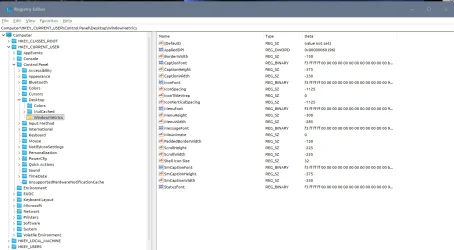
Just got an ASUS PN54 Slim Mini PC no entries for Icon Spacing.
Well-known member
Member
VIP
Installed W11 and hit one or two funnies.
Windows 11 Pro X64 Version 25H2 (OS Build 262... AMD Ryzen RAM 31.0GB 512MB ATI AMD Radeon 860M Graphics (ASUStek C... Windows 11 Pro X64 Version 25H2 (OS Build 26200.80 PC/Desktop ASUS PN54 AMD Ryzen A. ELM_PN54 (FP8DDR5) RAM 31.0GB 512MB ATI AMD Radeon 860M Graphics (ASUStek Computer Inc) Realtek High Definition Audio DELL U2718Q (3840x2160@60Hz) DELL U2913WM (2560x1080@60Hz) 3840x2160@60Hz / 2560x1080@60Hz 1863GB Crucial CT2000T500SSD8 SSD
Just a Computer User
Pro User
VIP
here is a copy of my registry key for that registry entry
with the icon spacing settings visible.
best of luck Steve ..
Windows 11 Home Ryzen 7 5825u 64GB DDR4 3200 Ryzen 7 5825u Windows 11 Home PC/Desktop HP 24" AiO Ryzen 7 5825u HP 64GB DDR4 3200 Ryzen 7 5825u Realtek External 5w speaker bar. 24" HP AiO 1920 x 1080 @60 Hz 1TB WD Blue SN580 M2 SSD Partitioned C:/D: drives. 90W external power brick 24" All in One Default Air Cooling Dell WiFi UK extended Dell WiFi 3 Button 1GB full fibre Vivaldi Browser/Email/Calendar AVG Internet Security/Windows Defender Mainly Open Source Software
Ubuntu 22.04.5 LTS i5 7200u 16GB DDR4 Intel Ubuntu 22.04.5 LTS Laptop Dell 13" Latitude 2017 i5 7200u Dell 16GB DDR4 Intel Intel 13" Dell Laptop 250GB Crucial 2.5" SSD Generic WiFi 3 button WiFi only Firefox ClamAV TK Mainly Open Source Software