Windows 11 26H2 is driving me a little crazy.....Help Please!


Warewasher2025

Well-known member
Member
Local time
5:53 PM
Posts
13
OS
Windows 10 Pro, Partition 1/Windows 11 Partition 2
At least once a day my NUC attempts to download and install 26H2. and it always ends with this error message!

Screenshot 2026-10-15 142907.webp

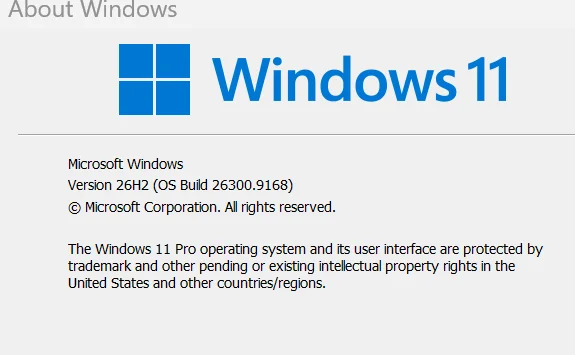
I have done all suggestions (driver updates, unplug all external stuff, turn off anti virus ETC) Still the cycle repeats. If I run winver I get this
Screenshot 2026-10-15 142745.webp

Sys it's installed but none of the features are there. Any cluse other that a clean install????
 

My Computer My Computer

At a glance

Windows 10 Pro, Partition 1/Windows 11 Partit...Intel Core I516 GB DDR4Onboard
OS
Windows 10 Pro, Partition 1/Windows 11 Partition 2
Computer type
PC/Desktop
Manufacturer/Model
NUC 7i5BNB
CPU
Intel Core I5
Motherboard
Intel
Memory
16 GB DDR4
Graphics Card(s)
Onboard
Sound Card
Onboard
Hard Drives
Samsung M.2 NVMB 500
Internet Speed
DSL
Browser
Edge
Antivirus
MS
Any cluse other that a clean install????


Just run the 26H2 Enablement Package found here...


That will hopefully fix things. It takes only 3 seconds to install and a reboot.
Yes... I see that winver already says 26H2. But run the Enablement Package anyway.

NOTE: 26300.9168 was the August 11th update.


Also... here's ten points, just for filling out your computer specs. :-)


And here's some other things that you may find useful...


My Computers My Computers

  • At a glance

    Win 11 Home ♦♦♦26300.9711 ♦♦♦♦♦♦♦26H2AMD Ryzen 7 3700XG.Skill (F4-3200C14D-16GTZKW)EVGA RTX 2070 (08G-P4-2171-KR)
    OS
    Win 11 Home ♦♦♦26300.9711 ♦♦♦♦♦♦♦26H2
    Computer type
    PC/Desktop
    Manufacturer/Model
    Built by Ghot® [May 2020]
    CPU
    AMD Ryzen 7 3700X
    Motherboard
    Asus Pro WS X570-ACE (BIOS 5302)
    Memory
    G.Skill (F4-3200C14D-16GTZKW)
    Graphics Card(s)
    EVGA RTX 2070 (08G-P4-2171-KR)
    Sound Card
    Realtek ALC1220P / ALC S1220A
    Monitor(s) Displays
    Dell U3011 30"
    Screen Resolution
    2560 x 1600
    Hard Drives
    2x Samsung 860 EVO 500GB,
    WD 4TB Black FZBX - SATA III,
    WD 8TB Black FZBX - SATA III,
    DRW-24B1ST CD/DVD Burner
    PSU
    PC Power & Cooling 750W Quad EPS12V
    Case
    Cooler Master ATCS 840 Tower
    Cooling
    CM Hyper 212 EVO (push/pull)
    Keyboard
    Ducky DK9008 Shine II Blue LED
    Mouse
    Logitech Optical M-100
    Internet Speed
    300/300
    Browser
    Firefox (latest)
    Antivirus
    Bitdefender Total Security
    Other Info
    Speakers: Klipsch Pro Media 2.1
  • At a glance

    Windows XP Pro 32bit w/SP3AMD Athlon 64 X2 5000+ (OC'd @ 3.2Ghz)TWIN2X2048-6400C4DHX (2 x 1GB, DDR2 800)EVGA 256-P2-N758-TR GeForce 8600GT SSC
    Operating System
    Windows XP Pro 32bit w/SP3
    Computer type
    PC/Desktop
    Manufacturer/Model
    Built by Ghot® (not in use)
    CPU
    AMD Athlon 64 X2 5000+ (OC'd @ 3.2Ghz)
    Motherboard
    ASUS M2N32-SLI Deluxe Wireless Edition
    Memory
    TWIN2X2048-6400C4DHX (2 x 1GB, DDR2 800)
    Graphics card(s)
    EVGA 256-P2-N758-TR GeForce 8600GT SSC
    Sound Card
    Onboard
    Monitor(s) Displays
    ViewSonic G90FB Black 19" Professional (CRT)
    Screen Resolution
    up to 2048 x 1536
    Hard Drives
    WD 36GB 10,000rpm Raptor SATA
    Seagate 80GB 7200rpm SATA
    Lite-On LTR-52246S CD/RW
    Lite-On LH-18A1P CD/DVD Burner
    PSU
    PC Power & Cooling Silencer 750 Quad EPS12V
    Case
    Generic Beige case, 80mm fans
    Cooling
    ZALMAN 9500A 92mm CPU Cooler
    Keyboard
    Logitech Classic Keybooard 200
    Mouse
    Logitech Optical M-BT96a
    Internet Speed
    300/300
    Browser
    Firefox 3.x ??
    Antivirus
    Symantec (Norton)
    Other Info
    Still assembled, still runs. Haven't turned it on for 15 years?
I don't have an answer for you re: the Error Message you're getting, but the latest update/version is KB5127648 (26H2 Build 26300.9711) released October 13, 2026. As you're already on 26H2 (26300), are you sure it's not simply wanting to install the 'Cumulative Update'?
 

My Computers My Computers

  • At a glance

    Windows 11 Pro 24H2 Linux Mint 22.2Intel® Core i7-10850H64 GB DDR4-3200MHzNVIDIA Quadro® T2000
    OS
    Windows 11 Pro 24H2 Linux Mint 22.2
    Computer type
    Laptop
    Manufacturer/Model
    Lenovo ThinkPad P1
    CPU
    Intel® Core i7-10850H
    Memory
    64 GB DDR4-3200MHz
    Graphics Card(s)
    NVIDIA Quadro® T2000
    Screen Resolution
    4K (3840x2160)
  • At a glance

    Windows 11 Pro 24H2Intel® Core I9-10850KG.Skill Trident Z 32GB CL16 DDR4-3600MHz | Sa...EVGA | NVIDIA GeForce RTX 3080 Ti FTW3 Ultra ...
    Operating System
    Windows 11 Pro 24H2
    Computer type
    PC/Desktop
    Manufacturer/Model
    NHRacecraft Custom Build
    CPU
    Intel® Core I9-10850K
    Motherboard
    ASUS ROG Maximus XII Hero | Z490
    Memory
    G.Skill Trident Z 32GB CL16 DDR4-3600MHz | Samsung B-Die
    Graphics card(s)
    EVGA | NVIDIA GeForce RTX 3080 Ti FTW3 Ultra Gaming
    Sound Card
    ROG SupremeFX S1220
    Monitor(s) Displays
    Samsung G6 G60SF 27" 500Hz OLED Gigabyte AORUS CV27Q-SA 27" HDR HP Development Z24q G3 24" IPS
    Screen Resolution
    2K QHD (2560x1440)
    Hard Drives
    Samsung 500GB 980 Pro M.2 PCIe 4.0 x4 NVMe
    Samsung 2TB 980 Pro M.2 PCIe 4.0 x4 NVMe
    Samsung 2TB 860 Pro 2.5" SATA III SSD
    Western Digital 4TB WD Black 3.5" SATA III HDD
    PSU
    Seasonic Prime PX-850 Platinum 850W
    Case
    Razer Tomahawk ATX Mid-Tower w/ Fractal Design Flex B-20 Vertical GPU
    Cooling
    NZXT Kraken Z53 Liquid AIO
    Keyboard
    IQUNIX Zonex 75 Custom
    Mouse
    Logitech G PRO X Superlight 2
    Internet Speed
    Fidium Fiber 2.2Gbps Symmetrical
    Browser
    Firefox ESR | Brave
    Antivirus
    Windows Defender
  • Lenovo ThinkPad P51 [Windows 11 Pro 24H2, Intel® Core i7-7820HQ, 64GB DDR4-2400MHz, NVIDIA Quadro® M2200]
    Lenovo ThinkStation P320 SFF [Windows 11 Pro 24H2, Intel® Xeon E3-1240v5, 40GB DDR4-2400MHz, NVIDIA Quadro® P1000]
    Lenovo ThinkPad X1 Carbon G3 [Windows 11 Pro 24H2, Intel® Core i7-5600U, 8GB DDR3L-1600MHz, Intel® HD 5500]
    Lenovo ThinkPad T450s [Windows 11 Pro 24H2, Intel® Core i7-5600U, 20GB DDR3L-1600MHz, Intel® HD 5500]
@Warewasher2025

If running the Enablement Package doesn't help... try this...


The following are the September updates. If Resetting Windows Update doesn't help... you can download these from the Microsoft Update Catalog, and try installing them....


Update catalog download link: KB5124008


Below is the Sept. Out-of-Band update, which was a FIX for the Sept. 8th update...


Update Catalog download link: KB5129195
 
Last edited:

My Computers My Computers

  • At a glance

    Win 11 Home ♦♦♦26300.9711 ♦♦♦♦♦♦♦26H2AMD Ryzen 7 3700XG.Skill (F4-3200C14D-16GTZKW)EVGA RTX 2070 (08G-P4-2171-KR)
    OS
    Win 11 Home ♦♦♦26300.9711 ♦♦♦♦♦♦♦26H2
    Computer type
    PC/Desktop
    Manufacturer/Model
    Built by Ghot® [May 2020]
    CPU
    AMD Ryzen 7 3700X
    Motherboard
    Asus Pro WS X570-ACE (BIOS 5302)
    Memory
    G.Skill (F4-3200C14D-16GTZKW)
    Graphics Card(s)
    EVGA RTX 2070 (08G-P4-2171-KR)
    Sound Card
    Realtek ALC1220P / ALC S1220A
    Monitor(s) Displays
    Dell U3011 30"
    Screen Resolution
    2560 x 1600
    Hard Drives
    2x Samsung 860 EVO 500GB,
    WD 4TB Black FZBX - SATA III,
    WD 8TB Black FZBX - SATA III,
    DRW-24B1ST CD/DVD Burner
    PSU
    PC Power & Cooling 750W Quad EPS12V
    Case
    Cooler Master ATCS 840 Tower
    Cooling
    CM Hyper 212 EVO (push/pull)
    Keyboard
    Ducky DK9008 Shine II Blue LED
    Mouse
    Logitech Optical M-100
    Internet Speed
    300/300
    Browser
    Firefox (latest)
    Antivirus
    Bitdefender Total Security
    Other Info
    Speakers: Klipsch Pro Media 2.1
  • At a glance

    Windows XP Pro 32bit w/SP3AMD Athlon 64 X2 5000+ (OC'd @ 3.2Ghz)TWIN2X2048-6400C4DHX (2 x 1GB, DDR2 800)EVGA 256-P2-N758-TR GeForce 8600GT SSC
    Operating System
    Windows XP Pro 32bit w/SP3
    Computer type
    PC/Desktop
    Manufacturer/Model
    Built by Ghot® (not in use)
    CPU
    AMD Athlon 64 X2 5000+ (OC'd @ 3.2Ghz)
    Motherboard
    ASUS M2N32-SLI Deluxe Wireless Edition
    Memory
    TWIN2X2048-6400C4DHX (2 x 1GB, DDR2 800)
    Graphics card(s)
    EVGA 256-P2-N758-TR GeForce 8600GT SSC
    Sound Card
    Onboard
    Monitor(s) Displays
    ViewSonic G90FB Black 19" Professional (CRT)
    Screen Resolution
    up to 2048 x 1536
    Hard Drives
    WD 36GB 10,000rpm Raptor SATA
    Seagate 80GB 7200rpm SATA
    Lite-On LTR-52246S CD/RW
    Lite-On LH-18A1P CD/DVD Burner
    PSU
    PC Power & Cooling Silencer 750 Quad EPS12V
    Case
    Generic Beige case, 80mm fans
    Cooling
    ZALMAN 9500A 92mm CPU Cooler
    Keyboard
    Logitech Classic Keybooard 200
    Mouse
    Logitech Optical M-BT96a
    Internet Speed
    300/300
    Browser
    Firefox 3.x ??
    Antivirus
    Symantec (Norton)
    Other Info
    Still assembled, still runs. Haven't turned it on for 15 years?
@Warewasher2025


And here's what Google AI says about your error number...

Error 0xc1900101 during a Windows 11 installation or upgrade is a generic rollback error typically caused by driver conflicts, third-party antivirus/security software, insufficient disk space, or corrupted system files. [1]

Quick Fixes & Troubleshooting Steps
  • Disconnect External Hardware: Unplug all non-essential devices (printers, cameras, extra USB drives, docking stations, game controllers). Keep only your keyboard, mouse, and display connected. [1, 2]
  • Uninstall Third-Party Antivirus/VPN: Remove any non-Microsoft security software or VPN clients via Control Panel > Programs and Features, as their kernel-level drivers frequently block upgrades. [1, 2]
  • Free Up Disk Space: Ensure your C: drive has at least 20 GB of free space. Run Disk Cleanup (cleanmgr) to clear out old update files and temporary data. [1, 2, 3]
  • Update or Roll Back Drivers: Open Device Manager (Win + X), expand categories like Display adapters and Network adapters, and update or roll back problematic drivers. Look out for yellow warning icons (⚠️). [1, 2, 3]
  • Repair System Files:Open Command Prompt as an administrator and run these commands in order:
    • sfc /scannow
    • DISM.exe /Online /Cleanup-image /Restorehealth [1]
  • Try a Manual In-Place Upgrade: If standard Windows Update fails, download the official installation tool from the Microsoft Windows 11 Software Download Page to run an in-place upgrade while keeping your files and apps.


Here is the tutorial for the In-Place Upgrade (repair install), if nothing else works...

Use Option Two (the ISO method)...

The In-Place Upgrade just fixes Windows files, it won't touch your files, programs, etc.


SIDE NOTE: If I have weird problems like you're having, I always do the In-Place Upgrade, first.
But that's just me. :-)
 

My Computers My Computers

  • At a glance

    Win 11 Home ♦♦♦26300.9711 ♦♦♦♦♦♦♦26H2AMD Ryzen 7 3700XG.Skill (F4-3200C14D-16GTZKW)EVGA RTX 2070 (08G-P4-2171-KR)
    OS
    Win 11 Home ♦♦♦26300.9711 ♦♦♦♦♦♦♦26H2
    Computer type
    PC/Desktop
    Manufacturer/Model
    Built by Ghot® [May 2020]
    CPU
    AMD Ryzen 7 3700X
    Motherboard
    Asus Pro WS X570-ACE (BIOS 5302)
    Memory
    G.Skill (F4-3200C14D-16GTZKW)
    Graphics Card(s)
    EVGA RTX 2070 (08G-P4-2171-KR)
    Sound Card
    Realtek ALC1220P / ALC S1220A
    Monitor(s) Displays
    Dell U3011 30"
    Screen Resolution
    2560 x 1600
    Hard Drives
    2x Samsung 860 EVO 500GB,
    WD 4TB Black FZBX - SATA III,
    WD 8TB Black FZBX - SATA III,
    DRW-24B1ST CD/DVD Burner
    PSU
    PC Power & Cooling 750W Quad EPS12V
    Case
    Cooler Master ATCS 840 Tower
    Cooling
    CM Hyper 212 EVO (push/pull)
    Keyboard
    Ducky DK9008 Shine II Blue LED
    Mouse
    Logitech Optical M-100
    Internet Speed
    300/300
    Browser
    Firefox (latest)
    Antivirus
    Bitdefender Total Security
    Other Info
    Speakers: Klipsch Pro Media 2.1
  • At a glance

    Windows XP Pro 32bit w/SP3AMD Athlon 64 X2 5000+ (OC'd @ 3.2Ghz)TWIN2X2048-6400C4DHX (2 x 1GB, DDR2 800)EVGA 256-P2-N758-TR GeForce 8600GT SSC
    Operating System
    Windows XP Pro 32bit w/SP3
    Computer type
    PC/Desktop
    Manufacturer/Model
    Built by Ghot® (not in use)
    CPU
    AMD Athlon 64 X2 5000+ (OC'd @ 3.2Ghz)
    Motherboard
    ASUS M2N32-SLI Deluxe Wireless Edition
    Memory
    TWIN2X2048-6400C4DHX (2 x 1GB, DDR2 800)
    Graphics card(s)
    EVGA 256-P2-N758-TR GeForce 8600GT SSC
    Sound Card
    Onboard
    Monitor(s) Displays
    ViewSonic G90FB Black 19" Professional (CRT)
    Screen Resolution
    up to 2048 x 1536
    Hard Drives
    WD 36GB 10,000rpm Raptor SATA
    Seagate 80GB 7200rpm SATA
    Lite-On LTR-52246S CD/RW
    Lite-On LH-18A1P CD/DVD Burner
    PSU
    PC Power & Cooling Silencer 750 Quad EPS12V
    Case
    Generic Beige case, 80mm fans
    Cooling
    ZALMAN 9500A 92mm CPU Cooler
    Keyboard
    Logitech Classic Keybooard 200
    Mouse
    Logitech Optical M-BT96a
    Internet Speed
    300/300
    Browser
    Firefox 3.x ??
    Antivirus
    Symantec (Norton)
    Other Info
    Still assembled, still runs. Haven't turned it on for 15 years?
@Warewasher2025


Things I would check if I were you...

Open Device Manager, and click View > Show Hidden Devices and see if you have any YELLOW exclamation marks.

Open Disk Management, and see how much "free space" you have on your two partitions.

Best of all, post a screen shot of Device Manager and Disk Management for us. We may see something you don't see.


And just in case MS dislikes one of your drivers, you can try this...


On my computer I disabled the Vulnerable Driver Blocklist, and I blocked Microsoft from including drivers with Windows Updates.


But I'm an outlaw and Microsoft hates me. :D


This is me on every Microsoft patch Tuesday...
 
Last edited:

My Computers My Computers

  • At a glance

    Win 11 Home ♦♦♦26300.9711 ♦♦♦♦♦♦♦26H2AMD Ryzen 7 3700XG.Skill (F4-3200C14D-16GTZKW)EVGA RTX 2070 (08G-P4-2171-KR)
    OS
    Win 11 Home ♦♦♦26300.9711 ♦♦♦♦♦♦♦26H2
    Computer type
    PC/Desktop
    Manufacturer/Model
    Built by Ghot® [May 2020]
    CPU
    AMD Ryzen 7 3700X
    Motherboard
    Asus Pro WS X570-ACE (BIOS 5302)
    Memory
    G.Skill (F4-3200C14D-16GTZKW)
    Graphics Card(s)
    EVGA RTX 2070 (08G-P4-2171-KR)
    Sound Card
    Realtek ALC1220P / ALC S1220A
    Monitor(s) Displays
    Dell U3011 30"
    Screen Resolution
    2560 x 1600
    Hard Drives
    2x Samsung 860 EVO 500GB,
    WD 4TB Black FZBX - SATA III,
    WD 8TB Black FZBX - SATA III,
    DRW-24B1ST CD/DVD Burner
    PSU
    PC Power & Cooling 750W Quad EPS12V
    Case
    Cooler Master ATCS 840 Tower
    Cooling
    CM Hyper 212 EVO (push/pull)
    Keyboard
    Ducky DK9008 Shine II Blue LED
    Mouse
    Logitech Optical M-100
    Internet Speed
    300/300
    Browser
    Firefox (latest)
    Antivirus
    Bitdefender Total Security
    Other Info
    Speakers: Klipsch Pro Media 2.1
  • At a glance

    Windows XP Pro 32bit w/SP3AMD Athlon 64 X2 5000+ (OC'd @ 3.2Ghz)TWIN2X2048-6400C4DHX (2 x 1GB, DDR2 800)EVGA 256-P2-N758-TR GeForce 8600GT SSC
    Operating System
    Windows XP Pro 32bit w/SP3
    Computer type
    PC/Desktop
    Manufacturer/Model
    Built by Ghot® (not in use)
    CPU
    AMD Athlon 64 X2 5000+ (OC'd @ 3.2Ghz)
    Motherboard
    ASUS M2N32-SLI Deluxe Wireless Edition
    Memory
    TWIN2X2048-6400C4DHX (2 x 1GB, DDR2 800)
    Graphics card(s)
    EVGA 256-P2-N758-TR GeForce 8600GT SSC
    Sound Card
    Onboard
    Monitor(s) Displays
    ViewSonic G90FB Black 19" Professional (CRT)
    Screen Resolution
    up to 2048 x 1536
    Hard Drives
    WD 36GB 10,000rpm Raptor SATA
    Seagate 80GB 7200rpm SATA
    Lite-On LTR-52246S CD/RW
    Lite-On LH-18A1P CD/DVD Burner
    PSU
    PC Power & Cooling Silencer 750 Quad EPS12V
    Case
    Generic Beige case, 80mm fans
    Cooling
    ZALMAN 9500A 92mm CPU Cooler
    Keyboard
    Logitech Classic Keybooard 200
    Mouse
    Logitech Optical M-BT96a
    Internet Speed
    300/300
    Browser
    Firefox 3.x ??
    Antivirus
    Symantec (Norton)
    Other Info
    Still assembled, still runs. Haven't turned it on for 15 years?

Latest Tutorials

Back
Top Bottom