Insider KB5008697 CU Windows 11 Insider Preview Dev Build 22504.1010 - Nov. 19


UPDATE 12/1:

UPDATE 11/19: We are starting to roll out Cumulative Update Build 22504.1010 (KB5008697). This update does not include anything new and is designed to test our servicing pipeline for builds in the Dev Channel.

Hello Windows Insiders, today we are releasing Windows 11 Insider Preview Build 22504 to the Dev Channel.

TL;DR

  • We’ve expanded the 13 themes for the touch keyboard to other input experiences, including IMEs, the emoji panel, and voice typing. We have also added the ability for personalized combinations of emoji based on face and skin tones of family members, couples with heart, kissing, and people holding hands. Both experiences are beginning to roll out to Windows Insiders in the Dev Channel starting with this build.
  • We’re beginning to roll out the new design of the Your Phone app on Windows 11 to Windows Insiders in the Dev Channel first – details below!
  • The latest episode of the Windows Insider Program Podcast is up featuring Brandon and Jason chatting about a variety of topics including Surface devices, features in recent WIP builds, the seventh anniversary of the Windows Insider Program, and even TikTok videos.
  • Due to the U.S. Thanksgiving holiday, we will not be flighting a new build to the Dev Channel next week as many members of the team are planning to take the week of to re-charge!

Changes and Improvements

  • To further personalize your Windows text input experience, we have expanded the 13 themes for the touch keyboard to now apply to our other input experiences, including IMEs, the emoji panel, and voice typing. Also available for all themed experiences is the theme engine that allows you to create a fully customized theme including background images. You can find all this under the new “Text Input” section under Settings > Personalization. This isn’t available to all Insiders just yet as we plan to monitor feedback and see how it lands before pushing it out to everyone.

We have expanded the 13 themes for the touch keyboard to more input methods, including the IME, emoji panel, and voice input.
  • We have added the ability for personalized combinations of emoji based on face and skin tones of family members, couples with heart, kissing, and people holding hands. Just open the emoji panel (WIN + . ) and try these combinations out by typing the following in the search box: family, couple, holding hands, or kissing. This isn’t available to all Insiders just yet as we plan to monitor feedback and see how it lands before pushing it out to everyone.
We have added the ability for personalized combinations of emoji based on face and skin tones of family members, couples with heart, kissing, and people holding hands.
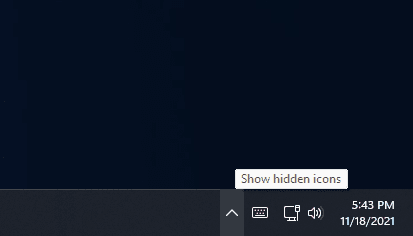
  • You can now use the WIN + Alt + K keyboard shortcut to toggle the new mute icon in the Taskbar when it’s showing.
  • Based on feedback, we’re making emoji search in Portuguese and Polish a little more flexible with keywords containing diacritics.
  • Introducing .NET Framework 4.8.1 our latest .NET Framework that will bring native ARM64 support for the .NET Framework runtime.
  • As Settings > System > Sound in Windows 11 shows a warning when microphone access has been restricted in your privacy settings, we’re removing the notification to alert you about this.
  • Added support for the cancellation of daylight savings time for the Republic of Fiji for 2021.
  • We’re making a change so that going forward on new installs the touch indicator option will now be turned off by default under Settings > Accessibility > Mouse pointer and touch. As part of this change, we’ve added a link to this Settings page from Settings > Bluetooth & Devices > Touch and made it so that the press and hold visual is now always displayed regardless of the setting state.
  • Apps will now launch maximized by default when in the tablet posture on small devices (11-inch screens diagonal and under).
  • [ADDED 11/18] We’ve adjusted the context menu highlight color in places like Task Manager and File Explorer’s “Show more options” to now align with your selected mode (light or dark).

Fixes

[Start]
  • Fixed an issue believed to be the root cause of icons not displaying correctly in the Recommended section of Start (showing the wrong or a generic icon) sometimes.
  • If you open Start and immediate press Shift + F10 or the context menu key, the context menu should be aligned with the search box now.
[Taskbar]
  • Fixed an issue leading to an explorer.exe crash in recent builds if there were issues loading the battery icon in the Taskbar.
  • Made some changes to help the clock in the Taskbar update more reliably, including addressing a recent issue where it wasn’t updating at all over Remote Desktop.
  • Mitigated a positioning issue that could cause the date and time to get clipped off the end of the Taskbar.
  • If you’ve updated the critical and low battery level notification definitions, the battery icon in the Taskbar will now align with that, rather than using the default values to show a warning.
  • Right clicking the date and time in the Taskbar will now dismiss the Notification Center if it’s open, so that you can see the context menu options.
[Input]
  • Keyboard lights (for example, for caps lock) should work properly again now with this build.
  • We’ve made a few more tweaks to our emoji search keywords based on feedback, including improving results for day, night, and face with raised eyebrow. Please continue sharing feedback with us about this under Input and Language > Emoji Panel in the Feedback Hub.
  • Fixed an issue that was causing the kaomoji list in WIN + . to be blank when accessed while using a Chinese IME.
  • Fixed an issue with the emoji panel search results that could lead to a single gif being displayed repeatedly with certain queries.
  • Mitigated an issue resulting in IMEs not working with certain games.
  • Addressed an issue where the options under Settings > Personalization > Typing to change the settings “Show text suggestions & add a spacebar after I choose a text suggestions” for the touch keyboard might unexpectedly not display.
  • If you make a long pause while using voice typing (WIN + H), it should be able to resume listening more reliability now.
  • Fixed some inconsistencies between actual listening status and the microphone visual in voice typing.
  • Text should no longer be unexpectedly duplicated if the caret is moved while using voice typing.
[Windowing]
  • Selecting snap layout options should no longer randomly put windows on your other monitor sometimes.
[Settings]
  • The brightness and volume sliders in Quick Settings should no longer randomly become invisible.
  • Fixed an issue preventing Adjusting active hours from being set to manually.
  • Addressed an issue which could result in the touch keyboard occluding the password entry field when connecting to a network in Quick Settings.
[Other]
  • Fixed a scaling issue that was causing the update prompt dialog (and other dialogs of that style) to get cut off and not draw correctly after the DPI changed.
  • Improved the positioning of the context menu when right clicking the bottom corner of the desktop.
  • Mitigated an issue related to TCPIP which could result in bug checks when waking a device.
  • Fixed an issue where high priority notifications (such as an alarm) would sometimes unexpectedly dismiss without you engaging with it, leading to it randomly reappearing the next time a normal priority notification came in.
NOTE: Some fixes noted here in Insider Preview builds from the active development branch may make their way into the servicing updates for the released version of Windows 11 that became generally available on October 5th.

Known issues

[General]
  • Users updating from Builds 22000.xxx, or earlier, to newer Dev Channel builds using the latest Dev Channel ISO, may receive the following warning message: The build you are trying to install is Flight Signed. To continue installing, enable flight signing. If you receive this message, press the Enable button, reboot the PC, and retry the update.
  • We’re investigating an issue where some PCs are unable to install new builds, or other updates. The PC may report an error code 0x80070002. If you are experiencing this issue, please reboot your PC and try again.
  • Some devices may bugcheck with error code 0xc1900101-0x4001c when installing this build. If you hit this, after the device rolls back to the previous build, you may want to pause updates until we release a fix.
[Start]
  • In some cases, you might be unable to enter text when using Search from Start or the Taskbar. If you experience the issue, press WIN + R on the keyboard to launch the Run dialog box, then close it.
[Taskbar]
  • The Taskbar will sometimes flicker when switching input methods.
[Windowing]
  • Hovering your mouse back and forth between different desktops in Task View will result in the displayed thumbnails and content area unexpectedly shrinking.
[Search]
  • After clicking the Search icon on the Taskbar, the Search panel may not open. If this occurs, restart the “Windows Explorer” process, and open the search panel again.

For developers

You can download the latest Windows Insider SDK at aka.ms/windowsinsidersdk.

SDK NuGet packages are now also flighting at NuGet Gallery | WindowsSDK which include:
These NuGet packages provide more granular access to the SDK and better integrate in CI/CD pipelines.

Your Phone’s new look begins to roll out

The Your Phone app is evolving with an updated design that puts notifications at the center. Keep your phone in your pocket while staying on top of your life. The Your Phone app brings you an organized feed of your real-time notifications across all your most used apps. In this new view, you’ll always have access to your messages, calls, and photos with the added benefit to stay on top of important messages and other notifications more efficiently with this glanceable view. The app also adopts the beauty of Windows 11 design to tie together your seamless experience on your Windows desktop.

Your Phone app on Windows 11 showing apps.

The updated design is gradually rolling out to Windows Insiders.

About the Dev Channel

We have moved the Dev Channel back to receiving builds from our active development branch (RS_PRERELEASE). These builds are from the earliest stage in a new development cycle with the latest work-in-progress code from our engineers. These aren’t always stable builds, and sometimes you will see issues that block key activities or require workarounds while flighting in the Dev Channel. It is important to make sure you read the known issues listed in our blog posts as we document many of these issues with each flight.

These builds are also not matched to a specific release. New features and OS improvements from these builds could show up in future Windows releases when they’re ready, and we may deliver them as full OS updates or servicing releases.

Build numbers are higher in the Dev Channel than the Windows 11 preview builds in the Beta and Release Preview Channels. You will not be able to switch from the Dev Channel to the Beta or Release Preview Channels without doing a clean install back to the released version of Windows 11 currently.

Are you not seeing any of the features listed for this build? Check your Windows Insider Settings to make sure you’re in the Dev Channel. Submit feedback here to let us know if things weren’t working the way you expected.

The desktop watermark you see at the lower right corner of your desktop is normal for these pre-release builds.

Important Insider Links

Thanks,
Amanda & Brandon


Source: Announcing Windows 11 Insider Preview Build 22504


UUP Dump:

64-bit ISO download:
Select language for Cumulative Update for Windows 11 Insider Preview (10.0.22504.1010) amd64

ARM64 ISO download: Select language for Cumulative Update for Windows 11 Insider Preview (10.0.22504.1010) arm64

 
Last edited:
I don't think that is OS related. Does anyone else report that issue?
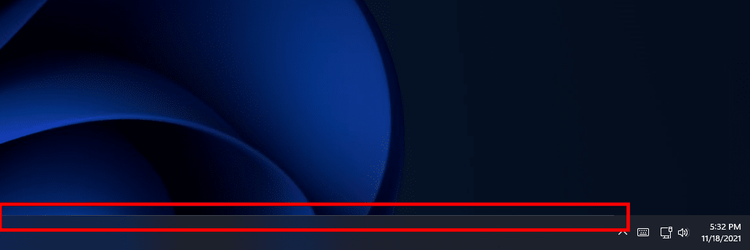
It's been pretty widely reported. It's a (probably) 1-pixel line, at the top of the taskbar, that ends right where the notification area starts. Just verified it's still there, by putting it up against a black background. One of those little things I mentioned earlier, but it should be addressed.
 

My Computer My Computer

At a glance

Windows 11 (Dev Channel)Intel Core i9-10980XE 3 GHz 18-CoreCorsair Vengeance RGB Pro 64 GB (4 x 16 GB) D...Asus GeForce RTX 3090 24 GB STRIX GAMING OC
OS
Windows 11 (Dev Channel)
Computer type
PC/Desktop
Manufacturer/Model
Homebuilt
CPU
Intel Core i9-10980XE 3 GHz 18-Core
Motherboard
ASRock X299 Taichi CLX ATX LGA2066
Memory
Corsair Vengeance RGB Pro 64 GB (4 x 16 GB) DDR4-3600 CL18
Graphics Card(s)
Asus GeForce RTX 3090 24 GB STRIX GAMING OC
Sound Card
Onboard
Monitor(s) Displays
HP Pavilion 32 QHD
Screen Resolution
2560 x 1440
Hard Drives
Samsung 980 Pro 2 TB M.2-2280 NVME
PSU
Super Flower
Case
NZXT 710i
Cooling
NZXT Kraken X63
Keyboard
Logitech G910
Mouse
Logitech G502
It's been pretty widely reported. It's a (probably) 1-pixel line, at the top of the taskbar, that ends right where the notification area starts. Just verified it's still there, by putting it up against a black background. One of those little things I mentioned earlier, but it should be addressed.
you mean this???

1637274838020.png
 

My Computers My Computers

  • At a glance

    Windows 11 ProAMD Ryzen 7 9800X3D32GB DDR5 CL30 Kingston FuryASUS Prime Radeon RX 9060 XT OC Edition 16GB
    OS
    Windows 11 Pro
    Computer type
    PC/Desktop
    CPU
    AMD Ryzen 7 9800X3D
    Motherboard
    MSI PRO B850-P Wifi
    Memory
    32GB DDR5 CL30 Kingston Fury
    Graphics Card(s)
    ASUS Prime Radeon RX 9060 XT OC Edition 16GB
    Monitor(s) Displays
    LG Ultrawide 34" 1440p+ MSI 27" 4K UHD
    Screen Resolution
    3440x1440
    Hard Drives
    Main Boot Drive : 512GB Adata XPG RGB Gen3x4 NVMe M.2 SSD
    PSU
    EVGA 750 Watts 80+ Gold
    Case
    Deepcool Genome II
    Cooling
    Thermalright Burst Assassin 120
    Internet Speed
    FTTH 3Gbps
    Browser
    Chrome
    Antivirus
    "Moderna"
  • At a glance

    Windows 11 Proi7-4790K16GB Corsair Vengeance ProMSI R9 290
    Operating System
    Windows 11 Pro
    Computer type
    PC/Desktop
    CPU
    i7-4790K
    Motherboard
    ASRock Xtreme6 Z97
    Memory
    16GB Corsair Vengeance Pro
    Graphics card(s)
    MSI R9 290
    Monitor(s) Displays
    LG Ultrawide 34"
    Screen Resolution
    3440x1440
    Hard Drives
    500GB Adata SSD (OS Only)
    PSU
    Thermaltake 475 Watts 80 Bronze
    Case
    Thermaltake Commander I Snow Edition
    Cooling
    Deep Cool Archer Air Cooler
    Keyboard
    Armageddon MKA-5R RGB-Hornet
    Mouse
    Logitech G402
    Internet Speed
    1Gbps
    Browser
    Chrome
    Antivirus
    Moderna :)

My Computer My Computer

At a glance

Windows 11 (Dev Channel)Intel Core i9-10980XE 3 GHz 18-CoreCorsair Vengeance RGB Pro 64 GB (4 x 16 GB) D...Asus GeForce RTX 3090 24 GB STRIX GAMING OC
OS
Windows 11 (Dev Channel)
Computer type
PC/Desktop
Manufacturer/Model
Homebuilt
CPU
Intel Core i9-10980XE 3 GHz 18-Core
Motherboard
ASRock X299 Taichi CLX ATX LGA2066
Memory
Corsair Vengeance RGB Pro 64 GB (4 x 16 GB) DDR4-3600 CL18
Graphics Card(s)
Asus GeForce RTX 3090 24 GB STRIX GAMING OC
Sound Card
Onboard
Monitor(s) Displays
HP Pavilion 32 QHD
Screen Resolution
2560 x 1440
Hard Drives
Samsung 980 Pro 2 TB M.2-2280 NVME
PSU
Super Flower
Case
NZXT 710i
Cooling
NZXT Kraken X63
Keyboard
Logitech G910
Mouse
Logitech G502
Thanks. Too lazy to pull a screenie. You rock.
that is not an issue. It's all around any floating window. It is an effect. If you switch to light theme, it becomes black.

1637275055670.png
 

My Computers My Computers

  • At a glance

    Windows 11 ProAMD Ryzen 7 9800X3D32GB DDR5 CL30 Kingston FuryASUS Prime Radeon RX 9060 XT OC Edition 16GB
    OS
    Windows 11 Pro
    Computer type
    PC/Desktop
    CPU
    AMD Ryzen 7 9800X3D
    Motherboard
    MSI PRO B850-P Wifi
    Memory
    32GB DDR5 CL30 Kingston Fury
    Graphics Card(s)
    ASUS Prime Radeon RX 9060 XT OC Edition 16GB
    Monitor(s) Displays
    LG Ultrawide 34" 1440p+ MSI 27" 4K UHD
    Screen Resolution
    3440x1440
    Hard Drives
    Main Boot Drive : 512GB Adata XPG RGB Gen3x4 NVMe M.2 SSD
    PSU
    EVGA 750 Watts 80+ Gold
    Case
    Deepcool Genome II
    Cooling
    Thermalright Burst Assassin 120
    Internet Speed
    FTTH 3Gbps
    Browser
    Chrome
    Antivirus
    "Moderna"
  • At a glance

    Windows 11 Proi7-4790K16GB Corsair Vengeance ProMSI R9 290
    Operating System
    Windows 11 Pro
    Computer type
    PC/Desktop
    CPU
    i7-4790K
    Motherboard
    ASRock Xtreme6 Z97
    Memory
    16GB Corsair Vengeance Pro
    Graphics card(s)
    MSI R9 290
    Monitor(s) Displays
    LG Ultrawide 34"
    Screen Resolution
    3440x1440
    Hard Drives
    500GB Adata SSD (OS Only)
    PSU
    Thermaltake 475 Watts 80 Bronze
    Case
    Thermaltake Commander I Snow Edition
    Cooling
    Deep Cool Archer Air Cooler
    Keyboard
    Armageddon MKA-5R RGB-Hornet
    Mouse
    Logitech G402
    Internet Speed
    1Gbps
    Browser
    Chrome
    Antivirus
    Moderna :)
Thanks. Too lazy to pull a screenie. You rock.
On secondary screen (without date and time), it is just a continuous line.

1637275185775.png
 

My Computers My Computers

  • At a glance

    Windows 11 ProAMD Ryzen 7 9800X3D32GB DDR5 CL30 Kingston FuryASUS Prime Radeon RX 9060 XT OC Edition 16GB
    OS
    Windows 11 Pro
    Computer type
    PC/Desktop
    CPU
    AMD Ryzen 7 9800X3D
    Motherboard
    MSI PRO B850-P Wifi
    Memory
    32GB DDR5 CL30 Kingston Fury
    Graphics Card(s)
    ASUS Prime Radeon RX 9060 XT OC Edition 16GB
    Monitor(s) Displays
    LG Ultrawide 34" 1440p+ MSI 27" 4K UHD
    Screen Resolution
    3440x1440
    Hard Drives
    Main Boot Drive : 512GB Adata XPG RGB Gen3x4 NVMe M.2 SSD
    PSU
    EVGA 750 Watts 80+ Gold
    Case
    Deepcool Genome II
    Cooling
    Thermalright Burst Assassin 120
    Internet Speed
    FTTH 3Gbps
    Browser
    Chrome
    Antivirus
    "Moderna"
  • At a glance

    Windows 11 Proi7-4790K16GB Corsair Vengeance ProMSI R9 290
    Operating System
    Windows 11 Pro
    Computer type
    PC/Desktop
    CPU
    i7-4790K
    Motherboard
    ASRock Xtreme6 Z97
    Memory
    16GB Corsair Vengeance Pro
    Graphics card(s)
    MSI R9 290
    Monitor(s) Displays
    LG Ultrawide 34"
    Screen Resolution
    3440x1440
    Hard Drives
    500GB Adata SSD (OS Only)
    PSU
    Thermaltake 475 Watts 80 Bronze
    Case
    Thermaltake Commander I Snow Edition
    Cooling
    Deep Cool Archer Air Cooler
    Keyboard
    Armageddon MKA-5R RGB-Hornet
    Mouse
    Logitech G402
    Internet Speed
    1Gbps
    Browser
    Chrome
    Antivirus
    Moderna :)
that is not an issue. It's all around any floating window. It is an effect. If you switch to light theme, it becomes black.

View attachment 14030
Then, I suppose the issue is that it doesn't exist in the notification area? I think folks just see it as an inconsistency in the UI, and that's why it sticks out.
 

My Computer My Computer

At a glance

Windows 11 (Dev Channel)Intel Core i9-10980XE 3 GHz 18-CoreCorsair Vengeance RGB Pro 64 GB (4 x 16 GB) D...Asus GeForce RTX 3090 24 GB STRIX GAMING OC
OS
Windows 11 (Dev Channel)
Computer type
PC/Desktop
Manufacturer/Model
Homebuilt
CPU
Intel Core i9-10980XE 3 GHz 18-Core
Motherboard
ASRock X299 Taichi CLX ATX LGA2066
Memory
Corsair Vengeance RGB Pro 64 GB (4 x 16 GB) DDR4-3600 CL18
Graphics Card(s)
Asus GeForce RTX 3090 24 GB STRIX GAMING OC
Sound Card
Onboard
Monitor(s) Displays
HP Pavilion 32 QHD
Screen Resolution
2560 x 1440
Hard Drives
Samsung 980 Pro 2 TB M.2-2280 NVME
PSU
Super Flower
Case
NZXT 710i
Cooling
NZXT Kraken X63
Keyboard
Logitech G910
Mouse
Logitech G502
Then, I suppose the issue is that it doesn't exist in the notification area? I think folks just see it as an inconsistency in the UI, and that's why it sticks out.
It separates the main taskbar from that corner interactive notification bar.

1637275433718.png
 

My Computers My Computers

  • At a glance

    Windows 11 ProAMD Ryzen 7 9800X3D32GB DDR5 CL30 Kingston FuryASUS Prime Radeon RX 9060 XT OC Edition 16GB
    OS
    Windows 11 Pro
    Computer type
    PC/Desktop
    CPU
    AMD Ryzen 7 9800X3D
    Motherboard
    MSI PRO B850-P Wifi
    Memory
    32GB DDR5 CL30 Kingston Fury
    Graphics Card(s)
    ASUS Prime Radeon RX 9060 XT OC Edition 16GB
    Monitor(s) Displays
    LG Ultrawide 34" 1440p+ MSI 27" 4K UHD
    Screen Resolution
    3440x1440
    Hard Drives
    Main Boot Drive : 512GB Adata XPG RGB Gen3x4 NVMe M.2 SSD
    PSU
    EVGA 750 Watts 80+ Gold
    Case
    Deepcool Genome II
    Cooling
    Thermalright Burst Assassin 120
    Internet Speed
    FTTH 3Gbps
    Browser
    Chrome
    Antivirus
    "Moderna"
  • At a glance

    Windows 11 Proi7-4790K16GB Corsair Vengeance ProMSI R9 290
    Operating System
    Windows 11 Pro
    Computer type
    PC/Desktop
    CPU
    i7-4790K
    Motherboard
    ASRock Xtreme6 Z97
    Memory
    16GB Corsair Vengeance Pro
    Graphics card(s)
    MSI R9 290
    Monitor(s) Displays
    LG Ultrawide 34"
    Screen Resolution
    3440x1440
    Hard Drives
    500GB Adata SSD (OS Only)
    PSU
    Thermaltake 475 Watts 80 Bronze
    Case
    Thermaltake Commander I Snow Edition
    Cooling
    Deep Cool Archer Air Cooler
    Keyboard
    Armageddon MKA-5R RGB-Hornet
    Mouse
    Logitech G402
    Internet Speed
    1Gbps
    Browser
    Chrome
    Antivirus
    Moderna :)
I'm not trying to die on a hill, here, friend. Some people have reported it as inconsistent. Each to their own.
 

My Computer My Computer

At a glance

Windows 11 (Dev Channel)Intel Core i9-10980XE 3 GHz 18-CoreCorsair Vengeance RGB Pro 64 GB (4 x 16 GB) D...Asus GeForce RTX 3090 24 GB STRIX GAMING OC
OS
Windows 11 (Dev Channel)
Computer type
PC/Desktop
Manufacturer/Model
Homebuilt
CPU
Intel Core i9-10980XE 3 GHz 18-Core
Motherboard
ASRock X299 Taichi CLX ATX LGA2066
Memory
Corsair Vengeance RGB Pro 64 GB (4 x 16 GB) DDR4-3600 CL18
Graphics Card(s)
Asus GeForce RTX 3090 24 GB STRIX GAMING OC
Sound Card
Onboard
Monitor(s) Displays
HP Pavilion 32 QHD
Screen Resolution
2560 x 1440
Hard Drives
Samsung 980 Pro 2 TB M.2-2280 NVME
PSU
Super Flower
Case
NZXT 710i
Cooling
NZXT Kraken X63
Keyboard
Logitech G910
Mouse
Logitech G502
I'm not trying to die on a hill, here, friend. Some people have reported it as inconsistent. Each to their own.
I am just saying, it is not an issue. It is by design.
 

My Computers My Computers

  • At a glance

    Windows 11 ProAMD Ryzen 7 9800X3D32GB DDR5 CL30 Kingston FuryASUS Prime Radeon RX 9060 XT OC Edition 16GB
    OS
    Windows 11 Pro
    Computer type
    PC/Desktop
    CPU
    AMD Ryzen 7 9800X3D
    Motherboard
    MSI PRO B850-P Wifi
    Memory
    32GB DDR5 CL30 Kingston Fury
    Graphics Card(s)
    ASUS Prime Radeon RX 9060 XT OC Edition 16GB
    Monitor(s) Displays
    LG Ultrawide 34" 1440p+ MSI 27" 4K UHD
    Screen Resolution
    3440x1440
    Hard Drives
    Main Boot Drive : 512GB Adata XPG RGB Gen3x4 NVMe M.2 SSD
    PSU
    EVGA 750 Watts 80+ Gold
    Case
    Deepcool Genome II
    Cooling
    Thermalright Burst Assassin 120
    Internet Speed
    FTTH 3Gbps
    Browser
    Chrome
    Antivirus
    "Moderna"
  • At a glance

    Windows 11 Proi7-4790K16GB Corsair Vengeance ProMSI R9 290
    Operating System
    Windows 11 Pro
    Computer type
    PC/Desktop
    CPU
    i7-4790K
    Motherboard
    ASRock Xtreme6 Z97
    Memory
    16GB Corsair Vengeance Pro
    Graphics card(s)
    MSI R9 290
    Monitor(s) Displays
    LG Ultrawide 34"
    Screen Resolution
    3440x1440
    Hard Drives
    500GB Adata SSD (OS Only)
    PSU
    Thermaltake 475 Watts 80 Bronze
    Case
    Thermaltake Commander I Snow Edition
    Cooling
    Deep Cool Archer Air Cooler
    Keyboard
    Armageddon MKA-5R RGB-Hornet
    Mouse
    Logitech G402
    Internet Speed
    1Gbps
    Browser
    Chrome
    Antivirus
    Moderna :)
I am just saying, it is not an issue. It is by design.
Hmm, It only seems to have been added for me in not this update but the previous one, Only reason i noticed is it sends my OCD loopy. Around windows etc fair enough of course, But thats just silly. image_2021-11-18_224923.png

Could have atleast made it the full bar
 

My Computer My Computer

At a glance

11[email protected]Viper Steelseries 32gb@ 3600mhzGigabyte 2070 Super 8GB, +200 core + 600 memory
OS
11
Computer type
PC/Desktop
Manufacturer/Model
Custom
CPU
[email protected]
Motherboard
Gigabyte Gaming X Z490
Memory
Viper Steelseries 32gb@ 3600mhz
Graphics Card(s)
Gigabyte 2070 Super 8GB, +200 core + 600 memory
Monitor(s) Displays
ASUS 4k HDR, Two 1080p Benq and Samsung
Screen Resolution
3840x2160/2560x1440/1920x1080
Hard Drives
Adata XPG SX8200 PRO 1tb
Samsung EVO 870 500GB
PSU
Corsair RX 650
Case
NZXT h510
Cooling
CM HYPER 212 RGB
Keyboard
Razer Ornata Chroma
Mouse
Steelseries Rival 710
Hmm, It only seems to have been added for me in not this update but the previous one, Only reason i noticed is it sends my OCD loopy. Around windows etc fair enough of course, But thats just silly. View attachment 14033

Could have atleast made it the full bar
Totally not an issue here because my 34" screen it too wide to notice that corner. 🤣 And my taskbar is set to hide.
It is not noticeable on light theme.
 

My Computers My Computers

  • At a glance

    Windows 11 ProAMD Ryzen 7 9800X3D32GB DDR5 CL30 Kingston FuryASUS Prime Radeon RX 9060 XT OC Edition 16GB
    OS
    Windows 11 Pro
    Computer type
    PC/Desktop
    CPU
    AMD Ryzen 7 9800X3D
    Motherboard
    MSI PRO B850-P Wifi
    Memory
    32GB DDR5 CL30 Kingston Fury
    Graphics Card(s)
    ASUS Prime Radeon RX 9060 XT OC Edition 16GB
    Monitor(s) Displays
    LG Ultrawide 34" 1440p+ MSI 27" 4K UHD
    Screen Resolution
    3440x1440
    Hard Drives
    Main Boot Drive : 512GB Adata XPG RGB Gen3x4 NVMe M.2 SSD
    PSU
    EVGA 750 Watts 80+ Gold
    Case
    Deepcool Genome II
    Cooling
    Thermalright Burst Assassin 120
    Internet Speed
    FTTH 3Gbps
    Browser
    Chrome
    Antivirus
    "Moderna"
  • At a glance

    Windows 11 Proi7-4790K16GB Corsair Vengeance ProMSI R9 290
    Operating System
    Windows 11 Pro
    Computer type
    PC/Desktop
    CPU
    i7-4790K
    Motherboard
    ASRock Xtreme6 Z97
    Memory
    16GB Corsair Vengeance Pro
    Graphics card(s)
    MSI R9 290
    Monitor(s) Displays
    LG Ultrawide 34"
    Screen Resolution
    3440x1440
    Hard Drives
    500GB Adata SSD (OS Only)
    PSU
    Thermaltake 475 Watts 80 Bronze
    Case
    Thermaltake Commander I Snow Edition
    Cooling
    Deep Cool Archer Air Cooler
    Keyboard
    Armageddon MKA-5R RGB-Hornet
    Mouse
    Logitech G402
    Internet Speed
    1Gbps
    Browser
    Chrome
    Antivirus
    Moderna :)
Totally not an issue here because my 34" screen it too wide to notice that corner. 🤣 And my taskbar is set to hide.
It is not noticeable on light theme.
Or give yourself a sore neck turning to look for it xD.
I change my themes, wallpapers icons etc weekly, Or most weeks xD. albeit on my 2nd monitor, I cant see the line at all :S
 

My Computer My Computer

At a glance

11[email protected]Viper Steelseries 32gb@ 3600mhzGigabyte 2070 Super 8GB, +200 core + 600 memory
OS
11
Computer type
PC/Desktop
Manufacturer/Model
Custom
CPU
[email protected]
Motherboard
Gigabyte Gaming X Z490
Memory
Viper Steelseries 32gb@ 3600mhz
Graphics Card(s)
Gigabyte 2070 Super 8GB, +200 core + 600 memory
Monitor(s) Displays
ASUS 4k HDR, Two 1080p Benq and Samsung
Screen Resolution
3840x2160/2560x1440/1920x1080
Hard Drives
Adata XPG SX8200 PRO 1tb
Samsung EVO 870 500GB
PSU
Corsair RX 650
Case
NZXT h510
Cooling
CM HYPER 212 RGB
Keyboard
Razer Ornata Chroma
Mouse
Steelseries Rival 710
Or give yourself a sore neck turning to look for it xD.
I change my themes, wallpapers icons etc weekly, Or most weeks xD. albeit on my 2nd monitor, I cant see the line at all :S
Well, it is also visible on my 4.5" 3rd screen... :lmao:

1637277195587.png
 

My Computers My Computers

  • At a glance

    Windows 11 ProAMD Ryzen 7 9800X3D32GB DDR5 CL30 Kingston FuryASUS Prime Radeon RX 9060 XT OC Edition 16GB
    OS
    Windows 11 Pro
    Computer type
    PC/Desktop
    CPU
    AMD Ryzen 7 9800X3D
    Motherboard
    MSI PRO B850-P Wifi
    Memory
    32GB DDR5 CL30 Kingston Fury
    Graphics Card(s)
    ASUS Prime Radeon RX 9060 XT OC Edition 16GB
    Monitor(s) Displays
    LG Ultrawide 34" 1440p+ MSI 27" 4K UHD
    Screen Resolution
    3440x1440
    Hard Drives
    Main Boot Drive : 512GB Adata XPG RGB Gen3x4 NVMe M.2 SSD
    PSU
    EVGA 750 Watts 80+ Gold
    Case
    Deepcool Genome II
    Cooling
    Thermalright Burst Assassin 120
    Internet Speed
    FTTH 3Gbps
    Browser
    Chrome
    Antivirus
    "Moderna"
  • At a glance

    Windows 11 Proi7-4790K16GB Corsair Vengeance ProMSI R9 290
    Operating System
    Windows 11 Pro
    Computer type
    PC/Desktop
    CPU
    i7-4790K
    Motherboard
    ASRock Xtreme6 Z97
    Memory
    16GB Corsair Vengeance Pro
    Graphics card(s)
    MSI R9 290
    Monitor(s) Displays
    LG Ultrawide 34"
    Screen Resolution
    3440x1440
    Hard Drives
    500GB Adata SSD (OS Only)
    PSU
    Thermaltake 475 Watts 80 Bronze
    Case
    Thermaltake Commander I Snow Edition
    Cooling
    Deep Cool Archer Air Cooler
    Keyboard
    Armageddon MKA-5R RGB-Hornet
    Mouse
    Logitech G402
    Internet Speed
    1Gbps
    Browser
    Chrome
    Antivirus
    Moderna :)

My Computer My Computer

At a glance

11[email protected]Viper Steelseries 32gb@ 3600mhzGigabyte 2070 Super 8GB, +200 core + 600 memory
OS
11
Computer type
PC/Desktop
Manufacturer/Model
Custom
CPU
[email protected]
Motherboard
Gigabyte Gaming X Z490
Memory
Viper Steelseries 32gb@ 3600mhz
Graphics Card(s)
Gigabyte 2070 Super 8GB, +200 core + 600 memory
Monitor(s) Displays
ASUS 4k HDR, Two 1080p Benq and Samsung
Screen Resolution
3840x2160/2560x1440/1920x1080
Hard Drives
Adata XPG SX8200 PRO 1tb
Samsung EVO 870 500GB
PSU
Corsair RX 650
Case
NZXT h510
Cooling
CM HYPER 212 RGB
Keyboard
Razer Ornata Chroma
Mouse
Steelseries Rival 710
Why did ya skip you're 2nd screen and go straight to the 3rd xD. Yeah it simply just aint there on my 2nd xD
Comment #45 above is my 2nd screen.
 

My Computers My Computers

  • At a glance

    Windows 11 ProAMD Ryzen 7 9800X3D32GB DDR5 CL30 Kingston FuryASUS Prime Radeon RX 9060 XT OC Edition 16GB
    OS
    Windows 11 Pro
    Computer type
    PC/Desktop
    CPU
    AMD Ryzen 7 9800X3D
    Motherboard
    MSI PRO B850-P Wifi
    Memory
    32GB DDR5 CL30 Kingston Fury
    Graphics Card(s)
    ASUS Prime Radeon RX 9060 XT OC Edition 16GB
    Monitor(s) Displays
    LG Ultrawide 34" 1440p+ MSI 27" 4K UHD
    Screen Resolution
    3440x1440
    Hard Drives
    Main Boot Drive : 512GB Adata XPG RGB Gen3x4 NVMe M.2 SSD
    PSU
    EVGA 750 Watts 80+ Gold
    Case
    Deepcool Genome II
    Cooling
    Thermalright Burst Assassin 120
    Internet Speed
    FTTH 3Gbps
    Browser
    Chrome
    Antivirus
    "Moderna"
  • At a glance

    Windows 11 Proi7-4790K16GB Corsair Vengeance ProMSI R9 290
    Operating System
    Windows 11 Pro
    Computer type
    PC/Desktop
    CPU
    i7-4790K
    Motherboard
    ASRock Xtreme6 Z97
    Memory
    16GB Corsair Vengeance Pro
    Graphics card(s)
    MSI R9 290
    Monitor(s) Displays
    LG Ultrawide 34"
    Screen Resolution
    3440x1440
    Hard Drives
    500GB Adata SSD (OS Only)
    PSU
    Thermaltake 475 Watts 80 Bronze
    Case
    Thermaltake Commander I Snow Edition
    Cooling
    Deep Cool Archer Air Cooler
    Keyboard
    Armageddon MKA-5R RGB-Hornet
    Mouse
    Logitech G402
    Internet Speed
    1Gbps
    Browser
    Chrome
    Antivirus
    Moderna :)

My Computer My Computer

At a glance

11[email protected]Viper Steelseries 32gb@ 3600mhzGigabyte 2070 Super 8GB, +200 core + 600 memory
OS
11
Computer type
PC/Desktop
Manufacturer/Model
Custom
CPU
[email protected]
Motherboard
Gigabyte Gaming X Z490
Memory
Viper Steelseries 32gb@ 3600mhz
Graphics Card(s)
Gigabyte 2070 Super 8GB, +200 core + 600 memory
Monitor(s) Displays
ASUS 4k HDR, Two 1080p Benq and Samsung
Screen Resolution
3840x2160/2560x1440/1920x1080
Hard Drives
Adata XPG SX8200 PRO 1tb
Samsung EVO 870 500GB
PSU
Corsair RX 650
Case
NZXT h510
Cooling
CM HYPER 212 RGB
Keyboard
Razer Ornata Chroma
Mouse
Steelseries Rival 710

My Computer My Computer

At a glance

WIN 11 PROi-716
OS
WIN 11 PRO
Computer type
PC/Desktop
Manufacturer/Model
Dell xps 8940
CPU
i-7
Memory
16

My Computer My Computer

At a glance

WindowsXP/7/8/8.1/10/11,Linux,Android,FreeBSD...Intel® Core™ i7-8750H 8th Gen 2.2Ghz up to 4....64GB using 2x32GB CL16 Mushkin redLine modulesIntel UHD 630 & NVIDIA GeForce GTX 1050 Ti wi...
OS
WindowsXP/7/8/8.1/10/11,Linux,Android,FreeBSD Unix
Computer type
Laptop
Manufacturer/Model
Dell XPS 15 9570
CPU
Intel® Core™ i7-8750H 8th Gen 2.2Ghz up to 4.1Ghz
Motherboard
Dell XPS 15 9570
Memory
64GB using 2x32GB CL16 Mushkin redLine modules
Graphics Card(s)
Intel UHD 630 & NVIDIA GeForce GTX 1050 Ti with 4GB DDR5
Sound Card
Realtek ALC3266-CG
Monitor(s) Displays
15.6" 4K Touch UltraHD 3840x2160 made by Sharp
Screen Resolution
3840x2160 4K UltraHD
Hard Drives
Samsung MZ-V9P4T0B/AM 990 PRO 4TB PCIe®4.0 NVMe™ M.2 SSD was Toshiba KXG60ZNV1T02 NVMe 1TB SSD
PSU
Dell XPS 15 9570
Case
Dell XPS 15 9570
Cooling
Stock
Keyboard
Stock
Mouse
SwitftPoint ProPoint
Internet Speed
Comcast/XFinity 1.44Gbps/42.5Mbps
Browser
Microsoft EDGE (Chromium based) & Google Chrome
Antivirus
Windows Defender that came with Windows
Installed fine--will be nice when Microsoft gets around to listing and fixing issues that matter--like Taskbar positioning. The "answer" Microsoft provided about the huge amount of feedback on the Hub devoted to this issue--is no answer at all, unfortunately. If it is beyond the ability of the current Win11 Dev-channel team to fix, or Microsoft isn't going to do it because they have forgotten how to do it--the least Microsoft could do is say so! Superficial crap like emoj's is no substitute for doing the important stuff. I'm really missing the old Win10 fast-ring devs!
 

My Computer My Computer

At a glance

Win11 Experimental Channel for 26H2 buildsAMD R7 7800X3DGSkill 2x16GB @ 6400MT/sXFX 9070 XT SWIFT tri-fan (PCIe5.0)
OS
Win11 Experimental Channel for 26H2 builds
Computer type
PC/Desktop
Manufacturer/Model
a cherry-picked assembly
CPU
AMD R7 7800X3D
Motherboard
MSI x870 Tomahawk Wi-Fi, 8-layer, 2 oz copper, server PCB
Memory
GSkill 2x16GB @ 6400MT/s
Graphics Card(s)
XFX 9070 XT SWIFT tri-fan (PCIe5.0)
Sound Card
Creative Labs G8 USB External Sound device, Gaming DAC, Sound Card & Earphone AMP.. HIGHLY RECOMMENDED, btw. Totally changed my opinion of external USB sound. I like!...;)
Monitor(s) Displays
Philips 42" OLED @ 4k
Screen Resolution
3840x2160
Hard Drives
*Boot: Samsung 980 Pro 2 TB NVMe (PCIe4x4)
*Samsung 980 EVO NVMe 500GB (PCIe 4x4)
*Kingston SNV3S2000G 2TB NVMe (PCIe4x4)
*Samsung 960 EVO 250GB NVMe(PCIe3x2)
*8TB Toshiba x300 HDD
*ST4000DM004 S3 4TB HDD
PSU
Gigabyte 850W Gold, Rev 2
Case
Lian Li Lancool 217, white, with wood trim, very nice looking--tired of black, 5-fans standard
Cooling
Air coutesy Lian Li
Keyboard
Cherry MX 2.0S RGB
Mouse
Razer Basilisk V3 24k DPI
Internet Speed
~950Mbps down and up!
Browser
Firefox x64 DE
Antivirus
Defender
Other Info
Great New system. Exceeds my expectations by quite a bit, btw. I love the USB G8 SoundBlaster, it's quite an improvement over the G6!
Installed fine--will be nice when Microsoft gets around to listing and fixing issues that matter--like Taskbar positioning. The "answer" Microsoft provided about the huge amount of feedback on the Hub devoted to this issue--is no answer at all, unfortunately. If it is beyond the ability of the current Win11 Dev-channel team to fix, or Microsoft isn't going to do it because they have forgotten how to do it--the least Microsoft could do is say so! Superficial crap like emoj's is no substitute for doing the important stuff. I'm really missing the old Win10 fast-ring devs!
Completely agree. I'm sick to death of all the emoji crap. WTAF? I for one would like to see support dragging and dropping files onto the app icons put back. PUT BACK!!. Not added!!
 

My Computer My Computer

At a glance

Windows 11Intel(R) Core(TM) i7-107032 GBytes DDR4-2667 (1333 MHz)NVIDIA GeForce GT 1030
OS
Windows 11
Computer type
PC/Desktop
Manufacturer/Model
PCSpecialist
CPU
Intel(R) Core(TM) i7-1070
Motherboard
TUF GAMING B460-PLUS
Memory
32 GBytes DDR4-2667 (1333 MHz)
Graphics Card(s)
NVIDIA GeForce GT 1030
Sound Card
ONBOARD 6 CHANNEL (5.1) HIGH DEF AUDIO (AS STANDARD)
Monitor(s) Displays
Samsung U32J590UQU
Screen Resolution
4k
Hard Drives
SYSTEM Win 10 237.22GB SSD Disk 0 238.47GB M2 (mobo)
DATA Data 931.41GB HD 2.5" Disk 1 931.51GB SATA3
BACKUPS Backups 2TB HD 3.5" Disk 2 2TB SATA3
PSU
CORSAIR 550W CV SERIES™ CV-550 POWER SUPPLY
Case
PCS 3601 CASE
Cooling
CoolerMaster Hyper 212 (120mm) Fan CPU Cooler Black Edition
Internet Speed
57/18 Mbps
Browser
Vivaldi
Antivirus
Kaspersky Total Security
Back
Top Bottom