UPDATE 9/08:
 www.elevenforum.com


 blogs.windows.com
Check Windows Updates
ISO from Microsoft:
 www.elevenforum.com
UUP Dump:
64-bit ISO download:

ARM64 ISO download:
 www.elevenforum.com
Windows 11 Insider Beta (26H1) build 28020.2904 - Sept. 8
Microsoft Support: Source: https://blogs.windows.com/windows-insider/2026/09/08/announcing-new-builds-for-8-september-2026/ https://learn.microsoft.com/en-us/windows-insider/release-notes/beta-26h1/preview-build-28020-2904 Check Windows Updates UUP Dump: 64-bit ISO download: x ARM64...
www.elevenforum.com
Windows Insider Blog:
Changes and improvements gradually being rolled out
- This update includes a small set of general improvements and fixes that improve the overall experience for Insiders running this build on their PCs.
[Personalization]
- Improved reliability of the Personalization > Background page in Settings.
- Added support for using DIB image files as desktop backgrounds.
- Improved reliability of desktop slideshow transitions on newly created accounts.
- Improved the resolution of previews when selecting a desktop background in Personalization > Background.
- Improved the desktop background preview display in Settings for users with portrait mode monitors.
- Improved reliability of processing desktop wallpaper changes when they happen in quick succession.
- Added support for using slideshow wallpapers with multiple desktops so that it won't automatically switch you back to Picture.
- Fixed an issue that caused some Insiders to see their wallpaper go black after every reboot in the previous flight.
[Windows Recovery]
- New enhancements to networking in WinRE
- We're adding a new WinRE networking capability that allows the Windows Recovery Environment to automatically reuse eligible Wi-Fi profiles already saved in the main Windows OS, including supported certificate-based Wi-Fi networks. Previously, WinRE could automatically connect only to wired unauthenticated Ethernet or Wi-Fi networks that were separately preconfigured for WinRE, while users had to manually connect to other WPA2/3 networks by entering a password. With this update, WinRE can use saved Wi-Fi profile information when a recovery workflow requires connectivity, helping devices get online automatically during scenarios such as quick machine recovery or cloud rebuild without requiring users or IT admins to separately preconfigure Wi-Fi credentials in WinRE. By default, this capability is enabled. However, IT admins can disable this functionality if desired.
- To test this feature in your environment, see Test networking in WinRE.
[Print Management]
- We're temporarily removing the modernized Print Management experience from Windows Insider Preview builds while we continue refining the experience based on feedback. The existing Print Management tools remain available and are unaffected.
- We plan to bring the updated Print Management experience back to Windows Insiders in a future build after additional improvements are complete.
[File Explorer]
- File Explorer Home now preserves the state of sections (expanded or collapsed), so you can pick up where you left off.
[Magnifier]
- We're giving Magnifier's toolbar a modernized visual refresh.
- Updated icons. We've updated Magnifier's toolbar icons to align with Windows 11 visual design, giving the tool a cleaner, more modernized feel.
- Refined spacing and padding. We've adjusted the padding and spacing across the toolbar for a more polished, consistent layout.
- What's not changing: The way Magnifier works. Your views, zoom controls, keyboard shortcuts, and Read Aloud all behave exactly as they did in earlier versions.
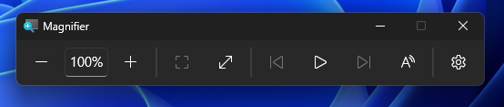
UI showing updated icons and a more polished, consistent layout.
[Emoji]
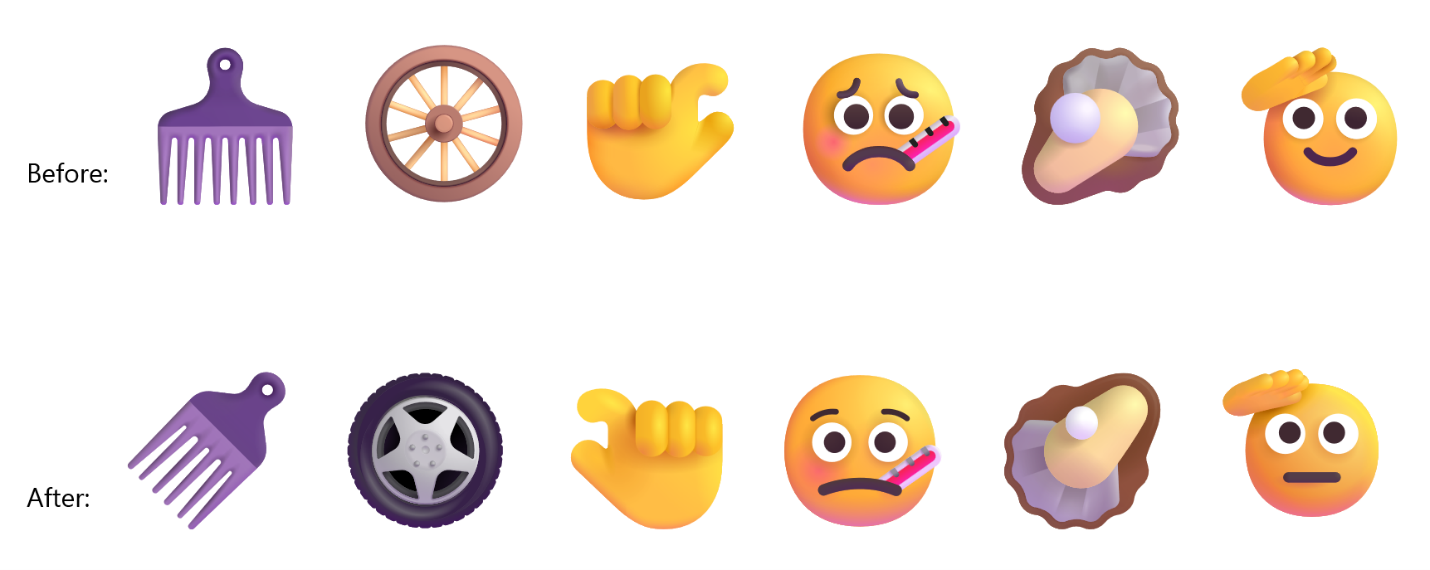
- We're adding support for Emoji 17.0. This includes new emoji such as distorted face, fight cloud, and hairy creature. To try the new emoji, press the Windows key plus Period (.) to open the emoji panel and insert them from there.

Open Emoji Panel in Windows 11
This tutorial will show you how to open the Emoji Panel in Windows 11. An emoji is a pictogram, logogram, ideogram or smiley embedded in text. Windows 11 includes 3D Fluent emoji you can use from the Emoji Panel. Starting with Windows 11 build 22631.3810, Microsoft is adding support for Emoji...
www.elevenforum.com

- As part of this effort, we've also made some slight adjustments to the design of some of our current emoji to improve consistency across platforms. This includes the saluting face, face with peeking eye, goose, lotus, and kissing cat emoji.
[Taskbar]
- Improved reliability of loading the system tray area of the taskbar.
Reminders for Windows Insiders in the Beta (26H1) channel
- The desktop watermark shown at the lower right corner of the desktop is normal for Windows Insider pre-release builds.
- Features and experiences included in these builds might never get released as we try out different concepts and get feedback. Features might change over time, be removed, or replaced and never get released beyond Windows Insiders. Some of these features and experiences could show up in future Windows releases when they're ready.
- Some features in active development we preview with Windows Insiders might not be fully localized, and localization will happen over time as features are finalized. As you see issues with localization in your language, report those issues to us via Feedback Hub.
- Check out Flight Hub for a complete look at what build is in which Insider channel.
Source:
Windows 11 Insider Beta (26H1) Preview Build 28020.2818 - Windows Insider Program
Release notes for Windows 11 Insider Beta (26H1) Preview Build 28020.2818
learn.microsoft.com
Announcing new builds for 31 August 2026
Hello Windows Insiders, Today, we’re releasing new Windows 11 Insider Preview builds for Windows 11, version 26H1 to the Beta and Experimental channels. Please see the release notes for each channel below: Beta (26H1):
blogs.windows.com
Check Windows Updates
ISO from Microsoft:
Download Official Windows 11 ISO file from Microsoft
This tutorial will show you how to download an official Windows Server or Windows 11 64-bit or ARM64 ISO file from Microsoft. Microsoft provides ISO files for Windows Server and Windows 11 to download. You can use these ISO files to clean install or in-place upgrade Windows 11. The Flight Hub...
www.elevenforum.com
UUP Dump:
64-bit ISO download:
Select language for Windows 11 Insider Preview Feature Update (28020.2818) amd64
Select language for Windows 11 Insider Preview Feature Update (28020.2818) amd64 on UUP dump. UUP dump lets you download Unified Update Platform files, like Windows Insider updates, directly from Windows Update.
uupdump.net
ARM64 ISO download:
Select language for Windows 11 Insider Preview Feature Update (28020.2818) arm64
Select language for Windows 11 Insider Preview Feature Update (28020.2818) arm64 on UUP dump. UUP dump lets you download Unified Update Platform files, like Windows Insider updates, directly from Windows Update.
uupdump.net
UUP Dump - Download Windows Insider ISO
UUP Dump is the most practical and easy way to get ISO images of any Insider Windows 10 or Windows 11 version, as soon as Microsoft has released a new build. UUP Dump creates a download configuration file according to your choices, downloads necessary files directly from Microsoft servers, and...
www.elevenforum.com
Last edited: