Win Update KB5013943 Cumulative Update for Windows 11 Build 22000.675 - May 10


UPDATE 5/24:


May 10, 2022—KB5013943 (OS Build 22000.675)​


Note: To improve the information presented in the history pages and related KBs and make them more useful to our customers, we have created an anonymous survey for you to share your comments and feedback.

For information about Windows update terminology, see the article about the types of Windows updates and the monthly quality update types. For an overview of Windows 11 (original release), see its update history page.

Note Follow @WindowsUpdate to find out when new content is published to the Windows release health dashboard.


For more information about this month's tips please see:

Use Password Generator to create more secure passwords in Microsoft Edge

Organize your ideas with Collections in Microsoft Edge

Highlights​

  • Addresses security issues for your Windows operating system.

Improvements​

This security update includes improvements that were a part of update KB5012643 (released April 25, 2022) and also addresses the following issues:
  • Addresses a known issue that might cause your screen to flicker if you start your device in Safe Mode. Components that rely on explorer.exe, such as File Explorer, the Start menu, and the taskbar, might be affected and appear unstable.
If you installed earlier updates, only the new updates contained in this package will be downloaded and installed on your device.

For more information about security vulnerabilities, please refer to the Security Update Guide website and the May 2022 Security Updates.

Windows 11 servicing stack update - 22000.652​

This update makes quality improvements to the servicing stack, which is the component that installs Windows updates. Servicing stack updates (SSU) ensure that you have a robust and reliable servicing stack so that your devices can receive and install Microsoft updates.

Known issues in this update​

Applies toSymptomWorkaround
IT adminsAfter installing the Windows updates released January 11, 2022 or later Windows versions on an affected version of Windows, recovery discs (CD or DVD) created by using the Backup and Restore (Windows 7) app in Control Panel might be unable to start.

Recovery discs that were created by using the Backup and Restore (Windows 7) app on devices which have installed Windows updates released before January 11, 2022 are not affected by this issue and should start as expected.

Note No third-party backup or recovery apps are currently known to be affected by this issue
We are working on a resolution and will provide an update in an upcoming release.
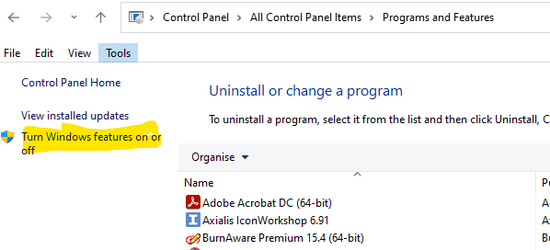
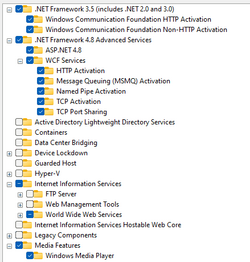
IT adminsAfter installing this update, some .NET Framework 3.5 apps might have issues or might fail to open. Affected apps are using certain optional components in .NET Framework 3.5, such as Windows Communication Foundation (WCF) and Windows Workflow (WWF) components.You can mitigate this issue by re-enabling .NET Framework 3.5 and the Windows Communication Foundation in Windows Features. For instructions, please see Enable the .NET Framework 3.5 in Control Panel. Advanced users or IT admins can do this programmatically using an elevated Command Prompt (run as administrator) and running the following commands:

dism /online /enable-feature /featurename:netfx3 /all

dism /online /enable-feature /featurename:WCF-HTTP-Activation

dism /online /enable-feature /featurename:WCF-NonHTTP-Activation
All usersAfter installing this update, Windows devices that use certain GPUs might cause apps to close unexpectedly or cause intermittent issues that affect some apps that use Direct3D 9. You might also receive an error in Event Log in Windows Logs/Applications, and the faulting module is d3d9on12.dll and the exception code is 0xc0000094.This issue is resolved using Known Issue Rollback (KIR). Please note that it might take up to 24 hours for the resolution to propagate automatically to consumer devices and non-managed business devices. Restarting your Windows device might help the resolution apply to your device faster. For enterprise-managed, devices that have installed an affected update and encountered this issue can resolve it by installing and configuring the special Group Policy listed below. For information on deploying and configuring these special Group Policies, see How to use Group Policy to deploy a Known Issue Rollback.

Group Policy download with Group Policy name:
Important You must install and configure the Group Policy to resolve this issue. Please see, How to use Group Policy to deploy a Known Issue Rollback.
IT adminsAfter installing updates released May 10, 2022 on domain controllers, you might see authentication failures on the server or client for some services. These services include Network Policy Server (NPS), Routing and Remote access Service (RRAS), Radius, Extensible Authentication Protocol (EAP), and Protected Extensible Authentication Protocol (PEAP). An issue has been found related to how the domain controller manages the mapping of certificates to machine accounts.

Note Installation of the May 10, 2022 updates on client Windows devices and non-domain controller Windows Servers will not cause this issue. This issue only affects servers that are used as domain controllers.
The preferred mitigation for this issue is to manually map certificates to a machine account in Active Directory. For instructions, see Certificate mapping.

Note The instructions are the same for mapping certificates to user or machine accounts in Active Directory. If the preferred mitigation will not work in your environment, see KB5014754—Certificate-based authentication changes on Windows domain controllers for other possible mitigations in the "SChannel registry key" section.

Note Any other mitigation except the preferred mitigations might lower or disable security hardening.

How to get this update​

Before installing this update

Microsoft combines the latest servicing stack update (SSU) for your operating system with the latest cumulative update (LCU). For general information about SSUs, see Servicing stack updates and Servicing Stack Updates (SSU): Frequently Asked Questions.

Install this update

Release ChannelAvailableNext Step
Windows Update and Microsoft UpdateYesNone. This update will be downloaded and installed automatically from Windows Update.
Windows Update for BusinessYesNone. This update will be downloaded and installed automatically from Windows Update in accordance with configured policies.
Microsoft Update CatalogYesTo get the standalone package for this update, go to the Microsoft Update Catalog website.
Windows Server Update Services (WSUS)YesThis update will automatically sync with WSUS if you configure Products and Classifications as follows:
Product: Windows 11
Classification: Security Updates

If you want to remove the LCU

To remove the LCU after installing the combined SSU and LCU package, use the DISM/Remove-Package command line option with the LCU package name as the argument. You can find the package name by using this command: DISM /online /get-packages.

Running Windows Update Standalone Installer (wusa.exe) with the /uninstall switch on the combined package will not work because the combined package contains the SSU. You cannot remove the SSU from the system after installation.

File information

For a list of the files that are provided in this update, download the file information for cumulative update 5013943.

For a list of the files that are provided in the servicing stack update, download the file information for the SSU - version 22000.652.


Source:

Check Windows Updates


Direct download links for KB5013943 MSU file from Microsoft Update Catalog:

[fa]fas fa-download[/fa] Download KB5013943 MSU for Windows 11 64-bit (x64) - 263.1 MB

[fa]fas fa-download[/fa] Download KB5013943 MSU for Windows 11 ARM64 - 335.6 MB


UUP Dump:

64-bit ISO download:
Select language for Windows 11 (22000.675) amd64

ARM64 ISO download: Select language for Windows 11 (22000.675) arm64

 
Last edited:

I'm getting the same issue I had before with the previous (now pulled) KB5016243 update. I ended up manually installing the previous KB5016243 update using the .msu file.

That one still shows as installed on my system, so I will try to uninstall it and then see if this one goes through. Error code on the installation of this update is 0x800701a1.

View attachment 29003

I'm still getting the same failure for installing this. I'm going to manually push it to my system today.
 

My Computers My Computers

  • At a glance

    Windows 11 23H2 Current buildAMD Ryzen 9 3950X4 * 32 GB - Corsair Vengeance 3600 MHzEVGA GeForce RTX 3080 Ti XC3 ULTRA GAMING (12...
    OS
    Windows 11 23H2 Current build
    Computer type
    PC/Desktop
    Manufacturer/Model
    HomeBrew
    CPU
    AMD Ryzen 9 3950X
    Motherboard
    MSI MEG X570 GODLIKE
    Memory
    4 * 32 GB - Corsair Vengeance 3600 MHz
    Graphics Card(s)
    EVGA GeForce RTX 3080 Ti XC3 ULTRA GAMING (12G-P5-3955-KR)
    Sound Card
    Realtek® ALC1220 Codec
    Monitor(s) Displays
    2x Eve Spectrum ES07D03 4K Gaming Monitor (Matte) | Eve Spectrum ES07DC9 4K Gaming Monitor (Glossy)
    Screen Resolution
    3x 3840 x 2160
    Hard Drives
    3x Samsung 980 Pro NVMe PCIe 4 M.2 2 TB SSD (MZ-V8P2T0B/AM) } 3x Sabrent Rocket NVMe 4.0 1 TB SSD (USB)
    PSU
    PC Power & Cooling’s Silencer Series 1050 Watt, 80 Plus Platinum
    Case
    Fractal Design Define 7 XL Dark ATX Full Tower Case
    Cooling
    Arctic Liquid Freezer III 420 RGB + Air 3x 140mm case fans (pull front) + 1x 120 mm (push back) and 1 x 120 mm (pull bottom)
    Keyboard
    SteelSeries Apex Pro Wired Gaming Keyboard
    Mouse
    Logitech MX Master 3S | MX Master 3 for Business
    Internet Speed
    AT&T LightSpeed Gigabit Duplex Ftth
    Browser
    Nightly (default) + Firefox (stable), Chrome, Edge , Arc
    Antivirus
    Defender + MB 5 Beta
  • At a glance

    ChromeOS Flex Dev Channel (current)Intel(R) Core(TM) i5-6300U CPU @ 2.40GHz, 250...16 GBIntel(R) HD Graphics 520
    Operating System
    ChromeOS Flex Dev Channel (current)
    Computer type
    Laptop
    Manufacturer/Model
    Dell Latitude E5470
    CPU
    Intel(R) Core(TM) i5-6300U CPU @ 2.40GHz, 2501 Mhz, 2 Core(s), 4 Logical Processor(s)
    Motherboard
    Dell
    Memory
    16 GB
    Graphics card(s)
    Intel(R) HD Graphics 520
    Sound Card
    Intel(R) HD Graphics 520 + RealTek Audio
    Monitor(s) Displays
    Dell laptop display 15"
    Screen Resolution
    1920 * 1080
    Hard Drives
    Toshiba 128GB M.2 22300 drive
    INTEL Cherryville 520 Series SSDSC2CW180A 180 GB SATA III SSD
    PSU
    Dell
    Case
    Dell
    Cooling
    Dell
    Keyboard
    Dell
    Mouse
    Logitech MX Master 3S (shared w. Sys 1) | Dell TouchPad
    Internet Speed
    AT&T LightSpeed Gigabit Duplex Ftth
Then how (?) could you update , without these two items I ( and a lot of other people also ) , could not update ! When I switch them off , it starts the update again .
Maybe coz I upgraded from 10 , so no "clean install "..........
I upgaded from Windows 10 as well. I got the update using an ISO image and did a repair install. It hasn't tried to install this update again as it was part of the base install
 

My Computer My Computer

At a glance

Windows 11 Pro 25H2 (RP channel)AMD Ryzen 7 9800X3D 8-core64GB Corsair Titanium 6000/CL30MSI Suprim 5080 SOC
OS
Windows 11 Pro 25H2 (RP channel)
Computer type
PC/Desktop
Manufacturer/Model
MSI
CPU
AMD Ryzen 7 9800X3D 8-core
Motherboard
MEG X870E Godlike
Memory
64GB Corsair Titanium 6000/CL30
Graphics Card(s)
MSI Suprim 5080 SOC
Sound Card
Soundblaster AE-9
Monitor(s) Displays
ASUS TUF Gaming VG289Q
Screen Resolution
3840x2160
Hard Drives
Samsung 9100 Pro 4TB (gen 5 x4, system drive/games)
Samsung 990 Pro 2TB
Samsung 980 Pro 2TB
Samsung 870 Evo 4TB
Samsung 870 Evo 2TB
Samsung T9 4TB
PSU
Seasonic PX-2200
Case
Bequiet! Dark Base Pro 901
Cooling
Noctua NH-D15S Chromax black
Keyboard
Logitech G915 X (wired)
Mouse
Logitech G903 with PowerPlay charger
Internet Speed
900Mb/sec
Browser
Microsoft Edge
Antivirus
Windows Defender
The problem is that Microsoft are trying to cater for so many different set ups that it is pretty much impossible to ensure that every single one updates flawlessly. Let's hope they don't move to the Apple model which to be fair still does have some problems;
 

My Computer My Computer

At a glance

Windows 11 Pro 25H2 26200.8737Ryzen 5 760032 Gb DDR5 6000Hz Corsair VengeanceSapphire Pulse RX 7600
OS
Windows 11 Pro 25H2 26200.8737
Computer type
PC/Desktop
Manufacturer/Model
Home built
CPU
Ryzen 5 7600
Motherboard
Gigabyte B650M Aorus Elite AX Ice
Memory
32 Gb DDR5 6000Hz Corsair Vengeance
Graphics Card(s)
Sapphire Pulse RX 7600
Sound Card
Internal Realtek
Monitor(s) Displays
Samsung 32" Odyssey G5 G50D QHD
Screen Resolution
2560 x 1440
Hard Drives
WD Black SN 770 1Tb; SanDisk SDSSDA240G ; Seagate 2Tb HDD
PSU
MSI MAG A750GL
Case
Enermax Marbleshell MS21
Cooling
Thermaltake Peerless Assassin 120 White ARGB, 3 x 120 intake, 1 x 120 exhaust
Keyboard
Aukey KM-G12
Mouse
Razer Basilisk v3 Pro 35K
Internet Speed
1 Gb/s up & 800 Mb/s down
Browser
Brave / Edge
Antivirus
Windows / Malwarebytes

My Computers My Computers

  • At a glance

    Win 11 Pro 25H2 26200.8894Intel® Core™ i7-14700KG.SKILL Ripjaws S5 Series 64GB (2 x 32GB) DDR5ASUS GeForce RTX 4070 Super 12GB
    OS
    Win 11 Pro 25H2 26200.8894
    Computer type
    PC/Desktop
    Manufacturer/Model
    Self Built
    CPU
    Intel® Core™ i7-14700K
    Motherboard
    ASUS TUF Z690-PLUS WIFI (BIOS 4505)
    Memory
    G.SKILL Ripjaws S5 Series 64GB (2 x 32GB) DDR5
    Graphics Card(s)
    ASUS GeForce RTX 4070 Super 12GB
    Sound Card
    Sound Blaster AE-5 Plus
    Monitor(s) Displays
    ASUS TUF Gaming 27" 2K HDR Gaming
    Screen Resolution
    2560 x 1440
    Hard Drives
    Samsung 990 Pro 1TB NVMe (Win 11 25H2)
    SK hynix P41 500GB NVMe
    SK hynix P41 2TB NVMe (x3)
    Crucial P3 Plus 4TB
    PSU
    Corsair RM850x Shift
    Case
    Antec Dark Phantom DP502 FLUX
    Cooling
    Corsair Nautilus 360 RS AIO
    Keyboard
    Logitech MK 320
    Mouse
    Razer Basilisk V3
    Internet Speed
    750Mbs
    Browser
    Firefox
    Antivirus
    Winows Security
    Other Info
    MR 8.1 Home
  • At a glance

    Win 11 Pro 25H2 26200.8894Intel Core i5-1140064 GB DDR4MSI GeForce RTX 3060 Ventus 2X 12GB
    Operating System
    Win 11 Pro 25H2 26200.8894
    Computer type
    PC/Desktop
    Manufacturer/Model
    Self Built
    CPU
    Intel Core i5-11400
    Motherboard
    Asus TUF Gaming Z590 Plus WiFi (BIOS 2803)
    Memory
    64 GB DDR4
    Graphics card(s)
    MSI GeForce RTX 3060 Ventus 2X 12GB
    Sound Card
    SoundBlaster Audigy Fx V2
    Monitor(s) Displays
    Samsung F27T350
    Screen Resolution
    1920x1080
    Hard Drives
    Samsung 980 Pro 1TB
    Samsung 970 EVO Plus 2TB
    Samsung 870 EVO 500GB SSD
    PSU
    Corsair HX750
    Case
    Cougar MX330-G Window
    Cooling
    Thermalright Frozen Edge 240 Black AIO
    Internet Speed
    350Mbps
    Browser
    Firefox
    Antivirus
    Windows Security
  • System Three
    Win 11 Pro 25H2 26200.8894
    ASUS PRIME Z370-P II BIOS 3004 7/12/21
    Intel Core i7-8700 CPU @ 3.20GHz
    32GB DDR4 RAM (4x8)
    iGPU Intel UHD Graphics 630
    Mid-Tower Desktop
It worked indeed , untill " DISM /Online /Cleanup-Image /StartComponentCleanup /ResetBase "
Then lots of troubles and had to use backup.............
After these .NET 3.5 turned on , I could cleanup and no troubles.
But could not switch it off again , then it would update the same kb5013943 again !
 

My Computers My Computers

  • At a glance

    Windows11 Pro 25H2i732GBnVidia
    OS
    Windows11 Pro 25H2
    Computer type
    PC/Desktop
    Manufacturer/Model
    Asus
    CPU
    i7
    Motherboard
    z97k
    Memory
    32GB
    Graphics Card(s)
    nVidia
    Sound Card
    Realtek
    Hard Drives
    3
    Cooling
    air
    Browser
    Edge
    Antivirus
    ESET
  • At a glance

    Windows11 ProIntel i516GBIntel
    Operating System
    Windows11 Pro
    Computer type
    PC/Desktop
    Manufacturer/Model
    ASUS
    CPU
    Intel i5
    Motherboard
    ASUS Basic
    Memory
    16GB
    Graphics card(s)
    Intel
    Sound Card
    Realtek
    Monitor(s) Displays
    Samsung
    Hard Drives
    one intern , 0ne extern, OS on SSD
    Cooling
    air
    Keyboard
    wireless Logitech
    Mouse
    wireless Logitech
    Internet Speed
    1GB
    Browser
    Edge
    Antivirus
    ESET
No problems installing the update but it caused severe slowdown. My Big Fish games froze every few seconds. I’ve uninstalled the May update & all works this morning but will check again tonight.
 

My Computers My Computers

  • At a glance

    Windows 11 Pro 64bit6th Gen Intel Core i7-6700HQ Quad Core proces...16GB HyperX IMPACT 1600MHz SODIMM DDR3 (2 x 8GB)NVIDIA® GeForce® GTX 960M - 2.0GB DDR5 Video ...
    OS
    Windows 11 Pro 64bit
    Computer type
    Laptop
    Manufacturer/Model
    PC Specialist Optimus VII V17-960 Gaming Laptop.
    CPU
    6th Gen Intel Core i7-6700HQ Quad Core processor.
    Memory
    16GB HyperX IMPACT 1600MHz SODIMM DDR3 (2 x 8GB)
    Graphics Card(s)
    NVIDIA® GeForce® GTX 960M - 2.0GB DDR5 Video RAM - DirectX® 12
    Sound Card
    Intel 2 Channel High Def. Audio + SoundBlaster™ Cinema 2 & Realtek
    Monitor(s) Displays
    Optimus Series: 17.3" Matte Full HD IPS LED Widescreen (1920x1080)
    Screen Resolution
    Full HD IPS display (1920 x 1080).
    Hard Drives
    4TB SSD (internal).
    1x 1TB & 1x 5TB external HDDs.
    Cooling
    STANDARD THERMAL PASTE FOR SUFFICIENT COOLING
    Keyboard
    Logitech K800 wireless keyboard
    Mouse
    Logitech M705 wireless mouse
    Internet Speed
    Upto 100Mbps
    Browser
    Edge.
    Antivirus
    Windows Defender & MalwareBytes pro.
  • At a glance

    IOS 14.6
    Operating System
    IOS 14.6
    Computer type
    Tablet
    Manufacturer/Model
    Apple
No problems installing the update but it caused severe slowdown. My Big Fish games froze every few seconds. I’ve uninstalled the May update & all works this morning but will check again tonight.
Was your entire system slower or was it only your Big Fish game?
 

My Computers My Computers

  • At a glance

    Windows 11 ProIntel Series 3 Core Ultra X9 388H64GB LPDDR5x 9600 MT/sIntel Arc graphics B390 Panther Lake
    OS
    Windows 11 Pro
    Computer type
    Laptop
    Manufacturer/Model
    Dell XPS 16 DA16260
    CPU
    Intel Series 3 Core Ultra X9 388H
    Memory
    64GB LPDDR5x 9600 MT/s
    Graphics Card(s)
    Intel Arc graphics B390 Panther Lake
    Monitor(s) Displays
    16" 3.2K Tandem OLED Infinity Edge
    Screen Resolution
    3200 x 2000 16:10 236 PPI
    Hard Drives
    1 Terabyte M.2 PCIe NVMe SSD
    Case
    Black Anodized Aluminum
    Cooling
    Vapor Chamber Cooling
    Mouse
    None
    Internet Speed
    942 Mbps Netgear Mesh + 2 Satellites
    Browser
    Microsoft Edge (Chromium)
    Antivirus
    Windows Security (Defender)
    Other Info
    NPU delivering 67 TOPS
    Microsoft 365 subscription
    Microsoft Office 365
    Microsoft OneDrive 1TB Cloud
    Microsoft Visual Studio
    Microsoft Visual Studio Code
    Microsoft Sysinternals Suite
    Microsoft BitLocker
    Microsoft Copilot
    Dell Support Assist
    Dell Command | Update
    Macrium Reflect X subscription
    1Password Password Manager
    Amazon Kindle for PC
    Lightroom/Photoshop subscription
    Interactive Brokers Trader Workstation
  • At a glance

    Windows 11 ProSnapdragon® X Elite (12 Core) with Hexagon NP...32GB LPDDR5x 8448 MT/sIntegrated Adreno GPU
    Operating System
    Windows 11 Pro
    Computer type
    Laptop
    Manufacturer/Model
    Microsoft Surface Laptop 7
    CPU
    Snapdragon® X Elite (12 Core) with Hexagon NPU delivering 45 TOPS
    Memory
    32GB LPDDR5x 8448 MT/s
    Graphics card(s)
    Integrated Adreno GPU
    Sound Card
    Omnisonic speakers with Dolby Atmos spatial sound
    Monitor(s) Displays
    13.8″ PixelSense Flow touchscreen 120 Hz 600 NIT
    Screen Resolution
    2304 × 1536 (201 PPI), 3:2 aspect ratio
    Hard Drives
    1 TB PCIe NVMe Gen 4 SSD
    Case
    Black Anodized Aluminum
    Cooling
    Vapor Chamber Cooling
    Mouse
    None
    Internet Speed
    942 Mbps Netgear Mesh + 2 Satellites
    Browser
    Microsoft Edge (Chromium)
    Antivirus
    Windows Security (Defender)
    Other Info
    Microsoft 365 subscription (Office)
    Microsoft Office 365
    Microsoft OneDrive 1TB Cloud
    Microsoft Visual Studio 2026
    Microsoft Visual Studio Code
    Interactive Brokers Trader Workstation
    Lightroom/Photoshop subscription
    1Password Password Manager
    Microsoft Sysinternals
    Amazon Kindle for PC
    Microsoft BitLocker
    Microsoft Copilot
The entire system. Opening programs/apps was marginally slower but it was during gaming I noticed it more.
 

My Computers My Computers

  • At a glance

    Windows 11 Pro 64bit6th Gen Intel Core i7-6700HQ Quad Core proces...16GB HyperX IMPACT 1600MHz SODIMM DDR3 (2 x 8GB)NVIDIA® GeForce® GTX 960M - 2.0GB DDR5 Video ...
    OS
    Windows 11 Pro 64bit
    Computer type
    Laptop
    Manufacturer/Model
    PC Specialist Optimus VII V17-960 Gaming Laptop.
    CPU
    6th Gen Intel Core i7-6700HQ Quad Core processor.
    Memory
    16GB HyperX IMPACT 1600MHz SODIMM DDR3 (2 x 8GB)
    Graphics Card(s)
    NVIDIA® GeForce® GTX 960M - 2.0GB DDR5 Video RAM - DirectX® 12
    Sound Card
    Intel 2 Channel High Def. Audio + SoundBlaster™ Cinema 2 & Realtek
    Monitor(s) Displays
    Optimus Series: 17.3" Matte Full HD IPS LED Widescreen (1920x1080)
    Screen Resolution
    Full HD IPS display (1920 x 1080).
    Hard Drives
    4TB SSD (internal).
    1x 1TB & 1x 5TB external HDDs.
    Cooling
    STANDARD THERMAL PASTE FOR SUFFICIENT COOLING
    Keyboard
    Logitech K800 wireless keyboard
    Mouse
    Logitech M705 wireless mouse
    Internet Speed
    Upto 100Mbps
    Browser
    Edge.
    Antivirus
    Windows Defender & MalwareBytes pro.
  • At a glance

    IOS 14.6
    Operating System
    IOS 14.6
    Computer type
    Tablet
    Manufacturer/Model
    Apple
No problems installing the update but it caused severe slowdown. My Big Fish games froze every few seconds. I’ve uninstalled the May update & all works this morning but will check again tonight.
Could it be that your (updated) video drivers didn't install properly? Just a WAG.
 

My Computers My Computers

  • At a glance

    Windows 11 23H2 22631.2861Intel(R) Core(TM) i7-10700 CPU @ 2.90GHz 2.90...16384 MBytesIntel UHD Graphics 630
    OS
    Windows 11 23H2 22631.2861
    Computer type
    PC/Desktop
    Manufacturer/Model
    HP Envy TE01-1xxx
    CPU
    Intel(R) Core(TM) i7-10700 CPU @ 2.90GHz 2.90 GHz
    Motherboard
    16.0GB Dual-Channel Unknown @ 1463MHz (21-21-21-47)
    Memory
    16384 MBytes
    Graphics Card(s)
    Intel UHD Graphics 630
    Sound Card
    Realtek High Definition Audio
    Monitor(s) Displays
    Monitor 1 - Acer 27" Monitor 2 - Acer 27"
    Screen Resolution
    1920 x 1080
    Hard Drives
    WDC PC SN530 SDBPNPZ-512G-1006 (SSD)
    Seagate ST1000DM003-1SB102
    Seagate BUP Slim SCSI Disk Device (SSD)
    PSU
    HP
    Case
    HP
    Cooling
    Standard
    Keyboard
    Logitech Wave K350
    Mouse
    Logitech M705
    Internet Speed
    500 mbps
    Browser
    Firefox
    Antivirus
    Windows Defender
    Other Info
    That's all Folks!
  • At a glance

    Windows 11Intel Core i7 (10th gen) 1070016 GBIntel UHD Graphics 630
    Operating System
    Windows 11
    Computer type
    PC/Desktop
    Manufacturer/Model
    HP
    CPU
    Intel Core i7 (10th gen) 10700
    Motherboard
    Intel
    Memory
    16 GB
    Graphics card(s)
    Intel UHD Graphics 630
    Sound Card
    Built-in
    Monitor(s) Displays
    Acer 27" & Samsung 24"
    Screen Resolution
    1920 x
    Hard Drives
    SSD (512 GB)
    HDD (1 TB)
    Seagate
    PSU
    Intel i7 10th Generation
    Case
    HP
    Cooling
    HP/Intel?
    Keyboard
    Logitech Wave K350
    Mouse
    Logitech M705
    Internet Speed
    50 mbps
    Browser
    Firefox 90.2
    Antivirus
    Windows Defender
    Other Info
    Headphone/Microphone Combo
    SuperSpeed USB Type-A (4 on front)
    HP 3-in-One Card Readr
    SuperSpeed USB Type-C
    DVD Writer
Could it be that your (updated) video drivers didn't install properly? Just a WAG.
So, are you saying you are a WAG - in UK, that means you are (generally good looking) rich wife or girlfriend of a footballer (round ball) with unlimited expense account.

However, fortunately, I do not think you qualify as a WAG, as they only have two brain cells, and they do not communicate with each other LOL.
 

My Computer My Computer

At a glance

Windows 11 Pro + Win11 Canary VM.I9 13th gen i9-13900H 2.60 GHZ16 GB solderedIntegrated Intel Iris XE
OS
Windows 11 Pro + Win11 Canary VM.
Computer type
Laptop
Manufacturer/Model
ASUS Zenbook 14
CPU
I9 13th gen i9-13900H 2.60 GHZ
Motherboard
Yep, Laptop has one.
Memory
16 GB soldered
Graphics Card(s)
Integrated Intel Iris XE
Sound Card
Realtek built in
Monitor(s) Displays
laptop OLED screen
Screen Resolution
2880x1800 touchscreen
Hard Drives
1 TB NVME SSD (only weakness is only one slot)
PSU
Internal + 65W thunderbolt USB4 charger
Case
Yep, got one
Cooling
Stella Artois (UK pint cans - 568 ml) - extra cost.
Keyboard
Built in UK keybd
Mouse
Bluetooth , wireless dongled, wired
Internet Speed
900 mbs (ethernet), wifi 6 typical 350-450 mb/s both up and down
Browser
Edge
Antivirus
Defender
Other Info
TPM 2.0, 2xUSB4 thunderbolt, 1xUsb3 (usb a), 1xUsb-c, hdmi out, 3.5 mm audio out/in combo, ASUS backlit trackpad (inc. switchable number pad)

Macrium Reflect Home V8
Office 365 Family (6 users each 1TB onedrive space)
Hyper-V (a vm runs almost as fast as my older laptop)
So, are you saying you are a WAG - in UK, that means you are (generally good looking) rich wife or girlfriend of a footballer (round ball) with unlimited expense account.

However, fortunately, I do not think you qualify as a WAG, as they only have two brain cells, and they do not communicate with each other LOL.
:ROFLMAO: :ROFLMAO::ROFLMAO:

Wild A.. Guess. And yep, contrary to some who think otherwise, I have more braincells than your average bear. :p

Y'know, on second thought the unlimited expense account does have me thinking twice . . .
 

My Computers My Computers

  • At a glance

    Windows 11 23H2 22631.2861Intel(R) Core(TM) i7-10700 CPU @ 2.90GHz 2.90...16384 MBytesIntel UHD Graphics 630
    OS
    Windows 11 23H2 22631.2861
    Computer type
    PC/Desktop
    Manufacturer/Model
    HP Envy TE01-1xxx
    CPU
    Intel(R) Core(TM) i7-10700 CPU @ 2.90GHz 2.90 GHz
    Motherboard
    16.0GB Dual-Channel Unknown @ 1463MHz (21-21-21-47)
    Memory
    16384 MBytes
    Graphics Card(s)
    Intel UHD Graphics 630
    Sound Card
    Realtek High Definition Audio
    Monitor(s) Displays
    Monitor 1 - Acer 27" Monitor 2 - Acer 27"
    Screen Resolution
    1920 x 1080
    Hard Drives
    WDC PC SN530 SDBPNPZ-512G-1006 (SSD)
    Seagate ST1000DM003-1SB102
    Seagate BUP Slim SCSI Disk Device (SSD)
    PSU
    HP
    Case
    HP
    Cooling
    Standard
    Keyboard
    Logitech Wave K350
    Mouse
    Logitech M705
    Internet Speed
    500 mbps
    Browser
    Firefox
    Antivirus
    Windows Defender
    Other Info
    That's all Folks!
  • At a glance

    Windows 11Intel Core i7 (10th gen) 1070016 GBIntel UHD Graphics 630
    Operating System
    Windows 11
    Computer type
    PC/Desktop
    Manufacturer/Model
    HP
    CPU
    Intel Core i7 (10th gen) 10700
    Motherboard
    Intel
    Memory
    16 GB
    Graphics card(s)
    Intel UHD Graphics 630
    Sound Card
    Built-in
    Monitor(s) Displays
    Acer 27" & Samsung 24"
    Screen Resolution
    1920 x
    Hard Drives
    SSD (512 GB)
    HDD (1 TB)
    Seagate
    PSU
    Intel i7 10th Generation
    Case
    HP
    Cooling
    HP/Intel?
    Keyboard
    Logitech Wave K350
    Mouse
    Logitech M705
    Internet Speed
    50 mbps
    Browser
    Firefox 90.2
    Antivirus
    Windows Defender
    Other Info
    Headphone/Microphone Combo
    SuperSpeed USB Type-A (4 on front)
    HP 3-in-One Card Readr
    SuperSpeed USB Type-C
    DVD Writer
I haven't gotten around to installing it - and seeing so many issues with it along with the last one, I'm tempted to skip it.

I have the .msu downloaded, but haven't crossed that bridge yet. I may do so if I see a compelling reason to install it.
 

My Computers My Computers

  • At a glance

    Windows 11 23H2 Current buildAMD Ryzen 9 3950X4 * 32 GB - Corsair Vengeance 3600 MHzEVGA GeForce RTX 3080 Ti XC3 ULTRA GAMING (12...
    OS
    Windows 11 23H2 Current build
    Computer type
    PC/Desktop
    Manufacturer/Model
    HomeBrew
    CPU
    AMD Ryzen 9 3950X
    Motherboard
    MSI MEG X570 GODLIKE
    Memory
    4 * 32 GB - Corsair Vengeance 3600 MHz
    Graphics Card(s)
    EVGA GeForce RTX 3080 Ti XC3 ULTRA GAMING (12G-P5-3955-KR)
    Sound Card
    Realtek® ALC1220 Codec
    Monitor(s) Displays
    2x Eve Spectrum ES07D03 4K Gaming Monitor (Matte) | Eve Spectrum ES07DC9 4K Gaming Monitor (Glossy)
    Screen Resolution
    3x 3840 x 2160
    Hard Drives
    3x Samsung 980 Pro NVMe PCIe 4 M.2 2 TB SSD (MZ-V8P2T0B/AM) } 3x Sabrent Rocket NVMe 4.0 1 TB SSD (USB)
    PSU
    PC Power & Cooling’s Silencer Series 1050 Watt, 80 Plus Platinum
    Case
    Fractal Design Define 7 XL Dark ATX Full Tower Case
    Cooling
    Arctic Liquid Freezer III 420 RGB + Air 3x 140mm case fans (pull front) + 1x 120 mm (push back) and 1 x 120 mm (pull bottom)
    Keyboard
    SteelSeries Apex Pro Wired Gaming Keyboard
    Mouse
    Logitech MX Master 3S | MX Master 3 for Business
    Internet Speed
    AT&T LightSpeed Gigabit Duplex Ftth
    Browser
    Nightly (default) + Firefox (stable), Chrome, Edge , Arc
    Antivirus
    Defender + MB 5 Beta
  • At a glance

    ChromeOS Flex Dev Channel (current)Intel(R) Core(TM) i5-6300U CPU @ 2.40GHz, 250...16 GBIntel(R) HD Graphics 520
    Operating System
    ChromeOS Flex Dev Channel (current)
    Computer type
    Laptop
    Manufacturer/Model
    Dell Latitude E5470
    CPU
    Intel(R) Core(TM) i5-6300U CPU @ 2.40GHz, 2501 Mhz, 2 Core(s), 4 Logical Processor(s)
    Motherboard
    Dell
    Memory
    16 GB
    Graphics card(s)
    Intel(R) HD Graphics 520
    Sound Card
    Intel(R) HD Graphics 520 + RealTek Audio
    Monitor(s) Displays
    Dell laptop display 15"
    Screen Resolution
    1920 * 1080
    Hard Drives
    Toshiba 128GB M.2 22300 drive
    INTEL Cherryville 520 Series SSDSC2CW180A 180 GB SATA III SSD
    PSU
    Dell
    Case
    Dell
    Cooling
    Dell
    Keyboard
    Dell
    Mouse
    Logitech MX Master 3S (shared w. Sys 1) | Dell TouchPad
    Internet Speed
    AT&T LightSpeed Gigabit Duplex Ftth
1653119915752.png
 

My Computer My Computer

At a glance

Windows 11 Pro Insider Preview DevAMD Ryzen™ 5 5600G with Radeon Graphics 3.90 GHz16,0 GBNVIDIA GeForce GT 720, NVIDIA compatible
OS
Windows 11 Pro Insider Preview Dev
Computer type
PC/Desktop
Manufacturer/Model
To be filled by O.E.M.
CPU
AMD Ryzen™ 5 5600G with Radeon Graphics 3.90 GHz
Motherboard
MSI B450 GAMING PLUS MAX
Memory
16,0 GB
Graphics Card(s)
NVIDIA GeForce GT 720, NVIDIA compatible
Sound Card
NVIDIA High Definition Audio
Monitor(s) Displays
BenQ GW2270 Color Profile.D6500
Screen Resolution
1920 x 1080
Hard Drives
Samsung SSD 850 EVO 250GB + CT1000BX500SSD1 + ST2000DM006-2DM164 + WDC WD5000AAKS-07TMA0 +WDC WD10EARX-00N0YB0
PSU
EVGA 600 W2, 80+ WHITE 600W, 3 Year Warranty, Power Supply 100-W2-0600-K2 (EU)
Case
RAIJINTEK Agos - mid tower - ATX
Cooling
Cooler Master Hyper 212 Evo heatsink + Fans: 2 front+1 back+1 up
Keyboard
Logitech Internet 350 Keyboard
Mouse
Logitech MX Revolution
Internet Speed
Download 159.29 Mbps - Upload 80.14 Mbps
Browser
Google Crome Dev
Antivirus
Microsoft Windows Security
I wonder if its possible to switch all these ( two) features off ( .NET) , after a succes-full install of the updates.
I just dont use them , and slows down the OS , by installed services and folders ............ :unsure:
I've had the same issue. Found a fix here.
 

My Computer My Computer

At a glance

Windows 11 Pro 25H2 (Build 26200.8968)Intel Core Ultra 9 285 5.6 GHz32.00 GBIntel Integrated Graphics (128 MB)
OS
Windows 11 Pro 25H2 (Build 26200.8968)
Computer type
PC/Desktop
Manufacturer/Model
Dell Pro Max Tower T2 FCT2250
CPU
Intel Core Ultra 9 285 5.6 GHz
Motherboard
64-bit operating system, x64-based processor
Memory
32.00 GB
Graphics Card(s)
Intel Integrated Graphics (128 MB)
Sound Card
Realtek Audio
Monitor(s) Displays
Dell P2714H Monitor
Screen Resolution
1920 x 1080
Hard Drives
1 x 512GB M.2 XG10d SED KIOXIA PCIe solid state drive (Internal)
1 x 2TB Seagate ST2000DM008-2UB102 HDD (Internal)
1 x 4TB Seagate STGX4000400 External HDD
1 x 6TB WD Elements AE 2689 External HDD
PSU
500 Watts
Cooling
Air
Keyboard
Microsoft Wired Keyboard 600
Mouse
Microsoft USB Basic Optical Mouse v2.0
Browser
Firefox
Antivirus
Windows Defender + Malwarebytes Premium
Other Info
BaseBoard Manufacturer Dell Inc.
BaseBoard Product 022RY57
BaseBoard Version A01
I've had the same issue. Found a fix here.
Yes, but I can not ( ! ) disable the two .NET 3.5 items , after the update .
If you do , this update will install again............!! :unsure:
So, I have to keep them enabled , while I never used them before !
 

My Computers My Computers

  • At a glance

    Windows11 Pro 25H2i732GBnVidia
    OS
    Windows11 Pro 25H2
    Computer type
    PC/Desktop
    Manufacturer/Model
    Asus
    CPU
    i7
    Motherboard
    z97k
    Memory
    32GB
    Graphics Card(s)
    nVidia
    Sound Card
    Realtek
    Hard Drives
    3
    Cooling
    air
    Browser
    Edge
    Antivirus
    ESET
  • At a glance

    Windows11 ProIntel i516GBIntel
    Operating System
    Windows11 Pro
    Computer type
    PC/Desktop
    Manufacturer/Model
    ASUS
    CPU
    Intel i5
    Motherboard
    ASUS Basic
    Memory
    16GB
    Graphics card(s)
    Intel
    Sound Card
    Realtek
    Monitor(s) Displays
    Samsung
    Hard Drives
    one intern , 0ne extern, OS on SSD
    Cooling
    air
    Keyboard
    wireless Logitech
    Mouse
    wireless Logitech
    Internet Speed
    1GB
    Browser
    Edge
    Antivirus
    ESET
Yes, but I can not ( ! ) disable the two .NET 3.5 items , after the update .
If you do , this update will install again............!! :unsure:
So, I have to keep them enabled , while I never used them before !
Please see this post; .NET framework 3.5 (& 4.8) needs to be installed for your apps that still require these.

You may need to restore from your latest backup image (if you have one), enable .Net Framework 3.5 & 4.8 in Windows Additional Features , reboot, and try installing the update again.

A.png

Windows Additional Features #01.png
 

My Computer My Computer

At a glance

Windows 11 Pro 25H2 (Build 26200.8968)Intel Core Ultra 9 285 5.6 GHz32.00 GBIntel Integrated Graphics (128 MB)
OS
Windows 11 Pro 25H2 (Build 26200.8968)
Computer type
PC/Desktop
Manufacturer/Model
Dell Pro Max Tower T2 FCT2250
CPU
Intel Core Ultra 9 285 5.6 GHz
Motherboard
64-bit operating system, x64-based processor
Memory
32.00 GB
Graphics Card(s)
Intel Integrated Graphics (128 MB)
Sound Card
Realtek Audio
Monitor(s) Displays
Dell P2714H Monitor
Screen Resolution
1920 x 1080
Hard Drives
1 x 512GB M.2 XG10d SED KIOXIA PCIe solid state drive (Internal)
1 x 2TB Seagate ST2000DM008-2UB102 HDD (Internal)
1 x 4TB Seagate STGX4000400 External HDD
1 x 6TB WD Elements AE 2689 External HDD
PSU
500 Watts
Cooling
Air
Keyboard
Microsoft Wired Keyboard 600
Mouse
Microsoft USB Basic Optical Mouse v2.0
Browser
Firefox
Antivirus
Windows Defender + Malwarebytes Premium
Other Info
BaseBoard Manufacturer Dell Inc.
BaseBoard Product 022RY57
BaseBoard Version A01
Ok, the update is installed , after enabling .NET 3.5 and the two items in it.
My question remains ; why I can not disable these two items anymore , I never used them , untill I updated to the 10 Mai-update..........
btw; all my software, etc, worked fine , without these two items also !
 

My Computers My Computers

  • At a glance

    Windows11 Pro 25H2i732GBnVidia
    OS
    Windows11 Pro 25H2
    Computer type
    PC/Desktop
    Manufacturer/Model
    Asus
    CPU
    i7
    Motherboard
    z97k
    Memory
    32GB
    Graphics Card(s)
    nVidia
    Sound Card
    Realtek
    Hard Drives
    3
    Cooling
    air
    Browser
    Edge
    Antivirus
    ESET
  • At a glance

    Windows11 ProIntel i516GBIntel
    Operating System
    Windows11 Pro
    Computer type
    PC/Desktop
    Manufacturer/Model
    ASUS
    CPU
    Intel i5
    Motherboard
    ASUS Basic
    Memory
    16GB
    Graphics card(s)
    Intel
    Sound Card
    Realtek
    Monitor(s) Displays
    Samsung
    Hard Drives
    one intern , 0ne extern, OS on SSD
    Cooling
    air
    Keyboard
    wireless Logitech
    Mouse
    wireless Logitech
    Internet Speed
    1GB
    Browser
    Edge
    Antivirus
    ESET
Could it be that your (updated) video drivers didn't install properly? Just a WAG.
Drivers installed fine. Problem started after the update installed & disappeared after the uninstall.
 

My Computers My Computers

  • At a glance

    Windows 11 Pro 64bit6th Gen Intel Core i7-6700HQ Quad Core proces...16GB HyperX IMPACT 1600MHz SODIMM DDR3 (2 x 8GB)NVIDIA® GeForce® GTX 960M - 2.0GB DDR5 Video ...
    OS
    Windows 11 Pro 64bit
    Computer type
    Laptop
    Manufacturer/Model
    PC Specialist Optimus VII V17-960 Gaming Laptop.
    CPU
    6th Gen Intel Core i7-6700HQ Quad Core processor.
    Memory
    16GB HyperX IMPACT 1600MHz SODIMM DDR3 (2 x 8GB)
    Graphics Card(s)
    NVIDIA® GeForce® GTX 960M - 2.0GB DDR5 Video RAM - DirectX® 12
    Sound Card
    Intel 2 Channel High Def. Audio + SoundBlaster™ Cinema 2 & Realtek
    Monitor(s) Displays
    Optimus Series: 17.3" Matte Full HD IPS LED Widescreen (1920x1080)
    Screen Resolution
    Full HD IPS display (1920 x 1080).
    Hard Drives
    4TB SSD (internal).
    1x 1TB & 1x 5TB external HDDs.
    Cooling
    STANDARD THERMAL PASTE FOR SUFFICIENT COOLING
    Keyboard
    Logitech K800 wireless keyboard
    Mouse
    Logitech M705 wireless mouse
    Internet Speed
    Upto 100Mbps
    Browser
    Edge.
    Antivirus
    Windows Defender & MalwareBytes pro.
  • At a glance

    IOS 14.6
    Operating System
    IOS 14.6
    Computer type
    Tablet
    Manufacturer/Model
    Apple
Ok, the update is installed , after enabling .NET 3.5 and the two items in it.
My question remains ; why I can not disable these two items anymore , I never used them , untill I updated to the 10 Mai-update..........
btw; all my software, etc, worked fine , without these two items also !
It's a known issue in the update. See the 'Known issues in this update' here.
 

My Computer My Computer

At a glance

Windows 11 Pro 25H2 (Build 26200.8968)Intel Core Ultra 9 285 5.6 GHz32.00 GBIntel Integrated Graphics (128 MB)
OS
Windows 11 Pro 25H2 (Build 26200.8968)
Computer type
PC/Desktop
Manufacturer/Model
Dell Pro Max Tower T2 FCT2250
CPU
Intel Core Ultra 9 285 5.6 GHz
Motherboard
64-bit operating system, x64-based processor
Memory
32.00 GB
Graphics Card(s)
Intel Integrated Graphics (128 MB)
Sound Card
Realtek Audio
Monitor(s) Displays
Dell P2714H Monitor
Screen Resolution
1920 x 1080
Hard Drives
1 x 512GB M.2 XG10d SED KIOXIA PCIe solid state drive (Internal)
1 x 2TB Seagate ST2000DM008-2UB102 HDD (Internal)
1 x 4TB Seagate STGX4000400 External HDD
1 x 6TB WD Elements AE 2689 External HDD
PSU
500 Watts
Cooling
Air
Keyboard
Microsoft Wired Keyboard 600
Mouse
Microsoft USB Basic Optical Mouse v2.0
Browser
Firefox
Antivirus
Windows Defender + Malwarebytes Premium
Other Info
BaseBoard Manufacturer Dell Inc.
BaseBoard Product 022RY57
BaseBoard Version A01
Drivers installed fine. Problem started after the update installed & disappeared after the uninstall.
Understood, but . . .

In the Known Issues, I found this for All Users:

Problem: After installing this update, Windows devices that use certain GPUs might cause apps to close unexpectedly or cause intermittent issues that affect some apps that use Direct3D 9. You might also receive an error in Event Log in Windows Logs/Applications, and the faulting module is d3d9on12.dll and the exception code is 0xc0000094.

Resolution: This issue is resolved using Known Issue Rollback (KIR). Please note that it might take up to 24 hours for the resolution to propagate automatically to consumer devices and non-managed business devices. Restarting your Windows device might help the resolution apply to your device faster. For enterprise-managed, devices that have installed an affected update and encountered this issue can resolve it by installing and configuring the special Group Policy listed below. For information on deploying and configuring these special Group Policies, see How to use Group Policy to deploy a Known Issue Rollback.

Group Policy download with Group Policy name:

Important You must install and configure the Group Policy to resolve this issue. Please see, How to use Group Policy to deploy a Known Issue Rollback.

Of course, the links don't work because I copied and pasted, but you can go to the top of this thread, expand Brink's post then find it under Known Issues - All Users.
 

My Computers My Computers

  • At a glance

    Windows 11 23H2 22631.2861Intel(R) Core(TM) i7-10700 CPU @ 2.90GHz 2.90...16384 MBytesIntel UHD Graphics 630
    OS
    Windows 11 23H2 22631.2861
    Computer type
    PC/Desktop
    Manufacturer/Model
    HP Envy TE01-1xxx
    CPU
    Intel(R) Core(TM) i7-10700 CPU @ 2.90GHz 2.90 GHz
    Motherboard
    16.0GB Dual-Channel Unknown @ 1463MHz (21-21-21-47)
    Memory
    16384 MBytes
    Graphics Card(s)
    Intel UHD Graphics 630
    Sound Card
    Realtek High Definition Audio
    Monitor(s) Displays
    Monitor 1 - Acer 27" Monitor 2 - Acer 27"
    Screen Resolution
    1920 x 1080
    Hard Drives
    WDC PC SN530 SDBPNPZ-512G-1006 (SSD)
    Seagate ST1000DM003-1SB102
    Seagate BUP Slim SCSI Disk Device (SSD)
    PSU
    HP
    Case
    HP
    Cooling
    Standard
    Keyboard
    Logitech Wave K350
    Mouse
    Logitech M705
    Internet Speed
    500 mbps
    Browser
    Firefox
    Antivirus
    Windows Defender
    Other Info
    That's all Folks!
  • At a glance

    Windows 11Intel Core i7 (10th gen) 1070016 GBIntel UHD Graphics 630
    Operating System
    Windows 11
    Computer type
    PC/Desktop
    Manufacturer/Model
    HP
    CPU
    Intel Core i7 (10th gen) 10700
    Motherboard
    Intel
    Memory
    16 GB
    Graphics card(s)
    Intel UHD Graphics 630
    Sound Card
    Built-in
    Monitor(s) Displays
    Acer 27" & Samsung 24"
    Screen Resolution
    1920 x
    Hard Drives
    SSD (512 GB)
    HDD (1 TB)
    Seagate
    PSU
    Intel i7 10th Generation
    Case
    HP
    Cooling
    HP/Intel?
    Keyboard
    Logitech Wave K350
    Mouse
    Logitech M705
    Internet Speed
    50 mbps
    Browser
    Firefox 90.2
    Antivirus
    Windows Defender
    Other Info
    Headphone/Microphone Combo
    SuperSpeed USB Type-A (4 on front)
    HP 3-in-One Card Readr
    SuperSpeed USB Type-C
    DVD Writer

Latest Support Threads

Back
Top Bottom