Insider KB5014105 Windows 11 22H2 Insider Dev and Beta Build 22598.200 (ni_release) - April 19


UPDATE 4/29:

UPDATE 4/19: We are starting to roll out Cumulative Update Build 22598.200 (KB5014105). This update does not include anything new and is designed to test our servicing pipeline for builds in the Dev and Beta Channels.

UPDATE 4/15: We are starting to roll out Cumulative Update Build 22598.100 (KB5014100). This update does not include anything new and is designed to test our servicing pipeline for builds in the Dev and Beta Channels.

Hello Windows Insiders, today we are releasing Windows 11 Insider Preview Build 22598 to the Dev and Beta Channels.

TL;DR

  • We are releasing ISOs for this build – they can be downloaded here.
  • Like last week, this build includes only a handful of changes and improvements but includes a good set of fixes that will improve Insider’s overall experience on their device.
  • We’re rolling out a new update to Media Player for Windows 11 (Version 11.2203.30.0) to Windows Insiders in the Dev Channel – details below.

Changes and Improvements

[General]

  • We are now offering new builds to Windows Insiders in China on Lenovo PCs starting with Build 22598. These users should connect to the internet for a minimum of 15 minutes to allow the Lenovo PC Manager to auto update to the latest version (version 5.0.0.3292 or later) to receive an important fix with the app.
  • We are trying out auto-launching of the Get Started app with some Windows Insiders after upgrade to help people get started with their PC.
  • [REMINDER] As described in our in our blog post here, Windows Insiders who use the Dev Channel may get to try out new ideas, longer lead features, and experiences that may never get released. In this build, a limited set of Insiders will see the first of these experimental features as we explore additional ways to help people discover and get quick access to content they care about on the web with the Windows search box. If you see some of these concepts, be sure to let us know what you think via Feedback Hub (Win + F) and choose category Desktop Environment > Search.

[Windows Spotlight]

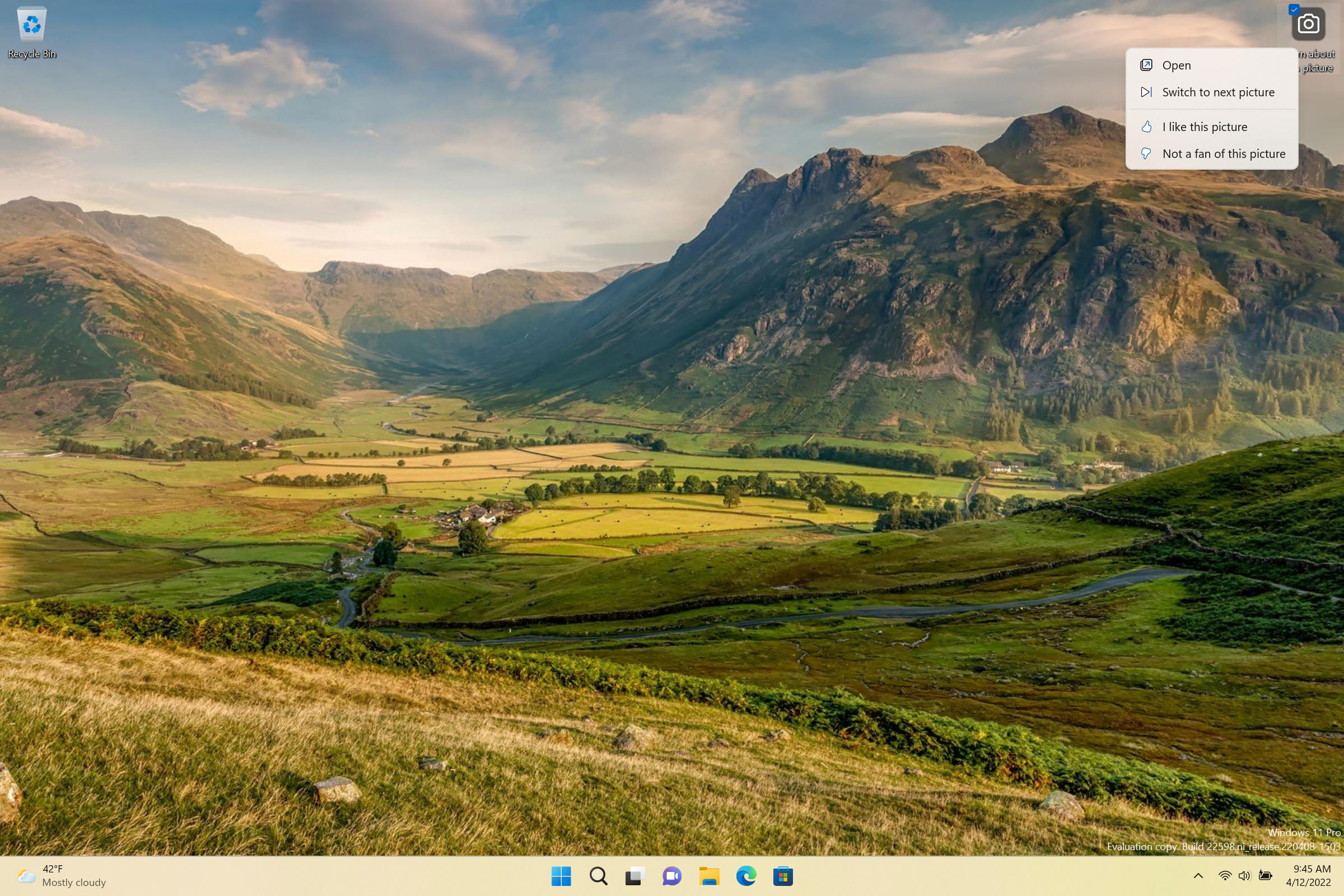
  • We are trying out Windows Spotlight on desktop is on by as the default background for new devices (clean installs using the ISO) and for upgrades where the background the Windows 11 default. We are trying this experience out with a limited number of Windows Insiders at first.


    Windows Spotlight showing a beautiful background with the contest menu to like, unlike backgrounds and switch to a different background.
    Windows Spotlight showing a beautiful background with the contest menu to like, unlike backgrounds and switch to a different background.
  • We are also trying out displaying 4K desktop backgrounds in Windows Spotlight. We are also trying this experience out with a limited number of Windows Insiders at first.

[Taskbar]

  • Updated the tooltip on the volume icon to tell you when you’re using spatial sound.

Fixes

[General]

  • Devices using Windows Information Protection (formerly EDP) policies can now access controlled data via protected apps such as Outlook, Word, Microsoft Edge, etc. as expected.

[Taskbar]

  • We fixed an issue where if you used keyboard focus on taskbar, hovers like previews would stay up during all taskbar interactions.
  • Fixed an issue that was causing taskbar badges to come back after explorer.exe crashes even if you had them turned off in Settings.
  • Made a fix for an issue where some mouse move events weren’t being passed to apps for icons in the system tray.
  • Fixed an issue where hovering over some app icons in the system tray wasn’t showing previews or tooltips.
  • App icons in the system tray should now be showing more reliably when opened again in this build.
  • Fixed an issue that was delaying or preventing the show hidden icons flyout from opening.
  • Fixed an issue where Chinese characters weren’t displaying in the taskbar calendar when the Lunar calendar was turned on.
  • Addressed an issue where the visual indicator around an app icon when sharing a window might not go away once you’d stopped sharing.

[Start menu]

  • We fixed a crash when selecting the More button in Start’s Recommended section.
  • Addressed an underlying issue which could lead to Start crashing on launch when invoked with a gesture.
  • Fixed an issue that was causing the buttons and labels in Start to be the wrong colors while using contrast themes.
  • Addressed an issue where if you swiped to scroll the contents of a folder in the pinned section of Start, it would unexpectedly close Start.

[File Explorer]

  • Addressed an issue which was causing the context menu to not render completely sometimes and be transparent.

[Input]

  • Improved the performance of launching the touch keyboard on the login screen.
  • Fixed an issue where if you had selected text with touch in certain apps like Settings, the backspace key in the touch keyboard would have to be tapped twice for it to delete.
  • Voice typing should no longer stop responding if you repeatedly press WIN + H.
  • Fixed an issue for people with a large number of input methods, where the currently selected one might not be in view when you opened the input switcher.
  • Fixed the link at the bottom of the Chinese (Simplified) IME appearance settings so it points to Settings > Personalization > Text Input.
  • Addressed an issue where the emoji panel’s background image and color might not be rendered correctly after using options in Settings > Personalization > Text Input.

[Settings]

  • Fixed an issue where high DPI options in the Compatibility tab of the properties for an executable weren’t working.
  • Narrator should now read the view options we added in Settings > Apps > Installed apps

[Windowing]

  • Returned the missing animation when pressing WIN + D or clicking the Show Desktop button.
  • We addressed an issue when using snap layouts with touch which could result in an acrylic sheet getting stuck on top of the window.
  • The thumbnails in Task View should no longer be inverted when using Hebrew or Arabic display languages.
  • Fixed an explorer.exe crash when invoking Task View.
  • If you have a lot of windows open, they should no longer become superimposed on top of Desktops in Task View.
  • Fixed an issue when using ALT + Tab with a screen reader, where if you ALT + Tabbed back to certain app windows, focus would be set to a pane within the window rather than the whole window.
  • Fixed an underlying issue where accented colored title bars (when enabled) for certain apps and File Explorer were only displaying when the windows were maximized.
  • Mitigated a rare issue that could lead to the system hanging when changing the resolution sometimes in certain games.
  • Addressed an issue causing white pixels in the corners of some apps when using dark mode.
  • Did some work to address an issue where certain app windows wouldn’t move to the expected area after selecting them using snap assist.
  • Fixed a glitch in the animation when using snap layouts at the top of the screen to snap windows.

[Live captions]

  • Fixed an issue where the very top of maximized apps (e.g., title bar window management buttons) couldn’t be reached with touch while live captions were positioned at the top.
  • Live captions will now tell you when it’s done downloading and ready to caption.

[Task Manager]

  • Mitigated an issue causing the Performance page CPU graph to be colored as if Show Kernel Times was enabled even though it wasn’t.
  • Did some work to further improve Task Manager reliability.
  • Added access key support for Run New Task (ALT + N), End Task (ALT + E), Efficiency Mode (ALT + V), and other buttons on each page. If you press ALT, the letters will display next to the button.
  • With a process selected, pressing the Delete key will now end the process like it used to.
  • CTRL + Tab and CTRL + Shift + Tab will now cycle through the pages in Task Manager.
  • Fixed an issue where the memory composition graph was blank instead of filed in with the appropriate color.
  • Mitigated an issue leading to the GPU graph on the performance tab not being displayed in some cases.
  • The icons in the status column of the Processes page are no longer touching the side of the column.
  • Fixed an issue where “Efficiency mode” was missing status column of the Users page.

[WSL]

  • Fixed an issue that would prevent WSL2 from mounting the host file system on ARM64.

[Other]

  • Fixed an issue from the previous flight where the acrylic might not extend across the entire login screen.
  • Fixed an issue that was causing the volume and brightness keys that appear when your use your hardware keys to be cut off in the middle.
  • Running powercfg /query should work now when launched from syswow64 or from a 32-bit process.
  • Fixed an apostrophe that wasn’t rendering correctly in the text when doing an offline scan from the Windows Security app.
  • Removed an extra “be” in the text describing Smart Account Control in the Windows Security app.
  • Fixed an issue for certain language which could lead to question marks being displayed in the place of some of the text when upgrading to a new build.
  • If you have increased the text size under Settings > Accessibility > Text Size and launch setup from a Windows ISO while booted into your currently installed OS, the text displayed in the setup window will now be increased to match your preferences.
NOTE: Some fixes noted here in Insider Preview builds from the active development branch may make their way into the servicing updates for the released version of Windows 11 that became generally available on October 5th, 2021.

Known issues

[General]

  • Windows Insiders running Windows 10 who join the Dev or Beta Channels to get the latest builds may encounter a download error code 0xc8000402 while trying to download the latest build. As a workaround, please join the Release Preview Channel first, install Windows 11 from there (Build 22000.xxxx), and then switch to the Dev or Beta Channel to receive the latest Insider Preview build. This issue is understood and will be fixed in an upcoming build.
  • We’re investigating reports that a few Insiders have been experiencing an issue where explorer.exe is crashing repeatedly in a loop in the latest builds and unable to successfully load. This build includes another fix that may help some Insiders who were experiencing this.
  • When opening Group Policy editor, an Administrative Template error will pop up. Click “Ok” to dismiss and continue using Group Policy editor normally.

[Taskbar]

  • The taskbar doesn’t always automatically collapse after launching an app or tapping outside of the expanded taskbar on 2-in-1 devices.
  • Some areas of the OS are not yet tracking the height of the expanded taskbar on 2-in-1 devices so you may see overlapping components.

[File Explorer]

  • Using context menu options in File Explorer or on the desktop for rename, copy, paste, and delete may cause explorer.exe to crash when the context menu dismisses. As a workaround if you are impacted you will need to use other methods for the desired action, for example, pressing F2 to rename a selected file or folder.
  • The option to “Add to Favorites” does not show when right-clicking on a file on Home. As a workaround, this option can be accessed by choosing “Show more options”.

[Widgets]

  • The widgets board may not open successfully when using the gesture from the side of the screen. If you are impacted, please tap the Widgets icon in the taskbar for now instead.

[Network]

  • We’re investigating reports from Insiders about internet connectivity issues when certain VPNs are connected.

[Live captions]

  • Certain apps in full screen (e.g., video players) prevent live captions from being visible.
  • Certain apps positioned near the top of the screen and closed before live captions is run will re-launch behind the live captions window positioned at top. Use the system menu (ALT + Spacebar) while the app has focus to move the app’s window further down.

For developers

You can download the latest Windows Insider SDK at aka.ms/windowsinsidersdk.

SDK NuGet packages are now also flighting at NuGet Gallery | WindowsSDK which include:
These NuGet packages provide more granular access to the SDK and better integrate in CI/CD pipelines.

Media Player: Improved library experience and new video playback enhancements

Today, we are starting to roll out a new update to Media Player for Windows 11 (Version 11.2203.30.0) to Windows Insiders in the Dev Channel.

The new album details view in the artist page in Media Player.

You can now switch between two different views on the artist page when browsing your collection. One view shows you all the albums in a grid; the other shows all the songs, grouped by album. We’ve also added quick actions to albums, artists, videos, and playlists when you hover over them for quick selection and playback.

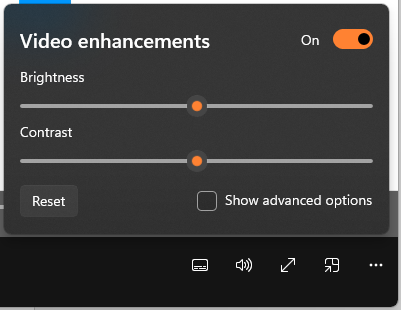
The video enhancements options dialog in the now playing view in Media Player.

There’s also now a handy context menu available if you right-click on the now playing screen. From here you can open new files without navigating to another page. You can also quickly access the album page and the artist page for your current song. We’ve added a new “video enhancements” feature as well, which allows you to adjust the brightness and contrast of your video.

In addition to these new features, we are continuing to work on improving the performance of Media Player for those of you with very large music libraries. Let us know what you think by sharing your feedback and suggestions in Feedback Hub (under Apps > Media Player).

About the Dev & Beta Channels [Updated!]

As a reminder, we are evolving the way we develop and release to Insiders with the Dev and Beta Channels now representing parallel development paths from our engineers. The Dev Channel will be a place where we will try out different concepts, incubate new ideas, and work on long lead items that may not get released to general customers. The Beta Channel will be the place we preview experiences that are closer to what we will ship to our general customers. However, this does not mean every feature we try out in the Beta Channel will ship. We encourage Insiders to read this blog post from last month that outlines the ways we’ll try things out with Insiders in the Dev and Beta Channels.

Now that the Dev and Beta Channels are receiving the same builds, the limited window has opened for Insiders to switch channels if you wish to do so by following these simple steps:
  1. Open Settings > Windows Update > Windows Insider Program.
  2. Select Choose your Insider settings.
  3. Select Beta Channel.
  4. The next time you receive an update, it will be for your new channel.

IMPORTANT: This window will close once we release builds with higher build numbers to the Dev Channel. If your device stays on the Dev Channel and receives a build that is a higher build number than what is in the Beta Channel, you will have to do a clean installation of the released version of Windows 11 on your device to switch to the Beta Channel.

These aren’t always stable builds, and sometimes you will see issues that block key activities or require workarounds. It is important to make sure you read the known issues listed in our blog posts as we document many of these issues with each flight.

The desktop watermark you see at the lower right corner of your desktop is normal for these pre-release builds.


Important Insider Links

Thanks,
Amanda & Brandon

Source:

Check Windows Updates


UUP Dump:

64-bit ISO download:
Select language for Windows 11, version 22H2 Insider Preview 10.0.22598.200 (ni_release) amd64

ARM64 ISO download: Select language for Windows 11, version 22H2 Insider Preview 10.0.22598.200 (ni_release) arm64

 
Last edited:

search doesn't work
Did you try with troubleshooter? Search and indexing has its own - in settings type troubleshoot search

1650229139672.png


My Computers My Computers

  • At a glance

    Windows 10 Pro, Windows 11 DevIntel I3 1010016 GB DDR4 CrucialIntel on chip
    OS
    Windows 10 Pro, Windows 11 Dev
    Computer type
    PC/Desktop
    Manufacturer/Model
    Homebuilt
    CPU
    Intel I3 10100
    Motherboard
    ASUS B460M
    Memory
    16 GB DDR4 Crucial
    Graphics Card(s)
    Intel on chip
    Sound Card
    Realtek onboard
    Monitor(s) Displays
    ASUS 24, LG 24
    Screen Resolution
    Full HD x 2
    Hard Drives
    kingston A2000 NVMe PCIe 500 GB
    PSU
    LC Power 650W
    Case
    Noname
    Cooling
    Air 2x 120mm
    Keyboard
    Cherry G-81
    Mouse
    Logitech M500
    Internet Speed
    100/20
    Browser
    Firefox, Vivaldi
    Antivirus
    MS Defender
  • At a glance

    Windows 10 HomeRyzen 7 4700u8 GB DDR4AMD Vega
    Operating System
    Windows 10 Home
    Computer type
    Laptop
    Manufacturer/Model
    ASUS/Vivobook Flip 14
    CPU
    Ryzen 7 4700u
    Memory
    8 GB DDR4
    Graphics card(s)
    AMD Vega
    Sound Card
    Realtek onboard
    Monitor(s) Displays
    14"
    Screen Resolution
    FullHD
    Hard Drives
    512 Samsung NVMe PCIe
    PSU
    -
    Case
    Laptop
    Mouse
    Touchpad, Touchscreen
    Internet Speed
    100/20
    Browser
    Firefox, Vivaldi
    Antivirus
    MS Defender
W
Did you try with troubleshooter? Search and indexing has its own - in settings type troubleshoot search

View attachment 27106
My success rate on those troubleshooters is so vanishingly small, I have given up using them. Of course, OP should give it a go, just in case...
 

My Computer My Computer

At a glance

Windows 11 Pro + Win11 Canary VM.I9 13th gen i9-13900H 2.60 GHZ16 GB solderedIntegrated Intel Iris XE
OS
Windows 11 Pro + Win11 Canary VM.
Computer type
Laptop
Manufacturer/Model
ASUS Zenbook 14
CPU
I9 13th gen i9-13900H 2.60 GHZ
Motherboard
Yep, Laptop has one.
Memory
16 GB soldered
Graphics Card(s)
Integrated Intel Iris XE
Sound Card
Realtek built in
Monitor(s) Displays
laptop OLED screen
Screen Resolution
2880x1800 touchscreen
Hard Drives
1 TB NVME SSD (only weakness is only one slot)
PSU
Internal + 65W thunderbolt USB4 charger
Case
Yep, got one
Cooling
Stella Artois (UK pint cans - 568 ml) - extra cost.
Keyboard
Built in UK keybd
Mouse
Bluetooth , wireless dongled, wired
Internet Speed
900 mbs (ethernet), wifi 6 typical 350-450 mb/s both up and down
Browser
Edge
Antivirus
Defender
Other Info
TPM 2.0, 2xUSB4 thunderbolt, 1xUsb3 (usb a), 1xUsb-c, hdmi out, 3.5 mm audio out/in combo, ASUS backlit trackpad (inc. switchable number pad)

Macrium Reflect Home V8
Office 365 Family (6 users each 1TB onedrive space)
Hyper-V (a vm runs almost as fast as my older laptop)
Noticed that if you open the taskbar flyout to see hidden icons on this build, it never closes unless you click the arrow again, no way this is by design - I used it to open a program, then launched a game - ended up with the flyout overlaying the game and no way to close it without leaving the game.

Edit: as soon as I posted this it started working again, quite confused!
 
Last edited:

My Computer My Computer

At a glance

Windows 11Intel Xeon E5-1630v332GB DDR4Nvidia GTX 760
OS
Windows 11
Computer type
PC/Desktop
Manufacturer/Model
Lenovo Thinkstation P500
CPU
Intel Xeon E5-1630v3
Motherboard
Lenovo Std
Memory
32GB DDR4
Graphics Card(s)
Nvidia GTX 760
Sound Card
Lenovo Std
Monitor(s) Displays
2 24" 75hz, 1 27" 144hz
Screen Resolution
1080p x3
Hard Drives
1x 500GB WD Black NVMe Gen 3 SSD
1x 750gb WD Black 2.5" 7500rpm
PSU
Lenovo Std 650w
Case
Lenovo Std
Cooling
Lenovo Std
Keyboard
Aorus K9 USI Red
Mouse
Logitech G502 Hero
Internet Speed
1.5Gbps Cable
Browser
Firefox
Antivirus
Trend Micro WFHBS
Noticed that if you open the taskbar flyout to see hidden icons on this build, it never closes unless you click the arrow again, no way this is by design - I used it to open a program, then launched a game - ended up with the flyout overlaying the game and no way to close it without leaving the game.
It's been like that for the last couple builds. They seem to be dumbing down the functionality of that area.....
 

My Computers My Computers

  • At a glance

    Win 11 Pro (25H2 RP)Intel(R) Core(TM) i5-9300H CPU @ 2.40GHz 2.40...32GBNvidia GeForce GTX 1650, Intel UHD 630
    OS
    Win 11 Pro (25H2 RP)
    Computer type
    Laptop
    Manufacturer/Model
    Acer AN515-54
    CPU
    Intel(R) Core(TM) i5-9300H CPU @ 2.40GHz 2.40 GHz
    Memory
    32GB
    Graphics Card(s)
    Nvidia GeForce GTX 1650, Intel UHD 630
    Monitor(s) Displays
    Acer CB272D
    Screen Resolution
    1920x1080
    Hard Drives
    256GB and 1T SSD
    Internet Speed
    500MB
    Browser
    Edge (Stable)
    Antivirus
    Microsoft Defender
  • At a glance

    Win 11 Pro (RP)Intel(R) Core(TM) Ultra 9 275HX (2.70 GHz)32GB DDR5-5600NVIDIA® GeForce RTX™ 5060 8GB
    Operating System
    Win 11 Pro (RP)
    Computer type
    Laptop
    Manufacturer/Model
    Lenovo Legion 5 16IAX10 - Type 83NX
    CPU
    Intel(R) Core(TM) Ultra 9 275HX (2.70 GHz)
    Memory
    32GB DDR5-5600
    Graphics card(s)
    NVIDIA® GeForce RTX™ 5060 8GB
    Monitor(s) Displays
    Acer CB272D
    Screen Resolution
    1920x1080 75Hz
    Hard Drives
    WD Green SN3000 (2TB)
    Samsung Portable T5 (2TB)
    Keyboard
    Logi MX Keys
    Mouse
    Logi MX Anywhere 3
    Internet Speed
    500MB
    Browser
    Edge
    Antivirus
    MS Defender
It's been like that for the last couple builds. They seem to be dumbing down the functionality of that area.....
Oddly it started working again as soon as I posted - still delayed 15-20 seconds, but not stuck - on Sunday night, it stayed put for almost 2 hours
 

My Computer My Computer

At a glance

Windows 11Intel Xeon E5-1630v332GB DDR4Nvidia GTX 760
OS
Windows 11
Computer type
PC/Desktop
Manufacturer/Model
Lenovo Thinkstation P500
CPU
Intel Xeon E5-1630v3
Motherboard
Lenovo Std
Memory
32GB DDR4
Graphics Card(s)
Nvidia GTX 760
Sound Card
Lenovo Std
Monitor(s) Displays
2 24" 75hz, 1 27" 144hz
Screen Resolution
1080p x3
Hard Drives
1x 500GB WD Black NVMe Gen 3 SSD
1x 750gb WD Black 2.5" 7500rpm
PSU
Lenovo Std 650w
Case
Lenovo Std
Cooling
Lenovo Std
Keyboard
Aorus K9 USI Red
Mouse
Logitech G502 Hero
Internet Speed
1.5Gbps Cable
Browser
Firefox
Antivirus
Trend Micro WFHBS
Oddly it started working again as soon as I posted - still delayed 15-20 seconds, but not stuck - on Sunday night, it stayed put for almost 2 hours
Well, I'll be, it does! I was never patient enough to wait that long. ;)
 

My Computers My Computers

  • At a glance

    Win 11 Pro (25H2 RP)Intel(R) Core(TM) i5-9300H CPU @ 2.40GHz 2.40...32GBNvidia GeForce GTX 1650, Intel UHD 630
    OS
    Win 11 Pro (25H2 RP)
    Computer type
    Laptop
    Manufacturer/Model
    Acer AN515-54
    CPU
    Intel(R) Core(TM) i5-9300H CPU @ 2.40GHz 2.40 GHz
    Memory
    32GB
    Graphics Card(s)
    Nvidia GeForce GTX 1650, Intel UHD 630
    Monitor(s) Displays
    Acer CB272D
    Screen Resolution
    1920x1080
    Hard Drives
    256GB and 1T SSD
    Internet Speed
    500MB
    Browser
    Edge (Stable)
    Antivirus
    Microsoft Defender
  • At a glance

    Win 11 Pro (RP)Intel(R) Core(TM) Ultra 9 275HX (2.70 GHz)32GB DDR5-5600NVIDIA® GeForce RTX™ 5060 8GB
    Operating System
    Win 11 Pro (RP)
    Computer type
    Laptop
    Manufacturer/Model
    Lenovo Legion 5 16IAX10 - Type 83NX
    CPU
    Intel(R) Core(TM) Ultra 9 275HX (2.70 GHz)
    Memory
    32GB DDR5-5600
    Graphics card(s)
    NVIDIA® GeForce RTX™ 5060 8GB
    Monitor(s) Displays
    Acer CB272D
    Screen Resolution
    1920x1080 75Hz
    Hard Drives
    WD Green SN3000 (2TB)
    Samsung Portable T5 (2TB)
    Keyboard
    Logi MX Keys
    Mouse
    Logi MX Anywhere 3
    Internet Speed
    500MB
    Browser
    Edge
    Antivirus
    MS Defender
Hi folks

Screenshot 2022-04-19 083423.png

Copied these fonts from my NAS server -- TTF still working on Windows. !!

Totally screwed up File explorer etc losing downlload folders , randomly putting stuff on one drive etc. It also cleared out Windows tools only leaving power shell !!!!

Not using it again -- waiting for next build.


The standard one is working OK though.


Cheers
jimbo
 

My Computer My Computer

At a glance

Windows XP,11 Linux Fedora Rawhide pre-releas...2 X Intel i7
OS
Windows XP,11 Linux Fedora Rawhide pre-release 45
Computer type
PC/Desktop
CPU
2 X Intel i7
Screen Resolution
4KUHD X 2
Yeah, this build is definitely a DUD. A lot of issues all over the place. Random stuff crashing here and there. Losing my displays completely and what not. The most unstable build I've used in a very long time.
 

My Computers My Computers

  • At a glance

    Win 11 Pro 25H2 26200.8894 / Linux Mint 22.3Ryzen 7 2700U Pro32GBiGPU Vega 10
    OS
    Win 11 Pro 25H2 26200.8894 / Linux Mint 22.3
    Computer type
    Laptop
    Manufacturer/Model
    Lenovo A485
    CPU
    Ryzen 7 2700U Pro
    Motherboard
    Lenovo (WiFi/BT module upgraded to Intel Wireless-AC-9260)
    Memory
    32GB
    Graphics Card(s)
    iGPU Vega 10
    Sound Card
    Realtek
    Monitor(s) Displays
    14" FHD (built-in) + 14" Lenovo Thinkvision M14t (touch+pen) + 32" Asus PB328
    Screen Resolution
    FHD + FHD + 1440p
    Hard Drives
    Intel 660p m.2 nVME PCIe3.0 x2 512GB
    PSU
    125W(Dock)/65W(Travel Adapter)
    Keyboard
    Thinkpad / Logitech MX Keys
    Mouse
    Logitech MX Master 2S
    Internet Speed
    1/1Gbit
    Browser
    Firefox
    Antivirus
    Windows Defender
    Other Info
    SecureBoot: Enabled
    TPM2.0: Enabled
    AMD-V: Enabled
  • At a glance

    Win 11 Pro 25H2 26200.8968(RP)i7-7700k @4.8GHz32GB 2x16GB 2133MHz CL15EVGA GTX1080Ti FTW 11GB
    Operating System
    Win 11 Pro 25H2 26200.8968(RP)
    Computer type
    PC/Desktop
    Manufacturer/Model
    Custom
    CPU
    i7-7700k @4.8GHz
    Motherboard
    Asus PRIME Z270-A
    Memory
    32GB 2x16GB 2133MHz CL15
    Graphics card(s)
    EVGA GTX1080Ti FTW 11GB
    Sound Card
    Integrated
    Monitor(s) Displays
    32" 10-bit Asus PB328Q
    Screen Resolution
    WQHD 2560x1440
    Hard Drives
    512GB ADATA SX8000NP NVMe PCIe Gen 3 x4
    PSU
    850W
    Case
    Fractal Design Define 7
    Cooling
    Noctua NH-D15 chromax.black
    Keyboard
    Logitech MX Keys
    Mouse
    Logitech MX Master 2S
    Internet Speed
    1/1Gbit
    Browser
    Firefox
    Antivirus
    Windows Defender
    Other Info
    AC WiFi Card
  • Asus U46SV (laptop), i5-2410M, 8GB RAM, 500GB SSD, 750GB HDD, Windows 10. (used as a local Minecraft server and data dump)
hello I wanted to ask if I activate the system with a key, the watermark may disappear from the desktop?
 

My Computer My Computer

At a glance

Windows 11Intel Core i7-9700F, 4500 MHz16 GB DDR4GeForce GTX 1070 (8 GB)
OS
Windows 11
Computer type
PC/Desktop
CPU
Intel Core i7-9700F, 4500 MHz
Motherboard
ASRock B365M-HDV
Memory
16 GB DDR4
Graphics Card(s)
GeForce GTX 1070 (8 GB)
Sound Card
Realtek ALC887 @ Intel Kaby Point PCH - High Definition Audio
Monitor(s) Displays
Samsung 32 cale
Screen Resolution
1680 x 1050
Hard Drives
Dysk nr 1 - Patriot Burst (B5950791083400100449) [894 GB] D: E:
Dysk nr 2 - SAMSUNG MZVLB256HBHQ-000L2 (0025_3889_91CB_C6D1.) [238 GB] C: F: G:
Keyboard
roccat
hello I wanted to ask if I activate the system with a key, the watermark may disappear from the desktop?
Not if it's a Beta or Dev build....
 

My Computers My Computers

  • At a glance

    Win 11 Pro (25H2 RP)Intel(R) Core(TM) i5-9300H CPU @ 2.40GHz 2.40...32GBNvidia GeForce GTX 1650, Intel UHD 630
    OS
    Win 11 Pro (25H2 RP)
    Computer type
    Laptop
    Manufacturer/Model
    Acer AN515-54
    CPU
    Intel(R) Core(TM) i5-9300H CPU @ 2.40GHz 2.40 GHz
    Memory
    32GB
    Graphics Card(s)
    Nvidia GeForce GTX 1650, Intel UHD 630
    Monitor(s) Displays
    Acer CB272D
    Screen Resolution
    1920x1080
    Hard Drives
    256GB and 1T SSD
    Internet Speed
    500MB
    Browser
    Edge (Stable)
    Antivirus
    Microsoft Defender
  • At a glance

    Win 11 Pro (RP)Intel(R) Core(TM) Ultra 9 275HX (2.70 GHz)32GB DDR5-5600NVIDIA® GeForce RTX™ 5060 8GB
    Operating System
    Win 11 Pro (RP)
    Computer type
    Laptop
    Manufacturer/Model
    Lenovo Legion 5 16IAX10 - Type 83NX
    CPU
    Intel(R) Core(TM) Ultra 9 275HX (2.70 GHz)
    Memory
    32GB DDR5-5600
    Graphics card(s)
    NVIDIA® GeForce RTX™ 5060 8GB
    Monitor(s) Displays
    Acer CB272D
    Screen Resolution
    1920x1080 75Hz
    Hard Drives
    WD Green SN3000 (2TB)
    Samsung Portable T5 (2TB)
    Keyboard
    Logi MX Keys
    Mouse
    Logi MX Anywhere 3
    Internet Speed
    500MB
    Browser
    Edge
    Antivirus
    MS Defender
Yeah, this build is definitely a DUD. A lot of issues all over the place. Random stuff crashing here and there. Losing my displays completely and what not. The most unstable build I've used in a very long time.

Hi there

@SlicEnDicE


Worst build in years - absolutely true.

I think this expresses it adequately :

Screenshot 2022-04-19 083423.png


This build totally destroyed File explorer loading files all over the place, including to One Drive, and trashing "Windows Tools " to only showing Powershell.

Also it seems to have zillions of "downloaded" folders to all over the place with all sorts of stuff missing or stored elsewhere.

The latest Std (220xxx build) is OK though -- but this 225xxx one -- no way until new one appears. OK I'm used to "beta" or even "Alpha" testing so I am well able to prepare for avoiding loss of data but this one really shouldn't have been let out of the door.

Conversely Ms seem to have got this one right. I.E the latest 220xxx build-- apart from a few language quirks even I haven't been able to break it yet. (At least not by "Normal Usage") -- I'm sure though @Edwin he's done all sorts of things with it.

Screenshot 2022-04-19 140324.png

cheers
jimbo
 
Last edited:

My Computer My Computer

At a glance

Windows XP,11 Linux Fedora Rawhide pre-releas...2 X Intel i7
OS
Windows XP,11 Linux Fedora Rawhide pre-release 45
Computer type
PC/Desktop
CPU
2 X Intel i7
Screen Resolution
4KUHD X 2
I'm back to Beta Channel, the only crashes are related to the files operations , so I'm doing with the File Explorer menus, hopefully next build will solve the File Explorer crashes
 

My Computers My Computers

  • At a glance

    Windows 11 ProIntel Core i9-14900HX32 GBIntel UHD Graphics, NVIDIA RTX 4070 Laptop
    OS
    Windows 11 Pro
    Computer type
    Laptop
    Manufacturer/Model
    Lenovo Legion 7i 16IRX9
    CPU
    Intel Core i9-14900HX
    Motherboard
    LENOVO LNVNB161216 Chipset HM 770
    Memory
    32 GB
    Graphics Card(s)
    Intel UHD Graphics, NVIDIA RTX 4070 Laptop
    Sound Card
    Realtek in-built
    Screen Resolution
    3200x2000 200% Scale
    Hard Drives
    C: HDD 1 TB SAMSUNG MZVL21T0HCLR-00BL2
    D: HDD 1 TB CRUCIAL CT1000P3PSSD8
    Antivirus
    BitDefender Free
  • At a glance

    Windows 11 ProI7 10750H32 GBIntel UHD - NVIDIA 1650 Ti Max-Q
    Operating System
    Windows 11 Pro
    Computer type
    Laptop
    Manufacturer/Model
    Lenovo ThinkPad X1 3Gen Extreme
    CPU
    I7 10750H
    Motherboard
    Intel MW-490
    Memory
    32 GB
    Graphics card(s)
    Intel UHD - NVIDIA 1650 Ti Max-Q
    Sound Card
    Realtek in-built
    Screen Resolution
    3840x2160 225% Scale
    Hard Drives
    C: WDC PC SN730 SDBQNTY-1T00-1001 (1 TB)
    D: KINGSTON SNV2S2000G (2 TB)
    Antivirus
    BitDefender
My Build on laptop is fine with just StartAllBack installed! 🤷‍♂️
 

My Computers My Computers

  • At a glance

    Windows 11 Pro
    OS
    Windows 11 Pro
    Computer type
    PC/Desktop
    Manufacturer/Model
    ASUS ROG Strix
  • At a glance

    Windows 11 Pro
    Operating System
    Windows 11 Pro
    Computer type
    Laptop
    Manufacturer/Model
    ASUS VivoBook
  • ASUS VivoBook 'Lite' ~ Windows 11 Home
Haven't had any problems with this build. Smooth and fast. Don't have any third party UI "enhancements" installed either.
 

My Computer My Computer

At a glance

Windows 11 RPAMD Ryzen 5 Pro 3400GE @3.30 GHz (4.0 GHz Turbo)20 GB DDR4 2666 (1x16GB + 1x4GB)AMD Radeon Vega 11
OS
Windows 11 RP
Computer type
PC/Desktop
Manufacturer/Model
Lenovo ThinkCentre M75Q-1
CPU
AMD Ryzen 5 Pro 3400GE @3.30 GHz (4.0 GHz Turbo)
Motherboard
Lenovo 3151
Memory
20 GB DDR4 2666 (1x16GB + 1x4GB)
Graphics Card(s)
AMD Radeon Vega 11
Sound Card
Integrated
Monitor(s) Displays
AOC 2369
Screen Resolution
1920 x 1080
Hard Drives
WD 512 GB NVME + SPCC 240GB SATA SSD
PSU
External 65W
Case
Mini (1L)

My Computers My Computers

  • At a glance

    Windows 11 Pro
    OS
    Windows 11 Pro
    Computer type
    PC/Desktop
    Manufacturer/Model
    ASUS ROG Strix
  • At a glance

    Windows 11 Pro
    Operating System
    Windows 11 Pro
    Computer type
    Laptop
    Manufacturer/Model
    ASUS VivoBook
  • ASUS VivoBook 'Lite' ~ Windows 11 Home
UPDATE:

KB5014105.jpg
 

My Computers My Computers

  • At a glance

    Windows 11 Pro for WorkstationsIntel i7-8700K 5 GHz64 GB (4x16GB) G.SKILL TridentZ RGB DDR4 3600...ASUS ROG-STRIX-GTX1080TI-O11G-GAMING (11GB GD...
    OS
    Windows 11 Pro for Workstations
    Computer type
    PC/Desktop
    Manufacturer/Model
    Custom self build
    CPU
    Intel i7-8700K 5 GHz
    Motherboard
    ASUS ROG Maximus XI Formula Z390
    Memory
    64 GB (4x16GB) G.SKILL TridentZ RGB DDR4 3600 MHz (F4-3600C18D-32GTZR)
    Graphics Card(s)
    ASUS ROG-STRIX-GTX1080TI-O11G-GAMING (11GB GDDR5X)
    Sound Card
    Integrated Digital Audio (S/PDIF)
    Monitor(s) Displays
    2 x Samsung Odyssey G75 27"
    Screen Resolution
    2560x1440
    Hard Drives
    1TB Samsung 990 PRO M.2,
    4TB Samsung 990 PRO M.2,
    TerraMaster F8 SSD Plus NAS
    PSU
    Seasonic Prime Titanium 850W
    Case
    Thermaltake Core P3 wall mounted
    Cooling
    Corsair Hydro H115i
    Keyboard
    Amazon Basics Wired Full Keyboard MD005
    Mouse
    Logitech MX Master 4
    Internet Speed
    2 Gbps Download and 100 Mbps Upload
    Browser
    Chrome and Edge
    Antivirus
    Microsoft Defender
    Other Info
    Logitech Z625 speaker system,
    Logitech BRIO 4K Pro webcam,
    HP Color LaserJet Pro MFP M477fdn,
    CyberPower CP1500PFCLCD
    Galaxy S23 Plus phone
  • At a glance

    Windows 11 ProSnapdragon X Elite (12 core) 3.42 GHz16 GB LPDDR5x-7467 MHz
    Operating System
    Windows 11 Pro
    Computer type
    Laptop
    Manufacturer/Model
    Surface Laptop 7 Copilot+ PC
    CPU
    Snapdragon X Elite (12 core) 3.42 GHz
    Memory
    16 GB LPDDR5x-7467 MHz
    Monitor(s) Displays
    15" HDR
    Screen Resolution
    2496 x 1664
    Hard Drives
    1 TB SSD
    Internet Speed
    Wi-Fi 7 and Bluetooth 5.4
    Browser
    Chrome and Edge
    Antivirus
    Microsoft Defender
Thanks Shawn. Updating
 

My Computers My Computers

  • At a glance

    Windows 10 Pro, Windows 11 DevIntel I3 1010016 GB DDR4 CrucialIntel on chip
    OS
    Windows 10 Pro, Windows 11 Dev
    Computer type
    PC/Desktop
    Manufacturer/Model
    Homebuilt
    CPU
    Intel I3 10100
    Motherboard
    ASUS B460M
    Memory
    16 GB DDR4 Crucial
    Graphics Card(s)
    Intel on chip
    Sound Card
    Realtek onboard
    Monitor(s) Displays
    ASUS 24, LG 24
    Screen Resolution
    Full HD x 2
    Hard Drives
    kingston A2000 NVMe PCIe 500 GB
    PSU
    LC Power 650W
    Case
    Noname
    Cooling
    Air 2x 120mm
    Keyboard
    Cherry G-81
    Mouse
    Logitech M500
    Internet Speed
    100/20
    Browser
    Firefox, Vivaldi
    Antivirus
    MS Defender
  • At a glance

    Windows 10 HomeRyzen 7 4700u8 GB DDR4AMD Vega
    Operating System
    Windows 10 Home
    Computer type
    Laptop
    Manufacturer/Model
    ASUS/Vivobook Flip 14
    CPU
    Ryzen 7 4700u
    Memory
    8 GB DDR4
    Graphics card(s)
    AMD Vega
    Sound Card
    Realtek onboard
    Monitor(s) Displays
    14"
    Screen Resolution
    FullHD
    Hard Drives
    512 Samsung NVMe PCIe
    PSU
    -
    Case
    Laptop
    Mouse
    Touchpad, Touchscreen
    Internet Speed
    100/20
    Browser
    Firefox, Vivaldi
    Antivirus
    MS Defender
Getting it..
 

My Computer My Computer

At a glance

Windows 11 Home() - 25H2 -26220.8894AMD Ryzen 5 5600GG.SKILL Ripjaws V Series 64GB 4x16Nvidia geforce gtx titan x
OS
Windows 11 Home() - 25H2 -26220.8894
Computer type
PC/Desktop
Manufacturer/Model
Banana Junior 5600-G Series
CPU
AMD Ryzen 5 5600G
Motherboard
Asus ROG Strix B550-F
Memory
G.SKILL Ripjaws V Series 64GB 4x16
Graphics Card(s)
Nvidia geforce gtx titan x
Monitor(s) Displays
28" ASUS VP28U 4k
Screen Resolution
4K
Hard Drives
Primary SAMSUNG 970 EVO Plus
PSU
EVGA BQ 700w 80+ Bronze
Case
Zalman i3 NEO
Cooling
ARCTIC Freezer 7 X
Keyboard
Corsair
Mouse
Amazon Generic with Cord
Internet Speed
Download: 295.11 mbps Upload: 65.35 mbps T-Mobile Internet
Browser
Firefox and Edge
Antivirus
MS - Defender
Other Info
Speakers: Klipsch ProMedia 2.1
Yay! Pipeline test, not had one of those for ages 🤪
 

My Computer My Computer

At a glance

Windows 11 Pro Beta, 11 Dev, W11 CanaryAMD Ryzen™ 9 5900HX32GBNVIDIA® GeForce RTX™ 3070 8GB GDDR6
OS
Windows 11 Pro Beta, 11 Dev, W11 Canary
Computer type
Laptop
Manufacturer/Model
Dell Alienware M15 Ryzen Edition R6
CPU
AMD Ryzen™ 9 5900HX
Memory
32GB
Graphics Card(s)
NVIDIA® GeForce RTX™ 3070 8GB GDDR6
Hard Drives
1 x Samsung 980 Pro 1TB
1 x Samsung 970 Evo Plus 1TB
Leaving this one alone...
 

My Computer My Computer

At a glance

Windows 11Intel® Xeon® X5690 3.47GHz Six-CoreG.Skill PC3-12800 1600MHz 24GBNVIDIA GeForce GTX 1050
OS
Windows 11
Computer type
PC/Desktop
Manufacturer/Model
Asus/Custom Build
CPU
Intel® Xeon® X5690 3.47GHz Six-Core
Motherboard
Asus P6T Deluxe v2
Memory
G.Skill PC3-12800 1600MHz 24GB
Graphics Card(s)
NVIDIA GeForce GTX 1050
Sound Card
SoundMAX ADI AD2000B HD Audio
Monitor(s) Displays
Acer T232HL Touch Screen
Screen Resolution
1920 x 1080 @ 60Hz
Hard Drives
6 Crucial MX500 SSD 1TB each.
PSU
Thermaltake Toughpower Gold 850W
Case
Thermaltake Armor VA8000SWA
Cooling
Thermaltake Air Cooling System
Keyboard
Illuminated Multimedia LED Keyboard
Mouse
M16 Dual Mode Illuminated Mouse - Bluetooth / 2.4 GHz Mode
Internet Speed
800 Mbps
Browser
Edge / Opera / Vivaldi / Chrome / Firefox / Brave
Antivirus
Windows Defender Security

Latest Support Threads

Back
Top Bottom