Insider KB5014770 Cumulative Update for Windows 11 Insider Beta Build 22621.160 - June 13


UPDATE 7/5:


Hello Windows Insiders, today we are releasing Windows 11 Insider Preview Build 22621.160 (KB5014770) to the Beta Channel.

What’s new

File Explorer Tabs & Navigation Updates

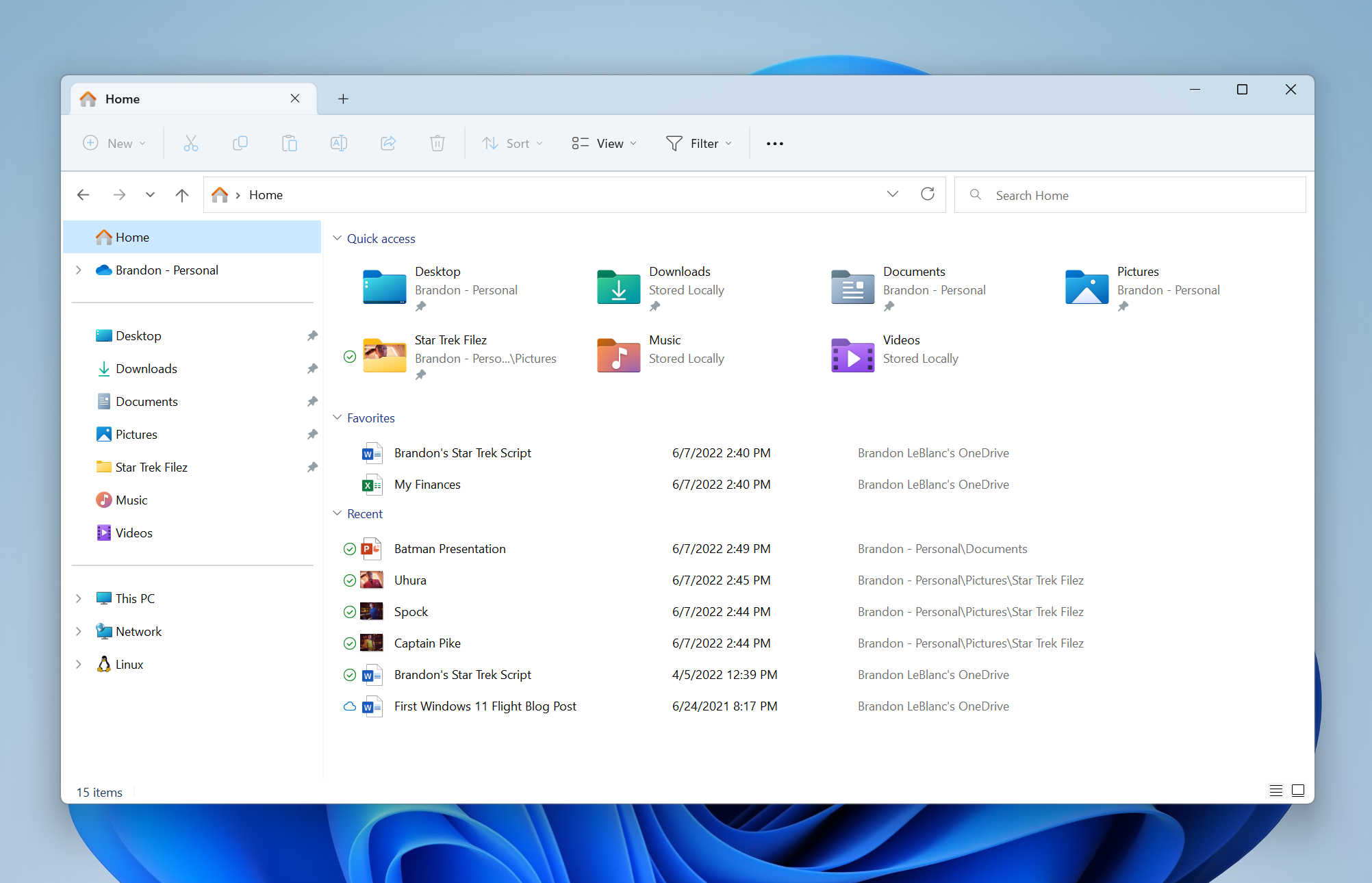
To help you work across multiple locations at the same time, the title bar of File Explorer now has tabs. We’d love your feedback on which tabs features you’d like to see next.


File Explorer with tabs and navigation updates.

File Explorer is also introducing a refreshed layout of the left navigation pane which makes it easy for you to navigate to folders that matter to you. The updated organization provides easy access to your pinned and frequently used folders (Quick access) and your OneDrive cloud profiles added to Windows. OneDrive cloud profiles reflect the user’s name associated with the account. Known Windows folders which are available by default in the navigation pane are no longer displayed under This PC to keep that view focused for your PC’s drives. When you navigate to folders syncing to OneDrive such as Documents, Pictures, etc., the address bar displays the correct path to help bring clarity when your folders are on the cloud vs when they are local to you.


[We are beginning to roll this feature out, so it isn’t available to all Insiders in the Beta Channel just yet as we plan to monitor feedback and see how it lands before pushing it out to everyone.]

FEEDBACK: Please file feedback in Feedback Hub (WIN + F) under Files, Folders, and Online Storage > File Explorer.

Known issues

[File Explorer]

  • The up arrow is misaligned in File Explorer tabs. This will be fixed in a future update.

About the Beta Channel

The Beta Channel will be the place we preview experiences that are closer to what we will ship to our general customers. Because the Dev and Beta Channels represent parallel development paths from our engineers, there may be cases where features and experiences show up in the Beta Channel first. However, this does not mean every feature we try out in the Beta Channel will ship. We encourage Insiders to read this blog post from last month that outlines the ways we’ll try things out with Insiders in both the Dev and Beta Channels.

Important Insider Links

Thanks,
Amanda & Brandon

Source:

Check Windows Updates


UUP Dump:

64-bit ISO download:
Select language for Windows 11 Insider Preview 10.0.22621.160 (ni_release) amd64

ARM64 ISO download: Select language for Windows 11 Insider Preview 10.0.22621.160 (ni_release) arm64

 
Last edited:
plz post the link to download manually this window update. kb5014770.
thanks.
I had that update present itself after manually installing the ISO that I created from uudump.
 

My Computer My Computer

At a glance

Win11 Pro 23H2 (Canary on secondary boxes)
OS
Win11 Pro 23H2 (Canary on secondary boxes)
explorer tab work with this build ?
 

My Computer My Computer

At a glance

Win11Pro Dev 25H2 26220.6972
OS
Win11Pro Dev 25H2 26220.6972
Computer type
PC/Desktop
Screen Resolution
4k
Browser
Microsoft Edge Beta
Antivirus
Eset Smart Security Premium
I had that update present itself after manually installing the ISO that I created from uudump.
manually checked for KB 5014770 MB in the windows archive update catalog but did not find it there. I think it would be a 223 MB or something similar size windows Exe file but so far I have not found it.
because when a windows update file was not installed, searching the windows update archive online catalog for this particular Windows update file would find it downloaded and installed it but not KB5014770.
 

My Computer My Computer

At a glance

windows 8.1Intel Core i7 @ 2.80GHz 57 °C Sandy Bridge 32...4.00GB Dual-Channel DDR3 @ 665MHz (9-9-9-24)Generic PnP Monitor (1366x768@40Hz) Intel HD ...
OS
windows 8.1
Computer type
Laptop
Manufacturer/Model
Dell Inc
CPU
Intel Core i7 @ 2.80GHz 57 °C Sandy Bridge 32nm Technology
Motherboard
Dell Inc. 0K0DNP (CPU 1)
Memory
4.00GB Dual-Channel DDR3 @ 665MHz (9-9-9-24)
Graphics Card(s)
Generic PnP Monitor (1366x768@40Hz) Intel HD Graphics 3000 (Dell)
Sound Card
High Definition Audio Device
Monitor(s) Displays
single
Screen Resolution
1366 x 768
Hard Drives
WDC WD2500BPVT-75JJ5T0
Keyboard
Standard PS/2 Keyboard
Mouse
PS/2 Compatible Mouse
Internet Speed
8mb
Browser
ms edge
Antivirus
windows defender
Other Info
http://u.pc.cd/TPRotalK
manually checked for KB 5014770 MB in the windows archive update catalog but did not find it there.
You won't. The Update Catalog only holds updates for the release builds. No updates for any Insider builds are available there.
 

My Computers My Computers

  • At a glance

    Windows 11 HomeAMD Athlon Silver 3050U8GBRadeon Graphics
    OS
    Windows 11 Home
    Computer type
    Laptop
    Manufacturer/Model
    Acer Aspire 3 A315-23-R9VY
    CPU
    AMD Athlon Silver 3050U
    Memory
    8GB
    Graphics Card(s)
    Radeon Graphics
    Monitor(s) Displays
    laptop screen
    Screen Resolution
    1366x768 native resolution, up to 2560x1440 with Radeon Virtual Super Resolution
    Hard Drives
    1TB Samsung EVO 870 SSD (from April 2026: 250GB EVO 850)
    Internet Speed
    150 Mbps
    Browser
    Edge, Firefox
    Antivirus
    Defender
    Other Info
    UPDATE - 11 April 2026: due to lid hinges starting to break up this laptop has been retired from active duty. The OS with all software and files has been migrated to my System Seven in 'Other systems' to carry on as my general purpose 'main machine'.

    I've now clean installed 25H2 and used Garlin's scripts to update Secure Boot to CA 2023 and revoke the PCA 2011 certificates. It's new role is to test secure boot issues.

    Info for 2021-2026:
    fully 'Windows 11 ready' laptop. Windows 10 C: partition migrated from my old unsupported 'main machine' then upgraded to 11. A test migration ran Insider builds for 2 months. When 11 was released on 5th October 2021 it was re-imaged back to 10 and was offered the upgrade in Windows Update on 20th October. Windows Update offered the 22H2 Feature Update on 20th September 2022. It got the 23H2 Feature Update on 4th November 2023 through Windows Update, 24H2 on 3rd October 2024 through Windows Update by setting the Target Release Version for 24H2, and 25H2 on 30th September 2025 through Windows Update by setting the Target Release Version for 25H2.
  • At a glance

    Windows 11 ProIntel® Core™ i5-520M8GB(integrated graphics) Intel HD Graphics
    Operating System
    Windows 11 Pro
    Computer type
    Laptop
    Manufacturer/Model
    Dell Latitude E4310
    CPU
    Intel® Core™ i5-520M
    Motherboard
    0T6M8G
    Memory
    8GB
    Graphics card(s)
    (integrated graphics) Intel HD Graphics
    Screen Resolution
    1366x768
    Hard Drives
    500GB Crucial MX500 SSD
    Browser
    Firefox, Edge
    Antivirus
    Defender
    Other Info
    unsupported machine: Legacy bios, MBR, TPM 1.2, upgraded from W10 to W11 using W10/W11 hybrid install media workaround.

    In-place upgrade to 22H2 using ISO and a workaround.
    Feature Update to 23H2 by manually installing the Enablement Package.
    In-place upgrade to 24H2 using hybrid 23H2/24H2 install media.
    Upgraded to 25H2 by Enablement Package.

    Also running Insider Dev, and Canary builds and Windows 10 as native boot .vhdx.
  • My SYSTEM THREE is a Dell Latitude 5410, i7-10610U, 32GB RAM, 512GB NVMe ssd, supported device running Windows 11 Pro.

    My SYSTEM FOUR was a 2-in-1 convertible Lenovo Yoga 11e (1st gen) type 20DA, Celeron N2930, 8GB RAM, 256GB ssd. Unsupported device. This has now been sold. It has been replaced by my System Eight.

    My SYSTEM FIVE is a Dell Latitude 3190 2-in-1, Pentium Silver N5030, 8GB RAM, 1TB NVMe ssd, supported device running Windows 11 Pro, plus Insider Beta, Dev, and Canary builds (and a few others) as a native boot .vhdx.

    My SYSTEM SIX is a Dell Latitude 5550, Core Ultra 7 165H, 64GB RAM, 1TB NVMe SSD, supported device, Windows 11 Pro, Hyper-V host machine. Updated to 25H2 on 30th September 2025.

    My SYSTEM SEVEN is a Lenovo Thinkpad T580, 1920x1080 touchscreen, Intel Core i7-8650U, 16GB RAM, 512GB NVMe SSD + 2nd 512GB NVMe SSD, a supported device for Windows 11. This is my current general purpose 'main machine'. The installed Windows 11 Home from my System One has been migrated to this machine. As its new home has an existing digital licence for Pro I've been able to upgrade the migrated OS from Home to Pro.

    My SYSTEM EIGHT is a 2-in-1 convertible Lenovo Yoga 11e (5th gen) type 20LN, Celeron N4120, 8GB RAM, 512GB NVMe ssd, a supported device for Windows 11. Currently running Windows 11 Pro, plus Insider Dev, Beta, and Canary builds as native boot vhdx.
You won't. The Update Catalog only holds updates for the release builds. No updates for any Insider builds are available there.
its KB 5014770 not KB 5014770 MB.
Sorrry.
 

My Computer My Computer

At a glance

windows 8.1Intel Core i7 @ 2.80GHz 57 °C Sandy Bridge 32...4.00GB Dual-Channel DDR3 @ 665MHz (9-9-9-24)Generic PnP Monitor (1366x768@40Hz) Intel HD ...
OS
windows 8.1
Computer type
Laptop
Manufacturer/Model
Dell Inc
CPU
Intel Core i7 @ 2.80GHz 57 °C Sandy Bridge 32nm Technology
Motherboard
Dell Inc. 0K0DNP (CPU 1)
Memory
4.00GB Dual-Channel DDR3 @ 665MHz (9-9-9-24)
Graphics Card(s)
Generic PnP Monitor (1366x768@40Hz) Intel HD Graphics 3000 (Dell)
Sound Card
High Definition Audio Device
Monitor(s) Displays
single
Screen Resolution
1366 x 768
Hard Drives
WDC WD2500BPVT-75JJ5T0
Keyboard
Standard PS/2 Keyboard
Mouse
PS/2 Compatible Mouse
Internet Speed
8mb
Browser
ms edge
Antivirus
windows defender
Other Info
http://u.pc.cd/TPRotalK

My Computers My Computers

  • At a glance

    Windows 11 PROi9-14900K64GB - 2 x32B DDR5 6400MHz (OC)Nvidia RTX 4060Ti
    OS
    Windows 11 PRO
    Computer type
    PC/Desktop
    Manufacturer/Model
    Home Built
    CPU
    i9-14900K
    Motherboard
    MSI MPG Z790 CARBON WIFI
    Memory
    64GB - 2 x32B DDR5 6400MHz (OC)
    Graphics Card(s)
    Nvidia RTX 4060Ti
    Hard Drives
    1 x 1TB Samsung 9100 PRO SSD; 1 x 2TB Samsung 860 EVO SSD; 1 x 2TB Samsung 870 EVO SSD; 1x 2TB WD Black SN850X SSD; 1 x 4TB Samsung 870 EVO SSD: 1 x 4TB Crucial CT4000P3PSSD8 SSD
    Internet Speed
    380Mb/s down; 36Mb/s up
    Browser
    Firefox
    Antivirus
    Bitdefender
  • At a glance

    Windows 11 PRO (Dev Channel)i7-9700K4x 8Gb DDR4 3000MhzNvidia GTX1070Ti
    Operating System
    Windows 11 PRO (Dev Channel)
    Computer type
    PC/Desktop
    Manufacturer/Model
    Home Built
    CPU
    i7-9700K
    Motherboard
    MSI Z390 A-PRO
    Memory
    4x 8Gb DDR4 3000Mhz
    Graphics card(s)
    Nvidia GTX1070Ti
    Hard Drives
    1x 500 GB Samsung 970 Evo Plus SSD; 1x 1TB ST1000DX001-1CM162 SSHD
    Internet Speed
    380Mb/s down; 36Mb/s up
    Browser
    Firefox
its KB 5014770 not KB 5014770 MB.
Sorrry.
Yes, I know. As I said, that KB5014770 is an update for an Insider build. You won't find it in the update catalog - the catalog is only for the RTM release builds.


My Computers My Computers

  • At a glance

    Windows 11 HomeAMD Athlon Silver 3050U8GBRadeon Graphics
    OS
    Windows 11 Home
    Computer type
    Laptop
    Manufacturer/Model
    Acer Aspire 3 A315-23-R9VY
    CPU
    AMD Athlon Silver 3050U
    Memory
    8GB
    Graphics Card(s)
    Radeon Graphics
    Monitor(s) Displays
    laptop screen
    Screen Resolution
    1366x768 native resolution, up to 2560x1440 with Radeon Virtual Super Resolution
    Hard Drives
    1TB Samsung EVO 870 SSD (from April 2026: 250GB EVO 850)
    Internet Speed
    150 Mbps
    Browser
    Edge, Firefox
    Antivirus
    Defender
    Other Info
    UPDATE - 11 April 2026: due to lid hinges starting to break up this laptop has been retired from active duty. The OS with all software and files has been migrated to my System Seven in 'Other systems' to carry on as my general purpose 'main machine'.

    I've now clean installed 25H2 and used Garlin's scripts to update Secure Boot to CA 2023 and revoke the PCA 2011 certificates. It's new role is to test secure boot issues.

    Info for 2021-2026:
    fully 'Windows 11 ready' laptop. Windows 10 C: partition migrated from my old unsupported 'main machine' then upgraded to 11. A test migration ran Insider builds for 2 months. When 11 was released on 5th October 2021 it was re-imaged back to 10 and was offered the upgrade in Windows Update on 20th October. Windows Update offered the 22H2 Feature Update on 20th September 2022. It got the 23H2 Feature Update on 4th November 2023 through Windows Update, 24H2 on 3rd October 2024 through Windows Update by setting the Target Release Version for 24H2, and 25H2 on 30th September 2025 through Windows Update by setting the Target Release Version for 25H2.
  • At a glance

    Windows 11 ProIntel® Core™ i5-520M8GB(integrated graphics) Intel HD Graphics
    Operating System
    Windows 11 Pro
    Computer type
    Laptop
    Manufacturer/Model
    Dell Latitude E4310
    CPU
    Intel® Core™ i5-520M
    Motherboard
    0T6M8G
    Memory
    8GB
    Graphics card(s)
    (integrated graphics) Intel HD Graphics
    Screen Resolution
    1366x768
    Hard Drives
    500GB Crucial MX500 SSD
    Browser
    Firefox, Edge
    Antivirus
    Defender
    Other Info
    unsupported machine: Legacy bios, MBR, TPM 1.2, upgraded from W10 to W11 using W10/W11 hybrid install media workaround.

    In-place upgrade to 22H2 using ISO and a workaround.
    Feature Update to 23H2 by manually installing the Enablement Package.
    In-place upgrade to 24H2 using hybrid 23H2/24H2 install media.
    Upgraded to 25H2 by Enablement Package.

    Also running Insider Dev, and Canary builds and Windows 10 as native boot .vhdx.
  • My SYSTEM THREE is a Dell Latitude 5410, i7-10610U, 32GB RAM, 512GB NVMe ssd, supported device running Windows 11 Pro.

    My SYSTEM FOUR was a 2-in-1 convertible Lenovo Yoga 11e (1st gen) type 20DA, Celeron N2930, 8GB RAM, 256GB ssd. Unsupported device. This has now been sold. It has been replaced by my System Eight.

    My SYSTEM FIVE is a Dell Latitude 3190 2-in-1, Pentium Silver N5030, 8GB RAM, 1TB NVMe ssd, supported device running Windows 11 Pro, plus Insider Beta, Dev, and Canary builds (and a few others) as a native boot .vhdx.

    My SYSTEM SIX is a Dell Latitude 5550, Core Ultra 7 165H, 64GB RAM, 1TB NVMe SSD, supported device, Windows 11 Pro, Hyper-V host machine. Updated to 25H2 on 30th September 2025.

    My SYSTEM SEVEN is a Lenovo Thinkpad T580, 1920x1080 touchscreen, Intel Core i7-8650U, 16GB RAM, 512GB NVMe SSD + 2nd 512GB NVMe SSD, a supported device for Windows 11. This is my current general purpose 'main machine'. The installed Windows 11 Home from my System One has been migrated to this machine. As its new home has an existing digital licence for Pro I've been able to upgrade the migrated OS from Home to Pro.

    My SYSTEM EIGHT is a 2-in-1 convertible Lenovo Yoga 11e (5th gen) type 20LN, Celeron N4120, 8GB RAM, 512GB NVMe ssd, a supported device for Windows 11. Currently running Windows 11 Pro, plus Insider Dev, Beta, and Canary builds as native boot vhdx.
My File Explorer Tabs out of the blue started working today...
1656628117484.png

Of course without ViVeTool.
 

My Computer My Computer

At a glance

Windows 11Intel® Xeon® X5690 3.47GHz Six-CoreG.Skill PC3-12800 1600MHz 24GBNVIDIA GeForce GTX 1050
OS
Windows 11
Computer type
PC/Desktop
Manufacturer/Model
Asus/Custom Build
CPU
Intel® Xeon® X5690 3.47GHz Six-Core
Motherboard
Asus P6T Deluxe v2
Memory
G.Skill PC3-12800 1600MHz 24GB
Graphics Card(s)
NVIDIA GeForce GTX 1050
Sound Card
SoundMAX ADI AD2000B HD Audio
Monitor(s) Displays
Acer T232HL Touch Screen
Screen Resolution
1920 x 1080 @ 60Hz
Hard Drives
6 Crucial MX500 SSD 1TB each.
PSU
Thermaltake Toughpower Gold 850W
Case
Thermaltake Armor VA8000SWA
Cooling
Thermaltake Air Cooling System
Keyboard
Illuminated Multimedia LED Keyboard
Mouse
M16 Dual Mode Illuminated Mouse - Bluetooth / 2.4 GHz Mode
Internet Speed
800 Mbps
Browser
Edge / Opera / Vivaldi / Chrome / Firefox / Brave
Antivirus
Windows Defender Security

My Computers My Computers

  • At a glance

    Windows 11 Pro 25H2 RP channelRyzen 9 5900XCorsair Vengeance RGB PRO 64GB (2x32GB) DDR4 ...ASUS GeForce RTX 4070 Super OC 12GB DDR6 / ZO...
    OS
    Windows 11 Pro 25H2 RP channel
    Computer type
    PC/Desktop
    Manufacturer/Model
    Home built
    CPU
    Ryzen 9 5900X
    Motherboard
    MSI MPG X570S Edge Max WiFi
    Memory
    Corsair Vengeance RGB PRO 64GB (2x32GB) DDR4 3600 (PC4-28800) C18
    Graphics Card(s)
    ASUS GeForce RTX 4070 Super OC 12GB DDR6 / ZOTAC RTX 3060 Twin Edge OC 12GB GDDR6
    Sound Card
    Proprietary on MB / FiiO K5Pro DAC
    Monitor(s) Displays
    ViewSonic XG2530 25"/Benq XL2411P 24"/ ASUS VA24DQSB) 23.8"
    Screen Resolution
    1920x1080 240Hz/144Hz/60Hz (based on monitor setup above)
    Hard Drives
    SK hynix Gold P31 1TB PCIe NVMe Gen3 M.2 2280 Internal SSD
    ADATA XPG SX8200 Pro 1TB
    Samsung SSD 860 EVO 1TB 2.5 Inch SATA III Internal SSD
    PSU
    Corsair RM1000e
    Case
    Phanteks Enthoo Pro Full Tower Chassis with Window
    Cooling
    Corsair iCUE H60i RGB PRO XT Liquid CPU Cooler
    Keyboard
    Corsair K70
    Mouse
    Logitech MX Master 3
    Internet Speed
    ~950Mb/s download / ~700Mb/s upload
    Browser
    Edge (Chromium)
    Antivirus
    Norton 360
  • At a glance

    Windows 11 ProRyzen 7 3700X32MB DDR4I forget, but it's old. I can't see the need ...
    Operating System
    Windows 11 Pro
    Computer type
    PC/Desktop
    Manufacturer/Model
    Home Built
    CPU
    Ryzen 7 3700X
    Motherboard
    MSI B550 Gaming GEN3 Gaming Motherboard
    Memory
    32MB DDR4
    Graphics card(s)
    I forget, but it's old. I can't see the need to upgrade it.
    Sound Card
    Propietary
    Monitor(s) Displays
    ACER LED 24" (dual monitor setup)
    Screen Resolution
    1920X1080
    Hard Drives
    1TB Samsung SSD 3.5"
    Case
    Corsair
    Cooling
    Stock
    Keyboard
    Logitech
    Mouse
    Logitech
    Internet Speed
    ~750Mb/s download / ~750Mb/s upload
    Browser
    Edge
    Antivirus
    Defender and Malware Bytes
  • ASUS Vivobook 16X, 16" WUXGA(1920x1200) Business Laptop Computer, AMD Ryzen 7, 16GB DDR4 RAM, 1TB SSD, Windows 11 Pro, Wi-Fi 6, USB-C, Full-Sized Keyboard, Webcam, HDMI
I'd like tabs... Why can't I get them?? 😭 lol

As others said that they received tabs on the next day, I was kind of expecting it too but as time passed and nothing, I thought that I probably would not receive it at all (for while) but it is working now.

:thumbsup:
 

My Computer My Computer

At a glance

Windows 11Intel® Xeon® X5690 3.47GHz Six-CoreG.Skill PC3-12800 1600MHz 24GBNVIDIA GeForce GTX 1050
OS
Windows 11
Computer type
PC/Desktop
Manufacturer/Model
Asus/Custom Build
CPU
Intel® Xeon® X5690 3.47GHz Six-Core
Motherboard
Asus P6T Deluxe v2
Memory
G.Skill PC3-12800 1600MHz 24GB
Graphics Card(s)
NVIDIA GeForce GTX 1050
Sound Card
SoundMAX ADI AD2000B HD Audio
Monitor(s) Displays
Acer T232HL Touch Screen
Screen Resolution
1920 x 1080 @ 60Hz
Hard Drives
6 Crucial MX500 SSD 1TB each.
PSU
Thermaltake Toughpower Gold 850W
Case
Thermaltake Armor VA8000SWA
Cooling
Thermaltake Air Cooling System
Keyboard
Illuminated Multimedia LED Keyboard
Mouse
M16 Dual Mode Illuminated Mouse - Bluetooth / 2.4 GHz Mode
Internet Speed
800 Mbps
Browser
Edge / Opera / Vivaldi / Chrome / Firefox / Brave
Antivirus
Windows Defender Security
Question --what recent builds have Windows / File explorer tabs working now. I have mine on 25xxx builds with tabbed version working but not on the 22xxx versions. I'm not sure how I can be both an A and B tester at the same time unless they think I'm Schrodinger's Cat.

Any Quantum physicists out there who can offer some sort of explanation to mere mortals like me.

Cheers
jimbo
 

My Computer My Computer

At a glance

Windows XP,11 Linux Fedora Rawhide pre-releas...2 X Intel i7
OS
Windows XP,11 Linux Fedora Rawhide pre-release 45
Computer type
PC/Desktop
CPU
2 X Intel i7
Screen Resolution
4KUHD X 2
Question --what recent builds have Windows / File explorer tabs working now. I have mine on 25xxx builds with tabbed version working but not on the 22xxx versions. I'm not sure how I can be both an A and B tester at the same time unless they think I'm Schrodinger's Cat.

Any Quantum physicists out there who can offer some sort of explanation to mere mortals like me.

Cheers
jimbo
Mine is Beta 22621.160 and it is working as I stated on posts 150 and 152.
 

My Computer My Computer

At a glance

Windows 11Intel® Xeon® X5690 3.47GHz Six-CoreG.Skill PC3-12800 1600MHz 24GBNVIDIA GeForce GTX 1050
OS
Windows 11
Computer type
PC/Desktop
Manufacturer/Model
Asus/Custom Build
CPU
Intel® Xeon® X5690 3.47GHz Six-Core
Motherboard
Asus P6T Deluxe v2
Memory
G.Skill PC3-12800 1600MHz 24GB
Graphics Card(s)
NVIDIA GeForce GTX 1050
Sound Card
SoundMAX ADI AD2000B HD Audio
Monitor(s) Displays
Acer T232HL Touch Screen
Screen Resolution
1920 x 1080 @ 60Hz
Hard Drives
6 Crucial MX500 SSD 1TB each.
PSU
Thermaltake Toughpower Gold 850W
Case
Thermaltake Armor VA8000SWA
Cooling
Thermaltake Air Cooling System
Keyboard
Illuminated Multimedia LED Keyboard
Mouse
M16 Dual Mode Illuminated Mouse - Bluetooth / 2.4 GHz Mode
Internet Speed
800 Mbps
Browser
Edge / Opera / Vivaldi / Chrome / Firefox / Brave
Antivirus
Windows Defender Security
Beta 22621.160 and no tabs.
 

My Computers My Computers

  • At a glance

    Windows 11 22H2 OS Build 22623.1095AMD Ryzen 7 3800X16GB Corsair Vengeance LPX DDR4 @3000MhzASUS - GeForce RTX 3070 Ti 8 GB TUF GAMING OC
    OS
    Windows 11 22H2 OS Build 22623.1095
    Computer type
    PC/Desktop
    Manufacturer/Model
    Self Build
    CPU
    AMD Ryzen 7 3800X
    Motherboard
    Asus PRIME B350-PLUS
    Memory
    16GB Corsair Vengeance LPX DDR4 @3000Mhz
    Graphics Card(s)
    ASUS - GeForce RTX 3070 Ti 8 GB TUF GAMING OC
    Sound Card
    On Board Realtec
    Monitor(s) Displays
    Acer KA241
    Screen Resolution
    1920 x 1080 @60Hz
    Hard Drives
    240GB PNY CS900 SSD - OS
    2 x 1TB Crucial MX500 SSD
    1 x 500GB Crucial MX300 SSD
    2TB Seagate ST2000DM001-1ER164
    2TB Seagate ST2000DM008-2FR102
    PSU
    750 Watt Corsair TX750 Plus
    Case
    Cooler Master 690 III
    Cooling
    Akasa AK98 5 Case Fans
    Keyboard
    Logitech K270 - wireless
    Mouse
    Logitech - M185 wireless
    Internet Speed
    BT Fibre 75 Mbps
    Browser
    Firefox
    Antivirus
    Windows Defender
    Other Info
    Use hardware KVM to switch monitors on three PCs and software (input director) to use mouse and keyboard on all 4 PCs.
  • At a glance

    Windows 11 Pro 22H2 build 22621.900Intel i5 - 1040016GB of HyperX Fury @ 2133 MhzEVGA 6GB GTX 1060.
    Operating System
    Windows 11 Pro 22H2 build 22621.900
    Computer type
    PC/Desktop
    Manufacturer/Model
    Dell Inspiron 3881 - modified with SFX PSU fitted internally
    CPU
    Intel i5 - 10400
    Motherboard
    Dell 032w55 version A00
    Memory
    16GB of HyperX Fury @ 2133 Mhz
    Graphics card(s)
    EVGA 6GB GTX 1060.
    Sound Card
    Builtin
    Monitor(s) Displays
    ACER KA241
    Screen Resolution
    1920x 1080 @60Hz
    Hard Drives
    256GB SK hynix NVMe
    1TB Western Digital WD10EZEX-75WN4A1
    PSU
    Modular 450 Watt Corsair SF450 Platinum ( Mod to replace the Dell 265 Watt PSU)
    Case
    Inspiron Small Desktop
    Cooling
    Dell stock cooler
    Keyboard
    Dell
    Mouse
    Dell
    Internet Speed
    BT Fibre 75 Mbps
    Browser
    Firefox
    Antivirus
    Windows Defender
    Other Info
    Use hardware KVM to switch monitors on three PCs and software (input director) to use mouse and keyboard on all 4 PCs.
Didn't have tabs yesterday after the update and they just appeared..... First time ever on my Beta box....

1656720691775.png
 

My Computers My Computers

  • At a glance

    Win 11 Pro (25H2 RP)Intel(R) Core(TM) i5-9300H CPU @ 2.40GHz 2.40...32GBNvidia GeForce GTX 1650, Intel UHD 630
    OS
    Win 11 Pro (25H2 RP)
    Computer type
    Laptop
    Manufacturer/Model
    Acer AN515-54
    CPU
    Intel(R) Core(TM) i5-9300H CPU @ 2.40GHz 2.40 GHz
    Memory
    32GB
    Graphics Card(s)
    Nvidia GeForce GTX 1650, Intel UHD 630
    Monitor(s) Displays
    Acer CB272D
    Screen Resolution
    1920x1080
    Hard Drives
    256GB and 1T SSD
    Internet Speed
    500MB
    Browser
    Edge (Stable)
    Antivirus
    Microsoft Defender
  • At a glance

    Win 11 Pro (RP)Intel(R) Core(TM) Ultra 9 275HX (2.70 GHz)32GB DDR5-5600NVIDIA® GeForce RTX™ 5060 8GB
    Operating System
    Win 11 Pro (RP)
    Computer type
    Laptop
    Manufacturer/Model
    Lenovo Legion 5 16IAX10 - Type 83NX
    CPU
    Intel(R) Core(TM) Ultra 9 275HX (2.70 GHz)
    Memory
    32GB DDR5-5600
    Graphics card(s)
    NVIDIA® GeForce RTX™ 5060 8GB
    Monitor(s) Displays
    Acer CB272D
    Screen Resolution
    1920x1080 75Hz
    Hard Drives
    WD Green SN3000 (2TB)
    Samsung Portable T5 (2TB)
    Keyboard
    Logi MX Keys
    Mouse
    Logi MX Anywhere 3
    Internet Speed
    500MB
    Browser
    Edge
    Antivirus
    MS Defender
newly released build window 11 22H2 build 22621.169 yesternight. they say they have fixed tons of bugs.
 

My Computer My Computer

At a glance

windows 8.1Intel Core i7 @ 2.80GHz 57 °C Sandy Bridge 32...4.00GB Dual-Channel DDR3 @ 665MHz (9-9-9-24)Generic PnP Monitor (1366x768@40Hz) Intel HD ...
OS
windows 8.1
Computer type
Laptop
Manufacturer/Model
Dell Inc
CPU
Intel Core i7 @ 2.80GHz 57 °C Sandy Bridge 32nm Technology
Motherboard
Dell Inc. 0K0DNP (CPU 1)
Memory
4.00GB Dual-Channel DDR3 @ 665MHz (9-9-9-24)
Graphics Card(s)
Generic PnP Monitor (1366x768@40Hz) Intel HD Graphics 3000 (Dell)
Sound Card
High Definition Audio Device
Monitor(s) Displays
single
Screen Resolution
1366 x 768
Hard Drives
WDC WD2500BPVT-75JJ5T0
Keyboard
Standard PS/2 Keyboard
Mouse
PS/2 Compatible Mouse
Internet Speed
8mb
Browser
ms edge
Antivirus
windows defender
Other Info
http://u.pc.cd/TPRotalK

My Computer My Computer

At a glance

windows 8.1Intel Core i7 @ 2.80GHz 57 °C Sandy Bridge 32...4.00GB Dual-Channel DDR3 @ 665MHz (9-9-9-24)Generic PnP Monitor (1366x768@40Hz) Intel HD ...
OS
windows 8.1
Computer type
Laptop
Manufacturer/Model
Dell Inc
CPU
Intel Core i7 @ 2.80GHz 57 °C Sandy Bridge 32nm Technology
Motherboard
Dell Inc. 0K0DNP (CPU 1)
Memory
4.00GB Dual-Channel DDR3 @ 665MHz (9-9-9-24)
Graphics Card(s)
Generic PnP Monitor (1366x768@40Hz) Intel HD Graphics 3000 (Dell)
Sound Card
High Definition Audio Device
Monitor(s) Displays
single
Screen Resolution
1366 x 768
Hard Drives
WDC WD2500BPVT-75JJ5T0
Keyboard
Standard PS/2 Keyboard
Mouse
PS/2 Compatible Mouse
Internet Speed
8mb
Browser
ms edge
Antivirus
windows defender
Other Info
http://u.pc.cd/TPRotalK
newly released build window 11 22H2 build 22621.169 yesternight. they say they have fixed tons of bugs.
If you read the KB5014958 thread here, you would see it pertains to build 22621.169 -- and it is only a few fixes --not really "tons" of them.
 

My Computer My Computer

At a glance

Windows 11Ryzen 5600X16GBEVGA GT 710
OS
Windows 11
Computer type
PC/Desktop
Manufacturer/Model
Custom built
CPU
Ryzen 5600X
Motherboard
ASRock Steel Legend
Memory
16GB
Graphics Card(s)
EVGA GT 710
Sound Card
None
Monitor(s) Displays
23",24", 19" - flat panels
Screen Resolution
1920x1200
Hard Drives
None - only M.2 SATA and NVMe drives
PSU
750W
Case
Antec
Cooling
stock Wraith cooler
Keyboard
Corsair gaming
Mouse
Logitech M720
Internet Speed
1Gb
@JGToy,
F.Y.I.
There is now a ViveTool v0.3.0 that fixes an error that was happening with v0.2.1 command "queryconfig all" in the latest MS Dev Builds.
Also, the syntax is changed, you can check it out.


View attachment 32438


Latest ViveTool GUI is 1.6.2

There is vivetool 0.3.1
 

My Computer My Computer

At a glance

26200.8037i5-11400F32GBGeforce GT-1030
OS
26200.8037
Computer type
PC/Desktop
CPU
i5-11400F
Motherboard
Gigabyte
Memory
32GB
Graphics Card(s)
Geforce GT-1030
Keyboard
Logitech K400
Mouse
Logitech M720
Internet Speed
600 Mb
Browser
Edge
a long and boring video link of window 11 22H2 build 22621.169 extraction downed from uudump.
 

My Computer My Computer

At a glance

windows 8.1Intel Core i7 @ 2.80GHz 57 °C Sandy Bridge 32...4.00GB Dual-Channel DDR3 @ 665MHz (9-9-9-24)Generic PnP Monitor (1366x768@40Hz) Intel HD ...
OS
windows 8.1
Computer type
Laptop
Manufacturer/Model
Dell Inc
CPU
Intel Core i7 @ 2.80GHz 57 °C Sandy Bridge 32nm Technology
Motherboard
Dell Inc. 0K0DNP (CPU 1)
Memory
4.00GB Dual-Channel DDR3 @ 665MHz (9-9-9-24)
Graphics Card(s)
Generic PnP Monitor (1366x768@40Hz) Intel HD Graphics 3000 (Dell)
Sound Card
High Definition Audio Device
Monitor(s) Displays
single
Screen Resolution
1366 x 768
Hard Drives
WDC WD2500BPVT-75JJ5T0
Keyboard
Standard PS/2 Keyboard
Mouse
PS/2 Compatible Mouse
Internet Speed
8mb
Browser
ms edge
Antivirus
windows defender
Other Info
http://u.pc.cd/TPRotalK
only for technical people because inside it has various kinds of errors with red fonts.
 

My Computer My Computer

At a glance

windows 8.1Intel Core i7 @ 2.80GHz 57 °C Sandy Bridge 32...4.00GB Dual-Channel DDR3 @ 665MHz (9-9-9-24)Generic PnP Monitor (1366x768@40Hz) Intel HD ...
OS
windows 8.1
Computer type
Laptop
Manufacturer/Model
Dell Inc
CPU
Intel Core i7 @ 2.80GHz 57 °C Sandy Bridge 32nm Technology
Motherboard
Dell Inc. 0K0DNP (CPU 1)
Memory
4.00GB Dual-Channel DDR3 @ 665MHz (9-9-9-24)
Graphics Card(s)
Generic PnP Monitor (1366x768@40Hz) Intel HD Graphics 3000 (Dell)
Sound Card
High Definition Audio Device
Monitor(s) Displays
single
Screen Resolution
1366 x 768
Hard Drives
WDC WD2500BPVT-75JJ5T0
Keyboard
Standard PS/2 Keyboard
Mouse
PS/2 Compatible Mouse
Internet Speed
8mb
Browser
ms edge
Antivirus
windows defender
Other Info
http://u.pc.cd/TPRotalK
Back
Top Bottom