Insider KB5016701 Windows 11 Insider Beta Build 22621.586 and 22622.586 - Aug. 24


UPDATE 9/01:


Hello Windows Insiders, today we are releasing Windows 11 Insider Preview Build 22621.586 and Build 22622.586 (KB5016701) to the Beta Channel.
  • Build 22622.586 = New features rolling out.
  • Build 22621.586 = New features off by default.
As a reminder, Insiders who landed in the group with new features turned off by default (Build 22621.xxxx) can check for updates and choose to install the update that will have features rolling out (Build 22622.xxx).

Fixes in Build 22622.586

[General]

  • We fixed an issue causing DWM crashes (leading to black flashes or content stuck on the screen) for Insiders on 22622.575.
  • We fixed an issue causing SQL Server Management Studio to fail to launch for some Insiders.

[File Explorer]

  • Fixed an issue causing the left-half of the File Explorer title bar to not be draggable via mouse or touch for some Insiders.
  • Selecting multiple folders and then using the context menu option to open them in a new tab will now actually do that, rather than opening the first folder in a new tab and all the others in a new window.
  • We fixed an issue causing Home, Documents, Pictures, and potentially other folders to become unexpectedly duplicated in File Explorer’s navigation pane or appear on the desktop.
  • We fixed an explorer.exe crash which could happen when closing a newly opened File Explorer window.
  • We fixed an issue where the search box background in File Explorer might be the opposite color of your current mode (for example dark in light mode).
  • Fixed an issue where File Explorer would appear to open, close, and re-open before it finished drawing after being launched from certain places (for example when opening the location of a downloaded file from Microsoft Edge).
  • Fixed an issue which could lead to explorer.exe crashing when File Explorer was closed.
  • The up arrow should no longer be misaligned in File Explorer.
  • • Removed the toolbar some people were unexpectedly seeing (with View / Edit / etc.) after the introduction of tabs in File Explorer. As part of this, the “always show menus” option in Folder Options was also removed which didn’t do anything.
  • Fixed an underlying explorer.exe crash which could happen when File Explorer launch was aborted, for example if you were attempting to access a network share from the Run dialog, were prompted for credentials, and then clicked cancel instead of entering them.
  • Fixed an issue causing the delete key to unexpectedly not work on files in File Explorer sometimes.
  • Fixed an issue which could lead to not being able to unpin Desktop, Pictures, or Documents folders from Quick access.
  • Fixed an issue when dragging and dropping a folder to pin it to the navigation pane, that the line indicating where it would be inserted didn’t have enough contrast in dark mode.
  • Fixed an issue where the min / max / close button might not be visible in File Explorer when using a contrast theme.

[Taskbar]

  • Fixed an issue which could lead to the taskbar overflow flyout unexpectedly appearing on the opposite side of the screen.
  • Fixed an issue where the taskbar overflow flyout might appear floating away from the taskbar if you opened it after a display scaling change.
  • Fixed an issue where if you right clicked an app in the taskbar and selected Close all windows, it wasn’t bringing the app into the foreground anymore if it needed attention before closing (for example, if you hadn’t saved the contents of a Notepad window).
  • Fixed an issue where explorer.exe might crash if you attempted to rearrange app icons on the taskbar while the taskbar overflow was open.
  • Fixed an issue for Insiders with at least two monitors, where if the monitors had different DPI, the taskbar overflow could appear before it was needed or end up overlapped with the date and time on the secondary monitor.

[Settings]

  • Fixed a Settings crash that could happen when uninstalling certain apps.
  • We fixed an issue where the buttons for changing current view in Settings > Apps > Installed apps might unexpectedly show arrows overlaid on top.

[Suggested Actions]

  • Fixed an issue where when Suggested Actions was enabled, if you copied multiple items in a row to your clipboard history, some of the items might not display after you pressed WIN + V.
  • Your preferred state for the Suggested Actions setting under System > Clipboard should persist upgrade going forward from this build.

Fixes for BOTH Build 22621.586 & Build 22622.586

  • We fixed an issue where some Lenovo devices were not receiving updates as expected.
  • We fixed an issue causing domain credentials to not work for some Insiders on the previous Beta Channel flight.
  • We fixed an issue where the “Sync across your devices” option under Settings > System > Clipboard wouldn’t stay enabled.
  • We fixed an issue that affects Microsoft Defender Application Guard (MDAG). It delays or stops MDAG from opening.
  • We fixed an issue that affects URLs generated by JavaScript: URLs. These URLs do not work as expected when you add them to the Favorites menu in IE mode.
  • We fixed an issue that forces the IE mode tabs in a session to reload.
  • We fixed an issue that affects open in IE mode.
  • We fixed an issue that successfully opens a browser window in IE mode to display a PDF file. Later, browsing to another IE mode site within the same window fails. 40411607
  • We fixed an issue that might bypass MSHTML and ActiveX rules for Windows Defender Application Control (WDAC).
  • We fixed an issue that affects the SharedPC account manager. The issue stops it from deleting many accounts during cleanup.
  • We fixed an issue that affects a network’s static IP. The issue causes the configuration of the static IP to be inconsistent. Because of this, NetworkAdapterConfiguration() fails sporadically.
  • We fixed an issue that affects the FindNextFileNameW() It might leak memory.

Known issues

[General]

  • We’re looking into reports that audio stopped working for some Insiders in recent Beta Channel builds.
  • [NEW] A small percent of Insiders may experience repeated explorer.exe crashes on this build after attempting to access certain folders on your system. Insiders who have the Xbox Dev Kit installed will hit this. We’re working on a fix for this in a future flight.
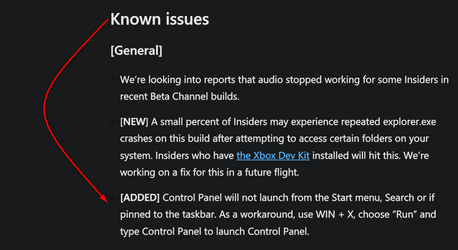
  • [ADDED] Control Panel will not launch from the Start menu, Search or if pinned to the taskbar. As a workaround, use WIN + X, choose “Run” and type Control Panel to launch Control Panel.

[File Explorer]

  • We’re working on the fix for an issue where the taskbar isn’t able to display if File Explorer is maximized and you have the taskbar set to auto-hide.

About the Beta Channel

The Beta Channel will be the place we preview experiences that are closer to what we will ship to our general customers. Because the Dev and Beta Channels represent parallel development paths from our engineers, there may be cases where features and experiences show up in the Beta Channel first. However, this does not mean every feature we try out in the Beta Channel will ship. We encourage Insiders to read this blog post that outlines the ways we’ll try things out with Insiders in both the Dev and Beta Channels.

Important Insider Links

Thanks,
Amanda & Brandon

Source:

Check Windows Updates


UUP Dump:

64-bit ISO download:


ARM64 ISO download:

 
Last edited:
22622.586 Installed but suddenly desktop access is lost from either the File Explorer icon or the "MyPC" icon. Both refuse to open from the desktop. I paused upgrades for a week, and then uninstalled the CU, and normal function has returned. Thankfully! Looks like Microsoft's last minute bug-fixes (labeled "added" in the build notes) actually [added] a couple of bugs. Have reported the issue to the HUB.
 

My Computer My Computer

At a glance

Win11 Experimental Channel for 26H2 buildsAMD R7 7800X3DGSkill 2x16GB @ 6400MT/sXFX 9070 XT SWIFT tri-fan (PCIe5.0)
OS
Win11 Experimental Channel for 26H2 builds
Computer type
PC/Desktop
Manufacturer/Model
a cherry-picked assembly
CPU
AMD R7 7800X3D
Motherboard
MSI x870 Tomahawk Wi-Fi, 8-layer, 2 oz copper, server PCB
Memory
GSkill 2x16GB @ 6400MT/s
Graphics Card(s)
XFX 9070 XT SWIFT tri-fan (PCIe5.0)
Sound Card
Creative Labs G8 USB External Sound device, Gaming DAC, Sound Card & Earphone AMP.. HIGHLY RECOMMENDED, btw. Totally changed my opinion of external USB sound. I like!...;)
Monitor(s) Displays
Philips 42" OLED @ 4k
Screen Resolution
3840x2160
Hard Drives
*Boot: Samsung 980 Pro 2 TB NVMe (PCIe4x4)
*Samsung 980 EVO NVMe 500GB (PCIe 4x4)
*Kingston SNV3S2000G 2TB NVMe (PCIe4x4)
*Samsung 960 EVO 250GB NVMe(PCIe3x2)
*8TB Toshiba x300 HDD
*ST4000DM004 S3 4TB HDD
PSU
Gigabyte 850W Gold, Rev 2
Case
Lian Li Lancool 217, white, with wood trim, very nice looking--tired of black, 5-fans standard
Cooling
Air coutesy Lian Li
Keyboard
Cherry MX 2.0S RGB
Mouse
Razer Basilisk V3 24k DPI
Internet Speed
~950Mbps down and up!
Browser
Firefox x64 DE
Antivirus
Defender
Other Info
Great New system. Exceeds my expectations by quite a bit, btw. I love the USB G8 SoundBlaster, it's quite an improvement over the G6!

My Computer My Computer

At a glance

Windows 11 Pro 25H2 (RP channel)AMD Ryzen 7 9800X3D 8-core64GB Corsair Titanium 6000/CL30MSI Suprim 5080 SOC
OS
Windows 11 Pro 25H2 (RP channel)
Computer type
PC/Desktop
Manufacturer/Model
MSI
CPU
AMD Ryzen 7 9800X3D 8-core
Motherboard
MEG X870E Godlike
Memory
64GB Corsair Titanium 6000/CL30
Graphics Card(s)
MSI Suprim 5080 SOC
Sound Card
Soundblaster AE-9
Monitor(s) Displays
ASUS TUF Gaming VG289Q
Screen Resolution
3840x2160
Hard Drives
Samsung 9100 Pro 4TB (gen 5 x4, system drive/games)
Samsung 990 Pro 2TB
Samsung 980 Pro 2TB
Samsung 870 Evo 4TB
Samsung 870 Evo 2TB
Samsung T9 4TB
PSU
Seasonic PX-2200
Case
Bequiet! Dark Base Pro 901
Cooling
Noctua NH-D15S Chromax black
Keyboard
Logitech G915 X (wired)
Mouse
Logitech G903 with PowerPlay charger
Internet Speed
900Mb/sec
Browser
Microsoft Edge
Antivirus
Windows Defender
• Removed the toolbar some people were unexpectedly seeing (with View / Edit / etc.) after the introduction of tabs in File Explorer. As part of this, the “always show menus” option in Folder Options was also removed which didn’t do anything.
this is from the fixes list. A few days ago I had a message from feedback hub telling me to use this “always show menus” option to turn off the menu bar because they couldn't fix the problem yet. Now they've fixed it by removing the option to turn the menu on or off because it didn't work. It worked fine a few days ago! There's still Alt F etc but there's still the white menu bar background and it's so much more inconvenient for me. What's with this we've fixed it by ripping out a feature that we lied about not working?


I feel better now:ROFLMAO:
 

My Computer My Computer

At a glance

Windows 11 Pro 25H2 26200.9168Ryzen 5 760032 Gb DDR5 6000Hz Corsair VengeanceSapphire Pulse RX 7600
OS
Windows 11 Pro 25H2 26200.9168
Computer type
PC/Desktop
Manufacturer/Model
Home built
CPU
Ryzen 5 7600
Motherboard
Gigabyte B650M Aorus Elite AX Ice
Memory
32 Gb DDR5 6000Hz Corsair Vengeance
Graphics Card(s)
Sapphire Pulse RX 7600
Sound Card
Internal Realtek
Monitor(s) Displays
Samsung 32" Odyssey G5 G50D QHD
Screen Resolution
2560 x 1440
Hard Drives
WD Black SN 770 1Tb; SanDisk SDSSDA240G ; Seagate 2Tb HDD
PSU
MSI MAG A750GL
Case
Enermax Marbleshell MS21
Cooling
Thermaltake Peerless Assassin 120 White ARGB, 3 x 120 intake, 1 x 120 exhaust
Keyboard
Aukey KM-G12
Mouse
Razer Basilisk v3 Pro 35K
Internet Speed
1 Gb/s up & 800 Mb/s down
Browser
Brave / Edge
Antivirus
Windows / Malwarebytes
My PC won't upgrade to 22622 Beta from 22621 RP, but with these issues in Beta I'm glad I'm still on RP.
FYI - You can't go backwards, can 't downgrade from RP to Beta. A clean install would allow you to choose Beta and go forward from there. I'm sure that would be fun...............;-)
 

My Computer My Computer

At a glance

Multi-boot Windows 11 & 10 - RTM, RP, Beta, D...11th Gen i9-11900KF @ 3.50GHz, 8 cores/16 log...32GBNVIDIA GeForce RTX 3080 w/10GB GDDR5X mem
OS
Multi-boot Windows 11 & 10 - RTM, RP, Beta, Dev and Canary
Computer type
PC/Desktop
Manufacturer/Model
Alienware R12
CPU
11th Gen i9-11900KF @ 3.50GHz, 8 cores/16 logical proc.
Motherboard
Alienware 07HV66 (U3E1)
Memory
32GB
Graphics Card(s)
NVIDIA GeForce RTX 3080 w/10GB GDDR5X mem
Sound Card
Realtek High Definition Audio
Monitor(s) Displays
Samsung 27" Curved C27F591
Screen Resolution
1920 x 1080 x 60 hertz
Hard Drives
1TB NVMe PM961 NVMe SSD SAMSUNG (Boot),
2TB Seagate ST2000DM001-1ER164 (SATA),
1TB Samsung SSD 850 EVO,
1TB Seagate ST1000DM003-1ER162,
1TB WD Elements 10A8 USB Device,
1TB BUFFALO HD-PNTU3 USB Device,
1TB x4 Seagate BUP Slim SCSI Disk Device
PSU
850W PSU Liquid Cooled Chassis - CyberPower 1500 UPS
Case
Alienware Mid-Tower (Dell)
Cooling
Liquid Cooled - 3 fan - Top exhaust
Keyboard
Logitech K800 Wireless
Mouse
Logitech MX Master Wireless
Internet Speed
1 Gigabit
Browser
FF, Chrome, Opera, Edge
Antivirus
Defender, MBAM, SuperAntiSpyware
Other Info
Blueray R/W Optical,
Canon MX410 series Printer/Fax/Scanner/Copier,
Altec 5.1 Speakers L-R, Mid Base Boom,

Macrium Home Premium, Revo Pro, Screenspresso Pro
Agree but a lot of the control panel apps have not been transferred to the settings section in Windows, so this is a problem

Yes, for one there is no other way to get to the power settings (power profiles) in the "new" settings. The only way is through the control panel or directly to powercfg.cpl in system32.
 

My Computers My Computers

  • At a glance

    Windows 11 ProIntel Core i9 14900K 5800/4500 P/E all core96GB (2x48) G.skill Ripjaws 6800 MT/s DDR5Asus ROG Strix 4070 Ti OC
    OS
    Windows 11 Pro
    Computer type
    PC/Desktop
    Manufacturer/Model
    DIY Photoshop/Audio/Game/tinker
    CPU
    Intel Core i9 14900K 5800/4500 P/E all core
    Motherboard
    Asus ROG Maximus Z790 Dark Hero
    Memory
    96GB (2x48) G.skill Ripjaws 6800 MT/s DDR5
    Graphics Card(s)
    Asus ROG Strix 4070 Ti OC
    Sound Card
    Bowers & Wilkins 606 S3 speakers; Audiolabs 7000a integrated amp; RSL 10S Mk2 sub; Creative Pebble Pro Minimilist
    Monitor(s) Displays
    Eizo CG2730 ColorEdge, ViewSonic VP2768, i1 Display Pro calibration puck
    Screen Resolution
    2560 x 1440p x 2
    Hard Drives
    WDC SN850X 4TB nvme, SN850 1TB nvme, SK-Hynix 2 TB P41 nvme,. Sabrent USB-C DS-SC5B 5-bay docking station: 6TB WDC Black, 6TB Ironwolf Pro; 2x 2TB WDC Black HDD
    PSU
    850W Seasonic Vertex PX-850 ATX 3.0/PCI-E 5.0
    Case
    Fractal Design North XL Mesh, Black Walnut
    Cooling
    EK Nucleus black 360 AIO w/Phanteks T30-120 fans, 2 Noctua NF-A14 Chromax case fan, 1 T30-120 fan cooling memory
    Keyboard
    Keychron Q3 Max TKL with custom GMK Redsuns Red Samuri keycaps, TX Stabs
    Mouse
    Logitech G305 wireless gaming
    Internet Speed
    575 Mb/s down | 25 Mb/s up
    Browser
    Firefox
    Antivirus
    Defender, Macrium Reflect X
    Other Info
    Phangkey Amaterasu V2 Desk Mat
  • At a glance

    Apple M1
    Computer type
    Laptop
    Manufacturer/Model
    💻 Apple 13" Macbook Pro 2020 (m1)
    CPU
    Apple M1
    Screen Resolution
    2560x1600
    Browser
    Firefox

My Computer My Computer

At a glance

Multi-boot Windows 11 & 10 - RTM, RP, Beta, D...11th Gen i9-11900KF @ 3.50GHz, 8 cores/16 log...32GBNVIDIA GeForce RTX 3080 w/10GB GDDR5X mem
OS
Multi-boot Windows 11 & 10 - RTM, RP, Beta, Dev and Canary
Computer type
PC/Desktop
Manufacturer/Model
Alienware R12
CPU
11th Gen i9-11900KF @ 3.50GHz, 8 cores/16 logical proc.
Motherboard
Alienware 07HV66 (U3E1)
Memory
32GB
Graphics Card(s)
NVIDIA GeForce RTX 3080 w/10GB GDDR5X mem
Sound Card
Realtek High Definition Audio
Monitor(s) Displays
Samsung 27" Curved C27F591
Screen Resolution
1920 x 1080 x 60 hertz
Hard Drives
1TB NVMe PM961 NVMe SSD SAMSUNG (Boot),
2TB Seagate ST2000DM001-1ER164 (SATA),
1TB Samsung SSD 850 EVO,
1TB Seagate ST1000DM003-1ER162,
1TB WD Elements 10A8 USB Device,
1TB BUFFALO HD-PNTU3 USB Device,
1TB x4 Seagate BUP Slim SCSI Disk Device
PSU
850W PSU Liquid Cooled Chassis - CyberPower 1500 UPS
Case
Alienware Mid-Tower (Dell)
Cooling
Liquid Cooled - 3 fan - Top exhaust
Keyboard
Logitech K800 Wireless
Mouse
Logitech MX Master Wireless
Internet Speed
1 Gigabit
Browser
FF, Chrome, Opera, Edge
Antivirus
Defender, MBAM, SuperAntiSpyware
Other Info
Blueray R/W Optical,
Canon MX410 series Printer/Fax/Scanner/Copier,
Altec 5.1 Speakers L-R, Mid Base Boom,

Macrium Home Premium, Revo Pro, Screenspresso Pro
Apart from the Control prog problem looks OK.
 

My Computers My Computers

  • At a glance

    windows 11 25H2I5-85008GB
    OS
    windows 11 25H2
    Computer type
    PC/Desktop
    Manufacturer/Model
    Dell Optiplex 3060
    CPU
    I5-8500
    Motherboard
    Dell
    Memory
    8GB
    Monitor(s) Displays
    2 x Dell 24 inch
    Screen Resolution
    2560 x 1440
    Hard Drives
    250GB NVMe SSD, 2x 250 GB SSD
    PSU
    Intel(R) Core(TM) i5-8500 CPU @ 3.00GHz 3.00 GHz
    Mouse
    Logitech M310t
    Internet Speed
    100/20
    Browser
    Edge
    Antivirus
    Win Defender
  • At a glance

    Win 11 25H2I5-6300U8GBFHD
    Operating System
    Win 11 25H2
    Computer type
    Laptop
    Manufacturer/Model
    HP Elitebook 840 G3
    CPU
    I5-6300U
    Memory
    8GB
    Graphics card(s)
    FHD
    Hard Drives
    256 SSD
    Internet Speed
    100/20
    Browser
    Edge
New known issue added below. See first post for more details.

[ADDED] Control Panel will not launch from the Start menu, Search or if pinned to the taskbar. As a workaround, use WIN + X, choose “Run” and type Control Panel to launch Control Panel.

 

My Computers My Computers

  • At a glance

    Windows 11 Pro for WorkstationsIntel i7-8700K 5 GHz64 GB (4x16GB) G.SKILL TridentZ RGB DDR4 3600...ASUS ROG-STRIX-GTX1080TI-O11G-GAMING (11GB GD...
    OS
    Windows 11 Pro for Workstations
    Computer type
    PC/Desktop
    Manufacturer/Model
    Custom self build
    CPU
    Intel i7-8700K 5 GHz
    Motherboard
    ASUS ROG Maximus XI Formula Z390
    Memory
    64 GB (4x16GB) G.SKILL TridentZ RGB DDR4 3600 MHz (F4-3600C18D-32GTZR)
    Graphics Card(s)
    ASUS ROG-STRIX-GTX1080TI-O11G-GAMING (11GB GDDR5X)
    Sound Card
    Integrated Digital Audio (S/PDIF)
    Monitor(s) Displays
    2 x Samsung Odyssey G75 27"
    Screen Resolution
    2560x1440
    Hard Drives
    1TB Samsung 990 PRO M.2,
    4TB Samsung 990 PRO M.2,
    TerraMaster F8 SSD Plus NAS
    PSU
    Seasonic Prime Titanium 850W
    Case
    Thermaltake Core P3 wall mounted
    Cooling
    Corsair Hydro H115i
    Keyboard
    Amazon Basics Wired Full Keyboard MD005
    Mouse
    Logitech MX Master 4
    Internet Speed
    2 Gbps Download and 100 Mbps Upload
    Browser
    Chrome and Edge
    Antivirus
    Microsoft Defender
    Other Info
    Logitech Z625 speaker system,
    Logitech BRIO 4K Pro webcam,
    HP Color LaserJet Pro MFP M477fdn,
    CyberPower CP1500PFCLCD
    Galaxy S23 Plus phone
  • At a glance

    Windows 11 ProSnapdragon X Elite (12 core) 3.42 GHz16 GB LPDDR5x-7467 MHz
    Operating System
    Windows 11 Pro
    Computer type
    Laptop
    Manufacturer/Model
    Surface Laptop 7 Copilot+ PC
    CPU
    Snapdragon X Elite (12 core) 3.42 GHz
    Memory
    16 GB LPDDR5x-7467 MHz
    Monitor(s) Displays
    15" HDR
    Screen Resolution
    2496 x 1664
    Hard Drives
    1 TB SSD
    Internet Speed
    Wi-Fi 7 and Bluetooth 5.4
    Browser
    Chrome and Edge
    Antivirus
    Microsoft Defender
Quicker version:

As a workaround, use WIN + R, and type Control Panel to launch Control Panel.
 

My Computer My Computer

At a glance

Multi-boot Windows 11 & 10 - RTM, RP, Beta, D...11th Gen i9-11900KF @ 3.50GHz, 8 cores/16 log...32GBNVIDIA GeForce RTX 3080 w/10GB GDDR5X mem
OS
Multi-boot Windows 11 & 10 - RTM, RP, Beta, Dev and Canary
Computer type
PC/Desktop
Manufacturer/Model
Alienware R12
CPU
11th Gen i9-11900KF @ 3.50GHz, 8 cores/16 logical proc.
Motherboard
Alienware 07HV66 (U3E1)
Memory
32GB
Graphics Card(s)
NVIDIA GeForce RTX 3080 w/10GB GDDR5X mem
Sound Card
Realtek High Definition Audio
Monitor(s) Displays
Samsung 27" Curved C27F591
Screen Resolution
1920 x 1080 x 60 hertz
Hard Drives
1TB NVMe PM961 NVMe SSD SAMSUNG (Boot),
2TB Seagate ST2000DM001-1ER164 (SATA),
1TB Samsung SSD 850 EVO,
1TB Seagate ST1000DM003-1ER162,
1TB WD Elements 10A8 USB Device,
1TB BUFFALO HD-PNTU3 USB Device,
1TB x4 Seagate BUP Slim SCSI Disk Device
PSU
850W PSU Liquid Cooled Chassis - CyberPower 1500 UPS
Case
Alienware Mid-Tower (Dell)
Cooling
Liquid Cooled - 3 fan - Top exhaust
Keyboard
Logitech K800 Wireless
Mouse
Logitech MX Master Wireless
Internet Speed
1 Gigabit
Browser
FF, Chrome, Opera, Edge
Antivirus
Defender, MBAM, SuperAntiSpyware
Other Info
Blueray R/W Optical,
Canon MX410 series Printer/Fax/Scanner/Copier,
Altec 5.1 Speakers L-R, Mid Base Boom,

Macrium Home Premium, Revo Pro, Screenspresso Pro

My Computers My Computers

  • At a glance

    Windows11 Pro 26200.9128Intel Core i9 14900F (24 -Core, 68 MB Total C...32GB DDR5RTX 4080 Super w/610.74
    OS
    Windows11 Pro 26200.9128
    Computer type
    PC/Desktop
    Manufacturer/Model
    Dell Alienware Aurora R16
    CPU
    Intel Core i9 14900F (24 -Core, 68 MB Total Cache)
    Motherboard
    Dell Alienware
    Memory
    32GB DDR5
    Graphics Card(s)
    RTX 4080 Super w/610.74
    Sound Card
    Realtec
    Monitor(s) Displays
    Corsair XENEON 32QHD165
    Screen Resolution
    2560 X 1440
    Hard Drives
    1-2TB Samsung 990 Pro PCIe NVMe M2 SSD
    1-4TB Samsung 990 Pro PCIe NVMe M2 SSD
    PSU
    1000 Watt Platinum Dell
    Case
    Alienware
    Cooling
    Liquid Closed Loop
    Keyboard
    Corsair Strafe RGB
    Mouse
    Logitech MK270 Wireless
    Internet Speed
    100Gb's Down-20 Up
    Browser
    Firefox 153.0.1
    Antivirus
    Defender
    Other Info
    Very Quiet And Fast
    CyberPower UPS CP1500PFCLCD
  • At a glance

    PClinuxOS Mate (2025.7)13th Gen Inter(R) Core(TM) i3-1315U64 GB DDR4 @3200 MHz.Internal
    Operating System
    PClinuxOS Mate (2025.7)
    Computer type
    PC/Desktop
    Manufacturer/Model
    Intel
    CPU
    13th Gen Inter(R) Core(TM) i3-1315U
    Motherboard
    Intel
    Memory
    64 GB DDR4 @3200 MHz.
    Graphics card(s)
    Internal
    Sound Card
    None
    Monitor(s) Displays
    Dell 2419HGCF
    Screen Resolution
    1920 X 1080
    Hard Drives
    SAMSUNG 980 PRO SSD 2TB, PCIe 4.0 M.2 2280
    PSU
    Chicony 30 Watt
    Case
    Small
    Keyboard
    Dell
    Mouse
    Razor
    Internet Speed
    1GB
    Browser
    Slimjet
Anybody else see this? When I try to launch reliability history from the search (recent) it doesn't launch the first time, only the second.

Doesn't MS have QC and testers? (A: guess they are us LOL)
 
Last edited:

My Computers My Computers

  • At a glance

    Windows 11 ProIntel Core i9 14900K 5800/4500 P/E all core96GB (2x48) G.skill Ripjaws 6800 MT/s DDR5Asus ROG Strix 4070 Ti OC
    OS
    Windows 11 Pro
    Computer type
    PC/Desktop
    Manufacturer/Model
    DIY Photoshop/Audio/Game/tinker
    CPU
    Intel Core i9 14900K 5800/4500 P/E all core
    Motherboard
    Asus ROG Maximus Z790 Dark Hero
    Memory
    96GB (2x48) G.skill Ripjaws 6800 MT/s DDR5
    Graphics Card(s)
    Asus ROG Strix 4070 Ti OC
    Sound Card
    Bowers & Wilkins 606 S3 speakers; Audiolabs 7000a integrated amp; RSL 10S Mk2 sub; Creative Pebble Pro Minimilist
    Monitor(s) Displays
    Eizo CG2730 ColorEdge, ViewSonic VP2768, i1 Display Pro calibration puck
    Screen Resolution
    2560 x 1440p x 2
    Hard Drives
    WDC SN850X 4TB nvme, SN850 1TB nvme, SK-Hynix 2 TB P41 nvme,. Sabrent USB-C DS-SC5B 5-bay docking station: 6TB WDC Black, 6TB Ironwolf Pro; 2x 2TB WDC Black HDD
    PSU
    850W Seasonic Vertex PX-850 ATX 3.0/PCI-E 5.0
    Case
    Fractal Design North XL Mesh, Black Walnut
    Cooling
    EK Nucleus black 360 AIO w/Phanteks T30-120 fans, 2 Noctua NF-A14 Chromax case fan, 1 T30-120 fan cooling memory
    Keyboard
    Keychron Q3 Max TKL with custom GMK Redsuns Red Samuri keycaps, TX Stabs
    Mouse
    Logitech G305 wireless gaming
    Internet Speed
    575 Mb/s down | 25 Mb/s up
    Browser
    Firefox
    Antivirus
    Defender, Macrium Reflect X
    Other Info
    Phangkey Amaterasu V2 Desk Mat
  • At a glance

    Apple M1
    Computer type
    Laptop
    Manufacturer/Model
    💻 Apple 13" Macbook Pro 2020 (m1)
    CPU
    Apple M1
    Screen Resolution
    2560x1600
    Browser
    Firefox
Quicker version:

As a workaround, use WIN + R, and type Control Panel to launch Control Panel.

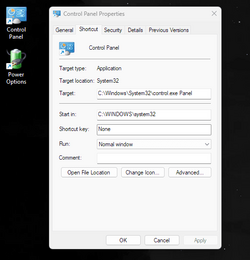
Or just create a shortcut with the target: "C:\Windows\System32\control.exe Panel" and a Start in: "C:\WINDOWS\system32"

Screenshot 2022-08-25 131841.png
 

My Computers My Computers

  • At a glance

    Windows 11 ProIntel Core i9 14900K 5800/4500 P/E all core96GB (2x48) G.skill Ripjaws 6800 MT/s DDR5Asus ROG Strix 4070 Ti OC
    OS
    Windows 11 Pro
    Computer type
    PC/Desktop
    Manufacturer/Model
    DIY Photoshop/Audio/Game/tinker
    CPU
    Intel Core i9 14900K 5800/4500 P/E all core
    Motherboard
    Asus ROG Maximus Z790 Dark Hero
    Memory
    96GB (2x48) G.skill Ripjaws 6800 MT/s DDR5
    Graphics Card(s)
    Asus ROG Strix 4070 Ti OC
    Sound Card
    Bowers & Wilkins 606 S3 speakers; Audiolabs 7000a integrated amp; RSL 10S Mk2 sub; Creative Pebble Pro Minimilist
    Monitor(s) Displays
    Eizo CG2730 ColorEdge, ViewSonic VP2768, i1 Display Pro calibration puck
    Screen Resolution
    2560 x 1440p x 2
    Hard Drives
    WDC SN850X 4TB nvme, SN850 1TB nvme, SK-Hynix 2 TB P41 nvme,. Sabrent USB-C DS-SC5B 5-bay docking station: 6TB WDC Black, 6TB Ironwolf Pro; 2x 2TB WDC Black HDD
    PSU
    850W Seasonic Vertex PX-850 ATX 3.0/PCI-E 5.0
    Case
    Fractal Design North XL Mesh, Black Walnut
    Cooling
    EK Nucleus black 360 AIO w/Phanteks T30-120 fans, 2 Noctua NF-A14 Chromax case fan, 1 T30-120 fan cooling memory
    Keyboard
    Keychron Q3 Max TKL with custom GMK Redsuns Red Samuri keycaps, TX Stabs
    Mouse
    Logitech G305 wireless gaming
    Internet Speed
    575 Mb/s down | 25 Mb/s up
    Browser
    Firefox
    Antivirus
    Defender, Macrium Reflect X
    Other Info
    Phangkey Amaterasu V2 Desk Mat
  • At a glance

    Apple M1
    Computer type
    Laptop
    Manufacturer/Model
    💻 Apple 13" Macbook Pro 2020 (m1)

    CPU
    Apple M1
    Screen Resolution
    2560x1600
    Browser
    Firefox
Or just create a shortcut with the target: "C:\Windows\System32\control.exe Panel" and a Start in: "C:\WINDOWS\system32"

View attachment 37396
Mine was in reply to the MS solution, they made it too hard, I posted the short version of what they did.
 

My Computer My Computer

At a glance

Multi-boot Windows 11 & 10 - RTM, RP, Beta, D...11th Gen i9-11900KF @ 3.50GHz, 8 cores/16 log...32GBNVIDIA GeForce RTX 3080 w/10GB GDDR5X mem
OS
Multi-boot Windows 11 & 10 - RTM, RP, Beta, Dev and Canary
Computer type
PC/Desktop
Manufacturer/Model
Alienware R12
CPU
11th Gen i9-11900KF @ 3.50GHz, 8 cores/16 logical proc.
Motherboard
Alienware 07HV66 (U3E1)
Memory
32GB
Graphics Card(s)
NVIDIA GeForce RTX 3080 w/10GB GDDR5X mem
Sound Card
Realtek High Definition Audio
Monitor(s) Displays
Samsung 27" Curved C27F591
Screen Resolution
1920 x 1080 x 60 hertz
Hard Drives
1TB NVMe PM961 NVMe SSD SAMSUNG (Boot),
2TB Seagate ST2000DM001-1ER164 (SATA),
1TB Samsung SSD 850 EVO,
1TB Seagate ST1000DM003-1ER162,
1TB WD Elements 10A8 USB Device,
1TB BUFFALO HD-PNTU3 USB Device,
1TB x4 Seagate BUP Slim SCSI Disk Device
PSU
850W PSU Liquid Cooled Chassis - CyberPower 1500 UPS
Case
Alienware Mid-Tower (Dell)
Cooling
Liquid Cooled - 3 fan - Top exhaust
Keyboard
Logitech K800 Wireless
Mouse
Logitech MX Master Wireless
Internet Speed
1 Gigabit
Browser
FF, Chrome, Opera, Edge
Antivirus
Defender, MBAM, SuperAntiSpyware
Other Info
Blueray R/W Optical,
Canon MX410 series Printer/Fax/Scanner/Copier,
Altec 5.1 Speakers L-R, Mid Base Boom,

Macrium Home Premium, Revo Pro, Screenspresso Pro
Anybody else see this? When I try to launch reliability history from the search (recent) it doesn't launch the first time, only the second.

Doesn't MS have QC and testers? (A: guess they are us LOL)
Reliability History is a sub-task of the Control Panel. All the CP stuff could act weird.
 

My Computer My Computer

At a glance

Multi-boot Windows 11 & 10 - RTM, RP, Beta, D...11th Gen i9-11900KF @ 3.50GHz, 8 cores/16 log...32GBNVIDIA GeForce RTX 3080 w/10GB GDDR5X mem
OS
Multi-boot Windows 11 & 10 - RTM, RP, Beta, Dev and Canary
Computer type
PC/Desktop
Manufacturer/Model
Alienware R12
CPU
11th Gen i9-11900KF @ 3.50GHz, 8 cores/16 logical proc.
Motherboard
Alienware 07HV66 (U3E1)
Memory
32GB
Graphics Card(s)
NVIDIA GeForce RTX 3080 w/10GB GDDR5X mem
Sound Card
Realtek High Definition Audio
Monitor(s) Displays
Samsung 27" Curved C27F591
Screen Resolution
1920 x 1080 x 60 hertz
Hard Drives
1TB NVMe PM961 NVMe SSD SAMSUNG (Boot),
2TB Seagate ST2000DM001-1ER164 (SATA),
1TB Samsung SSD 850 EVO,
1TB Seagate ST1000DM003-1ER162,
1TB WD Elements 10A8 USB Device,
1TB BUFFALO HD-PNTU3 USB Device,
1TB x4 Seagate BUP Slim SCSI Disk Device
PSU
850W PSU Liquid Cooled Chassis - CyberPower 1500 UPS
Case
Alienware Mid-Tower (Dell)
Cooling
Liquid Cooled - 3 fan - Top exhaust
Keyboard
Logitech K800 Wireless
Mouse
Logitech MX Master Wireless
Internet Speed
1 Gigabit
Browser
FF, Chrome, Opera, Edge
Antivirus
Defender, MBAM, SuperAntiSpyware
Other Info
Blueray R/W Optical,
Canon MX410 series Printer/Fax/Scanner/Copier,
Altec 5.1 Speakers L-R, Mid Base Boom,

Macrium Home Premium, Revo Pro, Screenspresso Pro

FYI - You can't go backwards, can 't downgrade from RP to Beta. A clean install would allow you to choose Beta and go forward from there. I'm sure that would be fun...............;-)
This is not the case. You can select to move to RP from Beta, and then when next RP update is issued where the sub build number of RP is later than the Beta sub build number, it will switch to RP. That assumes you are on 22621.

You can also do a repair upgrade from 22621 iso, join RP and upgrade to latest RP.
 

My Computer My Computer

At a glance

Windows 11 Pro + Win11 Canary VM.I9 13th gen i9-13900H 2.60 GHZ16 GB solderedIntegrated Intel Iris XE
OS
Windows 11 Pro + Win11 Canary VM.
Computer type
Laptop
Manufacturer/Model
ASUS Zenbook 14
CPU
I9 13th gen i9-13900H 2.60 GHZ
Motherboard
Yep, Laptop has one.
Memory
16 GB soldered
Graphics Card(s)
Integrated Intel Iris XE
Sound Card
Realtek built in
Monitor(s) Displays
laptop OLED screen
Screen Resolution
2880x1800 touchscreen
Hard Drives
1 TB NVME SSD (only weakness is only one slot)
PSU
Internal + 65W thunderbolt USB4 charger
Case
Yep, got one
Cooling
Stella Artois (UK pint cans - 568 ml) - extra cost.
Keyboard
Built in UK keybd
Mouse
Bluetooth , wireless dongled, wired
Internet Speed
900 mbs (ethernet), wifi 6 typical 350-450 mb/s both up and down
Browser
Edge
Antivirus
Defender
Other Info
TPM 2.0, 2xUSB4 thunderbolt, 1xUsb3 (usb a), 1xUsb-c, hdmi out, 3.5 mm audio out/in combo, ASUS backlit trackpad (inc. switchable number pad)

Macrium Reflect Home V8
Office 365 Family (6 users each 1TB onedrive space)
Hyper-V (a vm runs almost as fast as my older laptop)
Mine was in reply to the MS solution, they made it too hard, I posted the short version of what they did.
I know. And mine shorter. Just a click (or two)
 

My Computers My Computers

  • At a glance

    Windows 11 ProIntel Core i9 14900K 5800/4500 P/E all core96GB (2x48) G.skill Ripjaws 6800 MT/s DDR5Asus ROG Strix 4070 Ti OC
    OS
    Windows 11 Pro
    Computer type
    PC/Desktop
    Manufacturer/Model
    DIY Photoshop/Audio/Game/tinker
    CPU
    Intel Core i9 14900K 5800/4500 P/E all core
    Motherboard
    Asus ROG Maximus Z790 Dark Hero
    Memory
    96GB (2x48) G.skill Ripjaws 6800 MT/s DDR5
    Graphics Card(s)
    Asus ROG Strix 4070 Ti OC
    Sound Card
    Bowers & Wilkins 606 S3 speakers; Audiolabs 7000a integrated amp; RSL 10S Mk2 sub; Creative Pebble Pro Minimilist
    Monitor(s) Displays
    Eizo CG2730 ColorEdge, ViewSonic VP2768, i1 Display Pro calibration puck
    Screen Resolution
    2560 x 1440p x 2
    Hard Drives
    WDC SN850X 4TB nvme, SN850 1TB nvme, SK-Hynix 2 TB P41 nvme,. Sabrent USB-C DS-SC5B 5-bay docking station: 6TB WDC Black, 6TB Ironwolf Pro; 2x 2TB WDC Black HDD
    PSU
    850W Seasonic Vertex PX-850 ATX 3.0/PCI-E 5.0
    Case
    Fractal Design North XL Mesh, Black Walnut
    Cooling
    EK Nucleus black 360 AIO w/Phanteks T30-120 fans, 2 Noctua NF-A14 Chromax case fan, 1 T30-120 fan cooling memory
    Keyboard
    Keychron Q3 Max TKL with custom GMK Redsuns Red Samuri keycaps, TX Stabs
    Mouse
    Logitech G305 wireless gaming
    Internet Speed
    575 Mb/s down | 25 Mb/s up
    Browser
    Firefox
    Antivirus
    Defender, Macrium Reflect X
    Other Info
    Phangkey Amaterasu V2 Desk Mat
  • At a glance

    Apple M1
    Computer type
    Laptop
    Manufacturer/Model
    💻 Apple 13" Macbook Pro 2020 (m1)

    CPU
    Apple M1
    Screen Resolution
    2560x1600
    Browser
    Firefox
How do I enable Dynamic Widgets on taskbar ?
 

My Computer My Computer

At a glance

26200.8037i5-11400F32GBGeforce GT-1030
OS
26200.8037
Computer type
PC/Desktop
CPU
i5-11400F
Motherboard
Gigabyte
Memory
32GB
Graphics Card(s)
Geforce GT-1030
Keyboard
Logitech K400
Mouse
Logitech M720
Internet Speed
600 Mb
Browser
Edge
This is not the case. You can select to move to RP from Beta, and then when next RP update is issued where the sub build number of RP is later than the Beta sub build number, it will switch to RP. That assumes you are on 22621.

You can also do a repair upgrade from 22621 iso, join RP and upgrade to latest RP.
He was talking about going from RP to Beta. Sounds like you are talking about RP from Beta.
 

My Computer My Computer

At a glance

Multi-boot Windows 11 & 10 - RTM, RP, Beta, D...11th Gen i9-11900KF @ 3.50GHz, 8 cores/16 log...32GBNVIDIA GeForce RTX 3080 w/10GB GDDR5X mem
OS
Multi-boot Windows 11 & 10 - RTM, RP, Beta, Dev and Canary
Computer type
PC/Desktop
Manufacturer/Model
Alienware R12
CPU
11th Gen i9-11900KF @ 3.50GHz, 8 cores/16 logical proc.
Motherboard
Alienware 07HV66 (U3E1)
Memory
32GB
Graphics Card(s)
NVIDIA GeForce RTX 3080 w/10GB GDDR5X mem
Sound Card
Realtek High Definition Audio
Monitor(s) Displays
Samsung 27" Curved C27F591
Screen Resolution
1920 x 1080 x 60 hertz
Hard Drives
1TB NVMe PM961 NVMe SSD SAMSUNG (Boot),
2TB Seagate ST2000DM001-1ER164 (SATA),
1TB Samsung SSD 850 EVO,
1TB Seagate ST1000DM003-1ER162,
1TB WD Elements 10A8 USB Device,
1TB BUFFALO HD-PNTU3 USB Device,
1TB x4 Seagate BUP Slim SCSI Disk Device
PSU
850W PSU Liquid Cooled Chassis - CyberPower 1500 UPS
Case
Alienware Mid-Tower (Dell)
Cooling
Liquid Cooled - 3 fan - Top exhaust
Keyboard
Logitech K800 Wireless
Mouse
Logitech MX Master Wireless
Internet Speed
1 Gigabit
Browser
FF, Chrome, Opera, Edge
Antivirus
Defender, MBAM, SuperAntiSpyware
Other Info
Blueray R/W Optical,
Canon MX410 series Printer/Fax/Scanner/Copier,
Altec 5.1 Speakers L-R, Mid Base Boom,

Macrium Home Premium, Revo Pro, Screenspresso Pro
He was talking about going from RP to Beta. Sounds like you are talking about RP from Beta.

FYI - You can't go backwards, can 't downgrade from RP to Beta.
Yeah -misread but even more so, you can go from RP to Beta - just change channel, click update.
 

My Computer My Computer

At a glance

Windows 11 Pro + Win11 Canary VM.I9 13th gen i9-13900H 2.60 GHZ16 GB solderedIntegrated Intel Iris XE
OS
Windows 11 Pro + Win11 Canary VM.
Computer type
Laptop
Manufacturer/Model
ASUS Zenbook 14
CPU
I9 13th gen i9-13900H 2.60 GHZ
Motherboard
Yep, Laptop has one.
Memory
16 GB soldered
Graphics Card(s)
Integrated Intel Iris XE
Sound Card
Realtek built in
Monitor(s) Displays
laptop OLED screen
Screen Resolution
2880x1800 touchscreen
Hard Drives
1 TB NVME SSD (only weakness is only one slot)
PSU
Internal + 65W thunderbolt USB4 charger
Case
Yep, got one
Cooling
Stella Artois (UK pint cans - 568 ml) - extra cost.
Keyboard
Built in UK keybd
Mouse
Bluetooth , wireless dongled, wired
Internet Speed
900 mbs (ethernet), wifi 6 typical 350-450 mb/s both up and down
Browser
Edge
Antivirus
Defender
Other Info
TPM 2.0, 2xUSB4 thunderbolt, 1xUsb3 (usb a), 1xUsb-c, hdmi out, 3.5 mm audio out/in combo, ASUS backlit trackpad (inc. switchable number pad)

Macrium Reflect Home V8
Office 365 Family (6 users each 1TB onedrive space)
Hyper-V (a vm runs almost as fast as my older laptop)
Anyone else notice that double clicking on items in Control Panel doesn't always open the app you clicked on? (If you have the option to double click to open selected)
 

My Computers My Computers

  • At a glance

    Windows 11 25H2Intel i9 14900KF64GB Corsair Vengeance RGBMSI 4090 Suprim X
    OS
    Windows 11 25H2
    Computer type
    PC/Desktop
    Manufacturer/Model
    Custom Built
    CPU
    Intel i9 14900KF
    Motherboard
    ASUS Z790 ProArt Creator WiFi
    Memory
    64GB Corsair Vengeance RGB
    Graphics Card(s)
    MSI 4090 Suprim X
    Sound Card
    Onboard
    Monitor(s) Displays
    1 x Asus 24". 1 x Asus 32"
    Screen Resolution
    1920 x 1080 & 2560 x 1440
    Hard Drives
    Multiple
    PSU
    Corsair 1200HX
    Case
    Corsair 7000D RGB
    Cooling
    Corsair H150I Capellix XT
    Keyboard
    Corsair K70 RGB PRO
    Mouse
    Corsair M55 RGB Pro
    Internet Speed
    1000Mbps
    Browser
    Edge
    Antivirus
    Windows Default
  • At a glance

    Windows 11 25H2Intel i7 6800K32GB DDR4 (Corsair)ASUS GTX 1080ti
    Operating System
    Windows 11 25H2
    Computer type
    PC/Desktop
    Manufacturer/Model
    Custom Built
    CPU
    Intel i7 6800K
    Motherboard
    ASUS Z99 Deluxe
    Memory
    32GB DDR4 (Corsair)
    Graphics card(s)
    ASUS GTX 1080ti
    Sound Card
    Onboard
    Monitor(s) Displays
    1x Viewsonic 24" 1x LG 19"
    Screen Resolution
    1920 x 1080 & 1600 x 900
    Hard Drives
    3 x SATA SSD
    PSU
    650W Gigabyte Bronze
    Case
    Coolermaster HAF-X
    Cooling
    Noctua NH-15 Chroma black
    Keyboard
    Generic RGB
    Mouse
    Microsoft Basic
    Internet Speed
    1000Mbps
    Browser
    Edge
    Antivirus
    Windows Default
Back
Top Bottom