UPDATE 10/27:
 www.elevenforum.com
Source:

 blogs.windows.com
Check Windows Updates
UUP Dump:
64-bit ISO download:

ARM64 ISO download:
 www.elevenforum.com
KB5018486 Windows 11 Insider Beta Build 22621.875 and 22623.875 - Oct. 27
UPDATE 11/07: https://www.elevenforum.com/t/kb5020054-windows-11-insider-beta-build-22621-885-and-22623-885-nov-7.10302/ Hello Windows Insiders, today we are releasing Windows 11 Insider Preview Build 22621.875 and Build 22623.875 (KB5018486) to the Beta Channel. Build 22623.875 = New...
www.elevenforum.com
Hello Windows Insiders, today we are releasing Windows 11 Insider Preview Build 22621.870 and Build 22623.870 (KB5018499) to the Beta Channel.
- Build 22623.870 = New features rolling out.
- Build 22621.870 = New features off by default.
KB5018863 Enablement Package for Windows 11 22H2 build 22623.xxx
REMINDER: Insiders who were previously on Build 22622 will automatically get moved to Build 22623 via an enablement package. The enablement package artificially increments the build number for the update with new features getting rolled out and turned on to make it easier to differentiate from devices with the update with features off by default. This approach is being used for the Beta Channel only and is not indicative of any changes or plans for final feature rollouts.
Insiders who landed in the group with new features turned off by default (Build 22621.xxxx) can check for updates and choose to install the update that will have features rolling out (Build 22623.xxx).
What’s new in Build 22623.870
Narrator Braille Driver Solution
Braille devices will continue working while switching between Narrator and third-party screen readers as narrator will automatically change Braille drivers.
Prerequisites:
You must remove Narrator’s current braille support if it is already installed by following the steps below:
Install new narrator braille support:
- Open Settings.
- Go to Apps> Optional features > Installed features.
- Search for Accessibility – Braille support.
- Expand Accessibility – Braille supportand uninstall the feature.
Refer to the detailed documentation to learn more about the braille driver solution.
- Go to Settings > Accessibility > Narrator > Braille.
- Select the more button.
- Download braille from this new window by selecting the Download and installbraille button.
- After braille is installed, then return to Settings > Accessibility > Narrator > Braille.
- Select the braille display driver used by your third-party screen reader from the “Braille display driver” option. This only needs to be done once.
Additional Resources:
Please refer to the Narrator User Guide for additional information on supported braille displays and braille functionality in Narrator.
FEEDBACK: Please file feedback in Feedback Hub (WIN + F) under Accessibility > Narrator.
Changes and Improvements in Build 22623.870
[Taskbar]
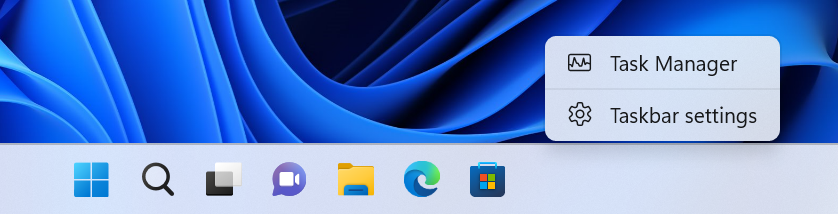
- Based on your feedback, we’ve added Task Manager to the context menu when right-clicking on the taskbar. We are beginning to roll this out, so the experience isn’t available to all Insiders in the Beta Channel just yet.
Context menu when right-clicking on the taskbar shows link to Task Manager.Fixes in Build 22623.870
[Tablet-optimized taskbar]
NOTE: These fixes will only show if tablet-optimized taskbar is enabled on your device. Tablet-optimized taskbar is still rolling out to Windows Insiders and not yet available for everyone.
- Improved how touch gestures and their animations with the tablet-optimized taskbar work with the touch keyboard.
[System Tray Updates]
NOTE: These fixes will only show if tablet-optimized taskbar with System Tray updates is enabled on your device. Tablet-optimized taskbar and System Tray is still rolling out to Windows Insiders and not yet available for everyone.
- Fixed an issue causing explorer.exe to crash when dragging icons in the system tray.
Fixes for BOTH Build 22621.870 & Build 22623.870
- New! We added improvements to the Microsoft Account experience in Settings. For instance, you can manage your Microsoft One Drive subscription and related storage alerts.
- New! We added a new consent form for those of you enrolled in Windows Hello Face and Fingerprint. You have new choices for your biometric data. You can keep storing your biometric data or open Settings to delete the data if you have not used your face or fingerprint for authentication in over 365 days. You also have these options if you upgraded to Windows 11 and have not yet seen the new Hello Learn More Privacy text.
- New! We enhanced search visual treatments on the taskbar to improve discoverability. This is available to a small audience initially and deploys more broadly in the months that follow. Some devices might notice different visual treatments as we gather feedback. To learn more about why you might be seeing these changes, see Search for anything, anywhere.
- We updated DriverSiPolicy.p7b for the Windows kernel vulnerable driver blocklist. This update includes drivers that are vulnerable to Bring Your Own Vulnerable Driver (BYOVD) attacks.
- We extended original equipment manufacturer (OEM) control of Hypervisor-protected Code Integrity (HVCI) enforcement for targeted hardware configurations.
- We fixed an issue that affects the Microsoft Azure Active Directory (AAD) Application Proxy connector. It cannot retrieve a Kerberos ticket on behalf of the user. The error message is, “The handle specified is invalid (0x80090301).”
- We fixed an issue that affects cached credentials for security keys and Fast Identity Online 2.0 (FIDO2) On hybrid domain-joined devices, the system removes these cached credentials.
- We fixed an issue that might cause vertical and horizontal line artifacts to appear on the screen.
- We fixed an issue that affects title bars when you use third-party tools to customize them. The title bars did not render. This update ensures that title bars render; however, we cannot guarantee all text customizations will work as before.
- We fixed an issue that might fail to sync the audio when you record game play using the Xbox Game Bar.
Known issues
[General]
- We’re looking into reports that audio stopped working for some Insiders in recent Beta Channel builds.
[Tablet-optimized taskbar]
- The taskbar sometimes flashes when transitioning between desktop posture and tablet posture.
- The taskbar takes longer than expected to transition to the touch-optimized version when switching between desktop posture and tablet posture.
- When using the bottom right edge gesture to see Quick Settings, the taskbar sometimes stays stuck in the expanded state, instead of dismissing to collapsed state.
About the Beta Channel
The Beta Channel will be the place we preview experiences that are closer to what we will ship to our general customers. Because the Dev and Beta Channels represent parallel development paths from our engineers, there may be cases where features and experiences show up in the Beta Channel first. However, this does not mean every feature we try out in the Beta Channel will ship. We encourage Insiders to read this blog post that outlines the ways we’ll try things out with Insiders in both the Dev and Beta Channels.
Important Insider Links
Thanks,
- Want to learn how we made Windows 11? Check out our Inside Windows 11 website to hear and meet our makers from Engineering, Design and Research to share their insights and unique perspectives throughout this journey.
- You can check out our Windows Insider Program documentation here.
- Check out Flight Hub for a complete look at what build is in which Insider channel.
Amanda & Brandon
Source:
Announcing Windows 11 Insider Preview Build 22621.870 and 22623.870
Hello Windows Insiders, today we are releasing Windows 11 Insider Preview Build 22621.870 and Build 22623.870 (KB5018499) to the Beta Channel. Build 22623.870 = New features rolling out.
blogs.windows.com
Check Windows Updates
UUP Dump:
64-bit ISO download:
Select language for Windows 11 Insider Preview 10.0.22621.870 (ni_release) amd64
Select language for Windows 11 Insider Preview 10.0.22621.870 (ni_release) amd64 on UUP dump. UUP dump lets you download Unified Update Platform files, like Windows Insider updates, directly from Windows Update.
uupdump.net
Select language for Windows 11 Insider Preview 10.0.22623.870 (ni_release) amd64
Select language for Windows 11 Insider Preview 10.0.22623.870 (ni_release) amd64 on UUP dump. UUP dump lets you download Unified Update Platform files, like Windows Insider updates, directly from Windows Update.
uupdump.net
ARM64 ISO download:
Select language for Windows 11 Insider Preview 10.0.22621.870 (ni_release) arm64
Select language for Windows 11 Insider Preview 10.0.22621.870 (ni_release) arm64 on UUP dump. UUP dump lets you download Unified Update Platform files, like Windows Insider updates, directly from Windows Update.
uupdump.net
Select language for Windows 11 Insider Preview 10.0.22623.870 (ni_release) arm64
Select language for Windows 11 Insider Preview 10.0.22623.870 (ni_release) arm64 on UUP dump. UUP dump lets you download Unified Update Platform files, like Windows Insider updates, directly from Windows Update.
uupdump.net
UUP Dump - Download Windows Insider ISO
UUP Dump is the most practical and easy way to get ISO images of any Insider Windows 10 or Windows 11 version, as soon as Microsoft has released a new build. UUP Dump creates a download configuration file according to your choices, downloads necessary files directly from Microsoft servers, and...
www.elevenforum.com
Last edited:




 Sound by Fosi Audio DA-2120C pushing Magnat Series 503 bookshelf speakers and a SVS SB-1000 Pro subwoofer.