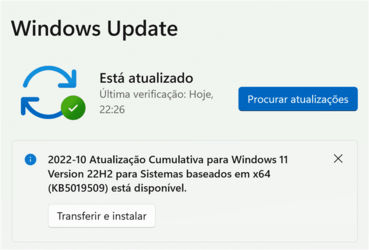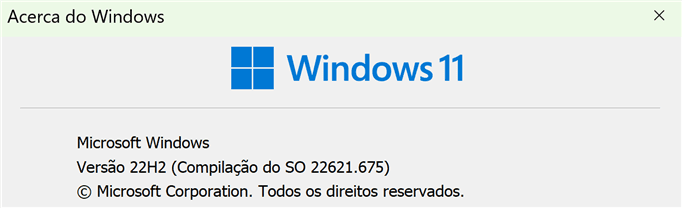
Win Update KB5019509 Cumulative Update for Windows 11 Build 22621.675 (22H2) - Oct. 18


UPDATE 10/25:


October 18, 2022 - KB5019509 (OS Build 22621.675) Out-of-band​


For information about Windows update terminology, see the article about the types of Windows updates and the monthly quality update types. For an overview of Windows 11, version 22H2, see its update history page.

Note Follow @WindowsUpdate to find out when new content is published to the Windows release health dashboard.

Highlights​

  • New! We enhance File Explorer. It now includes tabs to help you organize your File Explorer sessions like you do in Microsoft Edge. On the new File Explorer homepage, you can pin important files for quick and easy access. Using the power of Microsoft OneDrive, you can view your colleagues’ actions on your shared files. We also provide personalized suggestions based on your Microsoft 365 account.
  • New! We add a feature called Suggested Actions for items that you copy. This is available for customers in the United States, Canada, and Mexico. For example, when you copy phone numbers or future dates, we provide suggestions, such as make a call with Teams or Skype or add an event in the Calendar app.
  • New! We add a taskbar overflow menu. The taskbar will offer an entry point to a menu that shows you all your overflowed apps in one space.

Improvements​

This non-security update includes quality improvements. Key changes include:
  • New! We enhance File Explorer. It now includes tabs to help you organize your File Explorer sessions like you do in Microsoft Edge. On the new File Explorer homepage, you can pin important files for quick and easy access. Using the power of Microsoft OneDrive, you can view your colleagues’ actions on your shared files. We also provide personalized suggestions based on your Microsoft 365 account.

  • New! We add a feature called Suggested Actions for items that you copy. This is available for customers in the United States, Canada, and Mexico. For example, when you copy phone numbers or future dates, we provide suggestions, such as make a call with Teams or Skype or add an event in the Calendar app.

  • New! We add a taskbar overflow menu. The taskbar will offer an entry point to a menu that shows you all your overflowed apps in one space.
  • New! You can now discover and share to more devices, including desktops, using nearby sharing.

  • New! Now, you can uninstall, repair, and modify all apps from Windows Settings instead of Control Panel.
  • New! We improve the performance of federated authentication.
If you installed earlier updates, only the new updates contained in this package will be downloaded and installed on your device.

Windows 11 servicing stack update - 22621.378​

This update makes quality improvements to the servicing stack, which is the component that installs Windows updates. Servicing stack updates (SSU) ensure that you have a robust and reliable servicing stack so that your devices can receive and install Microsoft updates.

Known issues in this update​

Microsoft is not currently aware of any issues with this update.

How to get this update​

Before installing this update

Microsoft combines the latest servicing stack update (SSU) for your operating system with the latest cumulative update (LCU). For general information about SSUs, see Servicing stack updates and Servicing Stack Updates (SSU): Frequently Asked Questions.

Install this update

Release ChannelAvailableNext Step
Windows Update or Microsoft UpdateYesGo to Settings > Update & Security > Windows Update. In the Optional updates available area, you’ll find the link to download and install the update.
Windows Update for BusinessNoNone. These changes will be included in the next security update to this channel.
Microsoft Update CatalogYesTo get the standalone package for this update, go to the Microsoft Update Catalog website.
Windows Server Update Services (WSUS)NoYou can import this update into WSUS manually. See the Microsoft Update Catalog for instructions.

If you want to remove the LCU

To remove the LCU after installing the combined SSU and LCU package, use the DISM/Remove-Package command line option with the LCU package name as the argument. You can find the package name by using this command: DISM /online /get-packages.

Running Windows Update Standalone Installer (wusa.exe) with the /uninstall switch on the combined package will not work because the combined package contains the SSU. You cannot remove the SSU from the system after installation.

File information

For a list of the files that are provided in this update, download the file information for cumulative update 5019509.

For a list of the files that are provided in the servicing stack update, download the file information for the SSU - version 22621.378.

Source:

Check Windows Updates

Direct download links for KB5019509 MSU file from Microsoft Update Catalog:

[fa]fas fa-download[/fa] Download KB5019509 MSU for Windows 11 v22H2 64-bit (x64) - 242.7 MB

[fa]fas fa-download[/fa] Download KB5019509 MSU for Windows 11 v22H2 ARM64 - 324.1 MB


UUP Dump:

64-bit ISO download:
Select language for Windows 11, version 22H2 (22621.675) amd64

ARM64 ISO download: Select language for Windows 11, version 22H2 (22621.675) arm64

 
Last edited:
View attachment 42716

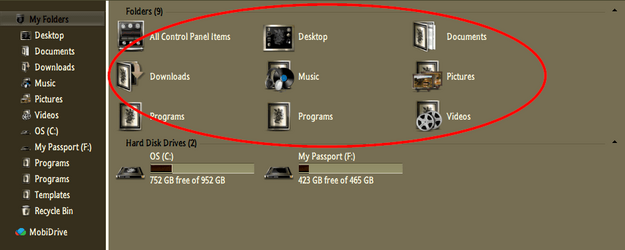
There used to be a section right here (arrow) labeled "Folders" with the libraries and other folders. It is missing. I know it was missing in RP and before, but is there any way to get it back?
Navigation pane.. under View / more

1666127699093.png
 

My Computers My Computers

  • At a glance

    Windows 10 Pro, Windows 11 DevIntel I3 1010016 GB DDR4 CrucialIntel on chip
    OS
    Windows 10 Pro, Windows 11 Dev
    Computer type
    PC/Desktop
    Manufacturer/Model
    Homebuilt
    CPU
    Intel I3 10100
    Motherboard
    ASUS B460M
    Memory
    16 GB DDR4 Crucial
    Graphics Card(s)
    Intel on chip
    Sound Card
    Realtek onboard
    Monitor(s) Displays
    ASUS 24, LG 24
    Screen Resolution
    Full HD x 2
    Hard Drives
    kingston A2000 NVMe PCIe 500 GB
    PSU
    LC Power 650W
    Case
    Noname
    Cooling
    Air 2x 120mm
    Keyboard
    Cherry G-81
    Mouse
    Logitech M500
    Internet Speed
    100/20
    Browser
    Firefox, Vivaldi
    Antivirus
    MS Defender
  • At a glance

    Windows 10 HomeRyzen 7 4700u8 GB DDR4AMD Vega
    Operating System
    Windows 10 Home
    Computer type
    Laptop
    Manufacturer/Model
    ASUS/Vivobook Flip 14
    CPU
    Ryzen 7 4700u
    Memory
    8 GB DDR4
    Graphics card(s)
    AMD Vega
    Sound Card
    Realtek onboard
    Monitor(s) Displays
    14"
    Screen Resolution
    FullHD
    Hard Drives
    512 Samsung NVMe PCIe
    PSU
    -
    Case
    Laptop
    Mouse
    Touchpad, Touchscreen
    Internet Speed
    100/20
    Browser
    Firefox, Vivaldi
    Antivirus
    MS Defender
There used to be a section right here (arrow) labeled "Folders" with the libraries and other folders. It is missing. I know it was missing in RP and before, but is there any way to get it back?
I don't think so!
It was somehow tied to Navigation Pane entries and Quick Access, I think they axed it with the transformation to Home!

0003186.png

I certainly haven't found a way to reinstate it!
 

My Computers My Computers

  • At a glance

    Windows 11 Pro
    OS
    Windows 11 Pro
    Computer type
    PC/Desktop
    Manufacturer/Model
    ASUS ROG Strix
  • At a glance

    Windows 11 Pro
    Operating System
    Windows 11 Pro
    Computer type
    Laptop
    Manufacturer/Model
    ASUS VivoBook
  • ASUS VivoBook 'Lite' ~ Windows 11 Home
Navigation pane.. under View / more

View attachment 42720
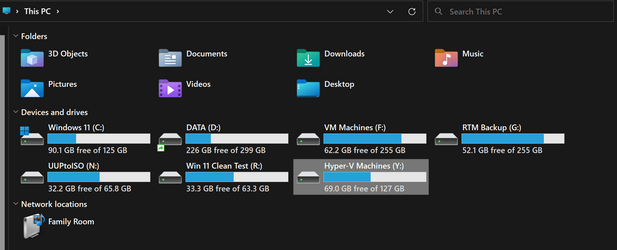
Thanks, Andre, but that's not what I'm after. Your pic does not show the Folders section either. I'm not trying to show the laft side navigation, I'm trying to get back the Folders section that appeared right above Devices and Drives. You don't show that either, I'm trying to get that back.
 

My Computer My Computer

At a glance

Multi-boot Windows 11 & 10 - RTM, RP, Beta, D...11th Gen i9-11900KF @ 3.50GHz, 8 cores/16 log...32GBNVIDIA GeForce RTX 3080 w/10GB GDDR5X mem
OS
Multi-boot Windows 11 & 10 - RTM, RP, Beta, Dev and Canary
Computer type
PC/Desktop
Manufacturer/Model
Alienware R12
CPU
11th Gen i9-11900KF @ 3.50GHz, 8 cores/16 logical proc.
Motherboard
Alienware 07HV66 (U3E1)
Memory
32GB
Graphics Card(s)
NVIDIA GeForce RTX 3080 w/10GB GDDR5X mem
Sound Card
Realtek High Definition Audio
Monitor(s) Displays
Samsung 27" Curved C27F591
Screen Resolution
1920 x 1080 x 60 hertz
Hard Drives
1TB NVMe PM961 NVMe SSD SAMSUNG (Boot),
2TB Seagate ST2000DM001-1ER164 (SATA),
1TB Samsung SSD 850 EVO,
1TB Seagate ST1000DM003-1ER162,
1TB WD Elements 10A8 USB Device,
1TB BUFFALO HD-PNTU3 USB Device,
1TB x4 Seagate BUP Slim SCSI Disk Device
PSU
850W PSU Liquid Cooled Chassis - CyberPower 1500 UPS
Case
Alienware Mid-Tower (Dell)
Cooling
Liquid Cooled - 3 fan - Top exhaust
Keyboard
Logitech K800 Wireless
Mouse
Logitech MX Master Wireless
Internet Speed
1 Gigabit
Browser
FF, Chrome, Opera, Edge
Antivirus
Defender, MBAM, SuperAntiSpyware
Other Info
Blueray R/W Optical,
Canon MX410 series Printer/Fax/Scanner/Copier,
Altec 5.1 Speakers L-R, Mid Base Boom,

Macrium Home Premium, Revo Pro, Screenspresso Pro
Thanks, Andre, but that's not what I'm after. Your pic does not show the Folders section either. I'm not trying to show the laft side navigation, I'm trying to get back the Folders section that appeared right above Devices and Drives. You don't show that either, I'm trying to get that back.
Oh, that one... Quick access in folders pane. Sorry, that's gone. Send feedback to MS. They listen to you :-)
 

My Computers My Computers

  • At a glance

    Windows 10 Pro, Windows 11 DevIntel I3 1010016 GB DDR4 CrucialIntel on chip
    OS
    Windows 10 Pro, Windows 11 Dev
    Computer type
    PC/Desktop
    Manufacturer/Model
    Homebuilt
    CPU
    Intel I3 10100
    Motherboard
    ASUS B460M
    Memory
    16 GB DDR4 Crucial
    Graphics Card(s)
    Intel on chip
    Sound Card
    Realtek onboard
    Monitor(s) Displays
    ASUS 24, LG 24
    Screen Resolution
    Full HD x 2
    Hard Drives
    kingston A2000 NVMe PCIe 500 GB
    PSU
    LC Power 650W
    Case
    Noname
    Cooling
    Air 2x 120mm
    Keyboard
    Cherry G-81
    Mouse
    Logitech M500
    Internet Speed
    100/20
    Browser
    Firefox, Vivaldi
    Antivirus
    MS Defender
  • At a glance

    Windows 10 HomeRyzen 7 4700u8 GB DDR4AMD Vega
    Operating System
    Windows 10 Home
    Computer type
    Laptop
    Manufacturer/Model
    ASUS/Vivobook Flip 14
    CPU
    Ryzen 7 4700u
    Memory
    8 GB DDR4
    Graphics card(s)
    AMD Vega
    Sound Card
    Realtek onboard
    Monitor(s) Displays
    14"
    Screen Resolution
    FullHD
    Hard Drives
    512 Samsung NVMe PCIe
    PSU
    -
    Case
    Laptop
    Mouse
    Touchpad, Touchscreen
    Internet Speed
    100/20
    Browser
    Firefox, Vivaldi
    Antivirus
    MS Defender
I don't think so!
It was somehow tied to Navigation Pane entries and Quick Access, I think they axed it with the transformation to Home!

View attachment 42729
I don't think so!
It was somehow tied to Navigation Pane entries and Quick Access, I think they axed it with the transformation to Home!

View attachment 42729
Thanks you MS. Another set of BITS erased for eternity for no logical reason and without even a whimper or attempt to explain why. Just poof!
 

My Computer My Computer

At a glance

Multi-boot Windows 11 & 10 - RTM, RP, Beta, D...11th Gen i9-11900KF @ 3.50GHz, 8 cores/16 log...32GBNVIDIA GeForce RTX 3080 w/10GB GDDR5X mem
OS
Multi-boot Windows 11 & 10 - RTM, RP, Beta, Dev and Canary
Computer type
PC/Desktop
Manufacturer/Model
Alienware R12
CPU
11th Gen i9-11900KF @ 3.50GHz, 8 cores/16 logical proc.
Motherboard
Alienware 07HV66 (U3E1)
Memory
32GB
Graphics Card(s)
NVIDIA GeForce RTX 3080 w/10GB GDDR5X mem
Sound Card
Realtek High Definition Audio
Monitor(s) Displays
Samsung 27" Curved C27F591
Screen Resolution
1920 x 1080 x 60 hertz
Hard Drives
1TB NVMe PM961 NVMe SSD SAMSUNG (Boot),
2TB Seagate ST2000DM001-1ER164 (SATA),
1TB Samsung SSD 850 EVO,
1TB Seagate ST1000DM003-1ER162,
1TB WD Elements 10A8 USB Device,
1TB BUFFALO HD-PNTU3 USB Device,
1TB x4 Seagate BUP Slim SCSI Disk Device
PSU
850W PSU Liquid Cooled Chassis - CyberPower 1500 UPS
Case
Alienware Mid-Tower (Dell)
Cooling
Liquid Cooled - 3 fan - Top exhaust
Keyboard
Logitech K800 Wireless
Mouse
Logitech MX Master Wireless
Internet Speed
1 Gigabit
Browser
FF, Chrome, Opera, Edge
Antivirus
Defender, MBAM, SuperAntiSpyware
Other Info
Blueray R/W Optical,
Canon MX410 series Printer/Fax/Scanner/Copier,
Altec 5.1 Speakers L-R, Mid Base Boom,

Macrium Home Premium, Revo Pro, Screenspresso Pro
There used to be a section right here (arrow) labeled "Folders" with the libraries and other folders. It is missing. I know it was missing in RP and before, but is there any way to get it back?

Hello Dick, :-)

You can use this below to add the "Folders" section back to "This PC".


My Computers My Computers

  • At a glance

    Windows 11 Pro for WorkstationsIntel i7-8700K 5 GHz64 GB (4x16GB) G.SKILL TridentZ RGB DDR4 3600...ASUS ROG-STRIX-GTX1080TI-O11G-GAMING (11GB GD...
    OS
    Windows 11 Pro for Workstations
    Computer type
    PC/Desktop
    Manufacturer/Model
    Custom self build
    CPU
    Intel i7-8700K 5 GHz
    Motherboard
    ASUS ROG Maximus XI Formula Z390
    Memory
    64 GB (4x16GB) G.SKILL TridentZ RGB DDR4 3600 MHz (F4-3600C18D-32GTZR)
    Graphics Card(s)
    ASUS ROG-STRIX-GTX1080TI-O11G-GAMING (11GB GDDR5X)
    Sound Card
    Integrated Digital Audio (S/PDIF)
    Monitor(s) Displays
    2 x Samsung Odyssey G75 27"
    Screen Resolution
    2560x1440
    Hard Drives
    1TB Samsung 990 PRO M.2,
    4TB Samsung 990 PRO M.2,
    TerraMaster F8 SSD Plus NAS
    PSU
    Seasonic Prime Titanium 850W
    Case
    Thermaltake Core P3 wall mounted
    Cooling
    Corsair Hydro H115i
    Keyboard
    Amazon Basics Wired Full Keyboard MD005
    Mouse
    Logitech MX Master 4
    Internet Speed
    2 Gbps Download and 100 Mbps Upload
    Browser
    Chrome and Edge
    Antivirus
    Microsoft Defender
    Other Info
    Logitech Z625 speaker system,
    Logitech BRIO 4K Pro webcam,
    HP Color LaserJet Pro MFP M477fdn,
    CyberPower CP1500PFCLCD
    Galaxy S23 Plus phone
  • At a glance

    Windows 11 ProSnapdragon X Elite (12 core) 3.42 GHz16 GB LPDDR5x-7467 MHz
    Operating System
    Windows 11 Pro
    Computer type
    Laptop
    Manufacturer/Model
    Surface Laptop 7 Copilot+ PC
    CPU
    Snapdragon X Elite (12 core) 3.42 GHz
    Memory
    16 GB LPDDR5x-7467 MHz
    Monitor(s) Displays
    15" HDR
    Screen Resolution
    2496 x 1664
    Hard Drives
    1 TB SSD
    Internet Speed
    Wi-Fi 7 and Bluetooth 5.4
    Browser
    Chrome and Edge
    Antivirus
    Microsoft Defender
Hello Dick, :-)

You can use this below to add the "Folders" section back to "This PC".

Thanks Shawn..
 

My Computers My Computers

  • At a glance

    Windows 10 Pro, Windows 11 DevIntel I3 1010016 GB DDR4 CrucialIntel on chip
    OS
    Windows 10 Pro, Windows 11 Dev
    Computer type
    PC/Desktop
    Manufacturer/Model
    Homebuilt
    CPU
    Intel I3 10100
    Motherboard
    ASUS B460M
    Memory
    16 GB DDR4 Crucial
    Graphics Card(s)
    Intel on chip
    Sound Card
    Realtek onboard
    Monitor(s) Displays
    ASUS 24, LG 24
    Screen Resolution
    Full HD x 2
    Hard Drives
    kingston A2000 NVMe PCIe 500 GB
    PSU
    LC Power 650W
    Case
    Noname
    Cooling
    Air 2x 120mm
    Keyboard
    Cherry G-81
    Mouse
    Logitech M500
    Internet Speed
    100/20
    Browser
    Firefox, Vivaldi
    Antivirus
    MS Defender
  • At a glance

    Windows 10 HomeRyzen 7 4700u8 GB DDR4AMD Vega
    Operating System
    Windows 10 Home
    Computer type
    Laptop
    Manufacturer/Model
    ASUS/Vivobook Flip 14
    CPU
    Ryzen 7 4700u
    Memory
    8 GB DDR4
    Graphics card(s)
    AMD Vega
    Sound Card
    Realtek onboard
    Monitor(s) Displays
    14"
    Screen Resolution
    FullHD
    Hard Drives
    512 Samsung NVMe PCIe
    PSU
    -
    Case
    Laptop
    Mouse
    Touchpad, Touchscreen
    Internet Speed
    100/20
    Browser
    Firefox, Vivaldi
    Antivirus
    MS Defender
The VM only took about 15 minutes from start to finish to install the update.

The WIndows 10 installs took a little longer, though....
 

My Computers My Computers

  • At a glance

    Windows 11 23H2 Current buildAMD Ryzen 9 3950X4 * 32 GB - Corsair Vengeance 3600 MHzEVGA GeForce RTX 3080 Ti XC3 ULTRA GAMING (12...
    OS
    Windows 11 23H2 Current build
    Computer type
    PC/Desktop
    Manufacturer/Model
    HomeBrew
    CPU
    AMD Ryzen 9 3950X
    Motherboard
    MSI MEG X570 GODLIKE
    Memory
    4 * 32 GB - Corsair Vengeance 3600 MHz
    Graphics Card(s)
    EVGA GeForce RTX 3080 Ti XC3 ULTRA GAMING (12G-P5-3955-KR)
    Sound Card
    Realtek® ALC1220 Codec
    Monitor(s) Displays
    2x Eve Spectrum ES07D03 4K Gaming Monitor (Matte) | Eve Spectrum ES07DC9 4K Gaming Monitor (Glossy)
    Screen Resolution
    3x 3840 x 2160
    Hard Drives
    3x Samsung 980 Pro NVMe PCIe 4 M.2 2 TB SSD (MZ-V8P2T0B/AM) } 3x Sabrent Rocket NVMe 4.0 1 TB SSD (USB)
    PSU
    PC Power & Cooling’s Silencer Series 1050 Watt, 80 Plus Platinum
    Case
    Fractal Design Define 7 XL Dark ATX Full Tower Case
    Cooling
    Arctic Liquid Freezer III 420 RGB + Air 3x 140mm case fans (pull front) + 1x 120 mm (push back) and 1 x 120 mm (pull bottom)
    Keyboard
    SteelSeries Apex Pro Wired Gaming Keyboard
    Mouse
    Logitech MX Master 3S | MX Master 3 for Business
    Internet Speed
    AT&T LightSpeed Gigabit Duplex Ftth
    Browser
    Nightly (default) + Firefox (stable), Chrome, Edge , Arc
    Antivirus
    Defender + MB 5 Beta
  • At a glance

    ChromeOS Flex Dev Channel (current)Intel(R) Core(TM) i5-6300U CPU @ 2.40GHz, 250...16 GBIntel(R) HD Graphics 520
    Operating System
    ChromeOS Flex Dev Channel (current)
    Computer type
    Laptop
    Manufacturer/Model
    Dell Latitude E5470
    CPU
    Intel(R) Core(TM) i5-6300U CPU @ 2.40GHz, 2501 Mhz, 2 Core(s), 4 Logical Processor(s)
    Motherboard
    Dell
    Memory
    16 GB
    Graphics card(s)
    Intel(R) HD Graphics 520
    Sound Card
    Intel(R) HD Graphics 520 + RealTek Audio
    Monitor(s) Displays
    Dell laptop display 15"
    Screen Resolution
    1920 * 1080
    Hard Drives
    Toshiba 128GB M.2 22300 drive
    INTEL Cherryville 520 Series SSDSC2CW180A 180 GB SATA III SSD
    PSU
    Dell
    Case
    Dell
    Cooling
    Dell
    Keyboard
    Dell
    Mouse
    Logitech MX Master 3S (shared w. Sys 1) | Dell TouchPad
    Internet Speed
    AT&T LightSpeed Gigabit Duplex Ftth
You can use this below to add the "Folders" section back to "This PC".
Yay! It worked!
The Brink strikes again!!! (y)(y)(y) ;-)
And, I have have Tabs and the new Nav Pane disabled!!! 🤷‍♂️ Go figure!
 

My Computers My Computers

  • At a glance

    Windows 11 Pro
    OS
    Windows 11 Pro
    Computer type
    PC/Desktop
    Manufacturer/Model
    ASUS ROG Strix
  • At a glance

    Windows 11 Pro
    Operating System
    Windows 11 Pro
    Computer type
    Laptop
    Manufacturer/Model
    ASUS VivoBook
  • ASUS VivoBook 'Lite' ~ Windows 11 Home
Oh, that one... Quick access in folders pane. Sorry, that's gone. Send feedback to MS. They listen to you :-)

Hello Dick, :-)

You can use this below to add the "Folders" section back to "This PC".

Thanks! Bingo!
1666131099420.png
 

My Computer My Computer

At a glance

Multi-boot Windows 11 & 10 - RTM, RP, Beta, D...11th Gen i9-11900KF @ 3.50GHz, 8 cores/16 log...32GBNVIDIA GeForce RTX 3080 w/10GB GDDR5X mem
OS
Multi-boot Windows 11 & 10 - RTM, RP, Beta, Dev and Canary
Computer type
PC/Desktop
Manufacturer/Model
Alienware R12
CPU
11th Gen i9-11900KF @ 3.50GHz, 8 cores/16 logical proc.
Motherboard
Alienware 07HV66 (U3E1)
Memory
32GB
Graphics Card(s)
NVIDIA GeForce RTX 3080 w/10GB GDDR5X mem
Sound Card
Realtek High Definition Audio
Monitor(s) Displays
Samsung 27" Curved C27F591
Screen Resolution
1920 x 1080 x 60 hertz
Hard Drives
1TB NVMe PM961 NVMe SSD SAMSUNG (Boot),
2TB Seagate ST2000DM001-1ER164 (SATA),
1TB Samsung SSD 850 EVO,
1TB Seagate ST1000DM003-1ER162,
1TB WD Elements 10A8 USB Device,
1TB BUFFALO HD-PNTU3 USB Device,
1TB x4 Seagate BUP Slim SCSI Disk Device
PSU
850W PSU Liquid Cooled Chassis - CyberPower 1500 UPS
Case
Alienware Mid-Tower (Dell)
Cooling
Liquid Cooled - 3 fan - Top exhaust
Keyboard
Logitech K800 Wireless
Mouse
Logitech MX Master Wireless
Internet Speed
1 Gigabit
Browser
FF, Chrome, Opera, Edge
Antivirus
Defender, MBAM, SuperAntiSpyware
Other Info
Blueray R/W Optical,
Canon MX410 series Printer/Fax/Scanner/Copier,
Altec 5.1 Speakers L-R, Mid Base Boom,

Macrium Home Premium, Revo Pro, Screenspresso Pro
Hello Dick, :-)

You can use this below to add the "Folders" section back to "This PC".


Ah... it's changed from the Win 10 version. :-)
Didn't the Win 10 version work on Win 11 in the past?
 

My Computers My Computers

  • At a glance

    Win 11 Home ♦♦♦26200.9168 ♦♦♦♦♦♦♦25H2AMD Ryzen 7 3700XG.Skill (F4-3200C14D-16GTZKW)EVGA RTX 2070 (08G-P4-2171-KR)
    OS
    Win 11 Home ♦♦♦26200.9168 ♦♦♦♦♦♦♦25H2
    Computer type
    PC/Desktop
    Manufacturer/Model
    Built by Ghot® [May 2020]
    CPU
    AMD Ryzen 7 3700X
    Motherboard
    Asus Pro WS X570-ACE (BIOS 5302)
    Memory
    G.Skill (F4-3200C14D-16GTZKW)
    Graphics Card(s)
    EVGA RTX 2070 (08G-P4-2171-KR)
    Sound Card
    Realtek ALC1220P / ALC S1220A
    Monitor(s) Displays
    Dell U3011 30"
    Screen Resolution
    2560 x 1600
    Hard Drives
    2x Samsung 860 EVO 500GB,
    WD 4TB Black FZBX - SATA III,
    WD 8TB Black FZBX - SATA III,
    DRW-24B1ST CD/DVD Burner
    PSU
    PC Power & Cooling 750W Quad EPS12V
    Case
    Cooler Master ATCS 840 Tower
    Cooling
    CM Hyper 212 EVO (push/pull)
    Keyboard
    Ducky DK9008 Shine II Blue LED
    Mouse
    Logitech Optical M-100
    Internet Speed
    300/300
    Browser
    Firefox (latest)
    Antivirus
    Bitdefender Total Security
    Other Info
    Speakers: Klipsch Pro Media 2.1
  • At a glance

    Windows XP Pro 32bit w/SP3AMD Athlon 64 X2 5000+ (OC'd @ 3.2Ghz)TWIN2X2048-6400C4DHX (2 x 1GB, DDR2 800)EVGA 256-P2-N758-TR GeForce 8600GT SSC
    Operating System
    Windows XP Pro 32bit w/SP3
    Computer type
    PC/Desktop
    Manufacturer/Model
    Built by Ghot® (not in use)
    CPU
    AMD Athlon 64 X2 5000+ (OC'd @ 3.2Ghz)
    Motherboard
    ASUS M2N32-SLI Deluxe Wireless Edition
    Memory
    TWIN2X2048-6400C4DHX (2 x 1GB, DDR2 800)
    Graphics card(s)
    EVGA 256-P2-N758-TR GeForce 8600GT SSC
    Sound Card
    Onboard
    Monitor(s) Displays
    ViewSonic G90FB Black 19" Professional (CRT)
    Screen Resolution
    up to 2048 x 1536
    Hard Drives
    WD 36GB 10,000rpm Raptor SATA
    Seagate 80GB 7200rpm SATA
    Lite-On LTR-52246S CD/RW
    Lite-On LH-18A1P CD/DVD Burner
    PSU
    PC Power & Cooling Silencer 750 Quad EPS12V
    Case
    Generic Beige case, 80mm fans
    Cooling
    ZALMAN 9500A 92mm CPU Cooler
    Keyboard
    Logitech Classic Keybooard 200
    Mouse
    Logitech Optical M-BT96a
    Internet Speed
    300/300
    Browser
    Firefox 3.x ??
    Antivirus
    Symantec (Norton)
    Other Info
    Still assembled, still runs. Haven't turned it on for 15 years?
Ah... it's changed from the Win 10 version. :-)
Didn't the Win 10 version work on Win 11 in the past?

It used to until this change.
 

My Computers My Computers

  • At a glance

    Windows 11 Pro for WorkstationsIntel i7-8700K 5 GHz64 GB (4x16GB) G.SKILL TridentZ RGB DDR4 3600...ASUS ROG-STRIX-GTX1080TI-O11G-GAMING (11GB GD...
    OS
    Windows 11 Pro for Workstations
    Computer type
    PC/Desktop
    Manufacturer/Model
    Custom self build
    CPU
    Intel i7-8700K 5 GHz
    Motherboard
    ASUS ROG Maximus XI Formula Z390
    Memory
    64 GB (4x16GB) G.SKILL TridentZ RGB DDR4 3600 MHz (F4-3600C18D-32GTZR)
    Graphics Card(s)
    ASUS ROG-STRIX-GTX1080TI-O11G-GAMING (11GB GDDR5X)
    Sound Card
    Integrated Digital Audio (S/PDIF)
    Monitor(s) Displays
    2 x Samsung Odyssey G75 27"
    Screen Resolution
    2560x1440
    Hard Drives
    1TB Samsung 990 PRO M.2,
    4TB Samsung 990 PRO M.2,
    TerraMaster F8 SSD Plus NAS
    PSU
    Seasonic Prime Titanium 850W
    Case
    Thermaltake Core P3 wall mounted
    Cooling
    Corsair Hydro H115i
    Keyboard
    Amazon Basics Wired Full Keyboard MD005
    Mouse
    Logitech MX Master 4
    Internet Speed
    2 Gbps Download and 100 Mbps Upload
    Browser
    Chrome and Edge
    Antivirus
    Microsoft Defender
    Other Info
    Logitech Z625 speaker system,
    Logitech BRIO 4K Pro webcam,
    HP Color LaserJet Pro MFP M477fdn,
    CyberPower CP1500PFCLCD
    Galaxy S23 Plus phone
  • At a glance

    Windows 11 ProSnapdragon X Elite (12 core) 3.42 GHz16 GB LPDDR5x-7467 MHz
    Operating System
    Windows 11 Pro
    Computer type
    Laptop
    Manufacturer/Model
    Surface Laptop 7 Copilot+ PC
    CPU
    Snapdragon X Elite (12 core) 3.42 GHz
    Memory
    16 GB LPDDR5x-7467 MHz
    Monitor(s) Displays
    15" HDR
    Screen Resolution
    2496 x 1664
    Hard Drives
    1 TB SSD
    Internet Speed
    Wi-Fi 7 and Bluetooth 5.4
    Browser
    Chrome and Edge
    Antivirus
    Microsoft Defender
It used to until this change.


That makes sense. I could've sworn it worked before. :-)

I did notice they now have an "Unpin from Quick Access" on the right click menu of those folders.
That removed those folders as well.
 

My Computers My Computers

  • At a glance

    Win 11 Home ♦♦♦26200.9168 ♦♦♦♦♦♦♦25H2AMD Ryzen 7 3700XG.Skill (F4-3200C14D-16GTZKW)EVGA RTX 2070 (08G-P4-2171-KR)
    OS
    Win 11 Home ♦♦♦26200.9168 ♦♦♦♦♦♦♦25H2
    Computer type
    PC/Desktop
    Manufacturer/Model
    Built by Ghot® [May 2020]
    CPU
    AMD Ryzen 7 3700X
    Motherboard
    Asus Pro WS X570-ACE (BIOS 5302)
    Memory
    G.Skill (F4-3200C14D-16GTZKW)
    Graphics Card(s)
    EVGA RTX 2070 (08G-P4-2171-KR)
    Sound Card
    Realtek ALC1220P / ALC S1220A
    Monitor(s) Displays
    Dell U3011 30"
    Screen Resolution
    2560 x 1600
    Hard Drives
    2x Samsung 860 EVO 500GB,
    WD 4TB Black FZBX - SATA III,
    WD 8TB Black FZBX - SATA III,
    DRW-24B1ST CD/DVD Burner
    PSU
    PC Power & Cooling 750W Quad EPS12V
    Case
    Cooler Master ATCS 840 Tower
    Cooling
    CM Hyper 212 EVO (push/pull)
    Keyboard
    Ducky DK9008 Shine II Blue LED
    Mouse
    Logitech Optical M-100
    Internet Speed
    300/300
    Browser
    Firefox (latest)
    Antivirus
    Bitdefender Total Security
    Other Info
    Speakers: Klipsch Pro Media 2.1
  • At a glance

    Windows XP Pro 32bit w/SP3AMD Athlon 64 X2 5000+ (OC'd @ 3.2Ghz)TWIN2X2048-6400C4DHX (2 x 1GB, DDR2 800)EVGA 256-P2-N758-TR GeForce 8600GT SSC
    Operating System
    Windows XP Pro 32bit w/SP3
    Computer type
    PC/Desktop
    Manufacturer/Model
    Built by Ghot® (not in use)
    CPU
    AMD Athlon 64 X2 5000+ (OC'd @ 3.2Ghz)
    Motherboard
    ASUS M2N32-SLI Deluxe Wireless Edition
    Memory
    TWIN2X2048-6400C4DHX (2 x 1GB, DDR2 800)
    Graphics card(s)
    EVGA 256-P2-N758-TR GeForce 8600GT SSC
    Sound Card
    Onboard
    Monitor(s) Displays
    ViewSonic G90FB Black 19" Professional (CRT)
    Screen Resolution
    up to 2048 x 1536
    Hard Drives
    WD 36GB 10,000rpm Raptor SATA
    Seagate 80GB 7200rpm SATA
    Lite-On LTR-52246S CD/RW
    Lite-On LH-18A1P CD/DVD Burner
    PSU
    PC Power & Cooling Silencer 750 Quad EPS12V
    Case
    Generic Beige case, 80mm fans
    Cooling
    ZALMAN 9500A 92mm CPU Cooler
    Keyboard
    Logitech Classic Keybooard 200
    Mouse
    Logitech Optical M-BT96a
    Internet Speed
    300/300
    Browser
    Firefox 3.x ??
    Antivirus
    Symantec (Norton)
    Other Info
    Still assembled, still runs. Haven't turned it on for 15 years?

My Computers My Computers

  • At a glance

    Win 11 Pro 25H2 26200.9168Intel® Core™ i7-14700KG.SKILL Ripjaws S5 Series 64GB (2 x 32GB) DDR5ASUS GeForce RTX 4070 Super 12GB
    OS
    Win 11 Pro 25H2 26200.9168
    Computer type
    PC/Desktop
    Manufacturer/Model
    Self Built
    CPU
    Intel® Core™ i7-14700K
    Motherboard
    ASUS TUF Z690-PLUS WIFI (BIOS 4505)
    Memory
    G.SKILL Ripjaws S5 Series 64GB (2 x 32GB) DDR5
    Graphics Card(s)
    ASUS GeForce RTX 4070 Super 12GB
    Sound Card
    Sound Blaster AE-5 Plus
    Monitor(s) Displays
    ASUS TUF Gaming 27" 2K HDR Gaming
    Screen Resolution
    2560 x 1440
    Hard Drives
    Samsung 990 Pro 1TB NVMe (Win 11 25H2)
    SK hynix P41 500GB NVMe
    SK hynix P41 2TB NVMe (x3)
    Crucial P3 Plus 4TB
    PSU
    Corsair RM850x Shift
    Case
    Antec Dark Phantom DP502 FLUX
    Cooling
    Corsair Nautilus 360 RS AIO
    Keyboard
    Logitech MK 320
    Mouse
    Razer Basilisk V3
    Internet Speed
    750Mbs
    Browser
    Firefox
    Antivirus
    Winows Security
    Other Info
    MR 8.1 Home
  • At a glance

    Win 11 Pro 25H2 26200.9168Intel Core i5-1140064 GB DDR4MSI GeForce RTX 3060 Ventus 2X 12GB
    Operating System
    Win 11 Pro 25H2 26200.9168
    Computer type
    PC/Desktop
    Manufacturer/Model
    Self Built
    CPU
    Intel Core i5-11400
    Motherboard
    Asus TUF Gaming Z590 Plus WiFi (BIOS 2803)
    Memory
    64 GB DDR4
    Graphics card(s)
    MSI GeForce RTX 3060 Ventus 2X 12GB
    Sound Card
    SoundBlaster Audigy Fx V2
    Monitor(s) Displays
    Samsung F27T350
    Screen Resolution
    1920x1080
    Hard Drives
    Samsung 980 Pro 1TB
    Samsung 970 EVO Plus 2TB
    Samsung 870 EVO 500GB SSD
    PSU
    Corsair HX750
    Case
    Cougar MX330-G Window
    Cooling
    Thermalright Frozen Edge 240 Black AIO
    Internet Speed
    350Mbps
    Browser
    Firefox
    Antivirus
    Windows Security
  • System Three
    Win 11 Pro 25H2 26200.9168
    ASUS PRIME Z370-P II BIOS 3004 7/12/21
    Intel Core i7-8700 CPU @ 3.20GHz
    32GB DDR4 RAM (4x8)
    iGPU Intel UHD Graphics 630
    Cooler Master Hyper 212
    Mid-Tower Desktop
Updated, all seems to be fine.
Update 2022-10-18_22h30_40.png
winver 2022-10-18_22h49_14.png
 

My Computers My Computers

  • At a glance

    Windows 11 Pro 64-bits 25H2 26200-7922AMD Ryzen 3 3200G with Radeon Vega Graphics 3...32,00 GB TeamGroup DDR4-2667Nvidia GeForce GT 730 & Radeon™ Vega 8 Graphics
    OS
    Windows 11 Pro 64-bits 25H2 26200-7922
    Computer type
    PC/Desktop
    Manufacturer/Model
    Custom self built
    CPU
    AMD Ryzen 3 3200G with Radeon Vega Graphics 3.60 GHz
    Motherboard
    MSI B350 PC MATE
    Memory
    32,00 GB TeamGroup DDR4-2667
    Graphics Card(s)
    Nvidia GeForce GT 730 & Radeon™ Vega 8 Graphics
    Sound Card
    nVIDIA GK208 HDMI/DP High Definition Audio Controller
    Monitor(s) Displays
    AOC 27"
    Screen Resolution
    3840x2160
    Hard Drives
    SSD Team Group T-Force Cardea Zero Z440 1TB Gen4 M.2 NVMe (5000/4400MB/s), SSD Team Group CX2 512GB SATA III (530/470MB/s) and 2x Seagate 1TB BarraCuda 64MB 7200rpm SATA III 3.5 - ST1000DM010
    PSU
    LC-Power 650W V2.3
    Case
    ATX Nox Hummer ZS
    Cooling
    No cooling
    Keyboard
    Logitech K220
    Mouse
    Logitech
    Internet Speed
    1000/200
    Browser
    Firefox 148.0
    Antivirus
    Windows Defender
    Other Info
    Optical Drive ASUS DRW-24D5MT
  • At a glance

    Windows 11 Pro 64-bits 25H2 26200-7922Intel Core i5-8365U16 GBIntel UHD Graphics 620 - Whiskey Lake-U GT2
    Operating System
    Windows 11 Pro 64-bits 25H2 26200-7922
    Computer type
    Laptop
    Manufacturer/Model
    Dell Latitude 5400
    CPU
    Intel Core i5-8365U
    Motherboard
    Dell 03WM4C - Intel Cannon Lake-U PCH-LP Premium
    Memory
    16 GB
    Graphics card(s)
    Intel UHD Graphics 620 - Whiskey Lake-U GT2
    Sound Card
    Intel Cannon Lake-LP - cAVS (Audio, Voice, Speech) [D0]
    Monitor(s) Displays
    Dell NV14N4F
    Screen Resolution
    1920 x 1080
    Hard Drives
    Micron 2200S NVMe 256 GB
    PSU
    Dell X7XY03
    Internet Speed
    1000 Mbps / 200 MBps
    Browser
    Firefox 148.0
    Antivirus
    Microsoft Windows Defender
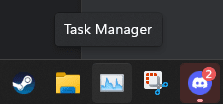
Hmm I'm missing the task manager by right clicking the taskbar too. I have rebooted and run a sfc + rebooted again to see if it will appear, but it hasn't.

I'm not confident in messing about in the registry and making keys. @Brink if you have the time and inclination, would you be able to create one of your magic BAT files to achieve this? No worries if no time or not possible. :)
 

My Computer My Computer

At a glance

Windows 11 Proi7-8850H16GBIntel UHD 530 + Quadro P600
OS
Windows 11 Pro
Computer type
Laptop
Manufacturer/Model
HP Zbook 15v
CPU
i7-8850H
Memory
16GB
Graphics Card(s)
Intel UHD 530 + Quadro P600
Monitor(s) Displays
When used as a desktop - Dell P2415Q (4K)
Screen Resolution
4K
Hard Drives
1 x SSD
Keyboard
Logitech MX Keys
Mouse
Logitech MX Anywhere 3
Internet Speed
4G Wireless Broadband. Speeds vary from 260/50 to 70/20 (Mb) depending on day/time.
Browser
Edge, Chrome. Firefox
Antivirus
Windows Defender. MBAM Pro
Other Info
No battery - spicy pillow removed. Laptop is permanently plugged in.
I have four PCs. After this update all four failed the SFC. One RestoreHealth later all is fine. Anyone experience similar?
 

My Computer My Computer

At a glance

11 if on this site
OS
11 if on this site
Hmm I'm missing the task manager by right clicking the taskbar too. I have rebooted and run a sfc + rebooted again to see if it will appear, but it hasn't.

I'm not confident in messing about in the registry and making keys. @Brink if you have the time and inclination, would you be able to create one of your magic BAT files to achieve this? No worries if no time or not possible. :)

Hello,

I'm afraid this can't be added like that. I'd recommend to wait until it gets enabled eventually. :(
 

My Computers My Computers

  • At a glance

    Windows 11 Pro for WorkstationsIntel i7-8700K 5 GHz64 GB (4x16GB) G.SKILL TridentZ RGB DDR4 3600...ASUS ROG-STRIX-GTX1080TI-O11G-GAMING (11GB GD...
    OS
    Windows 11 Pro for Workstations
    Computer type
    PC/Desktop
    Manufacturer/Model
    Custom self build
    CPU
    Intel i7-8700K 5 GHz
    Motherboard
    ASUS ROG Maximus XI Formula Z390
    Memory
    64 GB (4x16GB) G.SKILL TridentZ RGB DDR4 3600 MHz (F4-3600C18D-32GTZR)
    Graphics Card(s)
    ASUS ROG-STRIX-GTX1080TI-O11G-GAMING (11GB GDDR5X)
    Sound Card
    Integrated Digital Audio (S/PDIF)
    Monitor(s) Displays
    2 x Samsung Odyssey G75 27"
    Screen Resolution
    2560x1440
    Hard Drives
    1TB Samsung 990 PRO M.2,
    4TB Samsung 990 PRO M.2,
    TerraMaster F8 SSD Plus NAS
    PSU
    Seasonic Prime Titanium 850W
    Case
    Thermaltake Core P3 wall mounted
    Cooling
    Corsair Hydro H115i
    Keyboard
    Amazon Basics Wired Full Keyboard MD005
    Mouse
    Logitech MX Master 4
    Internet Speed
    2 Gbps Download and 100 Mbps Upload
    Browser
    Chrome and Edge
    Antivirus
    Microsoft Defender
    Other Info
    Logitech Z625 speaker system,
    Logitech BRIO 4K Pro webcam,
    HP Color LaserJet Pro MFP M477fdn,
    CyberPower CP1500PFCLCD
    Galaxy S23 Plus phone
  • At a glance

    Windows 11 ProSnapdragon X Elite (12 core) 3.42 GHz16 GB LPDDR5x-7467 MHz
    Operating System
    Windows 11 Pro
    Computer type
    Laptop
    Manufacturer/Model
    Surface Laptop 7 Copilot+ PC
    CPU
    Snapdragon X Elite (12 core) 3.42 GHz
    Memory
    16 GB LPDDR5x-7467 MHz
    Monitor(s) Displays
    15" HDR
    Screen Resolution
    2496 x 1664
    Hard Drives
    1 TB SSD
    Internet Speed
    Wi-Fi 7 and Bluetooth 5.4
    Browser
    Chrome and Edge
    Antivirus
    Microsoft Defender
Ah no worries @Brink ! Yes I daresay it will be fixed in another update, and it is still perfectly accessible with R clicking the start button (not that I EVER do until I after have R clicked the taskbar - STILL!! lol)
 

My Computer My Computer

At a glance

Windows 11 Proi7-8850H16GBIntel UHD 530 + Quadro P600
OS
Windows 11 Pro
Computer type
Laptop
Manufacturer/Model
HP Zbook 15v
CPU
i7-8850H
Memory
16GB
Graphics Card(s)
Intel UHD 530 + Quadro P600
Monitor(s) Displays
When used as a desktop - Dell P2415Q (4K)
Screen Resolution
4K
Hard Drives
1 x SSD
Keyboard
Logitech MX Keys
Mouse
Logitech MX Anywhere 3
Internet Speed
4G Wireless Broadband. Speeds vary from 260/50 to 70/20 (Mb) depending on day/time.
Browser
Edge, Chrome. Firefox
Antivirus
Windows Defender. MBAM Pro
Other Info
No battery - spicy pillow removed. Laptop is permanently plugged in.
Back
Top Bottom