Insider KB5022910 Windows 11 Insider Beta 22621.1537 and 22624.1537 - March 31


UPDATE 4/07:


Hello Windows Insiders, today we are releasing Windows 11 Insider Preview Build 22621.1537 and Build 22624.1537 (KB5022910) to the Beta Channel.
  • Build 22624.1537 = New features rolling out.
  • Build 22621.1537 = New features off by default.

KB5023595 Enablement Package for Windows 11 22H2 build 22624.xxx


REMINDER: Insiders who were previously on Build 22623 will automatically get moved to Build 22624 via an enablement package. The enablement package artificially increments the build number for the update with new features getting rolled out and turned on to make it easier to differentiate from devices with the update with features off by default. This approach is being used for the Beta Channel only and is not indicative of any changes or plans for final feature rollouts.

Insiders who landed in the group with new features turned off by default (Build 22621.xxxx) can check for updates and choose to install the update that will have features rolling out (Build 22624.xxxx).

What’s new in Build 22624.1537

Access Keys in File Explorer

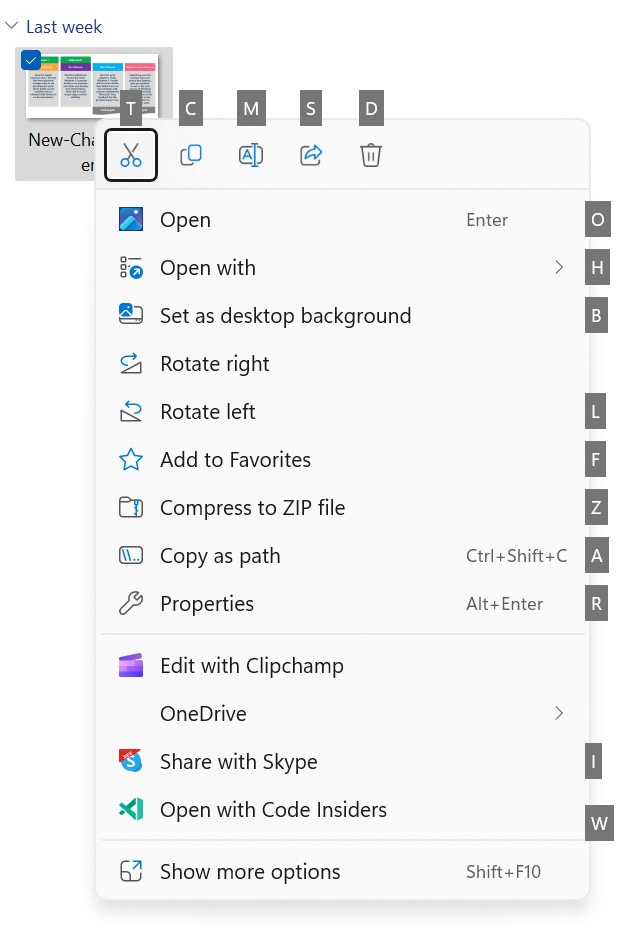
We are adding access key shortcuts into the XAML context menu in File Explorer. An access key is a one keystroke shortcut that allows a keyboard user to quickly execute a command in context menu. Each access key will correspond with a letter in the display name. It’s part of our effort to make File Explorer more accessible. To try this out, you can click on a file in File Explorer and press the menu key on your keyboard.


Access keys in the XAML context menu in File Explorer.

[We are beginning to roll this out, so the experience isn’t available to all Insiders in the Beta Channel just yet as we plan to monitor feedback and see how it lands before pushing it out to everyone.]

FEEDBACK: Please file feedback in Feedback Hub (WIN + F) under Files, Folders, and Online Storage > File Explorer.

Create live kernel memory dumps in Task Manager

We are introducing a set of new developer-focused features in Task Manager to aid the collection of live kernel memory dumps (LKDs). This is in addition to the existing “Memory dump” for user mode processes. The goal of kernel live dump is to gather data to troubleshoot an abnormal situation but allow the OS to continue operation. This reduces downtime when compared to a bug check for “non-fatal” but high-impact failures and hangs. Click here for more info on live kernel dumps.

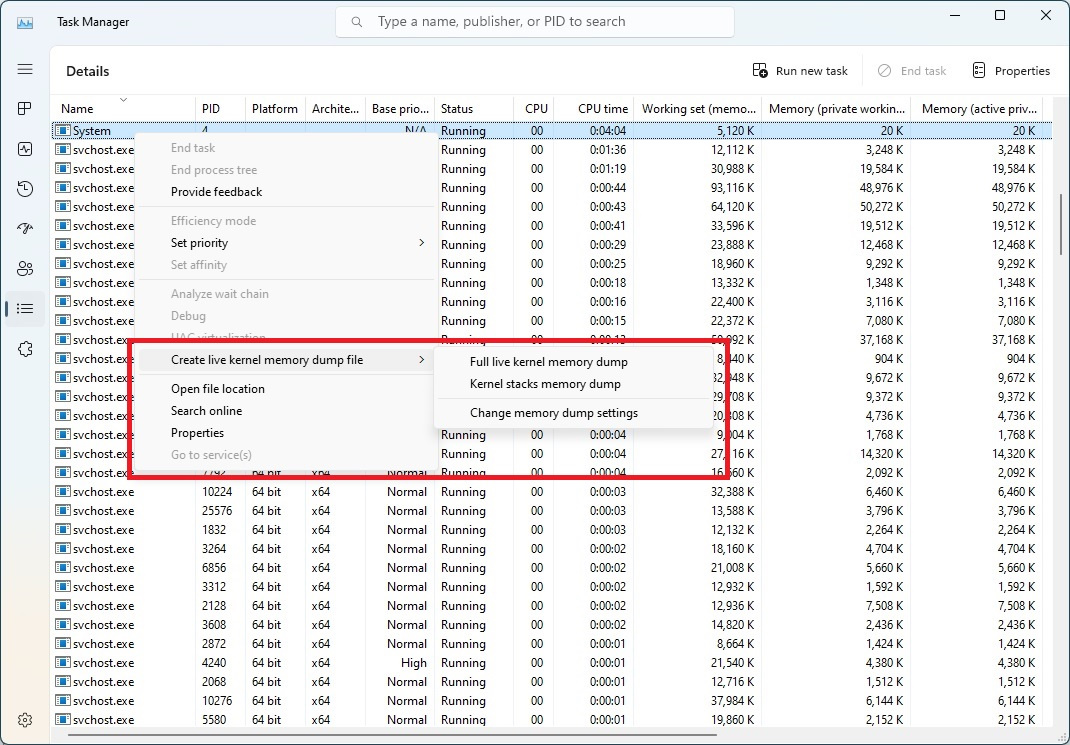
To capture a live kernel memory dump (LKD), go to the Details page in Task Manager, right-click on the System process and the context menu should light up to show “Create live kernel memory dump file” to capture a Full live kernel or Kernel stack memory dumps.

The dumps will be written to a fixed location:

%LocalAppData%\Microsoft\Windows\TaskManager\LiveKernelDumps


Choose the new “Create live kernel memory dump file” option when right-clicking on a process on the details page in Task Manager.

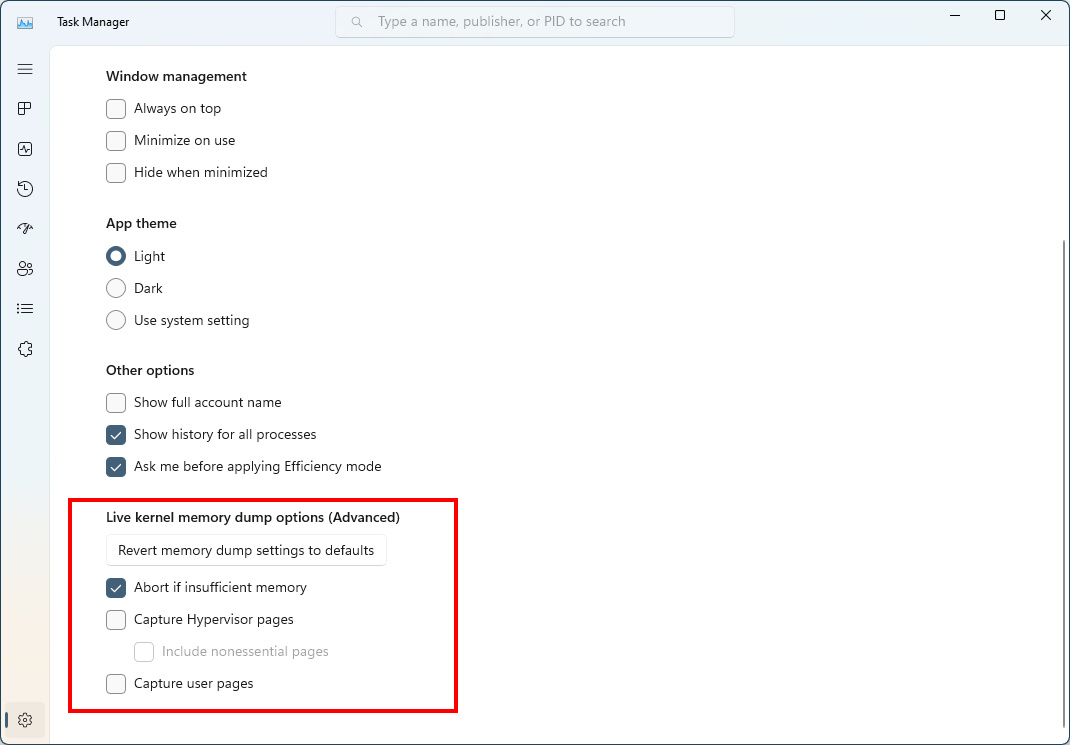
You can also go to the Task Manager Settings page to view/edit the settings for live kernel memory dumps.


Configure live kernel dumps options in Task Manager settings.

FEEDBACK: Please file feedback in Feedback Hub (WIN + F) under Desktop Environment > Task Manager.

Content Adaptive Brightness Control (CABC) on plugged in devices including desktop PCs

Content Adaptive Brightness Control (CABC) is already a feature that users are familiar with. This feature in Windows 11 will dim or brighten areas of a display or monitor based on the content being displayed with the goal of striking a balance between reduced power consumption with visual experience to save battery life. Starting with this build, we are allowing this feature to run on devices such as laptops and 2-in-1’s that are plugged into a charger, as well as on desktop PCs. For most users, this change won’t be noticeable and should reduce energy consumption.


CABC-power-change-1024x708.jpg
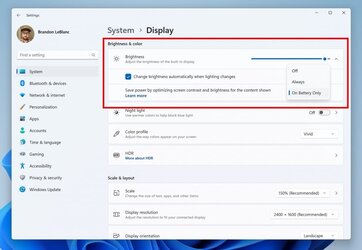
Content Adaptive Brightness Control options in Settings.

This feature can be adjusted via Settings > System > Display under “Brightness & color” and through a drop-down menu with 3 options: Off, Always, and “On Battery Only”. For battery powered devices such as laptops and 2-in-1’s, the default is “On Battery Only”. On desktop PCs, this is off by default. We encourage Insiders across laptops, 2-in1’s, and desktop PCs to try the “Always” option and give us feedback on the visual quality of CABC so we can ensure it is properly tuned.

UPDATE 4/3: We previously documented this feature working on desktop PCs – however, it does not. Content Adaptive Brightness Control (CABC) needs to be enabled by the OEM (the manufacturer of the device). As a result, this feature is not available on all laptop or 2-in-1 devices.

FEEDBACK: Please file feedback in Feedback Hub (WIN + F) under Display and Graphics > Adaptive Brightness.


Changes and Improvements in Build 22624.1537

[Settings]

  • As part of the deprecation of Microsoft Support Diagnostic Tool (MSDT) and MSDT Troubleshooters, we have begun redirecting some of the troubleshooters found under Settings > System > Troubleshoot and in other areas of the OS to the new Get Help troubleshooting platform.

[Developer]

Changes and Improvements for BOTH Build 22621.1537 & Build 22624.1537

[Search on the Taskbar]

  • Once you have access to the new Bing, the search box on the taskbar will include a button that opens the Bing chat experience in Edge. If you don’t have access, the search box on the taskbar will feature a dynamic search highlight button. We’re beginning to roll this out to Insiders, not everyone will see it right away.

Fixes in Build 22624.1537

[General]

  • Improved the experience on logon after booting up by reducing the performance impact of startup apps.

[Taskbar & System Tray]

  • We fixed the issue in the previous build where the option under Settings > Personalization > Taskbar in the Taskbar behavior section to show seconds in the clock on the system tray was not actually enabling the functionality. Enabling should work now.

  • Fixed an issue causing the show hidden icons flyout to open behind things like OneNote flyout and live captions.

[Settings]

  • Improved the performance of search within Settings.

[Voice access]

  • Fixed an issue that was causing voice access to take some time to turn on after using the wake-up command.

[Other]

  • Fixed an issue which was causing an unexpected error message to appear when opening Group Policy Editor in the previous flight.

Fixes for BOTH Build 22621.1537 & Build 22624.1537

  • New! This update adds many new features and improvements to Microsoft Defender for Endpoint. For more information, see Microsoft Defender for Endpoint.
  • New! The search box on the taskbar will be lighter when you set Windows to a custom color mode. This will occur when you set the Windows mode to dark and the app mode to light in Settings > Personalization > Colors.

  • This update affects the Arab Republic of Egypt. The update supports the government’s daylight saving time change order for 2023.
  • This update affects jscript9Legacy.dll. It adds ITracker and ITrackingService to stop MHTML from not responding.
  • This update addresses an issue that affects complexity policy settings for PINs. They are ignored.
  • This update affects Xbox Elite users who have the Xbox Adaptive Controller. This update applies your controller remapping preferences on the desktop.
  • This update addresses an issue that affects the Dynamic Host Configuration Protocol (DHCP) option 119 – Domain Search Option. The issue stops you from using a connection-specific DNS Suffix Search List.
  • This update addresses an issue that affects a Clustered Shared Volume (CSV). The CSV fails to come online. This occurs if you enable BitLocker and local CSV managed protectors, and the system recently rotated the BitLocker keys.
  • This update addresses an issue that might affect your audio. It might cause glitching or screeching. This occurs when the system is under a heavy load or wakes from sleep.
  • This update addresses an issue that affects Microsoft Narrator. It fails to read items in dropdown lists in Microsoft Excel.
  • This update addresses an issue that affects the Windows Remote Management (WinRM) client. The client returns an HTTP server error status (500). This error occurs when it runs a transfer job in the Storage Migration Service.
  • This update addresses an issue that affects Active Directory Users & Computers. It stops responding. This occurs when you use TaskPad view to enable or disable many objects at the same time.
  • This update affects the Group Policy Editor. It adds Transport Layer Security (TLS) 1.3 to the list of protocols that you can set.
  • This update addresses an issue that affects Windows Search. Windows Search fails inside of Windows container images.
  • This update addresses a rare issue that might cause an input destination to be null. This issue might occur when you attempt to convert a physical point to a logical point during hit testing. Because of this, the computer raises a stop error.
  • This update addresses an issue that affects Desired State Configuration. It loses its previously configured options. This occurs if metaconfig.mof is missing.
  • The update addresses an issue that affects the Remote Procedure Call Service (rpcss.exe). The issue might cause a race condition between the Distributed Component Object Model (DCOM) and the Microsoft Remote Procedure Call (RPC) endpoint mapper.
  • This update addresses an issue that affects Microsoft PowerPoint. It stops responding on the Azure Virtual Desktop (AVD). This occurs when you use Visual Basic for Applications (VBA).
  • This update addresses an issue that affects the Fast Identity Online 2.0 (FIDO2) PIN credential icon. It does not appear on the credentials screen of an external monitor. This occurs when that monitor is attached to a closed laptop.
  • This update addresses an issue that affects the new Windows Runtime (WinRT) API. This issue stops an application from querying for location information using MBIM2.0+.
  • This update addresses an issue that affects USB printers. The system classifies them as multimedia devices even though they are not.
  • This update addresses an issue that affects the Microsoft HTML Application Host (HTA). This issue blocks code execution that uses Microsoft HTA. This occurs when you turn on Windows Defender Application Control (WDAC) User Mode Code Integrity (UMCI) enforced mode.
  • This update affects the Group Policy Management Console. It addresses a scripting error in the Group Policy Preferences window.
  • This update addresses an issue that stops WDAC from parsing fields from binaries.
  • This update addresses an issue that affects the Simple Certificate Enrollment Protocol (SCEP) certificate. The system reports some SCEP certificate installations as failed. Instead, the system should report them as pending.
  • This update addresses an issue that affects Microsoft PowerPoint. It stops responding. This occurs when you use accessibility tools.
  • This update addresses an issue that affects the Notepad combo box in Settings. It fails to show all the available options.
  • This update addresses an issue that might affect Win32 and Universal Windows Platform (UWP) apps. They might close when devices enter Modern Standby. Modern Standby is an expansion of the Connected Standby power model. This issue occurs if certain Bluetooth PhoneLink features are turned on.

Known issues

[Search on the Taskbar]

  • If you have the Bing button in the search box on the taskbar and you restart your computer, you may see the daily rotating search highlight for some time before getting the Bing button back.

[Live captions]

  • On Arm64 devices, enhanced speech recognition support installed through the Language & Region settings page will require restarting live captions if you switch languages in the live captions Caption language menu.
  • Certain languages shown on the Language & Region settings page will indicate speech recognition support (e.g., Korean) but don’t yet have support for live captions.
  • When adding a language through the Language & Region settings page, language feature installation progress may become hidden, and you may not see install completion of “Enhanced speech recognition” (required by Live Captions). (You can use the language’s “Language options” to monitor progress.) If this happens, there may be an unexpected delay before the live caption setup experience detects this and lets you continue.
  • Captioning performance may be degraded in non-English languages and missing out-of-language filtering in non-English (United States) languages which means that incorrect captions will be shown for speech not in the caption language.

About the Beta Channel

The Beta Channel is the place we preview experiences that are closer to what we will ship to our general customers. Because the Dev and Beta Channels represent parallel development paths from our engineers, there may be cases where features and experiences show up in the Beta Channel first. However, this does not mean every feature we try out in the Beta Channel will ship. We encourage Insiders to read this blog post that outlines the ways we’ll try things out with Insiders in both the Dev and Beta Channels.

Important Insider Links

Thanks,
Amanda & Brandon

Source:

Check Windows Updates


UUP Dump:

64-bit ISO download:

ARM64 ISO download:

 
Last edited:
I have finally worked out what ni stands for in ni_release

The first time I click on Start Menu, it comes up but I cannot select anything. The second time it works.

Others have posted feedback about it.
First time selection on Start Menu works fine for me.
 

My Computers My Computers

  • At a glance

    Win 11 Pro 25H2 Beta 26220.8925AMD Ryzen 7 5700UCrucial 64GB DDR4 SDRAM PC4-25600AMD Radeon Vega Graphics 1.80 GHz - Adrenalin...
    OS
    Win 11 Pro 25H2 Beta 26220.8925
    Computer type
    PC/Desktop
    Manufacturer/Model
    Asus MiniPC PN51-E1
    CPU
    AMD Ryzen 7 5700U
    Motherboard
    Asus PN51-E1 - Bios Version 0505
    Memory
    Crucial 64GB DDR4 SDRAM PC4-25600
    Graphics Card(s)
    AMD Radeon Vega Graphics 1.80 GHz - Adrenalin Edition 23.9.2
    Sound Card
    USB to Sound Blaster Live (24bit External) to Firestone DAC to Event Studio Monitors
    Monitor(s) Displays
    Gigabyte 27" 165 hertz
    Screen Resolution
    2560 x 1440
    Hard Drives
    Samsung SSD 970 EVO Plus 2TB PCIE NVME
    PSU
    65 Watt
    Case
    Asus Mini
    Cooling
    Air
    Keyboard
    Logitech K810
    Mouse
    Logitech MX Master 2S
    Internet Speed
    Telstra Modem Wifi - NBN 50/18
    Browser
    Firefox
    Antivirus
    Microsoft
    Other Info
    This replaced my Linux Notebook. I've used Windows since V2, tried various Linux distros but Windows continues to win for me.
  • At a glance

    Win 11 Home 26H2 26300.8935Core i7-7700HQ @2.8 Ghz16.0 GBNVIDIA GeForce GTX 1060 (6 GB)
    Operating System
    Win 11 Home 26H2 26300.8935
    Computer type
    Laptop
    Manufacturer/Model
    Resistance
    CPU
    Core i7-7700HQ @2.8 Ghz
    Motherboard
    Resistance
    Memory
    16.0 GB
    Graphics card(s)
    NVIDIA GeForce GTX 1060 (6 GB)
    Screen Resolution
    4k
    Hard Drives
    1.8tb

My Computers My Computers

  • At a glance

    Win 11 Pro 25H2 Beta 26220.8925AMD Ryzen 7 5700UCrucial 64GB DDR4 SDRAM PC4-25600AMD Radeon Vega Graphics 1.80 GHz - Adrenalin...
    OS
    Win 11 Pro 25H2 Beta 26220.8925
    Computer type
    PC/Desktop
    Manufacturer/Model
    Asus MiniPC PN51-E1
    CPU
    AMD Ryzen 7 5700U
    Motherboard
    Asus PN51-E1 - Bios Version 0505
    Memory
    Crucial 64GB DDR4 SDRAM PC4-25600
    Graphics Card(s)
    AMD Radeon Vega Graphics 1.80 GHz - Adrenalin Edition 23.9.2
    Sound Card
    USB to Sound Blaster Live (24bit External) to Firestone DAC to Event Studio Monitors
    Monitor(s) Displays
    Gigabyte 27" 165 hertz
    Screen Resolution
    2560 x 1440
    Hard Drives
    Samsung SSD 970 EVO Plus 2TB PCIE NVME
    PSU
    65 Watt
    Case
    Asus Mini
    Cooling
    Air
    Keyboard
    Logitech K810
    Mouse
    Logitech MX Master 2S
    Internet Speed
    Telstra Modem Wifi - NBN 50/18
    Browser
    Firefox
    Antivirus
    Microsoft
    Other Info
    This replaced my Linux Notebook. I've used Windows since V2, tried various Linux distros but Windows continues to win for me.
  • At a glance

    Win 11 Home 26H2 26300.8935Core i7-7700HQ @2.8 Ghz16.0 GBNVIDIA GeForce GTX 1060 (6 GB)
    Operating System
    Win 11 Home 26H2 26300.8935
    Computer type
    Laptop
    Manufacturer/Model
    Resistance
    CPU
    Core i7-7700HQ @2.8 Ghz
    Motherboard
    Resistance
    Memory
    16.0 GB
    Graphics card(s)
    NVIDIA GeForce GTX 1060 (6 GB)
    Screen Resolution
    4k
    Hard Drives
    1.8tb
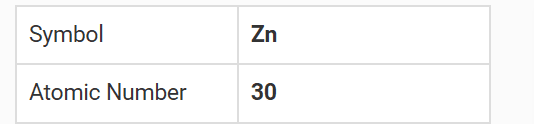
Yes, Windows release internal codenames are the elements. 21H2 was Cobalt, 22H2 is Nickel, 23H2 will be Zinc. Look in the Registry of the Canary build and you'll already see references to ZN23H2.

View attachment 57047

Well, where is rs_prerelease coming from ? 😎🤷‍♂️

Atomic NumberSymbolName
86RnRadon
75ReRhenium
45RhRhodium
111RsRoentgenium

1680553524714.png

1680553707709.png
 

My Computer My Computer

At a glance

Windows 11 Pro 25H2Intel I9-9900K64GBNVIDIA RTX 2060
OS
Windows 11 Pro 25H2
Computer type
PC/Desktop
Manufacturer/Model
Dell XPS 8930
CPU
Intel I9-9900K
Memory
64GB
Graphics Card(s)
NVIDIA RTX 2060
Sound Card
NVIDIA High Definition Audio
Monitor(s) Displays
4k Samsung
Screen Resolution
3840 x 2160
Hard Drives
512GB NVMe, ADATA SU 800, 2TB HDD
The first time I click on Start Menu, it comes up but I cannot select anything. The second time it works.

Others have posted feedback about it.
Well it must only affect a small number then. Neither of my my Beta machines have that, one is a VM the othe a 2-in-1 Lenovo Yoga 11e.
 

My Computers My Computers

  • At a glance

    Windows 11 HomeAMD Athlon Silver 3050U8GBRadeon Graphics
    OS
    Windows 11 Home
    Computer type
    Laptop
    Manufacturer/Model
    Acer Aspire 3 A315-23-R9VY
    CPU
    AMD Athlon Silver 3050U
    Memory
    8GB
    Graphics Card(s)
    Radeon Graphics
    Monitor(s) Displays
    laptop screen
    Screen Resolution
    1366x768 native resolution, up to 2560x1440 with Radeon Virtual Super Resolution
    Hard Drives
    1TB Samsung EVO 870 SSD (from April 2026: 250GB EVO 850)
    Internet Speed
    150 Mbps
    Browser
    Edge, Firefox
    Antivirus
    Defender
    Other Info
    UPDATE - 11 April 2026: due to lid hinges starting to break up this laptop has been retired from active duty. The OS with all software and files has been migrated to my System Seven in 'Other systems' to carry on as my general purpose 'main machine'.

    I've now clean installed 25H2 and used Garlin's scripts to update Secure Boot to CA 2023 and revoke the PCA 2011 certificates. It's new role is to test secure boot issues.

    Info for 2021-2026:
    fully 'Windows 11 ready' laptop. Windows 10 C: partition migrated from my old unsupported 'main machine' then upgraded to 11. A test migration ran Insider builds for 2 months. When 11 was released on 5th October 2021 it was re-imaged back to 10 and was offered the upgrade in Windows Update on 20th October. Windows Update offered the 22H2 Feature Update on 20th September 2022. It got the 23H2 Feature Update on 4th November 2023 through Windows Update, 24H2 on 3rd October 2024 through Windows Update by setting the Target Release Version for 24H2, and 25H2 on 30th September 2025 through Windows Update by setting the Target Release Version for 25H2.
  • At a glance

    Windows 11 ProIntel® Core™ i5-520M8GB(integrated graphics) Intel HD Graphics
    Operating System
    Windows 11 Pro
    Computer type
    Laptop
    Manufacturer/Model
    Dell Latitude E4310
    CPU
    Intel® Core™ i5-520M
    Motherboard
    0T6M8G
    Memory
    8GB
    Graphics card(s)
    (integrated graphics) Intel HD Graphics
    Screen Resolution
    1366x768
    Hard Drives
    500GB Crucial MX500 SSD
    Browser
    Firefox, Edge
    Antivirus
    Defender
    Other Info
    unsupported machine: Legacy bios, MBR, TPM 1.2, upgraded from W10 to W11 using W10/W11 hybrid install media workaround.

    In-place upgrade to 22H2 using ISO and a workaround.
    Feature Update to 23H2 by manually installing the Enablement Package.
    In-place upgrade to 24H2 using hybrid 23H2/24H2 install media.
    Upgraded to 25H2 by Enablement Package.

    Also running Insider Dev, and Canary builds and Windows 10 as native boot .vhdx.
  • My SYSTEM THREE is a Dell Latitude 5410, i7-10610U, 32GB RAM, 512GB NVMe ssd, supported device running Windows 11 Pro.

    My SYSTEM FOUR was a 2-in-1 convertible Lenovo Yoga 11e (1st gen) type 20DA, Celeron N2930, 8GB RAM, 256GB ssd. Unsupported device. This has now been sold. It has been replaced by my System Eight.

    My SYSTEM FIVE is a Dell Latitude 3190 2-in-1, Pentium Silver N5030, 8GB RAM, 1TB NVMe ssd, supported device running Windows 11 Pro, plus Insider Beta, Dev, and Canary builds (and a few others) as a native boot .vhdx.

    My SYSTEM SIX is a Dell Latitude 5550, Core Ultra 7 165H, 64GB RAM, 1TB NVMe SSD, supported device, Windows 11 Pro, Hyper-V host machine. Updated to 25H2 on 30th September 2025.

    My SYSTEM SEVEN is a Lenovo Thinkpad T580, 1920x1080 touchscreen, Intel Core i7-8650U, 16GB RAM, 512GB NVMe SSD + 2nd 512GB NVMe SSD, a supported device for Windows 11. This is my current general purpose 'main machine'. The installed Windows 11 Home from my System One has been migrated to this machine. As its new home has an existing digital licence for Pro I've been able to upgrade the migrated OS from Home to Pro.

    My SYSTEM EIGHT is a 2-in-1 convertible Lenovo Yoga 11e (5th gen) type 20LN, Celeron N4120, 8GB RAM, 512GB NVMe ssd, a supported device for Windows 11. Currently running Windows 11 Pro, plus Insider Dev, Beta, and Canary builds as native boot vhdx.
Well it must only affect a small number then. Neither of my my Beta machines have that, one is a VM the othe a 2-in-1 Lenovo Yoga 11e.
Neither me. That's why I was asking....
 

My Computers My Computers

  • At a glance

    Windows 11 ProIntel Core i9-14900HX32 GBIntel UHD Graphics, NVIDIA RTX 4070 Laptop
    OS
    Windows 11 Pro
    Computer type
    Laptop
    Manufacturer/Model
    Lenovo Legion 7i 16IRX9
    CPU
    Intel Core i9-14900HX
    Motherboard
    LENOVO LNVNB161216 Chipset HM 770
    Memory
    32 GB
    Graphics Card(s)
    Intel UHD Graphics, NVIDIA RTX 4070 Laptop
    Sound Card
    Realtek in-built
    Screen Resolution
    3200x2000 200% Scale
    Hard Drives
    C: HDD 1 TB SAMSUNG MZVL21T0HCLR-00BL2
    D: HDD 1 TB CRUCIAL CT1000P3PSSD8
    Antivirus
    BitDefender Free
  • At a glance

    Windows 11 ProI7 10750H32 GBIntel UHD - NVIDIA 1650 Ti Max-Q
    Operating System
    Windows 11 Pro
    Computer type
    Laptop
    Manufacturer/Model
    Lenovo ThinkPad X1 3Gen Extreme
    CPU
    I7 10750H
    Motherboard
    Intel MW-490
    Memory
    32 GB
    Graphics card(s)
    Intel UHD - NVIDIA 1650 Ti Max-Q
    Sound Card
    Realtek in-built
    Screen Resolution
    3840x2160 225% Scale
    Hard Drives
    C: WDC PC SN730 SDBQNTY-1T00-1001 (1 TB)
    D: KINGSTON SNV2S2000G (2 TB)
    Antivirus
    BitDefender
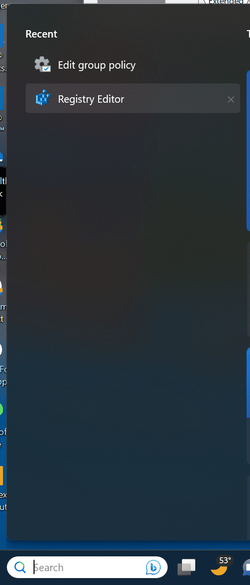
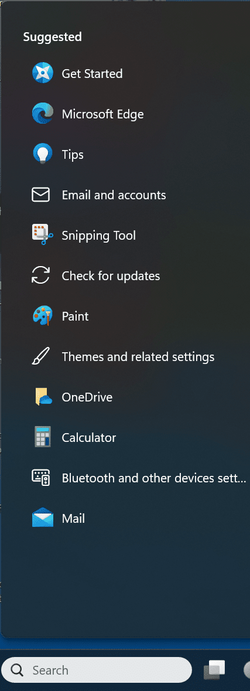
Clicking anywhere except on the "Bing Button", I see "Recent" and the appropriate recent functions.
I keep getting "Suggested" on mines and occasionally, "Recent" will show up.
 

My Computer My Computer

At a glance

WindowsXP/7/8/8.1/10/11,Linux,Android,FreeBSD...Intel® Core™ i7-8750H 8th Gen 2.2Ghz up to 4....64GB using 2x32GB CL16 Mushkin redLine modulesIntel UHD 630 & NVIDIA GeForce GTX 1050 Ti wi...
OS
WindowsXP/7/8/8.1/10/11,Linux,Android,FreeBSD Unix
Computer type
Laptop
Manufacturer/Model
Dell XPS 15 9570
CPU
Intel® Core™ i7-8750H 8th Gen 2.2Ghz up to 4.1Ghz
Motherboard
Dell XPS 15 9570
Memory
64GB using 2x32GB CL16 Mushkin redLine modules
Graphics Card(s)
Intel UHD 630 & NVIDIA GeForce GTX 1050 Ti with 4GB DDR5
Sound Card
Realtek ALC3266-CG
Monitor(s) Displays
15.6" 4K Touch UltraHD 3840x2160 made by Sharp
Screen Resolution
3840x2160 4K UltraHD
Hard Drives
Samsung MZ-V9P4T0B/AM 990 PRO 4TB PCIe®4.0 NVMe™ M.2 SSD was Toshiba KXG60ZNV1T02 NVMe 1TB SSD
PSU
Dell XPS 15 9570
Case
Dell XPS 15 9570
Cooling
Stock
Keyboard
Stock
Mouse
SwitftPoint ProPoint
Internet Speed
Comcast/XFinity 1.44Gbps/42.5Mbps
Browser
Microsoft EDGE (Chromium based) & Google Chrome
Antivirus
Windows Defender that came with Windows
I keep getting "Suggested" on mines and occasionally, "Recent" will show up.

I get suggested if I don't have any recent, or if I delete the recent using the x on the right. 😎
1680580443066.png

1680580286235.png
 

Attachments

  • 1680580370058.png
    1680580370058.png
    83.3 KB · Views: 1

My Computer My Computer

At a glance

Windows 11 Pro 25H2Intel I9-9900K64GBNVIDIA RTX 2060
OS
Windows 11 Pro 25H2
Computer type
PC/Desktop
Manufacturer/Model
Dell XPS 8930
CPU
Intel I9-9900K
Memory
64GB
Graphics Card(s)
NVIDIA RTX 2060
Sound Card
NVIDIA High Definition Audio
Monitor(s) Displays
4k Samsung
Screen Resolution
3840 x 2160
Hard Drives
512GB NVMe, ADATA SU 800, 2TB HDD
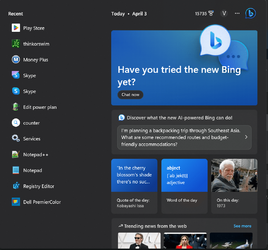
This is my "Recent" when it works which is 1 out of 9 tries...

1680580681496.png
 

My Computer My Computer

At a glance

WindowsXP/7/8/8.1/10/11,Linux,Android,FreeBSD...Intel® Core™ i7-8750H 8th Gen 2.2Ghz up to 4....64GB using 2x32GB CL16 Mushkin redLine modulesIntel UHD 630 & NVIDIA GeForce GTX 1050 Ti wi...
OS
WindowsXP/7/8/8.1/10/11,Linux,Android,FreeBSD Unix
Computer type
Laptop
Manufacturer/Model
Dell XPS 15 9570
CPU
Intel® Core™ i7-8750H 8th Gen 2.2Ghz up to 4.1Ghz
Motherboard
Dell XPS 15 9570
Memory
64GB using 2x32GB CL16 Mushkin redLine modules
Graphics Card(s)
Intel UHD 630 & NVIDIA GeForce GTX 1050 Ti with 4GB DDR5
Sound Card
Realtek ALC3266-CG
Monitor(s) Displays
15.6" 4K Touch UltraHD 3840x2160 made by Sharp
Screen Resolution
3840x2160 4K UltraHD
Hard Drives
Samsung MZ-V9P4T0B/AM 990 PRO 4TB PCIe®4.0 NVMe™ M.2 SSD was Toshiba KXG60ZNV1T02 NVMe 1TB SSD
PSU
Dell XPS 15 9570
Case
Dell XPS 15 9570
Cooling
Stock
Keyboard
Stock
Mouse
SwitftPoint ProPoint
Internet Speed
Comcast/XFinity 1.44Gbps/42.5Mbps
Browser
Microsoft EDGE (Chromium based) & Google Chrome
Antivirus
Windows Defender that came with Windows
Build 22624.1537 installed without a hitch, but I do notice the following. About 2/3 of my small systray icons (right side of the taskbar) take a much longer time to appear than is usual. They do show eventually, however, and are fully functional. This happens now on every reboot, warm or cold. Everything to the left of the Windows Security icon takes several minutes to appear. With or without StartAllBack running, the result is the same.
 

My Computer My Computer

At a glance

Win11 Experimental Channel for 26H2 buildsAMD R7 7800X3DGSkill 2x16GB @ 6400MT/sXFX 9070 XT SWIFT tri-fan (PCIe5.0)
OS
Win11 Experimental Channel for 26H2 builds
Computer type
PC/Desktop
Manufacturer/Model
a cherry-picked assembly
CPU
AMD R7 7800X3D
Motherboard
MSI x870 Tomahawk Wi-Fi, 8-layer, 2 oz copper, server PCB
Memory
GSkill 2x16GB @ 6400MT/s
Graphics Card(s)
XFX 9070 XT SWIFT tri-fan (PCIe5.0)
Sound Card
Creative Labs G8 USB External Sound device, Gaming DAC, Sound Card & Earphone AMP.. HIGHLY RECOMMENDED, btw. Totally changed my opinion of external USB sound. I like!...;)
Monitor(s) Displays
Philips 42" OLED @ 4k
Screen Resolution
3840x2160
Hard Drives
*Boot: Samsung 980 Pro 2 TB NVMe (PCIe4x4)
*Samsung 980 EVO NVMe 500GB (PCIe 4x4)
*Kingston SNV3S2000G 2TB NVMe (PCIe4x4)
*Samsung 960 EVO 250GB NVMe(PCIe3x2)
*8TB Toshiba x300 HDD
*ST4000DM004 S3 4TB HDD
PSU
Gigabyte 850W Gold, Rev 2
Case
Lian Li Lancool 217, white, with wood trim, very nice looking--tired of black, 5-fans standard
Cooling
Air coutesy Lian Li
Keyboard
Cherry MX 2.0S RGB
Mouse
Razer Basilisk V3 24k DPI
Internet Speed
~950Mbps down and up!
Browser
Firefox x64 DE
Antivirus
Defender
Other Info
Great New system. Exceeds my expectations by quite a bit, btw. I love the USB G8 SoundBlaster, it's quite an improvement over the G6!
Installed 22624.1537 --- a few days late. No problems with install or features so far.
 

My Computers My Computers

  • At a glance

    windows 10 & 11AMD Ryzen 7X64GbRadeon RX 480 8Gb
    OS
    windows 10 & 11
    Computer type
    PC/Desktop
    Manufacturer/Model
    iBuyPower (special build)
    CPU
    AMD Ryzen 7X
    Motherboard
    Asus Prime x370 Pro
    Memory
    64Gb
    Graphics Card(s)
    Radeon RX 480 8Gb
    Monitor(s) Displays
    Samsung UHD 27 inch
    Screen Resolution
    UHD
    Hard Drives
    3 Samsung 1 TB SSD each; 1 Samsung PCIe M.2 at 2 TB
  • At a glance

    Windows 11 proAMD 9 5900X32 GbNvidia GeForce RTX 3080 Ti 12 GB GDDR6X
    Operating System
    Windows 11 pro
    Computer type
    PC/Desktop
    Manufacturer/Model
    IBuyPower
    CPU
    AMD 9 5900X
    Motherboard
    Asus x570 ROG Crosshair VIII Dark Hero WI-FI 6E ARGB
    Memory
    32 Gb
    Graphics card(s)
    Nvidia GeForce RTX 3080 Ti 12 GB GDDR6X
    Sound Card
    3D PREMIUM surround sound onboard
    Monitor(s) Displays
    Samsung 32 inch UHD curved monitor
    Screen Resolution
    UHD
    Hard Drives
    Samsung 980 pro 2 tb gen 4 NVMe ssd
    PSU
    850 watt consair RM850X
    Case
    Lian Li LANCOOL ONE tempered glass RGB gaming case
    Cooling
    DEEPCOOL GAMERSTORM RGB 240 mm CASTLE 240EX liquid cooler
    Keyboard
    Ares m.2 gaming keyboard
    Mouse
    Ares m.2 gaming optical mouse
    Internet Speed
    450
    Browser
    Firefox / Edge
    Antivirus
    Windows defender
    Other Info
    With all this gaming rig I am not a gamer!
Hi,
First time poster.
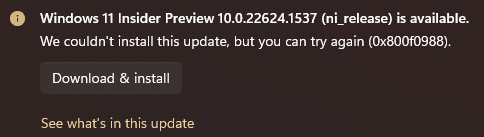
Been trying to install the update and continues to fail:
1680646255116.png
I have gone through multiple troubleshooting paths with no luck.
This is the only update that fails for me.

Any ideas?
Thanks
 

My Computer My Computer

At a glance

Windows 11
OS
Windows 11
I had the exact same issue. Tried everything but in the end went down the UUP ISO route.
 

My Computer My Computer

At a glance

Windows 11i7 12700K32GbMSI RTX 4090 Gaming X Trio
OS
Windows 11
Computer type
PC/Desktop
CPU
i7 12700K
Motherboard
ASUS ROG STRYX Z690-A Gaming Wi-Fi D4
Memory
32Gb
Graphics Card(s)
MSI RTX 4090 Gaming X Trio
Sound Card
Sound Blaster Z
Monitor(s) Displays
MSI MPG321UR-QD
Screen Resolution
4K
PSU
Corsair 850W
Installed and runs just fine no obvious issues
 

My Computer My Computer

At a glance

Windows 11 Pro 25H2 26200.9168Ryzen 5 760032 Gb DDR5 6000Hz Corsair VengeanceSapphire Pulse RX 7600
OS
Windows 11 Pro 25H2 26200.9168
Computer type
PC/Desktop
Manufacturer/Model
Home built
CPU
Ryzen 5 7600
Motherboard
Gigabyte B650M Aorus Elite AX Ice
Memory
32 Gb DDR5 6000Hz Corsair Vengeance
Graphics Card(s)
Sapphire Pulse RX 7600
Sound Card
Internal Realtek
Monitor(s) Displays
Samsung 32" Odyssey G5 G50D QHD
Screen Resolution
2560 x 1440
Hard Drives
WD Black SN 770 1Tb; SanDisk SDSSDA240G ; Seagate 2Tb HDD
PSU
MSI MAG A750GL
Case
Enermax Marbleshell MS21
Cooling
Thermaltake Peerless Assassin 120 White ARGB, 3 x 120 intake, 1 x 120 exhaust
Keyboard
Aukey KM-G12
Mouse
Razer Basilisk v3 Pro 35K
Internet Speed
1 Gb/s up & 800 Mb/s down
Browser
Brave / Edge
Antivirus
Windows / Malwarebytes
I had the exact same issue. Tried everything but in the end went down the UUP ISO route.
Hi,
Yes, that's what I ended up doing as well.
Thanks.
 

My Computer My Computer

At a glance

Windows 11
OS
Windows 11
Updated successfully to this release on the first attempt - but - the install was *very* slow. It remained on 69% complete for around 20 minutes. I just let it sit there and continue. It finally moved to 70% complete and then very rapidly finished after that ~ 2 minutes. Reboot was for all intents and purposes "normal".

Odd install behavior but...then it's :win: 🤷‍♂️
 

My Computer My Computer

At a glance

Windows 11 Insideri6700HQ12.0 GBIntel HD Graphics 530 + NVIDIA GeForce 940M
OS
Windows 11 Insider
Computer type
PC/Desktop
Manufacturer/Model
Dell 7459 AIO
CPU
i6700HQ
Motherboard
Dell
Memory
12.0 GB
Graphics Card(s)
Intel HD Graphics 530 + NVIDIA GeForce 940M
Updated successfully to this release on the first attempt - but - the install was *very* slow. It remained on 69% complete for around 20 minutes. I just let it sit there and continue. It finally moved to 70% complete and then very rapidly finished after that ~ 2 minutes. Reboot was for all intents and purposes "normal".

Odd install behavior but...then it's :win: 🤷‍♂️
I think that "69%" is a Microsoft thing because it seems with both the Canary and Stable updates for Micosoft Edge browser, it also hangs at 69% for some time as part of the install process.
 

My Computer My Computer

At a glance

WindowsXP/7/8/8.1/10/11,Linux,Android,FreeBSD...Intel® Core™ i7-8750H 8th Gen 2.2Ghz up to 4....64GB using 2x32GB CL16 Mushkin redLine modulesIntel UHD 630 & NVIDIA GeForce GTX 1050 Ti wi...
OS
WindowsXP/7/8/8.1/10/11,Linux,Android,FreeBSD Unix
Computer type
Laptop
Manufacturer/Model
Dell XPS 15 9570
CPU
Intel® Core™ i7-8750H 8th Gen 2.2Ghz up to 4.1Ghz
Motherboard
Dell XPS 15 9570
Memory
64GB using 2x32GB CL16 Mushkin redLine modules
Graphics Card(s)
Intel UHD 630 & NVIDIA GeForce GTX 1050 Ti with 4GB DDR5
Sound Card
Realtek ALC3266-CG
Monitor(s) Displays
15.6" 4K Touch UltraHD 3840x2160 made by Sharp
Screen Resolution
3840x2160 4K UltraHD
Hard Drives
Samsung MZ-V9P4T0B/AM 990 PRO 4TB PCIe®4.0 NVMe™ M.2 SSD was Toshiba KXG60ZNV1T02 NVMe 1TB SSD
PSU
Dell XPS 15 9570
Case
Dell XPS 15 9570
Cooling
Stock
Keyboard
Stock
Mouse
SwitftPoint ProPoint
Internet Speed
Comcast/XFinity 1.44Gbps/42.5Mbps
Browser
Microsoft EDGE (Chromium based) & Google Chrome
Antivirus
Windows Defender that came with Windows
I think that "69%" is a Microsoft thing because it seems with both the Canary and Stable updates for Micosoft Edge browser, it also hangs at 69% for some time as part of the install process.
+1 I have seen this behavior as well on many Insider installs. Just mentioning it here for others to get some "comfort" that the process is continuing even though it appears to have hung.

Keep watching the hard drive light for periodic flashes (if you have one). While not an absolute indicator, it does, again, give some degree of confirmation that the install process it still proceeding.
 

My Computer My Computer

At a glance

Windows 11 Insideri6700HQ12.0 GBIntel HD Graphics 530 + NVIDIA GeForce 940M
OS
Windows 11 Insider
Computer type
PC/Desktop
Manufacturer/Model
Dell 7459 AIO
CPU
i6700HQ
Motherboard
Dell
Memory
12.0 GB
Graphics Card(s)
Intel HD Graphics 530 + NVIDIA GeForce 940M
+1 I have seen this behavior as well on many Insider installs. Just mentioning it here for others to get some "comfort" that the process is continuing even though it appears to have hung.

Keep watching the hard drive light for periodic flashes (if you have one). While not an absolute indicator, it does, again, give some degree of confirmation that the install process it still proceeding.
LOL, the last part would be hard as I don't have a HDD LED being on a notebook computer and ofcourse one can't use a Virtual HDD LED in that part. With a SSD, you can't hear it either so sometimes the installation does really hang but that would probably be determined if it sat at a certain % like for an hour or some unreasonable amount of time.
 

My Computer My Computer

At a glance

WindowsXP/7/8/8.1/10/11,Linux,Android,FreeBSD...Intel® Core™ i7-8750H 8th Gen 2.2Ghz up to 4....64GB using 2x32GB CL16 Mushkin redLine modulesIntel UHD 630 & NVIDIA GeForce GTX 1050 Ti wi...
OS
WindowsXP/7/8/8.1/10/11,Linux,Android,FreeBSD Unix
Computer type
Laptop
Manufacturer/Model
Dell XPS 15 9570
CPU
Intel® Core™ i7-8750H 8th Gen 2.2Ghz up to 4.1Ghz
Motherboard
Dell XPS 15 9570
Memory
64GB using 2x32GB CL16 Mushkin redLine modules
Graphics Card(s)
Intel UHD 630 & NVIDIA GeForce GTX 1050 Ti with 4GB DDR5
Sound Card
Realtek ALC3266-CG
Monitor(s) Displays
15.6" 4K Touch UltraHD 3840x2160 made by Sharp
Screen Resolution
3840x2160 4K UltraHD
Hard Drives
Samsung MZ-V9P4T0B/AM 990 PRO 4TB PCIe®4.0 NVMe™ M.2 SSD was Toshiba KXG60ZNV1T02 NVMe 1TB SSD
PSU
Dell XPS 15 9570
Case
Dell XPS 15 9570
Cooling
Stock
Keyboard
Stock
Mouse
SwitftPoint ProPoint
Internet Speed
Comcast/XFinity 1.44Gbps/42.5Mbps
Browser
Microsoft EDGE (Chromium based) & Google Chrome
Antivirus
Windows Defender that came with Windows
It remained on 69% complete for around 20 minutes. I just let it sit there and continue....

think that "69%" is a Microsoft thing.....

+1 I have seen this behavior as well on many Insider installs. Just mentioning it here for others to get some "comfort" that the process is continuing even though it appears to have hung.

Keep watching the hard drive light for periodic flashes (if you have one). While not an absolute indicator, it does, again, give some degree of confirmation that the install process it still proceeding.....
I've seen this for countless CUs, and not just for 11, in 10 too. There is one absolute indicator you can check. Open Task Manager, look on Details, and sort by CPU. You'll find that TiWorker (the Trusted Installer) is up near the top and working away hard.
 

My Computers My Computers

  • At a glance

    Windows 11 HomeAMD Athlon Silver 3050U8GBRadeon Graphics
    OS
    Windows 11 Home
    Computer type
    Laptop
    Manufacturer/Model
    Acer Aspire 3 A315-23-R9VY
    CPU
    AMD Athlon Silver 3050U
    Memory
    8GB
    Graphics Card(s)
    Radeon Graphics
    Monitor(s) Displays
    laptop screen
    Screen Resolution
    1366x768 native resolution, up to 2560x1440 with Radeon Virtual Super Resolution
    Hard Drives
    1TB Samsung EVO 870 SSD (from April 2026: 250GB EVO 850)
    Internet Speed
    150 Mbps
    Browser
    Edge, Firefox
    Antivirus
    Defender
    Other Info
    UPDATE - 11 April 2026: due to lid hinges starting to break up this laptop has been retired from active duty. The OS with all software and files has been migrated to my System Seven in 'Other systems' to carry on as my general purpose 'main machine'.

    I've now clean installed 25H2 and used Garlin's scripts to update Secure Boot to CA 2023 and revoke the PCA 2011 certificates. It's new role is to test secure boot issues.

    Info for 2021-2026:
    fully 'Windows 11 ready' laptop. Windows 10 C: partition migrated from my old unsupported 'main machine' then upgraded to 11. A test migration ran Insider builds for 2 months. When 11 was released on 5th October 2021 it was re-imaged back to 10 and was offered the upgrade in Windows Update on 20th October. Windows Update offered the 22H2 Feature Update on 20th September 2022. It got the 23H2 Feature Update on 4th November 2023 through Windows Update, 24H2 on 3rd October 2024 through Windows Update by setting the Target Release Version for 24H2, and 25H2 on 30th September 2025 through Windows Update by setting the Target Release Version for 25H2.
  • At a glance

    Windows 11 ProIntel® Core™ i5-520M8GB(integrated graphics) Intel HD Graphics
    Operating System
    Windows 11 Pro
    Computer type
    Laptop
    Manufacturer/Model
    Dell Latitude E4310
    CPU
    Intel® Core™ i5-520M
    Motherboard
    0T6M8G
    Memory
    8GB
    Graphics card(s)
    (integrated graphics) Intel HD Graphics
    Screen Resolution
    1366x768
    Hard Drives
    500GB Crucial MX500 SSD
    Browser
    Firefox, Edge
    Antivirus
    Defender
    Other Info
    unsupported machine: Legacy bios, MBR, TPM 1.2, upgraded from W10 to W11 using W10/W11 hybrid install media workaround.

    In-place upgrade to 22H2 using ISO and a workaround.
    Feature Update to 23H2 by manually installing the Enablement Package.
    In-place upgrade to 24H2 using hybrid 23H2/24H2 install media.
    Upgraded to 25H2 by Enablement Package.

    Also running Insider Dev, and Canary builds and Windows 10 as native boot .vhdx.
  • My SYSTEM THREE is a Dell Latitude 5410, i7-10610U, 32GB RAM, 512GB NVMe ssd, supported device running Windows 11 Pro.

    My SYSTEM FOUR was a 2-in-1 convertible Lenovo Yoga 11e (1st gen) type 20DA, Celeron N2930, 8GB RAM, 256GB ssd. Unsupported device. This has now been sold. It has been replaced by my System Eight.

    My SYSTEM FIVE is a Dell Latitude 3190 2-in-1, Pentium Silver N5030, 8GB RAM, 1TB NVMe ssd, supported device running Windows 11 Pro, plus Insider Beta, Dev, and Canary builds (and a few others) as a native boot .vhdx.

    My SYSTEM SIX is a Dell Latitude 5550, Core Ultra 7 165H, 64GB RAM, 1TB NVMe SSD, supported device, Windows 11 Pro, Hyper-V host machine. Updated to 25H2 on 30th September 2025.

    My SYSTEM SEVEN is a Lenovo Thinkpad T580, 1920x1080 touchscreen, Intel Core i7-8650U, 16GB RAM, 512GB NVMe SSD + 2nd 512GB NVMe SSD, a supported device for Windows 11. This is my current general purpose 'main machine'. The installed Windows 11 Home from my System One has been migrated to this machine. As its new home has an existing digital licence for Pro I've been able to upgrade the migrated OS from Home to Pro.

    My SYSTEM EIGHT is a 2-in-1 convertible Lenovo Yoga 11e (5th gen) type 20LN, Celeron N4120, 8GB RAM, 512GB NVMe ssd, a supported device for Windows 11. Currently running Windows 11 Pro, plus Insider Dev, Beta, and Canary builds as native boot vhdx.
LOL, the last part would be hard as I don't have a HDD LED being on a notebook computer and ofcourse one can't use a Virtual HDD LED in that part. With a SSD, you can't hear it either so sometimes the installation does really hang but that would probably be determined if it sat at a certain % like for an hour or some unreasonable amount of time.

...well, I did say "if" you had a drive indicator light ;-). But, more to your broader point, you are right on target that there are cases in which determining a true "hang" is next to impossible.


I've seen this for countless CUs, and not just for 11, in 10 too. There is one absolute indicator you can check. Open Task Manager, look on Details, and sort by CPU. You'll find that TiWorker (the Trusted Installer) is up near the top and working away hard.

+1 Yup, I forgot to mention that! Although, I have seen the TiWorker thread continue to show activity even though the process has hung. It is apparently is in a loop that it cannot exit from and while Task Manager is displaying changing activity associated with the process, it will never actually finish.
 

My Computer My Computer

At a glance

Windows 11 Insideri6700HQ12.0 GBIntel HD Graphics 530 + NVIDIA GeForce 940M
OS
Windows 11 Insider
Computer type
PC/Desktop
Manufacturer/Model
Dell 7459 AIO
CPU
i6700HQ
Motherboard
Dell
Memory
12.0 GB
Graphics Card(s)
Intel HD Graphics 530 + NVIDIA GeForce 940M
Back
Top Bottom