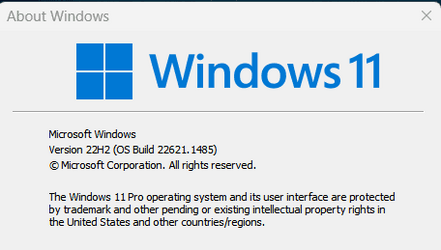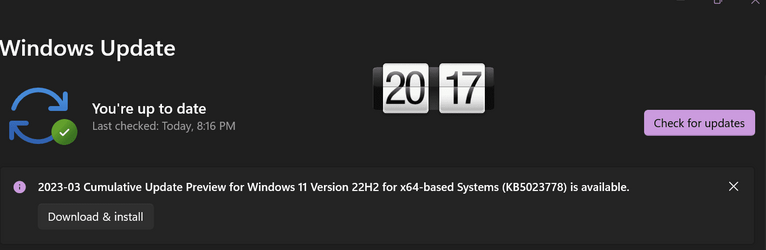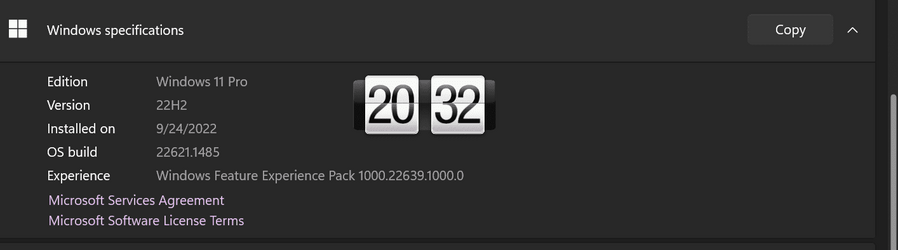
Win Update KB5023778 Windows 11 Cumulative Update Preview Build 22621.1485 (22H2)


UPDATE 4/11:


 Microsoft Support:

March 28, 2023 - KB5023778 (OS Build 22621.1485) Preview​


For information about Windows update terminology, see the article about the types of Windows updates and the monthly quality update types. For an overview of Windows 11, version 22H2, see its update history page.

Note Follow @WindowsUpdate to find out when new content is published to the Windows release health dashboard.

Highlights​

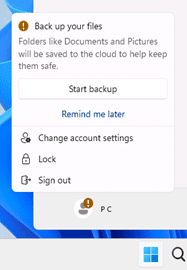
  • New! This update introduces notifications for Microsoft accounts in the Start menu. This is only available to a small audience right now. It will deploy more broadly in the coming months. Some devices might notice different visual treatments as we gather feedback. See the example below.

    Badging on Start menu

  • New! The search box on the taskbar will be lighter when you set Windows to a custom color mode. This will occur when you set the Windows mode to dark and the app mode to light in Settings > Personalization > Colors.

  • This update addresses an issue that affects the Notepad combo box in Settings. It fails to show all the available options.
  • This update addresses an issue that affects Microsoft PowerPoint. It stops responding. This occurs when you use accessibility tools.
  • This update addresses an issue that affects Microsoft Narrator. It fails to read items in dropdown lists in Microsoft Excel.
  • This update addresses an issue that affects USB printers. The system classifies them as multimedia devices even though they are not.

Improvements​

This non-security update includes quality improvements. When you install this KB:
  • New! This update adds many new features and improvements to Microsoft Defender for Endpoint. For more information, see Microsoft Defender for Endpoint.
  • This update addresses an issue that affects complexity policy settings for PINs. They are ignored.
  • This update addresses an issue that affects the Fast Identity Online 2.0 (FIDO2) PIN credential icon. It does not appear on the credentials screen of an external monitor. This occurs when that monitor is attached to a closed laptop.
  • This update addresses an issue that affects a Clustered Shared Volume (CSV). The CSV fails to come online. This occurs if you enable BitLocker and local CSV managed protectors, and the system recently rotated the BitLocker keys.
  • This update addresses an issue that affects Active Directory Users & Computers. It stops responding. This occurs when you use TaskPad view to enable or disable many objects at the same time.
  • The update addresses an issue that affects the Remote Procedure Call Service (rpcss.exe). The issue might cause a race condition between the Distributed Component Object Model (DCOM) and the Microsoft Remote Procedure Call (RPC) endpoint mapper.
  • This update addresses an issue that affects Microsoft PowerPoint. It stops responding on the Azure Virtual Desktop. This occurs while you are using Think-Cell Features.
  • This update addresses an issue that affects Windows Search. Windows Search fails inside of Windows container images.
  • This update affects the Group Policy Editor. It adds Transport Layer Security (TLS) 1.3 to the list of protocols that you can set.
  • This update affects the Arab Republic of Egypt. The update supports the government’s daylight saving time change order for 2023.
  • This update affects jscript9Legacy.dll. It adds ITracker and ITrackingService to stop MHTML from not responding.
  • This update addresses an issue that affects the Microsoft HTML Application Host (HTA). This issue blocks code execution that uses Microsoft HTA. This occurs when you turn on Windows Defender Application Control (WDAC) User Mode Code Integrity (UMCI) enforced mode.
  • This update affects the Group Policy Management Console. It addresses a scripting error in the Group Policy Preferences window.
  • This update addresses an issue that affects the Windows Remote Management (WinRM) client. The client returns an HTTP server error status (500). This error occurs when it runs a transfer job in the Storage Migration Service.
  • This update addresses an issue that affects Desired State Configuration. It loses its previously configured options. This occurs if metaconfig.mof is missing.
  • This update addresses an issue that affects the Dynamic Host Configuration Protocol (DHCP) option 119 - Domain Search Option. The issue stops you from using a connection-specific DNS Suffix Search List.
  • This update addresses a rare issue that might cause an input destination to be null. This issue might occur when you attempt to convert a physical point to a logical point during hit testing. Because of this, the computer raises a stop error.
  • This update addresses an issue that affects the Simple Certificate Enrollment Protocol (SCEP) certificate. The system reports some SCEP certificate installations as failed. Instead, the system should report them as pending.
  • This update addresses an issue that affects the new Windows Runtime (WinRT) API. This issue stops an application from querying for location information using MBIM2.0+.
  • This update addresses a known issue that affects kiosk device profiles. If you have enabled automatic logon, it might not work. After Autopilot completes provisioning, these devices stay on the credential screen. This issue occurs after you install updates dated January 10, 2023, and later.
If you installed earlier updates, only the new updates contained in this package will be downloaded and installed on your device.

Windows 11 servicing stack update - 22621.1482​

This update makes quality improvements to the servicing stack, which is the component that installs Windows updates. Servicing stack updates (SSU) ensure that you have a robust and reliable servicing stack so that your devices can receive and install Microsoft updates.

Known issues in this update​

Applies toSymptomWorkaround
IT adminsUsing provisioning packages on Windows 11, version 22H2 (also called Windows 11 2022 Update) might not work as expected. Windows might only be partially configured, and the Out Of Box Experience might not finish or might restart unexpectedly. Provisioning packages are .PPKG files which are used to help configure new devices for use on business or school networks. Provisioning packages which are applied during initial setup are most likely to be impacted by this issue. For more information on provisioning packages, please see Provisioning packages for Windows.

Note Provisioning Windows devices using Windows Autopilot is not affected by this issue.

Windows devices used by consumers in their home or small offices are not likely to be affected by this issue.
If you can provision the Windows device before upgrading to Windows 11, version 22H2, this will prevent the issue.

We are presently investigating and will provide an update in an upcoming release.
IT adminsUpdates released February 14, 2023 or later might not be offered from some Windows Server Update Services (WSUS) servers to Windows 11, version 22H2. The updates will download to the WSUS server but might not propagate further to client devices. Affected WSUS servers are only those running Windows Server 2022 which have been upgraded from Windows Server 2016 or Windows Server 2019. This issue is caused by the accidental removal of required Unified Update Platform (UUP) MIME types during the upgrade to Windows Server 2022 from a previous version of Windows Server. This issue might affect security updates or feature updates for Windows 11, version 22H2. Microsoft Configuration Manager is not affected by this issue.To mitigate this issue, please see Adding file types for Unified Update Platform on premises.

We are working on a resolution and will provide an update in an upcoming release.
All usersAfter installing this or later updates, Windows devices with some third-party UI customization apps might not start up. These third-party apps might cause errors with explorer.exe that might repeat multiple times in a loop. The known affected third-party UI customization apps are ExplorerPatcher and StartAllBack. These types of apps often use unsupported methods to achieve their customization and as a result can have unintended results on your Windows device.ExplorerPatcher and StartAllBack have released a version that lists this issue as resolved.

Note If you are using any third-party UI customization app and encounter this or any other issues, you will need to contact customer support for the developer of the app you are using.
All usersAfter installing this update, some apps might have intermittent issues with speech recognition, expressive input, and handwriting when using Chinese or Japanese languages. Affected apps might sometimes fail to recognize certain words or might be unable to receive any input from speech recognition or affected input types. This issue is more likely to occur when apps are using offline speech recognition.

Note for app developers This issue only affects speech recognition using Speech Recognition Grammar Specification (SRGS) in Windows.Media.SpeechRecognition. Other implementations of speech recognition are not affected.
To mitigate this issue, you will need to do the following once every time you restart your device:
  1. Close the app which is having issues with speech recognition or other affected input types.
  2. Open Task Manager by selecting the Start button and type "task manager" and select it.
  3. Select the "Processes" tab on the left and then select the "Name" column so that the list of processes is sorted by their names.
  4. Find ctfrmon.exe and select it.
  5. Select the "End Task" button.
  6. Confirm a new instance of ctfmon.exe is started automatically.
  7. You should now be able to open the affected app and use speech recognition and other input types.
We are working on a resolution and will provide an update in an upcoming release.

How to get this update​

Before installing this update

Microsoft combines the latest servicing stack update (SSU) for your operating system with the latest cumulative update (LCU). For general information about SSUs, see Servicing stack updates and Servicing Stack Updates (SSU): Frequently Asked Questions.

Install this update

Release ChannelAvailableNext Step
Windows Update or Microsoft UpdateYesGo to Settings > Update & Security > Windows Update. In the Optional updates available area, you’ll find the link to download and install the update.
Windows Update for BusinessNoNone. These changes will be included in the next security update to this channel.
Microsoft Update CatalogYesTo get the standalone package for this update, go to the Microsoft Update Catalog website.
Windows Server Update Services (WSUS)NoYou can import this update into WSUS manually. See the Microsoft Update Catalog for instructions.

If you want to remove the LCU

To remove the LCU after installing the combined SSU and LCU package, use the DISM/Remove-Package command line option with the LCU package name as the argument. You can find the package name by using this command: DISM /online /get-packages.

Running Windows Update Standalone Installer (wusa.exe) with the /uninstall switch on the combined package will not work because the combined package contains the SSU. You cannot remove the SSU from the system after installation.

File information

For a list of the files that are provided in this update, download the file information for cumulative update 5023778.

For a list of the files that are provided in the servicing stack update, download the file information for the SSU - version 22621.1482.


 Source:


Check Windows Updates

Direct download links for KB5023778 MSU file from Microsoft Update Catalog:

[fa]fas fa-download[/fa] Download KB5023778 MSU for Windows 11 v22H2 64-bit (x64) - 294.8 MB

[fa]fas fa-download[/fa] Download KB5023778 MSU for Windows 11 v22H2 ARM64 - 398.7 MB

UUP Dump:

64-bit ISO download:
Select language for Windows 11, version 22H2 (22621.1485) amd64

ARM64 ISO download: Select language for Windows 11, version 22H2 (22621.1485) arm64

 
Last edited:
Quick install, no sfc or dism health issues.
 

My Computers My Computers

  • At a glance

    Windows 11 ProIntel Core i9 14900K 5800/4500 P/E all core96GB (2x48) G.skill Ripjaws 6800 MT/s DDR5Asus ROG Strix 4070 Ti OC
    OS
    Windows 11 Pro
    Computer type
    PC/Desktop
    Manufacturer/Model
    DIY Photoshop/Audio/Game/tinker
    CPU
    Intel Core i9 14900K 5800/4500 P/E all core
    Motherboard
    Asus ROG Maximus Z790 Dark Hero
    Memory
    96GB (2x48) G.skill Ripjaws 6800 MT/s DDR5
    Graphics Card(s)
    Asus ROG Strix 4070 Ti OC
    Sound Card
    Bowers & Wilkins 606 S3 speakers; Audiolabs 7000a integrated amp; RSL 10S Mk2 sub; Creative Pebble Pro Minimilist
    Monitor(s) Displays
    Eizo CG2730 ColorEdge, ViewSonic VP2768, i1 Display Pro calibration puck
    Screen Resolution
    2560 x 1440p x 2
    Hard Drives
    WDC SN850X 4TB nvme, SN850 1TB nvme, SK-Hynix 2 TB P41 nvme,. Sabrent USB-C DS-SC5B 5-bay docking station: 6TB WDC Black, 6TB Ironwolf Pro; 2x 2TB WDC Black HDD
    PSU
    850W Seasonic Vertex PX-850 ATX 3.0/PCI-E 5.0
    Case
    Fractal Design North XL Mesh, Black Walnut
    Cooling
    EK Nucleus black 360 AIO w/Phanteks T30-120 fans, 2 Noctua NF-A14 Chromax case fan, 1 T30-120 fan cooling memory
    Keyboard
    Keychron Q3 Max TKL with custom GMK Redsuns Red Samuri keycaps, TX Stabs
    Mouse
    Logitech G305 wireless gaming
    Internet Speed
    575 Mb/s down | 25 Mb/s up
    Browser
    Firefox
    Antivirus
    Defender, Macrium Reflect X
    Other Info
    Phangkey Amaterasu V2 Desk Mat
  • At a glance

    Apple M1
    Computer type
    Laptop
    Manufacturer/Model
    💻 Apple 13" Macbook Pro 2020 (m1)
    CPU
    Apple M1
    Screen Resolution
    2560x1600
    Browser
    Firefox
Everything seems okay so far...

1680023984055.png
 

My Computers My Computers

  • At a glance

    Win 11 Pro 25H2 26200.8894Intel® Core™ i7-14700KG.SKILL Ripjaws S5 Series 64GB (2 x 32GB) DDR5ASUS GeForce RTX 4070 Super 12GB
    OS
    Win 11 Pro 25H2 26200.8894
    Computer type
    PC/Desktop
    Manufacturer/Model
    Self Built
    CPU
    Intel® Core™ i7-14700K
    Motherboard
    ASUS TUF Z690-PLUS WIFI (BIOS 4505)
    Memory
    G.SKILL Ripjaws S5 Series 64GB (2 x 32GB) DDR5
    Graphics Card(s)
    ASUS GeForce RTX 4070 Super 12GB
    Sound Card
    Sound Blaster AE-5 Plus
    Monitor(s) Displays
    ASUS TUF Gaming 27" 2K HDR Gaming
    Screen Resolution
    2560 x 1440
    Hard Drives
    Samsung 990 Pro 1TB NVMe (Win 11 25H2)
    SK hynix P41 500GB NVMe
    SK hynix P41 2TB NVMe (x3)
    Crucial P3 Plus 4TB
    PSU
    Corsair RM850x Shift
    Case
    Antec Dark Phantom DP502 FLUX
    Cooling
    Corsair Nautilus 360 RS AIO
    Keyboard
    Logitech MK 320
    Mouse
    Razer Basilisk V3
    Internet Speed
    750Mbs
    Browser
    Firefox
    Antivirus
    Winows Security
    Other Info
    MR 8.1 Home
  • At a glance

    Win 11 Pro 25H2 26200.8894Intel Core i5-1140064 GB DDR4MSI GeForce RTX 3060 Ventus 2X 12GB
    Operating System
    Win 11 Pro 25H2 26200.8894
    Computer type
    PC/Desktop
    Manufacturer/Model
    Self Built
    CPU
    Intel Core i5-11400
    Motherboard
    Asus TUF Gaming Z590 Plus WiFi (BIOS 2803)
    Memory
    64 GB DDR4
    Graphics card(s)
    MSI GeForce RTX 3060 Ventus 2X 12GB
    Sound Card
    SoundBlaster Audigy Fx V2
    Monitor(s) Displays
    Samsung F27T350
    Screen Resolution
    1920x1080
    Hard Drives
    Samsung 980 Pro 1TB
    Samsung 970 EVO Plus 2TB
    Samsung 870 EVO 500GB SSD
    PSU
    Corsair HX750
    Case
    Cougar MX330-G Window
    Cooling
    Thermalright Frozen Edge 240 Black AIO
    Internet Speed
    350Mbps
    Browser
    Firefox
    Antivirus
    Windows Security
  • System Three
    Win 11 Pro 25H2 26200.8894
    ASUS PRIME Z370-P II BIOS 3004 7/12/21
    Intel Core i7-8700 CPU @ 3.20GHz
    32GB DDR4 RAM (4x8)
    iGPU Intel UHD Graphics 630
    Mid-Tower Desktop
No problems here 👍
 

My Computer My Computer

At a glance

Windows 11 Pro 25H2 (RP channel)AMD Ryzen 7 9800X3D 8-core64GB Corsair Titanium 6000/CL30MSI Suprim 5080 SOC
OS
Windows 11 Pro 25H2 (RP channel)
Computer type
PC/Desktop
Manufacturer/Model
MSI
CPU
AMD Ryzen 7 9800X3D 8-core
Motherboard
MEG X870E Godlike
Memory
64GB Corsair Titanium 6000/CL30
Graphics Card(s)
MSI Suprim 5080 SOC
Sound Card
Soundblaster AE-9
Monitor(s) Displays
ASUS TUF Gaming VG289Q
Screen Resolution
3840x2160
Hard Drives
Samsung 9100 Pro 4TB (gen 5 x4, system drive/games)
Samsung 990 Pro 2TB
Samsung 980 Pro 2TB
Samsung 870 Evo 4TB
Samsung 870 Evo 2TB
Samsung T9 4TB
PSU
Seasonic PX-2200
Case
Bequiet! Dark Base Pro 901
Cooling
Noctua NH-D15S Chromax black
Keyboard
Logitech G915 X (wired)
Mouse
Logitech G903 with PowerPlay charger
Internet Speed
900Mb/sec
Browser
Microsoft Edge
Antivirus
Windows Defender
Downloaded & installed - no issues encountered. 👍
 

My Computer My Computer

At a glance

Windows 11 Pro 25H2 (Build 26200.8968)Intel Core Ultra 9 285 5.6 GHz32.00 GBIntel Integrated Graphics (128 MB)
OS
Windows 11 Pro 25H2 (Build 26200.8968)
Computer type
PC/Desktop
Manufacturer/Model
Dell Pro Max Tower T2 FCT2250
CPU
Intel Core Ultra 9 285 5.6 GHz
Motherboard
64-bit operating system, x64-based processor
Memory
32.00 GB
Graphics Card(s)
Intel Integrated Graphics (128 MB)
Sound Card
Realtek Audio
Monitor(s) Displays
Dell P2714H Monitor
Screen Resolution
1920 x 1080
Hard Drives
1 x 512GB M.2 XG10d SED KIOXIA PCIe solid state drive (Internal)
1 x 2TB Seagate ST2000DM008-2UB102 HDD (Internal)
1 x 4TB Seagate STGX4000400 External HDD
1 x 6TB WD Elements AE 2689 External HDD
PSU
500 Watts
Cooling
Air
Keyboard
Microsoft Wired Keyboard 600
Mouse
Microsoft USB Basic Optical Mouse v2.0
Browser
Firefox
Antivirus
Windows Defender + Malwarebytes Premium
Other Info
BaseBoard Manufacturer Dell Inc.
BaseBoard Product 022RY57
BaseBoard Version A01
Update went smoothly, but DISM and SFC took about half an hour to complete. I am new to Windows 11 and in Windows 10 it only takes about 5 minutes. But anyway no problems found.
 

My Computer My Computer

At a glance

Windows 11 Home v23H2 OS Build 22631.2506Intel Core i3-71008 GBIntel HD Graphics 630 (Kaby Lake-S GT2)
OS
Windows 11 Home v23H2 OS Build 22631.2506
Computer type
PC/Desktop
Manufacturer/Model
HP
CPU
Intel Core i3-7100
Motherboard
HP 82F2
Memory
8 GB
Graphics Card(s)
Intel HD Graphics 630 (Kaby Lake-S GT2)
Sound Card
RealTek
Monitor(s) Displays
HP W2071d
Screen Resolution
1600x900
Hard Drives
Seagate ST1000DM003-1SB102

SAMSUNG MZVLW128HEGR-000H1
Internet Speed
400 Mbs
Browser
Firefox
Antivirus
Windows Defender
1680027510212.png
 

My Computer My Computer

At a glance

W11 Pro and Insider DevAMD Ryzen 9 7900x2x16GB Kingston 6000MHz, Cl 32 @ 6200MHz Cl30Gigabyte Rx 6600XT Gaming OC 8G Pro
OS
W11 Pro and Insider Dev
Computer type
PC/Desktop
Manufacturer/Model
Home brewed
CPU
AMD Ryzen 9 7900x
Motherboard
ASROCK b650 PRO RS
Memory
2x16GB Kingston 6000MHz, Cl 32 @ 6200MHz Cl30
Graphics Card(s)
Gigabyte Rx 6600XT Gaming OC 8G Pro
Sound Card
MB, Realtek Ac1220p
Monitor(s) Displays
3 x 27"
Screen Resolution
1080p
Hard Drives
Kingston KC3000. 1TBSamsung 970 evo Plus 500GB, Crucial P1 NVMe 1TB, Lexar NVMe 2 TB, Silicon Power M.2 SATA 500GB
PSU
Seasonic 750W
Case
Custom Raidmax
Cooling
Arctic Liquid Freezer III 360mm
Internet Speed
20/19 mbps
Downloading/installing now.
 

My Computers My Computers

  • At a glance

    windows 10 & 11AMD Ryzen 7X64GbRadeon RX 480 8Gb
    OS
    windows 10 & 11
    Computer type
    PC/Desktop
    Manufacturer/Model
    iBuyPower (special build)
    CPU
    AMD Ryzen 7X
    Motherboard
    Asus Prime x370 Pro
    Memory
    64Gb
    Graphics Card(s)
    Radeon RX 480 8Gb
    Monitor(s) Displays
    Samsung UHD 27 inch
    Screen Resolution
    UHD
    Hard Drives
    3 Samsung 1 TB SSD each; 1 Samsung PCIe M.2 at 2 TB
  • At a glance

    Windows 11 proAMD 9 5900X32 GbNvidia GeForce RTX 3080 Ti 12 GB GDDR6X
    Operating System
    Windows 11 pro
    Computer type
    PC/Desktop
    Manufacturer/Model
    IBuyPower
    CPU
    AMD 9 5900X
    Motherboard
    Asus x570 ROG Crosshair VIII Dark Hero WI-FI 6E ARGB
    Memory
    32 Gb
    Graphics card(s)
    Nvidia GeForce RTX 3080 Ti 12 GB GDDR6X
    Sound Card
    3D PREMIUM surround sound onboard
    Monitor(s) Displays
    Samsung 32 inch UHD curved monitor
    Screen Resolution
    UHD
    Hard Drives
    Samsung 980 pro 2 tb gen 4 NVMe ssd
    PSU
    850 watt consair RM850X
    Case
    Lian Li LANCOOL ONE tempered glass RGB gaming case
    Cooling
    DEEPCOOL GAMERSTORM RGB 240 mm CASTLE 240EX liquid cooler
    Keyboard
    Ares m.2 gaming keyboard
    Mouse
    Ares m.2 gaming optical mouse
    Internet Speed
    450
    Browser
    Firefox / Edge
    Antivirus
    Windows defender
    Other Info
    With all this gaming rig I am not a gamer!
I am pleased to announce that this new 22621.1485 update fixes the prior "Win+X" and "USB Safe Remove" issues induced by the 22621.1483 update!:thumbsup:
 

My Computer My Computer

At a glance

Windows 1111th Gen Intel(R) Core(TM) i7-1185G732 GbIntel(R) Iris(R) Xe Graphics
OS
Windows 11
Computer type
Laptop
Manufacturer/Model
Dell Latitude 5520
CPU
11th Gen Intel(R) Core(TM) i7-1185G7
Motherboard
N/A
Memory
32 Gb
Graphics Card(s)
Intel(R) Iris(R) Xe Graphics
Sound Card
Max Audio
Monitor(s) Displays
LCD
Screen Resolution
FHD
Hard Drives
Samsung 990 NVMe
Mouse
Logitech 650
Other Info
Plus many other Dell Precision Laptops
My system seems to be faster with this update.
 

My Computer My Computer

At a glance

Windows 11Ryzen 7 3700X16GBGeforce 1650
OS
Windows 11
Computer type
PC/Desktop
Manufacturer/Model
Asus Rog Strix B550-F
CPU
Ryzen 7 3700X
Motherboard
Asus
Memory
16GB
Graphics Card(s)
Geforce 1650
Sound Card
Realtek
Monitor(s) Displays
LG 23MP75
Screen Resolution
1920x1080
Hard Drives
Samsung 970 Pro
Case
Coolmaster
Keyboard
Logitech
Mouse
Logitech
Internet Speed
50
Browser
Edge
Antivirus
Microsoft
1680028384038.png
 

My Computer My Computer

At a glance

W11 Pro and Insider DevAMD Ryzen 9 7900x2x16GB Kingston 6000MHz, Cl 32 @ 6200MHz Cl30Gigabyte Rx 6600XT Gaming OC 8G Pro
OS
W11 Pro and Insider Dev
Computer type
PC/Desktop
Manufacturer/Model
Home brewed
CPU
AMD Ryzen 9 7900x
Motherboard
ASROCK b650 PRO RS
Memory
2x16GB Kingston 6000MHz, Cl 32 @ 6200MHz Cl30
Graphics Card(s)
Gigabyte Rx 6600XT Gaming OC 8G Pro
Sound Card
MB, Realtek Ac1220p
Monitor(s) Displays
3 x 27"
Screen Resolution
1080p
Hard Drives
Kingston KC3000. 1TBSamsung 970 evo Plus 500GB, Crucial P1 NVMe 1TB, Lexar NVMe 2 TB, Silicon Power M.2 SATA 500GB
PSU
Seasonic 750W
Case
Custom Raidmax
Cooling
Arctic Liquid Freezer III 360mm
Internet Speed
20/19 mbps

My Computer My Computer

At a glance

Windows 11 25H2 Pro (RP Build 26200.8968)
OS
Windows 11 25H2 Pro (RP Build 26200.8968)
Computer type
PC/Desktop
Manufacturer/Model
Alienware
This feature in 22621.1485 not working for me :
  • New! The search box on the taskbar will be lighter when you set Windows to a custom color mode. This will occur when you set the Windows mode to dark and the app mode to light in Settings > Personalization > Colors.
 

My Computer My Computer

At a glance

26200.8037i5-11400F32GBGeforce GT-1030
OS
26200.8037
Computer type
PC/Desktop
CPU
i5-11400F
Motherboard
Gigabyte
Memory
32GB
Graphics Card(s)
Geforce GT-1030
Keyboard
Logitech K400
Mouse
Logitech M720
Internet Speed
600 Mb
Browser
Edge
Arghhhhhhh -it has introduced the irritating start menu bug in Canary/Dev whereby the first time you press start menu, you cannot select any icons. It is ok after second start. Uninstalling this update.
 

My Computer My Computer

At a glance

Windows 11 Pro + Win11 Canary VM.I9 13th gen i9-13900H 2.60 GHZ16 GB solderedIntegrated Intel Iris XE
OS
Windows 11 Pro + Win11 Canary VM.
Computer type
Laptop
Manufacturer/Model
ASUS Zenbook 14
CPU
I9 13th gen i9-13900H 2.60 GHZ
Motherboard
Yep, Laptop has one.
Memory
16 GB soldered
Graphics Card(s)
Integrated Intel Iris XE
Sound Card
Realtek built in
Monitor(s) Displays
laptop OLED screen
Screen Resolution
2880x1800 touchscreen
Hard Drives
1 TB NVME SSD (only weakness is only one slot)
PSU
Internal + 65W thunderbolt USB4 charger
Case
Yep, got one
Cooling
Stella Artois (UK pint cans - 568 ml) - extra cost.
Keyboard
Built in UK keybd
Mouse
Bluetooth , wireless dongled, wired
Internet Speed
900 mbs (ethernet), wifi 6 typical 350-450 mb/s both up and down
Browser
Edge
Antivirus
Defender
Other Info
TPM 2.0, 2xUSB4 thunderbolt, 1xUsb3 (usb a), 1xUsb-c, hdmi out, 3.5 mm audio out/in combo, ASUS backlit trackpad (inc. switchable number pad)

Macrium Reflect Home V8
Office 365 Family (6 users each 1TB onedrive space)
Hyper-V (a vm runs almost as fast as my older laptop)
Arghhhhhhh -it has introduced the irritating start menu bug in Canary/Dev whereby the first time you press start menu, you cannot select any icons. It is ok after second start. Uninstalling this update.
Thanks for heads-up!
 

My Computers My Computers

  • At a glance

    windows 10 & 11AMD Ryzen 7X64GbRadeon RX 480 8Gb
    OS
    windows 10 & 11
    Computer type
    PC/Desktop
    Manufacturer/Model
    iBuyPower (special build)
    CPU
    AMD Ryzen 7X
    Motherboard
    Asus Prime x370 Pro
    Memory
    64Gb
    Graphics Card(s)
    Radeon RX 480 8Gb
    Monitor(s) Displays
    Samsung UHD 27 inch
    Screen Resolution
    UHD
    Hard Drives
    3 Samsung 1 TB SSD each; 1 Samsung PCIe M.2 at 2 TB
  • At a glance

    Windows 11 proAMD 9 5900X32 GbNvidia GeForce RTX 3080 Ti 12 GB GDDR6X
    Operating System
    Windows 11 pro
    Computer type
    PC/Desktop
    Manufacturer/Model
    IBuyPower
    CPU
    AMD 9 5900X
    Motherboard
    Asus x570 ROG Crosshair VIII Dark Hero WI-FI 6E ARGB
    Memory
    32 Gb
    Graphics card(s)
    Nvidia GeForce RTX 3080 Ti 12 GB GDDR6X
    Sound Card
    3D PREMIUM surround sound onboard
    Monitor(s) Displays
    Samsung 32 inch UHD curved monitor
    Screen Resolution
    UHD
    Hard Drives
    Samsung 980 pro 2 tb gen 4 NVMe ssd
    PSU
    850 watt consair RM850X
    Case
    Lian Li LANCOOL ONE tempered glass RGB gaming case
    Cooling
    DEEPCOOL GAMERSTORM RGB 240 mm CASTLE 240EX liquid cooler
    Keyboard
    Ares m.2 gaming keyboard
    Mouse
    Ares m.2 gaming optical mouse
    Internet Speed
    450
    Browser
    Firefox / Edge
    Antivirus
    Windows defender
    Other Info
    With all this gaming rig I am not a gamer!
A quick update and seems fine at the moment.
 

My Computers My Computers

  • At a glance

    Windows 11 Home ((26100.2894)Intel Core Ultra 5 226VLPDDR5X16GBIntel Arc Graphics
    OS
    Windows 11 Home ((26100.2894)
    Computer type
    Laptop
    Manufacturer/Model
    Acer Swift SF14-51
    CPU
    Intel Core Ultra 5 226V
    Motherboard
    Icefresh_LNV
    Memory
    LPDDR5X16GB
    Graphics Card(s)
    Intel Arc Graphics
    Sound Card
    Realtek
    Monitor(s) Displays
    Samsung ATNA40YK11-0
    Screen Resolution
    2880x1800
    Hard Drives
    512GB NVMe Gen 4 M.2 SSD
    Keyboard
    Generic
    Browser
    Edge
    Antivirus
    Windows Defender
  • At a glance

    Windows 11Home(26120.3073)24H2i7-155hLPDDR5X 32GBIntel Arc Graphics
    Operating System
    Windows 11Home(26120.3073)24H2
    Computer type
    Laptop
    Manufacturer/Model
    Acer Swift SFG14-72
    CPU
    i7-155h
    Motherboard
    Coral_MTH
    Memory
    LPDDR5X 32GB
    Graphics card(s)
    Intel Arc Graphics
    Sound Card
    Realtek
    Monitor(s) Displays
    SamsungATNA40YK 11-0
    Screen Resolution
    2880x1800
    Hard Drives
    1TB NVMe Gen 4 M.2 SSD
    Browser
    Edge, Google Chrome
    Antivirus
    Windows Defender
Thanks for heads-up!
Uninstalled it - bug went away, reinstalled it bug back, uninstalled it bug went away. No doubt update is causing bug.
 

My Computer My Computer

At a glance

Windows 11 Pro + Win11 Canary VM.I9 13th gen i9-13900H 2.60 GHZ16 GB solderedIntegrated Intel Iris XE
OS
Windows 11 Pro + Win11 Canary VM.
Computer type
Laptop
Manufacturer/Model
ASUS Zenbook 14
CPU
I9 13th gen i9-13900H 2.60 GHZ
Motherboard
Yep, Laptop has one.
Memory
16 GB soldered
Graphics Card(s)
Integrated Intel Iris XE
Sound Card
Realtek built in
Monitor(s) Displays
laptop OLED screen
Screen Resolution
2880x1800 touchscreen
Hard Drives
1 TB NVME SSD (only weakness is only one slot)
PSU
Internal + 65W thunderbolt USB4 charger
Case
Yep, got one
Cooling
Stella Artois (UK pint cans - 568 ml) - extra cost.
Keyboard
Built in UK keybd
Mouse
Bluetooth , wireless dongled, wired
Internet Speed
900 mbs (ethernet), wifi 6 typical 350-450 mb/s both up and down
Browser
Edge
Antivirus
Defender
Other Info
TPM 2.0, 2xUSB4 thunderbolt, 1xUsb3 (usb a), 1xUsb-c, hdmi out, 3.5 mm audio out/in combo, ASUS backlit trackpad (inc. switchable number pad)

Macrium Reflect Home V8
Office 365 Family (6 users each 1TB onedrive space)
Hyper-V (a vm runs almost as fast as my older laptop)
Updated and all seems well :)
 

My Computer My Computer

At a glance

Windows 11 HomeIntel i5-10600kG.Skill 2x16GB F4-3600C18D Ripjaws V 3600MHz ...PNY GeForce RTX 5070 12GB ARGB OC Triple Fan
OS
Windows 11 Home
Computer type
PC/Desktop
CPU
Intel i5-10600k
Motherboard
MSI Z490 G+
Memory
G.Skill 2x16GB F4-3600C18D Ripjaws V 3600MHz CL18 DDR4
Graphics Card(s)
PNY GeForce RTX 5070 12GB ARGB OC Triple Fan
Sound Card
SMSL D6S ES9039Q2M DAC
Monitor(s) Displays
AOC 31.5" Q32V3S/WS 75Hz 4ms Adaptive-Sync 2K-QHD Monitor
Screen Resolution
2560 x 1440
Hard Drives
Samsung 980 M.2 SSD 500GB x 3
PSU
MSI MPG A850GF 80+
Case
Antec DF600 FLUX
Cooling
Mirage 5 Cooler
Keyboard
Logitech G19
Mouse
Logitech G502 Hero
Internet Speed
FTTH 500/50
Browser
Waterfox, Firefox, Edge and Chrome.
Antivirus
Bitdefender Antivirus
Other Info
Q Acoustics M20 Active Speakers
This build is more stable than 1413. Runs great
 

My Computer My Computer

At a glance

Windows 11 EducationIntel® Core™ i9-13900K Desktop Processor 16 (...G.Skill Ripjaws V Series 32gb (2x16gb) DDR4 3...Asus Dual Geforce Rtx™ 3060 TI Edition 8gb Gddr6
OS
Windows 11 Education
Computer type
PC/Desktop
CPU
Intel® Core™ i9-13900K Desktop Processor 16 (8P+8E)
Motherboard
Asus TUF Gaming Z790-PLUS WIFI D4
Memory
G.Skill Ripjaws V Series 32gb (2x16gb) DDR4 3600mhz
Graphics Card(s)
Asus Dual Geforce Rtx™ 3060 TI Edition 8gb Gddr6
Monitor(s) Displays
BenQ EW3270U 31.5” 3840x2160 UHD 16:9 HDR LED 4K LG 27UK850-W 27'' 4K UHD IPS LED Monitor with HDR10
Screen Resolution
3840x2160
Hard Drives
Samsung 990 with heatsink PRO PCIe 4.0 Gen 4 NVMe® SSD 1TB
WD_BLACK SN850X NVMe M.2 2280 1TB PCI-Express 4.0
Crucial T500 2TB Gen4
Samsung 970 Evo M.2 2280 2tb Pcie Gen3. X4
PSU
Corsair AXi Series AX860i Digital 860W 80 PLUS PSU
Case
Fractal Meshify C ATX Mid Tower Case
Keyboard
Logi MX Keys
Mouse
Logi M705
Internet Speed
400 mbs
Browser
Firefox
Antivirus
Eset NOD32
Other Info
Love fast boots
This build is more stable than 1413. Runs great
Same here. Thankfully I haven't got that irritating start menu bug that cereberus mentioned. Have had it when I was on the insider channels.
 

My Computers My Computers

  • At a glance

    Windows 11 Pro 25H2Intel Core i9 13900KCorsair Dominator Platinum 64gb 5600MT/s DDR5...Sapphire NITRO+ AMD Radeon RX 7900 XTX Vapor-...
    OS
    Windows 11 Pro 25H2
    Computer type
    PC/Desktop
    Manufacturer/Model
    Homebuilt
    CPU
    Intel Core i9 13900K
    Motherboard
    Asus ProArt Z790 Creator WiFi - Bios 3107
    Memory
    Corsair Dominator Platinum 64gb 5600MT/s DDR5 Dual Channel
    Graphics Card(s)
    Sapphire NITRO+ AMD Radeon RX 7900 XTX Vapor-X 24GB
    Sound Card
    External DAC: Cambridge Audio DACMagic200M - Headphone Amp: Topping L50
    Monitor(s) Displays
    Panasonic MX950 Mini LED 55" TV 120hz
    Screen Resolution
    3840 x 2160 120hz
    Hard Drives
    Samsung 980 Pro 2TB (OS)
    Samsung 980 Pro 1TB (Files)
    Lexar NZ790 4TB
    LaCie d2 Professional 6TB external - USB 3.1
    Seagate Expansion 16TB external - USB 3.2
    Seagate One Touch 18TB external HD - USB 3.0
    PSU
    Corsair RM1200x Shift
    Case
    Corsair RGB Smart Case 5000x (white)
    Cooling
    Corsair iCue H150i Elite Capellix XT
    Keyboard
    Incase Ergonomic USB (Microsoft clone)
    Mouse
    Logitech MX Master 3S
    Internet Speed
    Fibre 900/500 Mbps
    Browser
    Microsoft Edge Chromium
    Antivirus
    Bitdefender Total Security
    Other Info
    AMD Radeon Software & Drivers 26.1.1
    Hasleo Backup Suite
    Dashlane password manager
    Kensington Verimark fingerprint reader
    Logitech Brio 4K webcam
    Orico 10-port powered USB 3.0 hub
  • At a glance

    Windows 11 Pro 25H2Intel® Core™ i9-13900H32GB DDR4-3200 Dual channel*Intel Iris Xᵉ Graphics G7
    Operating System
    Windows 11 Pro 25H2
    Computer type
    Laptop
    Manufacturer/Model
    Asus Vivobook X1605VA
    CPU
    Intel® Core™ i9-13900H
    Motherboard
    Asus X1605VA bios 309
    Memory
    32GB DDR4-3200 Dual channel
    Graphics card(s)
    *Intel Iris Xᵉ Graphics G7
    Sound Card
    Realtek | Intel SST Bluetooth & USB
    Monitor(s) Displays
    16.0-inch, WUXGA 16:10 aspect ratio, IPS-level Panel
    Screen Resolution
    1920 x 1200 60hz
    Hard Drives
    512GB M.2 NVMe™ PCIe® 3.0 SSD
    Mouse
    Logitech MX Ergo Trackball
    Antivirus
    Bitdefender Total Security
    Other Info
    720p Webcam
    WiFi & USB to ethernet
Back
Top Bottom