UPDATE 8/31:
 www.elevenforum.com
Hello Windows Insiders, today we are releasing Windows 11 Insider Preview Build 22621.2262 and Build 22631.2262 (KB5029339) to the Beta Channel.
IMPORTANT: Due to the bug in the previous Beta Channel flight, the “Check for updates” button does not appear as expected under Settings > Windows Update. As a workaround to get this update immediately, you can open Windows Terminal (or the Run dialog) and enter the USOClient StartInteractiveScan command which will perform the same function as clicking the “Check for updates” button in Windows Update. Note that running the command will not display any output. To confirm that the operation was successful, you can run the command while the Windows Update settings page is open. You should see your device checking for updates. Once you’re on this new build, the “Check for updates” button will appear again as expected. Without doing this workaround, this new build will install automatically on its own over the next day or two.
 www.elevenforum.com
REMINDER: Insiders who were previously on Build 22624 will automatically get moved to Build 22631 via an enablement package. The enablement package artificially increments the build number for the update with new features getting rolled out and turned on to make it easier to differentiate from devices with the update with features off by default. This approach is being used for the Beta Channel only and is not indicative of any changes or plans for final feature rollouts.
Insiders who landed in the group with new features turned off by default (Build 22621.xxxx) can check for updates and choose to install the update that will have features rolling out (Build 22631.xxxx).
 www.elevenforum.com
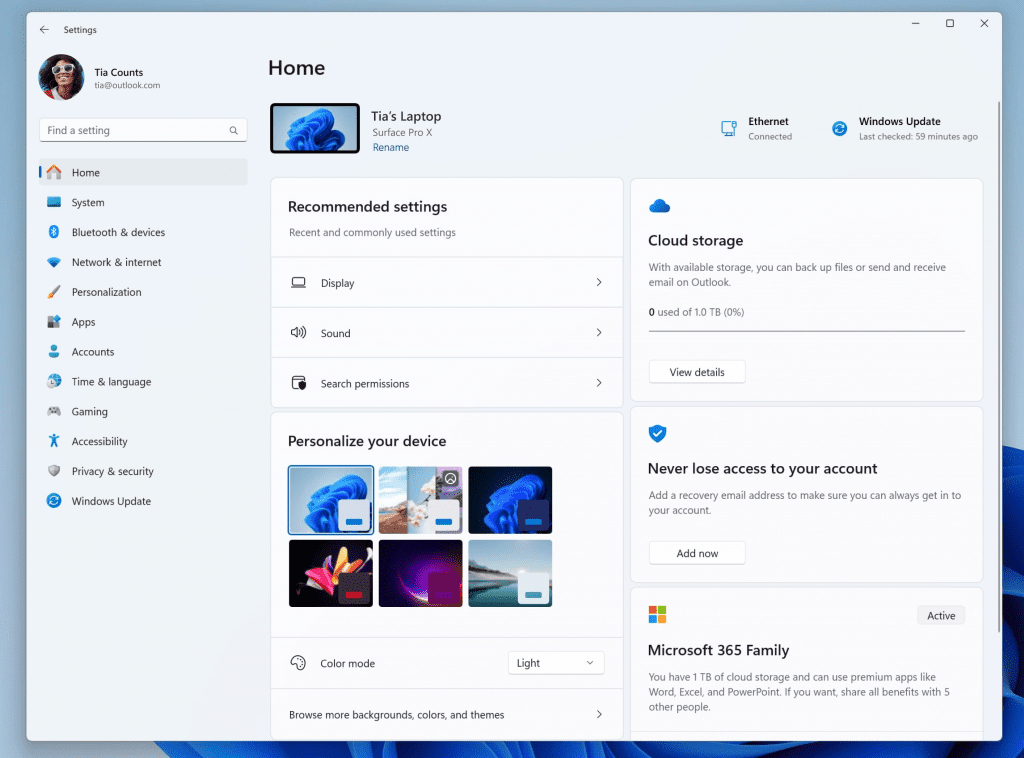
New Settings homepage.
We created interactive cards that represent various device and account related settings, grouped by commonly accessed functions. Each card is optimized to offer the most relevant information and controls at your fingertips. In this release, you’ll see up to seven cards, with more coming soon.
Here’s an overview of each card:
NOTE: This experience will only be available on Windows 11 Home and Pro editions and not on devices managed by organizations.
[We are beginning to roll this out, so the experience isn’t available to all Insiders in the Beta Channel just yet as we plan to monitor feedback and see how it lands before pushing it out to everyone.]
FEEDBACK: Please file feedback in Feedback Hub (WIN + F) under Settings > Settings Homepage.
 www.elevenforum.com
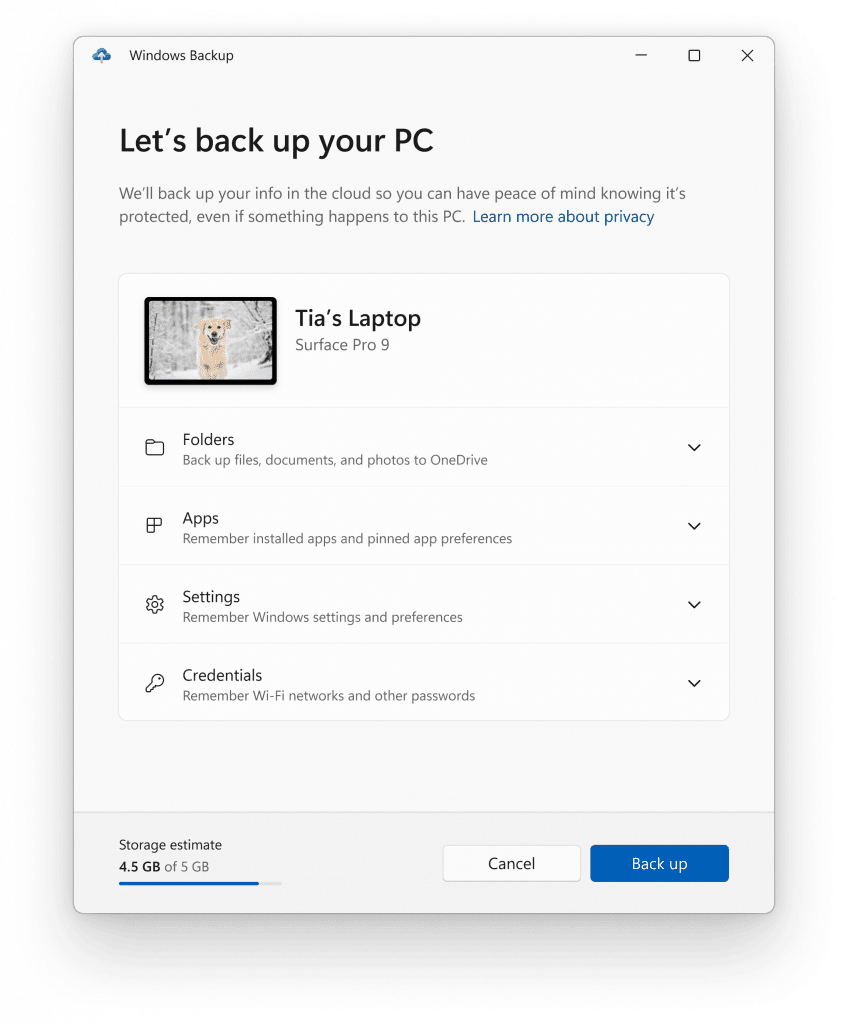
The Windows Backup app.
Users will see pins for their desktop app restored on the taskbar and Start Menu, including desktop apps that were not installed from the Microsoft Store.
Desktop apps that are available in the Microsoft Store can be restored by clicking on the app pin to get started. For apps that aren’t available in the Microsoft Store, you’ll be directed to the web to download the installer.
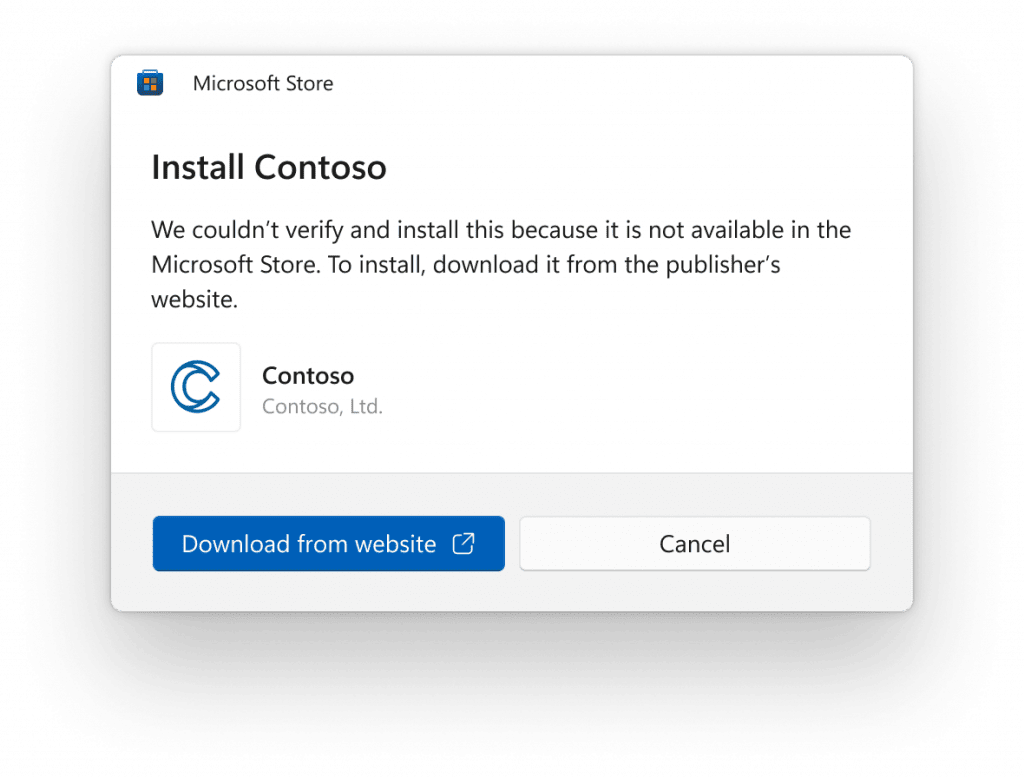
Screenshot showing a dialog box to install an app from the web.
NOTE: An easy way for Insiders to try this experience out is by running the Windows Backup app on a PC running this build and choosing “Reset this PC” under Settings > System > Recovery and then going through OOBE for the new restore experience.
For developers, review the developer best practices to learn more about how to provide the best restore experience for your app. Note that in this build not all settings and app types are supported, including Android apps. Backing up a Work or School account is also not supported.
FEEDBACK: Please file feedback in Feedback Hub (WIN + F) under Install and Update > Backup and Restore.
Amanda & Brandon

 blogs.windows.com
Check Windows Updates
UUP Dump:
64-bit ISO download:

ARM64 ISO download:
 www.elevenforum.com
KB5029347 Windows 11 Insider Beta 22621.2265 and 22631.2265 - Aug. 31
UPDATE 9/06: https://www.elevenforum.com/t/kb5030316-windows-11-insider-beta-22621-2271-and-22631-2271-sept-6.17732/ Windows Blogs: [UPDATE 1:05pm PDT] The issue that was causing this update to not be offered to Windows Insiders in the Beta Channel is resolved and you should be able to download...
www.elevenforum.com
Windows Blogs:
Hello Windows Insiders, today we are releasing Windows 11 Insider Preview Build 22621.2262 and Build 22631.2262 (KB5029339) to the Beta Channel.
IMPORTANT: Due to the bug in the previous Beta Channel flight, the “Check for updates” button does not appear as expected under Settings > Windows Update. As a workaround to get this update immediately, you can open Windows Terminal (or the Run dialog) and enter the USOClient StartInteractiveScan command which will perform the same function as clicking the “Check for updates” button in Windows Update. Note that running the command will not display any output. To confirm that the operation was successful, you can run the command while the Windows Update settings page is open. You should see your device checking for updates. Once you’re on this new build, the “Check for updates” button will appear again as expected. Without doing this workaround, this new build will install automatically on its own over the next day or two.
Create Check for Updates shortcut in Windows 11
This tutorial will show you how to create a Check for Updates shortcut in Windows 11. In Windows 11, you decide when and how to get the latest updates to keep your device running smoothly and securely. When you update, you'll get the latest fixes and security improvements, helping your device...
www.elevenforum.com
- Build 22631.2262 = New features rolling out.
- Build 22621.2262 = New features off by default.
KB5027397 Enablement Package for Windows 11 Beta build 22621.xxx (22H2) to build 22631.xxx (23H2)
REMINDER: Insiders who were previously on Build 22624 will automatically get moved to Build 22631 via an enablement package. The enablement package artificially increments the build number for the update with new features getting rolled out and turned on to make it easier to differentiate from devices with the update with features off by default. This approach is being used for the Beta Channel only and is not indicative of any changes or plans for final feature rollouts.
Insiders who landed in the group with new features turned off by default (Build 22621.xxxx) can check for updates and choose to install the update that will have features rolling out (Build 22631.xxxx).
What’s new in Build 22631.2262
Introducing the new Settings homepage
We’re introducing a new homepage in Settings that offers you a dynamic and personalized experience. It provides an overview of your device, quick access to key settings, and helps manage your Microsoft account.
Add or Remove Settings Home page in Windows 11
This tutorial will show you how to add or remove the Home page in Settings for all users in Windows 11. Starting with Windows 11 version 22H2 KB5030310 Build 22621.2361, Microsoft is introduced a new homepage in Settings that offers you a dynamic and personalized experience. It provides an...
www.elevenforum.com
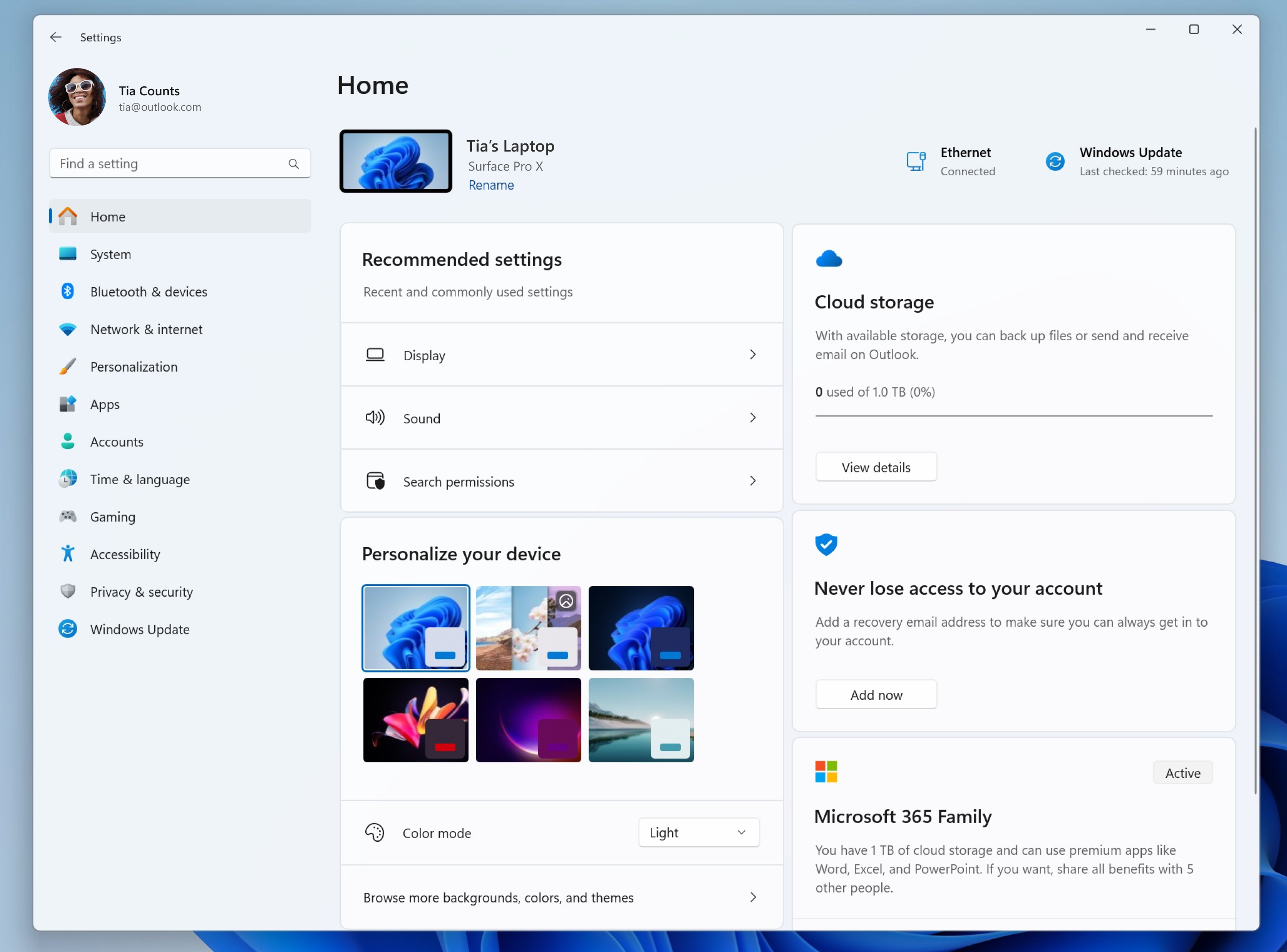
New Settings homepage.
We created interactive cards that represent various device and account related settings, grouped by commonly accessed functions. Each card is optimized to offer the most relevant information and controls at your fingertips. In this release, you’ll see up to seven cards, with more coming soon.
Here’s an overview of each card:
- Recommended settings: This card adapts to your specific usage patterns, providing timely and relevant settings options. It’s designed to streamline your settings management and save you time.
- Cloud storage: Gives you an overview of your cloud storage use and lets you know when you’re nearing capacity.
- Account recovery: Helps keep your Microsoft account more secure by helping you add additional recovery info so you never get locked out of your account, even if you forget your password.
- Personalization: Brings customization to the forefront by offering one-click access to update your background theme or change your color mode.
- Microsoft 365: Provides a quick glimpse of your subscription status and benefits, along with the ability to take some key actions right in Settings instead of going to the web.
- Xbox: Similar to the Microsoft 365 card, you’ll be able to view your subscription status and manage the subscription from the Settings app.
- Bluetooth Devices: To simplify your Bluetooth device management experience, we’ve brought this to the forefront so you can quickly access and connect to your favorite Bluetooth-enabled devices.
NOTE: This experience will only be available on Windows 11 Home and Pro editions and not on devices managed by organizations.
[We are beginning to roll this out, so the experience isn’t available to all Insiders in the Beta Channel just yet as we plan to monitor feedback and see how it lands before pushing it out to everyone.]
FEEDBACK: Please file feedback in Feedback Hub (WIN + F) under Settings > Settings Homepage.
Backup and Restore improvements
Building on the app restore feature we announced last year, we are introducing additional backup and restore capabilities in this build to make moving to a new PC easier than ever and to help app developers retain users across this new PC transition. The goal of these changes is to land users on a desktop that feels familiar to them and get them back to productivity within minutes on their new PC.
Turn On or Off Remember Preferences for MSA Across Windows 11 Devices
This tutorial will show you how to turn on or off Remember my preferences for your Microsoft account (MSA) across all your Windows 10 and Windows 11 devices you sign in with the same Microsoft account. When Windows backup is turned on, Windows backs up the settings you choose across all your...
www.elevenforum.com
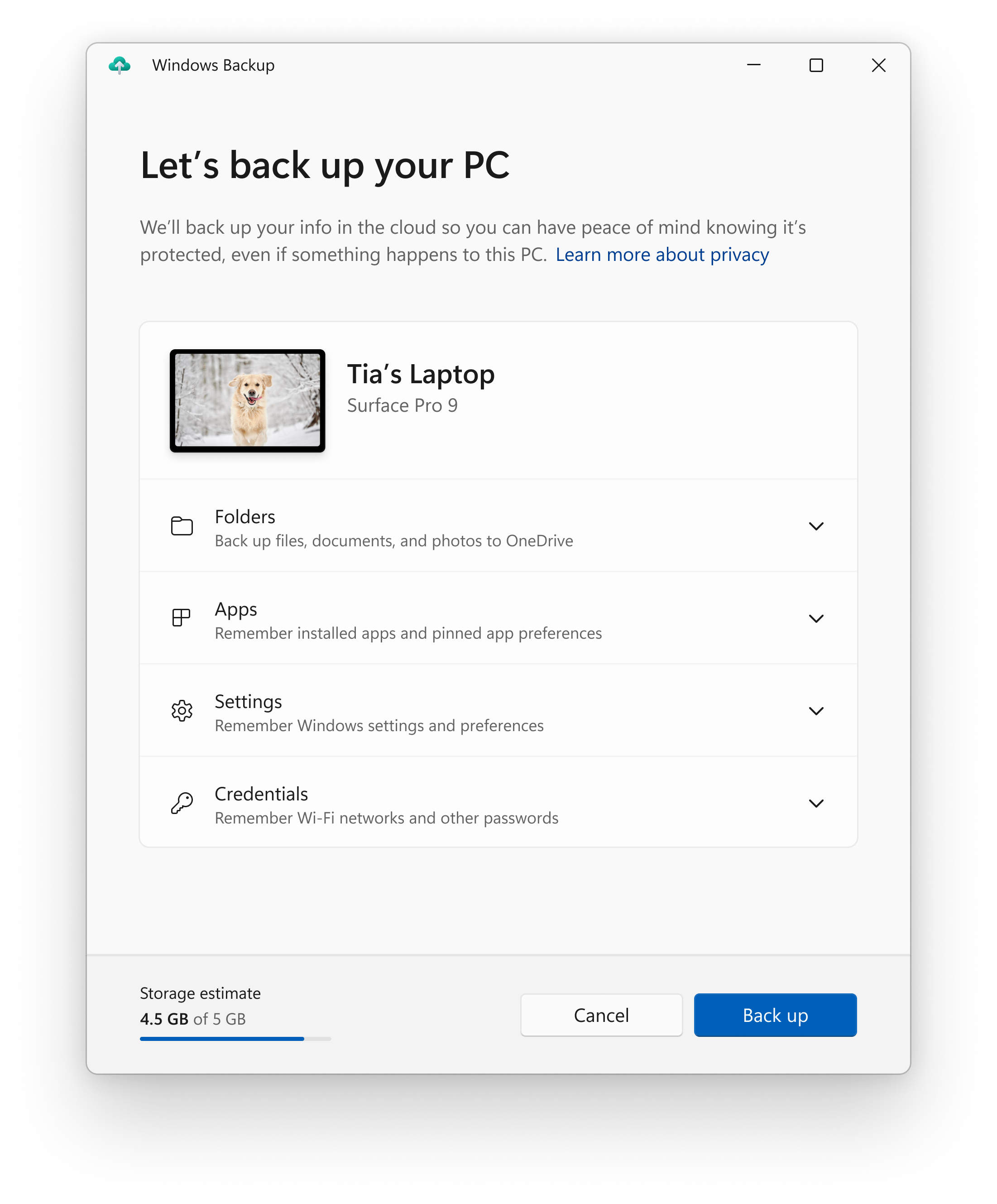
The Windows Backup app.
- Windows Backup app – we’re introducing this new app to quickly get your current PC backed up and ready to move to a new PC.
- App pins – your Store apps from your prior PC will be pinned where you left them, both on taskbar and in the Start menu.
- Settings – Settings from your previous device will restore to your new PC to help you get back into the flow as quickly as possible.
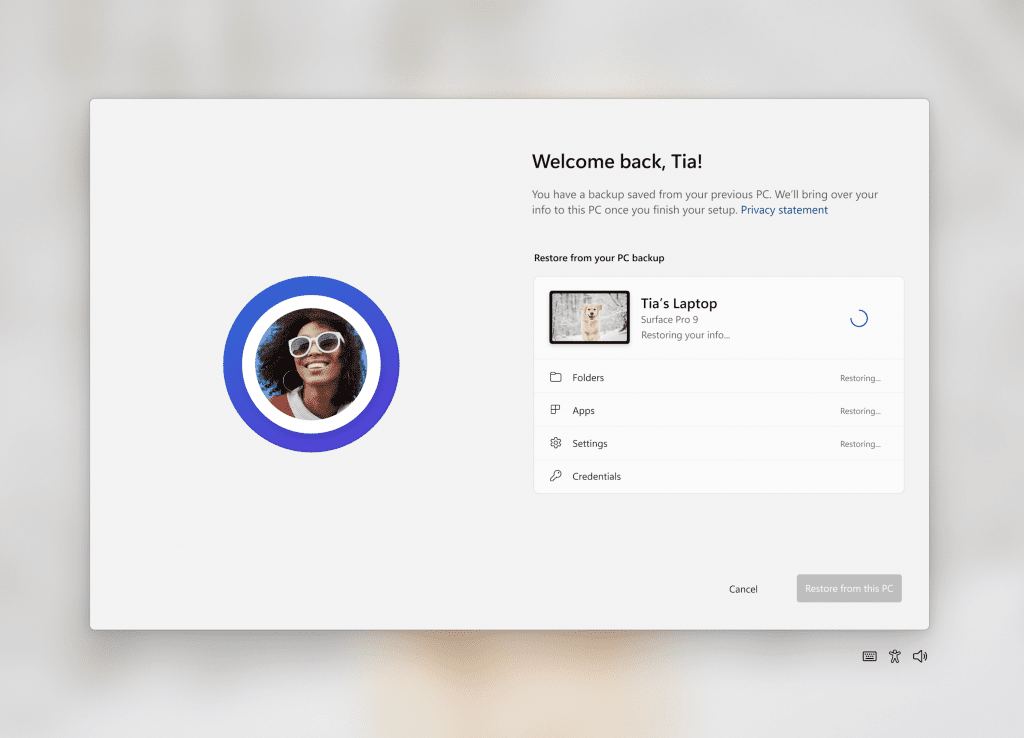
Welcome back screen showing PC restoring from backup.
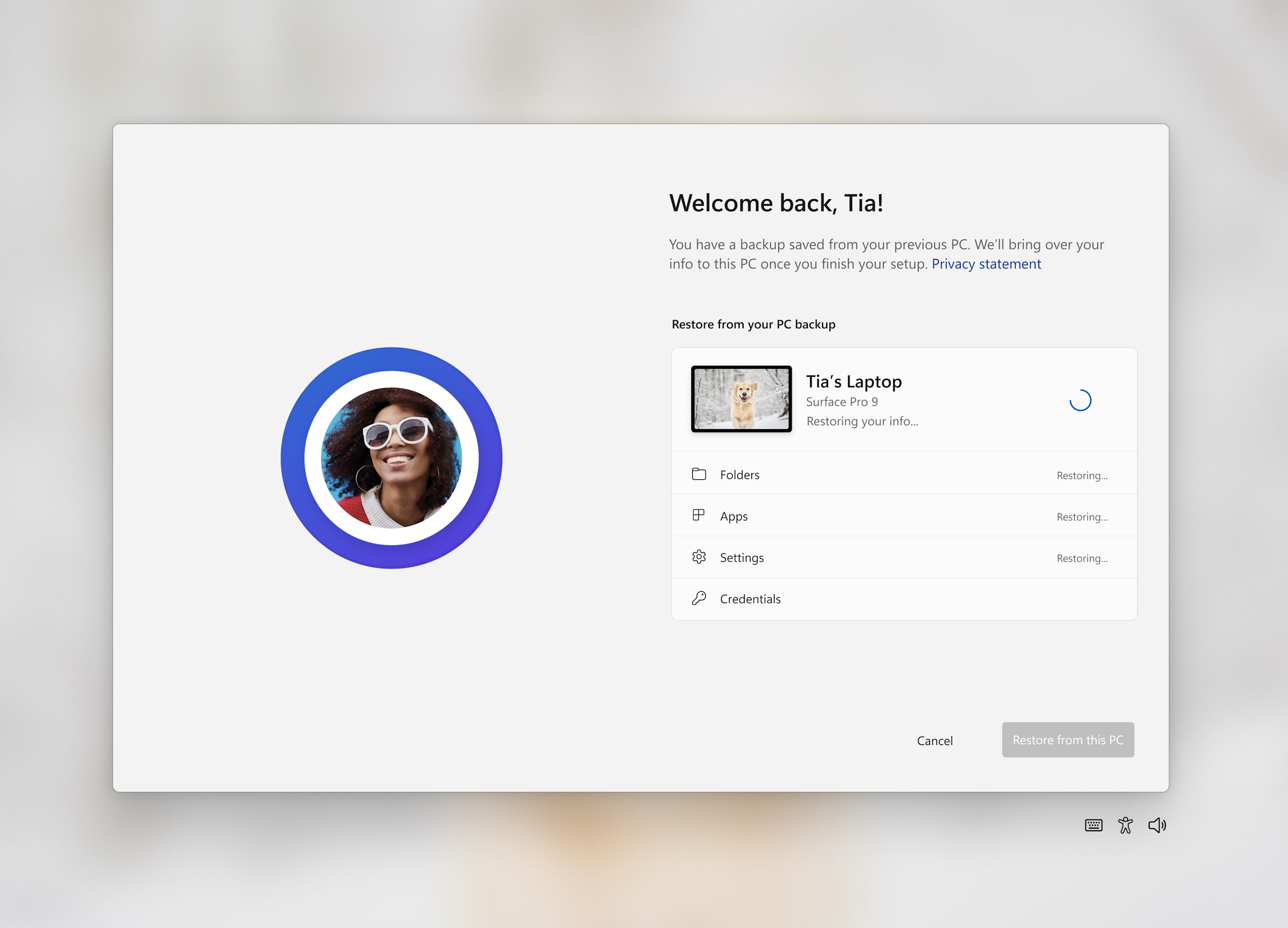
Users will see pins for their desktop app restored on the taskbar and Start Menu, including desktop apps that were not installed from the Microsoft Store.
Desktop apps that are available in the Microsoft Store can be restored by clicking on the app pin to get started. For apps that aren’t available in the Microsoft Store, you’ll be directed to the web to download the installer.
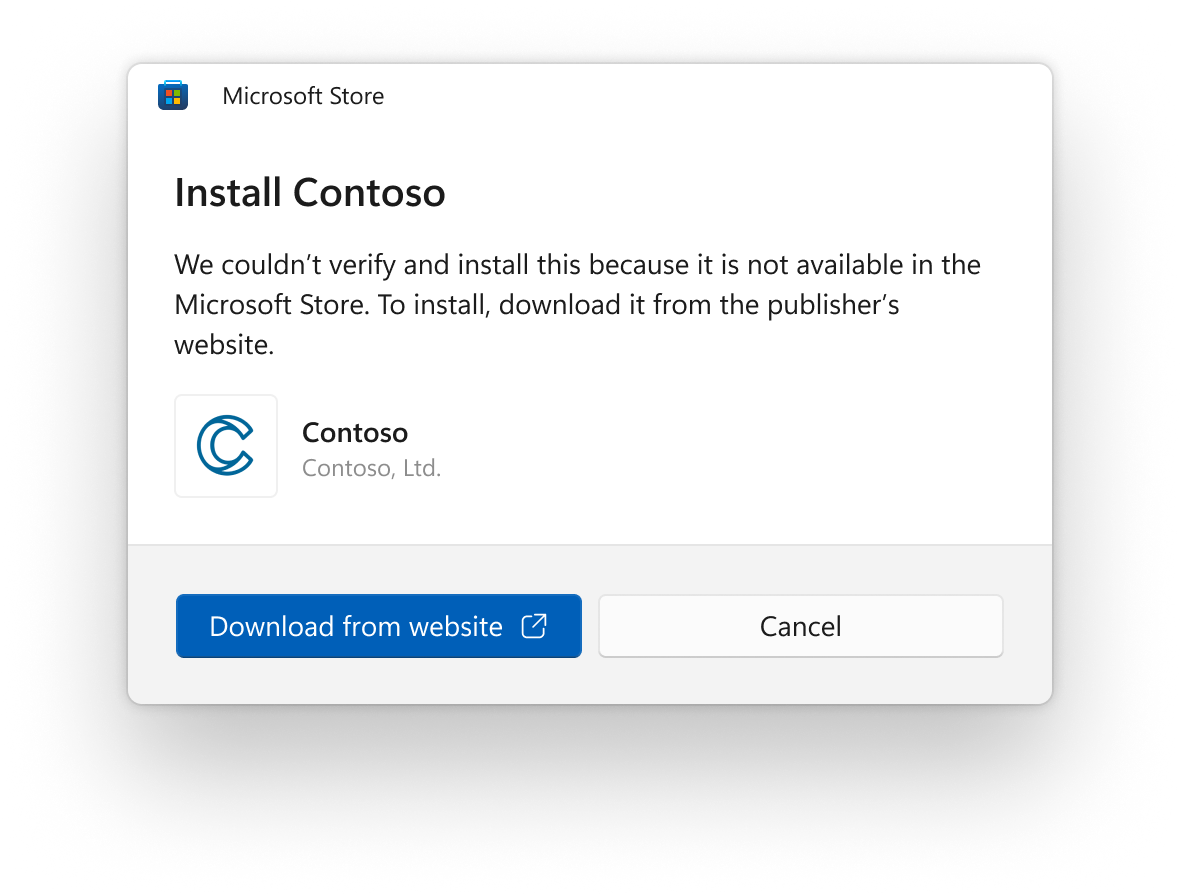
Screenshot showing a dialog box to install an app from the web.
NOTE: An easy way for Insiders to try this experience out is by running the Windows Backup app on a PC running this build and choosing “Reset this PC” under Settings > System > Recovery and then going through OOBE for the new restore experience.
For developers, review the developer best practices to learn more about how to provide the best restore experience for your app. Note that in this build not all settings and app types are supported, including Android apps. Backing up a Work or School account is also not supported.
FEEDBACK: Please file feedback in Feedback Hub (WIN + F) under Install and Update > Backup and Restore.
Changes and Improvements in Build 22631.2262
[File Explorer]
- Made some changes which should noticeably help improve the performance of the “calculating” phase when sending a large number of files at once in File Explorer to the recycle bin.
[Cast]
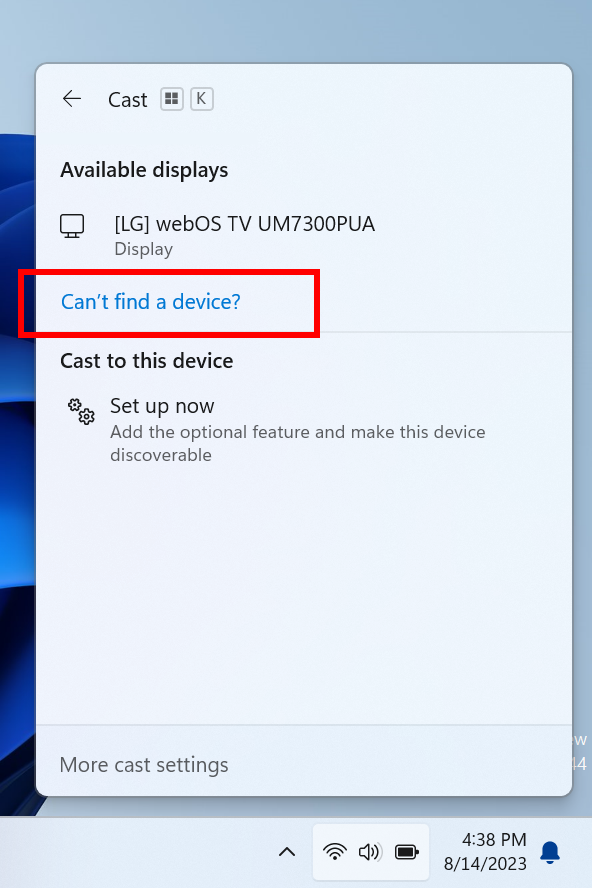
- Building off the Cast improvements introduced with Build 22631.2129, we have updated the Cast flyout in Quick Settings with additional support for you in case you face any trouble discovering nearby displays, fixing connections, and more.

Connect to Wireless Display with Miracast in Windows 11
This tutorial will show you how to wirelessly connect your Windows 11 PC to a TV, projector, another PC, or other kind of external display that supports Miracast. Miracast is a wireless technology your PC, laptop, or tablet can use to project your screen to wireless TVs, projectors, and...
www.elevenforum.com
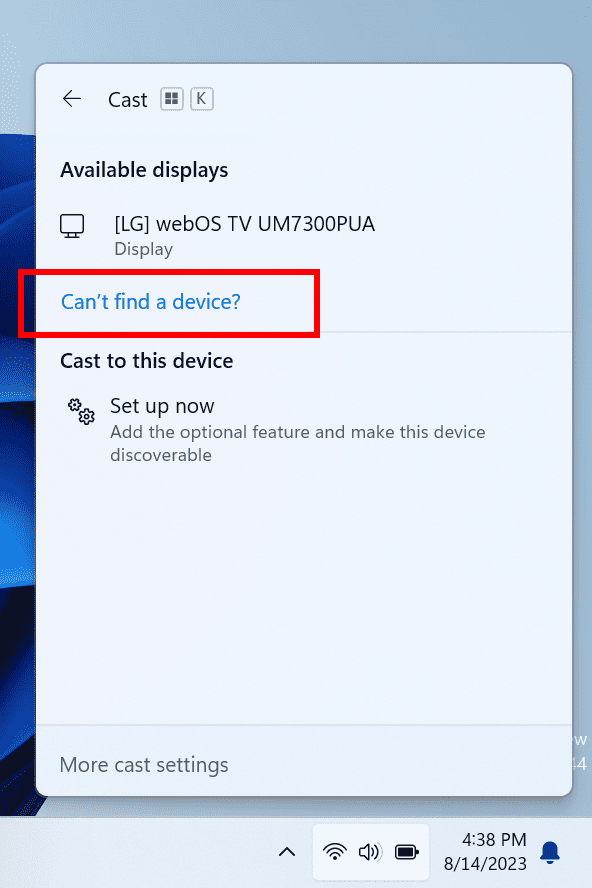
Cast flyout in Quick Settings now shows link for troubleshooting device discovery and other casting issues.
[Dynamic Lighting]
- You can now instantly sync your Windows accent color with the devices around you with the “Match my Windows accent color” toggle under “Effects” for Dynamic Lighting via Settings > Personalization > Dynamic Lighting.
- We have added the ability to choose a custom color to light up your devices with.

Enable or Disable Dynamic Lighting on RGB Devices in Windows 11
This tutorial will show you how to turn on or off using Dynamic Lighting on RGB devices for your account in Windows 11. Lighted accessories have been on the rise and can add energy and emotion to your PC experience. Today, many of these accessories rely on third-party apps and integrations that...
www.elevenforum.com
Fixes in Build 22631.2262
[Taskbar & System Tray]
- Fixed an issue where after upgrading the Bluetooth icon in the system tray might not display in the system tray after upgrade even though your PC supported Bluetooth and the Bluetooth options were shown in Settings.
- Fixed an issue where the new bell icon might be very difficult to see in some cases because it was using a dark outline when your taskbar was dark.
- Fixed an issue where the titles were missing from taskbar previews when turning on tablet-optimized taskbar while using uncombined taskbar.
- Fixed an issue where app icons on the taskbar would become empty (with no icon) in recent Insider builds after switching between desktops.
- Fixed an issue where if the taskbar was set to uncombined it would still show animations even if they’d been turned off.
- Disabled the setting for uncombining taskbar buttons on other screens by default when no secondary monitors are connected.
- Fixed an issue where using drag to rearrange icons in the overflow area wasn’t working well when the taskbar was set to uncombined.
- Fixed an issue where uncombined taskbar’s app indicators weren’t shown correctly after it showed something was being downloaded.
- Fixed an issue where the hidden icons flyout might close unexpectedly when using keyboard navigation to move focus between icons.
[File Explorer]
- Fixed an issue where in some cases, the context menu background in File Explorer appeared transparent. This also impacted the command bar dropdown menus.
- Fixed an issue where the context menu and dropdown menus in File Explorer weren’t working with touch.
- Fixed an issue which was causing the search box in File Explorer to not work well with IMEs.
- Fixed a white flash in dark mode when switching between Home and Gallery.
- Fixed an issue impacted File Explorer reliability.
- Fixed an issue where “Automatically type into the Search Box” wasn’t working when File Explorer was open to Home.
- Fixed an issue where pasting using the context menu in the address bar wasn’t working (or other context menu actions in the address bar).
- Added a little more space between Home in the navigation page and the bottom of the command bar.
[Input]
- Fixed an issue where typing with the Japanese and Chinese IMEs may not have performed as expected in certain apps in the last few flights when you had selected the option to use the previous version of the IME. If you are continuing to experience issues with this build installed, please file feedback.
- Fixed an issue where when inking into a text field, if you were writing in Chinese, certain characters were being perceived as taps and not working.
- Fixed an issue where inking into a text field while magnifier was running was not working well as the ink was offset.
[HDR Wallpapers]
- Fixed an issue which could cause sporadic explorer.exe crashes when using an HDR wallpaper.
[Task Manager]
- Fixed an issue where Task Manager was crashing when using the reset to default button in Settings.
- Did some work to help improve the performance when switching between different pages in Task Manager.
[Other]
- Fixed an issue which could cause sporadic explorer.exe crashes when using an HDR wallpaper.
Fixes for BOTH Build 22621.2262 & Build 22631.2262
- We fixed the issue causing the “Check for updates” button to not appear as expected under Settings > Windows Update. After updating to this build, the “Check for updates” button should appear as expected. If you are on the previous Beta Channel flight, you can manually check for updates by opening Windows Terminal (or the Run dialog) and entering the USOClient StartInteractiveScan command which will perform the same function as clicking the “Check for updates” button in Windows Update. Note that running the command will not display any output. To confirm that the operation was successful, you can run the command while the Windows Update settings page is open. You should see your device checking for updates.
- Fixed an issue where removing a monitor while connected to a Cloud PC could result in a black screen with only a mouse visible in recent builds.
Known issues
[General]
- We’re working on the fix for an issue causing explorer.exe to crash on the login screen when attempting to enter safe mode.
[File Explorer]
- Investigating an issue where the icons on your desktop may all go blank. Right-click and refresh on the desktop will bypass the issue if it occurs.
[Narrator]
- You may see some of the strings are NOT localized to the selected language. This will be fixed in a future flight.
About the Beta Channel
The Beta Channel is the place we preview experiences that are closer to what we will ship to our general customers. Because the Dev and Beta Channels represent parallel development paths from our engineers, there may be cases where features and experiences show up in the Beta Channel first. However, this does not mean every feature we try out in the Beta Channel will ship. We encourage Insiders to read this blog post that outlines the ways we’ll try things out with Insiders in both the Dev and Beta Channels.Important Insider Links
- Want to learn how we made Windows 11? Check out our Inside Windows 11 website to hear and meet our makers from Engineering, Design and Research to share their insights and unique perspectives throughout this journey.
- You can check out our Windows Insider Program documentation here.
- Check out Flight Hub for a complete look at what build is in which Insider channel.
Amanda & Brandon
Source:
Announcing Windows 11 Insider Preview Build 22621.2262 and 22631.2262 (Beta Channel)
Hello Windows Insiders, today we are releasing Windows 11 Insider Preview Build 22621.2262 and Build 22631.2262 (KB5029339) to the Beta Channel. IMPORTANT: Due to the bug in the
blogs.windows.com
Check Windows Updates
UUP Dump:
64-bit ISO download:
Select language for Windows 11 Insider Preview 10.0.22621.2262 (ni_release) amd64
Select language for Windows 11 Insider Preview 10.0.22621.2262 (ni_release) amd64 on UUP dump. UUP dump lets you download Unified Update Platform files, like Windows Insider updates, directly from Windows Update.
uupdump.net
Select language for Windows 11 Insider Preview 10.0.22631.2262 (ni_release) amd64
Select language for Windows 11 Insider Preview 10.0.22631.2262 (ni_release) amd64 on UUP dump. UUP dump lets you download Unified Update Platform files, like Windows Insider updates, directly from Windows Update.
uupdump.net
ARM64 ISO download:
Select language for Windows 11 Insider Preview 10.0.22621.2262 (ni_release) arm64
Select language for Windows 11 Insider Preview 10.0.22621.2262 (ni_release) arm64 on UUP dump. UUP dump lets you download Unified Update Platform files, like Windows Insider updates, directly from Windows Update.
uupdump.net
Select language for Windows 11 Insider Preview 10.0.22631.2262 (ni_release) arm64
Select language for Windows 11 Insider Preview 10.0.22631.2262 (ni_release) arm64 on UUP dump. UUP dump lets you download Unified Update Platform files, like Windows Insider updates, directly from Windows Update.
uupdump.net
UUP Dump - Download Windows Insider ISO
UUP Dump is the most practical and easy way to get ISO images of any Insider Windows 10 or Windows 11 version, as soon as Microsoft has released a new build. UUP Dump creates a download configuration file according to your choices, downloads necessary files directly from Microsoft servers, and...
www.elevenforum.com
Last edited:






 Sound by Fosi Audio DA-2120C pushing Magnat Series 503 bookshelf speakers and a SVS SB-1000 Pro subwoofer.