Win Update KB5029351 Windows 11 Cumulative Update Preview Build 22621.2215 (22H2)


UPDATE 9/12:


 Microsoft Support:

August 22, 2023 - KB5029351 (OS Build 22621.2215) Preview​


For information about Windows update terminology, see the article about the types of Windows updates and the monthly quality update types. For an overview of Windows 11, version 22H2, see its update history page.

Note Follow @WindowsUpdate to find out when new content is published to the Windows release health dashboard.

Highlights​

  • New! This update adds a new hover behavior to the search box gleam. When you hover over it, the search flyout box might appear. You can adjust this behavior by right-clicking the taskbar. Then choose Taskbar settings to change your search box experience.

  • This update supports daylight saving time (DST) changes in Israel.
  • This update addresses an issue that affects the search icon. When you select it, the Search app does not open. This occurs after a machine has been asleep.
  • This update improves the reliability of the Search app.
  • This update addresses an issue that affects the TAB key. Using it to browse search results requires additional actions.
  • This update addresses an issue that affects Narrator. It does not correctly identify the search box on the taskbar and search highlights within the search box.
  • This update addresses an issue that affects the search box size. Its size is reduced in tablet posture mode on Microsoft Surface Pro and Surface Book devices.

Improvements​

This non-security update includes quality improvements. When you install this KB:
  • New! This update adds new functionality that affects app defaults. To learn more, see A principled approach to app pinning and app defaults in Windows.
  • New! This release adds a new policy called “Enable optional updates.” Administrators can use it to configure the monthly, optional cumulative updates for commercial devices. You can also use this policy for the gradual Controlled Feature Rollouts (CFR). To learn more, see Enable and control optional updates for your organization.
  • This update addresses an issue that affects the Group Policy Service. It will not wait for 30 seconds, which is the default wait time, for the network to be available. Because of this, policies are not correctly processed.
  • This update adds a new API for D3D12 Independent Devices. You can use it to create multiple D3D12 devices on the same adapter. To learn more, seeD3D12 Independent Devices.
  • This update addresses an issue that affects a WS_EX_LAYERED window. The window might render with the wrong dimensions or at the wrong position. This occurs when you scale the display screen.
  • This update addresses an issue that affects print jobs that are sent to a virtual print queue. They fail without an error.
  • This update addresses an issue that causes high CPU use. This occurs when you enable the “fBlockNonDomain” policy.
  • This update addresses an issue that affects disk partitions. The system might stop working. This occurs after you delete a disk partition and add the space from the deleted partition to an existing BitLocker partition.
  • This update addresses an issue that causes Windows to fail. This occurs when you use BitLocker on a storage medium that has a large sector size.
  • This update addresses an issue that affects Remote Desktop sessions. Sometimes you receive a wrong error message when you try to sign in to a session.
  • This update addresses an issue that affects Start menu icons. They are missing after you sign in for the first time.
  • This update addresses an issue that affects settings. They do not sync even if you turn on the toggle on the Windows Backup page in the Settings app.
  • This update addresses an issue that affects the Resultant Set of Policy (RSOP). The Windows LAPS "BackupDirectory" policy setting was not being reported. This occurs when the setting is set to 1, which is “Back up to AAD.”
  • The update addresses an issue that affects those who use Windows Update for Business. After you are asked to change your password at sign in, the change operation fails. Then you cannot sign in. The error code is 0xc000006d.
If you installed earlier updates, only the new updates contained in this package will be downloaded and installed on your device.

Windows 11 servicing stack update - 22621.2061​

This update makes quality improvements to the servicing stack, which is the component that installs Windows updates. Servicing stack updates (SSU) ensure that you have a robust and reliable servicing stack so that your devices can receive and install Microsoft updates.

Known issues in this update​

Applies toSymptomWorkaround
All usersMicrosoft has received reports of an issue in which users are receiving an “UNSUPPORTED_PROCESSOR” error message on a blue screen after installing updates released on August 22, 2023 and then restarting their device. This update might automatically uninstall to allow Windows to start up as expected.

If you are experiencing issues, please use Feedback Hub to file a report following the below steps:
  1. Open Feedback Hub by opening the Start menu and typing "Feedback hub", or pressing the Windows key + F
  2. Fill in the "Summarize your feedback" and "Explain in more detail" boxes, then click Next.
  3. Under the "Choose a category" section, click the "Problem" button, and select "Install and Update" category. Then select "Downloading, installing, and configuring Windows Update” subcategory. Click Next.
  4. Under the "Find similar feedback" section, select the "Make new bug" radio button and click Next.
  5. Under the "Add more details" section, supply any relevant detail (Note this is not critical to addressing your issue).
  6. Expand the "Recreate my problem" box and press "Start recording". Reproduce the issue on your device.
  7. Press "Stop recording" once finished. Click the "Submit" button.
For additional information, see Send feedback to Microsoft with the Feedback Hub app.
After investigating these reports, we have found that the “UNSUPPORTED_PROCESSOR” error was not caused by issues in this update and is limited to a specific subset of processors. We are collaborating with device manufacturers (OEMs) and will temporarily mitigate this issue by not offering this update to Windows devices that might be affected by this issue. If you still experience this issue, please contact your device’s processor manufacturer.

How to get this update​

Before installing this update

Microsoft combines the latest servicing stack update (SSU) for your operating system with the latest cumulative update (LCU). For general information about SSUs, see Servicing stack updates and Servicing Stack Updates (SSU): Frequently Asked Questions.

Install this update

Release ChannelAvailableNext Step
Windows Update or Microsoft UpdateYesGo to Settings > Update & Security > Windows Update. In the Optional updates available area, you’ll find the link to download and install the update.
Windows Update for BusinessNoNone. These changes will be included in the next security update to this channel.
Microsoft Update CatalogYesTo get the standalone package for this update, go to the Microsoft Update Catalog website.
Windows Server Update Services (WSUS)NoYou can import this update into WSUS manually. See the Microsoft Update Catalog for instructions.

If you want to remove the LCU

To remove the LCU after installing the combined SSU and LCU package, use the DISM/Remove-Package command line option with the LCU package name as the argument. You can find the package name by using this command: DISM /online /get-packages.

Running Windows Update Standalone Installer (wusa.exe) with the /uninstall switch on the combined package will not work because the combined package contains the SSU. You cannot remove the SSU from the system after installation.

File information

For a list of the files that are provided in this update, download the file information for cumulative update 5029351.

For a list of the files that are provided in the servicing stack update, download the file information for the SSU - version 22621.2061.


 Source:


Check Windows Updates


Direct download links for KB5029351 MSU file from Microsoft Update Catalog:

[fa]fas fa-download[/fa] Download KB5029351 MSU for Windows 11 v22H2 64-bit (x64) - 400.8 MB

[fa]fas fa-download[/fa] Download KB5029351 MSU for Windows 11 v22H2 ARM64 - 523.3 MB


UUP Dump:

64-bit ISO download:

ARM64 ISO download:

 
Last edited:

Took maybe 10 minutes. Got stuck at 0% for a few minutes but then rapidly progressed.
No issues found from SFC and DISM.

Now version 22621.2215
 

My Computer My Computer

At a glance

Windows 11Intel Core i7-8700K 3.7 GHz 6C/12T Unlocked32 GB DDR4EVGA NVIDIA 1070 Ti
OS
Windows 11
Computer type
PC/Desktop
Manufacturer/Model
Gigaparts Zero Ascension
CPU
Intel Core i7-8700K 3.7 GHz 6C/12T Unlocked
Motherboard
Gigabyte Z370 AORUS ULTRA Gaming
Memory
32 GB DDR4
Graphics Card(s)
EVGA NVIDIA 1070 Ti
Sound Card
Onboard
Monitor(s) Displays
ASUS 27" x 2
Screen Resolution
1400p
Internet Speed
1 Gbps

Next steps: After investigating these reports, we have found that the “UNSUPPORTED_PROCESSOR” error was not caused by issues in KB5029351 and is limited to a specific subset of processors. We are collaborating with device manufacturers (OEMs) and will temporarily mitigate this issue by not offering KB5029351 to Windows devices that might be affected by this issue. If you still experience this issue, please contact your device’s processor manufacturer.
 

My Computer My Computer

At a glance

windows 10 ltsc
OS
windows 10 ltsc

My Computer My Computer

At a glance

Windows 11I5Too much haha!NVidia 1060
OS
Windows 11
Computer type
PC/Desktop
Manufacturer/Model
Cooler master
CPU
I5
Motherboard
Gigabyte
Memory
Too much haha!
Graphics Card(s)
NVidia 1060
When Windows 11 is installed on a device that does not meet the minimum system requirements, we'll notify you using a watermark on your Windows 11 desktop. You might also see a notification in Settings to let you know the requirements are not met.

Yawn. Never got any, MS.
 

My Computer My Computer

At a glance

Windows 11I5Too much haha!NVidia 1060
OS
Windows 11
Computer type
PC/Desktop
Manufacturer/Model
Cooler master
CPU
I5
Motherboard
Gigabyte
Memory
Too much haha!
Graphics Card(s)
NVidia 1060
Screenshot 2023-08-28 080617.png
 

My Computer My Computer

At a glance

Windows 11 HomeIntel i5-10600kG.Skill 2x16GB F4-3600C18D Ripjaws V 3600MHz ...PNY GeForce RTX 5070 12GB ARGB OC Triple Fan
OS
Windows 11 Home
Computer type
PC/Desktop
CPU
Intel i5-10600k
Motherboard
MSI Z490 G+
Memory
G.Skill 2x16GB F4-3600C18D Ripjaws V 3600MHz CL18 DDR4
Graphics Card(s)
PNY GeForce RTX 5070 12GB ARGB OC Triple Fan
Sound Card
SMSL D6S ES9039Q2M DAC
Monitor(s) Displays
AOC 31.5" Q32V3S/WS 75Hz 4ms Adaptive-Sync 2K-QHD Monitor
Screen Resolution
2560 x 1440
Hard Drives
Samsung 980 M.2 SSD 500GB x 3
PSU
MSI MPG A850GF 80+
Case
Antec DF600 FLUX
Cooling
Mirage 5 Cooler
Keyboard
Logitech G19
Mouse
Logitech G502 Hero
Internet Speed
FTTH 500/50
Browser
Waterfox, Firefox, Edge and Chrome.
Antivirus
Bitdefender Antivirus
Other Info
Q Acoustics M20 Active Speakers
I just upgraded to Windows release, 22631.2262 on my ASUS TUF Gaming A17 FA707XV-MS94 17.3" Laptop Computer running Windows 11 home edition. I still get an unknown hard error before getting the PIN prompt for going into safe mode. However now I can get into safe mode with limited functionality. The Windows key does not work to bring up any menus, but if I right-click on the windows icon, it brings up the appropriate menu choices for a right click.
 

My Computers My Computers

  • At a glance

    Windows 11 ProAMD Ryzen 9 7950X32 GB DDR5XFX RX 7900XT
    OS
    Windows 11 Pro
    Computer type
    PC/Desktop
    Manufacturer/Model
    Self Built
    CPU
    AMD Ryzen 9 7950X
    Motherboard
    ROG STRIX X870E-E GAMING WIFi
    Memory
    32 GB DDR5
    Graphics Card(s)
    XFX RX 7900XT
    Monitor(s) Displays
    LG 32GK850F-B 32 Inch UltraGear™ QHD
    Browser
    Firefox
  • At a glance

    Windows 11 HomeAMD 7940HS32 GB DDR5Nvidia 4060
    Operating System
    Windows 11 Home
    Computer type
    Laptop
    Manufacturer/Model
    ASUS TUF Gaming A17 FA707XV-MS94 17.3" Laptop
    CPU
    AMD 7940HS
    Memory
    32 GB DDR5
    Graphics card(s)
    Nvidia 4060
    Screen Resolution
    1080P
    Browser
    Firefox
I just upgraded to Windows release, 22631.2262 on my ASUS TUF Gaming A17 FA707XV-MS94 17.3" Laptop Computer running Windows 11 home edition. I still get an unknown hard error before getting the PIN prompt for going into safe mode. However now I can get into safe mode with limited functionality. The Windows key does not work to bring up any menus, but if I right-click on the windows icon, it brings up the appropriate menu choices for a right click.


Same safe mode problem with Windows release, 22631.2262 on my desktop computer with an ASUS Prime X670E-PRO Wi-Fi Socket AM5 motherboard with an AMD Ryzen 9 7950X processor running Windows 11 Pro. I also get an error message when I try to access the setting menu on both the desktop and laptop.
 

My Computers My Computers

  • At a glance

    Windows 11 ProAMD Ryzen 9 7950X32 GB DDR5XFX RX 7900XT
    OS
    Windows 11 Pro
    Computer type
    PC/Desktop
    Manufacturer/Model
    Self Built
    CPU
    AMD Ryzen 9 7950X
    Motherboard
    ROG STRIX X870E-E GAMING WIFi
    Memory
    32 GB DDR5
    Graphics Card(s)
    XFX RX 7900XT
    Monitor(s) Displays
    LG 32GK850F-B 32 Inch UltraGear™ QHD
    Browser
    Firefox
  • At a glance

    Windows 11 HomeAMD 7940HS32 GB DDR5Nvidia 4060
    Operating System
    Windows 11 Home
    Computer type
    Laptop
    Manufacturer/Model
    ASUS TUF Gaming A17 FA707XV-MS94 17.3" Laptop
    CPU
    AMD 7940HS
    Memory
    32 GB DDR5
    Graphics card(s)
    Nvidia 4060
    Screen Resolution
    1080P
    Browser
    Firefox

My Computers My Computers

  • At a glance

    Windows 11 ProIntel Core i9-10900XCorsair 64 GB (4 x 16 GB) CMW64GX4M4C3000C15 ...GIGABYTE GeForce GTX 1660 Super Mini ITX 6 GB OC
    OS
    Windows 11 Pro
    Computer type
    PC/Desktop
    Manufacturer/Model
    Stigg's Build
    CPU
    Intel Core i9-10900X
    Motherboard
    GIGABYTE X299X DESIGNARE 10G
    Memory
    Corsair 64 GB (4 x 16 GB) CMW64GX4M4C3000C15 Vengeance RGB Pro 3000Mhz DDR4
    Graphics Card(s)
    GIGABYTE GeForce GTX 1660 Super Mini ITX 6 GB OC
    Sound Card
    Realtek ALC1220
    Monitor(s) Displays
    Samsung 27" FHD LED FreeSync Gaming Monitor (LS27F350FHEXXY)
    Screen Resolution
    1920 x 1080
    Hard Drives
    Samsung 970 Pro Series 1TB M.2 2280 NVMe SSD
    Western Digital Red Pro WD8003FFBX-68B9AN0 8 TB, 7200 RPM, SATA-III
    Western Digital Red Pro WD8003FFBX-68B9AN0 8 TB, 7200 RPM, SATA-III
    PSU
    Corsair HX1200 1200W 80 Plus Platinum
    Case
    Fractal Design Define 7 Black Solid Case
    Cooling
    Noctua NH-D15 Chromax Black
    Keyboard
    Razer Ornata V2
    Mouse
    Razer DeathAdder Essential
    Internet Speed
    FTTN 100Mbps / 40Mbps
    Browser
    Mozilla Firefox
    Antivirus
    N/A
    Other Info
    Logitech BRIO 4k Ultra HD USB-C Webcam
  • At a glance

    Windows 10 ProCore i7-8750HSK Hynix 32 GB (2 x 16 GB) HMA82GS6CJR8N-VK 1...NVIDIA GeForce GTX 1070
    Operating System
    Windows 10 Pro
    Computer type
    Laptop
    Manufacturer/Model
    ASUS ROG Zephyrus M GM501GS
    CPU
    Core i7-8750H
    Motherboard
    Zephyrus M GM501GS
    Memory
    SK Hynix 32 GB (2 x 16 GB) HMA82GS6CJR8N-VK 16 GB DDR4-2666 DDR4 SDRAM
    Graphics card(s)
    NVIDIA GeForce GTX 1070
    Sound Card
    Realtek ALC294
    Monitor(s) Displays
    AU Optronics B156HAN07.1 [15.6" LCD]
    Screen Resolution
    1920 x 1080
    Hard Drives
    Samsung MZVKW512HMJP-00000 512 GB, PCI-E 3.0 x4
    Samsung SSD 860 QVO 4TB 4 TB, SATA-III
    PSU
    N/A
    Case
    N/A
    Cooling
    N/A
    Keyboard
    PC/AT Enhanced PS2 Keyboard (101/102-Key)
    Mouse
    Razer DeathAdder Essential
    Internet Speed
    FTTN 100Mbps / 40Mbps
    Browser
    Mozilla Firefox
    Antivirus
    N/A
    Other Info
    USB2.0 HD UVC Webcam
What exactly do you run, and is it necessary?

Many users here run these two commands after an update:

sfc /scannow

Dism /online /Cleanup-Image /StartComponentCleanup

Necessary? Probably not.

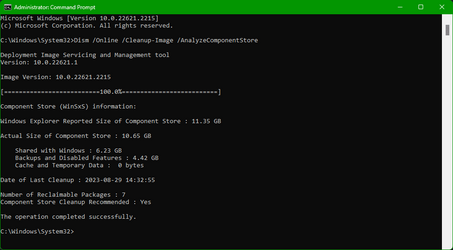
You can run this command to check the status of you component store:

Dism /Online /Cleanup-Image /AnalyzeComponentStore
 

My Computers My Computers

  • At a glance

    Win 11 Pro 25H2 26200.8737Intel® Core™ i7-14700KG.SKILL Ripjaws S5 Series 64GB (2 x 32GB) DDR5ASUS GeForce RTX 4070 Super 12GB
    OS
    Win 11 Pro 25H2 26200.8737
    Computer type
    PC/Desktop
    Manufacturer/Model
    Self Built
    CPU
    Intel® Core™ i7-14700K
    Motherboard
    ASUS TUF Z690-PLUS WIFI BIOS 4505 11/29/25
    Memory
    G.SKILL Ripjaws S5 Series 64GB (2 x 32GB) DDR5
    Graphics Card(s)
    ASUS GeForce RTX 4070 Super 12GB
    Sound Card
    Sound Blaster AE-5 Plus
    Monitor(s) Displays
    ASUS TUF Gaming 27" 2K HDR Gaming
    Screen Resolution
    2560 x 1440
    Hard Drives
    Samsung 990 Pro 1TB NVMe (Win 11 25H2)
    SK hynix P41 500GB NVMe 25H2 DEV/Games
    SK hynix P41 2TB NVMe (x3)
    Crucial P3 Plus 4TB
    PSU
    Corsair RM850x Shift
    Case
    Antec Dark Phantom DP502 FLUX
    Cooling
    Corsair Nautilus 360 RS AIO
    Keyboard
    Logitech MK 320
    Mouse
    Razer Basilisk V3
    Internet Speed
    750Mbs
    Browser
    Firefox
    Antivirus
    Winows Security
    Other Info
    MR 8.1 Home
  • At a glance

    Win 11 Pro 25H2 26200.8737Intel Core i7-11700F64 GB DDR4MSI GeForce RTX 3060 Ventus 2X 12GB
    Operating System
    Win 11 Pro 25H2 26200.8737
    Computer type
    PC/Desktop
    Manufacturer/Model
    Self Built
    CPU
    Intel Core i7-11700F
    Motherboard
    Asus TUF Gaming Z590 Plus WiFi (BIOS 2803)
    Memory
    64 GB DDR4
    Graphics card(s)
    MSI GeForce RTX 3060 Ventus 2X 12GB
    Sound Card
    SoundBlaster Audigy Fx V2
    Monitor(s) Displays
    Samsung F27T350
    Screen Resolution
    1920x1080
    Hard Drives
    Samsung 980 Pro 1TB
    Samsung 970 EVO Plus 2TB
    Samsung 870 EVO 500GB SSD
    PSU
    Corsair HX750
    Case
    Cougar MX330-G Window
    Cooling
    Thermalright Frozen Edge 240 Black AIO
    Internet Speed
    350Mbps
    Browser
    Firefox
    Antivirus
    Windows Security
  • System Three
    Win 11 Pro 25H2 26200.8737
    ASUS PRIME Z370-P II BIOS 3004 7/12/21
    Intel Core i7-8700 CPU @ 3.20GHz
    32GB DDR4 RAM (4x8)
    iGPU Intel UHD Graphics 630
    Mid-Tower Desktop
Mine just recommended a cleanup.

1693285524359.png
 

My Computers My Computers

  • At a glance

    Win 11 Pro 25H2 26200.8737Intel® Core™ i7-14700KG.SKILL Ripjaws S5 Series 64GB (2 x 32GB) DDR5ASUS GeForce RTX 4070 Super 12GB
    OS
    Win 11 Pro 25H2 26200.8737
    Computer type
    PC/Desktop
    Manufacturer/Model
    Self Built
    CPU
    Intel® Core™ i7-14700K
    Motherboard
    ASUS TUF Z690-PLUS WIFI BIOS 4505 11/29/25
    Memory
    G.SKILL Ripjaws S5 Series 64GB (2 x 32GB) DDR5
    Graphics Card(s)
    ASUS GeForce RTX 4070 Super 12GB
    Sound Card
    Sound Blaster AE-5 Plus
    Monitor(s) Displays
    ASUS TUF Gaming 27" 2K HDR Gaming
    Screen Resolution
    2560 x 1440
    Hard Drives
    Samsung 990 Pro 1TB NVMe (Win 11 25H2)
    SK hynix P41 500GB NVMe 25H2 DEV/Games
    SK hynix P41 2TB NVMe (x3)
    Crucial P3 Plus 4TB
    PSU
    Corsair RM850x Shift
    Case
    Antec Dark Phantom DP502 FLUX
    Cooling
    Corsair Nautilus 360 RS AIO
    Keyboard
    Logitech MK 320
    Mouse
    Razer Basilisk V3
    Internet Speed
    750Mbs
    Browser
    Firefox
    Antivirus
    Winows Security
    Other Info
    MR 8.1 Home
  • At a glance

    Win 11 Pro 25H2 26200.8737Intel Core i7-11700F64 GB DDR4MSI GeForce RTX 3060 Ventus 2X 12GB
    Operating System
    Win 11 Pro 25H2 26200.8737
    Computer type
    PC/Desktop
    Manufacturer/Model
    Self Built
    CPU
    Intel Core i7-11700F
    Motherboard
    Asus TUF Gaming Z590 Plus WiFi (BIOS 2803)
    Memory
    64 GB DDR4
    Graphics card(s)
    MSI GeForce RTX 3060 Ventus 2X 12GB
    Sound Card
    SoundBlaster Audigy Fx V2
    Monitor(s) Displays
    Samsung F27T350
    Screen Resolution
    1920x1080
    Hard Drives
    Samsung 980 Pro 1TB
    Samsung 970 EVO Plus 2TB
    Samsung 870 EVO 500GB SSD
    PSU
    Corsair HX750
    Case
    Cougar MX330-G Window
    Cooling
    Thermalright Frozen Edge 240 Black AIO
    Internet Speed
    350Mbps
    Browser
    Firefox
    Antivirus
    Windows Security
  • System Three
    Win 11 Pro 25H2 26200.8737
    ASUS PRIME Z370-P II BIOS 3004 7/12/21
    Intel Core i7-8700 CPU @ 3.20GHz
    32GB DDR4 RAM (4x8)
    iGPU Intel UHD Graphics 630
    Mid-Tower Desktop

My Computers My Computers

  • At a glance

    Windows 11 ProIntel Core i9-10900XCorsair 64 GB (4 x 16 GB) CMW64GX4M4C3000C15 ...GIGABYTE GeForce GTX 1660 Super Mini ITX 6 GB OC
    OS
    Windows 11 Pro
    Computer type
    PC/Desktop
    Manufacturer/Model
    Stigg's Build
    CPU
    Intel Core i9-10900X
    Motherboard
    GIGABYTE X299X DESIGNARE 10G
    Memory
    Corsair 64 GB (4 x 16 GB) CMW64GX4M4C3000C15 Vengeance RGB Pro 3000Mhz DDR4
    Graphics Card(s)
    GIGABYTE GeForce GTX 1660 Super Mini ITX 6 GB OC
    Sound Card
    Realtek ALC1220
    Monitor(s) Displays
    Samsung 27" FHD LED FreeSync Gaming Monitor (LS27F350FHEXXY)
    Screen Resolution
    1920 x 1080
    Hard Drives
    Samsung 970 Pro Series 1TB M.2 2280 NVMe SSD
    Western Digital Red Pro WD8003FFBX-68B9AN0 8 TB, 7200 RPM, SATA-III
    Western Digital Red Pro WD8003FFBX-68B9AN0 8 TB, 7200 RPM, SATA-III
    PSU
    Corsair HX1200 1200W 80 Plus Platinum
    Case
    Fractal Design Define 7 Black Solid Case
    Cooling
    Noctua NH-D15 Chromax Black
    Keyboard
    Razer Ornata V2
    Mouse
    Razer DeathAdder Essential
    Internet Speed
    FTTN 100Mbps / 40Mbps
    Browser
    Mozilla Firefox
    Antivirus
    N/A
    Other Info
    Logitech BRIO 4k Ultra HD USB-C Webcam
  • At a glance

    Windows 10 ProCore i7-8750HSK Hynix 32 GB (2 x 16 GB) HMA82GS6CJR8N-VK 1...NVIDIA GeForce GTX 1070
    Operating System
    Windows 10 Pro
    Computer type
    Laptop
    Manufacturer/Model
    ASUS ROG Zephyrus M GM501GS
    CPU
    Core i7-8750H
    Motherboard
    Zephyrus M GM501GS
    Memory
    SK Hynix 32 GB (2 x 16 GB) HMA82GS6CJR8N-VK 16 GB DDR4-2666 DDR4 SDRAM
    Graphics card(s)
    NVIDIA GeForce GTX 1070
    Sound Card
    Realtek ALC294
    Monitor(s) Displays
    AU Optronics B156HAN07.1 [15.6" LCD]
    Screen Resolution
    1920 x 1080
    Hard Drives
    Samsung MZVKW512HMJP-00000 512 GB, PCI-E 3.0 x4
    Samsung SSD 860 QVO 4TB 4 TB, SATA-III
    PSU
    N/A
    Case
    N/A
    Cooling
    N/A
    Keyboard
    PC/AT Enhanced PS2 Keyboard (101/102-Key)
    Mouse
    Razer DeathAdder Essential
    Internet Speed
    FTTN 100Mbps / 40Mbps
    Browser
    Mozilla Firefox
    Antivirus
    N/A
    Other Info
    USB2.0 HD UVC Webcam
It will keep recommending cleanup until you run

Dism /online /Cleanup-Image /StartComponentCleanup

to clean out those reclaimable packages
 

My Computers My Computers

  • At a glance

    Win 11 Pro 25H2 26200.8737Intel® Core™ i7-14700KG.SKILL Ripjaws S5 Series 64GB (2 x 32GB) DDR5ASUS GeForce RTX 4070 Super 12GB
    OS
    Win 11 Pro 25H2 26200.8737
    Computer type
    PC/Desktop
    Manufacturer/Model
    Self Built
    CPU
    Intel® Core™ i7-14700K
    Motherboard
    ASUS TUF Z690-PLUS WIFI BIOS 4505 11/29/25
    Memory
    G.SKILL Ripjaws S5 Series 64GB (2 x 32GB) DDR5
    Graphics Card(s)
    ASUS GeForce RTX 4070 Super 12GB
    Sound Card
    Sound Blaster AE-5 Plus
    Monitor(s) Displays
    ASUS TUF Gaming 27" 2K HDR Gaming
    Screen Resolution
    2560 x 1440
    Hard Drives
    Samsung 990 Pro 1TB NVMe (Win 11 25H2)
    SK hynix P41 500GB NVMe 25H2 DEV/Games
    SK hynix P41 2TB NVMe (x3)
    Crucial P3 Plus 4TB
    PSU
    Corsair RM850x Shift
    Case
    Antec Dark Phantom DP502 FLUX
    Cooling
    Corsair Nautilus 360 RS AIO
    Keyboard
    Logitech MK 320
    Mouse
    Razer Basilisk V3
    Internet Speed
    750Mbs
    Browser
    Firefox
    Antivirus
    Winows Security
    Other Info
    MR 8.1 Home
  • At a glance

    Win 11 Pro 25H2 26200.8737Intel Core i7-11700F64 GB DDR4MSI GeForce RTX 3060 Ventus 2X 12GB
    Operating System
    Win 11 Pro 25H2 26200.8737
    Computer type
    PC/Desktop
    Manufacturer/Model
    Self Built
    CPU
    Intel Core i7-11700F
    Motherboard
    Asus TUF Gaming Z590 Plus WiFi (BIOS 2803)
    Memory
    64 GB DDR4
    Graphics card(s)
    MSI GeForce RTX 3060 Ventus 2X 12GB
    Sound Card
    SoundBlaster Audigy Fx V2
    Monitor(s) Displays
    Samsung F27T350
    Screen Resolution
    1920x1080
    Hard Drives
    Samsung 980 Pro 1TB
    Samsung 970 EVO Plus 2TB
    Samsung 870 EVO 500GB SSD
    PSU
    Corsair HX750
    Case
    Cougar MX330-G Window
    Cooling
    Thermalright Frozen Edge 240 Black AIO
    Internet Speed
    350Mbps
    Browser
    Firefox
    Antivirus
    Windows Security
  • System Three
    Win 11 Pro 25H2 26200.8737
    ASUS PRIME Z370-P II BIOS 3004 7/12/21
    Intel Core i7-8700 CPU @ 3.20GHz
    32GB DDR4 RAM (4x8)
    iGPU Intel UHD Graphics 630
    Mid-Tower Desktop
What exactly do you run, and is it necessary?

start /B /wait rundll32.exe pnpclean.dll,RunDLL_PnpClean /drivers/maxclean
start /B /wait dism /online /Cleanup-Image /Startcomponentcleanup /resetbase
start /B /wait dism /Online /Cleanup-Image /CheckHealth
start /B /wait sfc /scannow
start /B /wait dism /Online /Cleanup-Image /RestoreHealth
 

My Computer My Computer

At a glance

Windows 11 Pro 25H2 (Build 26200.8737)Intel Core Ultra 9 285 5.6 GHz32.00 GBIntel Integrated Graphics (128 MB)
OS
Windows 11 Pro 25H2 (Build 26200.8737)
Computer type
PC/Desktop
Manufacturer/Model
Dell Pro Max Tower T2 FCT2250
CPU
Intel Core Ultra 9 285 5.6 GHz
Motherboard
64-bit operating system, x64-based processor
Memory
32.00 GB
Graphics Card(s)
Intel Integrated Graphics (128 MB)
Sound Card
Realtek Audio
Monitor(s) Displays
Dell P2714H Monitor
Screen Resolution
1920 x 1080
Hard Drives
1 x 512GB M.2 XG10d SED KIOXIA PCIe solid state drive (Internal)
1 x 2TB Seagate ST2000DM008-2UB102 HDD (Internal)
1 x 1TB Seagate STGX4000400 External HDD
1 x 4TB Seagate STGX4000400 External HDD
1 x 6TB WD Elements AE 2689 External HDD
PSU
500 Watts
Cooling
Air
Keyboard
Microsoft Wired Keyboard 600
Mouse
Microsoft USB Basic Optical Mouse v2.0
Browser
Firefox
Antivirus
Windows Defender + Malwarebytes Premium
Other Info
BaseBoard Manufacturer Dell Inc.
BaseBoard Product 022RY57
BaseBoard Version A01
All together? All at once?
 

My Computer My Computer

At a glance

Win 11 Insider Release Preview and Beta chann...i5 Core [email protected] (Unsupported for Win 11)12GBGeneric PnP Monitor (1920x1080@60Hz) Intel HD...
OS
Win 11 Insider Release Preview and Beta channels.
Computer type
Laptop
Manufacturer/Model
HP ENVY Bought: March 2017
CPU
i5 Core [email protected] (Unsupported for Win 11)
Motherboard
HP 81AD (U3E1)
Memory
12GB
Graphics Card(s)
Generic PnP Monitor (1920x1080@60Hz) Intel HD Graphics 620 (HP)
Sound Card
Conexant ISST audio
Monitor(s) Displays
Generic PnP Monitor
Screen Resolution
1536x864 pixels
Hard Drives
HGST HTS721010A9E630
PSU
Well...PSU you too!! What's this mean?
Case
HP ENVY SILVER
Cooling
A fan.
Keyboard
USA
Mouse
Logitec Anywhere 2
Internet Speed
Good enough for me! Fast!
Browser
Edge/Waterfox
Antivirus
Windows Defender
Other Info
No 'mo.
After the latest update to 22631.2262 my Windows now states Version 23H2. One additional problem, I nor frequently lose the image of my desktop icons, such as the one for Firefox. A right click and choosing refresh corrects this. After the upgrade sfc/ scannow command did uncover some errors which were corrected.
 

My Computers My Computers

  • At a glance

    Windows 11 ProAMD Ryzen 9 7950X32 GB DDR5XFX RX 7900XT
    OS
    Windows 11 Pro
    Computer type
    PC/Desktop
    Manufacturer/Model
    Self Built
    CPU
    AMD Ryzen 9 7950X
    Motherboard
    ROG STRIX X870E-E GAMING WIFi
    Memory
    32 GB DDR5
    Graphics Card(s)
    XFX RX 7900XT
    Monitor(s) Displays
    LG 32GK850F-B 32 Inch UltraGear™ QHD
    Browser
    Firefox
  • At a glance

    Windows 11 HomeAMD 7940HS32 GB DDR5Nvidia 4060
    Operating System
    Windows 11 Home
    Computer type
    Laptop
    Manufacturer/Model
    ASUS TUF Gaming A17 FA707XV-MS94 17.3" Laptop
    CPU
    AMD 7940HS
    Memory
    32 GB DDR5
    Graphics card(s)
    Nvidia 4060
    Screen Resolution
    1080P
    Browser
    Firefox
After the latest update to 22631.2262 my Windows now states Version 23H2. One additional problem, I nor frequently lose the image of my desktop icons, such as the one for Firefox. A right click and choosing refresh corrects this. After the upgrade sfc/ scannow command did uncover some errors which were corrected.
I think you're in the wrong thread - this one's about 22621.2215.
 

My Computer My Computer

At a glance

Windows 11 Pro build 22000.65Intel Core i5 7400 @ 3 GHz12 GBIntel HD Graphics 630
OS
Windows 11 Pro build 22000.65
Computer type
PC/Desktop
Manufacturer/Model
HP Pavilion PC 570-p026
CPU
Intel Core i5 7400 @ 3 GHz
Motherboard
HP Model 82F2 (U3E1)
Memory
12 GB
Graphics Card(s)
Intel HD Graphics 630
Sound Card
Realtek High Definition Audio
Monitor(s) Displays
Acer V173
Screen Resolution
1280x1024
Hard Drives
500MB Samsung Evo+ SSD
1TB Western Digital WDC WD10EZEX-60WN4A0 (SATA) 7200 RPM
Internet Speed
300/300 Mbs fiber
After the latest update to 22631.2262 my Windows now states Version 23H2. One additional problem, I nor frequently lose the image of my desktop icons, such as the one for Firefox. A right click and choosing refresh corrects this.....
That's the latest Insider Beta build, this thread is for the latest CU for the release channel build. The blank icons are a known issue in the current Beta build.

Known issues

...​

[File Explorer]

  • Investigating an issue where the icons on your desktop may all go blank. Right-click and refresh on the desktop will bypass the issue if it occurs.
 

My Computers My Computers

  • At a glance

    Windows 11 HomeAMD Athlon Silver 3050U8GBRadeon Graphics
    OS
    Windows 11 Home
    Computer type
    Laptop
    Manufacturer/Model
    Acer Aspire 3 A315-23-R9VY
    CPU
    AMD Athlon Silver 3050U
    Memory
    8GB
    Graphics Card(s)
    Radeon Graphics
    Monitor(s) Displays
    laptop screen
    Screen Resolution
    1366x768 native resolution, up to 2560x1440 with Radeon Virtual Super Resolution
    Hard Drives
    1TB Samsung EVO 870 SSD (from April 2026: 250GB EVO 850)
    Internet Speed
    150 Mbps
    Browser
    Edge, Firefox
    Antivirus
    Defender
    Other Info
    fully 'Windows 11 ready' laptop. Windows 10 C: partition migrated from my old unsupported 'main machine' then upgraded to 11. A test migration ran Insider builds for 2 months. When 11 was released on 5th October 2021 it was re-imaged back to 10 and was offered the upgrade in Windows Update on 20th October. Windows Update offered the 22H2 Feature Update on 20th September 2022. It got the 23H2 Feature Update on 4th November 2023 through Windows Update, 24H2 on 3rd October 2024 through Windows Update by setting the Target Release Version for 24H2, and 25H2 on 30th September 2025 through Windows Update by setting the Target Release Version for 25H2.

    UPDATE - 11 April 2026: due to mechanical deterioration this PC has been retired from active duty. The OS with all software and files has been migrated to my System Seven in 'Other systems' to carry on as my general purpose 'main machine'.
  • At a glance

    Windows 11 ProIntel® Core™ i5-520M8GB(integrated graphics) Intel HD Graphics
    Operating System
    Windows 11 Pro
    Computer type
    Laptop
    Manufacturer/Model
    Dell Latitude E4310
    CPU
    Intel® Core™ i5-520M
    Motherboard
    0T6M8G
    Memory
    8GB
    Graphics card(s)
    (integrated graphics) Intel HD Graphics
    Screen Resolution
    1366x768
    Hard Drives
    500GB Crucial MX500 SSD
    Browser
    Firefox, Edge
    Antivirus
    Defender
    Other Info
    unsupported machine: Legacy bios, MBR, TPM 1.2, upgraded from W10 to W11 using W10/W11 hybrid install media workaround.

    In-place upgrade to 22H2 using ISO and a workaround.
    Feature Update to 23H2 by manually installing the Enablement Package.
    In-place upgrade to 24H2 using hybrid 23H2/24H2 install media.
    Upgraded to 25H2 by Enablement Package.

    Also running Insider Dev, and Canary builds and Windows 10 as native boot .vhdx.
  • My SYSTEM THREE is a Dell Latitude 5410, i7-10610U, 32GB RAM, 512GB NVMe ssd, supported device running Windows 11 Pro.

    My SYSTEM FOUR is a 2-in-1 convertible Lenovo Yoga 11e 20DA, Celeron N2930, 8GB RAM, 256GB ssd. Unsupported device: currently running Win10 Pro, plus Win11 Pro RTM and Insider Dev, Beta, and RP 24H2 as native boot vhdx.

    My SYSTEM FIVE is a Dell Latitude 3190 2-in-1, Pentium Silver N5030, 8GB RAM, 1TB NVMe ssd, supported device running Windows 11 Pro, plus Insider Beta, Dev, and Canary builds (and a few others) as a native boot .vhdx.

    My SYSTEM SIX is a Dell Latitude 5550, Core Ultra 7 165H, 64GB RAM, 1TB NVMe SSD, supported device, Windows 11 Pro 24H2, Hyper-V host machine. Updated to 25H2 on 30th September 2025.

    My SYSTEM SEVEN is a Lenovo Thinkpad T580, Intel Core i7-8650U, 16GB RAM, 512GB NVMe SSD + 2nd 512GB NVMe SSD, a supported device for Windows 11. This is my current general purpose 'main machine'. The installed Windows 11 Home from my System One has been migrated to this machine.
start /B /wait rundll32.exe pnpclean.dll,RunDLL_PnpClean /drivers/maxclean
start /B /wait dism /online /Cleanup-Image /Startcomponentcleanup /resetbase
start /B /wait dism /Online /Cleanup-Image /CheckHealth
start /B /wait sfc /scannow
start /B /wait dism /Online /Cleanup-Image /RestoreHealth
All these in one shot?
 

My Computer My Computer

At a glance

Win 11 Insider Release Preview and Beta chann...i5 Core [email protected] (Unsupported for Win 11)12GBGeneric PnP Monitor (1920x1080@60Hz) Intel HD...
OS
Win 11 Insider Release Preview and Beta channels.
Computer type
Laptop
Manufacturer/Model
HP ENVY Bought: March 2017
CPU
i5 Core [email protected] (Unsupported for Win 11)
Motherboard
HP 81AD (U3E1)
Memory
12GB
Graphics Card(s)
Generic PnP Monitor (1920x1080@60Hz) Intel HD Graphics 620 (HP)
Sound Card
Conexant ISST audio
Monitor(s) Displays
Generic PnP Monitor
Screen Resolution
1536x864 pixels
Hard Drives
HGST HTS721010A9E630
PSU
Well...PSU you too!! What's this mean?
Case
HP ENVY SILVER
Cooling
A fan.
Keyboard
USA
Mouse
Logitec Anywhere 2
Internet Speed
Good enough for me! Fast!
Browser
Edge/Waterfox
Antivirus
Windows Defender
Other Info
No 'mo.

My Computer My Computer

At a glance

Windows 114770k16 gb Kingston2070 super
OS
Windows 11
Computer type
PC/Desktop
Manufacturer/Model
-
CPU
4770k
Motherboard
Asus Maximus Formula VI
Memory
16 gb Kingston
Graphics Card(s)
2070 super
My two computers have Release Preview checked off, and the update was the 2262 (ni release).
 

My Computers My Computers

  • At a glance

    Windows 11 ProAMD Ryzen 9 7950X32 GB DDR5XFX RX 7900XT
    OS
    Windows 11 Pro
    Computer type
    PC/Desktop
    Manufacturer/Model
    Self Built
    CPU
    AMD Ryzen 9 7950X
    Motherboard
    ROG STRIX X870E-E GAMING WIFi
    Memory
    32 GB DDR5
    Graphics Card(s)
    XFX RX 7900XT
    Monitor(s) Displays
    LG 32GK850F-B 32 Inch UltraGear™ QHD
    Browser
    Firefox
  • At a glance

    Windows 11 HomeAMD 7940HS32 GB DDR5Nvidia 4060
    Operating System
    Windows 11 Home
    Computer type
    Laptop
    Manufacturer/Model
    ASUS TUF Gaming A17 FA707XV-MS94 17.3" Laptop
    CPU
    AMD 7940HS
    Memory
    32 GB DDR5
    Graphics card(s)
    Nvidia 4060
    Screen Resolution
    1080P
    Browser
    Firefox

Latest Support Threads

Back
Top Bottom