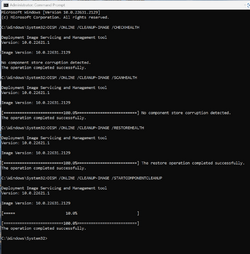
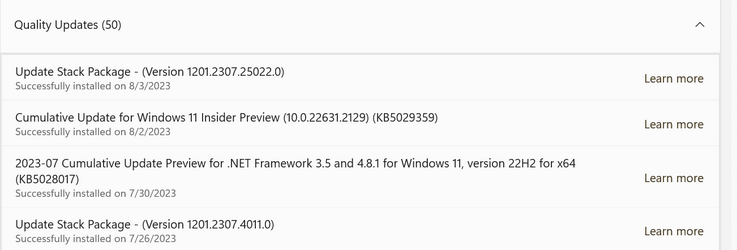
UPDATE 8/10:
 www.elevenforum.com
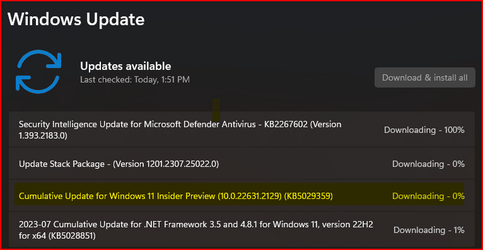
Hello Windows Insiders, today we are releasing Windows 11 Insider Preview Build 22621.2129 and Build 22631.2129 (KB5029359) to the Beta Channel.
IMPORTANT NOTE: If you are a NEW Windows Insider joining the Beta Channel today, you will not be offered this update to prevent the possibility of your device getting into a bad state. A very small subset of EXISTING Windows Insiders may also not receive this update for the same reason. This issue will be fixed in a newer Beta Channel update soon. Thank you for your patience!
REMINDER: Insiders who were previously on Build 22624 will automatically get moved to Build 22631 via an enablement package. The enablement package artificially increments the build number for the update with new features getting rolled out and turned on to make it easier to differentiate from devices with the update with features off by default. This approach is being used for the Beta Channel only and is not indicative of any changes or plans for final feature rollouts.
Insiders who landed in the group with new features turned off by default (Build 22621.xxxx) can check for updates and choose to install the update that will have features rolling out (Build 22631.xxxx).
August 2023 Bug Bash: Starting today August 2nd, the bug bash begins and will run through Monday August 7th at 11:59pm PDT. The bug bash will span the latest features available in the currently available preview builds across the Canary, Dev, and Beta Channels. Check Feedback Hub for quests!
 www.elevenforum.com
To get started, just click on the new button on the taskbar (or WIN + C) to launch Windows Copilot. Windows Copilot will use the same Microsoft account (MSA) or Azure Active Directory (AAD) account used to sign-in to Windows.
 www.elevenforum.com
 www.elevenforum.com
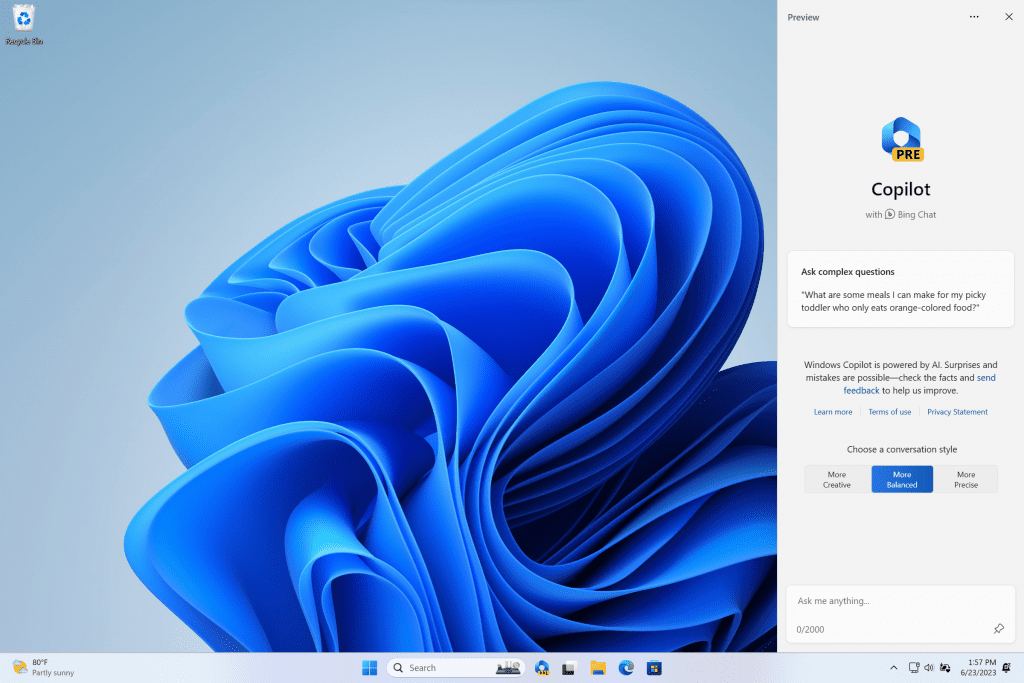
Click the new button on the taskbar to launch Windows Copilot.
Windows Copilot will appear as a side bar docked to the right where it won’t overlap with your desktop content and will run unobstructed alongside your open app windows, allowing you to interact with Windows Copilot anytime you need.
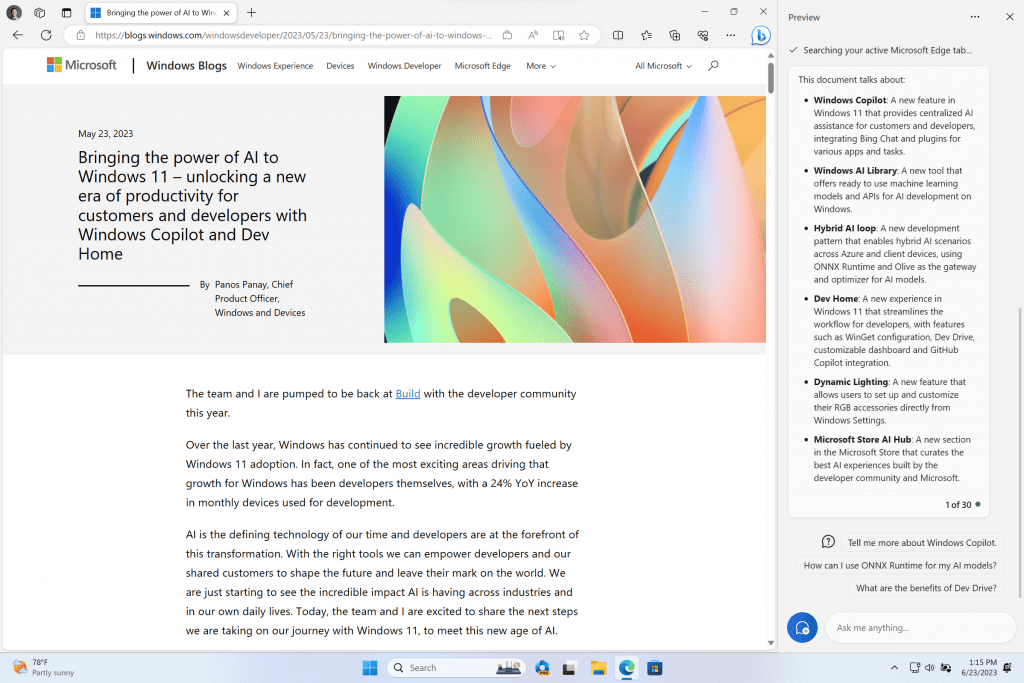
Windows Copilot docked with Microsoft Edge in the foreground and showing a summary of a website.
In this first preview, you can ask Windows Copilot a range of questions or to take actions such as:
As we begin the rollout for the Windows Copilot Preview to Windows Insiders in the Beta Channel, please understand that not everyone in the Beta Channel will see it right away. We will continue to increase the rollout in the coming weeks. Windows insiders in the Beta Channel who log in and are managed by AAD (soon to be Microsoft Entra ID) will see Windows Copilot in a future flight.
Windows Copilot with Bing Chat generates responses that are contextual and improves your experience in Windows. You may see inline recommendations we think are relevant through ads in Bing. We’ll continue to learn and listen to customer feedback. Understand what Bing does with your data by visiting Microsoft Privacy Statement. Read more about our responsible AI journey, the ethical principles that guide us, and the tooling and capabilities we’ve created to assure that we develop AI technology responsibly at Microsoft’s commitment to responsible AI.
Please note that not everything shown at Build for Windows Copilot is included in this first, early preview. For example, Windows Copilot has a basic set of Windows settings plugins but no third-party plugin support yet. Over time, features will be added as we refine the Windows Copilot experience with Windows Insiders.
[We are beginning to roll this out, so the experience isn’t available to all Insiders in the Beta Channel just yet as we plan to monitor feedback and see how it lands before pushing it out to everyone.]
To setup a Dev Drive, you can create one in free space on an existing drive or create a VHD/VHDX. This is done via Settings > System > For developers, or via the command-line. A Dev Drive must be at least 50GB or higher in size and we recommend having 8GB or higher RAM on your device.
 www.elevenforum.com
Performance mode, a new capability of Microsoft Defender Antivirus, is designed for Dev Drive to minimize impact on developer workloads.
More details on Dev Drive, see this documentation on MS Learn.
FEEDBACK: Please file feedback in Feedback Hub (WIN + F) under Developer Platform > Dev Drive.
To enable the enhanced announcements, you need to be on the latest Windows Insider and Microsoft 365 Insiders builds and start Narrator using the keyboard shortcut Control + Windows + Enter. The updated experience will be available through the Microsoft Store, so it may take a few minutes to be available on your PC. We look forward to you trying out our new changes and would love to hear your feedback and suggestions.
FEEDBACK: Please file feedback in Feedback Hub (Win + F) under Accessibility > Narrator.
You can say “correct [text]” or “correct that” to correct a specific piece of text or last dictated text. The correction window appears with a list of options labelled with numbers.
You can say “click [number]” to select any option from the list. If you choose an alternate word from the window , the selected text will be replaced by the word. You can also say “spell that” to dictate the correct spelling of the text.
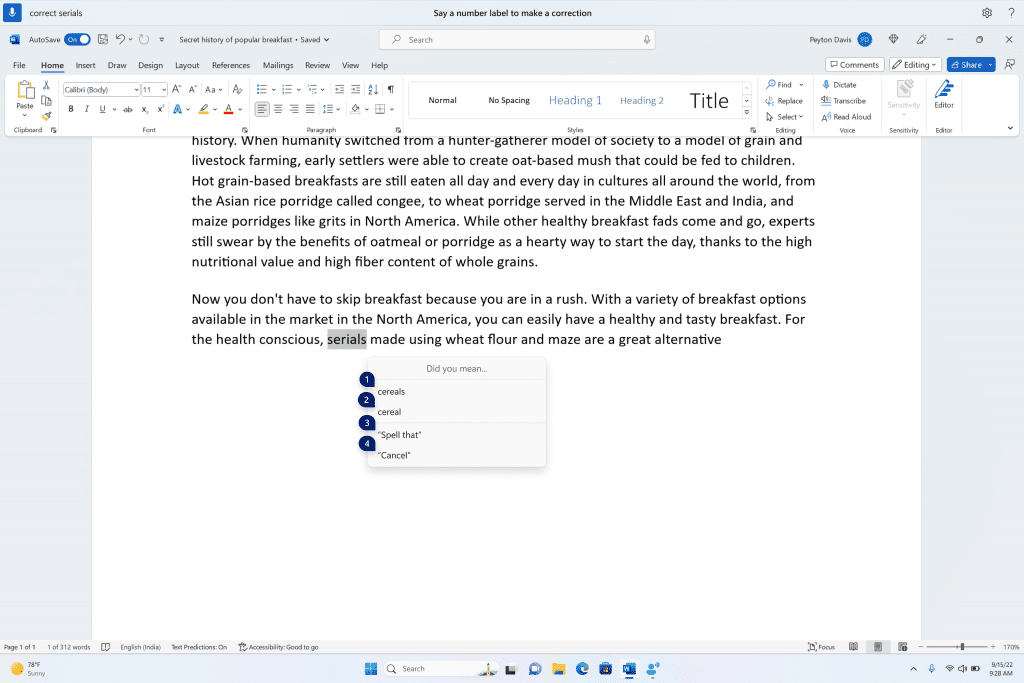
A word document showing corrections window with candidates for the text “cereals”.
Users can directly use the “spell that” or “spell out” command to dictate the right spelling of non-standard words such as usernames, topics, etc. A spelling window appears where you can dictate letters, numbers, symbols, phonetic alphabet, etc. You get suggestions as you spell out the text. You can say “click 1” to enter the text you spelled out or say “click [number]” to pick a suggestion (if any). All words and phrases dictated using spelling experience are added to Windows dictionary and show up as suggestions when you try to spell the text next time.
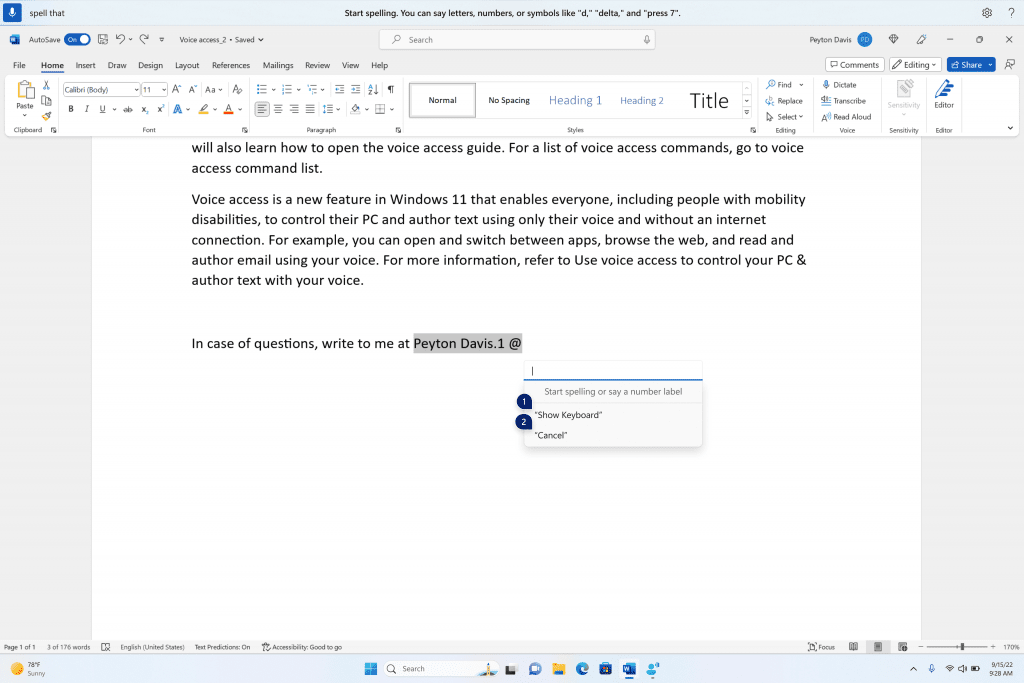
Spelling window is floating on top of the Word application.
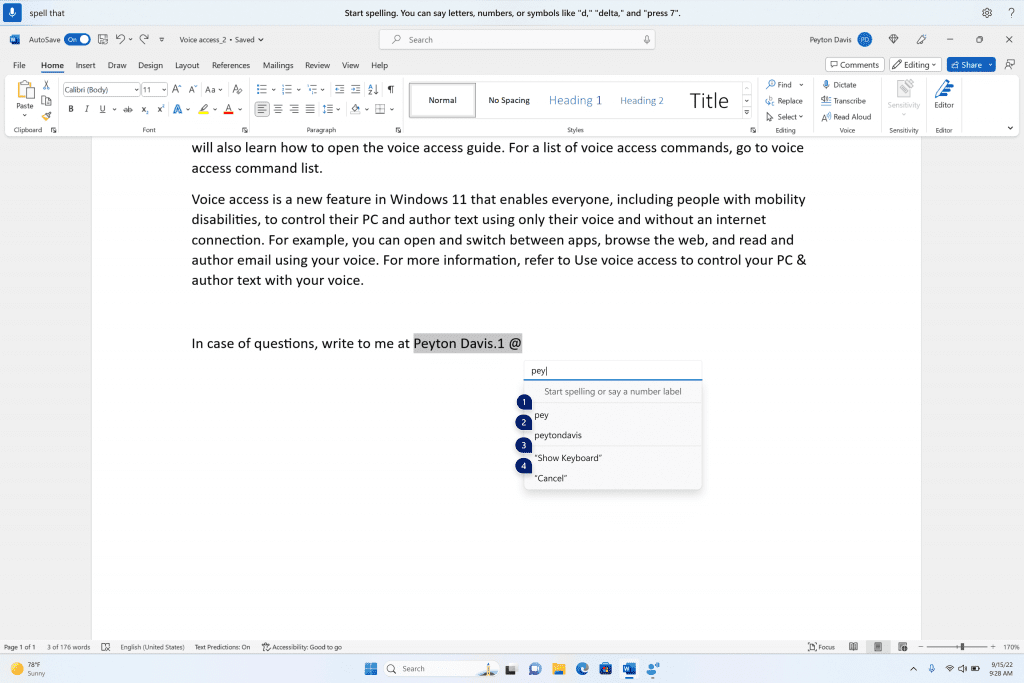
Spelling window showing suggestions as few characters are dictated.
FEEDBACK: Please file feedback in Feedback Hub (WIN + F) under Accessibility > Voice Access.
 www.elevenforum.com
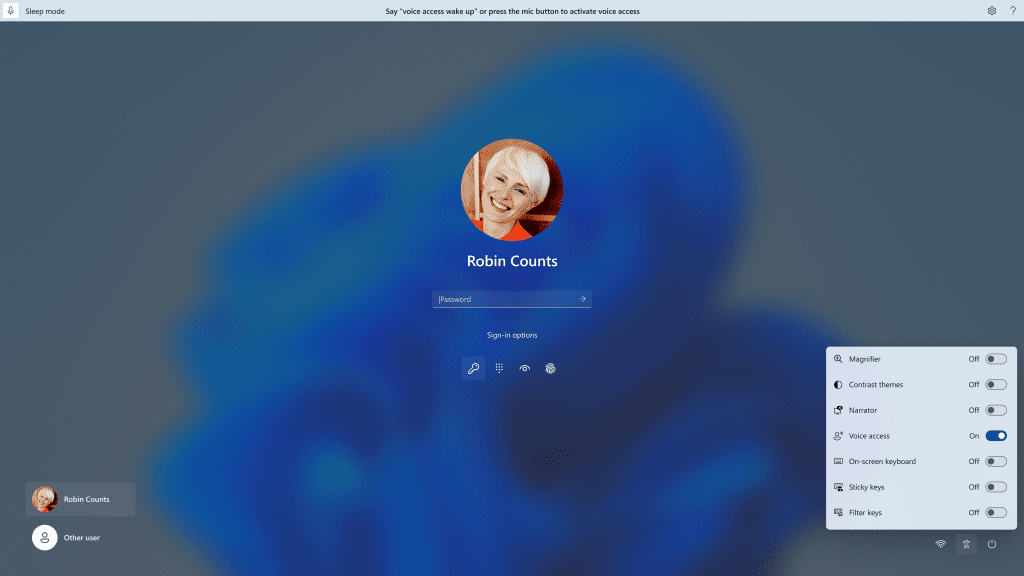
You can use voice access to login to your PC and access other areas on the Lock screen.
 www.elevenforum.com
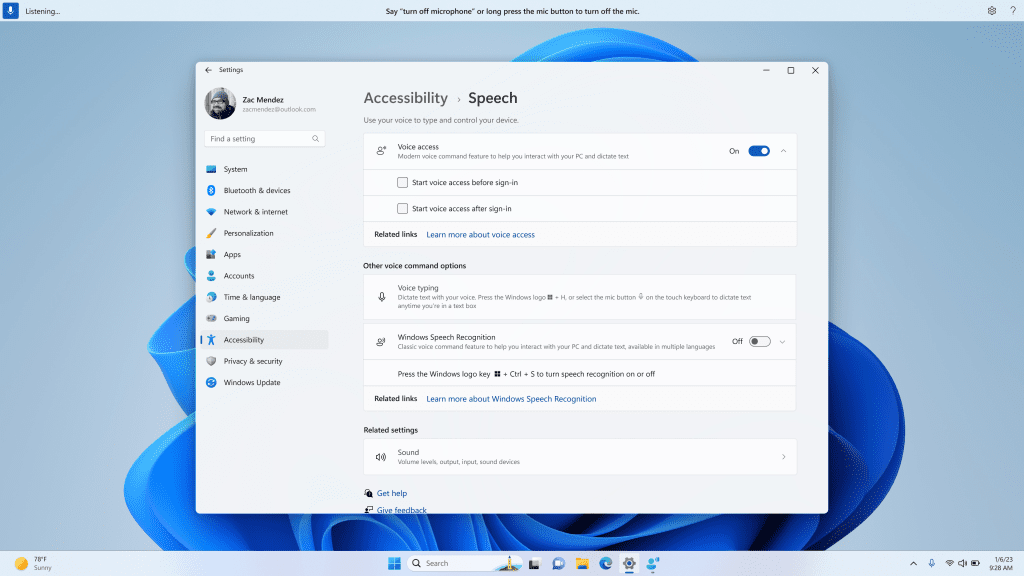
New setting to start voice access before you sign in to your PC.
Note: If you have never tried voice access, we recommend you search for voice access in search on the taskbar and complete the initial setup before trying it first time on the lock screen.
You can follow the instructions on the voice access bar to get your focus on the password field and use your voice to dictate your password or PIN. Alternatively, you can say “show keyboard” to bring up the touch keyboard with number labels on it. You can say the numbers on the keys to enter the letters associated with it. This will mask the actual password you are entering from being heard by anyone in your vicinity.
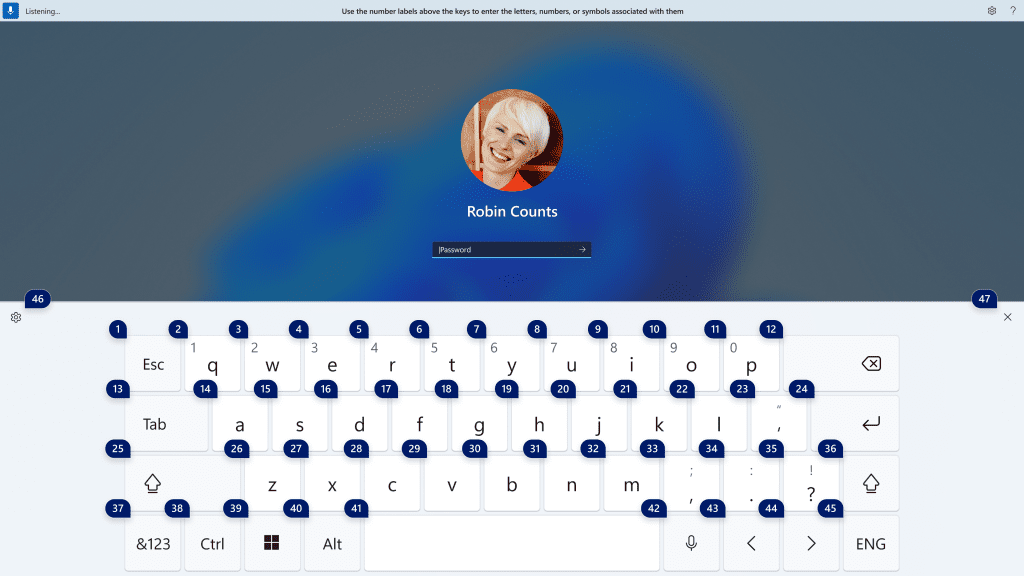
The touch keyboard with number labels on it to use voice access to enter a password.
You can also use other commands such as “show numbers” or “click [element name]” to access other elements on t.
And voice access now works for apps running with Microsoft Defender Application Guard.
FEEDBACK: Please file feedback in Feedback Hub (WIN + F) under Accessibility > Voice Access.
Once the policy is set, it removes passwords from the user experience, both for device logon as well as in-session auth scenarios like password managers in a web browser or “Run as” admin scenarios, and User Account Control (UAC). Users will navigate through their core authentication scenarios using WHFB in place of passwords. If the user fails to sign in, recovery mechanisms such as PIN reset or web sign-in can be used to help the user recover their credentials without IT helpdesk engagement.
FEEDBACK: Please file feedback in Feedback Hub (WIN + F) under Security and Privacy > Windows Hello PIN.
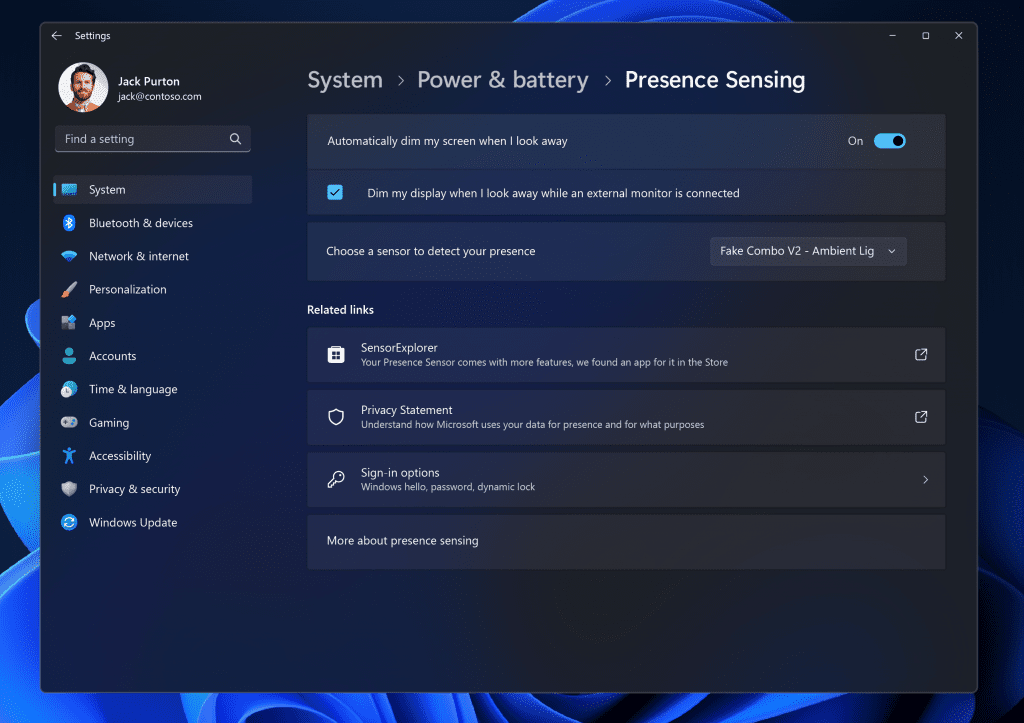
New Adaptive Dimming setting.
Wake on Approach, Lock on Leave, Adaptive Dimming are all powered by Presence Sensing in Windows and now can be enabled via the OOBE (“out of box experience”) setup process when choosing your privacy settings for your device. This will give more control of the presence sensing features and app access to presence information when setting up a new device with a compatible sensor.
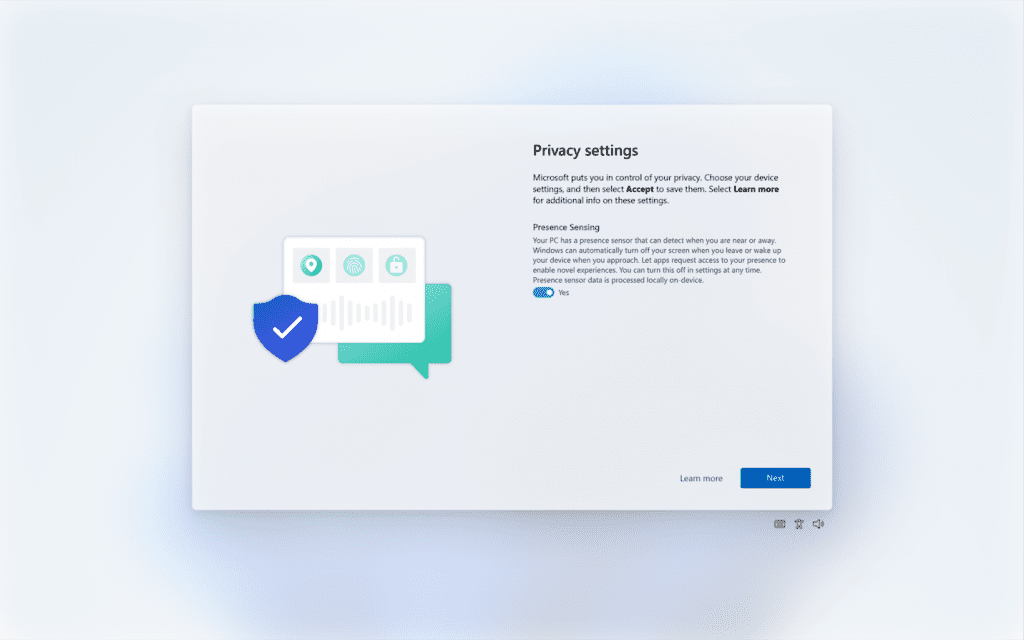
Enabling Presence Sensing in Windows via OOBE.
As a reminder, app developers with devices with compatible presence sensors can target apps to request and read user presence information after requesting a human presence capability. Learn more about the API here.
FEEDBACK: Please file feedback in Feedback Hub (WIN + F) under Devices and Drivers > Sensors.
Amanda & Brandon

 blogs.windows.com
Check Windows Updates
UUP Dump:
64-bit ISO download:

ARM64 ISO download:
 www.elevenforum.com
KB5029336 Windows 11 Insider Beta 22621.2191 and 22631.2191 - Aug. 10
UPDATE 8/18: https://www.elevenforum.com/t/kb5029352-windows-11-insider-beta-22621-2199-and-22631-2199-aug-18.17257/ Windows Blogs: Hello Windows Insiders, today we are releasing Windows 11 Insider Preview Build 22621.2191 and Build 22631.2191 (KB5029336) to the Beta Channel. Build 22631.2191...
www.elevenforum.com
Windows Blogs:
Hello Windows Insiders, today we are releasing Windows 11 Insider Preview Build 22621.2129 and Build 22631.2129 (KB5029359) to the Beta Channel.
- Build 22631.2129 = New features rolling out.
- Build 22621.2129 = New features off by default.
KB5027397 Enablement Package for Windows 11 Beta build 22621.xxx (22H2) to build 22631.xxx (23H2)
IMPORTANT NOTE: If you are a NEW Windows Insider joining the Beta Channel today, you will not be offered this update to prevent the possibility of your device getting into a bad state. A very small subset of EXISTING Windows Insiders may also not receive this update for the same reason. This issue will be fixed in a newer Beta Channel update soon. Thank you for your patience!
REMINDER: Insiders who were previously on Build 22624 will automatically get moved to Build 22631 via an enablement package. The enablement package artificially increments the build number for the update with new features getting rolled out and turned on to make it easier to differentiate from devices with the update with features off by default. This approach is being used for the Beta Channel only and is not indicative of any changes or plans for final feature rollouts.
Insiders who landed in the group with new features turned off by default (Build 22621.xxxx) can check for updates and choose to install the update that will have features rolling out (Build 22631.xxxx).
August 2023 Bug Bash: Starting today August 2nd, the bug bash begins and will run through Monday August 7th at 11:59pm PDT. The bug bash will span the latest features available in the currently available preview builds across the Canary, Dev, and Beta Channels. Check Feedback Hub for quests!
Windows 11 Insider Bug Bash starting August 2, 2023
August 2023 Bug Bash Coming Soon: Starting on August 2nd, we’ll be having our next bug bash! The bug bash will span the latest features available in preview builds across the Canary, Dev, and Beta Channels. Stay tuned for more details in next week’s flight blog posts. Source...
www.elevenforum.com
What’s new in Build 22631.2129
Windows Copilot Preview
Back in May at the Build conference, we introduced Windows Copilot for Windows 11. At the end of June, we kicked off the first preview of Windows Copilot and today, we’re expanding the preview to Windows Insiders in the Beta Channel via a controlled feature rollout. This first preview focuses on our integrated UI experience, with additional functionality coming down the road in future previews. To use Copilot in this flight you must have Windows 11 Insider Preview Build 22631.2129 or higher in the Beta Channel, and Microsoft Edge version 115.0.1901.150 or higher.To get started, just click on the new button on the taskbar (or WIN + C) to launch Windows Copilot. Windows Copilot will use the same Microsoft account (MSA) or Azure Active Directory (AAD) account used to sign-in to Windows.
Open Copilot in Windows 11
This tutorial will show you different ways to open the Copilot app in Windows 11. The Microsoft Copilot app is an AI here to give advice, inspiration, and help when you need a hand. You can start a conversation to get clear answers to tough questions, turn ideas into images, or polish your...
www.elevenforum.com
Add or Remove Copilot Button on Taskbar in Windows 11
This tutorial will show you how to add or remove the Copilot icon on the taskbar for your account in Windows 11. Microsoft Copilot is an AI-powered digital assistant designed to help you with a range of tasks and activities. When you sign in to Copilot with your Microsoft account Copilot uses...
www.elevenforum.com
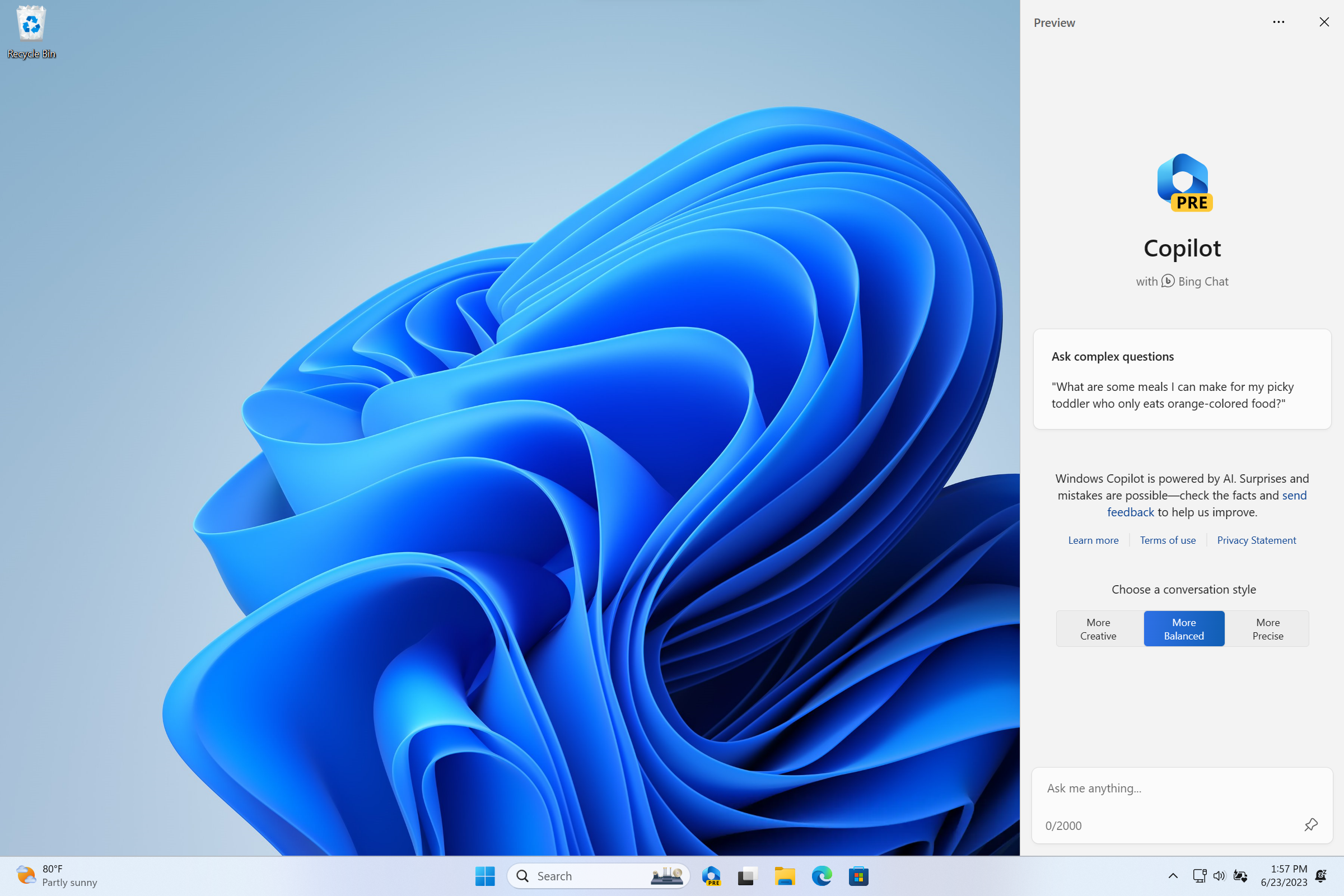
Click the new button on the taskbar to launch Windows Copilot.
Windows Copilot will appear as a side bar docked to the right where it won’t overlap with your desktop content and will run unobstructed alongside your open app windows, allowing you to interact with Windows Copilot anytime you need.
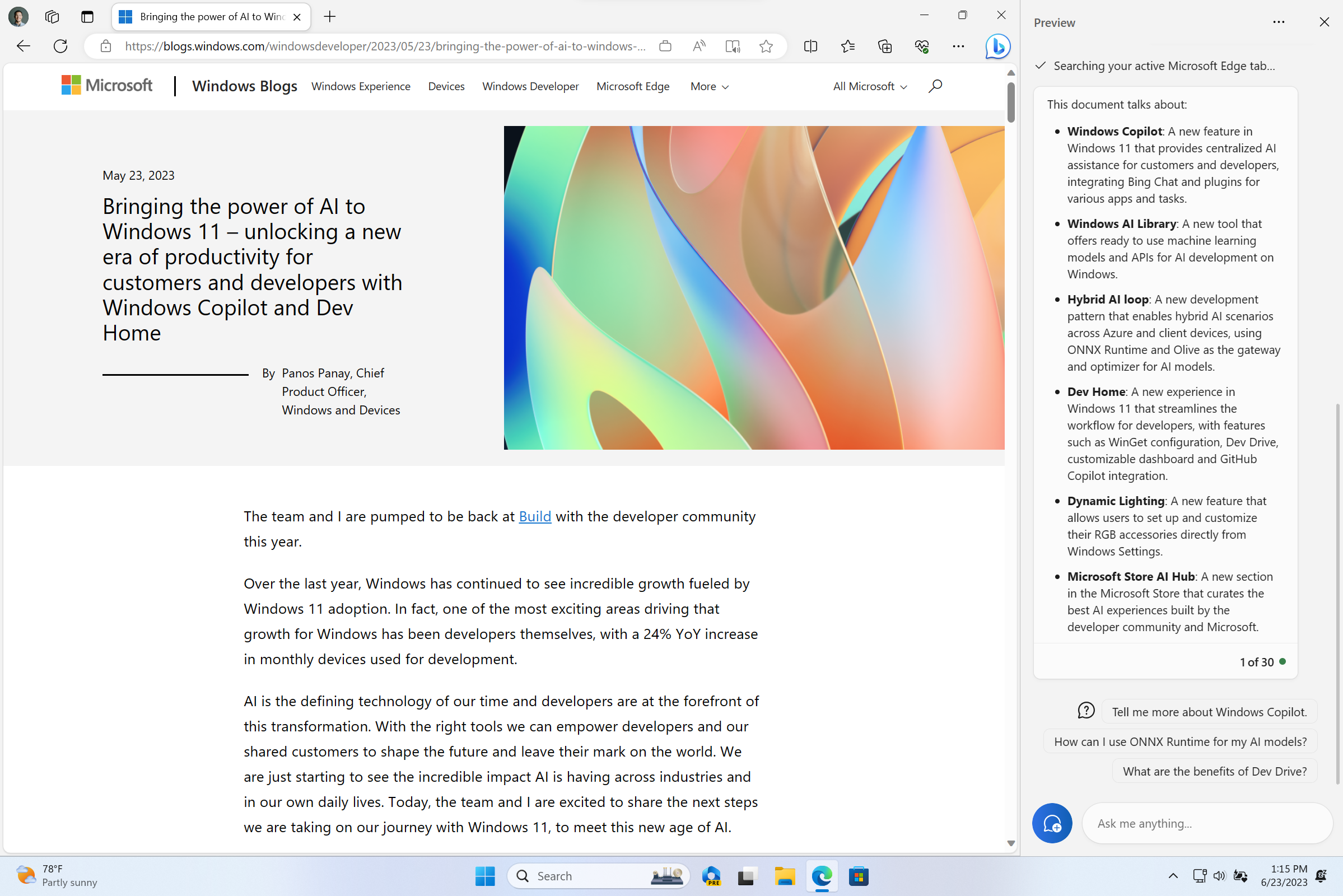
Windows Copilot docked with Microsoft Edge in the foreground and showing a summary of a website.
In this first preview, you can ask Windows Copilot a range of questions or to take actions such as:
- “Change to dark mode.”
- “Turn on do not disturb.”
- “Take a screenshot”
- “Summarize this website” (Active tab in Microsoft Edge)
- “Write a story about a dog who lives on the moon.”
- “Make me a picture of a serene koi fishpond with lily pads.”
As we begin the rollout for the Windows Copilot Preview to Windows Insiders in the Beta Channel, please understand that not everyone in the Beta Channel will see it right away. We will continue to increase the rollout in the coming weeks. Windows insiders in the Beta Channel who log in and are managed by AAD (soon to be Microsoft Entra ID) will see Windows Copilot in a future flight.
Windows Copilot with Bing Chat generates responses that are contextual and improves your experience in Windows. You may see inline recommendations we think are relevant through ads in Bing. We’ll continue to learn and listen to customer feedback. Understand what Bing does with your data by visiting Microsoft Privacy Statement. Read more about our responsible AI journey, the ethical principles that guide us, and the tooling and capabilities we’ve created to assure that we develop AI technology responsibly at Microsoft’s commitment to responsible AI.
Please note that not everything shown at Build for Windows Copilot is included in this first, early preview. For example, Windows Copilot has a basic set of Windows settings plugins but no third-party plugin support yet. Over time, features will be added as we refine the Windows Copilot experience with Windows Insiders.
[We are beginning to roll this out, so the experience isn’t available to all Insiders in the Beta Channel just yet as we plan to monitor feedback and see how it lands before pushing it out to everyone.]
Dev Drive
Dev Drive is a new form of storage volume available to improve performance for key developer workloads. Dev Drive is built upon Resilient File System (ReFS) technology and includes file system optimizations and features that enable developers to better manage their performance and security profile. It has been designed to meet a developer’s needs to host project source code, working folders, and package caches. It is not designed for general consumer workloads such as document libraries, installing packaged applications or non-developer tools.To setup a Dev Drive, you can create one in free space on an existing drive or create a VHD/VHDX. This is done via Settings > System > For developers, or via the command-line. A Dev Drive must be at least 50GB or higher in size and we recommend having 8GB or higher RAM on your device.
Create Dev Drive in Windows 11
This tutorial will show you how to create a Dev Drive using unallocated space on a disk or new virtual hard disk (VHD/VHDX) in Windows 11. Starting with Windows 11 version 22H2 KB5030310 Build 22621.2361,, Microsoft introduced Dev Drive. Dev Drive is a new form of storage volume available to...
www.elevenforum.com
Performance mode, a new capability of Microsoft Defender Antivirus, is designed for Dev Drive to minimize impact on developer workloads.
More details on Dev Drive, see this documentation on MS Learn.
FEEDBACK: Please file feedback in Feedback Hub (WIN + F) under Developer Platform > Dev Drive.
Narrator enhances interaction with Excel
Narrator now provides a more succinct and efficient reading experience while working in Microsoft Excel. Announcements are prioritized based on the information you need to skim a workbook and are customizable using convenient keyboard shortcuts. Review the Enhanced Narrator support in Excel documentation for further information.To enable the enhanced announcements, you need to be on the latest Windows Insider and Microsoft 365 Insiders builds and start Narrator using the keyboard shortcut Control + Windows + Enter. The updated experience will be available through the Microsoft Store, so it may take a few minutes to be available on your PC. We look forward to you trying out our new changes and would love to hear your feedback and suggestions.
FEEDBACK: Please file feedback in Feedback Hub (Win + F) under Accessibility > Narrator.
New text authoring experiences in voice access
We have added two new experiences to make text authoring easy with voice access. Users can now use “correction” commands to correct words that are misrecognized by voice access.You can say “correct [text]” or “correct that” to correct a specific piece of text or last dictated text. The correction window appears with a list of options labelled with numbers.
You can say “click [number]” to select any option from the list. If you choose an alternate word from the window , the selected text will be replaced by the word. You can also say “spell that” to dictate the correct spelling of the text.
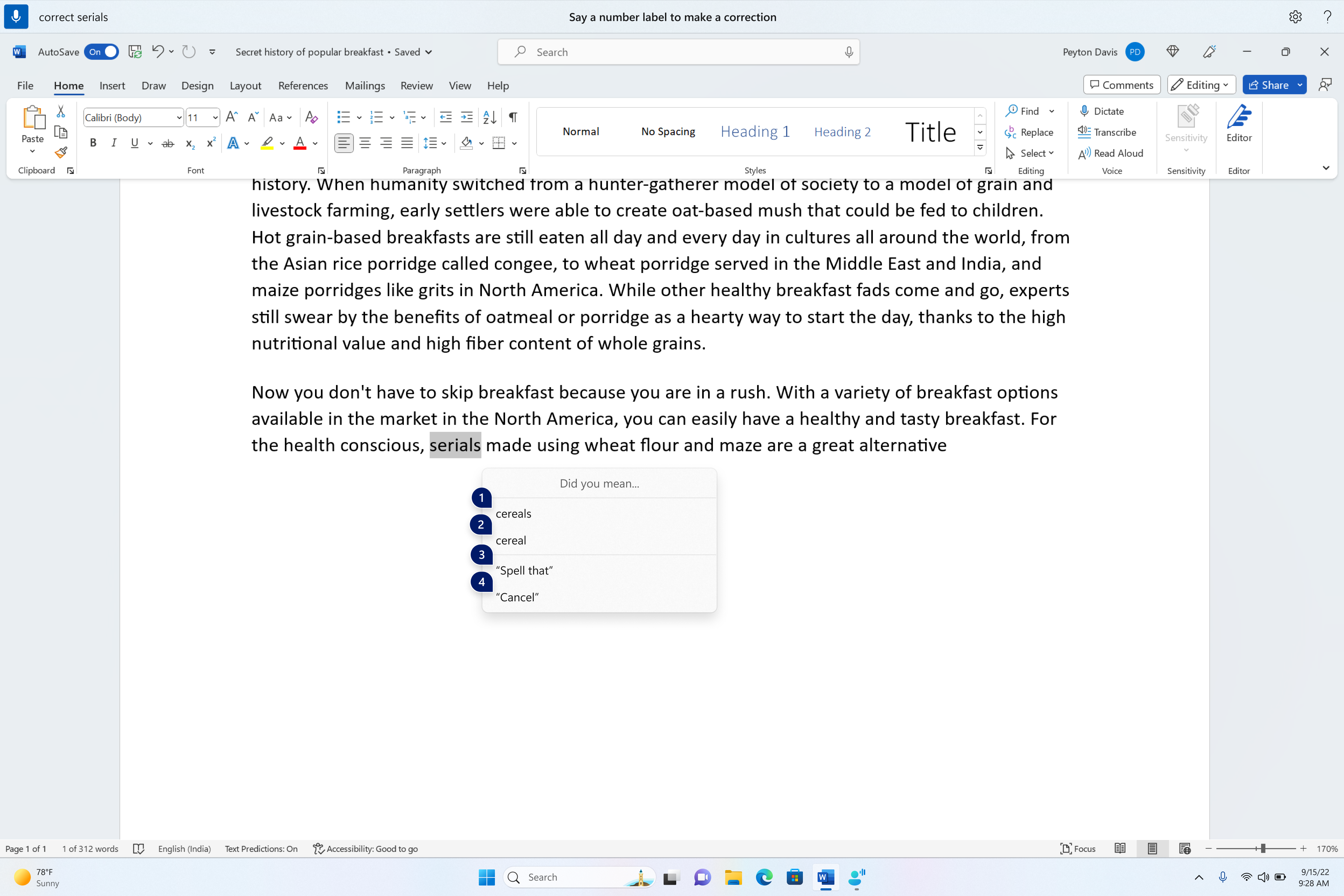
A word document showing corrections window with candidates for the text “cereals”.
Users can directly use the “spell that” or “spell out” command to dictate the right spelling of non-standard words such as usernames, topics, etc. A spelling window appears where you can dictate letters, numbers, symbols, phonetic alphabet, etc. You get suggestions as you spell out the text. You can say “click 1” to enter the text you spelled out or say “click [number]” to pick a suggestion (if any). All words and phrases dictated using spelling experience are added to Windows dictionary and show up as suggestions when you try to spell the text next time.
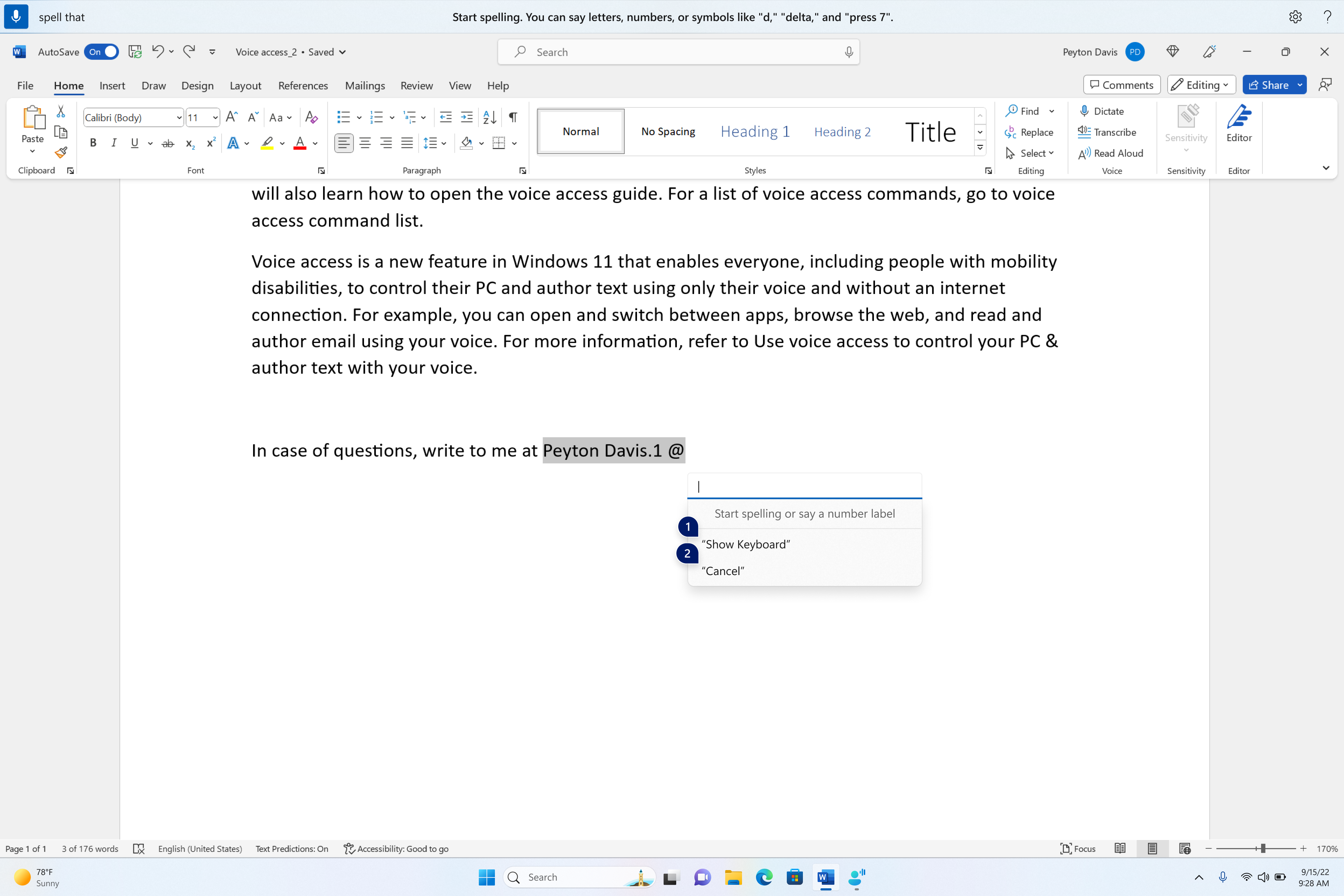
Spelling window is floating on top of the Word application.
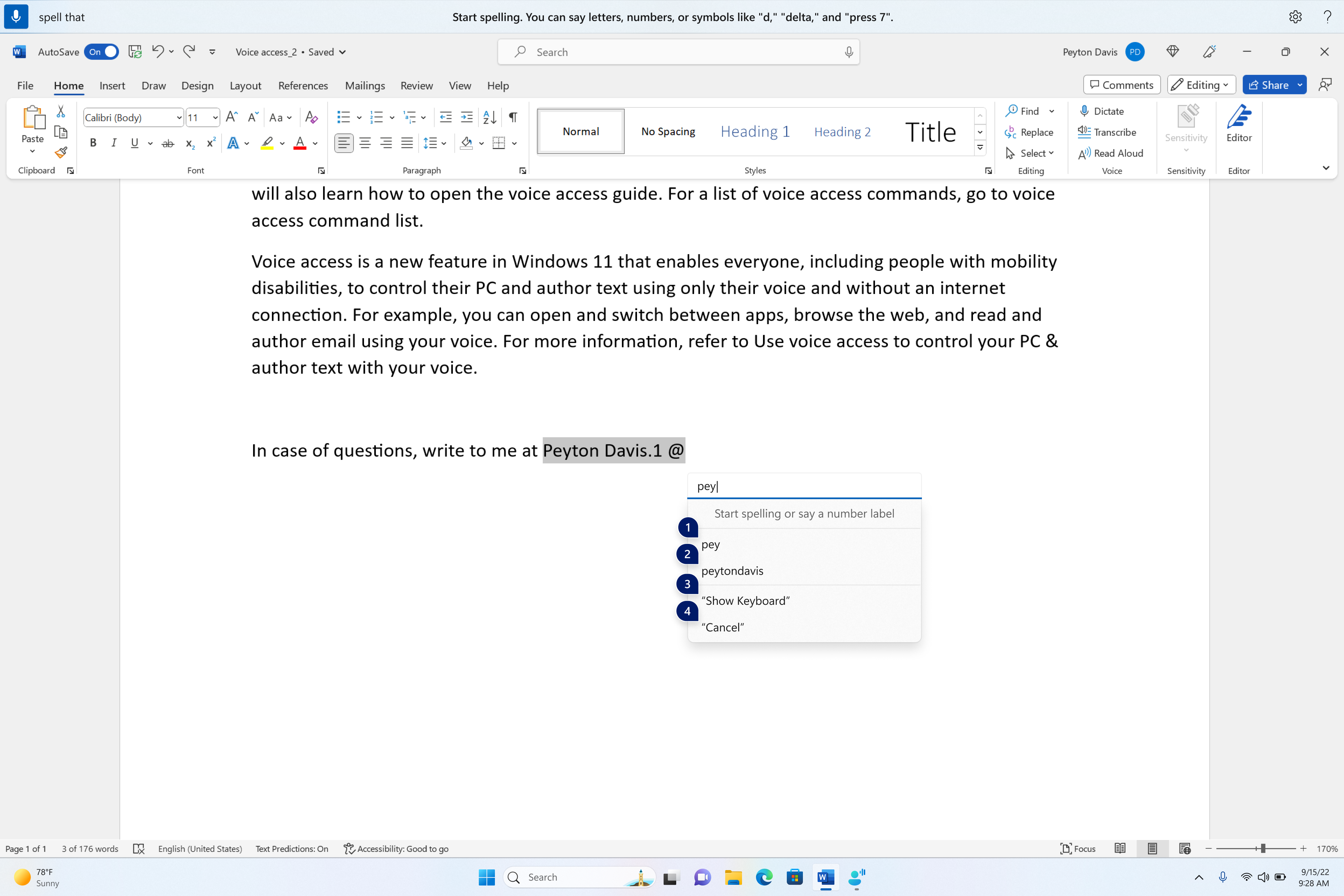
Spelling window showing suggestions as few characters are dictated.
| To do this | Say this |
| Correct a specific word or text | “correct [text]”, e.g., “correct site” |
| Correct selected text or last dictated text | “correct that” |
| Spell a word letter by letter. | , “spell that” |
FEEDBACK: Please file feedback in Feedback Hub (WIN + F) under Accessibility > Voice Access.
Voice access is now available to use on more areas in Windows
We have added support for voice access to work right when you start your PC. You can use voice access to login to your PC and access other areas on the Lock screen. You can turn on voice access from the accessibility flyout on Lock screen or have it on automatically every time by checking the setting to “Start voice access before you sign in to your PC” via Settings > Accessibility > Speech.
Turn On or Off Voice Access in Windows 11
This tutorial will show you how to turn on or off voice access for your account in Windows 11. Voice access is a new experience starting with Windows 11 build 22518 that enables everyone, including people with mobility disabilities, to control their PC and author text using only their voice and...
www.elevenforum.com
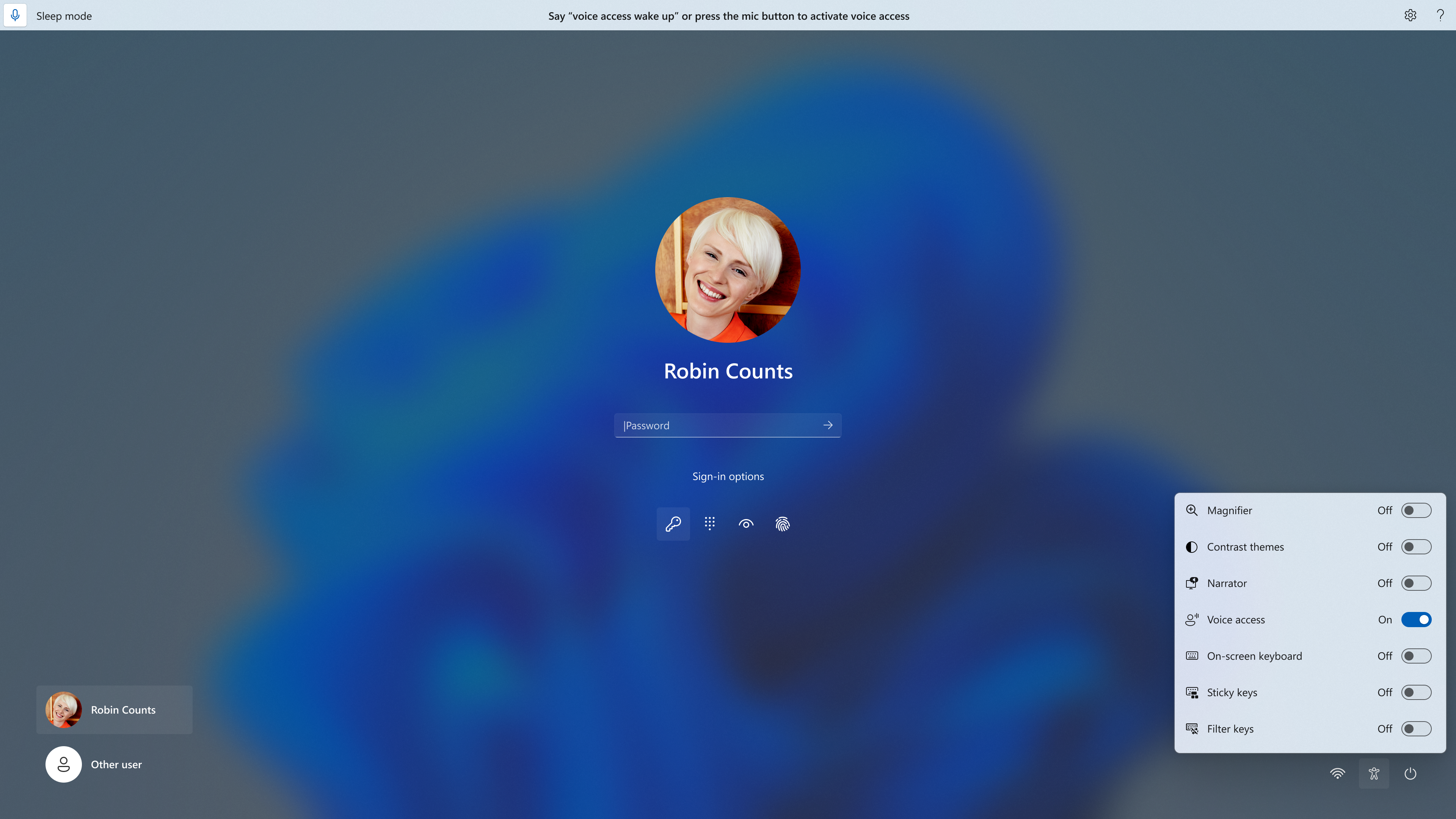
You can use voice access to login to your PC and access other areas on the Lock screen.
Turn On or Off Auto Start Voice Access before Sign in to Windows 11
This tutorial will show you how to turn on or off automatically start voice access before you sign in for all users in Windows 11. Voice access is a new feature in Windows 11 that enables everyone, including people with mobility disabilities, to control their PC and author text using only their...
www.elevenforum.com
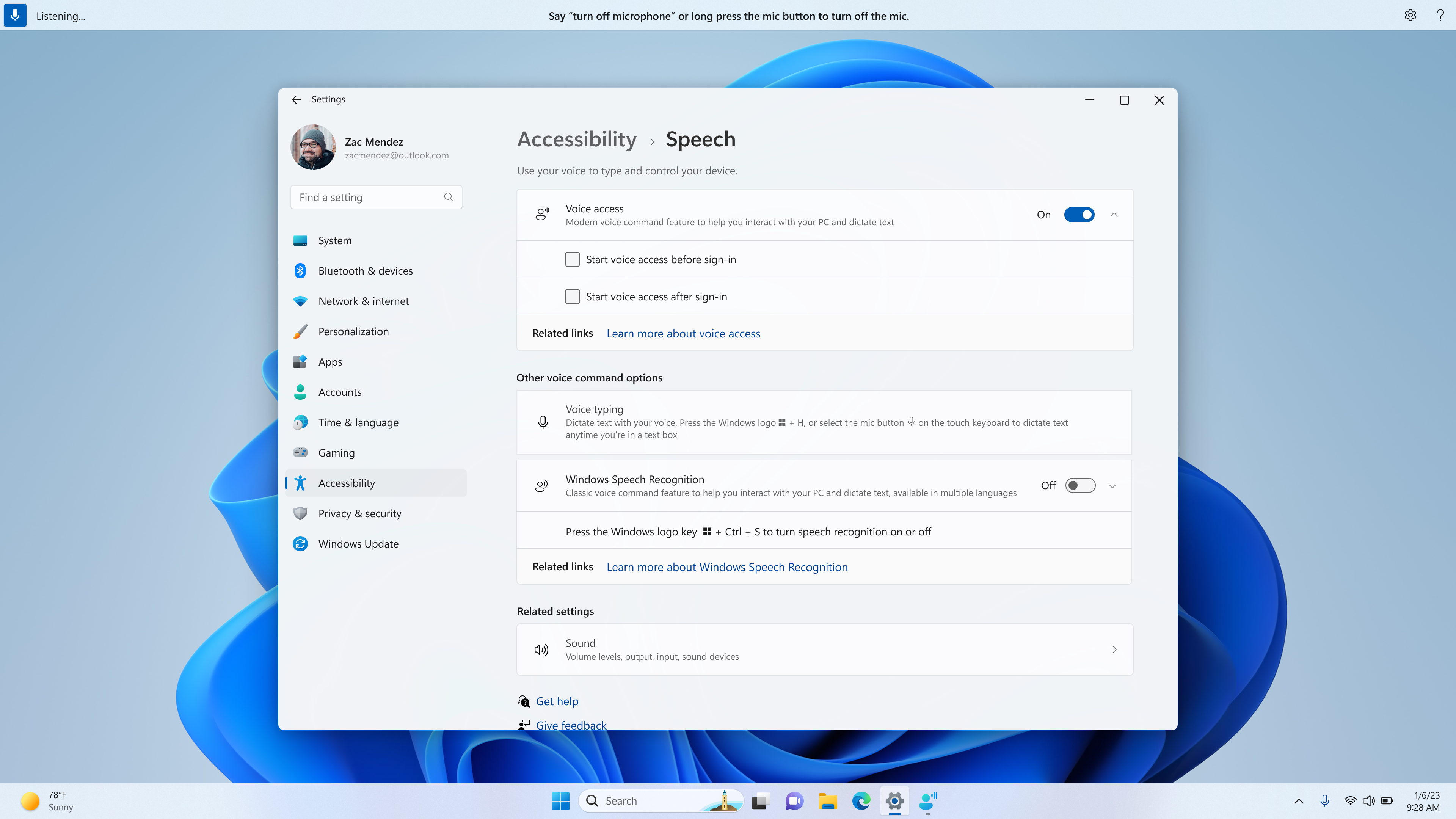
New setting to start voice access before you sign in to your PC.
Note: If you have never tried voice access, we recommend you search for voice access in search on the taskbar and complete the initial setup before trying it first time on the lock screen.
You can follow the instructions on the voice access bar to get your focus on the password field and use your voice to dictate your password or PIN. Alternatively, you can say “show keyboard” to bring up the touch keyboard with number labels on it. You can say the numbers on the keys to enter the letters associated with it. This will mask the actual password you are entering from being heard by anyone in your vicinity.
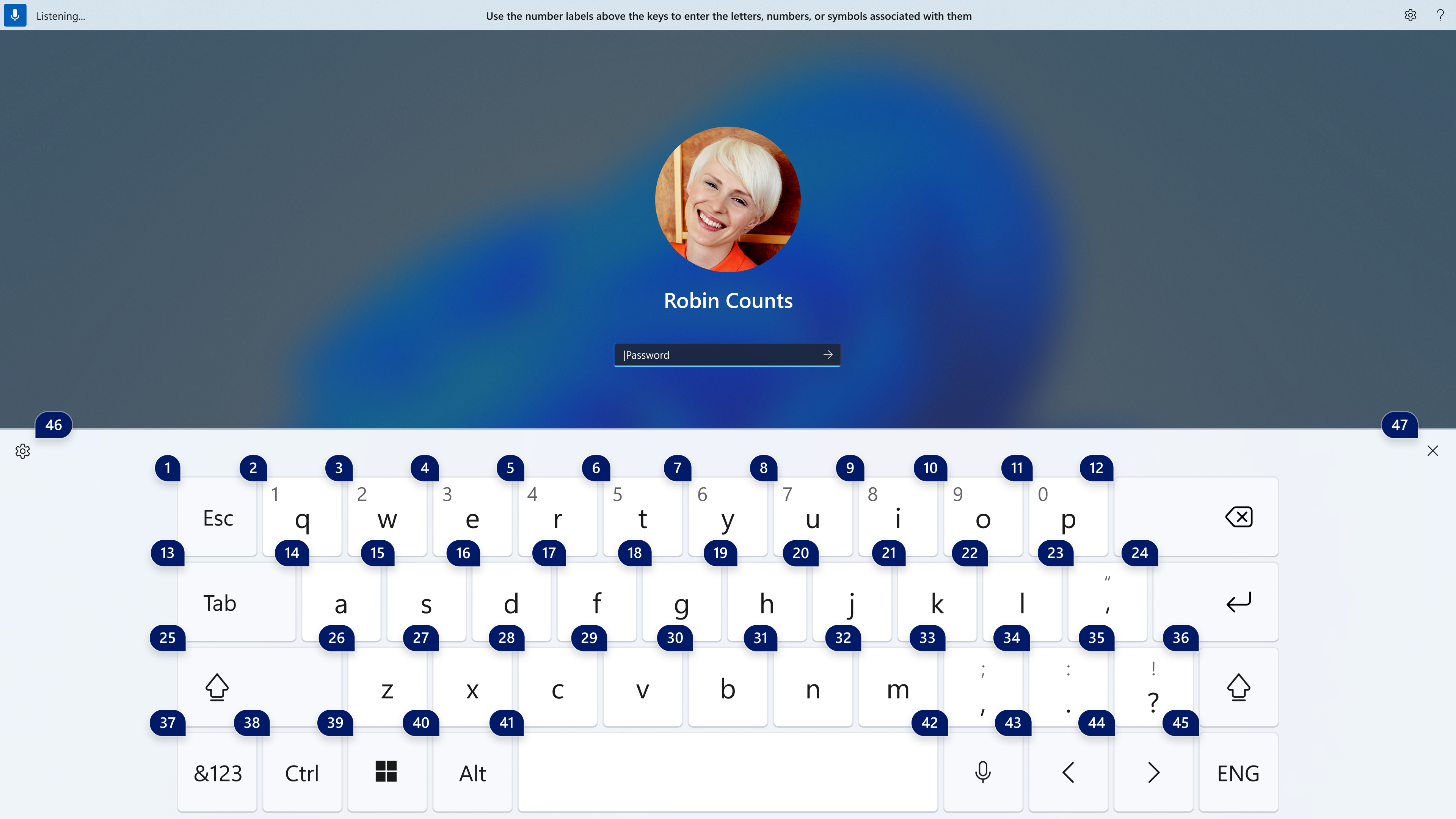
The touch keyboard with number labels on it to use voice access to enter a password.
You can also use other commands such as “show numbers” or “click [element name]” to access other elements on t.
And voice access now works for apps running with Microsoft Defender Application Guard.
FEEDBACK: Please file feedback in Feedback Hub (WIN + F) under Accessibility > Voice Access.
Passwordless experience with Windows Hello for Business
With Windows Hello for Business (WHFB), Windows provides organizations with a strong, phish-resistant credential, helping customers move to a passwordless future. Enterprise customers can now set the EnablePasswordlessExperience policy that promotes a user experience on AAD joined machines for core authentication scenarios without requiring a password. This new experience hides passwords from certain Windows authentication scenarios and leverages passwordless recovery mechanisms, such as WHFB PIN reset, if necessary.Once the policy is set, it removes passwords from the user experience, both for device logon as well as in-session auth scenarios like password managers in a web browser or “Run as” admin scenarios, and User Account Control (UAC). Users will navigate through their core authentication scenarios using WHFB in place of passwords. If the user fails to sign in, recovery mechanisms such as PIN reset or web sign-in can be used to help the user recover their credentials without IT helpdesk engagement.
FEEDBACK: Please file feedback in Feedback Hub (WIN + F) under Security and Privacy > Windows Hello PIN.
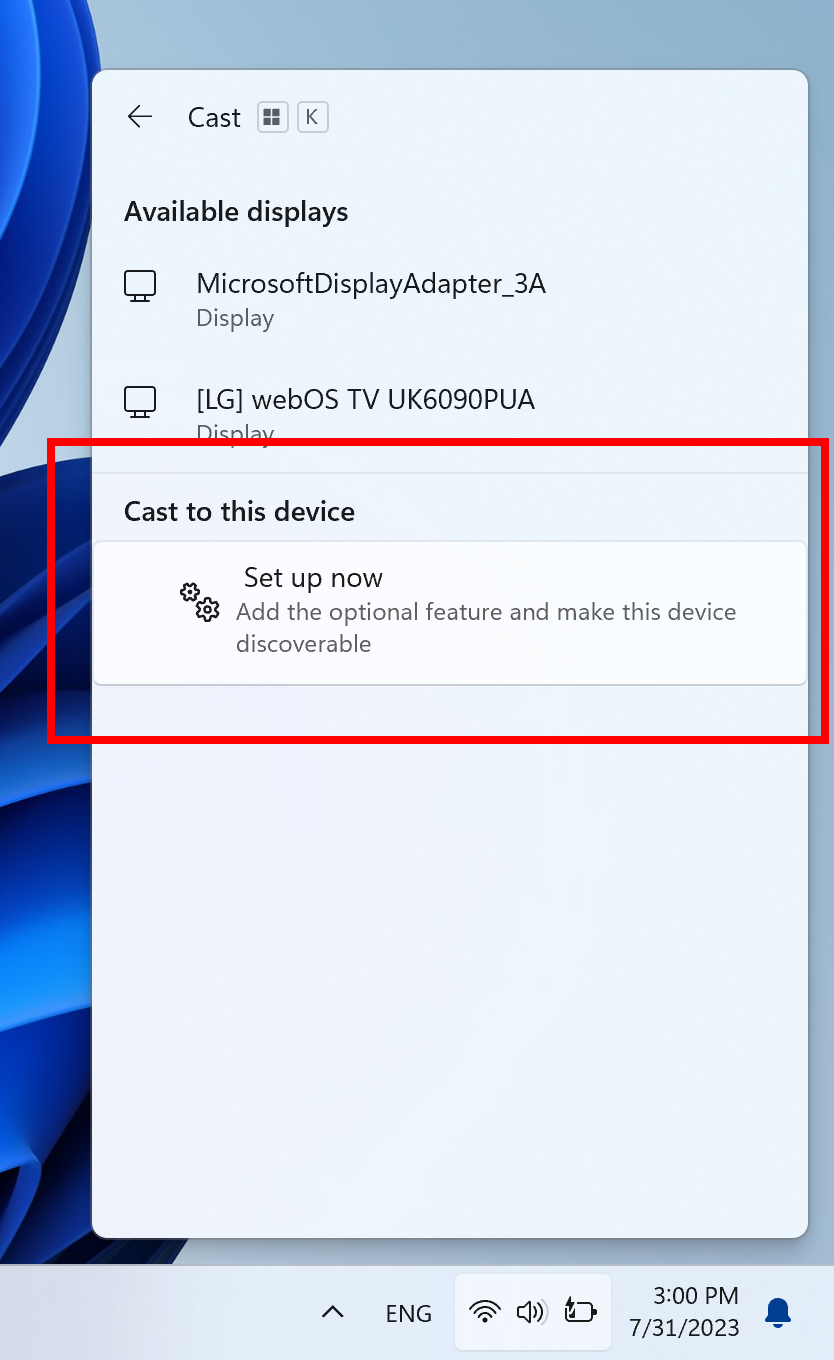
Improving the screen casting experience
Casting from your Windows PC allows you to wirelessly extend your display to another nearby PC, TV or other external displays. We are making some improvements that focus on educating people about the Cast feature, improving its discoverability, and simplifying the overall experience in Windows 11. Those improvements include:- When doing multitasking activities on your PC such as often switching between windows to complete a task or using Snap Assist to organise your screen space, we will provide the suggestion to Cast via a notification toast.
- We will now provide inline setup of a PC from within the Cast flyout in Quick Settings, with step-by-step guidance for users to enable:
- Installation of the optional Wireless Display feature.
- Discoverability of the PC to other devices, via the “Projecting to this PC” Settings page.

Connect to Wireless Display with Miracast in Windows 11
This tutorial will show you how to wirelessly connect your Windows 11 PC to a TV, projector, another PC, or other kind of external display that supports Miracast. Miracast is a wireless technology your PC, laptop, or tablet can use to project your screen to wireless TVs, projectors, and...
www.elevenforum.com

Install or Uninstall Wireless Display app in Windows 11
This tutorial will show you how to install or uninstall the Wireless Display app for all users in Windows 11. If you’re working on a Windows PC and want the apps and content from another device to show on your PC screen, you’ll want to consider mirroring that device‘s screen or projecting it to...
www.elevenforum.com
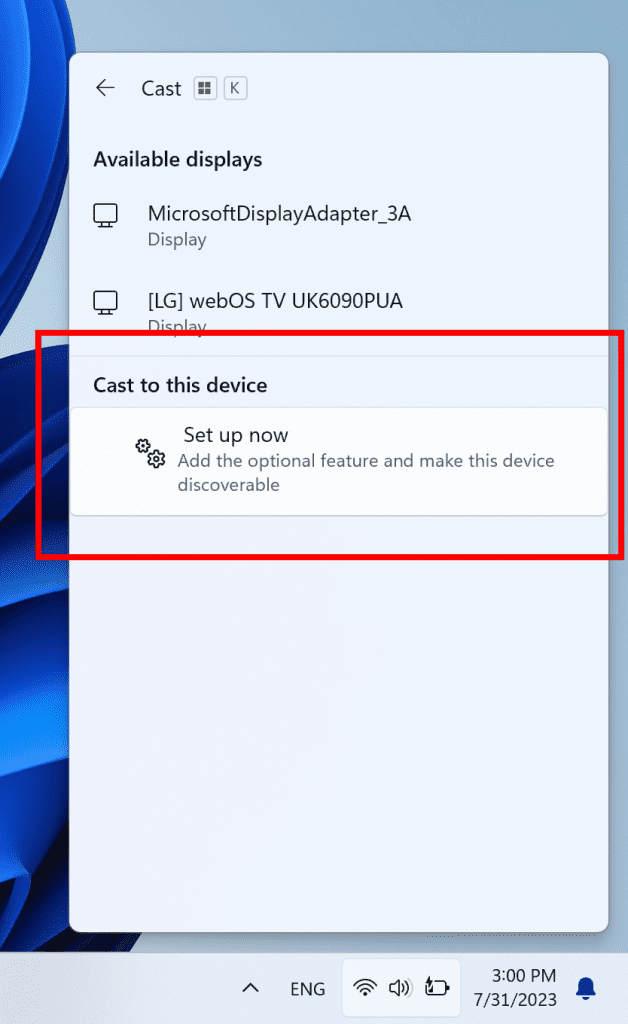
Inline setup of a PC from within the Cast flyout in Quick Settings.
Presence Sensing Improvements
For PCs with presence sensors that support attention detection, we are introducing Adaptive Dimming. Now your device can intelligently dim your screen when you look away and undim when you look back. You will find these settings under Settings > Privacy & security > Presence sensing here if your device supports it.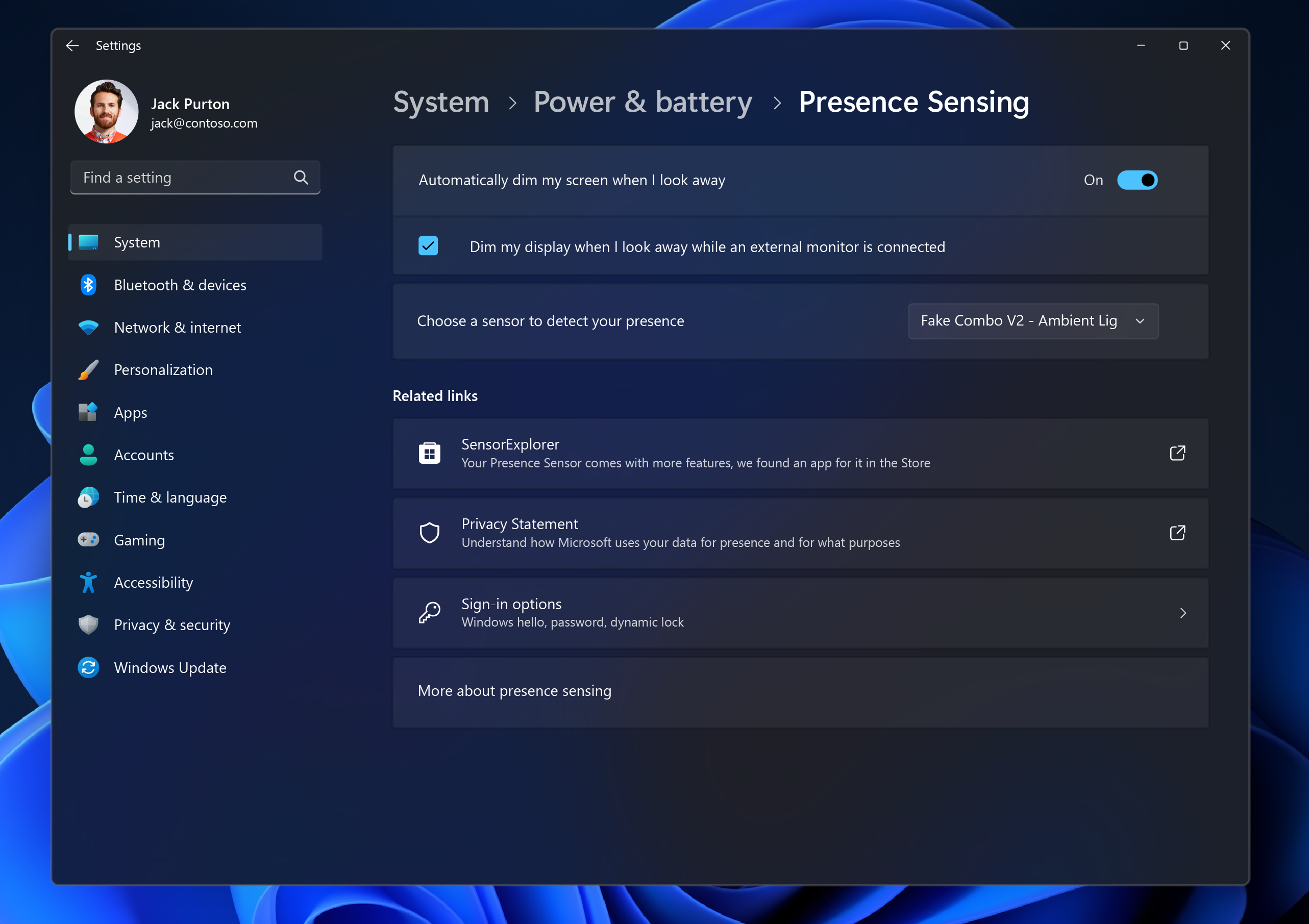
New Adaptive Dimming setting.
Wake on Approach, Lock on Leave, Adaptive Dimming are all powered by Presence Sensing in Windows and now can be enabled via the OOBE (“out of box experience”) setup process when choosing your privacy settings for your device. This will give more control of the presence sensing features and app access to presence information when setting up a new device with a compatible sensor.
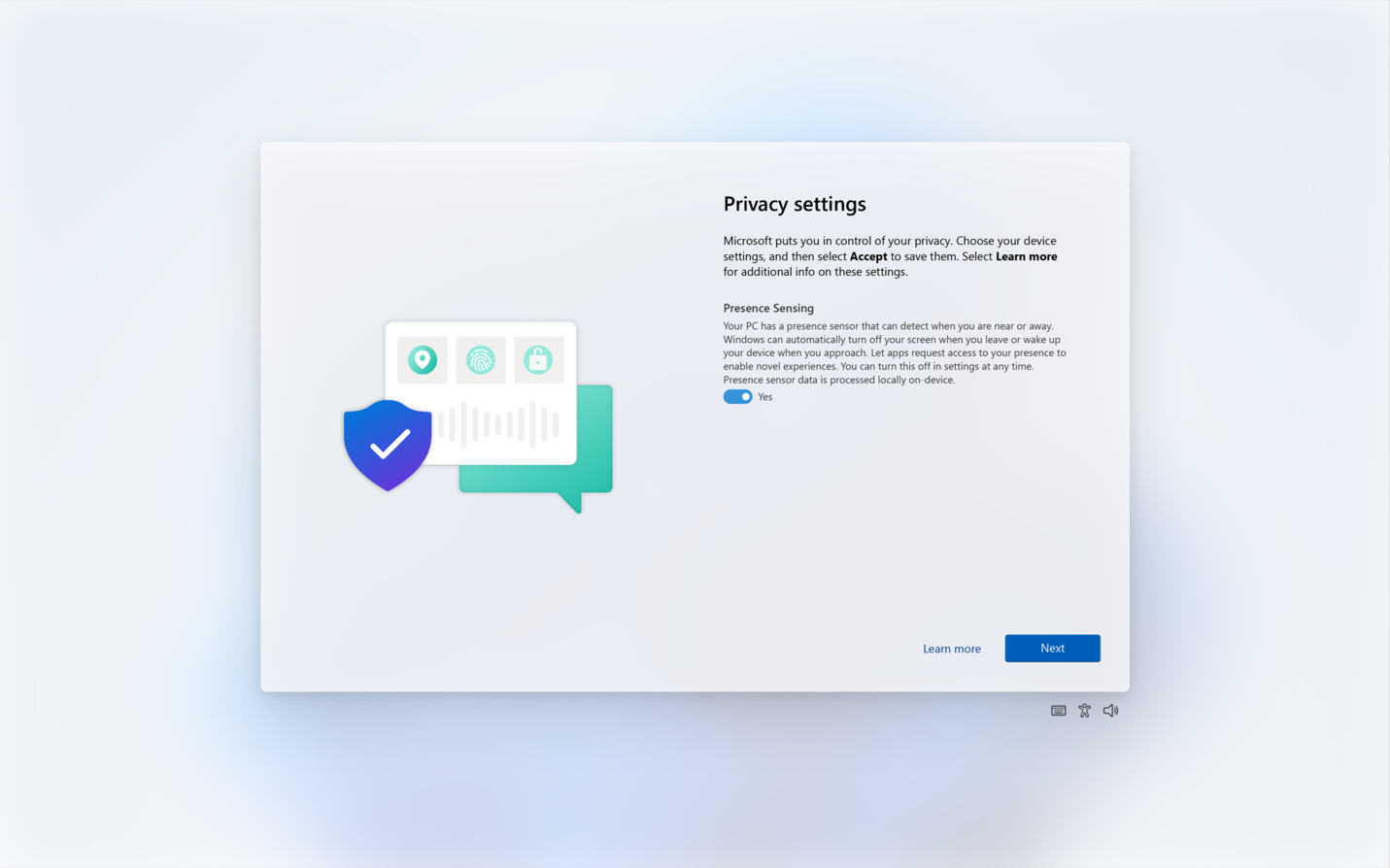
Enabling Presence Sensing in Windows via OOBE.
As a reminder, app developers with devices with compatible presence sensors can target apps to request and read user presence information after requesting a human presence capability. Learn more about the API here.
FEEDBACK: Please file feedback in Feedback Hub (WIN + F) under Devices and Drivers > Sensors.
Changes and Improvements in Build 22631.2129
[Start menu]
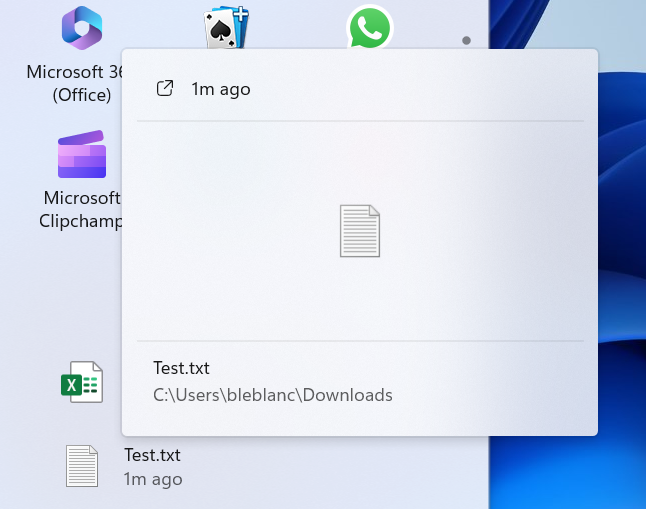
- For people logged into a Windows 11 Pro or Enterprise editions with an AAD account (soon to be Microsoft Entra ID), we are providing a richer preview when hovering over files such as Word documents under Recommended on the Start menu. For this initial release, thumbnails will not be available for all files and a later update will enable the experience for more files and for MSA users. Additionally, when right-clicking on cloud file recommendations, there is now an option to quickly share these files.

Example of richer preview when hovering over files such as Word documents under Recommended on the Start menu.
[Taskbar & System Tray]
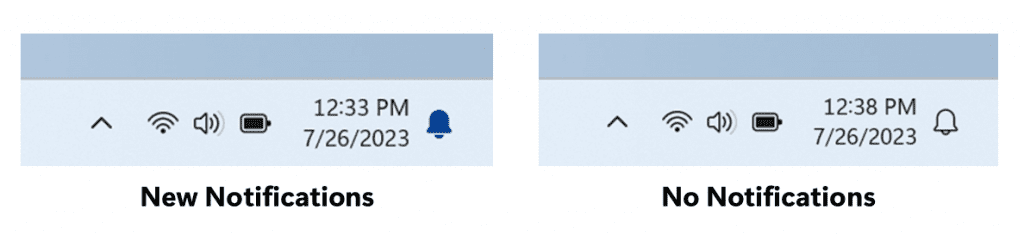
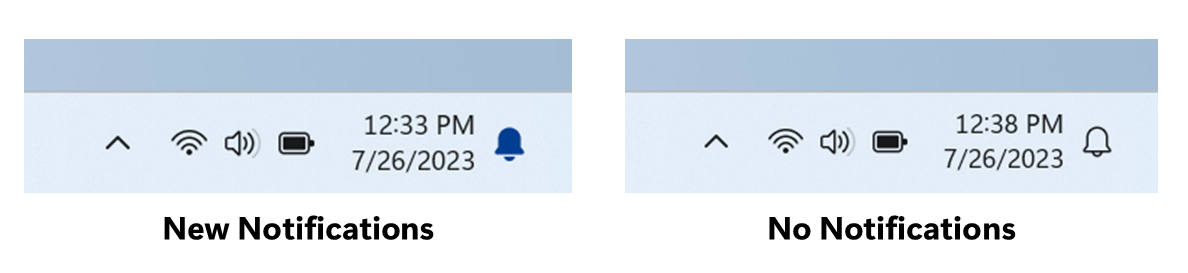
- Notifications will now show as a bell in the system tray and when new notifications come through, the bell will colorize based on your system accent color. When there are no notifications and the clock is visible, the bell will be empty. Notification counts are no longer shown.
Turn On or Off Notifications in Windows 11
This tutorial will show you how to turn on or off getting notifications from all or specific apps and other senders for your account in Windows 11. Notifications are alerts from apps, system, and other senders. Windows 11 shows notifications on the lock screen (Win+L), Notification Center...
www.elevenforum.com
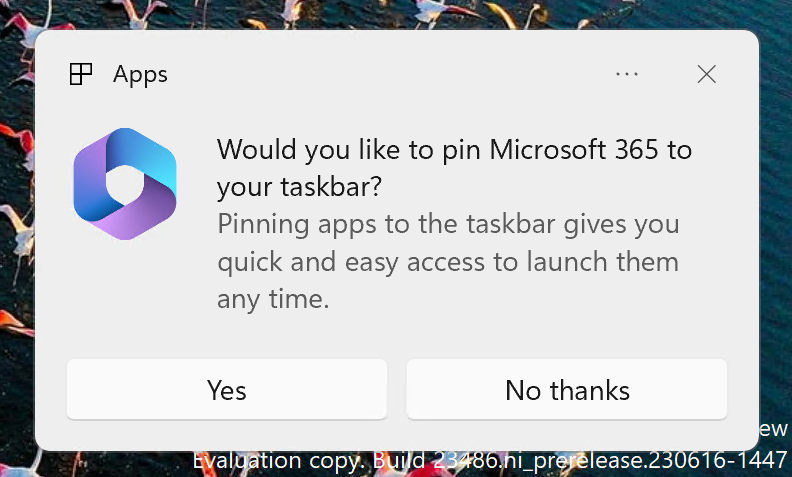
- The updated API for pinning as mentioned here in this blog post are now included in this build for preview.
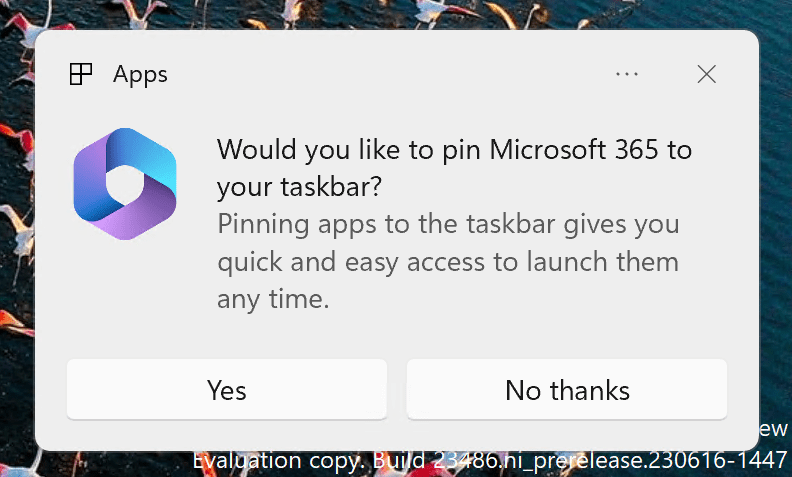
Example of new dialog that is displayed based on the updated API for pinning apps to the taskbar.
[Task Manager]
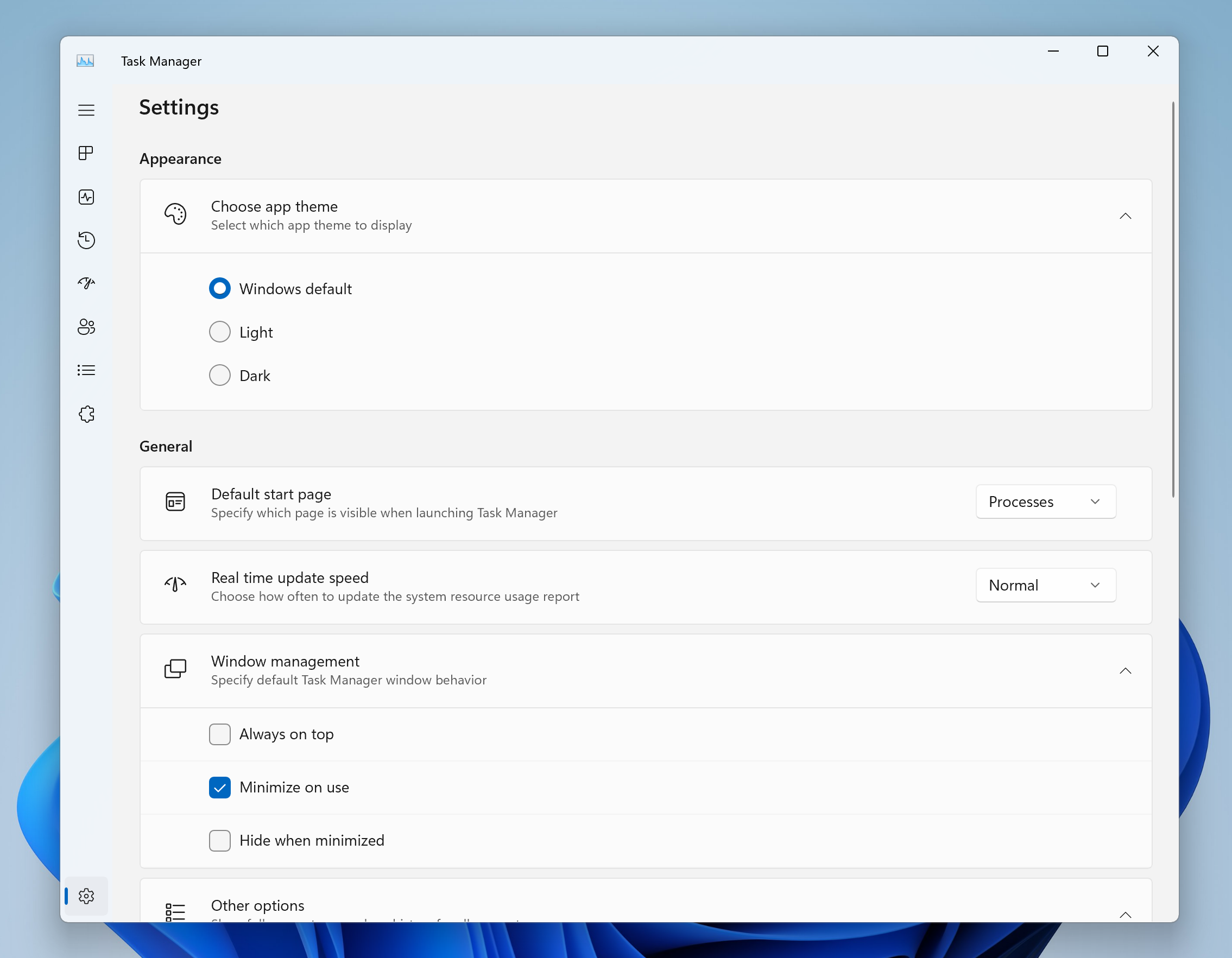
- We’ve updated the Task Manager settings page to match the design principles of Windows 11. The design has a similar look and feel to the Settings in Windows 11 and provides a cleaner UI separating categories into different sections. We will also be enabling this in the Dev Channel soon.
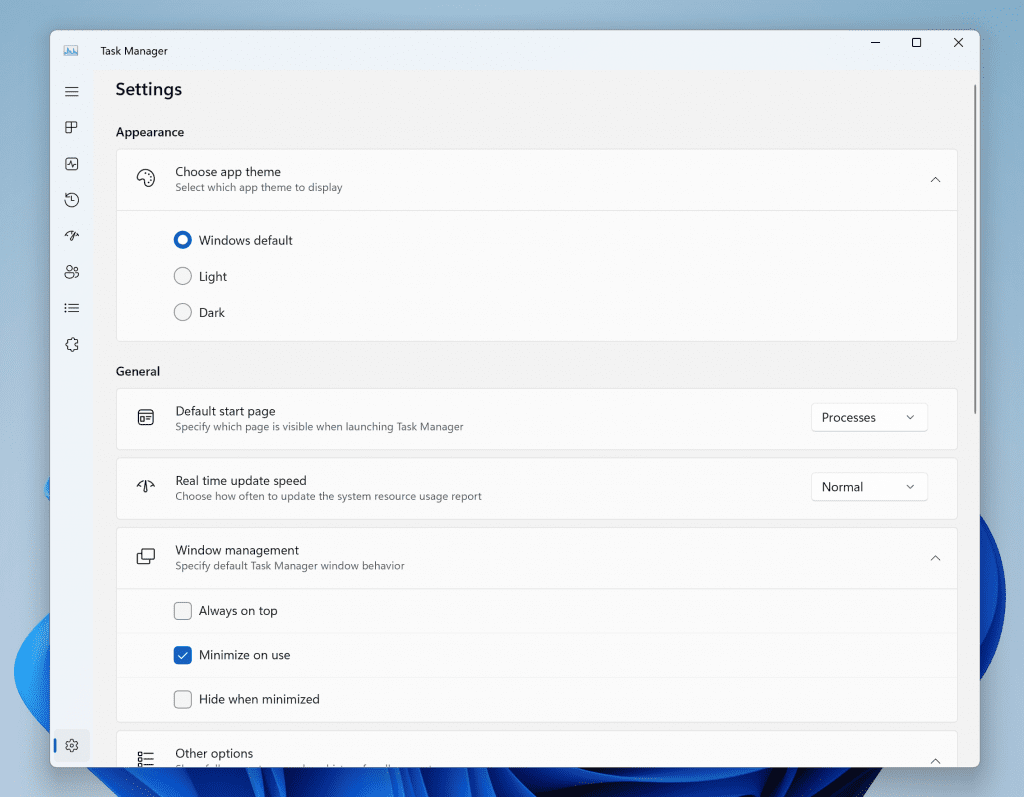
Redesigned Task Manager settings.
[Settings]
- We are improving the user experience when changing time zones, including cases of low confidence in location data. It displays a non-dismissible notification for accepting or rejecting the change and prompts the user for confirmation before adjusting the time zone.
- We are also improving the user experience while changing the time zone via Settings > Time & language > Date & time. If location settings are disabled, a warning is now shown to the user, urging them to enable location settings to ensure accurate time zone adjustments. This warning provides helpful information to the user, helping them understand why their time zone may not be correct and guiding them towards resolving the issue.
Fixes in Build 22631.2129
[File Explorer]
- The keyboard shortcuts to set focus to the search box (CTRL + F, CTRL + E, F3) should work now.
- Fixed an issue where the dropdown in the address bar could appear totally blank.
[Taskbar & System Tray]
- Fixed an issue that was causing quick settings not to open when selecting the network, volume, and battery icons in the system tray.
- Fixed a few issues causing explorer.exe crashes and leading to taskbar reliability issues.
[Notifications]
- Fixed an issue causing Insiders to unexpectedly see a notification suggesting you turn off notifications for an app named NotifyiconGeneratedAumid_*.
[Input]
- Fixed a high hitting ctfmon.exe crash in the last two flights, which could impact the ability to type.
[Task View & Desktops]
- Adjusted the desktops switching animation to ease into the animation a little more.
[Task Manager]
- Fixed an issue where some of the app icons in the Startup Apps section of Task Manager were very tiny.
- Fixed an issue where the selection color wasn’t displaying correctly if you were using a contrast theme.
- Fixed an issue where focus wasn’t getting set correctly to search if the Task Manager window was small enough that search was collapsed to an icon.
- Fixed alignment of Task Manager icon and name in the title bar.
Known issues
[General]
- We’re working on the fix for an issue causing explorer.exe to crash on the login screen when attempting to enter safe mode.
[File Explorer]
- We’re working on the fix for an issue causing File Explorer to crash when going to Home. If you encounter this when opening File Explorer, you may need to use Search or the Run dialog to open File Explorer directly to a specific folder (for example, C:).
- In some cases, the context menu background in File Explorer may appear transparent.
- In some cases, the icons on your desktop may all go blank. If this happens, using the refresh option in the desktop context menu should resolve it.
[Taskbar]
- We’re working on a fix for an issue causing the safely remove hardware icon to not appear when expected in the system tray.
[Input]
- We’re investigating reports that typing with the Japanese and Chinese IMEs is not working correctly after the last flight.
[Narrator]
- You may see some of the strings are NOT localized to the selected language. This will be fixed in a future flight.
About the Beta Channel
The Beta Channel is the place we preview experiences that are closer to what we will ship to our general customers. Because the Dev and Beta Channels represent parallel development paths from our engineers, there may be cases where features and experiences show up in the Beta Channel first. However, this does not mean every feature we try out in the Beta Channel will ship. We encourage Insiders to read this blog post that outlines the ways we’ll try things out with Insiders in both the Dev and Beta Channels.Important Insider Links
- Want to learn how we made Windows 11? Check out our Inside Windows 11 website to hear and meet our makers from Engineering, Design and Research to share their insights and unique perspectives throughout this journey.
- You can check out our Windows Insider Program documentation here.
- Check out Flight Hub for a complete look at what build is in which Insider channel.
Amanda & Brandon
Source:
Announcing Windows 11 Insider Preview Build 22621.2129 and 22631.2129
Hello Windows Insiders, today we are releasing Windows 11 Insider Preview Build 22621.2129 and Build 22631.2129 (KB5029359) to the Beta Channel. Build 22631.2129 = New features rolling out.
blogs.windows.com
Check Windows Updates
UUP Dump:
64-bit ISO download:
Select language for Windows 11 Insider Preview 10.0.22621.2129 (ni_release) amd64
Select language for Windows 11 Insider Preview 10.0.22621.2129 (ni_release) amd64 on UUP dump. UUP dump lets you download Unified Update Platform files, like Windows Insider updates, directly from Windows Update.
uupdump.net
Select language for Windows 11 Insider Preview 10.0.22631.2129 (ni_release) amd64
Select language for Windows 11 Insider Preview 10.0.22631.2129 (ni_release) amd64 on UUP dump. UUP dump lets you download Unified Update Platform files, like Windows Insider updates, directly from Windows Update.
uupdump.net
ARM64 ISO download:
Select language for Windows 11 Insider Preview 10.0.22621.2129 (ni_release) arm64
Select language for Windows 11 Insider Preview 10.0.22621.2129 (ni_release) arm64 on UUP dump. UUP dump lets you download Unified Update Platform files, like Windows Insider updates, directly from Windows Update.
uupdump.net
Select language for Windows 11 Insider Preview 10.0.22631.2129 (ni_release) arm64
Select language for Windows 11 Insider Preview 10.0.22631.2129 (ni_release) arm64 on UUP dump. UUP dump lets you download Unified Update Platform files, like Windows Insider updates, directly from Windows Update.
uupdump.net
UUP Dump - Download Windows Insider ISO
UUP Dump is the most practical and easy way to get ISO images of any Insider Windows 10 or Windows 11 version, as soon as Microsoft has released a new build. UUP Dump creates a download configuration file according to your choices, downloads necessary files directly from Microsoft servers, and...
www.elevenforum.com
Last edited: