Insider KB5030120 Windows 11 Insider Canary Build 25931.1010 (23H2) - Aug. 21


UPDATE 8/25:
New #Windows11 #WindowsInsiders Preview Build 25936.1000 (rs_prerelease) released to Canary channel #WIMVP


 Windows Blogs:

UPDATE 8/21: We are starting to roll out Cumulative Update Build 25931.1010 (KB5030120). This update does not include anything new and is designed to test our servicing pipeline for builds in the Canary Channel.


Hello Windows Insiders, today we are releasing Windows 11 Insider Preview Build 25931 to the Canary Channel. We are releasing ISOs for this build – they can be downloaded here.

REMINDER: As builds released to the Canary Channel are “hot off the presses,” we will offer limited documentation for builds flighted to the Canary Channel including documenting only the most significant and highly impactful known issues. Please note that we will not publish a blog post for every flight – only when new features are available in a build.

What’s new in Build 25931

New features from the Dev Channel

This build includes new features from the Dev Channel such as Unicode Emoji 15 support, voice access is available to use on more areas in Windows such as the Lock screen, and more.


DC location will no longer use NetBIOS\WINS\mailslot-based discovery by default

We have previously announced the deprecation of both Windows Internet Name Service (WINS) and Remote Mailslots (see this blog post here for information on Remote Mailslots). These deprecations are legacy technologies that are no longer secure in today’s environments. As part of these deprecations, DC location in your environment may be affected mainly because many legacy applications still specify short NetBIOS-style domain names when trying to locate a domain controller (DC). To help ease this transition with these deprecations, we are making two improvements to the DC locator algorithm in Windows.

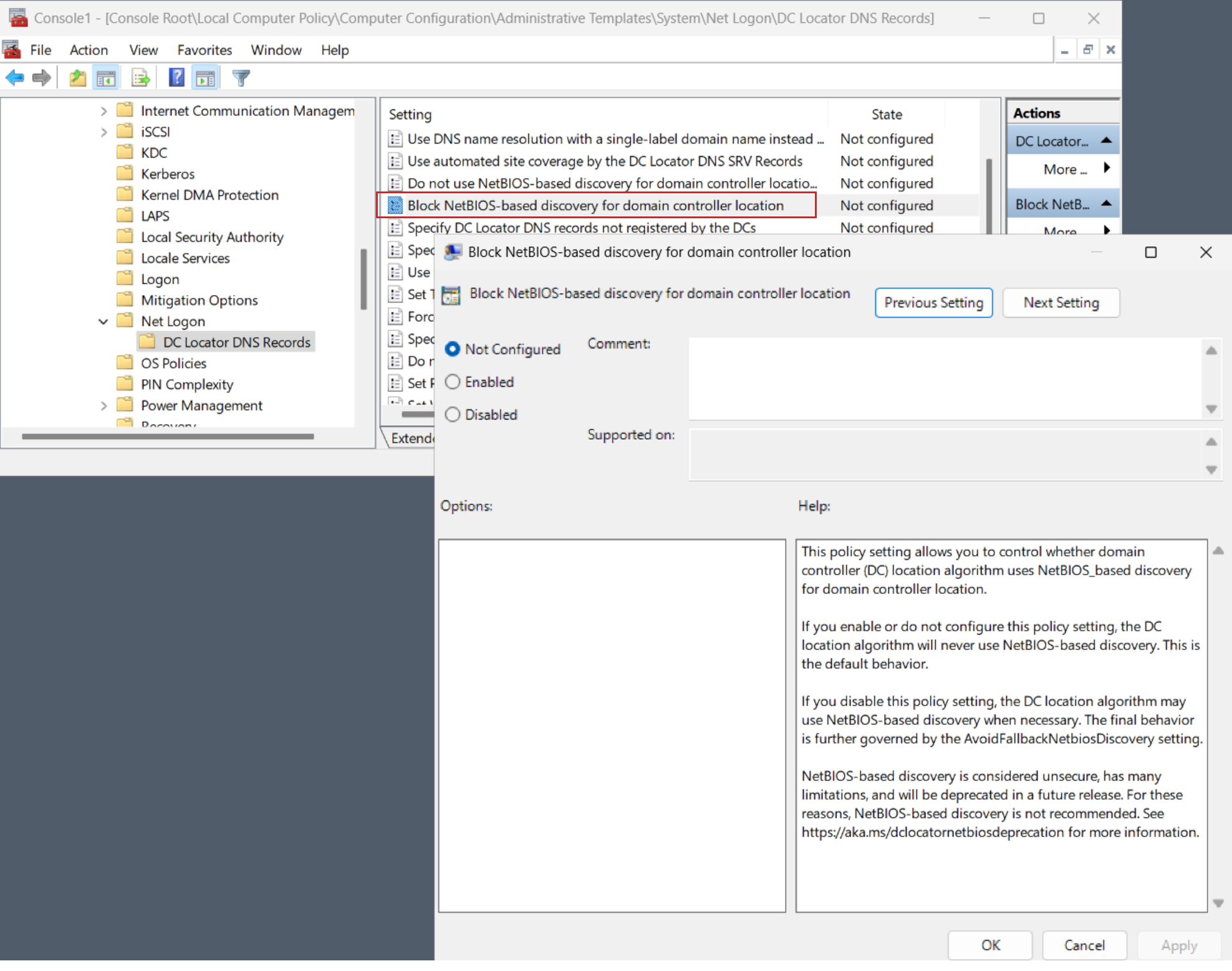
First, we are blocking by default the use of NetBIOS\WINS\mailslot-based methods for DC-discovery. This behavior can be reverted with the use of a new Group Policy setting (BlockNetBIOSDiscovery). In addition to disabling the new BlockNetBIOSDiscovery policy, reversion to default behavior also requires enabling the EnableMailslots SMB configuration option. (You can query and set the EnableMailslots setting using the Get-SmbClientConfiguration and Set-SmbClientConfiguration PowerShell cmdlets.)

PLEASE NOTE: Reversion should be considered only as a temporary measure while more viable, longer-term solutions are explored.
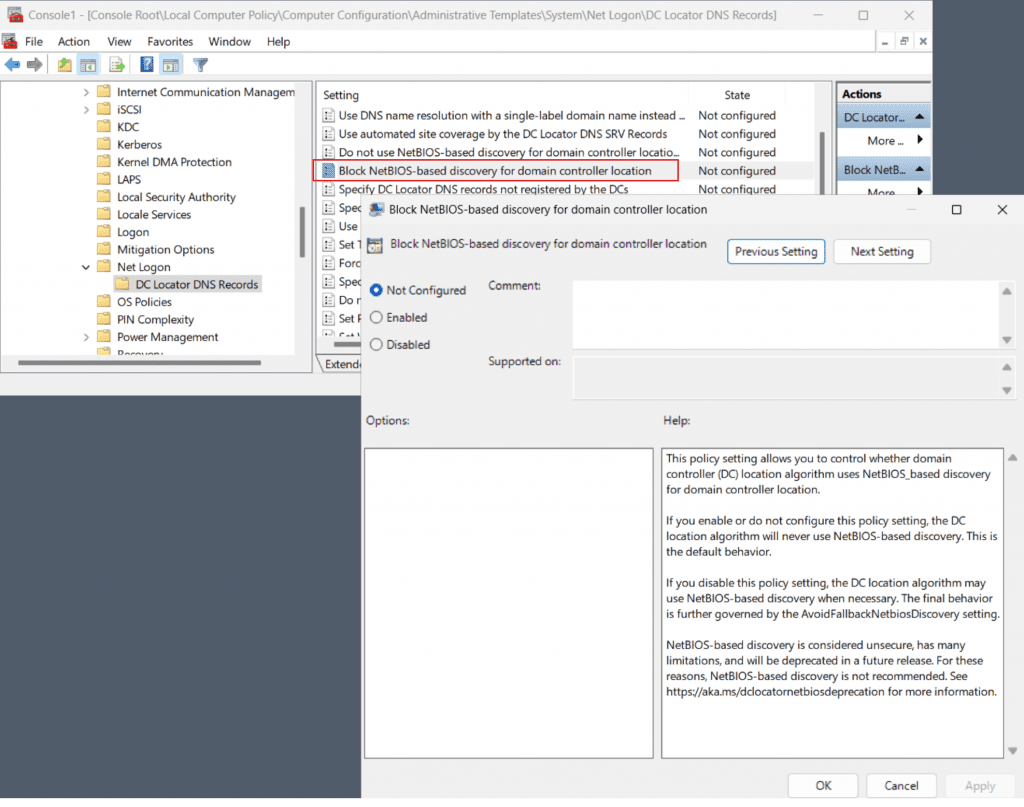
Screenshot of the BlockNetBIOSDiscovery Group Policy setting.

Second, we have added additional client-side logic to aid in the mapping of short NetBIOS-style domain names to DNS domain names. This improvement consists of two parts:
  1. DC locator will now automatically download additional information about the child domains in trusting forests and use that information as part of the discovery algorithm.
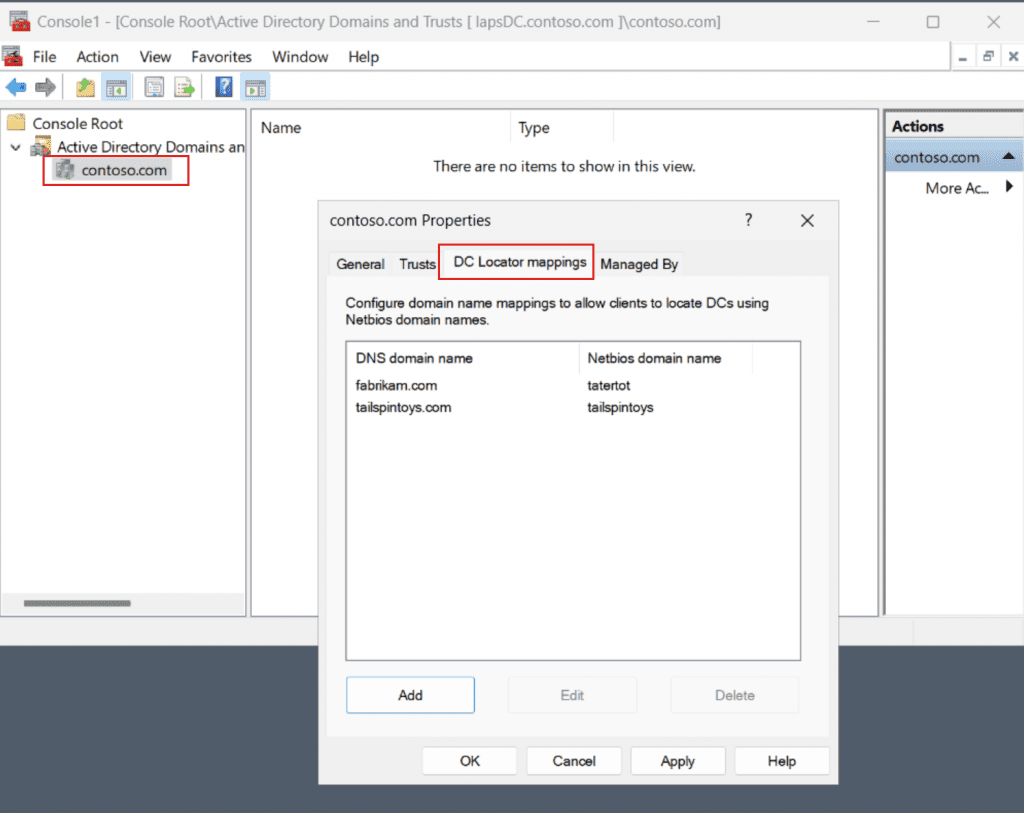
  2. As a last-resort fallback, and to accommodate unforeseen situations, forest administrators can manually configure a set of DNS-to-NetBIOS-domain-name mappings (using the Active Directory Domains and Trusts management snap-in) which are also downloaded and used by DC Locator during discovery.

    Screenshot of the DC Locator domain name mappings property page in the Active Directory Domains and Trusts snap-in.
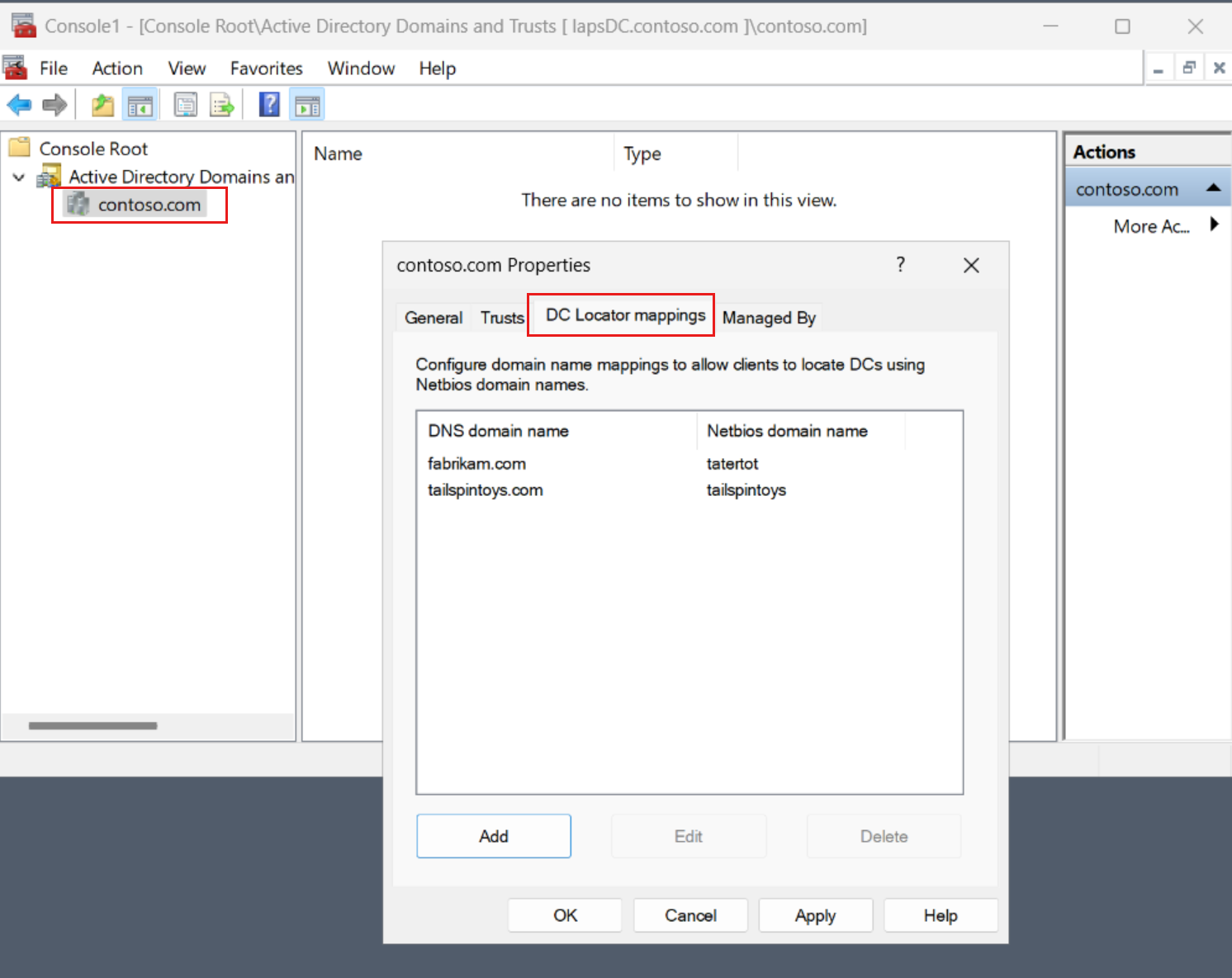
    Screenshot of the DC Locator domain name mappings property page in the Active Directory Domains and Trusts snap-in.
Additional information is available here for DC locator changes.

Changes and Improvements

[General]

  • Insider Preview Build Expiration: The expiration date for Insider Preview builds flighted to the Canary Channel has been updated to 9/15/2024 starting with Build 25931. Please make sure you are updated to the latest build in the Canary Channel.
  • In addition to the Camera app and Cortana, the Photos app, People app, and Remote Desktop (MSTSC) client can be uninstalled.

[File Explorer]

  • Added more fields to show in the Details pane, including image dimensions for pictures, number of pages for .docx, space used and free information for drives, and many others.

[Dynamic Lighting]

  • You can now instantly sync your Windows accent color with the devices around you with the “Match my Windows accent color” toggle under “Effects” for Dynamic Lighting via Settings > Personalization > Dynamic Lighting.

[Windows Spotlight]

  • After doing an OS update, in certain cases such as using the default Windows 11 background or a solid color – Windows Spotlight may be enabled for you. If you decide you don’t want Windows Spotlight enabled, you can turn it off and in future OS updates it should not be enabled for you again unless you choose to re-enable the experience.

Fixes for known issues

  • We fixed a major issue where you could no longer connect over SMB to a third-party storage device using guest (no username or password) credentials.

For developers

You can download the latest Windows Insider SDK at aka.ms/windowsinsidersdk.

SDK NuGet packages are now also flighting at NuGet Gallery | WindowsSDK which include:
These NuGet packages provide more granular access to the SDK and better integration in CI/CD pipelines.

SDK flights are now published for both the Canary and Dev Channels, so be sure to choose the right version for your Insider Channel.

Remember to use adaptive code when targeting new APIs to make sure your app runs on all customer machines, particularly when building against the Dev Channel SDK. Feature detection is recommended over OS version checks, as OS version checks are unreliable and will not work as expected in all cases.

About the Canary Channel

The Canary Channel is the place to preview platform changes that require longer-lead time before getting released to customers. Some examples of this include major changes to the Windows kernel, new APIs, etc. Builds that we release to the Canary Channel should not be seen as matched to any specific release of Windows and some of the changes we try out in the Canary Channel will never ship, and others could show up in future Windows releases when they’re ready.

The builds that will be flighted to the Canary Channel are “hot off the presses,” flighting very soon after they are built, which means very little validation and documentation will be done before they are offered to Insiders. These builds could include major issues that could result in not being able to use your PC correctly or even in some rare cases require you to reinstall Windows. We will offer limited documentation for the Canary Channel, but we will not publish a blog post for every flight – only when new features are available in a build.

Our Canary Channel won’t receive daily builds; however, we may ramp up releasing builds more frequently in the future.

The desktop watermark you see at the lower right corner of your desktop is normal for these pre-release builds.

Important Insider Links

Thanks,
Amanda & Brandon


 Source:


Check Windows Updates


UUP Dump:

64-bit ISO download:

ARM64 ISO download:

 
Last edited:
I have not seen what you describe, or at least I don't understand exactly what you are doing.
Are you saving files on the desktop and then moving them around?
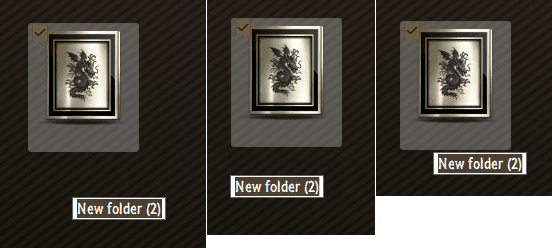
The file either already exists at that spot or it's a file that is moved to that spot either from somewhere else on the desktop or anoher folder, it seems only effect files on the right half of the screen. If you rename a file already there (it does change the name) or drag a file there, a few seconds later, you will see it basically get moved to the top left corner where it can either be "A" or "B" at the left and basically push all existing icons down.

A
B

Might be easier to explain if I can figure out how to get virtual desktop working or a image of a desktop that has files as it could be due to a limit on the # of things one can have on a desktop.
 
Last edited:

My Computer

System One

  • OS
    WindowsXP/7/8/8.1/10/11,Linux,Android,FreeBSD Unix
    Computer type
    Laptop
    Manufacturer/Model
    Dell XPS 15 9570
    CPU
    Intel® Core™ i7-8750H 8th Gen 2.2Ghz up to 4.1Ghz
    Motherboard
    Dell XPS 15 9570
    Memory
    64GB using 2x32GB CL16 Mushkin redLine modules
    Graphics Card(s)
    Intel UHD 630 & NVIDIA GeForce GTX 1050 Ti with 4GB DDR5
    Sound Card
    Realtek ALC3266-CG
    Monitor(s) Displays
    15.6" 4K Touch UltraHD 3840x2160 made by Sharp
    Screen Resolution
    3840x2160 4K UltraHD
    Hard Drives
    Samsung MZ-V9P4T0B/AM 990 PRO 4TB PCIe®4.0 NVMe™ M.2 SSD was Toshiba KXG60ZNV1T02 NVMe 1TB SSD
    PSU
    Dell XPS 15 9570
    Case
    Dell XPS 15 9570
    Cooling
    Stock
    Keyboard
    Stock
    Mouse
    SwitftPoint ProPoint
    Internet Speed
    Comcast/XFinity 1.44Gbps/42.5Mbps
    Browser
    Microsoft EDGE (Chromium based) & Google Chrome
    Antivirus
    Windows Defender that came with Windows
The file either already exists at that spot or it's a file that is moved to that spot either from somewhere else on the desktop or anoher folder, it seems only effect files on the right half of the screen. If you rename a file already there (it does change the name) or drag a file there, a few seconds later, you will see it basically get moved to the top left corner where it can either be "A" or "B" at the left and basically push all existing icons down.

A
B

Might be easier to explain if I can figure out how to get virtual desktop working or a image of a desktop that has files as it could be due to a limit on the # of things one can have on a desktop.
Sometimes the recycle bin is moved downwards to leave an empty space top left of the desktop. Don't know what tiggers this, though, and it doesn't happen very often.
 

My Computers

System One System Two

  • OS
    Win 11 Pro
    Computer type
    Laptop
    Manufacturer/Model
    ASUS Vivobook
    CPU
    AMD Ryzen™ 7 7730U
    Motherboard
    M1605YA
    Memory
    24GB Dual-Channel DDR4 @ 1596MHz (22-22-22-52)
    Graphics Card(s)
    512MB ATI AMD Radeon Graphics (ASUStek Computer Inc)
    Monitor(s) Displays
    Generic PnP Monitor (1920x1200@60Hz) - P1 PLUS (1920x1080@59Hz)
    Screen Resolution
    1920 X 1200
    Hard Drives
    953GB Western Digital WD
    PSU
    45 Watts
    Mouse
    Lenovo Bluetooth.
    Internet Speed
    500 Mbps
    Browser
    Edge
    Antivirus
    Defender
  • Operating System
    Windows 11
    Computer type
    Laptop
    Manufacturer/Model
    ACER NITRO
    CPU
    AMD Ryzen 7 5800H / 3.2 GHz
    Motherboard
    CZ Scala_CAS (FP6)
    Memory
    32 GB DDR4 SDRAM 3200 MHz
    Graphics card(s)
    NVIDIA GeForce RTX 3060 6 GB GDDR6 SDRAM
    Sound Card
    Realtek Audio. NVIDIA High Definition Audio
    Monitor(s) Displays
    15.6" LED backlight 1920 x 1080 (Full HD) 144 Hz
    Screen Resolution
    1920 x 1080 (Full HD)
    Hard Drives
    Samsung 970 Evo Plus 2TB NVMe M.2
    PSU
    180 Watt, 19.5 V
    Mouse
    Lenovo Bluetooth
    Internet Speed
    500 Mbps
    Browser
    Edge
    Antivirus
    Defender
The file either already exists at that spot or it's a file that is moved to that spot either from somewhere else on the desktop or anoher folder, it seems only effect files on the right half of the screen. If you rename a file already there (it does change the name) or drag a file there, a few seconds later, you will see it basically get moved to the top left corner where it can either be "A" or "B" at the left and basically push all existing icons down.

A
B

Might be easier to explain if I can figure out how to get virtual desktop working or a image of a desktop that has files as it could be due to a limit on the # of things one can have on a desktop.
I cannot reproduce what you are describing on my machines, regardless of where I move the files on the screen.
The only problem I see are the icons becoming white because they are not refreshing.
The second problem I see is when I change the icon and click apply, the icon does not show until I hit refresh. 🤷‍♂️
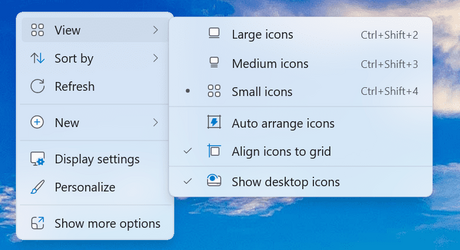
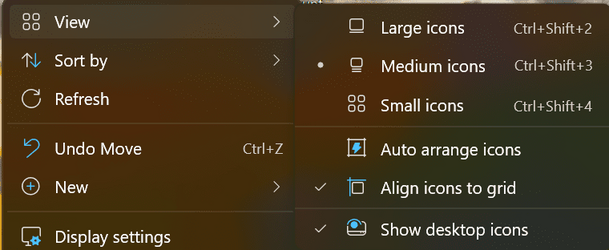
What are the view settings for your desktop? Auto arrange icons is unchecked here.

1692855203841.png
 

My Computer

System One

  • OS
    Windows 11 Pro 25H2
    Computer type
    PC/Desktop
    Manufacturer/Model
    Dell XPS 8930
    CPU
    Intel I9-9900K
    Memory
    64GB
    Graphics Card(s)
    NVIDIA RTX 2060
    Sound Card
    NVIDIA High Definition Audio
    Monitor(s) Displays
    4k Samsung
    Screen Resolution
    3840 x 2160
    Hard Drives
    512GB NVMe, ADATA SU 800, 2TB HDD
@fg2001gf11F - It could either be the number of item(s) or it could e after a certain item # as I am using 3840x2160 resolution.

1692862164943.png

I mean the problem is since I have 14 icons per row and basically whenever this happens, I have to move 10 rows of icons so it's correct again.
 

My Computer

System One

  • OS
    WindowsXP/7/8/8.1/10/11,Linux,Android,FreeBSD Unix
    Computer type
    Laptop
    Manufacturer/Model
    Dell XPS 15 9570
    CPU
    Intel® Core™ i7-8750H 8th Gen 2.2Ghz up to 4.1Ghz
    Motherboard
    Dell XPS 15 9570
    Memory
    64GB using 2x32GB CL16 Mushkin redLine modules
    Graphics Card(s)
    Intel UHD 630 & NVIDIA GeForce GTX 1050 Ti with 4GB DDR5
    Sound Card
    Realtek ALC3266-CG
    Monitor(s) Displays
    15.6" 4K Touch UltraHD 3840x2160 made by Sharp
    Screen Resolution
    3840x2160 4K UltraHD
    Hard Drives
    Samsung MZ-V9P4T0B/AM 990 PRO 4TB PCIe®4.0 NVMe™ M.2 SSD was Toshiba KXG60ZNV1T02 NVMe 1TB SSD
    PSU
    Dell XPS 15 9570
    Case
    Dell XPS 15 9570
    Cooling
    Stock
    Keyboard
    Stock
    Mouse
    SwitftPoint ProPoint
    Internet Speed
    Comcast/XFinity 1.44Gbps/42.5Mbps
    Browser
    Microsoft EDGE (Chromium based) & Google Chrome
    Antivirus
    Windows Defender that came with Windows
I get, the description placeholder of a new item is all over the place....

000995.png
 

My Computers

System One System Two

  • OS
    Windows 11 Pro
    Computer type
    PC/Desktop
    Manufacturer/Model
    ASUS ROG Strix
  • Operating System
    Windows 11 Pro
    Computer type
    Laptop
    Manufacturer/Model
    ASUS VivoBook

My Computers

System One System Two

  • OS
    Windows 11 Pro 25H2
    Computer type
    PC/Desktop
    Manufacturer/Model
    PowerSpec B746
    CPU
    Intel Core i7-10700K
    Motherboard
    ASRock Z490 Phantom Gaming 4/ax
    Memory
    16GB (8GB PC4-19200 DDR4 SDRAM x2)
    Graphics Card(s)
    NVIDIA GeForce GTX 1050 TI
    Sound Card
    Realtek Audio
    Monitor(s) Displays
    #1. LG ULTRAWIDE 34" #2. AOC Q32G2WG3 32"
    Screen Resolution
    #1. 3440 X 1440 #2. 1920 x 1080
    Hard Drives
    NVMe WDC WDS100T2B0C-00PXH0 1TB
    Samsung SSD 860 EVO 1TB
    PSU
    750 Watts (62.5A)
    Case
    PowerSpec/Lian Li ATX 205
    Keyboard
    Logitech K270
    Mouse
    Logitech M185
    Browser
    Microsoft Edge and Firefox
    Antivirus
    Webroot SecureAnywhere CE 26.1
  • Operating System
    Windows 11 Canary Channel
    Computer type
    PC/Desktop
    Manufacturer/Model
    PowerSpec G156
    CPU
    Intel Core i5-8400 CPU @ 2.80GHz
    Motherboard
    AsusTeK Prime B360M-A
    Memory
    16 MB DDR 4-2666
    Monitor(s) Displays
    23" Speptre HDMI 75Hz
    Screen Resolution
    1920x1080
    Hard Drives
    Samsung 970 EVO 500GB NVMe
    Keyboard
    Logitek K270
    Mouse
    Logitek M185
    Browser
    Firefox, Edge and Edge Canary
    Antivirus
    Windows Defender
@fg2001gf11F - It could either be the number of item(s) or it could e after a certain item # as I am using 3840x2160 resolution.

View attachment 68762

I mean the problem is since I have 14 icons per row and basically whenever this happens, I have to move 10 rows of icons so it's correct again.
I have the same resolution, and plenty of icons on my desktop, but I don't have the problem you describe.
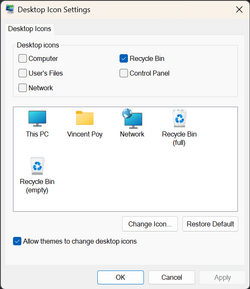
This is unchecked too. 🤷‍♂️

1692885316654.png
 

My Computer

System One

  • OS
    Windows 11 Pro 25H2
    Computer type
    PC/Desktop
    Manufacturer/Model
    Dell XPS 8930
    CPU
    Intel I9-9900K
    Memory
    64GB
    Graphics Card(s)
    NVIDIA RTX 2060
    Sound Card
    NVIDIA High Definition Audio
    Monitor(s) Displays
    4k Samsung
    Screen Resolution
    3840 x 2160
    Hard Drives
    512GB NVMe, ADATA SU 800, 2TB HDD
This doesn't include the general release?
Not for now. Not the same mess. 😉
Taking forever to fix the bugs, applies to all. 🤣🤣🤣
 

My Computer

System One

  • OS
    Windows 11 Pro 25H2
    Computer type
    PC/Desktop
    Manufacturer/Model
    Dell XPS 8930
    CPU
    Intel I9-9900K
    Memory
    64GB
    Graphics Card(s)
    NVIDIA RTX 2060
    Sound Card
    NVIDIA High Definition Audio
    Monitor(s) Displays
    4k Samsung
    Screen Resolution
    3840 x 2160
    Hard Drives
    512GB NVMe, ADATA SU 800, 2TB HDD
Not for now. Not the same mess. 😉
Taking forever to fix the bugs, applies to all. 🤣🤣🤣
Sometimes I think that MS's solution to a problem is to ignore it and hope that users stop complaining about it.
 

My Computers

System One System Two

  • OS
    Windows 11 Pro 25H2
    Computer type
    PC/Desktop
    Manufacturer/Model
    PowerSpec B746
    CPU
    Intel Core i7-10700K
    Motherboard
    ASRock Z490 Phantom Gaming 4/ax
    Memory
    16GB (8GB PC4-19200 DDR4 SDRAM x2)
    Graphics Card(s)
    NVIDIA GeForce GTX 1050 TI
    Sound Card
    Realtek Audio
    Monitor(s) Displays
    #1. LG ULTRAWIDE 34" #2. AOC Q32G2WG3 32"
    Screen Resolution
    #1. 3440 X 1440 #2. 1920 x 1080
    Hard Drives
    NVMe WDC WDS100T2B0C-00PXH0 1TB
    Samsung SSD 860 EVO 1TB
    PSU
    750 Watts (62.5A)
    Case
    PowerSpec/Lian Li ATX 205
    Keyboard
    Logitech K270
    Mouse
    Logitech M185
    Browser
    Microsoft Edge and Firefox
    Antivirus
    Webroot SecureAnywhere CE 26.1
  • Operating System
    Windows 11 Canary Channel
    Computer type
    PC/Desktop
    Manufacturer/Model
    PowerSpec G156
    CPU
    Intel Core i5-8400 CPU @ 2.80GHz
    Motherboard
    AsusTeK Prime B360M-A
    Memory
    16 MB DDR 4-2666
    Monitor(s) Displays
    23" Speptre HDMI 75Hz
    Screen Resolution
    1920x1080
    Hard Drives
    Samsung 970 EVO 500GB NVMe
    Keyboard
    Logitek K270
    Mouse
    Logitek M185
    Browser
    Firefox, Edge and Edge Canary
    Antivirus
    Windows Defender
I have the same resolution, and plenty of icons on my desktop, but I don't have the problem you describe.
This is unchecked too. 🤷‍♂️

View attachment 68792
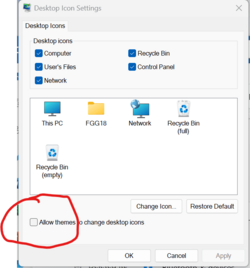
I've never actually set that settings screen and I know the problem only happened recently in the last 3 or more Beta builds, basically when the Desktop icons started having the problem. The other thing is I did change the DPI scaling prior to Windows 11 even going RTM while it was still in Beta so it can fit more icons for the task bar which ofcourse allows more icons on the Desktop as well. @Fabler2 in post #82 did describe the issue so atleast someone else had seen it before.

1692896272785.png
1692896028191.png
 

My Computer

System One

  • OS
    WindowsXP/7/8/8.1/10/11,Linux,Android,FreeBSD Unix
    Computer type
    Laptop
    Manufacturer/Model
    Dell XPS 15 9570
    CPU
    Intel® Core™ i7-8750H 8th Gen 2.2Ghz up to 4.1Ghz
    Motherboard
    Dell XPS 15 9570
    Memory
    64GB using 2x32GB CL16 Mushkin redLine modules
    Graphics Card(s)
    Intel UHD 630 & NVIDIA GeForce GTX 1050 Ti with 4GB DDR5
    Sound Card
    Realtek ALC3266-CG
    Monitor(s) Displays
    15.6" 4K Touch UltraHD 3840x2160 made by Sharp
    Screen Resolution
    3840x2160 4K UltraHD
    Hard Drives
    Samsung MZ-V9P4T0B/AM 990 PRO 4TB PCIe®4.0 NVMe™ M.2 SSD was Toshiba KXG60ZNV1T02 NVMe 1TB SSD
    PSU
    Dell XPS 15 9570
    Case
    Dell XPS 15 9570
    Cooling
    Stock
    Keyboard
    Stock
    Mouse
    SwitftPoint ProPoint
    Internet Speed
    Comcast/XFinity 1.44Gbps/42.5Mbps
    Browser
    Microsoft EDGE (Chromium based) & Google Chrome
    Antivirus
    Windows Defender that came with Windows
 

My Computers

System One System Two

  • OS
    Windows 11 Pro for Workstations
    Computer type
    PC/Desktop
    Manufacturer/Model
    Custom self build
    CPU
    Intel i7-8700K 5 GHz
    Motherboard
    ASUS ROG Maximus XI Formula Z390
    Memory
    64 GB (4x16GB) G.SKILL TridentZ RGB DDR4 3600 MHz (F4-3600C18D-32GTZR)
    Graphics Card(s)
    ASUS ROG-STRIX-GTX1080TI-O11G-GAMING (11GB GDDR5X)
    Sound Card
    Integrated Digital Audio (S/PDIF)
    Monitor(s) Displays
    2 x Samsung Odyssey G75 27"
    Screen Resolution
    2560x1440
    Hard Drives
    1TB Samsung 990 PRO M.2,
    4TB Samsung 990 PRO M.2,
    TerraMaster F8 SSD Plus NAS
    PSU
    Seasonic Prime Titanium 850W
    Case
    Thermaltake Core P3 wall mounted
    Cooling
    Corsair Hydro H115i
    Keyboard
    Amazon Basics Wired Full Keyboard MD005
    Mouse
    Logitech MX Master 4
    Internet Speed
    2 Gbps Download and 100 Mbps Upload
    Browser
    Chrome and Edge
    Antivirus
    Microsoft Defender
    Other Info
    Logitech Z625 speaker system,
    Logitech BRIO 4K Pro webcam,
    HP Color LaserJet Pro MFP M477fdn,
    CyberPower CP1500PFCLCD
    Galaxy S23 Plus phone
  • Operating System
    Windows 11 Pro
    Computer type
    Laptop
    Manufacturer/Model
    Surface Laptop 7 Copilot+ PC
    CPU
    Snapdragon X Elite (12 core) 3.42 GHz
    Memory
    16 GB LPDDR5x-7467 MHz
    Monitor(s) Displays
    15" HDR
    Screen Resolution
    2496 x 1664
    Hard Drives
    1 TB SSD
    Internet Speed
    Wi-Fi 7 and Bluetooth 5.4
    Browser
    Chrome and Edge
    Antivirus
    Microsoft Defender
Here is another anomaly found on Canary It seems to be related to the problem of desktop icons turning white and not updating. If I click "Refresh" on the desktop the icons become visible again.‼️‼️
I haven't had that problem on my two desktops. I wonder if it's a problem with the driver for the video card? My old desktop is using the onboard Intel UHD Graphics 630 and my new desktop is using the NVIDIA GeForce GTX 1050 Ti card.
 

My Computers

System One System Two

  • OS
    Windows 11 Pro 25H2
    Computer type
    PC/Desktop
    Manufacturer/Model
    PowerSpec B746
    CPU
    Intel Core i7-10700K
    Motherboard
    ASRock Z490 Phantom Gaming 4/ax
    Memory
    16GB (8GB PC4-19200 DDR4 SDRAM x2)
    Graphics Card(s)
    NVIDIA GeForce GTX 1050 TI
    Sound Card
    Realtek Audio
    Monitor(s) Displays
    #1. LG ULTRAWIDE 34" #2. AOC Q32G2WG3 32"
    Screen Resolution
    #1. 3440 X 1440 #2. 1920 x 1080
    Hard Drives
    NVMe WDC WDS100T2B0C-00PXH0 1TB
    Samsung SSD 860 EVO 1TB
    PSU
    750 Watts (62.5A)
    Case
    PowerSpec/Lian Li ATX 205
    Keyboard
    Logitech K270
    Mouse
    Logitech M185
    Browser
    Microsoft Edge and Firefox
    Antivirus
    Webroot SecureAnywhere CE 26.1
  • Operating System
    Windows 11 Canary Channel
    Computer type
    PC/Desktop
    Manufacturer/Model
    PowerSpec G156
    CPU
    Intel Core i5-8400 CPU @ 2.80GHz
    Motherboard
    AsusTeK Prime B360M-A
    Memory
    16 MB DDR 4-2666
    Monitor(s) Displays
    23" Speptre HDMI 75Hz
    Screen Resolution
    1920x1080
    Hard Drives
    Samsung 970 EVO 500GB NVMe
    Keyboard
    Logitek K270
    Mouse
    Logitek M185
    Browser
    Firefox, Edge and Edge Canary
    Antivirus
    Windows Defender
I haven't had that problem on my two desktops. I wonder if it's a problem with the driver for the video card? My old desktop is using the onboard Intel UHD Graphics 630 and my new desktop is using the NVIDIA GeForce GTX 1050 Ti card.
Nothing to do with the drivers.
I have latest Nvidia and latest Intel graphics driver on my Desktops. I have both Intel onboard adapters and Nvidia on different models of desktops.
Maybe you don't have some of the experimental features enabled like WASDK. 😎🤷‍♂️
 

My Computer

System One

  • OS
    Windows 11 Pro 25H2
    Computer type
    PC/Desktop
    Manufacturer/Model
    Dell XPS 8930
    CPU
    Intel I9-9900K
    Memory
    64GB
    Graphics Card(s)
    NVIDIA RTX 2060
    Sound Card
    NVIDIA High Definition Audio
    Monitor(s) Displays
    4k Samsung
    Screen Resolution
    3840 x 2160
    Hard Drives
    512GB NVMe, ADATA SU 800, 2TB HDD
Nothing to do with the drivers.
I have latest Nvidia and latest Intel graphics driver on my Desktops. I have both Intel onboard adapters and Nvidia on different models of desktops.
Maybe you don't have some of the experimental features enabled like WASDK. 😎🤷‍♂️
You're right about me not manually turning on new features. Very rarely will I manually turn on a feature that is turned off in the update.
 

My Computers

System One System Two

  • OS
    Windows 11 Pro 25H2
    Computer type
    PC/Desktop
    Manufacturer/Model
    PowerSpec B746
    CPU
    Intel Core i7-10700K
    Motherboard
    ASRock Z490 Phantom Gaming 4/ax
    Memory
    16GB (8GB PC4-19200 DDR4 SDRAM x2)
    Graphics Card(s)
    NVIDIA GeForce GTX 1050 TI
    Sound Card
    Realtek Audio
    Monitor(s) Displays
    #1. LG ULTRAWIDE 34" #2. AOC Q32G2WG3 32"
    Screen Resolution
    #1. 3440 X 1440 #2. 1920 x 1080
    Hard Drives
    NVMe WDC WDS100T2B0C-00PXH0 1TB
    Samsung SSD 860 EVO 1TB
    PSU
    750 Watts (62.5A)
    Case
    PowerSpec/Lian Li ATX 205
    Keyboard
    Logitech K270
    Mouse
    Logitech M185
    Browser
    Microsoft Edge and Firefox
    Antivirus
    Webroot SecureAnywhere CE 26.1
  • Operating System
    Windows 11 Canary Channel
    Computer type
    PC/Desktop
    Manufacturer/Model
    PowerSpec G156
    CPU
    Intel Core i5-8400 CPU @ 2.80GHz
    Motherboard
    AsusTeK Prime B360M-A
    Memory
    16 MB DDR 4-2666
    Monitor(s) Displays
    23" Speptre HDMI 75Hz
    Screen Resolution
    1920x1080
    Hard Drives
    Samsung 970 EVO 500GB NVMe
    Keyboard
    Logitek K270
    Mouse
    Logitek M185
    Browser
    Firefox, Edge and Edge Canary
    Antivirus
    Windows Defender
You're right about me not manually turning on new features. Very rarely will I manually turn on a feature that is turned off in the update.
SDK features were turned on by MS but as usual never for all users. They treat me like a Guinea pig, I always get the ones that create some new bugs. 😂😂😂🤐🤷‍♂️
 

My Computer

System One

  • OS
    Windows 11 Pro 25H2
    Computer type
    PC/Desktop
    Manufacturer/Model
    Dell XPS 8930
    CPU
    Intel I9-9900K
    Memory
    64GB
    Graphics Card(s)
    NVIDIA RTX 2060
    Sound Card
    NVIDIA High Definition Audio
    Monitor(s) Displays
    4k Samsung
    Screen Resolution
    3840 x 2160
    Hard Drives
    512GB NVMe, ADATA SU 800, 2TB HDD

Latest Support Threads

Back
Top Bottom