Insider KB5030305 Windows 11 Insider Beta 22621.2338 (22H2) and 22631.2338 (23H2)


UPDATE 10/10:


 Windows Blogs:

Hello Windows Insiders, today we are releasing Windows 11 Insider Preview Build 22621.2338 and Build 22631.2338 (KB5030305) to the Beta Channel.
  • Build 22631.2338 = New features rolling out.
  • Build 22621.2338 = New features off by default.

KB5027397 Enablement Package for Windows 11 Beta build 22621.xxx (22H2) to build 22631.xxx (23H2)


REMINDER: Insiders who were previously on Build 22624 will automatically get moved to Build 22631 via an enablement package. The enablement package artificially increments the build number for the update with new features getting rolled out and turned on to make it easier to differentiate from devices with the update with features off by default. This approach is being used for the Beta Channel only and is not indicative of any changes or plans for final feature rollouts.

Insiders who landed in the group with new features turned off by default (Build 22621.xxxx) can check for updates and choose to install the update that will have features rolling out (Build 22631.xxxx).

New Widget: Focus Session

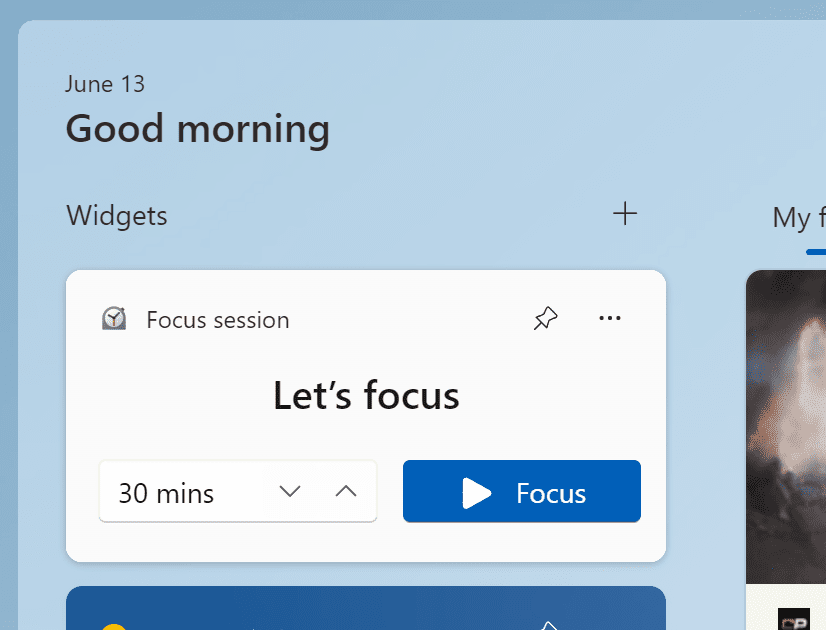
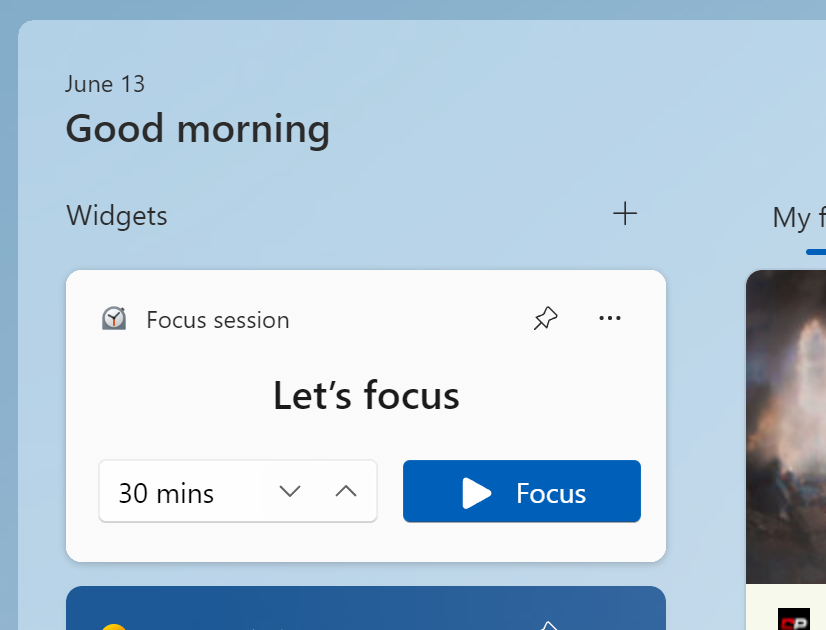
We are beginning to roll out a new Focus Session widget as part of a Clock app update (version 11.2306.22.0 and higher) via the Microsoft Store to Windows Insiders in the Beta Channel. With this new widget, you will be able to quickly start and stop focus sessions on your device.


The new Focus Session widget.

[We are beginning to roll this out, so the experience isn’t available to all Insiders in the Beta Channel just yet as we plan to monitor feedback and see how it lands before pushing it out to everyone.]

FEEDBACK: Please file feedback in Feedback Hub (WIN + F) under Apps > Clock App.

Changes and Improvements in Build 22631.2338

[Taskbar & System Tray]

  • Beginning to roll out with this build, Chat is now Microsoft Teams – Free. Microsoft Teams – Free is pinned by default to the taskbar and can be unpinned like other apps on the taskbar.

Fixes in Build 22631.2338

[General]

  • Fixed an issue which was causing some Insiders to see untranslated text in some areas across the system, including in File Explorer and Settings. If you’re continuing to see issues with translations, please file feedback.

[Taskbar & System Tray]

  • Fixed an issue where dragging app icons in the taskbar may sometimes lead to an explorer.exe crash.
  • Fixed an issue which was causing some Insiders to see labels in their taskbar unexpectedly.
  • Fixed an issue causing Task Manager to not launch for some Insiders.

[File Explorer]

  • Fixed an issue for dark mode users, where you would see a white flash when opening File Explorer.
  • Fixed an issue where after changing between dark and light mode, the icons in the command bar and context menu might become very difficult to see.
  • We made some more improvements to help with the performance of loading Home. Also fixed a memory leak related to Home that would grow each time Home was refreshed or accessed.

[Settings]

  • Fixed an issue where Settings wasn’t launching in safe mode for some Insiders.

[Task Manager]

  • Fixed an issue where the dialog when collecting a process memory dump erroneously said it was collecting a kernel memory dump.

[Dynamic Lighting]

  • Fixed an issue where you may not see the notification on first update to a build with dynamic lighting, letting you know that dynamic lighting is enabled.

Fixes for BOTH Build 22621.2338 & Build 22631.2338

  • The Camera app, Cortana, Photos app, and People app can be uninstalled.
  • New! This update completes the work to comply with the GB18030-2022 requirements. It removes and remaps characters for Microsoft Wubi input and Microsoft Pinyin U-mode input. You can no longer enter character codepoints that are not supported. All the required codepoints are up to date.
  • This update addresses an issue that affects sleep mode. After you resume from sleep, a blank window appears that has the title “Windows Input Experience.”
  • This update affects the Key Distribution Center (KDC) and user security identifiers (SID). KDC now reads the user SID from the Subject Alternative Name (SAN) of a certificate. Because of this, mobile device management (MDM) providers can use offline templates to fill in the user SID. To learn more, see KB5014754.
  • This update addresses an issue that affects IMEPad. It stops working. This occurs when you enter end-user-defined characters (EUDC).
  • This update addresses an issue that affects authentication. Using a smart card to join or rejoin a computer to an Active Directory domain might fail. This occurs after you install Windows updates dated October 2022 or later. For more details, see KB5020276.
  • This update addresses an issue that affects Microsoft Excel. It stops responding when you try to share a file as a PDF in Microsoft Outlook.
  • This update addresses an issue that affects Remote Apps. The display of some elements is not aligned correctly.
  • This update supports daylight saving time (DST) changes in Greenland.
  • This update addresses an issue that affects account lockout event 4625. The format of the event is wrong in the ForwardedEvents log. This occurs when an account name is in the user principal name (UPN) format.
  • This update addresses an issue that affects XPath queries on FileHash and other binary fields. It stops them from matching values in event records.
  • This update changes the spelling of Ukraine’s capital from Kiev to Kyiv.
  • This update addresses an issue that affects Windows Defender Application Control (WDAC). AppID Tagging policies might greatly increase how long it takes your device to start up.
  • This update addresses an issue that affects events that have a TAB character. The events do not render, or you cannot forward them.
  • This update addresses an issue that might make Windows stop responding. This might occur if you use Microsoft OneDrive files that are compressed by NTFS.
  • This update addresses an issue that might cause a user-mode memory leak. It might occur when you call CopyFile() or MoveFile().
  • This update addresses an issue that affects an Application Virtualization (App-V) environment. Copy operations within it stop working. This occurs after you install the April 2023 update.
  • This update addresses an issue that affects some USB printers. Microsoft Defender stops them from printing.
  • This update addresses an issue that affects Microsoft Print to PDF. It uses the metadata for the name you sign in with as the author of a printed PDF. It should use the display name instead.
  • This update addresses an issue that is related to changes in the forwarding of events.
  • This update addresses an issue that affects the Microsoft Distributed Transaction Coordinator (DTC). It has a handle leak. Because of this, the system runs out of memory.
  • This update removes a blank menu item from the Sticky Keys menu. This issue occurs after you install KB5029351.
  • This update addresses an issue that affects application compatibility. It is related to Microsoft Defender for Endpoint.

About the Beta Channel

The Beta Channel is the place we preview experiences that are closer to what we will ship to our general customers. Because the Dev and Beta Channels represent parallel development paths from our engineers, there may be cases where features and experiences show up in the Beta Channel first. However, this does not mean every feature we try out in the Beta Channel will ship. We encourage Insiders to read this blog post that outlines the ways we’ll try things out with Insiders in both the Dev and Beta Channels.

Important Insider Links

Thanks,
Amanda & Brandon


 Source:


Check Windows Updates


UUP Dump:

64-bit ISO download:

ARM64 ISO download:

 
Last edited:
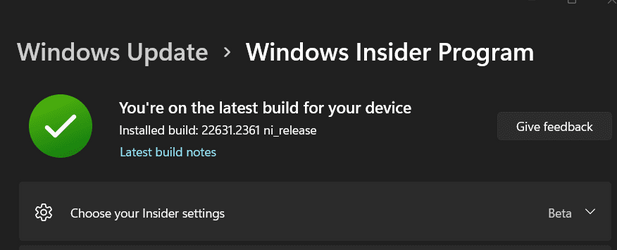
22631.2361 is the current Release Preview channel, not Beta which is still 22631.2338.
Check your insider settings, something doesn't sound right, see below the 2 screenshots. 😎🤷‍♂️

22631.2361 is the current Release Preview channel, not Beta which is still 22631.2338.
Check your insider settings, something doesn't sound right, see below the 2 screenshots. 😎🤷‍♂️

View attachment 72476

View attachment 72477
This is what's up on my laptop. WU said 2338 in the update description but this is what installed.
1695974921742.png
 

My Computers My Computers

  • At a glance

    Windows 11 ProIntel Core i9 14900k, Intel UHD 770 integrated32gb G.Skill Trident Z5 7200Gigabyte RTX 4090 Gaming OC
    OS
    Windows 11 Pro
    Computer type
    PC/Desktop
    Manufacturer/Model
    Self Built
    CPU
    Intel Core i9 14900k, Intel UHD 770 integrated
    Motherboard
    Gigabyte Z790 Aorus Master X
    Memory
    32gb G.Skill Trident Z5 7200
    Graphics Card(s)
    Gigabyte RTX 4090 Gaming OC
    Sound Card
    EVGA Nu Audio, Razer Kraken V3 Pro, Realtek Onboard
    Monitor(s) Displays
    Dell U4025QW nano IPS monitor, Samsung Odyssey G75F, Wisecoco 12.6" IPS sensor panel
    Screen Resolution
    5120X2160 x 2 1920x515
    Hard Drives
    WD Black SN8100, Samsung 990 Pro x 3, WD BLACK SN850x, WD Black 8tb HD
    PSU
    FSP Hydro PTM Pro 1350w
    Case
    Thermaltake Level 20 XT
    Cooling
    ARCTIC Liquid Freezer III 420 ARGB in push/pull, Antec Prism X 120mm ARGB Fans x 15
    Keyboard
    Razer Blackwidow V4 Pro
    Mouse
    Razer Basilik V3 Pro on Razer Firefly V2 mouse pad.
    Internet Speed
    950 Mbps cable primary, 6Mbps secondary vdsl
    Browser
    Chrome primary, FF-Edge-IE secondary
    Antivirus
    Norton 360 Premium
    Other Info
    I sit on a Libernovo Omni chair.😍 Sound by Fosi Audio DA-2120C pushing Magnat Series 503 bookshelf speakers and a SVS SB-1000 Pro subwoofer.
  • At a glance

    Windows 11 ProIntel 14900HX32gb ddr 5 5600Nvidia RTX 4090 mobile
    Operating System
    Windows 11 Pro
    Computer type
    Laptop
    Manufacturer/Model
    2023 Acer Predator Helios 18
    CPU
    Intel 14900HX
    Motherboard
    factory
    Memory
    32gb ddr 5 5600
    Graphics card(s)
    Nvidia RTX 4090 mobile
    Sound Card
    onboard
    Monitor(s) Displays
    18" 250hz IPS
    Screen Resolution
    2560X1600
    Hard Drives
    Samsung 9100 Pro, 990 Pro
    PSU
    factory 330W
    Case
    factory
    Cooling
    factory
    Keyboard
    individual key argb
    Mouse
    touchpad
    Internet Speed
    WiFi 7, 2.5gb ethernet
    Browser
    Chrome primary, FF-IE and Edge secondary
    Antivirus
    Norton 360 Premium
    Other Info
    Acer will not allow WD Black SN8100 to function in m.2 slot 0 and Crucial T710 ssd's to function in either slot.
ok i Restarted windows and now i have copilot
 

My Computers My Computers

  • At a glance

    windows 11 HomeIntel 12th gen i7 12700KF 3.6GhzCorsair Vengence LPX 32GB 3600MHz (2x 16GB)𝙰𝚂𝚄𝚂 𝙰𝙼𝙳 𝙿𝚁𝙸𝙼𝙴 𝟿𝟶𝟽𝟶 𝚇𝚃 𝟷𝟼𝙶𝙱 𝙾𝙲
    OS
    windows 11 Home
    Computer type
    PC/Desktop
    Manufacturer/Model
    Asus
    CPU
    Intel 12th gen i7 12700KF 3.6Ghz
    Motherboard
    Asus Prime Z790-P Wifi D4 DDR4
    Memory
    Corsair Vengence LPX 32GB 3600MHz (2x 16GB)
    Graphics Card(s)
    𝙰𝚂𝚄𝚂 𝙰𝙼𝙳 𝙿𝚁𝙸𝙼𝙴 𝟿𝟶𝟽𝟶 𝚇𝚃 𝟷𝟼𝙶𝙱 𝙾𝙲
    Monitor(s) Displays
    𝙰𝚂𝚄𝚂 𝚁𝙾𝙶 𝚂𝚝𝚛𝚒𝚡 𝚇𝙶𝟸𝟽𝙰𝙲𝚂 𝟸𝟽" 𝟸𝟻𝟼𝟶𝚡𝟷𝟺𝟺𝟶, 𝟷𝟾𝟶𝙷𝚣
    Screen Resolution
    𝟸𝟻𝟼𝟶𝚡𝟷𝟺𝟺𝟶, 𝟷𝟾𝟶𝙷𝚣
    Hard Drives
    SSD 𝙽𝖾𝗍𝚊𝖼 𝙽𝚅𝟽𝟶𝟶𝟶-𝚃 𝙼.𝟸 𝙶𝚎𝚗 𝟺 𝙽𝚅𝙼𝚎 𝟺𝚃𝙱 x2 and WD Black SN850X 2TB M.2 Gen 4 NVMe x1
    PSU
    Asus TUF Gaming 1000W 80+ Gold
    Case
    Lian Li 011 Dynamic XL ROG Black
    Cooling
    Asus ROG Strix LC II 360 ARGB
    Mouse
    Razer Death Adder V2 Pro Wireless
    Browser
    Opera GX firefox and some times edge
    Antivirus
    Bitdefender Internet Security
  • At a glance

    Windows 11 homeIntel Core I7 4700HQ 2.4 ghz8GB DDR3 1600MHzNvidia Geforce 750M
    Operating System
    Windows 11 home
    Computer type
    Laptop
    Manufacturer/Model
    Asus
    CPU
    Intel Core I7 4700HQ 2.4 ghz
    Memory
    8GB DDR3 1600MHz
    Graphics card(s)
    Nvidia Geforce 750M
    Screen Resolution
    1920:1080
    Hard Drives
    V Series 480GB SATA SSD
I have no interest in Co-pilot, and don't run it, so I can't speak to that application. Sorry that DesktopOK doesn't work for you. I let it run in the systray, so that if any application messes up my desktop icons, I just right click the systray icon, a menu pops up listing my default desktop arrangement right at the top, and when I select it my desktop is restored. I will say, though, that it's been awhile since I've had an app mess up my icons. The little program works really well for me.
 

Attachments

  • DesktopCropped2023.jpg
    DesktopCropped2023.jpg
    677.1 KB · Views: 1

My Computer My Computer

At a glance

Win11 Experimental Channel for 26H2 buildsAMD R7 7800X3DGSkill 2x16GB @ 6400MT/sXFX 9070 XT SWIFT tri-fan (PCIe5.0)
OS
Win11 Experimental Channel for 26H2 builds
Computer type
PC/Desktop
Manufacturer/Model
a cherry-picked assembly
CPU
AMD R7 7800X3D
Motherboard
MSI x870 Tomahawk Wi-Fi, 8-layer, 2 oz copper, server PCB
Memory
GSkill 2x16GB @ 6400MT/s
Graphics Card(s)
XFX 9070 XT SWIFT tri-fan (PCIe5.0)
Sound Card
Creative Labs G8 USB External Sound device, Gaming DAC, Sound Card & Earphone AMP.. HIGHLY RECOMMENDED, btw. Totally changed my opinion of external USB sound. I like!...;)
Monitor(s) Displays
Philips 42" OLED @ 4k
Screen Resolution
3840x2160
Hard Drives
*Boot: Samsung 980 Pro 2 TB NVMe (PCIe4x4)
*Samsung 980 EVO NVMe 500GB (PCIe 4x4)
*Kingston SNV3S2000G 2TB NVMe (PCIe4x4)
*Samsung 960 EVO 250GB NVMe(PCIe3x2)
*8TB Toshiba x300 HDD
*ST4000DM004 S3 4TB HDD
PSU
Gigabyte 850W Gold, Rev 2
Case
Lian Li Lancool 217, white, with wood trim, very nice looking--tired of black, 5-fans standard
Cooling
Air coutesy Lian Li
Keyboard
Cherry MX 2.0S RGB
Mouse
Razer Basilisk V3 24k DPI
Internet Speed
~950Mbps down and up!
Browser
Firefox x64 DE
Antivirus
Defender
Other Info
Great New system. Exceeds my expectations by quite a bit, btw. I love the USB G8 SoundBlaster, it's quite an improvement over the G6!
Another week without Beta (or Canary) build. At least at traditional time.
 

My Computer My Computer

At a glance

Windows 11 Pro 64bit (release preview channel)i5 840016 GB DDR4RTX 3060 Ti
OS
Windows 11 Pro 64bit (release preview channel)
Computer type
PC/Desktop
Manufacturer/Model
Asus
CPU
i5 8400
Motherboard
ROG STRIX Z370-H GAMING
Memory
16 GB DDR4
Graphics Card(s)
RTX 3060 Ti
Sound Card
On Board
Monitor(s) Displays
Acer VG242Y P
Screen Resolution
1080p
Hard Drives
Intel 660p SSD
PSU
800w
Internet Speed
1000 Mbps

My Computers My Computers

  • At a glance

    Windows 11 25H2Intel i9 14900KF64GB Corsair Vengeance RGBMSI 4090 Suprim X
    OS
    Windows 11 25H2
    Computer type
    PC/Desktop
    Manufacturer/Model
    Custom Built
    CPU
    Intel i9 14900KF
    Motherboard
    ASUS Z790 ProArt Creator WiFi
    Memory
    64GB Corsair Vengeance RGB
    Graphics Card(s)
    MSI 4090 Suprim X
    Sound Card
    Onboard
    Monitor(s) Displays
    1 x Asus 24". 1 x Asus 32"
    Screen Resolution
    1920 x 1080 & 2560 x 1440
    Hard Drives
    Multiple
    PSU
    Corsair 1200HX
    Case
    Corsair 7000D RGB
    Cooling
    Corsair H150I Capellix XT
    Keyboard
    Corsair K70 RGB PRO
    Mouse
    Corsair M55 RGB Pro
    Internet Speed
    1000Mbps
    Browser
    Edge
    Antivirus
    Windows Default
  • At a glance

    Windows 11 25H2Intel i7 6800K32GB DDR4 (Corsair)ASUS GTX 1080ti
    Operating System
    Windows 11 25H2
    Computer type
    PC/Desktop
    Manufacturer/Model
    Custom Built
    CPU
    Intel i7 6800K
    Motherboard
    ASUS Z99 Deluxe
    Memory
    32GB DDR4 (Corsair)
    Graphics card(s)
    ASUS GTX 1080ti
    Sound Card
    Onboard
    Monitor(s) Displays
    1x Viewsonic 24" 1x LG 19"
    Screen Resolution
    1920 x 1080 & 1600 x 900
    Hard Drives
    3 x SATA SSD
    PSU
    650W Gigabyte Bronze
    Case
    Coolermaster HAF-X
    Cooling
    Noctua NH-15 Chroma black
    Keyboard
    Generic RGB
    Mouse
    Microsoft Basic
    Internet Speed
    1000Mbps
    Browser
    Edge
    Antivirus
    Windows Default

My Computers My Computers

  • At a glance

    windows 11 HomeIntel 12th gen i7 12700KF 3.6GhzCorsair Vengence LPX 32GB 3600MHz (2x 16GB)𝙰𝚂𝚄𝚂 𝙰𝙼𝙳 𝙿𝚁𝙸𝙼𝙴 𝟿𝟶𝟽𝟶 𝚇𝚃 𝟷𝟼𝙶𝙱 𝙾𝙲
    OS
    windows 11 Home
    Computer type
    PC/Desktop
    Manufacturer/Model
    Asus
    CPU
    Intel 12th gen i7 12700KF 3.6Ghz
    Motherboard
    Asus Prime Z790-P Wifi D4 DDR4
    Memory
    Corsair Vengence LPX 32GB 3600MHz (2x 16GB)
    Graphics Card(s)
    𝙰𝚂𝚄𝚂 𝙰𝙼𝙳 𝙿𝚁𝙸𝙼𝙴 𝟿𝟶𝟽𝟶 𝚇𝚃 𝟷𝟼𝙶𝙱 𝙾𝙲
    Monitor(s) Displays
    𝙰𝚂𝚄𝚂 𝚁𝙾𝙶 𝚂𝚝𝚛𝚒𝚡 𝚇𝙶𝟸𝟽𝙰𝙲𝚂 𝟸𝟽" 𝟸𝟻𝟼𝟶𝚡𝟷𝟺𝟺𝟶, 𝟷𝟾𝟶𝙷𝚣
    Screen Resolution
    𝟸𝟻𝟼𝟶𝚡𝟷𝟺𝟺𝟶, 𝟷𝟾𝟶𝙷𝚣
    Hard Drives
    SSD 𝙽𝖾𝗍𝚊𝖼 𝙽𝚅𝟽𝟶𝟶𝟶-𝚃 𝙼.𝟸 𝙶𝚎𝚗 𝟺 𝙽𝚅𝙼𝚎 𝟺𝚃𝙱 x2 and WD Black SN850X 2TB M.2 Gen 4 NVMe x1
    PSU
    Asus TUF Gaming 1000W 80+ Gold
    Case
    Lian Li 011 Dynamic XL ROG Black
    Cooling
    Asus ROG Strix LC II 360 ARGB
    Mouse
    Razer Death Adder V2 Pro Wireless
    Browser
    Opera GX firefox and some times edge
    Antivirus
    Bitdefender Internet Security
  • At a glance

    Windows 11 homeIntel Core I7 4700HQ 2.4 ghz8GB DDR3 1600MHzNvidia Geforce 750M
    Operating System
    Windows 11 home
    Computer type
    Laptop
    Manufacturer/Model
    Asus
    CPU
    Intel Core I7 4700HQ 2.4 ghz
    Memory
    8GB DDR3 1600MHz
    Graphics card(s)
    Nvidia Geforce 750M
    Screen Resolution
    1920:1080
    Hard Drives
    V Series 480GB SATA SSD
This is what's up on my laptop. WU said 2338 in the update description but this is what installed.
View attachment 72484
You probably switched to Beta after installing 22631.2361, so you are ahead of the current Beta Build which is still 22631.2338. 😂🤷‍♂️
I can switch my R.P. to Beta and it is going to stay as .2361 it is not going to uninstall the update and go back to .2338 unless I manually uninstall KB5030310. 😉

As you can see here, I can do the same, but that is not the current Beta Build. It it just a R.P. build switched to Beta channel. 😂🤷‍♂️
1696024692335.png
 
Last edited:

My Computer My Computer

At a glance

Windows 11 Pro 25H2Intel I9-9900K64GBNVIDIA RTX 2060
OS
Windows 11 Pro 25H2
Computer type
PC/Desktop
Manufacturer/Model
Dell XPS 8930
CPU
Intel I9-9900K
Memory
64GB
Graphics Card(s)
NVIDIA RTX 2060
Sound Card
NVIDIA High Definition Audio
Monitor(s) Displays
4k Samsung
Screen Resolution
3840 x 2160
Hard Drives
512GB NVMe, ADATA SU 800, 2TB HDD

My Computer My Computer

At a glance

Windows 11 Pro 25H2Intel I9-9900K64GBNVIDIA RTX 2060
OS
Windows 11 Pro 25H2
Computer type
PC/Desktop
Manufacturer/Model
Dell XPS 8930
CPU
Intel I9-9900K
Memory
64GB
Graphics Card(s)
NVIDIA RTX 2060
Sound Card
NVIDIA High Definition Audio
Monitor(s) Displays
4k Samsung
Screen Resolution
3840 x 2160
Hard Drives
512GB NVMe, ADATA SU 800, 2TB HDD
Another week without Beta (or Canary) build. At least at traditional time.

Some Apps have been updated through MS Store, this is also an alternate way of updating the OS functionalities

I think the priority for MS is to stabilize the code before implementing new fonctionalities.
 

My Computer My Computer

At a glance

Windows 11 22631.2271Ryzen 5600X16GBRTX 2070
OS
Windows 11 22631.2271
Computer type
PC/Desktop
CPU
Ryzen 5600X
Motherboard
B550M
Memory
16GB
Graphics Card(s)
RTX 2070
Monitor(s) Displays
LCD
Screen Resolution
Full HD
Hard Drives
SSD
Internet Speed
Fiber
Browser
Edge
All working "AOK" on my system, -- haven't had any weird slow boot problems reported by various. Can't say copilot bothers me or not -- however having now 4 (YES FOUR !!) insider streams - it's getting Bonkers. 23H2 seems alright for me.

Skjámynd 2023-09-30 121720.png


cheers
jimbo
 

My Computer My Computer

At a glance

Windows XP,11 Linux Fedora Rawhide pre-releas...2 X Intel i7
OS
Windows XP,11 Linux Fedora Rawhide pre-release 45
Computer type
PC/Desktop
CPU
2 X Intel i7
Screen Resolution
4KUHD X 2
I have no boot problems in terms of spped, but I got some BSOD at launch, just reboot and ok
 

My Computer My Computer

At a glance

Windows 11 22631.2271Ryzen 5600X16GBRTX 2070
OS
Windows 11 22631.2271
Computer type
PC/Desktop
CPU
Ryzen 5600X
Motherboard
B550M
Memory
16GB
Graphics Card(s)
RTX 2070
Monitor(s) Displays
LCD
Screen Resolution
Full HD
Hard Drives
SSD
Internet Speed
Fiber
Browser
Edge
....the current Beta Build which is still 22631.2338. 😂🤷‍♂️
Beta (22621.2338/22631.2338) is in the curious position where it's CU build is lagging behind not only the Insider Release Preview build (23H2 Build 22631.2361) but even the latest public RTM build (22H2 22621.2361). I'm guessing it should currently be possible for Insiders on the Beta Channel to switch to the Insider Release Preview Channel, or even leave Insiders completely and switch to the General Availability RTM release (uninstall the enablement package to switch from 22631 to 22621, if required).
 

My Computers My Computers

  • At a glance

    Windows 11 HomeAMD Athlon Silver 3050U8GBRadeon Graphics
    OS
    Windows 11 Home
    Computer type
    Laptop
    Manufacturer/Model
    Acer Aspire 3 A315-23-R9VY
    CPU
    AMD Athlon Silver 3050U
    Memory
    8GB
    Graphics Card(s)
    Radeon Graphics
    Monitor(s) Displays
    laptop screen
    Screen Resolution
    1366x768 native resolution, up to 2560x1440 with Radeon Virtual Super Resolution
    Hard Drives
    1TB Samsung EVO 870 SSD (from April 2026: 250GB EVO 850)
    Internet Speed
    150 Mbps
    Browser
    Edge, Firefox
    Antivirus
    Defender
    Other Info
    UPDATE - 11 April 2026: due to lid hinges starting to break up this laptop has been retired from active duty. The OS with all software and files has been migrated to my System Seven in 'Other systems' to carry on as my general purpose 'main machine'.

    I've now clean installed 25H2 and used Garlin's scripts to update Secure Boot to CA 2023 and revoke the PCA 2011 certificates. It's new role is to test secure boot issues.

    Info for 2021-2026:
    fully 'Windows 11 ready' laptop. Windows 10 C: partition migrated from my old unsupported 'main machine' then upgraded to 11. A test migration ran Insider builds for 2 months. When 11 was released on 5th October 2021 it was re-imaged back to 10 and was offered the upgrade in Windows Update on 20th October. Windows Update offered the 22H2 Feature Update on 20th September 2022. It got the 23H2 Feature Update on 4th November 2023 through Windows Update, 24H2 on 3rd October 2024 through Windows Update by setting the Target Release Version for 24H2, and 25H2 on 30th September 2025 through Windows Update by setting the Target Release Version for 25H2.
  • At a glance

    Windows 11 ProIntel® Core™ i5-520M8GB(integrated graphics) Intel HD Graphics
    Operating System
    Windows 11 Pro
    Computer type
    Laptop
    Manufacturer/Model
    Dell Latitude E4310
    CPU
    Intel® Core™ i5-520M
    Motherboard
    0T6M8G
    Memory
    8GB
    Graphics card(s)
    (integrated graphics) Intel HD Graphics
    Screen Resolution
    1366x768
    Hard Drives
    500GB Crucial MX500 SSD
    Browser
    Firefox, Edge
    Antivirus
    Defender
    Other Info
    unsupported machine: Legacy bios, MBR, TPM 1.2, upgraded from W10 to W11 using W10/W11 hybrid install media workaround.

    In-place upgrade to 22H2 using ISO and a workaround.
    Feature Update to 23H2 by manually installing the Enablement Package.
    In-place upgrade to 24H2 using hybrid 23H2/24H2 install media.
    Upgraded to 25H2 by Enablement Package.

    Also running Insider Dev, and Canary builds and Windows 10 as native boot .vhdx.
  • My SYSTEM THREE is a Dell Latitude 5410, i7-10610U, 32GB RAM, 512GB NVMe ssd, supported device running Windows 11 Pro.

    My SYSTEM FOUR was a 2-in-1 convertible Lenovo Yoga 11e (1st gen) type 20DA, Celeron N2930, 8GB RAM, 256GB ssd. Unsupported device. This has now been sold. It has been replaced by my System Eight.

    My SYSTEM FIVE is a Dell Latitude 3190 2-in-1, Pentium Silver N5030, 8GB RAM, 1TB NVMe ssd, supported device running Windows 11 Pro, plus Insider Beta, Dev, and Canary builds (and a few others) as a native boot .vhdx.

    My SYSTEM SIX is a Dell Latitude 5550, Core Ultra 7 165H, 64GB RAM, 1TB NVMe SSD, supported device, Windows 11 Pro, Hyper-V host machine. Updated to 25H2 on 30th September 2025.

    My SYSTEM SEVEN is a Lenovo Thinkpad T580, 1920x1080 touchscreen, Intel Core i7-8650U, 16GB RAM, 512GB NVMe SSD + 2nd 512GB NVMe SSD, a supported device for Windows 11. This is my current general purpose 'main machine'. The installed Windows 11 Home from my System One has been migrated to this machine. As its new home has an existing digital licence for Pro I've been able to upgrade the migrated OS from Home to Pro.

    My SYSTEM EIGHT is a 2-in-1 convertible Lenovo Yoga 11e (5th gen) type 20LN, Celeron N4120, 8GB RAM, 512GB NVMe ssd, a supported device for Windows 11. Currently running Windows 11 Pro, plus Insider Dev, Beta, and Canary builds as native boot vhdx.
Beta will superseed soon the RTM, this is just a matter of weeks

I bet on a new beta in 15 days most
 

My Computer My Computer

At a glance

Windows 11 22631.2271Ryzen 5600X16GBRTX 2070
OS
Windows 11 22631.2271
Computer type
PC/Desktop
CPU
Ryzen 5600X
Motherboard
B550M
Memory
16GB
Graphics Card(s)
RTX 2070
Monitor(s) Displays
LCD
Screen Resolution
Full HD
Hard Drives
SSD
Internet Speed
Fiber
Browser
Edge
Beta will superseed soon the RTM, this is just a matter of weeks

I bet on a new beta in 15 days most
True, but this looks like one of those small windows of opportunity for those Beta Insiders who wish to leave and rejoin the mainstream builds.
 

My Computers My Computers

  • At a glance

    Windows 11 HomeAMD Athlon Silver 3050U8GBRadeon Graphics
    OS
    Windows 11 Home
    Computer type
    Laptop
    Manufacturer/Model
    Acer Aspire 3 A315-23-R9VY
    CPU
    AMD Athlon Silver 3050U
    Memory
    8GB
    Graphics Card(s)
    Radeon Graphics
    Monitor(s) Displays
    laptop screen
    Screen Resolution
    1366x768 native resolution, up to 2560x1440 with Radeon Virtual Super Resolution
    Hard Drives
    1TB Samsung EVO 870 SSD (from April 2026: 250GB EVO 850)
    Internet Speed
    150 Mbps
    Browser
    Edge, Firefox
    Antivirus
    Defender
    Other Info
    UPDATE - 11 April 2026: due to lid hinges starting to break up this laptop has been retired from active duty. The OS with all software and files has been migrated to my System Seven in 'Other systems' to carry on as my general purpose 'main machine'.

    I've now clean installed 25H2 and used Garlin's scripts to update Secure Boot to CA 2023 and revoke the PCA 2011 certificates. It's new role is to test secure boot issues.

    Info for 2021-2026:
    fully 'Windows 11 ready' laptop. Windows 10 C: partition migrated from my old unsupported 'main machine' then upgraded to 11. A test migration ran Insider builds for 2 months. When 11 was released on 5th October 2021 it was re-imaged back to 10 and was offered the upgrade in Windows Update on 20th October. Windows Update offered the 22H2 Feature Update on 20th September 2022. It got the 23H2 Feature Update on 4th November 2023 through Windows Update, 24H2 on 3rd October 2024 through Windows Update by setting the Target Release Version for 24H2, and 25H2 on 30th September 2025 through Windows Update by setting the Target Release Version for 25H2.
  • At a glance

    Windows 11 ProIntel® Core™ i5-520M8GB(integrated graphics) Intel HD Graphics
    Operating System
    Windows 11 Pro
    Computer type
    Laptop
    Manufacturer/Model
    Dell Latitude E4310
    CPU
    Intel® Core™ i5-520M
    Motherboard
    0T6M8G
    Memory
    8GB
    Graphics card(s)
    (integrated graphics) Intel HD Graphics
    Screen Resolution
    1366x768
    Hard Drives
    500GB Crucial MX500 SSD
    Browser
    Firefox, Edge
    Antivirus
    Defender
    Other Info
    unsupported machine: Legacy bios, MBR, TPM 1.2, upgraded from W10 to W11 using W10/W11 hybrid install media workaround.

    In-place upgrade to 22H2 using ISO and a workaround.
    Feature Update to 23H2 by manually installing the Enablement Package.
    In-place upgrade to 24H2 using hybrid 23H2/24H2 install media.
    Upgraded to 25H2 by Enablement Package.

    Also running Insider Dev, and Canary builds and Windows 10 as native boot .vhdx.
  • My SYSTEM THREE is a Dell Latitude 5410, i7-10610U, 32GB RAM, 512GB NVMe ssd, supported device running Windows 11 Pro.

    My SYSTEM FOUR was a 2-in-1 convertible Lenovo Yoga 11e (1st gen) type 20DA, Celeron N2930, 8GB RAM, 256GB ssd. Unsupported device. This has now been sold. It has been replaced by my System Eight.

    My SYSTEM FIVE is a Dell Latitude 3190 2-in-1, Pentium Silver N5030, 8GB RAM, 1TB NVMe ssd, supported device running Windows 11 Pro, plus Insider Beta, Dev, and Canary builds (and a few others) as a native boot .vhdx.

    My SYSTEM SIX is a Dell Latitude 5550, Core Ultra 7 165H, 64GB RAM, 1TB NVMe SSD, supported device, Windows 11 Pro, Hyper-V host machine. Updated to 25H2 on 30th September 2025.

    My SYSTEM SEVEN is a Lenovo Thinkpad T580, 1920x1080 touchscreen, Intel Core i7-8650U, 16GB RAM, 512GB NVMe SSD + 2nd 512GB NVMe SSD, a supported device for Windows 11. This is my current general purpose 'main machine'. The installed Windows 11 Home from my System One has been migrated to this machine. As its new home has an existing digital licence for Pro I've been able to upgrade the migrated OS from Home to Pro.

    My SYSTEM EIGHT is a 2-in-1 convertible Lenovo Yoga 11e (5th gen) type 20LN, Celeron N4120, 8GB RAM, 512GB NVMe ssd, a supported device for Windows 11. Currently running Windows 11 Pro, plus Insider Dev, Beta, and Canary builds as native boot vhdx.
You probably switched to Beta after installing 22631.2361, so you are ahead of the current Beta Build which is still 22631.2338. 😂🤷‍♂️
I can switch my R.P. to Beta and it is going to stay as .2361 it is not going to uninstall the update and go back to .2338 unless I manually uninstall KB5030310. 😉

As you can see here, I can do the same, but that is not the current Beta Build. It it just a R.P. build switched to Beta channel. 😂🤷‍♂️
View attachment 72564
If you want both or all of the streams - just install each build as .vhdx files. Each build BTW you can select different insider streams. You don't need to "Unjoin" anything.


Whether it's worth it or not is a moot point.There's no consistency as to which build gets new features first currently. My "gut feel" is if you want the sort of latest stuff go for the insider preview. DEV seems pointless currently while BETA is on terminal life support. Probably only Canary and Insider will be significant -- and I'm not even sure whether the "Birdie" release (sorry -- been watching the Ryder Cup Golf - hence the "Birdie" quip !! ) will even be relevant in the future.

Cheers
jimbo
 

My Computer My Computer

At a glance

Windows XP,11 Linux Fedora Rawhide pre-releas...2 X Intel i7
OS
Windows XP,11 Linux Fedora Rawhide pre-release 45
Computer type
PC/Desktop
CPU
2 X Intel i7
Screen Resolution
4KUHD X 2
I think the priority for MS is to stabilize the code before implementing new fonctionalities.
It should be a priority to fix the bugs first, but unfortunately it never is the case. 😝🤬
 

My Computer My Computer

At a glance

Windows 11 Pro 25H2Intel I9-9900K64GBNVIDIA RTX 2060
OS
Windows 11 Pro 25H2
Computer type
PC/Desktop
Manufacturer/Model
Dell XPS 8930
CPU
Intel I9-9900K
Memory
64GB
Graphics Card(s)
NVIDIA RTX 2060
Sound Card
NVIDIA High Definition Audio
Monitor(s) Displays
4k Samsung
Screen Resolution
3840 x 2160
Hard Drives
512GB NVMe, ADATA SU 800, 2TB HDD

My Computers My Computers

  • At a glance

    windows 11 HomeIntel 12th gen i7 12700KF 3.6GhzCorsair Vengence LPX 32GB 3600MHz (2x 16GB)𝙰𝚂𝚄𝚂 𝙰𝙼𝙳 𝙿𝚁𝙸𝙼𝙴 𝟿𝟶𝟽𝟶 𝚇𝚃 𝟷𝟼𝙶𝙱 𝙾𝙲
    OS
    windows 11 Home
    Computer type
    PC/Desktop
    Manufacturer/Model
    Asus
    CPU
    Intel 12th gen i7 12700KF 3.6Ghz
    Motherboard
    Asus Prime Z790-P Wifi D4 DDR4
    Memory
    Corsair Vengence LPX 32GB 3600MHz (2x 16GB)
    Graphics Card(s)
    𝙰𝚂𝚄𝚂 𝙰𝙼𝙳 𝙿𝚁𝙸𝙼𝙴 𝟿𝟶𝟽𝟶 𝚇𝚃 𝟷𝟼𝙶𝙱 𝙾𝙲
    Monitor(s) Displays
    𝙰𝚂𝚄𝚂 𝚁𝙾𝙶 𝚂𝚝𝚛𝚒𝚡 𝚇𝙶𝟸𝟽𝙰𝙲𝚂 𝟸𝟽" 𝟸𝟻𝟼𝟶𝚡𝟷𝟺𝟺𝟶, 𝟷𝟾𝟶𝙷𝚣
    Screen Resolution
    𝟸𝟻𝟼𝟶𝚡𝟷𝟺𝟺𝟶, 𝟷𝟾𝟶𝙷𝚣
    Hard Drives
    SSD 𝙽𝖾𝗍𝚊𝖼 𝙽𝚅𝟽𝟶𝟶𝟶-𝚃 𝙼.𝟸 𝙶𝚎𝚗 𝟺 𝙽𝚅𝙼𝚎 𝟺𝚃𝙱 x2 and WD Black SN850X 2TB M.2 Gen 4 NVMe x1
    PSU
    Asus TUF Gaming 1000W 80+ Gold
    Case
    Lian Li 011 Dynamic XL ROG Black
    Cooling
    Asus ROG Strix LC II 360 ARGB
    Mouse
    Razer Death Adder V2 Pro Wireless
    Browser
    Opera GX firefox and some times edge
    Antivirus
    Bitdefender Internet Security
  • At a glance

    Windows 11 homeIntel Core I7 4700HQ 2.4 ghz8GB DDR3 1600MHzNvidia Geforce 750M
    Operating System
    Windows 11 home
    Computer type
    Laptop
    Manufacturer/Model
    Asus
    CPU
    Intel Core I7 4700HQ 2.4 ghz
    Memory
    8GB DDR3 1600MHz
    Graphics card(s)
    Nvidia Geforce 750M
    Screen Resolution
    1920:1080
    Hard Drives
    V Series 480GB SATA SSD
I see under Accounts in the Settings App, my Microsoft 365 subscription is no longer listed.
 

My Computers My Computers

  • At a glance

    Windows 11 25H2Intel i9 14900KF64GB Corsair Vengeance RGBMSI 4090 Suprim X
    OS
    Windows 11 25H2
    Computer type
    PC/Desktop
    Manufacturer/Model
    Custom Built
    CPU
    Intel i9 14900KF
    Motherboard
    ASUS Z790 ProArt Creator WiFi
    Memory
    64GB Corsair Vengeance RGB
    Graphics Card(s)
    MSI 4090 Suprim X
    Sound Card
    Onboard
    Monitor(s) Displays
    1 x Asus 24". 1 x Asus 32"
    Screen Resolution
    1920 x 1080 & 2560 x 1440
    Hard Drives
    Multiple
    PSU
    Corsair 1200HX
    Case
    Corsair 7000D RGB
    Cooling
    Corsair H150I Capellix XT
    Keyboard
    Corsair K70 RGB PRO
    Mouse
    Corsair M55 RGB Pro
    Internet Speed
    1000Mbps
    Browser
    Edge
    Antivirus
    Windows Default
  • At a glance

    Windows 11 25H2Intel i7 6800K32GB DDR4 (Corsair)ASUS GTX 1080ti
    Operating System
    Windows 11 25H2
    Computer type
    PC/Desktop
    Manufacturer/Model
    Custom Built
    CPU
    Intel i7 6800K
    Motherboard
    ASUS Z99 Deluxe
    Memory
    32GB DDR4 (Corsair)
    Graphics card(s)
    ASUS GTX 1080ti
    Sound Card
    Onboard
    Monitor(s) Displays
    1x Viewsonic 24" 1x LG 19"
    Screen Resolution
    1920 x 1080 & 1600 x 900
    Hard Drives
    3 x SATA SSD
    PSU
    650W Gigabyte Bronze
    Case
    Coolermaster HAF-X
    Cooling
    Noctua NH-15 Chroma black
    Keyboard
    Generic RGB
    Mouse
    Microsoft Basic
    Internet Speed
    1000Mbps
    Browser
    Edge
    Antivirus
    Windows Default
It should be a priority to fix the bugs first, but unfortunately it never is the case. 😝🤬
It's 100% impossible to fix all the bugs considering the amount of different hardware, and applications that run on it -- even stable server releases of Linux need updates. I don't blame Windows for having bugs in it -- what I do blame is that there seems to be no regression testing -- I.e a bug is fixed, then something else is fixed which causes the original bug to re-appear.

There should be NO excuse for that scenario IMO. What seems to happen is check is done for current problems and if OK it's released. That is JUST NOT GOOD ENOUGH.

Cheers
jimbo
 

My Computer My Computer

At a glance

Windows XP,11 Linux Fedora Rawhide pre-releas...2 X Intel i7
OS
Windows XP,11 Linux Fedora Rawhide pre-release 45
Computer type
PC/Desktop
CPU
2 X Intel i7
Screen Resolution
4KUHD X 2
It's 100% impossible to fix all the bugs considering the amount of different hardware, and applications that run on it -- even stable server releases of Linux need updates. I don't blame Windows for having bugs in it -- what I do blame is that there seems to be no regression testing -- I.e a bug is fixed, then something else is fixed which causes the original bug to re-appear.

There should be NO excuse for that scenario IMO. What seems to happen is check is done for current problems and if OK it's released. That is JUST NOT GOOD ENOUGH.

Cheers
jimbo
Yeah, fix one (after months of waiting) and add 2 more bugs with the fix. 🤣😝
It is called job security! 😂😂😂😂🤐
 

My Computer My Computer

At a glance

Windows 11 Pro 25H2Intel I9-9900K64GBNVIDIA RTX 2060
OS
Windows 11 Pro 25H2
Computer type
PC/Desktop
Manufacturer/Model
Dell XPS 8930
CPU
Intel I9-9900K
Memory
64GB
Graphics Card(s)
NVIDIA RTX 2060
Sound Card
NVIDIA High Definition Audio
Monitor(s) Displays
4k Samsung
Screen Resolution
3840 x 2160
Hard Drives
512GB NVMe, ADATA SU 800, 2TB HDD

Latest Support Threads

Back
Top Bottom