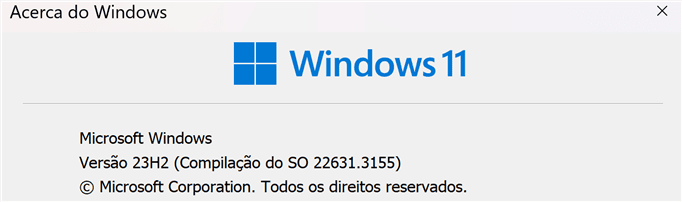
Win Update KB5034765 Windows 11 Cumulative Update Build 22621.3155 (22H2) and 22631.3155 (23H2)


UPDATE 2/29:


 Microsoft Support:

February 13, 2024 - KB5034765 (OS Builds 22621.3155 and 22631.3155)​


UPDATED 2/27/24
IMPORTANT: New dates for the end of non-security updates for Windows 11, version 22H2


The new end date is June 24, 2025 for Windows 11, version 22H2 Enterprise, Education, IoT Enterprise, and Enterprise multi-session editions. Home, Pro, Pro Education, and Pro for Workstations editions of version 22H2 will receive non-security preview updates until June, 26, 2024.

After these dates, only cumulative monthly security updates will continue for the supported editions of Windows 11, version 22H2. The initial date communicated for this change was February 27, 2024. Based on user feedback, this date has been changed so more customers can take advantage of our continuous innovations.


For information about Windows update terminology, see the article about the types of Windows updates and the monthly quality update types. For an overview of Windows 11, version 23H2, see its update history page.

Note Follow @WindowsUpdate to find out when new content is published to the Windows release health dashboard.


Highlights​

  • New! The Copilot in Windows icon now appears on the right side of the system tray on the taskbar. Also, the display of Show desktop at the rightmost corner of the taskbar will be off by default. To turn it back on, go to Settings > Personalization > Taskbar. You can alsoright-click the taskbar and choose Taskbar settings.


    Note Windows 11 devices will get this new functionality at different times. Some of these new features roll out gradually using controlled feature rollout (CFR) to consumers.
  • This update addresses security issues for your Windows operating system.

Improvements​

Note: To view the list of addressed issues, click or tap the OS name to expand the collapsible section.

Windows 11, version 23H2​

Important: Use EKB KB5027397 to update to Windows 11, version 23H2.
This security update includes quality improvements. Key changes include:
  • This build includes all the improvements in Windows 11, version 22H2.
  • No additional issues are documented for this release.

Windows 11, version 22H2​

This security update includes improvements that were a part of update KB5034204 (released January 23, 2024). When you install this KB:
  • This update addresses an issue that affects Narrator announcements. They are slow when you use Natural Voices.
  • This update addresses an issue that affects explorer.exe. It might stop responding. This occurs when you restart or shut down a PC that has a controller accessory attached to it.
  • This update addresses an issue that affects the download of device metadata. Downloads from the Windows Metadata and Internet Services (WMIS) over HTTPS are now more secure.
If you installed earlier updates, only the new updates contained in this package will be downloaded and installed on your device.
For more information about security vulnerabilities, please refer to the Security Update Guide website and the February 2024 Security Updates.

Windows 11 servicing stack update - 22621.3073 and 22631.3073​

This update makes quality improvements to the servicing stack, which is the component that installs Windows updates. Servicing stack updates (SSU) ensure that you have a robust and reliable servicing stack so that your devices can receive and install Microsoft updates.

Known issues in this update​

Applies toSymptomWorkaround
All usersWindows 11 devices attempting to install the February 2024 security update, released February 13, 2024 (KB5034765) might face installation failures and the system might stop responding at 96%.

Resulting from this error, the following message might be displayed:

“Something didn’t go as planned. No need to worry – undoing changes. Please keep your computer on”.

This issue might be reflected in the Windows Event Viewer with error code ‘0x800F0922’.
This issue is addressed in KB5035853.

How to get this update​

Before installing this update

Microsoft combines the latest servicing stack update (SSU) for your operating system with the latest cumulative update (LCU). For general information about SSUs, see Servicing stack updates and Servicing Stack Updates (SSU): Frequently Asked Questions.

Install this update

Release ChannelAvailableNext Step
Windows Update and Microsoft UpdateYesNone. This update will be downloaded and installed automatically from Windows Update.
Windows Update for BusinessYesNone. This update will be downloaded and installed automatically from Windows Update in accordance with configured policies.
Microsoft Update CatalogYesTo get the standalone package for this update, go to the Microsoft Update Catalog website.
Windows Server Update Services (WSUS)YesThis update will automatically sync with WSUS if you configure Products and Classifications as follows:
Product: Windows 11
Classification: Security Updates

If you want to remove the LCU

To remove the LCU after installing the combined SSU and LCU package, use the DISM/Remove-Package command line option with the LCU package name as the argument. You can find the package name by using this command: DISM /online /get-packages.

Running Windows Update Standalone Installer (wusa.exe) with the /uninstall switch on the combined package will not work because the combined package contains the SSU. You cannot remove the SSU from the system after installation.

File information

For a list of the files that are provided in this update, download the file information for cumulative update 5034765.

For a list of the files that are provided in the servicing stack update, download the file information for the SSU - versions 22621.3073 and 22631.3073.


 Source:


Check Windows Updates


Direct download links for KB5034765 MSU file from Microsoft Update Catalog:

[fa]fas fa-download[/fa] Download KB5034765 MSU for Windows 11 v23H2 64-bit (x64) - 648.4 MB

[fa]fas fa-download[/fa] Download KB5034765 MSU for Windows 11 v23H2 ARM64 - 776.5 MB


UUP Dump:

64-bit ISO download:

ARM64 ISO download:

 
Last edited:
Fast and no issues so far.

Captura de ecrã 2024-02-14 002907.png
 

My Computers My Computers

  • At a glance

    Windows 11 Pro 64-bits 25H2 26200-7922AMD Ryzen 3 3200G with Radeon Vega Graphics 3...32,00 GB TeamGroup DDR4-2667Nvidia GeForce GT 730 & Radeon™ Vega 8 Graphics
    OS
    Windows 11 Pro 64-bits 25H2 26200-7922
    Computer type
    PC/Desktop
    Manufacturer/Model
    Custom self built
    CPU
    AMD Ryzen 3 3200G with Radeon Vega Graphics 3.60 GHz
    Motherboard
    MSI B350 PC MATE
    Memory
    32,00 GB TeamGroup DDR4-2667
    Graphics Card(s)
    Nvidia GeForce GT 730 & Radeon™ Vega 8 Graphics
    Sound Card
    nVIDIA GK208 HDMI/DP High Definition Audio Controller
    Monitor(s) Displays
    AOC 27"
    Screen Resolution
    3840x2160
    Hard Drives
    SSD Team Group T-Force Cardea Zero Z440 1TB Gen4 M.2 NVMe (5000/4400MB/s), SSD Team Group CX2 512GB SATA III (530/470MB/s) and 2x Seagate 1TB BarraCuda 64MB 7200rpm SATA III 3.5 - ST1000DM010
    PSU
    LC-Power 650W V2.3
    Case
    ATX Nox Hummer ZS
    Cooling
    No cooling
    Keyboard
    Logitech K220
    Mouse
    Logitech
    Internet Speed
    1000/200
    Browser
    Firefox 148.0
    Antivirus
    Windows Defender
    Other Info
    Optical Drive ASUS DRW-24D5MT
  • At a glance

    Windows 11 Pro 64-bits 25H2 26200-7922Intel Core i5-8365U16 GBIntel UHD Graphics 620 - Whiskey Lake-U GT2
    Operating System
    Windows 11 Pro 64-bits 25H2 26200-7922
    Computer type
    Laptop
    Manufacturer/Model
    Dell Latitude 5400
    CPU
    Intel Core i5-8365U
    Motherboard
    Dell 03WM4C - Intel Cannon Lake-U PCH-LP Premium
    Memory
    16 GB
    Graphics card(s)
    Intel UHD Graphics 620 - Whiskey Lake-U GT2
    Sound Card
    Intel Cannon Lake-LP - cAVS (Audio, Voice, Speech) [D0]
    Monitor(s) Displays
    Dell NV14N4F
    Screen Resolution
    1920 x 1080
    Hard Drives
    Micron 2200S NVMe 256 GB
    PSU
    Dell X7XY03
    Internet Speed
    1000 Mbps / 200 MBps
    Browser
    Firefox 148.0
    Antivirus
    Microsoft Windows Defender
I've got the Copilot icon on the right on System1, but still next to Start on System 2, in the same room, on the same network, with the same software. Interestingly (to me), Copilot was present and persistent (through reboots) on System 2 before this update today, and now it's not, while it is (present and persistent) on System 1 now. Hmmm.

I didn't DO it, Ma; Microsoft did it! I swear! :confused:✋
 

My Computers My Computers

  • At a glance

    11 Pro 24H2 26100.2454i7-9700 @ 3.00GHz32GBDDR4 @ 2666MHzIntel HD 630 Graphics onboard
    OS
    11 Pro 24H2 26100.2454
    Computer type
    PC/Desktop
    Manufacturer/Model
    Lenovo ThinkCentre M920S SFF
    CPU
    i7-9700 @ 3.00GHz
    Motherboard
    Lenovo 3132
    Memory
    32GBDDR4 @ 2666MHz
    Graphics Card(s)
    Intel HD 630 Graphics onboard
    Sound Card
    Realtek HD Audio
    Monitor(s) Displays
    LG E2442
    Screen Resolution
    1920x1080
    Hard Drives
    1 x Samsung 970 EVO PLUS 500GB NVMe SSD, 1 x WD_BLACK SN770
    250GB NVMe SSD (OS and programs), 1 x WD_BLACK SN770
    500GB NVMe SSD (Data)
    Case
    Lenovo SFF
    Keyboard
    Cherry Stream TKL JK-8600US-2 Wired
    Mouse
    LogiTech M510 wireless
    Internet Speed
    Fast (for fixed wireless!)
    Browser
    Chrome, sometimes Firefox
    Antivirus
    Malwarebytes Premium & Defender (working together beautifully!)
  • At a glance

    11 Pro 24H2 26100.2454i5-8400 @ 2.80GHz32GB DDR4 @ 2600MHzIntel HD 630 Graphics onboard
    Operating System
    11 Pro 24H2 26100.2454
    Computer type
    PC/Desktop
    Manufacturer/Model
    Lenovo ThinkCentre M920S SFF
    CPU
    i5-8400 @ 2.80GHz
    Motherboard
    Lenovo 3132
    Memory
    32GB DDR4 @ 2600MHz
    Graphics card(s)
    Intel HD 630 Graphics onboard
    Sound Card
    Realtek High Definition Audio onboard
    Monitor(s) Displays
    LG FULL HD (1920x1080@59Hz)
    Screen Resolution
    1920 x 1080
    Hard Drives
    1 x Samsung 970 EVO PLUS NVMe; 1 x Samsung 980 NVMe SSD
    Case
    Lenovo Think Centre SFF
    Keyboard
    Cherry Stream TKL JK-8600US-2 Wired
    Mouse
    LogiTech M510 wireless
    Internet Speed
    Fast (for fixed wireless!)
    Browser
    Chrome
    Antivirus
    Malwarebytes Premium and MS Defender, beautiful together
I've got the Copilot icon on the right on System1, but still next to Start on System 2, in the same room, on the same network, with the same software. Interestingly (to me), Copilot was present and persistent (through reboots) on System 2 before this update today, and now it's not, while it is (present and persistent) on System 1 now. Hmmm.

I didn't DO it, Ma; Microsoft did it! I swear! :confused:✋
The same thing happened to me. But the Laptop with the Copilot not in the tray is Win 11 Home. I don't know if that had anything to do with it?
 

My Computers My Computers

  • At a glance

    Windows11 Pro 26200.9128Intel Core i9 14900F (24 -Core, 68 MB Total C...32GB DDR5RTX 4080 Super w/610.74
    OS
    Windows11 Pro 26200.9128
    Computer type
    PC/Desktop
    Manufacturer/Model
    Dell Alienware Aurora R16
    CPU
    Intel Core i9 14900F (24 -Core, 68 MB Total Cache)
    Motherboard
    Dell Alienware
    Memory
    32GB DDR5
    Graphics Card(s)
    RTX 4080 Super w/610.74
    Sound Card
    Realtec
    Monitor(s) Displays
    Corsair XENEON 32QHD165
    Screen Resolution
    2560 X 1440
    Hard Drives
    1-2TB Samsung 990 Pro PCIe NVMe M2 SSD
    1-4TB Samsung 990 Pro PCIe NVMe M2 SSD
    PSU
    1000 Watt Platinum Dell
    Case
    Alienware
    Cooling
    Liquid Closed Loop
    Keyboard
    Corsair Strafe RGB
    Mouse
    Logitech MK270 Wireless
    Internet Speed
    100Gb's Down-20 Up
    Browser
    Firefox 153.0.1
    Antivirus
    Defender
    Other Info
    Very Quiet And Fast
    CyberPower UPS CP1500PFCLCD
  • At a glance

    PClinuxOS Mate (2025.7)13th Gen Inter(R) Core(TM) i3-1315U64 GB DDR4 @3200 MHz.Internal
    Operating System
    PClinuxOS Mate (2025.7)
    Computer type
    PC/Desktop
    Manufacturer/Model
    Intel
    CPU
    13th Gen Inter(R) Core(TM) i3-1315U
    Motherboard
    Intel
    Memory
    64 GB DDR4 @3200 MHz.
    Graphics card(s)
    Internal
    Sound Card
    None
    Monitor(s) Displays
    Dell 2419HGCF
    Screen Resolution
    1920 X 1080
    Hard Drives
    SAMSUNG 980 PRO SSD 2TB, PCIe 4.0 M.2 2280
    PSU
    Chicony 30 Watt
    Case
    Small
    Keyboard
    Dell
    Mouse
    Razor
    Internet Speed
    1GB
    Browser
    Slimjet
@Josey Wales

Couldn't be, but that was a good guess. Both mine are running Pro. Been running Pro versions since I moved from 3.11 ("Windows for workgroups") to 7. Not sure why. Maybe just force of habit. 🤷‍♂️

Hi, Josey. 🙋‍♂️
 

My Computers My Computers

  • At a glance

    11 Pro 24H2 26100.2454i7-9700 @ 3.00GHz32GBDDR4 @ 2666MHzIntel HD 630 Graphics onboard
    OS
    11 Pro 24H2 26100.2454
    Computer type
    PC/Desktop
    Manufacturer/Model
    Lenovo ThinkCentre M920S SFF
    CPU
    i7-9700 @ 3.00GHz
    Motherboard
    Lenovo 3132
    Memory
    32GBDDR4 @ 2666MHz
    Graphics Card(s)
    Intel HD 630 Graphics onboard
    Sound Card
    Realtek HD Audio
    Monitor(s) Displays
    LG E2442
    Screen Resolution
    1920x1080
    Hard Drives
    1 x Samsung 970 EVO PLUS 500GB NVMe SSD, 1 x WD_BLACK SN770
    250GB NVMe SSD (OS and programs), 1 x WD_BLACK SN770
    500GB NVMe SSD (Data)
    Case
    Lenovo SFF
    Keyboard
    Cherry Stream TKL JK-8600US-2 Wired
    Mouse
    LogiTech M510 wireless
    Internet Speed
    Fast (for fixed wireless!)
    Browser
    Chrome, sometimes Firefox
    Antivirus
    Malwarebytes Premium & Defender (working together beautifully!)
  • At a glance

    11 Pro 24H2 26100.2454i5-8400 @ 2.80GHz32GB DDR4 @ 2600MHzIntel HD 630 Graphics onboard
    Operating System
    11 Pro 24H2 26100.2454
    Computer type
    PC/Desktop
    Manufacturer/Model
    Lenovo ThinkCentre M920S SFF
    CPU
    i5-8400 @ 2.80GHz
    Motherboard
    Lenovo 3132
    Memory
    32GB DDR4 @ 2600MHz
    Graphics card(s)
    Intel HD 630 Graphics onboard
    Sound Card
    Realtek High Definition Audio onboard
    Monitor(s) Displays
    LG FULL HD (1920x1080@59Hz)
    Screen Resolution
    1920 x 1080
    Hard Drives
    1 x Samsung 970 EVO PLUS NVMe; 1 x Samsung 980 NVMe SSD
    Case
    Lenovo Think Centre SFF
    Keyboard
    Cherry Stream TKL JK-8600US-2 Wired
    Mouse
    LogiTech M510 wireless
    Internet Speed
    Fast (for fixed wireless!)
    Browser
    Chrome
    Antivirus
    Malwarebytes Premium and MS Defender, beautiful together
KB5034765, the most minimalistic Windows update I ever received, took 5 minutes to install, now on build 22631.3155, both Dism and SFC ran very fast, no issues.
 

My Computers My Computers

  • At a glance

    Windows 11 Home 25H2 build: 26200.8973Intel(R) Core(TM) Ultra 7 258V, 2200 Mhz, 8 C...32 GB LPDDR5X (soldered)Intel(R) Arc(TM) 140V GPU (16GB)
    OS
    Windows 11 Home 25H2 build: 26200.8973
    Computer type
    Laptop
    Manufacturer/Model
    Acer Swift Edge SFE14-51T
    CPU
    Intel(R) Core(TM) Ultra 7 258V, 2200 Mhz, 8 Cores
    Motherboard
    NB.JG411.004 mainboard, manufactured by Compal.
    Memory
    32 GB LPDDR5X (soldered)
    Graphics Card(s)
    Intel(R) Arc(TM) 140V GPU (16GB)
    Sound Card
    RealTek + Intel Smart Sound
    Monitor(s) Displays
    14" OLED matte Touch
    Screen Resolution
    2880 x1800 x120Hz
    Hard Drives
    KINGSTON OM8PGP41024Q-AA, NVMe Gen4, 1TB
    PSU
    65W USB-C charger
    Case
    Magnesium aluminum alloy body
    Cooling
    1 fan
    Keyboard
    US with Backlight
    Mouse
    Precision Trackpad
    Internet Speed
    25 Mb/s 5G
    Browser
    Edge
    Antivirus
    Windows Defender
    Other Info
    BIOS Version/Date: IInsyde Corp. V1.06, 3/16/2026, Windows Hello IR camera with Facial recognition. Secure Boot 2026 KEK key installed
  • At a glance

    Windows 11 Home 25H2 build: 26200.8973Intel 12th Gen. i7 12700H, 14 cores, 2.3 GHz ...8GB LPDDR4 on board + 8GB LPDDR4 3200 MHz in ...Intel Iris Xe supports up to 4096 x 2304 @ 120Hz
    Operating System
    Windows 11 Home 25H2 build: 26200.8973
    Computer type
    Laptop
    Manufacturer/Model
    Asus Vivobook K3502Z S15 15" OLED
    CPU
    Intel 12th Gen. i7 12700H, 14 cores, 2.3 GHz (24M Cache, up to 4.7 GHz, 6P+8E cores)
    Motherboard
    Alder Lake-H, 1700-4700 MHz clock rate
    Memory
    8GB LPDDR4 on board + 8GB LPDDR4 3200 MHz in Dual Channel.
    Graphics card(s)
    Intel Iris Xe supports up to 4096 x 2304 @ 120Hz
    Sound Card
    Harman Kardon - DTS
    Monitor(s) Displays
    OLED 15.6inch 2.8K (2880 x 1620)
    Screen Resolution
    16:9 aspect ratio 0.2ms response time 120Hz refresh rate, 550nits
    Hard Drives
    512GB M.2 NVMe Gen4 PCIe 4.0 SSD, Micron_2450_MTFDKBA512TFK
    PSU
    90-Watt USB charger (Thunderbolt4)
    Case
    Metal lid, plastic case
    Cooling
    1 fan
    Keyboard
    With adjustable backlight
    Mouse
    Precision Trackpad
    Internet Speed
    ISP provides 15 mb/s WIFI LTE (4G), laptop WIFI 6 adapter.
    Browser
    Edge
    Antivirus
    Windows Defender
    Other Info
    BIOS American Megatrends International, LLC. 10.1.2.312, 13/03/2024. Network adapter: Intel Wi-Fi 6E AX211 160 MHz, Secure Boot 2026 KEK key installed
lol I forgot to check for Windows updates earlier in the day..
I just noticed it now..
update went smooth.
 

My Computers My Computers

  • At a glance

    Windows 11 Pro (x64)(v25H2)(26200.8973)AMD Ryzen 9 3900X 12-Core/24-threads64GB, 2x G.Skill 32GB (PC3200)(DDR4-2137)ASUS PRIME GeForce RTX 5070 12GB OC Edition, ...
    OS
    Windows 11 Pro (x64)(v25H2)(26200.8973)
    Computer type
    PC/Desktop
    Manufacturer/Model
    [Self-built](custom-build)(June 2020)
    CPU
    AMD Ryzen 9 3900X 12-Core/24-threads
    Motherboard
    Asus PRIME X570-PRO (BIOS_r5044 [01/04/2026])
    Memory
    64GB, 2x G.Skill 32GB (PC3200)(DDR4-2137)
    Graphics Card(s)
    ASUS PRIME GeForce RTX 5070 12GB OC Edition, GPU by NVIDIA.
    Sound Card
    Realtek® ALC1220A 8-Channel High Definition Audio CODEC
    Monitor(s) Displays
    24" DELL Gaming Monitor - G2422HS - DisplayPort used
    Screen Resolution
    1920x1080p at 165Hz (16:9 Aspect Ratio)
    Hard Drives
    2TB Samsung 980 Pro (NVMe)(SSD)
    4TB Samsung 990 Pro (NVMe)(SSD)
    2TB Samsung 870 EVO (SSD)

    NVMe 2TB
    -- OS(Win11 Pro x64),
    -- programs,
    -- programming(MS Visual Studios 2022 Community Ed.),
    -- music

    NVMe 4TB
    video game installs.

    #3 FILE Server!
    PSU
    Thermaltake TOUGHPOWER DPS G RGB Titanium Certified 1250Watt
    Case
    Corsair Graphite Series 780T Full Tower PC Case
    Cooling
    AMD Wraith cooler (stock) & 3x Corsair case fans
    Keyboard
    Redragon K580 VATA RGB LED Backlit Mechanical Gaming Keyboard (brown switches).
    Mouse
    Redragon M602 RGB Wired USB Gaming mouse
    Internet Speed
    2,100Mbps Download, 300Mbps Upload
    Browser
    Firefox & Google Chrome
    Antivirus
    n/a aka "ABOVE TOP SECRET!" lol ;)
    Other Info
    My System is the ULTIMATE GAMING RIG ^_^
    TP-Link BE9300 Tri-Band Wi-Fi 7 Wireless 2.5Gigabit Router
    Model Archer BE550 (v1.0)
    Arris S34 Cable Modem

    printer/scanner/copier: Brother DCP-7065DN

    Nvidia GFX Drivers: (v610.74)
    Realtek UAD Drivers: (v6.0.10010.1)
    Realtek LAN Drivers:(v1125.30.50.508)(2026-06-21)
    Intel LAN Drivers: (v14.01.24.00)(2025-10-03)
  • At a glance

    Windows 11 Pro x64AMD Ryzen 7 5800H32GB GSkill DDR4 2x 16GB sticksRyzen 7 5800H integrated AMD Radeon Graphics ...
    Operating System
    Windows 11 Pro x64
    Computer type
    Laptop
    Manufacturer/Model
    DELL G15 Ryzen edition, model 5515
    CPU
    AMD Ryzen 7 5800H
    Motherboard
    DELL G15 Ryzen edition
    Memory
    32GB GSkill DDR4 2x 16GB sticks
    Graphics card(s)
    Ryzen 7 5800H integrated AMD Radeon Graphics and Nvidia GeForce 3060 6GB
    Sound Card
    Realtek ALC3254 with Nahimic 3D Audio for Gamers
    Monitor(s) Displays
    built-in
    Screen Resolution
    1920x1080
    Hard Drives
    512GB NVMe SSD, 1TB Samsung 970 EVO NVMe SSD
    PSU
    unknown
    Case
    laptop
    Keyboard
    built-in
    Mouse
    Logitech B100 USB
    Internet Speed
    2,100Mbps download, 300Mbps upload
    Browser
    Firefox & Google Chrome
1707884337667.png
 

My Computer My Computer

At a glance

W11 Pro and Insider DevAMD Ryzen 9 7900x2x16GB Kingston 6000MHz, Cl 32 @ 6200MHz Cl30Gigabyte Rx 6600XT Gaming OC 8G Pro
OS
W11 Pro and Insider Dev
Computer type
PC/Desktop
Manufacturer/Model
Home brewed
CPU
AMD Ryzen 9 7900x
Motherboard
ASROCK b650 PRO RS
Memory
2x16GB Kingston 6000MHz, Cl 32 @ 6200MHz Cl30
Graphics Card(s)
Gigabyte Rx 6600XT Gaming OC 8G Pro
Sound Card
MB, Realtek Ac1220p
Monitor(s) Displays
3 x 27"
Screen Resolution
1080p
Hard Drives
Kingston KC3000. 1TBSamsung 970 evo Plus 500GB, Crucial P1 NVMe 1TB, Lexar NVMe 2 TB, Silicon Power M.2 SATA 500GB
PSU
Seasonic 750W
Case
Custom Raidmax
Cooling
Arctic Liquid Freezer III 360mm
Internet Speed
20/19 mbps

My Computer My Computer

At a glance

26200.8037i5-11400F32GBGeforce GT-1030
OS
26200.8037
Computer type
PC/Desktop
CPU
i5-11400F
Motherboard
Gigabyte
Memory
32GB
Graphics Card(s)
Geforce GT-1030
Keyboard
Logitech K400
Mouse
Logitech M720
Internet Speed
600 Mb
Browser
Edge
@Zinoviev Great, that means when it gets installed in a few hours' time it will probably do the same to my PC also, as I had the same issues as you.
I used the DISM /remove-package command via command prompt and got the update uninstalled and everything is working again. Windows is showing up as build 22631.3007 so it seems to have worked. I also stopped the windows updates so it won't install again. Just gotta find a way to stop it for a longer time than a week.
 

My Computer My Computer

At a glance

Windows 11Ryzen 7 5700X32GB 3600MHZ CL16RTX3070TI
OS
Windows 11
Computer type
PC/Desktop
CPU
Ryzen 7 5700X
Motherboard
ASUS Crosshair VII Hero
Memory
32GB 3600MHZ CL16
Graphics Card(s)
RTX3070TI
Monitor(s) Displays
LG27GP850-B
Screen Resolution
2560x1440
PSU
Corsair RM750x
Case
Fractal Design Meshify 2
Cooling
Noctua NH-D15s
Keyboard
ASUS Strix Flare
Mouse
Glorious Model D- Wireless
Browser
MS Edge
updating now
1707903657301.png
 

My Computer My Computer

At a glance

Windows 10Intel Core i5-6200U12 GB DDR4-2400 / PC4-19200 DDR4 SDRAM SO-DIMMIntel HD Graphics 520 (Skylake-U GT2) [D0/D1]...
OS
Windows 10
Computer type
Laptop
Manufacturer/Model
Lenovo ThinkPad T470s W10DG (Type 20JT)
CPU
Intel Core i5-6200U
Motherboard
LENOVO 20JTS21X0A
Memory
12 GB DDR4-2400 / PC4-19200 DDR4 SDRAM SO-DIMM
Graphics Card(s)
Intel HD Graphics 520 (Skylake-U GT2) [D0/D1] [Lenovo]
Sound Card
Realtek High Definition Audio
Monitor(s) Displays
LEN40A9
Screen Resolution
1920 x 1080(p) (60.031Hz)
Hard Drives
SanDisk SD8TN8U256G1001 243.6 GB
PSU
Lenovo 65W Standard AC Adapter (USB Type-C)
Internet Speed
24Mb Speed ADSL
Browser
Edge
Antivirus
Microsoft Defender Antivirus,

My Computer My Computer

At a glance

26200.8037i5-11400F32GBGeforce GT-1030
OS
26200.8037
Computer type
PC/Desktop
CPU
i5-11400F
Motherboard
Gigabyte
Memory
32GB
Graphics Card(s)
Geforce GT-1030
Keyboard
Logitech K400
Mouse
Logitech M720
Internet Speed
600 Mb
Browser
Edge
The update went well. Now on 22631.3155. The taskbar is aligned in the center (default) where it has always been since the beginning, and the Copilot preview icon is next to the search bar on the left. So no change there, and all is good so far.
 
Last edited:

My Computer My Computer

At a glance

Windows 11/Linux MintIntel Core 2 Duo CPU E8400 @ 3.00 GHz x 28 GBIntel 4 Series Chipset Integrated Graphics Co...
OS
Windows 11/Linux Mint
Computer type
PC/Desktop
Manufacturer/Model
Dell Optiplex 960
CPU
Intel Core 2 Duo CPU E8400 @ 3.00 GHz x 2
Memory
8 GB
Graphics Card(s)
Intel 4 Series Chipset Integrated Graphics Controller
Monitor(s) Displays
HP x22LED
Hard Drives
Crucial 250 GB SSD, HD 1Tb
Last edited:

My Computers My Computers

  • At a glance

    11 Pro 24H2 26100.2454i7-9700 @ 3.00GHz32GBDDR4 @ 2666MHzIntel HD 630 Graphics onboard
    OS
    11 Pro 24H2 26100.2454
    Computer type
    PC/Desktop
    Manufacturer/Model
    Lenovo ThinkCentre M920S SFF
    CPU
    i7-9700 @ 3.00GHz
    Motherboard
    Lenovo 3132
    Memory
    32GBDDR4 @ 2666MHz
    Graphics Card(s)
    Intel HD 630 Graphics onboard
    Sound Card
    Realtek HD Audio
    Monitor(s) Displays
    LG E2442
    Screen Resolution
    1920x1080
    Hard Drives
    1 x Samsung 970 EVO PLUS 500GB NVMe SSD, 1 x WD_BLACK SN770
    250GB NVMe SSD (OS and programs), 1 x WD_BLACK SN770
    500GB NVMe SSD (Data)
    Case
    Lenovo SFF
    Keyboard
    Cherry Stream TKL JK-8600US-2 Wired
    Mouse
    LogiTech M510 wireless
    Internet Speed
    Fast (for fixed wireless!)
    Browser
    Chrome, sometimes Firefox
    Antivirus
    Malwarebytes Premium & Defender (working together beautifully!)
  • At a glance

    11 Pro 24H2 26100.2454i5-8400 @ 2.80GHz32GB DDR4 @ 2600MHzIntel HD 630 Graphics onboard
    Operating System
    11 Pro 24H2 26100.2454
    Computer type
    PC/Desktop
    Manufacturer/Model
    Lenovo ThinkCentre M920S SFF
    CPU
    i5-8400 @ 2.80GHz
    Motherboard
    Lenovo 3132
    Memory
    32GB DDR4 @ 2600MHz
    Graphics card(s)
    Intel HD 630 Graphics onboard
    Sound Card
    Realtek High Definition Audio onboard
    Monitor(s) Displays
    LG FULL HD (1920x1080@59Hz)
    Screen Resolution
    1920 x 1080
    Hard Drives
    1 x Samsung 970 EVO PLUS NVMe; 1 x Samsung 980 NVMe SSD
    Case
    Lenovo Think Centre SFF
    Keyboard
    Cherry Stream TKL JK-8600US-2 Wired
    Mouse
    LogiTech M510 wireless
    Internet Speed
    Fast (for fixed wireless!)
    Browser
    Chrome
    Antivirus
    Malwarebytes Premium and MS Defender, beautiful together
I used the DISM /remove-package command via command prompt and got the update uninstalled and everything is working again. Windows is showing up as build 22631.3007 so it seems to have worked. I also stopped the windows updates so it won't install again. Just gotta find a way to stop it for a longer time than a week.
Have you done a RAM test? Because I seem to have an issue with more than 16 GB of RAM and will investigate. I suspect more socket AM4 systems than I know, have an instability issue with 32 GB and more. Even though RAM instability, usually doesn't solely show up as symptoms like that.
I had to take out a 2x16 GB kit in 2023, because I got strangeness.
Even when in my case, it escalated to an unexpected "MEMORY_MANAGEMENT" BSOD.
 

My Computers My Computers

  • At a glance

    Windows 11 Pro x64 24H2Ryzen 9 5900X64 GB G.Skill RipJaws V F4-3200C16D-64GVKASRock Steel Legend Arc B580 12 GB
    OS
    Windows 11 Pro x64 24H2
    Computer type
    PC/Desktop
    CPU
    Ryzen 9 5900X
    Motherboard
    ASRock B550 PG Velocita (UEFI-BIOS 3.90)
    Memory
    64 GB G.Skill RipJaws V F4-3200C16D-64GVK
    Graphics Card(s)
    ASRock Steel Legend Arc B580 12 GB
    Monitor(s) Displays
    Alienware AW3423DWF OLED ultrawide
    Hard Drives
    Samsung 990 Pro 1 TB NVMe SSD
    PSU
    eVGA Supernova 750 G3
    Case
    Corsair 275R
    Internet Speed
    VTel FTTH 1 Gb down and 1 Gb up
  • At a glance

    Windows 11 Home x64 25H2Ryzen 7 5800X3D32 GB (2x16 GB G.Skill TridentZ Neo)Sapphire Nitro+ Radeon RX 6750 XT
    Operating System
    Windows 11 Home x64 25H2
    Computer type
    PC/Desktop
    CPU
    Ryzen 7 5800X3D
    Motherboard
    Asus ROG Strix B550-F Gaming (UEFI-BIOS version 3636)
    Memory
    32 GB (2x16 GB G.Skill TridentZ Neo)
    Graphics card(s)
    Sapphire Nitro+ Radeon RX 6750 XT
    Hard Drives
    Samsung 970 Pro 512 GB NVMe SSD
    PSU
    Corsair RM850x
    Case
    Fractal Focus G
1707923430116.png
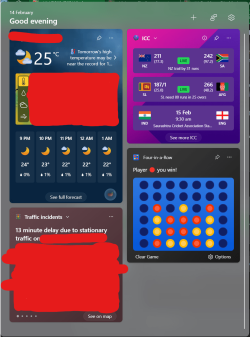
Feels so good to have no Microsoft Start content in the Widget Panel now with this update.
 

My Computer My Computer

At a glance

Windows 11 Pro 25H2Intel Core i7-11800H16GB (2x8 GB)RTX 3060 Laptop GPU
OS
Windows 11 Pro 25H2
Computer type
Laptop
Manufacturer/Model
Acer Predator Helios 300 PH314-54-72ZJ
CPU
Intel Core i7-11800H
Motherboard
TGL
Memory
16GB (2x8 GB)
Graphics Card(s)
RTX 3060 Laptop GPU
Sound Card
Realtek ALC295
Monitor(s) Displays
1
Screen Resolution
2560 x 1440 @ 165Hz
Hard Drives
1TB NVMe SSD, 512GB NVMe SSD, 1TB 7200 RPM HDD
Cooling
Aeroblade 5th Gen 3D fan
Keyboard
RGB Laptop keyboard
Mouse
Logitech Lightsync G203
Internet Speed
175 Mbps up/175 Mbps down
Browser
Firefox with uBlock Origin and YouTube enhancing extensions..
Antivirus
Windows Security with Core Isolation on
Amidst this confusing Microsoft muddle, I reported yesterday (post #42) that CP was MIA on my Sys 2, but present (not just accounted for) on Sys 1. Today when I booted both, it was there on both, but the icon didn't show on 1 until I went to Taskbar Settings and toggled the Show Desktop setting to On, then to OFF. Zap! CP icon on the far right.

I don't know why my OCD keeps making me check up on CP. I don't much want it (yet), and I've only used it a few times -- and Microsoft has already sent me a notice that it knows about and appreciates my using the danged thing, calling me a "creative genius"! Oh, my!
 

My Computers My Computers

  • At a glance

    11 Pro 24H2 26100.2454i7-9700 @ 3.00GHz32GBDDR4 @ 2666MHzIntel HD 630 Graphics onboard
    OS
    11 Pro 24H2 26100.2454
    Computer type
    PC/Desktop
    Manufacturer/Model
    Lenovo ThinkCentre M920S SFF
    CPU
    i7-9700 @ 3.00GHz
    Motherboard
    Lenovo 3132
    Memory
    32GBDDR4 @ 2666MHz
    Graphics Card(s)
    Intel HD 630 Graphics onboard
    Sound Card
    Realtek HD Audio
    Monitor(s) Displays
    LG E2442
    Screen Resolution
    1920x1080
    Hard Drives
    1 x Samsung 970 EVO PLUS 500GB NVMe SSD, 1 x WD_BLACK SN770
    250GB NVMe SSD (OS and programs), 1 x WD_BLACK SN770
    500GB NVMe SSD (Data)
    Case
    Lenovo SFF
    Keyboard
    Cherry Stream TKL JK-8600US-2 Wired
    Mouse
    LogiTech M510 wireless
    Internet Speed
    Fast (for fixed wireless!)
    Browser
    Chrome, sometimes Firefox
    Antivirus
    Malwarebytes Premium & Defender (working together beautifully!)
  • At a glance

    11 Pro 24H2 26100.2454i5-8400 @ 2.80GHz32GB DDR4 @ 2600MHzIntel HD 630 Graphics onboard
    Operating System
    11 Pro 24H2 26100.2454
    Computer type
    PC/Desktop
    Manufacturer/Model
    Lenovo ThinkCentre M920S SFF
    CPU
    i5-8400 @ 2.80GHz
    Motherboard
    Lenovo 3132
    Memory
    32GB DDR4 @ 2600MHz
    Graphics card(s)
    Intel HD 630 Graphics onboard
    Sound Card
    Realtek High Definition Audio onboard
    Monitor(s) Displays
    LG FULL HD (1920x1080@59Hz)
    Screen Resolution
    1920 x 1080
    Hard Drives
    1 x Samsung 970 EVO PLUS NVMe; 1 x Samsung 980 NVMe SSD
    Case
    Lenovo Think Centre SFF
    Keyboard
    Cherry Stream TKL JK-8600US-2 Wired
    Mouse
    LogiTech M510 wireless
    Internet Speed
    Fast (for fixed wireless!)
    Browser
    Chrome
    Antivirus
    Malwarebytes Premium and MS Defender, beautiful together
I used the DISM /remove-package command via command prompt and got the update uninstalled and everything is working again. Windows is showing up as build 22631.3007 so it seems to have worked. I also stopped the windows updates so it won't install again. Just gotta find a way to stop it for a longer time than a week.
There is a way to control the Windows Update. There are two tools:
WUMT
WUMGR
You can get both from Major Geeks, but I will advise that I stopped using WUMT a while ago as it rarely reported updates and would take a LONG time to show updates.
WUMGR is an older tool but works flawlessly despite not being updated since December 2019.

Simple, allows you to control WU's as well as block automatic updates from the Microsoft Store if that's something you also have a need for - I will be blocking all non-security updates this year when 24H2 arrives, because of Microsoft's announcement that they will no longer be supporting Windows Mixed Reality Devices, and will go even further by removing all WMR software from Windows, making my less than 1.5 year old $600 'HP Reverb 2' a paperweight.
This is still a very high quality VR headset with 2160x2160 per eye panel resolution, sharper and clearer than the newest 'Meta Quest 3'. I don't understand why Microsoft couldn't have simply left the WMR software available for 'legacy' users - most bypass anyway as only the framework is needed for use of the headset/or with Open-XR which provides much better performance in many VR titles.
Hopefully the community figures out a way to restore WMR functionality in 24H2 - there's enough impacted users wanting to keep ton's of perfectly functional headsets from adding to more electronic waste/landfills, but I'm hedging my bets.

Hope this helps you manage what you want from WU and what you don't.
 

My Computer My Computer

At a glance

Win 11 23H2 EnterpriseRyzen 9800X3DG.Skill Trident Z RGB 6200MT CL30MSI RTX 5090 Suprim SoC
OS
Win 11 23H2 Enterprise
Computer type
PC/Desktop
Manufacturer/Model
Self-Built
CPU
Ryzen 9800X3D
Motherboard
MSI MAG X870 Tomahawk WiFi
Memory
G.Skill Trident Z RGB 6200MT CL30
Graphics Card(s)
MSI RTX 5090 Suprim SoC
Sound Card
Sound Blaster G8
Monitor(s) Displays
LG C2 42 Main Desktop, 3x Gigabyte FI32Q in a triple array for gaming simulations
Screen Resolution
3840x2160, 2560x1440 (3)
Hard Drives
WD SN850X 2TB M.2 NVME (OS Drive), WD SN850X 2TB M.2 NVME, 2x Crucial 2TB SSD, Crucial 1TB SSD, Seagate Barracuda 2TB HDD
PSU
NZXT C1200 Gold ATX 3.1-Fully Modular/Low-Noise-1200 Watts-12V-2x6 Connector-Zero Fan Mode-100% Japanese Capacitors
Case
NZXT H7
Cooling
EK AIO Elite 360mm Elite
Keyboard
Razer Huntsman V3 Pro
Mouse
Logitech G502X
Internet Speed
1GB
Browser
Edge Chromium
Antivirus
Windows Defender
Copilot was on the right yesterday, now it is back on the left. WTF?
 

My Computers My Computers

  • At a glance

    Windows 11 ProIntel Core i9 14900K 5800/4500 P/E all core96GB (2x48) G.skill Ripjaws 6800 MT/s DDR5Asus ROG Strix 4070 Ti OC
    OS
    Windows 11 Pro
    Computer type
    PC/Desktop
    Manufacturer/Model
    DIY Photoshop/Audio/Game/tinker
    CPU
    Intel Core i9 14900K 5800/4500 P/E all core
    Motherboard
    Asus ROG Maximus Z790 Dark Hero
    Memory
    96GB (2x48) G.skill Ripjaws 6800 MT/s DDR5
    Graphics Card(s)
    Asus ROG Strix 4070 Ti OC
    Sound Card
    Bowers & Wilkins 606 S3 speakers; Audiolabs 7000a integrated amp; RSL 10S Mk2 sub; Creative Pebble Pro Minimilist
    Monitor(s) Displays
    Eizo CG2730 ColorEdge, ViewSonic VP2768, i1 Display Pro calibration puck
    Screen Resolution
    2560 x 1440p x 2
    Hard Drives
    WDC SN850X 4TB nvme, SN850 1TB nvme, SK-Hynix 2 TB P41 nvme,. Sabrent USB-C DS-SC5B 5-bay docking station: 6TB WDC Black, 6TB Ironwolf Pro; 2x 2TB WDC Black HDD
    PSU
    850W Seasonic Vertex PX-850 ATX 3.0/PCI-E 5.0
    Case
    Fractal Design North XL Mesh, Black Walnut
    Cooling
    EK Nucleus black 360 AIO w/Phanteks T30-120 fans, 2 Noctua NF-A14 Chromax case fan, 1 T30-120 fan cooling memory
    Keyboard
    Keychron Q3 Max TKL with custom GMK Redsuns Red Samuri keycaps, TX Stabs
    Mouse
    Logitech G305 wireless gaming
    Internet Speed
    575 Mb/s down | 25 Mb/s up
    Browser
    Firefox
    Antivirus
    Defender, Macrium Reflect X
    Other Info
    Phangkey Amaterasu V2 Desk Mat
  • At a glance

    Apple M1
    Computer type
    Laptop
    Manufacturer/Model
    💻 Apple 13" Macbook Pro 2020 (m1)

    CPU
    Apple M1
    Screen Resolution
    2560x1600
    Browser
    Firefox
@geneo

Gene, have you tried fiddling with the Show Desktop setting in Taskbar Settings? I dunno; maybe that just works for the icon not showing up at all at boot, not for changing its position.
Dan
 

My Computers My Computers

  • At a glance

    11 Pro 24H2 26100.2454i7-9700 @ 3.00GHz32GBDDR4 @ 2666MHzIntel HD 630 Graphics onboard
    OS
    11 Pro 24H2 26100.2454
    Computer type
    PC/Desktop
    Manufacturer/Model
    Lenovo ThinkCentre M920S SFF
    CPU
    i7-9700 @ 3.00GHz
    Motherboard
    Lenovo 3132
    Memory
    32GBDDR4 @ 2666MHz
    Graphics Card(s)
    Intel HD 630 Graphics onboard
    Sound Card
    Realtek HD Audio
    Monitor(s) Displays
    LG E2442
    Screen Resolution
    1920x1080
    Hard Drives
    1 x Samsung 970 EVO PLUS 500GB NVMe SSD, 1 x WD_BLACK SN770
    250GB NVMe SSD (OS and programs), 1 x WD_BLACK SN770
    500GB NVMe SSD (Data)
    Case
    Lenovo SFF
    Keyboard
    Cherry Stream TKL JK-8600US-2 Wired
    Mouse
    LogiTech M510 wireless
    Internet Speed
    Fast (for fixed wireless!)
    Browser
    Chrome, sometimes Firefox
    Antivirus
    Malwarebytes Premium & Defender (working together beautifully!)
  • At a glance

    11 Pro 24H2 26100.2454i5-8400 @ 2.80GHz32GB DDR4 @ 2600MHzIntel HD 630 Graphics onboard
    Operating System
    11 Pro 24H2 26100.2454
    Computer type
    PC/Desktop
    Manufacturer/Model
    Lenovo ThinkCentre M920S SFF
    CPU
    i5-8400 @ 2.80GHz
    Motherboard
    Lenovo 3132
    Memory
    32GB DDR4 @ 2600MHz
    Graphics card(s)
    Intel HD 630 Graphics onboard
    Sound Card
    Realtek High Definition Audio onboard
    Monitor(s) Displays
    LG FULL HD (1920x1080@59Hz)
    Screen Resolution
    1920 x 1080
    Hard Drives
    1 x Samsung 970 EVO PLUS NVMe; 1 x Samsung 980 NVMe SSD
    Case
    Lenovo Think Centre SFF
    Keyboard
    Cherry Stream TKL JK-8600US-2 Wired
    Mouse
    LogiTech M510 wireless
    Internet Speed
    Fast (for fixed wireless!)
    Browser
    Chrome
    Antivirus
    Malwarebytes Premium and MS Defender, beautiful together
@geneo

Gene, have you tried fiddling with the Show Desktop setting in Taskbar Settings? I dunno; maybe that just works for the icon not showing up at all at boot, not for changing its position.
Dan
Yes, it is the latter - only off/on
 

My Computers My Computers

  • At a glance

    Windows 11 ProIntel Core i9 14900K 5800/4500 P/E all core96GB (2x48) G.skill Ripjaws 6800 MT/s DDR5Asus ROG Strix 4070 Ti OC
    OS
    Windows 11 Pro
    Computer type
    PC/Desktop
    Manufacturer/Model
    DIY Photoshop/Audio/Game/tinker
    CPU
    Intel Core i9 14900K 5800/4500 P/E all core
    Motherboard
    Asus ROG Maximus Z790 Dark Hero
    Memory
    96GB (2x48) G.skill Ripjaws 6800 MT/s DDR5
    Graphics Card(s)
    Asus ROG Strix 4070 Ti OC
    Sound Card
    Bowers & Wilkins 606 S3 speakers; Audiolabs 7000a integrated amp; RSL 10S Mk2 sub; Creative Pebble Pro Minimilist
    Monitor(s) Displays
    Eizo CG2730 ColorEdge, ViewSonic VP2768, i1 Display Pro calibration puck
    Screen Resolution
    2560 x 1440p x 2
    Hard Drives
    WDC SN850X 4TB nvme, SN850 1TB nvme, SK-Hynix 2 TB P41 nvme,. Sabrent USB-C DS-SC5B 5-bay docking station: 6TB WDC Black, 6TB Ironwolf Pro; 2x 2TB WDC Black HDD
    PSU
    850W Seasonic Vertex PX-850 ATX 3.0/PCI-E 5.0
    Case
    Fractal Design North XL Mesh, Black Walnut
    Cooling
    EK Nucleus black 360 AIO w/Phanteks T30-120 fans, 2 Noctua NF-A14 Chromax case fan, 1 T30-120 fan cooling memory
    Keyboard
    Keychron Q3 Max TKL with custom GMK Redsuns Red Samuri keycaps, TX Stabs
    Mouse
    Logitech G305 wireless gaming
    Internet Speed
    575 Mb/s down | 25 Mb/s up
    Browser
    Firefox
    Antivirus
    Defender, Macrium Reflect X
    Other Info
    Phangkey Amaterasu V2 Desk Mat
  • At a glance

    Apple M1
    Computer type
    Laptop
    Manufacturer/Model
    💻 Apple 13" Macbook Pro 2020 (m1)

    CPU
    Apple M1
    Screen Resolution
    2560x1600
    Browser
    Firefox

Latest Support Threads

Back
Top Bottom