KB5035942 keeps installing daily. Why?


rzn6jw

Well-known member
Member
Local time
5:41 PM
Posts
272
OS
Win 11Pro v25H2 build 26200.7171
How can I keep KB5035942 from installing every single day? Started last week and it's getting stupid! Looked it up and it's from 3/26/24 for builds 22621.3374 and 22631.3374 for Win 11 22H2. I'm running 24H2 26100.3037. And it's not one that you can uninstall either. It's getting ridiculous.
 
Windows Build/Version
24H2 26100.3037

My Computer

System One

  • OS
    Win 11Pro v25H2 build 26200.7171
    Computer type
    PC/Desktop
    Manufacturer/Model
    DIY
    CPU
    AMD Ryzen 7 9800X3D
    Motherboard
    Gigabyte X670 Aorus Elite AX
    Memory
    64G DDR5 6000
    Graphics Card(s)
    ASUS RTX 4070 Ti Super OC
    Sound Card
    Soundblaster Z SE
    Monitor(s) Displays
    LG 24"
    Screen Resolution
    3480 x 2160
    Hard Drives
    C: drive SOLIDIGM P44 PRO 2TB SSD
    D: drive SOLIDIGM P44 PRO 2TB SSD
    H: drive Samsung 970 EVO Plus 2TB SSD
    PSU
    Corsair RM850X
    Case
    GameMax
    Cooling
    NZXT Kraken Elite 360 RGB 2024
    Keyboard
    Corsair
    Mouse
    Razor
    Internet Speed
    Gigabyte
    Browser
    Firefox
    Antivirus
    Norton 360
How can I keep KB5035942 from installing every single day? Started last week and it's getting stupid! Looked it up and it's from 3/26/24 for builds 22621.3374 and 22631.3374 for Win 11 22H2. I'm running 24H2 26100.3037. And it's not one that you can uninstall either. It's getting ridiculous.
Have you tried to run the update component script and reboot afterward?
Reset Windows Update in Windows 11 Tutorial
then I would run SFC and DISM commands:
-dism /online /cleanup-image /restorehealth (restart)
-dism /online /cleanup-image /startcomponentcleanup
 

My Computers

System One System Two

  • OS
    All Branches but Release
    Computer type
    Laptop
    Manufacturer/Model
    Acer Nitro ANV15-51
    CPU
    AMD Ryzen 7 7735HS 3200-4500 Mhz 8 cores x 2
    Motherboard
    Sportage_RBH
    Memory
    32 GB DDR5
    Graphics Card(s)
    Radeon Graphic / NVIDIA GeForce RTX 4060 8 GB GDDR6
    Sound Card
    AMD/Realtek(R) Audio
    Monitor(s) Displays
    Integrated Monitor (15.3"vis)
    Screen Resolution
    FHD 1920X1080 16:9 144Hz
    Hard Drives
    KINGSTON OM8SEP4512Q-AA 1TB
    Western Digital 256GB
    PSU
    19V DC 6.32 A 120 W
    Cooling
    Dual Fans
    Mouse
    MS Bluetooth
    Internet Speed
    Fiber 1GB Cox -us & 1GB Orange-fr
    Browser
    Edge Canary- Firefox Nightly-Chrome Dev-Chrome Dev
    Antivirus
    Windows Defender
  • Operating System
    Windows 11 Beta
    Computer type
    Laptop
    Manufacturer/Model
    Asus X751BP
    CPU
    AMD A9-9420
    Memory
    8 GB of DDR4
    Graphics card(s)
    AMD Radeon R5
    Screen Resolution
    1600x900
    Hard Drives
    Seagate 1 TB
I will do those things and get back with you. Thanks.
 

My Computer

System One

  • OS
    Win 11Pro v25H2 build 26200.7171
    Computer type
    PC/Desktop
    Manufacturer/Model
    DIY
    CPU
    AMD Ryzen 7 9800X3D
    Motherboard
    Gigabyte X670 Aorus Elite AX
    Memory
    64G DDR5 6000
    Graphics Card(s)
    ASUS RTX 4070 Ti Super OC
    Sound Card
    Soundblaster Z SE
    Monitor(s) Displays
    LG 24"
    Screen Resolution
    3480 x 2160
    Hard Drives
    C: drive SOLIDIGM P44 PRO 2TB SSD
    D: drive SOLIDIGM P44 PRO 2TB SSD
    H: drive Samsung 970 EVO Plus 2TB SSD
    PSU
    Corsair RM850X
    Case
    GameMax
    Cooling
    NZXT Kraken Elite 360 RGB 2024
    Keyboard
    Corsair
    Mouse
    Razor
    Internet Speed
    Gigabyte
    Browser
    Firefox
    Antivirus
    Norton 360
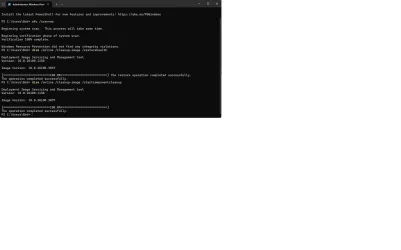
Rebooted after running script, SFC, and DISM commands to successful completion. Will have to wait until tomorrow morning to see if update doesn't run, as it runs sometime in the night. Will get back to you tomorrow morning. Thanks for the help.
 

Attachments

  • SFC and DISM command runs complete.webp
    SFC and DISM command runs complete.webp
    76.9 KB · Views: 1

My Computer

System One

  • OS
    Win 11Pro v25H2 build 26200.7171
    Computer type
    PC/Desktop
    Manufacturer/Model
    DIY
    CPU
    AMD Ryzen 7 9800X3D
    Motherboard
    Gigabyte X670 Aorus Elite AX
    Memory
    64G DDR5 6000
    Graphics Card(s)
    ASUS RTX 4070 Ti Super OC
    Sound Card
    Soundblaster Z SE
    Monitor(s) Displays
    LG 24"
    Screen Resolution
    3480 x 2160
    Hard Drives
    C: drive SOLIDIGM P44 PRO 2TB SSD
    D: drive SOLIDIGM P44 PRO 2TB SSD
    H: drive Samsung 970 EVO Plus 2TB SSD
    PSU
    Corsair RM850X
    Case
    GameMax
    Cooling
    NZXT Kraken Elite 360 RGB 2024
    Keyboard
    Corsair
    Mouse
    Razor
    Internet Speed
    Gigabyte
    Browser
    Firefox
    Antivirus
    Norton 360
  • Like
Reactions: OAT
Rebooted after running script, SFC, and DISM commands to successful completion. Will have to wait until tomorrow morning to see if update doesn't run, as it runs sometime in the night. Will get back to you tomorrow morning. Thanks for the help.
You just can trigger Windows Update to see if it downloads it.
 

My Computers

System One System Two

  • OS
    All Branches but Release
    Computer type
    Laptop
    Manufacturer/Model
    Acer Nitro ANV15-51
    CPU
    AMD Ryzen 7 7735HS 3200-4500 Mhz 8 cores x 2
    Motherboard
    Sportage_RBH
    Memory
    32 GB DDR5
    Graphics Card(s)
    Radeon Graphic / NVIDIA GeForce RTX 4060 8 GB GDDR6
    Sound Card
    AMD/Realtek(R) Audio
    Monitor(s) Displays
    Integrated Monitor (15.3"vis)
    Screen Resolution
    FHD 1920X1080 16:9 144Hz
    Hard Drives
    KINGSTON OM8SEP4512Q-AA 1TB
    Western Digital 256GB
    PSU
    19V DC 6.32 A 120 W
    Cooling
    Dual Fans
    Mouse
    MS Bluetooth
    Internet Speed
    Fiber 1GB Cox -us & 1GB Orange-fr
    Browser
    Edge Canary- Firefox Nightly-Chrome Dev-Chrome Dev
    Antivirus
    Windows Defender
  • Operating System
    Windows 11 Beta
    Computer type
    Laptop
    Manufacturer/Model
    Asus X751BP
    CPU
    AMD A9-9420
    Memory
    8 GB of DDR4
    Graphics card(s)
    AMD Radeon R5
    Screen Resolution
    1600x900
    Hard Drives
    Seagate 1 TB
I wonder if you look under windows update history, and hit the link learn more and go to the website to see the configuration changes, if all the links are going to the same page?

If you turn off "Get the latest updates as soon as they’re available" toggle. And try to update, does it then still try to install it?
 

My Computer

System One

  • OS
    Windows 11
    Computer type
    PC/Desktop
Do a web search and you will see this has been ongoing for almost a year. Nothing suggested here or anywhere else works at stopping the daily update of KB5035942. It doesn't actually install although it says successful. I believe it is happening to a lot more people but they are not checking optional updates each day. Trying to manually install the update doesn't work either.
 

My Computer

System One

  • OS
    Windows 11 25H2
    Computer type
    PC/Desktop
    Manufacturer/Model
    Self Built
    CPU
    Intel(R) Core(TM) i5-6600 CPU @ 3.30GHz
    Motherboard
    Gigabyte B150
    Memory
    16 GB
    Graphics Card(s)
    Intel 530 On Board
    Sound Card
    Realtek On Board
    Monitor(s) Displays
    Samsung
    Hard Drives
    Samsung 850 SSD
    PSU
    be quite Straight Power 11
    Case
    be quite Pure Base 600
    Keyboard
    MS USB
    Mouse
    Logitech Wireless
    Internet Speed
    550 m/b/s
    Browser
    Edge
    Antivirus
    Windows Security
My post should read "not checking other updates each day".
 

My Computer

System One

  • OS
    Windows 11 25H2
    Computer type
    PC/Desktop
    Manufacturer/Model
    Self Built
    CPU
    Intel(R) Core(TM) i5-6600 CPU @ 3.30GHz
    Motherboard
    Gigabyte B150
    Memory
    16 GB
    Graphics Card(s)
    Intel 530 On Board
    Sound Card
    Realtek On Board
    Monitor(s) Displays
    Samsung
    Hard Drives
    Samsung 850 SSD
    PSU
    be quite Straight Power 11
    Case
    be quite Pure Base 600
    Keyboard
    MS USB
    Mouse
    Logitech Wireless
    Internet Speed
    550 m/b/s
    Browser
    Edge
    Antivirus
    Windows Security
Well, it says it installed this morning, again. If this is an ongoing issue, why hasn't MS fixed it before now. After all, it was a March 2024 update. And something does happen when it runs: all the open apps I have at the time need to be restarted, for instance, Firefox. And event viewer does not show any kind of re-boot.
 
Last edited:

My Computer

System One

  • OS
    Win 11Pro v25H2 build 26200.7171
    Computer type
    PC/Desktop
    Manufacturer/Model
    DIY
    CPU
    AMD Ryzen 7 9800X3D
    Motherboard
    Gigabyte X670 Aorus Elite AX
    Memory
    64G DDR5 6000
    Graphics Card(s)
    ASUS RTX 4070 Ti Super OC
    Sound Card
    Soundblaster Z SE
    Monitor(s) Displays
    LG 24"
    Screen Resolution
    3480 x 2160
    Hard Drives
    C: drive SOLIDIGM P44 PRO 2TB SSD
    D: drive SOLIDIGM P44 PRO 2TB SSD
    H: drive Samsung 970 EVO Plus 2TB SSD
    PSU
    Corsair RM850X
    Case
    GameMax
    Cooling
    NZXT Kraken Elite 360 RGB 2024
    Keyboard
    Corsair
    Mouse
    Razor
    Internet Speed
    Gigabyte
    Browser
    Firefox
    Antivirus
    Norton 360
I'm back to this again. Every Single Day!!!!! This is ridiculous!!!!! I found 2 registry entries regarding this update (see attached). Is there any dword I can change to STOP this madness??????
 

Attachments

  • KB5035942 registry entry.webp
    KB5035942 registry entry.webp
    127.1 KB · Views: 2

My Computer

System One

  • OS
    Win 11Pro v25H2 build 26200.7171
    Computer type
    PC/Desktop
    Manufacturer/Model
    DIY
    CPU
    AMD Ryzen 7 9800X3D
    Motherboard
    Gigabyte X670 Aorus Elite AX
    Memory
    64G DDR5 6000
    Graphics Card(s)
    ASUS RTX 4070 Ti Super OC
    Sound Card
    Soundblaster Z SE
    Monitor(s) Displays
    LG 24"
    Screen Resolution
    3480 x 2160
    Hard Drives
    C: drive SOLIDIGM P44 PRO 2TB SSD
    D: drive SOLIDIGM P44 PRO 2TB SSD
    H: drive Samsung 970 EVO Plus 2TB SSD
    PSU
    Corsair RM850X
    Case
    GameMax
    Cooling
    NZXT Kraken Elite 360 RGB 2024
    Keyboard
    Corsair
    Mouse
    Razor
    Internet Speed
    Gigabyte
    Browser
    Firefox
    Antivirus
    Norton 360
I'm back to this again. Every Single Day!!!!! This is ridiculous!!!!! I found 2 registry entries regarding this update (see attached). Is there any dword I can change to STOP this madness??????
Had the same problem, what cured it for me was to turn off "get latest updates" then pause updates for a week, reboot and check for updates. It never came back after that. Hope that helps.
 

My Computers

System One System Two

  • OS
    Win 11 Pro 25H2
    Computer type
    PC/Desktop
    Manufacturer/Model
    User Built
    CPU
    Intel Ultra i7 270K Plus
    Motherboard
    Asrock Taichi Z890 OCF
    Memory
    Kingston Fury Renegrade 2x24 8400 M/tu
    Graphics Card(s)
    MSI - GeForce RTX 5070 12 GB GAMING TRIO OC
    Sound Card
    Headphone DAC
    Monitor(s) Displays
    AOC QD OLED 4K 32" + Eizo 32" FlexScan 4K
    Screen Resolution
    3840x2160
    Hard Drives
    1x 9100 Pro 2TB Nvme 1x 990 Pro 2TB 1X 1TB 990 Pro
    PSU
    Be Quiet Pure Power 13 1K Watt ATX 3.1
    Case
    Corsair 5000T Air Flow
    Cooling
    Arctic Freezer 3 360 Pro
    Keyboard
    Cherry G80-3000N
    Mouse
    Corsair
    Internet Speed
    500Mbps
    Browser
    Firefox x64
    Antivirus
    Defender
    Other Info
    Backup software MR ver 10
  • Operating System
    Win 11 Pro 25H2
    Computer type
    PC/Desktop
    Manufacturer/Model
    User Built
    CPU
    Ultra i7 270K Plus
    Motherboard
    Asus Z890 Strix - F
    Memory
    Kingston Fury 2x16 7200 M/tu
    Graphics card(s)
    MSI RTX 4070 Super OC 12 GB
    Sound Card
    Onboard
    Monitor(s) Displays
    KVM switch to AOC 4K 32" QD OLED
    Screen Resolution
    3840x2160
    Hard Drives
    Samsung 990 Pro 4TB+990 Pro 2TB +990 Pro 1TB
    PSU
    Super Flower Ledex 3 ATX 3.1 850 Watts
    Case
    Corsair 500d
    Cooling
    Noctua D15 Cromax
I'll give that a try. I did have 'get latest updates' off already. Paused updates until 2/22/25. Be back then. Thanks, really appreciate the help!
 

My Computer

System One

  • OS
    Win 11Pro v25H2 build 26200.7171
    Computer type
    PC/Desktop
    Manufacturer/Model
    DIY
    CPU
    AMD Ryzen 7 9800X3D
    Motherboard
    Gigabyte X670 Aorus Elite AX
    Memory
    64G DDR5 6000
    Graphics Card(s)
    ASUS RTX 4070 Ti Super OC
    Sound Card
    Soundblaster Z SE
    Monitor(s) Displays
    LG 24"
    Screen Resolution
    3480 x 2160
    Hard Drives
    C: drive SOLIDIGM P44 PRO 2TB SSD
    D: drive SOLIDIGM P44 PRO 2TB SSD
    H: drive Samsung 970 EVO Plus 2TB SSD
    PSU
    Corsair RM850X
    Case
    GameMax
    Cooling
    NZXT Kraken Elite 360 RGB 2024
    Keyboard
    Corsair
    Mouse
    Razor
    Internet Speed
    Gigabyte
    Browser
    Firefox
    Antivirus
    Norton 360
After turning off 'get latest updates' and pausing updates until 2/22, the *(%&^%$$$$@ thing ran again this morning. Can I delete the two registry entries for this blasted thing or is there something in those entries I can change to make it think it is installed and not run again. This is utterly STUPID.
 

My Computer

System One

  • OS
    Win 11Pro v25H2 build 26200.7171
    Computer type
    PC/Desktop
    Manufacturer/Model
    DIY
    CPU
    AMD Ryzen 7 9800X3D
    Motherboard
    Gigabyte X670 Aorus Elite AX
    Memory
    64G DDR5 6000
    Graphics Card(s)
    ASUS RTX 4070 Ti Super OC
    Sound Card
    Soundblaster Z SE
    Monitor(s) Displays
    LG 24"
    Screen Resolution
    3480 x 2160
    Hard Drives
    C: drive SOLIDIGM P44 PRO 2TB SSD
    D: drive SOLIDIGM P44 PRO 2TB SSD
    H: drive Samsung 970 EVO Plus 2TB SSD
    PSU
    Corsair RM850X
    Case
    GameMax
    Cooling
    NZXT Kraken Elite 360 RGB 2024
    Keyboard
    Corsair
    Mouse
    Razor
    Internet Speed
    Gigabyte
    Browser
    Firefox
    Antivirus
    Norton 360

My Computer

System One

  • OS
    Windows 10 Home
    Computer type
    Laptop
    Manufacturer/Model
    HP Elitebook 2530p
    CPU
    Intel Core 2 Duo [email protected] GHz
    Memory
    2 GB
Before I do that, why will hiding the KB keep it from running? And it appears that this constant running is an internal thing, something unique to my OS. Nothing shows up in event viewer when it runs, there's no download from MS, and the PC doesn't reboot but my desktop 'refreshes' to the point that previously open apps, like EA or Ubisoft or Firefox have to be restarted again.
 

My Computer

System One

  • OS
    Win 11Pro v25H2 build 26200.7171
    Computer type
    PC/Desktop
    Manufacturer/Model
    DIY
    CPU
    AMD Ryzen 7 9800X3D
    Motherboard
    Gigabyte X670 Aorus Elite AX
    Memory
    64G DDR5 6000
    Graphics Card(s)
    ASUS RTX 4070 Ti Super OC
    Sound Card
    Soundblaster Z SE
    Monitor(s) Displays
    LG 24"
    Screen Resolution
    3480 x 2160
    Hard Drives
    C: drive SOLIDIGM P44 PRO 2TB SSD
    D: drive SOLIDIGM P44 PRO 2TB SSD
    H: drive Samsung 970 EVO Plus 2TB SSD
    PSU
    Corsair RM850X
    Case
    GameMax
    Cooling
    NZXT Kraken Elite 360 RGB 2024
    Keyboard
    Corsair
    Mouse
    Razor
    Internet Speed
    Gigabyte
    Browser
    Firefox
    Antivirus
    Norton 360
Have you done any registry tweaks or scripts done in the past to force upgrade win11?
 

My Computer

System One

  • OS
    Windows 11
    Computer type
    PC/Desktop
Can you also try, to delete windows update cache.

run as admin in commands:

net stop wuauserv
net stop cryptSvc
net stop bits
net stop msiserver
ren C:\Windows\SoftwareDistribution SoftwareDistribution.old
ren C:\Windows\System32\catroot2 Catroot2.old
net start wuauserv
net start cryptSvc
net start bits
net start msiserver


Later if updates don't get reinstalled delete the two old folders:
C:\Windows\System32\catroot2.old
C:\Windows\SoftwareDistribution.old
 

My Computer

System One

  • OS
    Windows 11
    Computer type
    PC/Desktop
Before I do that, why will hiding the KB keep it from running? And it appears that this constant running is an internal thing, something unique to my OS. Nothing shows up in event viewer when it runs, there's no download from MS, and the PC doesn't reboot but my desktop 'refreshes' to the point that previously open apps, like EA or Ubisoft or Firefox have to be restarted again.

Start event viewer, expand "Windows Logs", highlight "System", right-click it, select "Find", paste or carefully type "KB5035942" into the search field and see if Windows Update is installing the update.

Ben
 

My Computer

System One

  • OS
    Windows 10 Home
    Computer type
    Laptop
    Manufacturer/Model
    HP Elitebook 2530p
    CPU
    Intel Core 2 Duo [email protected] GHz
    Memory
    2 GB
Tester: back a couple of months, my PC started doing crazy things - not showing folders, bigtime game stutters, etc (I was losing a non-OS SSD as I found out later). At that time I rebooted and came up with the BSOD. I couldn't do anything to get to the desktop so I did a OS restore from USB. That seemed to do the trick but I then found that instead of 23H2 I was now at 24H2.

I have been running 24H2 OK since then until about a week ago when this issue started.

I'll try your delete update cache and see what happens and get back.
 

My Computer

System One

  • OS
    Win 11Pro v25H2 build 26200.7171
    Computer type
    PC/Desktop
    Manufacturer/Model
    DIY
    CPU
    AMD Ryzen 7 9800X3D
    Motherboard
    Gigabyte X670 Aorus Elite AX
    Memory
    64G DDR5 6000
    Graphics Card(s)
    ASUS RTX 4070 Ti Super OC
    Sound Card
    Soundblaster Z SE
    Monitor(s) Displays
    LG 24"
    Screen Resolution
    3480 x 2160
    Hard Drives
    C: drive SOLIDIGM P44 PRO 2TB SSD
    D: drive SOLIDIGM P44 PRO 2TB SSD
    H: drive Samsung 970 EVO Plus 2TB SSD
    PSU
    Corsair RM850X
    Case
    GameMax
    Cooling
    NZXT Kraken Elite 360 RGB 2024
    Keyboard
    Corsair
    Mouse
    Razor
    Internet Speed
    Gigabyte
    Browser
    Firefox
    Antivirus
    Norton 360
Ben Myers: did a search of the System logs and KB5035942 did not show up, so it appears that Windows Update isn't running it.
 

My Computer

System One

  • OS
    Win 11Pro v25H2 build 26200.7171
    Computer type
    PC/Desktop
    Manufacturer/Model
    DIY
    CPU
    AMD Ryzen 7 9800X3D
    Motherboard
    Gigabyte X670 Aorus Elite AX
    Memory
    64G DDR5 6000
    Graphics Card(s)
    ASUS RTX 4070 Ti Super OC
    Sound Card
    Soundblaster Z SE
    Monitor(s) Displays
    LG 24"
    Screen Resolution
    3480 x 2160
    Hard Drives
    C: drive SOLIDIGM P44 PRO 2TB SSD
    D: drive SOLIDIGM P44 PRO 2TB SSD
    H: drive Samsung 970 EVO Plus 2TB SSD
    PSU
    Corsair RM850X
    Case
    GameMax
    Cooling
    NZXT Kraken Elite 360 RGB 2024
    Keyboard
    Corsair
    Mouse
    Razor
    Internet Speed
    Gigabyte
    Browser
    Firefox
    Antivirus
    Norton 360

Latest Support Threads

Back
Top Bottom