Win Update KB5043076 Windows 11 Cumulative Update Build 22621.4169 (22H2) and 22631.4169 (23H2) - Sept. 10


UPDATE 9/26:


 Microsoft Support:

September 10, 2024 - KB5043076 (OS Builds 22621.4169 and 22631.4169)​


07/09/24---END OF SERVICE NOTICE---

IMPORTANT Home and Pro editions of Windows 11, version 22H2 will reach end of service on October 8, 2024. Until then, these editions will only receive security updates. They will not receive non-security, preview updates. To continue receiving security and non-security updates after October 8, 2024, we recommend that you update to the latest version of Windows.

Note We will continue to support Enterprise and Education editions after October 8, 2024.


For information about Windows update terminology, see the article about the types of Windows updates and the monthly quality update types. For an overview of Windows 11, version 23H2, see its update history page.

Note Follow @WindowsUpdate to find out when new content is published to the Windows release health dashboard.


Highlights

  • This update addresses security issues for your Windows operating system.

Improvements

Note: To view the list of addressed issues, click or tap the OS name to expand the collapsible section.

Windows 11, version 23H2​

Important: Use EKB KB5027397 to update to Windows 11, version 23H2.
This security update includes quality improvements. Key changes include:
  • This build includes all the improvements in Windows 11, version 22H2.
  • No additional issues are documented for this release.

Windows 11, version 22H2​

This security update includes improvements that were a part of update KB5041587 (released August 27, 2024). Below is a summary of the key issues that this update addresses when you install this KB. If there are new features, it lists them as well. The bold text within the brackets indicates the item or area of the change we are documenting.
  • [Windows Installer] When it repairs an application, the User Account Control (UAC) does not prompt for your credentials. After you install this update, the UAC will prompt for them. Because of this, you must update your automation scripts. Application owners must add the Shield icon. It indicates that the process requires full administrator access. To turn off the UAC prompt, set the HKEY_LOCAL_MACHINE\SOFTWARE\Policies\Microsoft\Windows\Installer\DisableLUAInRepair registry value to 1. The changes in this update might affect automatic Windows Installer repairs; see Application Resiliency: Unlock the Hidden Features of Windows Installer.
If you installed earlier updates, only the new updates contained in this package will be downloaded and installed on your device.

For more information about security vulnerabilities, please refer to the Security Update Guide website and the September 2024 Security Updates.

Windows 11 servicing stack update (KB5043937) - 22621.4166 and 22631.4166​

This update makes quality improvements to the servicing stack, which is the component that installs Windows updates. Servicing stack updates (SSU) ensure that you have a robust and reliable servicing stack so that your devices can receive and install Microsoft updates.

Known issues in this update

Applies toSymptomWorkaround
All usersAfter installing this security update, you might face issues with booting Linux if you have enabled the dual-boot setup for Windows and Linux in your device. Resulting from this issue, your device might fail to boot Linux and show the error message “Verifying shim SBAT data failed: Security Policy Violation. Something has gone seriously wrong: SBAT self-check failed: Security Policy Violation.”

The August 2024 Windows security update applies a Secure Boot Advanced Targeting (SBAT) setting to devices that run Windows to block old, vulnerable boot managers. This SBAT update will not be applied to devices where dual booting is detected. On some devices, the dual-boot detection did not detect some customized methods of dual-booting and applied the SBAT value when it should not have been applied.
Please refer to the workaround mentioned in Windows release health site for this issue.

How to get this update

Before you install this update

Microsoft combines the latest servicing stack update (SSU) for your operating system with the latest cumulative update (LCU). For general information about SSUs, see Servicing stack updates and Servicing Stack Updates (SSU): Frequently Asked Questions.

Install this update

To install this update, use one of the following Windows and Microsoft release channels.

AvailableNext Step
Yes (Windows Update)None. This update will be downloaded and installed automatically from Windows Update and Microsoft Update.
Yes (MSU)To get the standalone package for this update, go to the Microsoft Update Catalog website.

If you want to remove the LCU

To remove the LCU after installing the combined SSU and LCU package, use the DISM/Remove-Package command line option with the LCU package name as the argument. You can find the package name by using this command: DISM /online /get-packages.

Running Windows Update Standalone Installer (wusa.exe) with the /uninstall switch on the combined package will not work because the combined package contains the SSU. You cannot remove the SSU from the system after installation.

File information

For a list of the files that are provided in this update, download the file information for cumulative update 5043076.

For a list of the files that are provided in the servicing stack update, download the file information for the SSU (KB5043937) - versions 22621.4166 and 22631.4166.


 Source:


Check Windows Updates


UUP Dump:

64-bit ISO download:

ARM64 ISO download:

 
Last edited:

Thanks so much. Its 'gone'... I will wait before trying that again to see if anyone else has issues. I am on Windows Home here, should that make a difference.
Nope. The REcovery environment is the same. Uninstalling updates via recovery has saved me more times than I can count. It's something everyone that installs preview versions (or any version) should know how to do. I recommend booting to the console just so you can be familiar with it. You don't actually have to do the uninstall. Just know your way around the menus.
 

My Computer My Computer

At a glance

Windows 11 25H2AMD 9950X3d264GB Corsair vengeance DDR5 (6000 MHz) CL30AMD 9070XT
OS
Windows 11 25H2
Computer type
PC/Desktop
Manufacturer/Model
N/A
CPU
AMD 9950X3d2
Motherboard
Asus x870E Extreme
Memory
64GB Corsair vengeance DDR5 (6000 MHz) CL30
Graphics Card(s)
AMD 9070XT
Sound Card
Realtek
Monitor(s) Displays
N/A
Screen Resolution
1440p
PSU
Thermaltake 1200w
Case
Asus View 71 TG RGB
Cooling
Custom Cooling loop With an Alphacool 13339 VPP Apex Pump and EK Quantum surface radiator
Internet Speed
Xfinity 2300 mbps
Antivirus
Norton
Nope. The REcovery environment is the same. Uninstalling updates via recovery has saved me more times than I can count. It's something everyone that installs preview versions (or any version) should know how to do. I recommend booting to the console just so you can be familiar with it. You don't actually have to do the uninstall. Just know your way around the menus.
thanks again. I just noticed however, the update downloaded again just now but since I set 'pause for 1 week' its just still there waiting 'Install'
So I date try again or wait a few days ?
 

My Computer My Computer

At a glance

Windows 11 Intel i5 10400 HD630 graphics chipi5-1040012 gbHD630 chipset
OS
Windows 11 Intel i5 10400 HD630 graphics chip
Computer type
PC/Desktop
Manufacturer/Model
HP
CPU
i5-10400
Memory
12 gb
Graphics Card(s)
HD630 chipset
Monitor(s) Displays
LG 24inch
Hard Drives
SSD, external usb drive 1tb for files/backups
Keyboard
wireless Logi
Mouse
ms 4000 wireless mouse
Internet Speed
10meg
Browser
Firefox
Antivirus
Defender
Other Info
Win11 Home 25h2 26200.9168 08/11/2026
SFC ran again did not find any integ violations
Unfortunately, during the pre-update checkup, while SFC came up clean, DISM found component store corruption. Was that caused by using the startcomponentcleanup option?

After I fixed the image, I was able to apply KB5043076 with no problem.
 

My Computers My Computers

  • At a glance

    Windows 11 Pro x64 24H2Ryzen 9 5900X64 GB G.Skill RipJaws V F4-3200C16D-64GVKASRock Steel Legend Arc B580 12 GB
    OS
    Windows 11 Pro x64 24H2
    Computer type
    PC/Desktop
    CPU
    Ryzen 9 5900X
    Motherboard
    ASRock B550 PG Velocita (UEFI-BIOS 3.90)
    Memory
    64 GB G.Skill RipJaws V F4-3200C16D-64GVK
    Graphics Card(s)
    ASRock Steel Legend Arc B580 12 GB
    Monitor(s) Displays
    Alienware AW3423DWF OLED ultrawide
    Hard Drives
    Samsung 990 Pro 1 TB NVMe SSD
    PSU
    eVGA Supernova 750 G3
    Case
    Corsair 275R
    Internet Speed
    VTel FTTH 1 Gb down and 1 Gb up
  • At a glance

    Windows 11 Home x64 25H2Ryzen 7 5800X3D32 GB (2x16 GB G.Skill TridentZ Neo)Sapphire Nitro+ Radeon RX 6750 XT
    Operating System
    Windows 11 Home x64 25H2
    Computer type
    PC/Desktop
    CPU
    Ryzen 7 5800X3D
    Motherboard
    Asus ROG Strix B550-F Gaming (UEFI-BIOS version 3636)
    Memory
    32 GB (2x16 GB G.Skill TridentZ Neo)
    Graphics card(s)
    Sapphire Nitro+ Radeon RX 6750 XT
    Hard Drives
    Samsung 970 Pro 512 GB NVMe SSD
    PSU
    Corsair RM850x
    Case
    Fractal Focus G
Unfortunately, during the pre-update checkup, while SFC came up clean, DISM found component store corruption. Was that caused by using the startcomponentcleanup option?

After I fixed the image, I was able to apply KB5043076 with no problem.
Yes, I ran : Dism.exe /online /Cleanup-Image /StartComponentCleanup /ResetBase
 

My Computer My Computer

At a glance

Windows 11 Intel i5 10400 HD630 graphics chipi5-1040012 gbHD630 chipset
OS
Windows 11 Intel i5 10400 HD630 graphics chip
Computer type
PC/Desktop
Manufacturer/Model
HP
CPU
i5-10400
Memory
12 gb
Graphics Card(s)
HD630 chipset
Monitor(s) Displays
LG 24inch
Hard Drives
SSD, external usb drive 1tb for files/backups
Keyboard
wireless Logi
Mouse
ms 4000 wireless mouse
Internet Speed
10meg
Browser
Firefox
Antivirus
Defender
Other Info
Win11 Home 25h2 26200.9168 08/11/2026
Did you guys get the framework NET update ? Today...
 

My Computer My Computer

At a glance

Windows 11 Pro x64, 24H2Ryzen 7 7700xKingston 32GB KIT DDR5 6000MHz CL36 FURY Beas...SAPPHIRE PULSE AMD Radeon RX 7900 XTX 24G
OS
Windows 11 Pro x64, 24H2
Computer type
PC/Desktop
Manufacturer/Model
Asus
CPU
Ryzen 7 7700x
Motherboard
ASUS TUF GAMING B650-PLUS WIFI
Memory
Kingston 32GB KIT DDR5 6000MHz CL36 FURY Beast Black EXPO
Graphics Card(s)
SAPPHIRE PULSE AMD Radeon RX 7900 XTX 24G
Sound Card
DTS APO4x
Monitor(s) Displays
27" Philips 27M1N3500LS Gaming, 27" Philips 275S9JAL
Screen Resolution
2560 x 1440
Hard Drives
2x Kingston KC3000 NVMe 2TB
PSU
Corsair RM850 White (2021)
Case
be quiet! Pure Base 500DX White
Cooling
DeepCool AK620 White
Keyboard
YENKEE YKB 3400 PANZER - CZ
Mouse
Razer DeathAdder V2
Internet Speed
200Mbps
Browser
Google Chrome
Antivirus
Microsoft Defender
Other Info
It is a gaming PC.

My Computer My Computer

At a glance

Windows 11 Pro x64, 24H2Ryzen 7 7700xKingston 32GB KIT DDR5 6000MHz CL36 FURY Beas...SAPPHIRE PULSE AMD Radeon RX 7900 XTX 24G
OS
Windows 11 Pro x64, 24H2
Computer type
PC/Desktop
Manufacturer/Model
Asus
CPU
Ryzen 7 7700x
Motherboard
ASUS TUF GAMING B650-PLUS WIFI
Memory
Kingston 32GB KIT DDR5 6000MHz CL36 FURY Beast Black EXPO
Graphics Card(s)
SAPPHIRE PULSE AMD Radeon RX 7900 XTX 24G
Sound Card
DTS APO4x
Monitor(s) Displays
27" Philips 27M1N3500LS Gaming, 27" Philips 275S9JAL
Screen Resolution
2560 x 1440
Hard Drives
2x Kingston KC3000 NVMe 2TB
PSU
Corsair RM850 White (2021)
Case
be quiet! Pure Base 500DX White
Cooling
DeepCool AK620 White
Keyboard
YENKEE YKB 3400 PANZER - CZ
Mouse
Razer DeathAdder V2
Internet Speed
200Mbps
Browser
Google Chrome
Antivirus
Microsoft Defender
Other Info
It is a gaming PC.

My Computers My Computers

  • At a glance

    Linux Mint (22.3) and Windows 11Ryzen 3900x32GB (2x16) @ 3600 MHz Corsair Vengeance LPXAsus Geforce RTX 5060 Ti Dual OC 16 GB
    OS
    Linux Mint (22.3) and Windows 11
    Computer type
    PC/Desktop
    Manufacturer/Model
    Home built
    CPU
    Ryzen 3900x
    Motherboard
    Gigabyte Aorus Master x570 rel 1.0
    Memory
    32GB (2x16) @ 3600 MHz Corsair Vengeance LPX
    Graphics Card(s)
    Asus Geforce RTX 5060 Ti Dual OC 16 GB
    Sound Card
    No separate sound card.
    Monitor(s) Displays
    Dell U2718Q
    Screen Resolution
    3840x2160
    Hard Drives
    1TB WD-Black SN850; 1TB Samsung Sata 850 Evo; 4 TB WD Blue Sata SA510 2.5''; 4TB Samsung Sata SSD 870 EVO 2.5".
    PSU
    Be Quiet Dark Power Pro 11 750W
    Case
    Lian Li PC-8FIB
    Cooling
    CPU: Noctua NH-U12A; Case: BeQuiet + Lian Li fans.
    Keyboard
    Steelseries Apex 7 brown keys.
    Mouse
    Logitech (wired) G403
    Internet Speed
    940 Mb/s down; 105 Mb/s up
    Browser
    Firefox
    Other Info
    Pioneer blu-ray optical drive.
  • At a glance

    Windows 11 Home (ARM version) (latest update)Qualcomm Snapdragon X Elite X1E-80-10016 GB LPDDR5Qualcomm Adreno
    Operating System
    Windows 11 Home (ARM version) (latest update)
    Computer type
    Laptop
    Manufacturer/Model
    Samsung Galaxy Book4 Edge 14" Copilot+ PC
    CPU
    Qualcomm Snapdragon X Elite X1E-80-100
    Memory
    16 GB LPDDR5
    Graphics card(s)
    Qualcomm Adreno
    Monitor(s) Displays
    Touch screen 14" AMOLED monitor
    Screen Resolution
    2880x1800
    Hard Drives
    512 GB eUFS
    Internet Speed
    930 Mb/s (Wifi)
    Browser
    Firefox
    Antivirus
    Eset Internet Security
    Other Info
    NPU Qualcomm Hexagon
Wham! 1725994970551.png
 

My Computer My Computer

At a glance

Windows 11I5Too much haha!NVidia 1060
OS
Windows 11
Computer type
PC/Desktop
Manufacturer/Model
Cooler master
CPU
I5
Motherboard
Gigabyte
Memory
Too much haha!
Graphics Card(s)
NVidia 1060
Just updated; went rather quickly! SFC or DISM didn't find any errors. ;-)
 

My Computer My Computer

At a glance

Windows 11 25H2 Home11th Generation Intel Core i712GB
OS
Windows 11 25H2 Home
Computer type
Laptop
Manufacturer/Model
HP ENVY Laptop 17m-ch1xxx
CPU
11th Generation Intel Core i7
Memory
12GB
Monitor(s) Displays
17.3” FHD Display
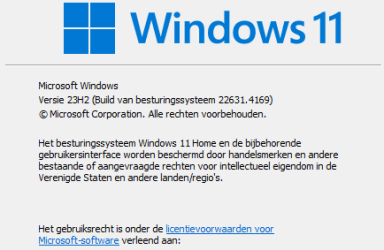
Updated 3 machines.

Edition Windows 11 Pro
Version 23H2
Installed on ‎7/‎31/‎2024
OS build 22631.4169
Experience Windows Feature Experience Pack 1000.22700.1034.0

This once again, is it ever going to be fixed?

1726002752455.png

1726002674129.png
 
Last edited:

My Computer My Computer

At a glance

Windows 11 Pro 25H2Intel I9-9900K64GBNVIDIA RTX 2060
OS
Windows 11 Pro 25H2
Computer type
PC/Desktop
Manufacturer/Model
Dell XPS 8930
CPU
Intel I9-9900K
Memory
64GB
Graphics Card(s)
NVIDIA RTX 2060
Sound Card
NVIDIA High Definition Audio
Monitor(s) Displays
4k Samsung
Screen Resolution
3840 x 2160
Hard Drives
512GB NVMe, ADATA SU 800, 2TB HDD
Also anyone noticed the download went VERY SLOW? (after a few minutes it suddenly ramped up!)
 

My Computer My Computer

At a glance

Windows 11I5Too much haha!NVidia 1060
OS
Windows 11
Computer type
PC/Desktop
Manufacturer/Model
Cooler master
CPU
I5
Motherboard
Gigabyte
Memory
Too much haha!
Graphics Card(s)
NVidia 1060
Just updated; went rather quickly! SFC or DISM didn't find any errors. ;-)
Unfortunately, before I updated, DISM found component store corruption and I had to do restorehealth then reboot, before applying updates.

Might be caused by the startcomponentcleanup option.
 

My Computers My Computers

  • At a glance

    Windows 11 Pro x64 24H2Ryzen 9 5900X64 GB G.Skill RipJaws V F4-3200C16D-64GVKASRock Steel Legend Arc B580 12 GB
    OS
    Windows 11 Pro x64 24H2
    Computer type
    PC/Desktop
    CPU
    Ryzen 9 5900X
    Motherboard
    ASRock B550 PG Velocita (UEFI-BIOS 3.90)
    Memory
    64 GB G.Skill RipJaws V F4-3200C16D-64GVK
    Graphics Card(s)
    ASRock Steel Legend Arc B580 12 GB
    Monitor(s) Displays
    Alienware AW3423DWF OLED ultrawide
    Hard Drives
    Samsung 990 Pro 1 TB NVMe SSD
    PSU
    eVGA Supernova 750 G3
    Case
    Corsair 275R
    Internet Speed
    VTel FTTH 1 Gb down and 1 Gb up
  • At a glance

    Windows 11 Home x64 25H2Ryzen 7 5800X3D32 GB (2x16 GB G.Skill TridentZ Neo)Sapphire Nitro+ Radeon RX 6750 XT
    Operating System
    Windows 11 Home x64 25H2
    Computer type
    PC/Desktop
    CPU
    Ryzen 7 5800X3D
    Motherboard
    Asus ROG Strix B550-F Gaming (UEFI-BIOS version 3636)
    Memory
    32 GB (2x16 GB G.Skill TridentZ Neo)
    Graphics card(s)
    Sapphire Nitro+ Radeon RX 6750 XT
    Hard Drives
    Samsung 970 Pro 512 GB NVMe SSD
    PSU
    Corsair RM850x
    Case
    Fractal Focus G
Also anyone noticed the download went VERY SLOW? (after a few minutes it suddenly ramped up!)
That's what 8.1's Windows Update does, IIRC, LOL. It would happen for the download, or the progress in general.
 

My Computers My Computers

  • At a glance

    Windows 11 Pro x64 24H2Ryzen 9 5900X64 GB G.Skill RipJaws V F4-3200C16D-64GVKASRock Steel Legend Arc B580 12 GB
    OS
    Windows 11 Pro x64 24H2
    Computer type
    PC/Desktop
    CPU
    Ryzen 9 5900X
    Motherboard
    ASRock B550 PG Velocita (UEFI-BIOS 3.90)
    Memory
    64 GB G.Skill RipJaws V F4-3200C16D-64GVK
    Graphics Card(s)
    ASRock Steel Legend Arc B580 12 GB
    Monitor(s) Displays
    Alienware AW3423DWF OLED ultrawide
    Hard Drives
    Samsung 990 Pro 1 TB NVMe SSD
    PSU
    eVGA Supernova 750 G3
    Case
    Corsair 275R
    Internet Speed
    VTel FTTH 1 Gb down and 1 Gb up
  • At a glance

    Windows 11 Home x64 25H2Ryzen 7 5800X3D32 GB (2x16 GB G.Skill TridentZ Neo)Sapphire Nitro+ Radeon RX 6750 XT
    Operating System
    Windows 11 Home x64 25H2
    Computer type
    PC/Desktop
    CPU
    Ryzen 7 5800X3D
    Motherboard
    Asus ROG Strix B550-F Gaming (UEFI-BIOS version 3636)
    Memory
    32 GB (2x16 GB G.Skill TridentZ Neo)
    Graphics card(s)
    Sapphire Nitro+ Radeon RX 6750 XT
    Hard Drives
    Samsung 970 Pro 512 GB NVMe SSD
    PSU
    Corsair RM850x
    Case
    Fractal Focus G
Updated 3 machines.

Edition Windows 11 Pro
Version 23H2
Installed on ‎7/‎31/‎2024
OS build 22631.4169
Experience Windows Feature Experience Pack 1000.22700.1034.0

This once again, is it ever going to be fixed?

View attachment 108148

View attachment 108147
The notorious "Bluetooth file bug" again, which I have been putting up with, since August, 2022, IIRC. But it didn't happen this time for me.

The old 11, 21H2, before August, 2022, didn't have that issue. 11 22H2 and 11 23H2 has the issue right out-of-the-box on a clean install.
 

My Computers My Computers

  • At a glance

    Windows 11 Pro x64 24H2Ryzen 9 5900X64 GB G.Skill RipJaws V F4-3200C16D-64GVKASRock Steel Legend Arc B580 12 GB
    OS
    Windows 11 Pro x64 24H2
    Computer type
    PC/Desktop
    CPU
    Ryzen 9 5900X
    Motherboard
    ASRock B550 PG Velocita (UEFI-BIOS 3.90)
    Memory
    64 GB G.Skill RipJaws V F4-3200C16D-64GVK
    Graphics Card(s)
    ASRock Steel Legend Arc B580 12 GB
    Monitor(s) Displays
    Alienware AW3423DWF OLED ultrawide
    Hard Drives
    Samsung 990 Pro 1 TB NVMe SSD
    PSU
    eVGA Supernova 750 G3
    Case
    Corsair 275R
    Internet Speed
    VTel FTTH 1 Gb down and 1 Gb up
  • At a glance

    Windows 11 Home x64 25H2Ryzen 7 5800X3D32 GB (2x16 GB G.Skill TridentZ Neo)Sapphire Nitro+ Radeon RX 6750 XT
    Operating System
    Windows 11 Home x64 25H2
    Computer type
    PC/Desktop
    CPU
    Ryzen 7 5800X3D
    Motherboard
    Asus ROG Strix B550-F Gaming (UEFI-BIOS version 3636)
    Memory
    32 GB (2x16 GB G.Skill TridentZ Neo)
    Graphics card(s)
    Sapphire Nitro+ Radeon RX 6750 XT
    Hard Drives
    Samsung 970 Pro 512 GB NVMe SSD
    PSU
    Corsair RM850x
    Case
    Fractal Focus G
This is the first update for my new computer.
Downloaded at 1PM EDT when first available.
I've been running problem free for over 5 hours.
 

My Computers My Computers

  • At a glance

    Windows 11 ProIntel Series 3 Core Ultra X9 388H64GB LPDDR5x 9600 MT/sIntel Arc graphics B390 Panther Lake
    OS
    Windows 11 Pro
    Computer type
    Laptop
    Manufacturer/Model
    Dell XPS 16 DA16260
    CPU
    Intel Series 3 Core Ultra X9 388H
    Memory
    64GB LPDDR5x 9600 MT/s
    Graphics Card(s)
    Intel Arc graphics B390 Panther Lake
    Monitor(s) Displays
    16" 3.2K Tandem OLED Infinity Edge
    Screen Resolution
    3200 x 2000 16:10 236 PPI
    Hard Drives
    1 Terabyte M.2 PCIe NVMe SSD
    Case
    Black Anodized Aluminum
    Cooling
    Vapor Chamber Cooling
    Mouse
    None
    Internet Speed
    942 Mbps Netgear Mesh + 2 Satellites
    Browser
    Microsoft Edge (Chromium)
    Antivirus
    Windows Security (Defender)
    Other Info
    NPU delivering 67 TOPS
    Microsoft 365 subscription
    Microsoft Office 365
    Microsoft OneDrive 1TB Cloud
    Microsoft Visual Studio
    Microsoft Visual Studio Code
    Microsoft Sysinternals Suite
    Microsoft BitLocker
    Microsoft Copilot
    Dell Support Assist
    Dell Command | Update
    Macrium Reflect X subscription
    1Password Password Manager
    Amazon Kindle for PC
    Lightroom/Photoshop subscription
    Interactive Brokers Trader Workstation
  • At a glance

    Windows 11 ProSnapdragon® X Elite (12 Core) with Hexagon NP...32GB LPDDR5x 8448 MT/sIntegrated Adreno GPU
    Operating System
    Windows 11 Pro
    Computer type
    Laptop
    Manufacturer/Model
    Microsoft Surface Laptop 7
    CPU
    Snapdragon® X Elite (12 Core) with Hexagon NPU delivering 45 TOPS
    Memory
    32GB LPDDR5x 8448 MT/s
    Graphics card(s)
    Integrated Adreno GPU
    Sound Card
    Omnisonic speakers with Dolby Atmos spatial sound
    Monitor(s) Displays
    13.8″ PixelSense Flow touchscreen 120 Hz 600 NIT
    Screen Resolution
    2304 × 1536 (201 PPI), 3:2 aspect ratio
    Hard Drives
    1 TB PCIe NVMe Gen 4 SSD
    Case
    Black Anodized Aluminum
    Cooling
    Vapor Chamber Cooling
    Mouse
    None
    Internet Speed
    942 Mbps Netgear Mesh + 2 Satellites
    Browser
    Microsoft Edge (Chromium)
    Antivirus
    Windows Security (Defender)
    Other Info
    Microsoft 365 subscription (Office)
    Microsoft Office 365
    Microsoft OneDrive 1TB Cloud
    Microsoft Visual Studio 2026
    Microsoft Visual Studio Code
    Interactive Brokers Trader Workstation
    Lightroom/Photoshop subscription
    1Password Password Manager
    Microsoft Sysinternals
    Amazon Kindle for PC
    Microsoft BitLocker
    Microsoft Copilot
The notorious "Bluetooth file bug" again, which I have been putting up with, since August, 2022, IIRC. But it didn't happen this time for me.

The old 11, 21H2, before August, 2022, didn't have that issue. 11 22H2 and 11 23H2 has the issue right out-of-the-box on a clean install.
Also, on this Lenovo Laptop. 😜🤷‍♂️
It is a recurring problem, almost after every update.

1726013526651.png
 

My Computer My Computer

At a glance

Windows 11 Pro 25H2Intel I9-9900K64GBNVIDIA RTX 2060
OS
Windows 11 Pro 25H2
Computer type
PC/Desktop
Manufacturer/Model
Dell XPS 8930
CPU
Intel I9-9900K
Memory
64GB
Graphics Card(s)
NVIDIA RTX 2060
Sound Card
NVIDIA High Definition Audio
Monitor(s) Displays
4k Samsung
Screen Resolution
3840 x 2160
Hard Drives
512GB NVMe, ADATA SU 800, 2TB HDD
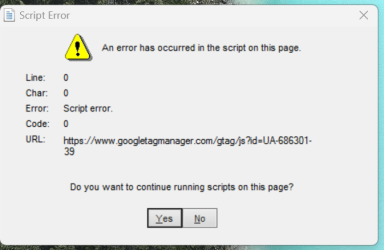
Anybody getting this error message? I have seen it now on multiple machines with Build 22631.4169 and also other insider builds.
What is it? 😎🤐

1726014470432.png
 

My Computer My Computer

At a glance

Windows 11 Pro 25H2Intel I9-9900K64GBNVIDIA RTX 2060
OS
Windows 11 Pro 25H2
Computer type
PC/Desktop
Manufacturer/Model
Dell XPS 8930
CPU
Intel I9-9900K
Memory
64GB
Graphics Card(s)
NVIDIA RTX 2060
Sound Card
NVIDIA High Definition Audio
Monitor(s) Displays
4k Samsung
Screen Resolution
3840 x 2160
Hard Drives
512GB NVMe, ADATA SU 800, 2TB HDD
Not sure why you’re getting that message


When does that error pop-up?
 

My Computers My Computers

  • At a glance

    Windows 11 Pro 25H2 Build 26200.8973Intel(R) Core(TM) i7-4770K CPU @ 3.50GHz32.0 GB of I forget and the box is in storage.Gigabyte nVidia GeForce GTX 1660 Super OC 6GB
    OS
    Windows 11 Pro 25H2 Build 26200.8973
    Computer type
    PC/Desktop
    Manufacturer/Model
    Sin-built 2013
    CPU
    Intel(R) Core(TM) i7-4770K CPU @ 3.50GHz
    Motherboard
    ASUS ROG Maximus VI Formula
    Memory
    32.0 GB of I forget and the box is in storage.
    Graphics Card(s)
    Gigabyte nVidia GeForce GTX 1660 Super OC 6GB
    Sound Card
    ROG SupremeFX Formula 8-Channel High Definition Audio
    Monitor(s) Displays
    5 x LG 25MS500-B - 1 x 24MK430H-B - 1 x Wacom Pro 22" Touch Screen Tablet
    Screen Resolution
    All over the place
    Hard Drives
    Too many to list. OS on Samsung 1TB 870 QVO SATA
    PSU
    Silverstone 1500
    Case
    NZXT Phantom 820 Full-Tower Case
    Cooling
    Noctua NH-D15 Elite Class Dual Tower CPU Cooler / 6 x EziDIY 120mm / 2 x Corsair 140mm somethings / 1 x 140mm Thermaltake something / 2 x 200mm Corsair.
    Keyboard
    Corsair K95 / Logitech diNovo Edge Wireless
    Mouse
    Logitech: G402 / G502 / Mx Masters / Mx Air Cordless
    Internet Speed
    2000/500Mbps
    Browser
    All sorts
    Antivirus
    Kaspersky Premium
    Other Info
    ㅤㅤㅤㅤㅤㅤㅤㅤㅤㅤㅤㅤㅤㅤㅤㅤㅤㅤㅤㅤㅤㅤㅤㅤㅤㅤㅤㅤㅤㅤㅤㅤㅤㅤㅤㅤㅤㅤㅤㅤ⠀⠀⠀⠀⠀⠀⠀⠀⠀⠀
    TP-Link BE9300 WiFi 7 Bluetooth 5.4 (Archer TBE550E)
    TP-Link TX201 V1 2.5GB Lan

    Grandstream HT812 - VoIP
    ASUS DSL-AX82U - Mesh
    ASUS RT-AC68U - Mesh
    ASUS RT-BE88U Router

    Brother MFC-L2880DW Printer

    I’m on a horse.
  • At a glance

    Windows 11 Pro 25H2 Build 26200.8973 (Wifes)13th Generation Intel® Core™ i5-1340P Process...16GB LPDDR5-52001x Intel® Iris® Xe Graphics
    Operating System
    Windows 11 Pro 25H2 Build 26200.8973 (Wifes)
    Computer type
    Laptop
    Manufacturer/Model
    LENOVO Yoga 7 14IRL8 - Type 82YL
    CPU
    13th Generation Intel® Core™ i5-1340P Processor(Core™ i5-1340P)
    Memory
    16GB LPDDR5-5200
    Graphics card(s)
    1x Intel® Iris® Xe Graphics
    Sound Card
    Optimized with Dolby Atmos®
    Screen Resolution
    QHD 2880 x 1800 OLED
    Hard Drives
    M.2 512 GB SSD PCIe
    Mouse
    Logiteck MX Master 3S
    Internet Speed
    2000/500
    Antivirus
    Defender / Malwarebytes
    Other Info
    …still on a horse.


    Wireless Network: Wi-Fi 6E 2x2 AX; Bluetooth® 5.1 or above
    Ports: 1x 1 Novo button; 2 in 1 Audio Combo jack; Micro SD Card Reader; HDMI 1.4b; 2 x USB Type-C (TBT4)
    USB 3.2 Gen 2 DP 1.4a
    PD 3.0); 1 x USB 3.2 Gen1 Type A
    Camera
    1x 1080P FHD IR/RGB Hybrid with Privacy Shutter and Dual Array Microphone
    Graphics
    1x Intel® Iris® Xe Graphics
    Monitor
    14" WUXGA
    Form Factor
    Convertible Notebook
  • Windows 11 Pro 25H2 Build 26200.8973 (Wifes)

    Yoga 7 2-in-1 14IML9 - Type 83DJ

    Processor: Intel® Core™ Ultra 7 155H Processor(Core™ Ultra 7 155H)

    Memory: 32GB LPD5X-7467

    Hard Drive: 1 TB SSD PCIe

    Wireless Network: 1x Wi-Fi 6E 2x2 AX; Bluetooth® 5.1 or above

    Ports: 1 x HDMI 2.1 TMDS; 1 x Novo Button; 1 x Combo Audio Jack
    2 x USB-C (USB 4.0)
    1 x USB-A 3.2 Gen 1

    Camera: 1080P FHD IR Hybrid with Dual Microphone

    Graphics: Intel® Arc™ Graphics

    Monitor: 14" 2.8K

    ...Where's my horse?
Not sure why you’re getting that message


When does that error pop-up?
Pops out at any time, without doing anything specific.
Last one happened when windows spotlight changed the background picture. 🤷‍♂️
 

My Computer My Computer

At a glance

Windows 11 Pro 25H2Intel I9-9900K64GBNVIDIA RTX 2060
OS
Windows 11 Pro 25H2
Computer type
PC/Desktop
Manufacturer/Model
Dell XPS 8930
CPU
Intel I9-9900K
Memory
64GB
Graphics Card(s)
NVIDIA RTX 2060
Sound Card
NVIDIA High Definition Audio
Monitor(s) Displays
4k Samsung
Screen Resolution
3840 x 2160
Hard Drives
512GB NVMe, ADATA SU 800, 2TB HDD
Pops out at any time, without doing anything specific.
Last one happened when windows spotlight changed the background picture. 🤷‍♂️
That’s really weird. I’m going to blindly state it’s a Google Chrome error. But don’t understand why it would be opening randomly unless you were running Google Chrome at the time. Because…

Gtag is a single tag you can added to a website to measure website and ads performance. The Gtag is needed to send data to Google Ads and Google Analytics.

So if I didn’t know better, a Chrome web page of some sort would need to be running or trying to open?

I’d wager it’s worth making a thread.
 

My Computers My Computers

  • At a glance

    Windows 11 Pro 25H2 Build 26200.8973Intel(R) Core(TM) i7-4770K CPU @ 3.50GHz32.0 GB of I forget and the box is in storage.Gigabyte nVidia GeForce GTX 1660 Super OC 6GB
    OS
    Windows 11 Pro 25H2 Build 26200.8973
    Computer type
    PC/Desktop
    Manufacturer/Model
    Sin-built 2013
    CPU
    Intel(R) Core(TM) i7-4770K CPU @ 3.50GHz
    Motherboard
    ASUS ROG Maximus VI Formula
    Memory
    32.0 GB of I forget and the box is in storage.
    Graphics Card(s)
    Gigabyte nVidia GeForce GTX 1660 Super OC 6GB
    Sound Card
    ROG SupremeFX Formula 8-Channel High Definition Audio
    Monitor(s) Displays
    5 x LG 25MS500-B - 1 x 24MK430H-B - 1 x Wacom Pro 22" Touch Screen Tablet
    Screen Resolution
    All over the place
    Hard Drives
    Too many to list. OS on Samsung 1TB 870 QVO SATA
    PSU
    Silverstone 1500
    Case
    NZXT Phantom 820 Full-Tower Case
    Cooling
    Noctua NH-D15 Elite Class Dual Tower CPU Cooler / 6 x EziDIY 120mm / 2 x Corsair 140mm somethings / 1 x 140mm Thermaltake something / 2 x 200mm Corsair.
    Keyboard
    Corsair K95 / Logitech diNovo Edge Wireless
    Mouse
    Logitech: G402 / G502 / Mx Masters / Mx Air Cordless
    Internet Speed
    2000/500Mbps
    Browser
    All sorts
    Antivirus
    Kaspersky Premium
    Other Info
    ㅤㅤㅤㅤㅤㅤㅤㅤㅤㅤㅤㅤㅤㅤㅤㅤㅤㅤㅤㅤㅤㅤㅤㅤㅤㅤㅤㅤㅤㅤㅤㅤㅤㅤㅤㅤㅤㅤㅤㅤ⠀⠀⠀⠀⠀⠀⠀⠀⠀⠀
    TP-Link BE9300 WiFi 7 Bluetooth 5.4 (Archer TBE550E)
    TP-Link TX201 V1 2.5GB Lan

    Grandstream HT812 - VoIP
    ASUS DSL-AX82U - Mesh
    ASUS RT-AC68U - Mesh
    ASUS RT-BE88U Router

    Brother MFC-L2880DW Printer

    I’m on a horse.
  • At a glance

    Windows 11 Pro 25H2 Build 26200.8973 (Wifes)13th Generation Intel® Core™ i5-1340P Process...16GB LPDDR5-52001x Intel® Iris® Xe Graphics
    Operating System
    Windows 11 Pro 25H2 Build 26200.8973 (Wifes)
    Computer type
    Laptop
    Manufacturer/Model
    LENOVO Yoga 7 14IRL8 - Type 82YL
    CPU
    13th Generation Intel® Core™ i5-1340P Processor(Core™ i5-1340P)
    Memory
    16GB LPDDR5-5200
    Graphics card(s)
    1x Intel® Iris® Xe Graphics
    Sound Card
    Optimized with Dolby Atmos®
    Screen Resolution
    QHD 2880 x 1800 OLED
    Hard Drives
    M.2 512 GB SSD PCIe
    Mouse
    Logiteck MX Master 3S
    Internet Speed
    2000/500
    Antivirus
    Defender / Malwarebytes
    Other Info
    …still on a horse.


    Wireless Network: Wi-Fi 6E 2x2 AX; Bluetooth® 5.1 or above
    Ports: 1x 1 Novo button; 2 in 1 Audio Combo jack; Micro SD Card Reader; HDMI 1.4b; 2 x USB Type-C (TBT4)
    USB 3.2 Gen 2 DP 1.4a
    PD 3.0); 1 x USB 3.2 Gen1 Type A
    Camera
    1x 1080P FHD IR/RGB Hybrid with Privacy Shutter and Dual Array Microphone
    Graphics
    1x Intel® Iris® Xe Graphics
    Monitor
    14" WUXGA
    Form Factor
    Convertible Notebook
  • Windows 11 Pro 25H2 Build 26200.8973 (Wifes)

    Yoga 7 2-in-1 14IML9 - Type 83DJ

    Processor: Intel® Core™ Ultra 7 155H Processor(Core™ Ultra 7 155H)

    Memory: 32GB LPD5X-7467

    Hard Drive: 1 TB SSD PCIe

    Wireless Network: 1x Wi-Fi 6E 2x2 AX; Bluetooth® 5.1 or above

    Ports: 1 x HDMI 2.1 TMDS; 1 x Novo Button; 1 x Combo Audio Jack
    2 x USB-C (USB 4.0)
    1 x USB-A 3.2 Gen 1

    Camera: 1080P FHD IR Hybrid with Dual Microphone

    Graphics: Intel® Arc™ Graphics

    Monitor: 14" 2.8K

    ...Where's my horse?

Latest Support Threads

Back
Top Bottom