Win Update KB5048667 Windows 11 Cumulative Update build 26100.2605 (24H2) - Dec. 10


UPDATE 1/14:


 Microsoft Support:

December 10, 2024 KB5048667 (OS Build 26100.2605)​

11/12/24
IMPORTANT
Because of minimal operations during the Western holidays and the upcoming new year, there won’t be a non-security preview release for the month of December 2024. There will be a monthly security release for December 2024. Normal monthly servicing for both security and non-security preview releases will resume in January 2025.


For information about Windows update terminology, see the article about the types of Windows updates and the monthly quality update types. For an overview of Windows 11, version 24H2, see its update history page.

Note Follow @WindowsUpdate to find out when new content is published to the Windows release health dashboard.

Important: Windows updates do not install Microsoft Store application updates. If you are an enterprise user, see Microsoft Store apps - Configuration Manager. If you are a consumer user, see Get updates for apps and games in Microsoft Store.

Tip: See the release notes for Windows Server 2025.

Highlights

  • This update addresses security issues for your Windows operating system.

Improvements

This security update includes improvements that were a part of update KB5046740 (released November 21, 2024). Below is a summary of the key issues that this update addresses when you install this KB. If there are new features, it lists them as well. The bold text within the brackets indicates the item or area of the change we are documenting.
  • This update makes miscellaneous security improvements to internal OS functionality. No additional issues were documented for this release.
If you installed earlier updates, only the new updates contained in this package will be downloaded and installed on your device.

For more information about security vulnerabilities, please refer to the Security Update Guide website and the December 2024 Security Updates.

Windows 11 servicing stack update (KB5049685)- 26100.2592​

This update makes quality improvements to the servicing stack, which is the component that installs Windows updates. Servicing stack updates (SSU) ensure that you have a robust and reliable servicing stack so that your devices can receive and install Microsoft updates.

Known issues in this update

Applies toSymptomWorkaround
All usersWe’re aware of an issue where players on Arm devices are unable to download and play Roblox via the Microsoft Store on Windows.Players on Arm devices can play Roblox by downloading the title directly from www.Roblox.com.
All usersFollowing the installation of the October 2024 security update, some customers report that the OpenSSH (Open Secure Shell) service fails to start, preventing SSH connections. The service fails with no detailed logging, and manual intervention is required to run the sshd.exe process.

This issue is affecting both enterprise, IOT, and education customers, with a limited number of devices impacted. Microsoft is investigating whether consumer customers using Home or Pro editions of Windows are affected.
Customers can temporarily resolve the issue by updating permissions (ACLs) on the affected directories. Follow these steps:
  1. Open PowerShell as an Administrator.
  2. Update the permissions for C:\ProgramData\ssh and C:\ProgramData\ssh\logs to allow full control for SYSTEM and the Administrators group, while allowing read access for Authenticated Users. You can restrict read access to specific users or groups by modifying the permissions string if needed.

    Use the following commands to update the permissions:

    $directoryPath = "C:\ProgramData\ssh" $acl = Get-Acl -Path $directoryPath $sddlString = "O:BAD:PAI(A;OICI;FA;;;SY)(A;OICI;FA;;;BA)(A;OICI;0x1200a9;;;AU)" $securityDescriptor = New-Object System.Security.AccessControl.RawSecurityDescriptor $sddlString $acl.SetSecurityDescriptorSddlForm($securityDescriptor.GetSddlForm("All")) Set-Acl -Path $directoryPath -AclObject $acl
  3. Repeat the above steps for C:\ProgramData\ssh\logs.

Microsoft is actively investigating the issue and will provide a resolution in an upcoming Windows update. Further communications will be provided when a resolution or additional workarounds are available.

How to get this update

Before you install this update

Microsoft combines the latest servicing stack update (SSU) for your operating system with the latest cumulative update (LCU). For general information about SSUs, see Servicing stack updates and Servicing Stack Updates (SSU): Frequently Asked Questions.

Install this update

To install this update, use one of the following Windows and Microsoft release channels.

AvailableNext Step
Yes (Windows Update)None. This update will be downloaded and installed automatically from Windows Update and Microsoft Update.
Yes (MSU)Before you install this update

To get the standalone package(s) for this update, go to the Microsoft Update Catalog website. This KB contains one or more MSU files that must be installed in order.


Install this update

Method 1: Install all MSU files together

Download all MSU files for KB5048667 from Microsoft Update Catalog and place them in the same folder (for example, C:/Packages). Use Deployment Image Servicing and Management (DISM.exe) to install the target update. DISM will use the folder specified in PackagePath to discover and install one or more prerequisite MSU files as needed.


Updating Windows PC
To apply this update to a running Windows PC, run the following command from an elevated Command Prompt:


DISM /Online /Add-Package /PackagePath:c:\packages\Windows11.0-KB

Or, run the following command from an elevated Windows PowerShell prompt:
Add-WindowsPackage -Online -PackagePath "c:\packages\Windows11.0-KB

Updating Windows Installation media
To apply this update to Windows Installation media, see Update Windows installation media with Dynamic Update.


To add this update to a mounted image, run the following command from an elevated Command Prompt:

DISM /Image:mountdir /Add-Package /PackagePath:Windows11.0-KB

Or, run the following command from an elevated Windows PowerShell prompt:

Add-WindowsPackage -Path "c:\offline" -PackagePath "Windows11.0-KB

Method 2: Install each MSU file individually, in order

Download and install each MSU file individually either using DISM or Windows Update Standalone Installer in the following order:
  1. windows11.0-kb5043080-x64_953449672073f8fb99badb4cc6d5d7849b9c83e8.msu
  2. windows11.0-kb5048667-x64_d4ad0ca69de9a02bc356757581e0e0d6960c9f93.msu

If you want to remove the LCU

To remove the LCU after installing the combined SSU and LCU package, use the DISM/Remove-Package command line option with the LCU package name as the argument. You can find the package name by using this command: DISM /online /get-packages.

Running Windows Update Standalone Installer (wusa.exe) with the /uninstall switch on the combined package will not work because the combined package contains the SSU. You cannot remove the SSU from the system after installation.

File information

For a list of the files that are provided in this update, download the file information for cumulative update 5048667 .

For a list of the files that are provided in the servicing stack update, download the file information for the SSU (KB5049685) - version 26100.2592 .


 Source:


Check Windows Updates


UUP Dump:

64-bit ISO download:

ARM64 ISO download:

 
Last edited:
The point is that the insider testing purpose is to identify the MS problems and get them fix.
Working around the bugs or ignoring them is not the solution. 😎
I'm not an insider tester and never will be. As stated, I use my computer for my photography avocation and to make my living. For what I do, I'm simply not having any problems with bugs whatsoever.

I certainly can understand that some do have problems with bugs, depending on their hardware, software, and what they do with their computers. You're apparently one of them and I can appreciate that. All I've done is state that, for what I do, I'm not in that group, and I'm not currently having any problems. :-)
 

My Computers My Computers

  • At a glance

    Windows 11 ProIntel Series 3 Core Ultra X9 388H64GB LPDDR5x 9600 MT/sIntel Arc graphics B390 Panther Lake
    OS
    Windows 11 Pro
    Computer type
    Laptop
    Manufacturer/Model
    Dell XPS 16 DA16260
    CPU
    Intel Series 3 Core Ultra X9 388H
    Memory
    64GB LPDDR5x 9600 MT/s
    Graphics Card(s)
    Intel Arc graphics B390 Panther Lake
    Monitor(s) Displays
    16" 3.2K Tandem OLED Infinity Edge
    Screen Resolution
    3200 x 2000 16:10 236 PPI
    Hard Drives
    1 Terabyte M.2 PCIe NVMe SSD
    Case
    Black Anodized Aluminum
    Cooling
    Vapor Chamber Cooling
    Mouse
    None
    Internet Speed
    942 Mbps Netgear Mesh + 2 Satellites
    Browser
    Microsoft Edge (Chromium)
    Antivirus
    Windows Security (Defender)
    Other Info
    NPU delivering 67 TOPS
    Microsoft 365 subscription
    Microsoft Office 365
    Microsoft OneDrive 1TB Cloud
    Microsoft Visual Studio
    Microsoft Visual Studio Code
    Microsoft Sysinternals Suite
    Microsoft BitLocker
    Microsoft Copilot
    Dell Support Assist
    Dell Command | Update
    Macrium Reflect X subscription
    1Password Password Manager
    Amazon Kindle for PC
    Lightroom/Photoshop subscription
    Interactive Brokers Trader Workstation
  • At a glance

    Windows 11 ProSnapdragon® X Elite (12 Core) with Hexagon NP...32GB LPDDR5x 8448 MT/sIntegrated Adreno GPU
    Operating System
    Windows 11 Pro
    Computer type
    Laptop
    Manufacturer/Model
    Microsoft Surface Laptop 7
    CPU
    Snapdragon® X Elite (12 Core) with Hexagon NPU delivering 45 TOPS
    Memory
    32GB LPDDR5x 8448 MT/s
    Graphics card(s)
    Integrated Adreno GPU
    Sound Card
    Omnisonic speakers with Dolby Atmos spatial sound
    Monitor(s) Displays
    13.8″ PixelSense Flow touchscreen 120 Hz 600 NIT
    Screen Resolution
    2304 × 1536 (201 PPI), 3:2 aspect ratio
    Hard Drives
    1 TB PCIe NVMe Gen 4 SSD
    Case
    Black Anodized Aluminum
    Cooling
    Vapor Chamber Cooling
    Mouse
    None
    Internet Speed
    942 Mbps Netgear Mesh + 2 Satellites
    Browser
    Microsoft Edge (Chromium)
    Antivirus
    Windows Security (Defender)
    Other Info
    Microsoft 365 subscription (Office)
    Microsoft Office 365
    Microsoft OneDrive 1TB Cloud
    Microsoft Visual Studio 2026
    Microsoft Visual Studio Code
    Interactive Brokers Trader Workstation
    Lightroom/Photoshop subscription
    1Password Password Manager
    Microsoft Sysinternals
    Amazon Kindle for PC
    Microsoft BitLocker
    Microsoft Copilot
I'm not an insider tester and never will be. As stated, I use my computer for my photography avocation and to make my living. For what I do, I'm simply not having any problems with bugs whatsoever.

I certainly can understand that some do have problems with bugs, depending on their hardware, software, and what they do with their computers. You're apparently one of them and I can appreciate that. All I've done is state that, for what I do, I'm not in that group, and I'm not currently having any problems. :-)
I think people on these forums are trying to get the problems fixed.
Among millions of users, I'm sure there are many that don't have or don't see any of the problems.
Knowing that doesn't really help fixing the existing bugs. 😉
 

My Computer My Computer

At a glance

Windows 11 Pro 25H2Intel I9-9900K64GBNVIDIA RTX 2060
OS
Windows 11 Pro 25H2
Computer type
PC/Desktop
Manufacturer/Model
Dell XPS 8930
CPU
Intel I9-9900K
Memory
64GB
Graphics Card(s)
NVIDIA RTX 2060
Sound Card
NVIDIA High Definition Audio
Monitor(s) Displays
4k Samsung
Screen Resolution
3840 x 2160
Hard Drives
512GB NVMe, ADATA SU 800, 2TB HDD
I like @TraderGary do not see any issues with this latest update that stops me using my PC for day to day activities. Yeah yeah, there are some things that do NOT work as we expect, however it is NOT a war stopper. I am sure Microsoft are aware of the explorer inconvenience but I have NOT heard that it breaks a PC.
Continually flooding every new thread regarding a KB update that the "explorer" issue still exists - Note it once and move on.
Members generally interested to see if the latest update will break their system, do NOT need to read the same old story repetitively through out a single thread.
 

My Computers My Computers

  • At a glance

    Windows 11 Pro 25H2Intel S1200 Core i3 1010532.0 GBMSI GT710 2GB PCIe Video Card
    OS
    Windows 11 Pro 25H2
    Computer type
    PC/Desktop
    Manufacturer/Model
    Home built
    CPU
    Intel S1200 Core i3 10105
    Motherboard
    Gigabyte S1200 MicroATX B560M DS3H DDR4
    Memory
    32.0 GB
    Graphics Card(s)
    MSI GT710 2GB PCIe Video Card
    Sound Card
    Realtek® Audio CODEC
    Monitor(s) Displays
    Dual Acer 24in
    Screen Resolution
    1920 x 1080
    Hard Drives
    500GB Crucial P1 M.2 PCIe SSD
    PSU
    500W
    Case
    Thermaltake ATX Versa H21 Case
    Cooling
    Internal fans by (3)
    Keyboard
    Microsoft Wireless Keyboard 850
    Mouse
    Microsoft Wireless mouse
    Internet Speed
    50Mbps / 20Mbps
    Browser
    Chrome
    Antivirus
    Defender, Malwarebyte
  • At a glance

    Windows 11 Pro 25H2Intel(R) Core(TM) i5-4460 CPU @ 3.20GHz12.0 GBIntegrated Video Card
    Operating System
    Windows 11 Pro 25H2
    Computer type
    PC/Desktop
    Manufacturer/Model
    Home built Test-PC
    CPU
    Intel(R) Core(TM) i5-4460 CPU @ 3.20GHz
    Motherboard
    ASUS S1150 MicroATX B85M-E
    Memory
    12.0 GB
    Graphics card(s)
    Integrated Video Card
    Sound Card
    Integrated Sound Card
    Monitor(s) Displays
    Chimei 22"
    Screen Resolution
    1680 x 1050
    Hard Drives
    120GB WD 2.5" Green SATA 6Gb/s SSD
    1TB WD 3.5" 7200rpm SATA 6Gb/s Caviar Blue
    PSU
    400W
    Case
    Cougar MicroATX MG100 Case Black
    Cooling
    Deepcool 120mm Case Fan
    Keyboard
    Logitech Wireless keyboard
    Mouse
    Logitech Wireless mouse
    Internet Speed
    50Mbps / 20Mbps
    Browser
    Chrome
    Antivirus
    Defender
    Other Info
    Only running Win 11 on this PC for test purposes
I think people on these forums are trying to get the problems fixed.
Among millions of users, I'm sure there are many that don't have or don't see any of the problems.
Knowing that doesn't really help fixing the existing bugs. 😉
I don't have any issues with these comments. And yes, I have 24H2 on both my computers with no issues.

I do have issues with some tech media sites like Windows Latest who seem to like bashing the silly line about how full of bugs 24H2 is. There are numerous other websites doing this. Also, the people on the internet, and yes of read this stuff here who go on how bad 24H2 is and using over-emotive words. It doesn't suck, nor is it a fiasco. It is a major update to Windows 11, the biggest since it was first released in 2021.

The driver frameworks/architecture/models and much more have had a big update which I think probably explains why some are having problems. I do think that it is essential to anyone planning to upgrade to 24H2 to make sure they have a full system image backup of their current install of Windows first.
 
Last edited:

My Computers My Computers

  • At a glance

    Windows 11 Pro 25H2Intel Core i9 13900KCorsair Dominator Platinum 64gb 5600MT/s DDR5...Sapphire NITRO+ AMD Radeon RX 7900 XTX Vapor-...
    OS
    Windows 11 Pro 25H2
    Computer type
    PC/Desktop
    Manufacturer/Model
    Homebuilt
    CPU
    Intel Core i9 13900K
    Motherboard
    Asus ProArt Z790 Creator WiFi - Bios 3107
    Memory
    Corsair Dominator Platinum 64gb 5600MT/s DDR5 Dual Channel
    Graphics Card(s)
    Sapphire NITRO+ AMD Radeon RX 7900 XTX Vapor-X 24GB
    Sound Card
    External DAC: Cambridge Audio DACMagic200M - Headphone Amp: Topping L50
    Monitor(s) Displays
    Panasonic MX950 Mini LED 55" TV 120hz
    Screen Resolution
    3840 x 2160 120hz
    Hard Drives
    Samsung 980 Pro 2TB (OS)
    Samsung 980 Pro 1TB (Files)
    Lexar NZ790 4TB
    LaCie d2 Professional 6TB external - USB 3.1
    Seagate Expansion 16TB external - USB 3.2
    Seagate One Touch 18TB external HD - USB 3.0
    PSU
    Corsair RM1200x Shift
    Case
    Corsair RGB Smart Case 5000x (white)
    Cooling
    Corsair iCue H150i Elite Capellix XT
    Keyboard
    Incase Ergonomic USB (Microsoft clone)
    Mouse
    Logitech MX Master 3S
    Internet Speed
    Fibre 900/500 Mbps
    Browser
    Microsoft Edge Chromium
    Antivirus
    Bitdefender Total Security
    Other Info
    AMD Radeon Software & Drivers 26.1.1
    Hasleo Backup Suite
    Dashlane password manager
    Kensington Verimark fingerprint reader
    Logitech Brio 4K webcam
    Orico 10-port powered USB 3.0 hub
  • At a glance

    Windows 11 Pro 25H2Intel® Core™ i9-13900H32GB DDR4-3200 Dual channel*Intel Iris Xᵉ Graphics G7
    Operating System
    Windows 11 Pro 25H2
    Computer type
    Laptop
    Manufacturer/Model
    Asus Vivobook X1605VA
    CPU
    Intel® Core™ i9-13900H
    Motherboard
    Asus X1605VA bios 309
    Memory
    32GB DDR4-3200 Dual channel
    Graphics card(s)
    *Intel Iris Xᵉ Graphics G7
    Sound Card
    Realtek | Intel SST Bluetooth & USB
    Monitor(s) Displays
    16.0-inch, WUXGA 16:10 aspect ratio, IPS-level Panel
    Screen Resolution
    1920 x 1200 60hz
    Hard Drives
    512GB M.2 NVMe™ PCIe® 3.0 SSD
    Mouse
    Logitech MX Ergo Trackball
    Antivirus
    Bitdefender Total Security
    Other Info
    720p Webcam
    WiFi & USB to ethernet

My Computer My Computer

At a glance

Windows 11 Stable, Beta, Dev, CanaryAMD Ryzen 9 PRO 5950X128 GbIntel(R) Arc(TM) A380 Graphics (2 ГБ)
OS
Windows 11 Stable, Beta, Dev, Canary
Computer type
PC/Desktop
Manufacturer/Model
Micro-Star International Co., Ltd. MS-7D54
CPU
AMD Ryzen 9 PRO 5950X
Motherboard
MSI MAG X570S Tomahawk Max WiFi (MS-7D54) (2 PCI-E x1, 2 PCI-E x16, 2 M.2, 4 DDR4 DIMM, Audio, Video, 2.5GbE LAN, WiFi)
Memory
128 Gb
Graphics Card(s)
Intel(R) Arc(TM) A380 Graphics (2 ГБ)
Sound Card
Устройство с поддержкой High Definition Audio
Monitor(s) Displays
HP X34 [34" LCD] (6CM1300J5J) {2021}
Screen Resolution
3440x1440
Hard Drives
KINGSTON SFYRD2000G (2000 ГБ, PCI-E 4.0 x4)
PSU
Be Quiet! Dark Rock Pro 4
Case
Cooler Master HAF XB EVO
Internet Speed
1000 Mb/s
Browser
Chrome
Antivirus
Windows Defender
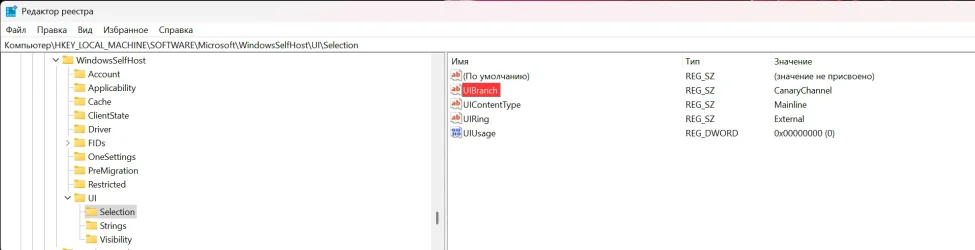
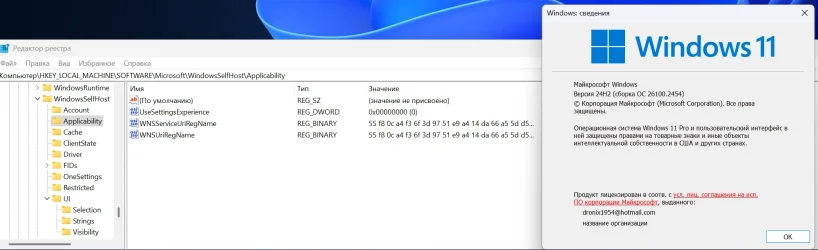
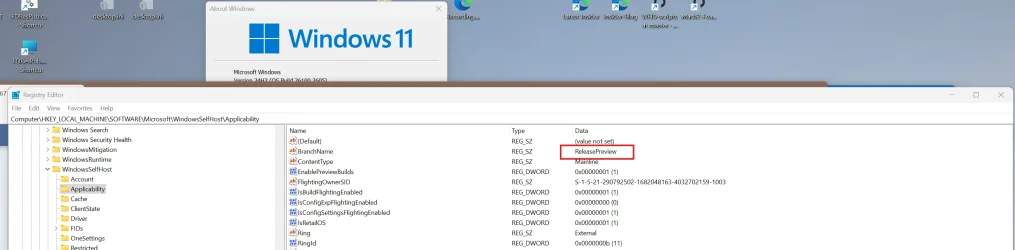
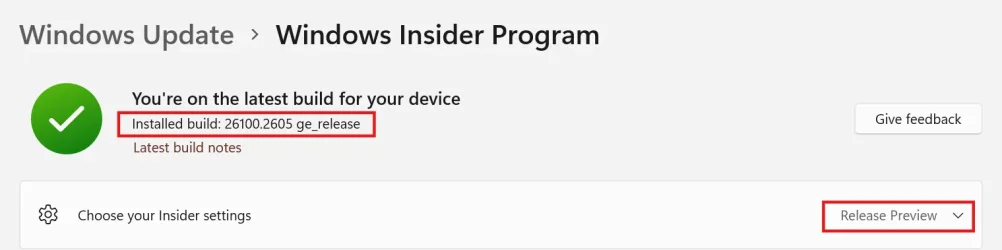
I have doubts that this is an insider build. Shawn Brink also wrote here how to switch to insider builds - Change Windows Insider Program Channel in Windows 11 / Here are screenshots of the registry 22764.1000 and 26100.2605. By the way, I am not registered in the Windows Pre-Evaluation Program on build 26100.2605.
I said it was released to both Insider R.P. and general public.
You just ignored what I said. 😂🤷‍♂️
From my reply to you earlier:
"In this case 26100.2605 is released to Insider Release Preview channel and also to the general public."
1733991336905.webp


1733991407689.webp

1733994142334.webp
 
Last edited:

My Computer My Computer

At a glance

Windows 11 Pro 25H2Intel I9-9900K64GBNVIDIA RTX 2060
OS
Windows 11 Pro 25H2
Computer type
PC/Desktop
Manufacturer/Model
Dell XPS 8930
CPU
Intel I9-9900K
Memory
64GB
Graphics Card(s)
NVIDIA RTX 2060
Sound Card
NVIDIA High Definition Audio
Monitor(s) Displays
4k Samsung
Screen Resolution
3840 x 2160
Hard Drives
512GB NVMe, ADATA SU 800, 2TB HDD
You just ignored what I said.
I didn't ignore anything. To my clear question about 26100.2605 about insider trading, a clear answer was given: It sure is. And to guess what you meant, I'm not a psychic. You also clarified this later about the Release Preview.
 

My Computer My Computer

At a glance

Windows 11 Stable, Beta, Dev, CanaryAMD Ryzen 9 PRO 5950X128 GbIntel(R) Arc(TM) A380 Graphics (2 ГБ)
OS
Windows 11 Stable, Beta, Dev, Canary
Computer type
PC/Desktop
Manufacturer/Model
Micro-Star International Co., Ltd. MS-7D54
CPU
AMD Ryzen 9 PRO 5950X
Motherboard
MSI MAG X570S Tomahawk Max WiFi (MS-7D54) (2 PCI-E x1, 2 PCI-E x16, 2 M.2, 4 DDR4 DIMM, Audio, Video, 2.5GbE LAN, WiFi)
Memory
128 Gb
Graphics Card(s)
Intel(R) Arc(TM) A380 Graphics (2 ГБ)
Sound Card
Устройство с поддержкой High Definition Audio
Monitor(s) Displays
HP X34 [34" LCD] (6CM1300J5J) {2021}
Screen Resolution
3440x1440
Hard Drives
KINGSTON SFYRD2000G (2000 ГБ, PCI-E 4.0 x4)
PSU
Be Quiet! Dark Rock Pro 4
Case
Cooler Master HAF XB EVO
Internet Speed
1000 Mb/s
Browser
Chrome
Antivirus
Windows Defender
I have "3 Dot Problem" on both my 7 year old AMD desktop and my shiny new Co-pilot+ laptop - both with this latest cumulative update. The laptop uses 200 scaling; the desktop 150. Apart from the dreaded "3 Dot Problem" everything works as expected.

I blame a mystery alien culture planning to invade Earth... I'm certain Brink knows something, but isn't saying.

John
 

My Computers My Computers

  • At a glance

    Linux Mint (22.3) and Windows 11Ryzen 3900x32GB (2x16) @ 3600 MHz Corsair Vengeance LPXAsus Geforce RTX 5060 Ti Dual OC 16 GB
    OS
    Linux Mint (22.3) and Windows 11
    Computer type
    PC/Desktop
    Manufacturer/Model
    Home built
    CPU
    Ryzen 3900x
    Motherboard
    Gigabyte Aorus Master x570 rel 1.0
    Memory
    32GB (2x16) @ 3600 MHz Corsair Vengeance LPX
    Graphics Card(s)
    Asus Geforce RTX 5060 Ti Dual OC 16 GB
    Sound Card
    No separate sound card.
    Monitor(s) Displays
    Dell U2718Q
    Screen Resolution
    3840x2160
    Hard Drives
    1TB WD-Black SN850; 1TB Samsung Sata 850 Evo; 4 TB WD Blue Sata SA510 2.5''; 4TB Samsung Sata SSD 870 EVO 2.5".
    PSU
    Be Quiet Dark Power Pro 11 750W
    Case
    Lian Li PC-8FIB
    Cooling
    CPU: Noctua NH-U12A; Case: BeQuiet + Lian Li fans.
    Keyboard
    Steelseries Apex 7 brown keys.
    Mouse
    Logitech (wired) G403
    Internet Speed
    940 Mb/s down; 105 Mb/s up
    Browser
    Firefox
    Other Info
    Pioneer blu-ray optical drive.
  • At a glance

    Windows 11 Home (ARM version) (latest update)Qualcomm Snapdragon X Elite X1E-80-10016 GB LPDDR5Qualcomm Adreno
    Operating System
    Windows 11 Home (ARM version) (latest update)
    Computer type
    Laptop
    Manufacturer/Model
    Samsung Galaxy Book4 Edge 14" Copilot+ PC
    CPU
    Qualcomm Snapdragon X Elite X1E-80-100
    Memory
    16 GB LPDDR5
    Graphics card(s)
    Qualcomm Adreno
    Monitor(s) Displays
    Touch screen 14" AMOLED monitor
    Screen Resolution
    2880x1800
    Hard Drives
    512 GB eUFS
    Internet Speed
    930 Mb/s (Wifi)
    Browser
    Firefox
    Antivirus
    Eset Internet Security
    Other Info
    NPU Qualcomm Hexagon
I think people on these forums are trying to get the problems fixed.
Among millions of users, I'm sure there are many that don't have or don't see any of the problems.
Knowing that doesn't really help fixing the existing bugs. 😉

Only MS developers can really fix these issues or bugs. Because we don't have the Windows source code.
 

My Computer My Computer

At a glance

Windows 11, version 25H2 (26200)AMD Ryzen 9 9950X 16-Core ProcessorDDR5-6000 (CL36) 64.0 GBNVIDIA GeForce RTX 4090
OS
Windows 11, version 25H2 (26200)
Computer type
PC/Desktop
CPU
AMD Ryzen 9 9950X 16-Core Processor
Motherboard
ASRock B650M PG Riptide
Memory
DDR5-6000 (CL36) 64.0 GB
Graphics Card(s)
NVIDIA GeForce RTX 4090
PSU
1200W
Case
Phanteks Enthoo Pro 2
Cooling
Noctua NH-D12L
Here is the outcome from 10.0.26100.2605 december build (tested on several different UPDATED machines where the new build was successfully deployed):

1. 3dot explorer menu bug is still present (always opens upwards despite explorer window size - full screen or not); display scale 100%, all resolutions up to 3440x1440 (incl) tested even with scales up to 200%.
2. 190 MB of windows update cleanup is still NON-removable by Disk Cleanup (run as admin incl. tested).
At least this latest bug 'steals' much less than the previous bug with 8-9 GB...
1733998453921.webp
3. Dism.exe /online /Cleanup-Image /StartComponentCleanup
Deployment Image Servicing and Management tool
Version: 10.0.26100.1150
Image Version: 10.0.26100.2605
[===========================70.0%======== ]
The operation completed successfully.

This should indicate that we are fine here also in accordance to the latest MS philosophy?

4. All of the following come up clean without issues this time around:
DISM /Online /Cleanup-Image /ScanHealth
DISM /Online /Cleanup-Image /CheckHealth
sfc /scannow
 

My Computer My Computer

At a glance

W11,Debian
OS
W11,Debian
Hi Guys,

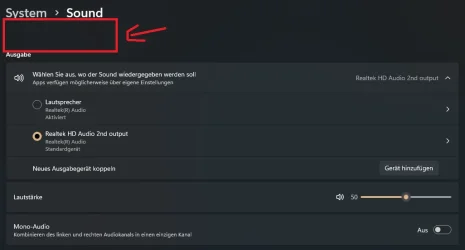
i installed KB5048667 for my 24H2 Build today and register an new Bug in Town ;):

When you open the Sound Tab in Settings there is too much Space between the two Headlines. This was not the Case before the Update. It´s a Minor Thing but my inner Monk hates this ;)

Anyone else?
 

Attachments

  • Screenshot 2024-12-12 110507.webp
    Screenshot 2024-12-12 110507.webp
    20.2 KB · Views: 2

My Computer My Computer

At a glance

Windows 11Ryzen 7 5700X3D32GB DDR4 3600 Kingston RenegadePowercolor 7800XT
OS
Windows 11
Computer type
PC/Desktop
CPU
Ryzen 7 5700X3D
Motherboard
ASUS B550-A Gaming
Memory
32GB DDR4 3600 Kingston Renegade
Graphics Card(s)
Powercolor 7800XT
Sound Card
Onboard ALC1220 Realtek
Monitor(s) Displays
Dell S3220DGF
Screen Resolution
1440p
Hard Drives
Samsung 1TB 980Pro - NVME
Samsung 500GB 970 Evo - NVME
PSU
Corsair RM750
Case
Bequiet Pure Base
Cooling
Arctic Cooling Case Fans 140 x5 / Arctic Freezer 34 for CPU
Keyboard
Roccat Magma
Mouse
Roccat Burst Pro
Internet Speed
1gbit
Browser
Edge
Antivirus
Defender
Other Info
Windows 11 24H2 - 26100.2894
Yosh79, don't rly remember how it was before... but it is spacy now :D
Perhaps this is intentional to distract you from the other bugs above.
1733998559914.webp
 

My Computer My Computer

At a glance

W11,Debian
OS
W11,Debian
I never access sound settings from there as I use audio switcher, however, I did check and just as you point out there's a lot of room now.
 

My Computers My Computers

  • At a glance

    Windows 11 ProIntel Core i9 14900k, Intel UHD 770 integrated32gb G.Skill Trident Z5 7200Gigabyte RTX 4090 Gaming OC
    OS
    Windows 11 Pro
    Computer type
    PC/Desktop
    Manufacturer/Model
    Self Built
    CPU
    Intel Core i9 14900k, Intel UHD 770 integrated
    Motherboard
    Gigabyte Z790 Aorus Master X
    Memory
    32gb G.Skill Trident Z5 7200
    Graphics Card(s)
    Gigabyte RTX 4090 Gaming OC
    Sound Card
    EVGA Nu Audio, Razer Kraken V3 Pro, Realtek Onboard
    Monitor(s) Displays
    Dell U4025QW nano IPS monitor, Samsung Odyssey G75F, Wisecoco 12.6" IPS sensor panel
    Screen Resolution
    5120X2160 x 2 1920x515
    Hard Drives
    WD Black SN8100, Samsung 990 Pro x 3, WD BLACK SN850x, WD Black 8tb HD
    PSU
    FSP Hydro PTM Pro 1350w
    Case
    Thermaltake Level 20 XT
    Cooling
    ARCTIC Liquid Freezer III 420 ARGB in push/pull, Antec Prism X 120mm ARGB Fans x 15
    Keyboard
    Razer Blackwidow V4 Pro
    Mouse
    Razer Basilik V3 Pro on Razer Firefly V2 mouse pad.
    Internet Speed
    950 Mbps cable primary, 6Mbps secondary vdsl
    Browser
    Chrome primary, FF-Edge-IE secondary
    Antivirus
    Norton 360 Premium
    Other Info
    I sit on a Libernovo Omni chair.😍 Sound by Fosi Audio DA-2120C pushing Magnat Series 503 bookshelf speakers and a SVS SB-1000 Pro subwoofer.
  • At a glance

    Windows 11 ProIntel 14900HX32gb ddr 5 5600Nvidia RTX 4090 mobile
    Operating System
    Windows 11 Pro
    Computer type
    Laptop
    Manufacturer/Model
    2023 Acer Predator Helios 18
    CPU
    Intel 14900HX
    Motherboard
    factory
    Memory
    32gb ddr 5 5600
    Graphics card(s)
    Nvidia RTX 4090 mobile
    Sound Card
    onboard
    Monitor(s) Displays
    18" 250hz IPS
    Screen Resolution
    2560X1600
    Hard Drives
    Samsung 9100 Pro, 990 Pro
    PSU
    factory 330W
    Case
    factory
    Cooling
    factory
    Keyboard
    individual key argb
    Mouse
    touchpad
    Internet Speed
    WiFi 7, 2.5gb ethernet
    Browser
    Chrome primary, FF-IE and Edge secondary
    Antivirus
    Norton 360 Premium
    Other Info
    Acer will not allow WD Black SN8100 to function in m.2 slot 0 and Crucial T710 ssd's to function in either slot.
Sound settings look normal here.
 

My Computer My Computer

At a glance

Windows 11 Intel i5 10400 HD630 graphics chipi5-1040012 gbHD630 chipset
OS
Windows 11 Intel i5 10400 HD630 graphics chip
Computer type
PC/Desktop
Manufacturer/Model
HP
CPU
i5-10400
Memory
12 gb
Graphics Card(s)
HD630 chipset
Monitor(s) Displays
LG 24inch
Hard Drives
SSD, external usb drive 1tb for files/backups
Keyboard
wireless Logi
Mouse
ms 4000 wireless mouse
Internet Speed
10meg
Browser
Firefox
Antivirus
Defender
Other Info
Win11 Home 25h2 26200.8894 07/18/2026
Here is the outcome from 10.0.26100.2605 december build (tested on several different UPDATED machines where the new build was successfully deployed):

1. 3dot explorer menu bug is still present (always opens upwards despite explorer window size - full screen or not); display scale 100%, all resolutions up to 3440x1440 (incl) tested even with scales up to 200%.
2. 190 MB of windows update cleanup is still NON-removable by Disk Cleanup (run as admin incl. tested).
At least this latest bug 'steals' much less than the previous bug with 8-9 GB...
View attachment 119174
3. Dism.exe /online /Cleanup-Image /StartComponentCleanup
Deployment Image Servicing and Management tool
Version: 10.0.26100.1150
Image Version: 10.0.26100.2605
[===========================70.0%======== ]
The operation completed successfully.

This should indicate that we are fine here also in accordance to the latest MS philosophy?

4. All of the following come up clean without issues this time around:
DISM /Online /Cleanup-Image /ScanHealth
DISM /Online /Cleanup-Image /CheckHealth
sfc /scannow
You are not alone, same here on 7 different machines .... in place upgrade makes no difference ... Only thing you missed listing is:

PS C:\Users\win24h2user> dism /online /cleanup-image /analyzecomponentstore

Deployment Image Servicing and Management tool
Version: 10.0.26100.1150

Image Version: 10.0.26100.2605

[==========================100.0%==========================]

Component Store (WinSxS) information:

Windows Explorer Reported Size of Component Store : 9.66 GB

Actual Size of Component Store : 9.29 GB

Shared with Windows : 6.74 GB
Backups and Disabled Features : 2.54 GB
Cache and Temporary Data : 0 bytes

Date of Last Cleanup : 2024-12-11 13:22:08

Number of Reclaimable Packages : 2
Component Store Cleanup Recommended : Yes

The operation completed successfully.
 

My Computer My Computer

At a glance

Windows 11 PRO / Windows Server 2016 Essentials
OS
Windows 11 PRO / Windows Server 2016 Essentials
Hey guys, as a follow up to my comprehensive list of issues here + Win7ine's addon post above, I can hereby confirm the following (tested and verified):

Dism /online /cleanup-image /StartComponentCleanup /ResetBase seems to fix and reclaim back the non-removable windows update cleanup storage (190 MB bug in this build). Unfortunately, as noted above, it fails to fix both /StartComponentCleanup and /analyzecomponentstore.
By the way the first time you run /StartComponentCleanup /ResetBase it should go all the way up to 100% and you will think for a split second that all is finally good, but... yeah :sneaky: run it again and you will be back to our favorite:

Dism /online /cleanup-image /StartComponentCleanup /ResetBase

Deployment Image Servicing and Management tool
Version: 10.0.26100.1150

Image Version: 10.0.26100.2605

[===========================70.0%======== ]
The operation completed successfully.

At least it does fix the non-removable windows update cleanup storage...
 
Last edited:

My Computer My Computer

At a glance

W11,Debian
OS
W11,Debian
I didn't ignore anything. To my clear question about 26100.2605 about insider trading, a clear answer was given: It sure is. And to guess what you meant, I'm not a psychic. You also clarified this later about the Release Preview.
Really? 🤣
 

My Computer My Computer

At a glance

Windows 11 Pro 25H2Intel I9-9900K64GBNVIDIA RTX 2060
OS
Windows 11 Pro 25H2
Computer type
PC/Desktop
Manufacturer/Model
Dell XPS 8930
CPU
Intel I9-9900K
Memory
64GB
Graphics Card(s)
NVIDIA RTX 2060
Sound Card
NVIDIA High Definition Audio
Monitor(s) Displays
4k Samsung
Screen Resolution
3840 x 2160
Hard Drives
512GB NVMe, ADATA SU 800, 2TB HDD
Only MS developers can really fix these issues or bugs. Because we don't have the Windows source code.
Good luck getting MS to fix anything if the users don't report the problems to them. 🤣🤣🤷‍♂️
Too often they also ignore the FBH reports and never fix the problems. 😝🤬🤷‍♂️
 

My Computer My Computer

At a glance

Windows 11 Pro 25H2Intel I9-9900K64GBNVIDIA RTX 2060
OS
Windows 11 Pro 25H2
Computer type
PC/Desktop
Manufacturer/Model
Dell XPS 8930
CPU
Intel I9-9900K
Memory
64GB
Graphics Card(s)
NVIDIA RTX 2060
Sound Card
NVIDIA High Definition Audio
Monitor(s) Displays
4k Samsung
Screen Resolution
3840 x 2160
Hard Drives
512GB NVMe, ADATA SU 800, 2TB HDD
Hey guys, as a follow up to my comprehensive list of issues here + Win7ine's addon post above, I can hereby confirm the following (tested and verified):

Dism /online /cleanup-image /StartComponentCleanup /ResetBase seems to fix and reclaim back the non-removable windows update cleanup storage (190 MB bug in this build). Unfortunately, as noted above, it fails to fix both /StartComponentCleanup and /analyzecomponentstore.
By the way the first time you run /StartComponentCleanup /ResetBase it should go all the way up to 100% and you will think for a split second that all is finally good, but... yeah :sneaky: run it again and you will be back to our favorite:

Dism /online /cleanup-image /StartComponentCleanup /ResetBase

Deployment Image Servicing and Management tool
Version: 10.0.26100.1150

Image Version: 10.0.26100.2605

[===========================70.0%======== ]
The operation completed successfully.

At least it does fix the non-removable windows update cleanup storage...
Same problems here on two machines (laptop and desktop) , do we have to wait until Windows 12 :-) to get this fixed ?
 

My Computer My Computer

At a glance

Windows 11 Pro 25H2 26200.8894Intel Core i7-8700KCorsair 32GB 4x DDR4-2998 / PC4-23900 DDR4 SD...AMD RX570
OS
Windows 11 Pro 25H2 26200.8894
Computer type
PC/Desktop
Manufacturer/Model
Self built midi tower
CPU
Intel Core i7-8700K
Motherboard
Gigabyte Z390GX
Memory
Corsair 32GB 4x DDR4-2998 / PC4-23900 DDR4 SDRAM UDIMM
Graphics Card(s)
AMD RX570
Sound Card
Sound Blaster Z
Monitor(s) Displays
2x IIyama Prolite X2380HS
Screen Resolution
1920x1080
Hard Drives
Samsung SSD 970 EVO Plus NVMe 1TB
Samsung SSD 970 EVO Plus NVMe 500GB
PSU
Seasonic 550W
Cooling
Noctua fans
Keyboard
Logitech G213
Mouse
Logitech Marble Mouse
Browser
Chrome
Antivirus
Norton
Other Info
Video/Audio editting machine
Good luck getting MS to fix anything if the users don't report the problems to them. 🤣🤣🤷‍♂️
Too often they also ignore the FBH reports and never fix the problems. 😝🤬🤷‍♂️

Reporting an Issue/Bug usually takes some time to investigate. In fact, MS is starting to fix "3dot explorer menu bug", it may not be suitable for all users. These "Confirmed Issues/Bugs" have a priority order, and maybe a certain "Bug" does not need to be fixed in priority.
 

My Computer My Computer

At a glance

Windows 11, version 25H2 (26200)AMD Ryzen 9 9950X 16-Core ProcessorDDR5-6000 (CL36) 64.0 GBNVIDIA GeForce RTX 4090
OS
Windows 11, version 25H2 (26200)
Computer type
PC/Desktop
CPU
AMD Ryzen 9 9950X 16-Core Processor
Motherboard
ASRock B650M PG Riptide
Memory
DDR5-6000 (CL36) 64.0 GB
Graphics Card(s)
NVIDIA GeForce RTX 4090
PSU
1200W
Case
Phanteks Enthoo Pro 2
Cooling
Noctua NH-D12L
Back
Top Bottom