Insider KB5050083 Windows 11 Insider Dev build 26120.2992 (24H2) - Jan. 17


UPDATE 1/24:


 Windows Blogs:

Hello Windows Insiders, today we are releasing Windows 11 Insider Preview Build 26120.2992 (KB5050083) to the Dev Channel. With this update, we are previewing improved Windows Search with Windows Insiders with Snapdragon-powered Copilot+ PCs.

New Copilot+ PC experiences

Improved Windows Search

We are making finding your documents, photos, and settings across Windows 11 easier on Copilot+ PCs by introducing semantic indexing along with traditional indexing. Whether it’s searching in File Explorer, in the Windows search box on your taskbar, or in Settings – just type what’s on your mind to find it on your Copilot+ PC. You no longer need to remember file names, exact words in file content, or settings names. For example, you can use your own words to find images by typing “bridge at sunset”, documents by describing what they are about like “Europe trip budget”, or settings like “change my theme”. Thanks to the power of the 40+ TOPS NPU onboard Copilot+ PCs, these search improvements work even when you’re not connected to the internet.

Use your own words to search for documents and images in File Explorer.

Use your own words to search for documents and images from your taskbar.

Use your own words to change settings on your Copilot+ PC in Settings.

Today, searching for files on your Copilot+ PC with improved Windows Search will only work for files saved locally in indexed locations on your PC. You can go to Settings > Privacy & security > Searching Windows to adjust which locations are indexed on your PC or turn on “Enhanced” to index your entire PC. In a future flight, we will support searching for documents and photos stored in cloud storage providers such as OneDrive.


Searching for settings like “change my theme” will work within the Settings app for now. In a future flight, you will be able to do this within the Windows search box on the taskbar.

These improved Windows Search experiences will gradually roll out to Windows Insiders on Snapdragon-powered Copilot+ PCs, with support for AMD and Intel-powered Copilot+ PCs coming soon. These experiences are supported in select languages (Chinese, English, French, German, Japanese, and Spanish) and document formats. Supported file formats include .txt, .pdf, .docx, .doc, .rtf, .pptx, .ppt, .xls, .xlsx for documents and .jpg/.jpeg, .png, .gif, .bmp, .ico for images. See here for more details.

You can learn more about semantic search on Copilot + PCs here.

FEEDBACK for File Explorer Search: Please file feedback in Feedback Hub (WIN + F) under Files Folders and Online Storage > File Explorer Search.

FEEDBACK for Windows Taskbar Search: Please file feedback in Feedback Hub (WIN + F) under Desktop Environment > Search.

FEEDBACK for Settings Search: Please file feedback in Feedback Hub (WIN + F) under Settings > Search Settings.


New text action for Click to Do (Preview)

You’ll see a new text action for Click to Do available on Copilot+ PCs called Refine. To try this out, press Win + Click directly on a block of text or press Win + Q and then navigate to the text you’d like to proofread and refine. When you open the menu, the new action will be under Rewrite > Refine.


New Refine text action in Click to Do.

All the other actions you’ve seen in Click to Do are still here. If anything looks missing, please check the Microsoft Store for the latest Photos and Paint apps installed.

You can learn more about using Click to Do here.

FEEDBACK: Please file feedback in Feedback Hub (WIN + F) under Desktop Environment > Click to Do.

Other changes included in this Dev Channel update

This update (Build 26120.2992) includes other changes and improvements available to Windows Insiders across all Windows 11 PCs in addition to the features noted above that are exclusive to Copilot+ PCs. These changes are documented below in two buckets:
  • New features, improvements, and fixes that are being gradually rolled out for Insiders who have turned on the toggle to get the latest updates as they are available (via Settings > Windows Update*).

  • New features, improvements, and fixes rolling out to everyone in the Dev Channel.
For more information, see the Reminders section at the bottom of this blog post.

Changes and Improvements gradually being rolled out to the Dev Channel with toggle on*

[File Explorer]

  • We’ve added a New Folder option in the context menu when right-clicking locations in the navigation pane.

[Magnifier]

  • We’re adding a new keyboard shortcut CTRL + ALT + Minus for Magnifier users to quickly toggle between the current zoom and 1X zoom.

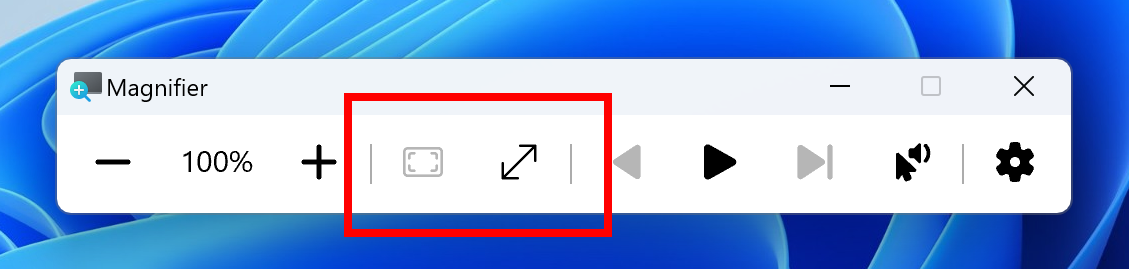
  • In addition to the keyboard shortcut CTRL + ALT + Minus to quickly toggle between the current zoom and 1X zoom, we have also added buttons in Magnifier to reset zoom to fit to screen and reset zoom to your last/preferred magnification.


    New buttons in Magnifier to reset zoom to fit to screen and reset zoom to your last or preferred magnification highlighted in a red box.
    New buttons in Magnifier to reset zoom to fit to screen and reset zoom to your last or preferred magnification highlighted in a red box.

Fixes gradually being rolled out to the Dev Channel with toggle on*

[File Explorer]

  • Fixed an issue where the date/time properties of files were unexpectedly updated in some cases after copying them.
  • Fixed an issue where File Explorer may sometimes lose focus on the search box while typing.
  • Fixed an issue where when you did a search it may unexpectedly trigger the search happening repeatedly.
  • Fixed an issue where the Details Pane icons weren’t responding correctly to theme changes, making it hard to see if you switched from dark to light or vice versa.
  • Fixed a black flash in File Explorer that appeared when duplicating a tab.

[Task Manager]

  • Fixed an issue where Task manager wrongly identified an HDD as an SSD.

[Click to Do]

  • We fixed the issue where Click to Do would sometimes not highlight any info on screen if there is no content on a connected external monitor in extended mode.

Changes and Improvements gradually being rolled out to everyone in the Dev Channel

[Windows Backup]

  • You will now have a standard Windows 11 taskbar after restoring from a backup via the Windows Setup experience (OOBE) on a new Windows PC. You can still find your apps in the Start menu and Search and pin apps you want to your taskbar.

Fixes for everyone in the Dev Channel

[Other]

  • [Windows Kernel Vulnerable Driver Blocklist file (DriverSiPolicy.p7b)] This update adds to the list of drivers that are at risk for Bring Your Own Vulnerable Driver (BYOVD) attacks.

Known issues

[General]

  • After you do a PC reset under Settings > System > Recovery, your build version may incorrectly show as Build 26100 instead of Build 26120. This will not prevent you from getting future Dev Channel updates which will resolve this issue.
  • [NEW] A 0xc0e90001 error will occur when booting into Windows Recovery (WinRE) on Arm64 PCs. This will be fixed in the next Dev Channel flight. For recovery options on your PC, visit Settings > System > Recovery.

[Recall]

The following known issues will be fixed in future updates to Windows Insiders:
  • Recall can be enabled or disabled from “Turn Windows features on or off”. We are caching the Recall binaries on disk while we test add/remove. In a future update we will completely remove the binaries.
  • Some users may see a message to “Make sure Recall is saving snapshots”, while the Settings page for Recall shows saving snapshots is enabled. Reboot your device to resolve this issue.
  • Make sure you update Microsoft 365 apps to the latest version so you can jump back into specific documents.

[Click to Do]

The following known issues will be fixed in future updates to Windows Insiders:
  • Sometimes additional context is given when using more intelligent text actions powered by Phi Silica.
  • The intelligent text actions leverage the power of Microsoft’s secure cloud to improve your text results by ensuring prompts and responses are safe and appropriate. This data is automatically deleted. Local moderation to ensure the safety of prompts and responses will be added in the future, replacing this cloud endpoint.
  • [NEW] If any of your actions on image entities are no longer appearing, please ensure you have the latest updates for the Photos and Paint app from the Microsoft Store.

[Live captions & real-time translation]

The following known issues will be fixed in future updates to Windows Insiders:
  • Some Insiders may see a crash on first launch of live captions. Restart live captions if you encounter this issue and you will not see it again.
  • If audio is playing or the microphone is enabled, switching languages will crash live captions. Stop audio when changing languages to resume captions or translations.

[File Explorer]

  • [NEW] If you open a File Explorer window and minimize it in this build, it may not render correctly when you restore it.

[Improved Windows Search]

The following known issues will be fixed in future updates to Windows Insiders:
  • [NEW] In this build, the search box on the taskbar does not yet have the same underline and sparkles icon UI that the File Explorer search box has. This is coming in a future flight.
  • [NEW] In some rare cases, improved Windows search experiences may not be available and may require a reboot to start working.
  • [NEW] In some rare cases, File explorer search might be unresponsive and may require a reboot to start working.
  • [NEW] In some rare cases, searching on Outlook while offline might result in some results not being found.
  • [NEW] The underline animation in the File Explorer search box sometimes does not stop pulsing.
  • [NEW] The tip about the new search improvements appears whenever you set focus to the search box in File Explorer, rather than only once.

Reminders for Windows Insiders in the Dev Channel

  • Windows Insiders in the Dev Channel receive updates based on Windows 11, version 24H2 via an enablement package (Build 26120.xxxx).
  • Updates delivered to the Dev Channel are in a format that offers a preview of enhancements to servicing technology on Windows 11, version 24H2. To learn more, see Introducing Windows 11 checkpoint cumulative updates | Windows IT Pro Blog.
  • Many features in the Dev Channel are rolled out using Control Feature Rollout technology, starting with a subset of Insiders and ramping up over time as we monitor feedback to see how they land before pushing them out to everyone in this channel.
  • For Windows Insiders in the Dev Channel who want to be the first to get features gradually rolled out to you, you can turn ON the toggle to get the latest updates as they are available via Settings > Windows Update*. Over time, we will increase the rollouts of features to everyone with the toggle turned on. Should you keep this toggle off, new features will gradually be rolled out to your device over time once they are ready.

  • Features and experiences included in these builds may never get released as we try out different concepts and get feedback. Features may change over time, be removed, or replaced and never get released beyond Windows Insiders. Some of these features and experiences could show up in future Windows releases when they’re ready.
  • Some features in active development we preview with Windows Insiders may not be fully localized and localization will happen over time as features are finalized. As you see issues with localization in your language, please report those issues to us via Feedback Hub.
  • Because the Dev and Beta Channels represent parallel development paths from our engineers, there may be cases where features and experiences show up in the Beta Channel first.
  • Check out Flight Hub for a complete look at what build is in which Insider channel.
Thanks,
Amanda & Brandon


 Source:


Check Windows Updates


UUP Dump:

64-bit ISO download:

ARM64 ISO download:

 
Last edited:

Nothing here !!!
 

My Computer My Computer

At a glance

W11 Pro and Insider DevAMD Ryzen 9 7900x2x16GB Kingston 6000MHz, Cl 32 @ 6200MHz Cl30Gigabyte Rx 6600XT Gaming OC 8G Pro
OS
W11 Pro and Insider Dev
Computer type
PC/Desktop
Manufacturer/Model
Home brewed
CPU
AMD Ryzen 9 7900x
Motherboard
ASROCK b650 PRO RS
Memory
2x16GB Kingston 6000MHz, Cl 32 @ 6200MHz Cl30
Graphics Card(s)
Gigabyte Rx 6600XT Gaming OC 8G Pro
Sound Card
MB, Realtek Ac1220p
Monitor(s) Displays
3 x 27"
Screen Resolution
1080p
Hard Drives
Kingston KC3000. 1TBSamsung 970 evo Plus 500GB, Crucial P1 NVMe 1TB, Lexar NVMe 2 TB, Silicon Power M.2 SATA 500GB
PSU
Seasonic 750W
Case
Custom Raidmax
Cooling
Arctic Liquid Freezer III 360mm
Internet Speed
20/19 mbps
I'm sadly getting this issue

1737176992757.webp
 

My Computer My Computer

At a glance

Windows 11AMD Ryzen 7 5800X48gbRTX 4060 Ti Founders Editiion
OS
Windows 11
Computer type
PC/Desktop
CPU
AMD Ryzen 7 5800X
Motherboard
MPG B550 GAMING PLUS
Memory
48gb
Graphics Card(s)
RTX 4060 Ti Founders Editiion
Monitor(s) Displays
MSI
Screen Resolution
3440x1440
Hard Drives
2 x 2tb
1 x 12tb
Keyboard
Razer Cynosa Chroma
Mouse
Razer DeathAdder V2 Mini
Internet Speed
1gbs
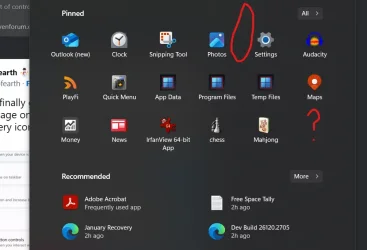
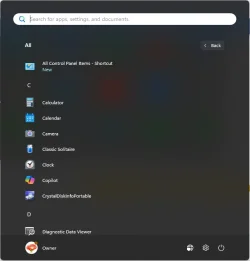
This update deleted 'Control Panel' from my Start Menu.

Screenshot 2025-01-18 133347.webp
 

My Computer My Computer

At a glance

W11 Pro x64 ongoing Canary 29500 latest buildsIntel i58GbIntel HD Graphics
OS
W11 Pro x64 ongoing Canary 29500 latest builds
Computer type
Laptop
Manufacturer/Model
Dell 7760 Mobile Precision 17"
CPU
Intel i5
Motherboard
Unknown
Memory
8Gb
Graphics Card(s)
Intel HD Graphics
Sound Card
Realtek
Monitor(s) Displays
Internal
Hard Drives
2 x 256Gb SSD
PSU
Dell 240 watt
Mouse
Dell Premier Bluetooth
Internet Speed
50Mbps
Browser
Edge
Antivirus
Default Microsoft Security
Seems like Control Panel is no longer pin-able to the Start Menu, at least for me. It reports as already pinned. If I unpin and re-pin it still does not appear. Rebooted and still same behaviour. Looks like I will have to try and make a shortcut for it.
 

My Computer My Computer

At a glance

W11 Pro x64 ongoing Canary 29500 latest buildsIntel i58GbIntel HD Graphics
OS
W11 Pro x64 ongoing Canary 29500 latest builds
Computer type
Laptop
Manufacturer/Model
Dell 7760 Mobile Precision 17"
CPU
Intel i5
Motherboard
Unknown
Memory
8Gb
Graphics Card(s)
Intel HD Graphics
Sound Card
Realtek
Monitor(s) Displays
Internal
Hard Drives
2 x 256Gb SSD
PSU
Dell 240 watt
Mouse
Dell Premier Bluetooth
Internet Speed
50Mbps
Browser
Edge
Antivirus
Default Microsoft Security
Seems like Control Panel is no longer pin-able to the Start Menu, at least for me. It reports as already pinned. If I unpin and re-pin it still does not appear. Rebooted and still same behaviour. Looks like I will have to try and make a shortcut for it.
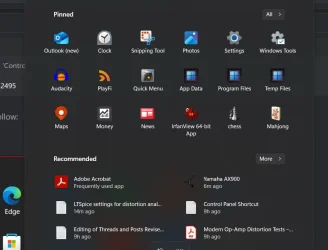
Also you can pin "Windows tools".
 

My Computers My Computers

  • At a glance

    Windows 11 Pro 25H2Ryzen 5 3500U8GBVega 8
    OS
    Windows 11 Pro 25H2
    Computer type
    Laptop
    Manufacturer/Model
    Huawei MateBook D15
    CPU
    Ryzen 5 3500U
    Memory
    8GB
    Graphics Card(s)
    Vega 8
    Screen Resolution
    FHD
    Hard Drives
    256GB Samsung SSD + 1TB HDD
    Browser
    Microsoft Edge
    Antivirus
    ESET Smart Security Premium
  • At a glance

    Windows 10 Enterprise LTSC 21H2intel core i7 6700HQ16GBNvidia Geforce GTX1060 (6GB)
    Operating System
    Windows 10 Enterprise LTSC 21H2
    Computer type
    Laptop
    Manufacturer/Model
    MSI GS73 6RF Stealth Pro
    CPU
    intel core i7 6700HQ
    Memory
    16GB
    Graphics card(s)
    Nvidia Geforce GTX1060 (6GB)
    Screen Resolution
    FHD
    Hard Drives
    128GB SSD + 1TB HDD
    Browser
    Microsoft Edge
    Antivirus
    Windows Defender
Why am I not receiving this build ? Did they pull it ? Did anybody receive it today ?
 

My Computer My Computer

At a glance

W11 Pro and Insider DevAMD Ryzen 9 7900x2x16GB Kingston 6000MHz, Cl 32 @ 6200MHz Cl30Gigabyte Rx 6600XT Gaming OC 8G Pro
OS
W11 Pro and Insider Dev
Computer type
PC/Desktop
Manufacturer/Model
Home brewed
CPU
AMD Ryzen 9 7900x
Motherboard
ASROCK b650 PRO RS
Memory
2x16GB Kingston 6000MHz, Cl 32 @ 6200MHz Cl30
Graphics Card(s)
Gigabyte Rx 6600XT Gaming OC 8G Pro
Sound Card
MB, Realtek Ac1220p
Monitor(s) Displays
3 x 27"
Screen Resolution
1080p
Hard Drives
Kingston KC3000. 1TBSamsung 970 evo Plus 500GB, Crucial P1 NVMe 1TB, Lexar NVMe 2 TB, Silicon Power M.2 SATA 500GB
PSU
Seasonic 750W
Case
Custom Raidmax
Cooling
Arctic Liquid Freezer III 360mm
Internet Speed
20/19 mbps
Also you can pin "Windows tools".
Do you know, I have never seen that before. I'll try that later as I'm not on the 'Dev' PC just now but it certainly works OK on this one. Thanks.
 

My Computer My Computer

At a glance

W11 Pro x64 ongoing Canary 29500 latest buildsIntel i58GbIntel HD Graphics
OS
W11 Pro x64 ongoing Canary 29500 latest builds
Computer type
Laptop
Manufacturer/Model
Dell 7760 Mobile Precision 17"
CPU
Intel i5
Motherboard
Unknown
Memory
8Gb
Graphics Card(s)
Intel HD Graphics
Sound Card
Realtek
Monitor(s) Displays
Internal
Hard Drives
2 x 256Gb SSD
PSU
Dell 240 watt
Mouse
Dell Premier Bluetooth
Internet Speed
50Mbps
Browser
Edge
Antivirus
Default Microsoft Security
Why am I not receiving this build ? Did they pull it ? Did anybody receive it today ?
It appeared for me a couple of hours ago when I 'checked for updates'. I normally pause updates after a Dev build. So yes, received today.
 

My Computer My Computer

At a glance

W11 Pro x64 ongoing Canary 29500 latest buildsIntel i58GbIntel HD Graphics
OS
W11 Pro x64 ongoing Canary 29500 latest builds
Computer type
Laptop
Manufacturer/Model
Dell 7760 Mobile Precision 17"
CPU
Intel i5
Motherboard
Unknown
Memory
8Gb
Graphics Card(s)
Intel HD Graphics
Sound Card
Realtek
Monitor(s) Displays
Internal
Hard Drives
2 x 256Gb SSD
PSU
Dell 240 watt
Mouse
Dell Premier Bluetooth
Internet Speed
50Mbps
Browser
Edge
Antivirus
Default Microsoft Security

My Computer My Computer

At a glance

Windows 11Intel® Xeon® X5690 3.47GHz Six-CoreG.Skill PC3-12800 1600MHz 24GBNVIDIA GeForce GTX 1050
OS
Windows 11
Computer type
PC/Desktop
Manufacturer/Model
Asus/Custom Build
CPU
Intel® Xeon® X5690 3.47GHz Six-Core
Motherboard
Asus P6T Deluxe v2
Memory
G.Skill PC3-12800 1600MHz 24GB
Graphics Card(s)
NVIDIA GeForce GTX 1050
Sound Card
SoundMAX ADI AD2000B HD Audio
Monitor(s) Displays
Acer T232HL Touch Screen
Screen Resolution
1920 x 1080 @ 60Hz
Hard Drives
6 Crucial MX500 SSD 1TB each.
PSU
Thermaltake Toughpower Gold 850W
Case
Thermaltake Armor VA8000SWA
Cooling
Thermaltake Air Cooling System
Keyboard
Illuminated Multimedia LED Keyboard
Mouse
M16 Dual Mode Illuminated Mouse - Bluetooth / 2.4 GHz Mode
Internet Speed
800 Mbps
Browser
Edge / Opera / Vivaldi / Chrome / Firefox / Brave
Antivirus
Windows Defender Security
Why am I not receiving this build ? Did they pull it ? Did anybody receive it today ?
There is no reason why you shouldn't receive it, if you're on the channel.
 

My Computer My Computer

At a glance

Win 11 Insider Release Preview and Beta chann...i5 Core [email protected] (Unsupported for Win 11)12GBGeneric PnP Monitor (1920x1080@60Hz) Intel HD...
OS
Win 11 Insider Release Preview and Beta channels.
Computer type
Laptop
Manufacturer/Model
HP ENVY Bought: March 2017
CPU
i5 Core [email protected] (Unsupported for Win 11)
Motherboard
HP 81AD (U3E1)
Memory
12GB
Graphics Card(s)
Generic PnP Monitor (1920x1080@60Hz) Intel HD Graphics 620 (HP)
Sound Card
Conexant ISST audio
Monitor(s) Displays
Generic PnP Monitor
Screen Resolution
1536x864 pixels
Hard Drives
HGST HTS721010A9E630
PSU
Well...PSU you too!! What's this mean?
Case
HP ENVY SILVER
Cooling
A fan.
Keyboard
USA
Mouse
Logitec Anywhere 2
Internet Speed
Good enough for me! Fast!
Browser
Edge/Waterfox
Antivirus
Windows Defender
Other Info
No 'mo.
How is this even possible? that some files and folders are dated one day ahead ?
Notice this after upgrading to latest DEV build from Insider release Preview
 

Attachments

  • Screenshot 2025-01-18 234709.webp
    Screenshot 2025-01-18 234709.webp
    25.3 KB · Views: 1

My Computer My Computer

At a glance

Windows 11 Pro (Currently 25H2)Intel Core i7 5820k32GB RAMNvidia RTX 5090
OS
Windows 11 Pro (Currently 25H2)
Computer type
PC/Desktop
CPU
Intel Core i7 5820k
Motherboard
Asus X99A
Memory
32GB RAM
Graphics Card(s)
Nvidia RTX 5090
Sound Card
Intergraded
Monitor(s) Displays
Samsung OdysseyG7
Screen Resolution
4K HDR
Hard Drives
2x Samsung M2 990Pro 4TB
PSU
Corsair RM1000X
Case
Fractal Design
Cooling
In & Outtake Noctua 3000 RPMs
Keyboard
Razer Black widow
Mouse
Razer Naga Trinity
Internet Speed
1000Mbit
Browser
Edge
Antivirus
Custom
How is this even possible? that some files and folders are dated one day ahead ?
Notice this after upgrading to latest DEV build from Insider release Preview
Have you ever post-dated a cheque?
 

My Computers My Computers

  • At a glance

    Win 11 Pro (25H2 RP)Intel(R) Core(TM) i5-9300H CPU @ 2.40GHz 2.40...32GBNvidia GeForce GTX 1650, Intel UHD 630
    OS
    Win 11 Pro (25H2 RP)
    Computer type
    Laptop
    Manufacturer/Model
    Acer AN515-54
    CPU
    Intel(R) Core(TM) i5-9300H CPU @ 2.40GHz 2.40 GHz
    Memory
    32GB
    Graphics Card(s)
    Nvidia GeForce GTX 1650, Intel UHD 630
    Monitor(s) Displays
    Acer CB272D
    Screen Resolution
    1920x1080
    Hard Drives
    256GB and 1T SSD
    Internet Speed
    500MB
    Browser
    Edge (Stable)
    Antivirus
    Microsoft Defender
  • At a glance

    Win 11 Pro (RP)Intel(R) Core(TM) Ultra 9 275HX (2.70 GHz)32GB DDR5-5600NVIDIA® GeForce RTX™ 5060 8GB
    Operating System
    Win 11 Pro (RP)
    Computer type
    Laptop
    Manufacturer/Model
    Lenovo Legion 5 16IAX10 - Type 83NX
    CPU
    Intel(R) Core(TM) Ultra 9 275HX (2.70 GHz)
    Memory
    32GB DDR5-5600
    Graphics card(s)
    NVIDIA® GeForce RTX™ 5060 8GB
    Monitor(s) Displays
    Acer CB272D
    Screen Resolution
    1920x1080 75Hz
    Hard Drives
    WD Green SN3000 (2TB)
    Samsung Portable T5 (2TB)
    Keyboard
    Logi MX Keys
    Mouse
    Logi MX Anywhere 3
    Internet Speed
    500MB
    Browser
    Edge
    Antivirus
    MS Defender

My Computer My Computer

At a glance

Windows 11 Pro (Currently 25H2)Intel Core i7 5820k32GB RAMNvidia RTX 5090
OS
Windows 11 Pro (Currently 25H2)
Computer type
PC/Desktop
CPU
Intel Core i7 5820k
Motherboard
Asus X99A
Memory
32GB RAM
Graphics Card(s)
Nvidia RTX 5090
Sound Card
Intergraded
Monitor(s) Displays
Samsung OdysseyG7
Screen Resolution
4K HDR
Hard Drives
2x Samsung M2 990Pro 4TB
PSU
Corsair RM1000X
Case
Fractal Design
Cooling
In & Outtake Noctua 3000 RPMs
Keyboard
Razer Black widow
Mouse
Razer Naga Trinity
Internet Speed
1000Mbit
Browser
Edge
Antivirus
Custom
How is this even possible? that some files and folders are dated one day ahead ?
Notice this after upgrading to latest DEV build from Insider release Preview
Check your Date & Time settings and then sync.
 

My Computer My Computer

At a glance

Win 11 Insider Release Preview and Beta chann...i5 Core [email protected] (Unsupported for Win 11)12GBGeneric PnP Monitor (1920x1080@60Hz) Intel HD...
OS
Win 11 Insider Release Preview and Beta channels.
Computer type
Laptop
Manufacturer/Model
HP ENVY Bought: March 2017
CPU
i5 Core [email protected] (Unsupported for Win 11)
Motherboard
HP 81AD (U3E1)
Memory
12GB
Graphics Card(s)
Generic PnP Monitor (1920x1080@60Hz) Intel HD Graphics 620 (HP)
Sound Card
Conexant ISST audio
Monitor(s) Displays
Generic PnP Monitor
Screen Resolution
1536x864 pixels
Hard Drives
HGST HTS721010A9E630
PSU
Well...PSU you too!! What's this mean?
Case
HP ENVY SILVER
Cooling
A fan.
Keyboard
USA
Mouse
Logitec Anywhere 2
Internet Speed
Good enough for me! Fast!
Browser
Edge/Waterfox
Antivirus
Windows Defender
Other Info
No 'mo.

My Computer My Computer

At a glance

Windows 11 Pro (Currently 25H2)Intel Core i7 5820k32GB RAMNvidia RTX 5090
OS
Windows 11 Pro (Currently 25H2)
Computer type
PC/Desktop
CPU
Intel Core i7 5820k
Motherboard
Asus X99A
Memory
32GB RAM
Graphics Card(s)
Nvidia RTX 5090
Sound Card
Intergraded
Monitor(s) Displays
Samsung OdysseyG7
Screen Resolution
4K HDR
Hard Drives
2x Samsung M2 990Pro 4TB
PSU
Corsair RM1000X
Case
Fractal Design
Cooling
In & Outtake Noctua 3000 RPMs
Keyboard
Razer Black widow
Mouse
Razer Naga Trinity
Internet Speed
1000Mbit
Browser
Edge
Antivirus
Custom
what do you mean? :)
It's what they call it when you write a cheque with a date in the future. Not meant to cash before then.
 

My Computers My Computers

  • At a glance

    Win 11 Pro (25H2 RP)Intel(R) Core(TM) i5-9300H CPU @ 2.40GHz 2.40...32GBNvidia GeForce GTX 1650, Intel UHD 630
    OS
    Win 11 Pro (25H2 RP)
    Computer type
    Laptop
    Manufacturer/Model
    Acer AN515-54
    CPU
    Intel(R) Core(TM) i5-9300H CPU @ 2.40GHz 2.40 GHz
    Memory
    32GB
    Graphics Card(s)
    Nvidia GeForce GTX 1650, Intel UHD 630
    Monitor(s) Displays
    Acer CB272D
    Screen Resolution
    1920x1080
    Hard Drives
    256GB and 1T SSD
    Internet Speed
    500MB
    Browser
    Edge (Stable)
    Antivirus
    Microsoft Defender
  • At a glance

    Win 11 Pro (RP)Intel(R) Core(TM) Ultra 9 275HX (2.70 GHz)32GB DDR5-5600NVIDIA® GeForce RTX™ 5060 8GB
    Operating System
    Win 11 Pro (RP)
    Computer type
    Laptop
    Manufacturer/Model
    Lenovo Legion 5 16IAX10 - Type 83NX
    CPU
    Intel(R) Core(TM) Ultra 9 275HX (2.70 GHz)
    Memory
    32GB DDR5-5600
    Graphics card(s)
    NVIDIA® GeForce RTX™ 5060 8GB
    Monitor(s) Displays
    Acer CB272D
    Screen Resolution
    1920x1080 75Hz
    Hard Drives
    WD Green SN3000 (2TB)
    Samsung Portable T5 (2TB)
    Keyboard
    Logi MX Keys
    Mouse
    Logi MX Anywhere 3
    Internet Speed
    500MB
    Browser
    Edge
    Antivirus
    MS Defender
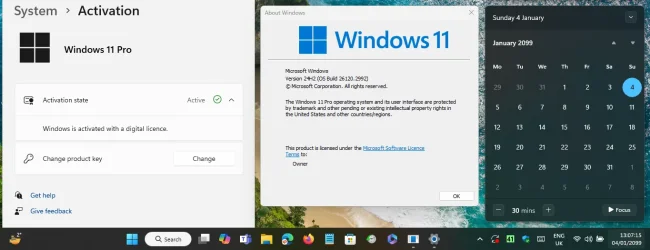
Does the Dev build have an expiry built in, want to switch from Insider Preview to this build?
Yes, it does.
It is not always present but usually Insiders builds have a shelf life of 12 months -1 or 11 months.
Announcements are usually made well in advance.
For 26120.xxx the release date was 10/25/2024 so you are looking at an expiration date of Sept 2025 or thereabout.
Turn off automatic time updates, reboot to the bios and set the bios date as far ahead as you can, the see what happens.

Apparently Dev doesn't expire, well, not in the next 74 years anyway.....

1737243991233.webp
 

My Computers My Computers

  • At a glance

    Windows 11 HomeAMD Athlon Silver 3050U8GBRadeon Graphics
    OS
    Windows 11 Home
    Computer type
    Laptop
    Manufacturer/Model
    Acer Aspire 3 A315-23-R9VY
    CPU
    AMD Athlon Silver 3050U
    Memory
    8GB
    Graphics Card(s)
    Radeon Graphics
    Monitor(s) Displays
    laptop screen
    Screen Resolution
    1366x768 native resolution, up to 2560x1440 with Radeon Virtual Super Resolution
    Hard Drives
    1TB Samsung EVO 870 SSD (from April 2026: 250GB EVO 850)
    Internet Speed
    150 Mbps
    Browser
    Edge, Firefox
    Antivirus
    Defender
    Other Info
    UPDATE - 11 April 2026: due to lid hinges starting to break up this laptop has been retired from active duty. The OS with all software and files has been migrated to my System Seven in 'Other systems' to carry on as my general purpose 'main machine'.

    I've now clean installed 25H2 and used Garlin's scripts to update Secure Boot to CA 2023 and revoke the PCA 2011 certificates. It's new role is to test secure boot issues.

    Info for 2021-2026:
    fully 'Windows 11 ready' laptop. Windows 10 C: partition migrated from my old unsupported 'main machine' then upgraded to 11. A test migration ran Insider builds for 2 months. When 11 was released on 5th October 2021 it was re-imaged back to 10 and was offered the upgrade in Windows Update on 20th October. Windows Update offered the 22H2 Feature Update on 20th September 2022. It got the 23H2 Feature Update on 4th November 2023 through Windows Update, 24H2 on 3rd October 2024 through Windows Update by setting the Target Release Version for 24H2, and 25H2 on 30th September 2025 through Windows Update by setting the Target Release Version for 25H2.
  • At a glance

    Windows 11 ProIntel® Core™ i5-520M8GB(integrated graphics) Intel HD Graphics
    Operating System
    Windows 11 Pro
    Computer type
    Laptop
    Manufacturer/Model
    Dell Latitude E4310
    CPU
    Intel® Core™ i5-520M
    Motherboard
    0T6M8G
    Memory
    8GB
    Graphics card(s)
    (integrated graphics) Intel HD Graphics
    Screen Resolution
    1366x768
    Hard Drives
    500GB Crucial MX500 SSD
    Browser
    Firefox, Edge
    Antivirus
    Defender
    Other Info
    unsupported machine: Legacy bios, MBR, TPM 1.2, upgraded from W10 to W11 using W10/W11 hybrid install media workaround.

    In-place upgrade to 22H2 using ISO and a workaround.
    Feature Update to 23H2 by manually installing the Enablement Package.
    In-place upgrade to 24H2 using hybrid 23H2/24H2 install media.
    Upgraded to 25H2 by Enablement Package.

    Also running Insider Dev, and Canary builds and Windows 10 as native boot .vhdx.
  • My SYSTEM THREE is a Dell Latitude 5410, i7-10610U, 32GB RAM, 512GB NVMe ssd, supported device running Windows 11 Pro.

    My SYSTEM FOUR was a 2-in-1 convertible Lenovo Yoga 11e (1st gen) type 20DA, Celeron N2930, 8GB RAM, 256GB ssd. Unsupported device. This has now been sold. It has been replaced by my System Eight.

    My SYSTEM FIVE is a Dell Latitude 3190 2-in-1, Pentium Silver N5030, 8GB RAM, 1TB NVMe ssd, supported device running Windows 11 Pro, plus Insider Beta, Dev, and Canary builds (and a few others) as a native boot .vhdx.

    My SYSTEM SIX is a Dell Latitude 5550, Core Ultra 7 165H, 64GB RAM, 1TB NVMe SSD, supported device, Windows 11 Pro, Hyper-V host machine. Updated to 25H2 on 30th September 2025.

    My SYSTEM SEVEN is a Lenovo Thinkpad T580, 1920x1080 touchscreen, Intel Core i7-8650U, 16GB RAM, 512GB NVMe SSD + 2nd 512GB NVMe SSD, a supported device for Windows 11. This is my current general purpose 'main machine'. The installed Windows 11 Home from my System One has been migrated to this machine. As its new home has an existing digital licence for Pro I've been able to upgrade the migrated OS from Home to Pro.

    My SYSTEM EIGHT is a 2-in-1 convertible Lenovo Yoga 11e (5th gen) type 20LN, Celeron N4120, 8GB RAM, 512GB NVMe ssd, a supported device for Windows 11. Currently running Windows 11 Pro, plus Insider Dev, Beta, and Canary builds as native boot vhdx.
This update deleted 'Control Panel' from my Start Menu.
Mine still okay...
I can't say I've ever gone to the Start menu for Control Panel, I usually just hit 'Search' and type it, so I can't say if it was there before or not. It certainly isn't in the Apps list now. But I can make a new shortcut and pin it to Start.

1737245010693.webp
 

My Computers My Computers

  • At a glance

    Windows 11 HomeAMD Athlon Silver 3050U8GBRadeon Graphics
    OS
    Windows 11 Home
    Computer type
    Laptop
    Manufacturer/Model
    Acer Aspire 3 A315-23-R9VY
    CPU
    AMD Athlon Silver 3050U
    Memory
    8GB
    Graphics Card(s)
    Radeon Graphics
    Monitor(s) Displays
    laptop screen
    Screen Resolution
    1366x768 native resolution, up to 2560x1440 with Radeon Virtual Super Resolution
    Hard Drives
    1TB Samsung EVO 870 SSD (from April 2026: 250GB EVO 850)
    Internet Speed
    150 Mbps
    Browser
    Edge, Firefox
    Antivirus
    Defender
    Other Info
    UPDATE - 11 April 2026: due to lid hinges starting to break up this laptop has been retired from active duty. The OS with all software and files has been migrated to my System Seven in 'Other systems' to carry on as my general purpose 'main machine'.

    I've now clean installed 25H2 and used Garlin's scripts to update Secure Boot to CA 2023 and revoke the PCA 2011 certificates. It's new role is to test secure boot issues.

    Info for 2021-2026:
    fully 'Windows 11 ready' laptop. Windows 10 C: partition migrated from my old unsupported 'main machine' then upgraded to 11. A test migration ran Insider builds for 2 months. When 11 was released on 5th October 2021 it was re-imaged back to 10 and was offered the upgrade in Windows Update on 20th October. Windows Update offered the 22H2 Feature Update on 20th September 2022. It got the 23H2 Feature Update on 4th November 2023 through Windows Update, 24H2 on 3rd October 2024 through Windows Update by setting the Target Release Version for 24H2, and 25H2 on 30th September 2025 through Windows Update by setting the Target Release Version for 25H2.
  • At a glance

    Windows 11 ProIntel® Core™ i5-520M8GB(integrated graphics) Intel HD Graphics
    Operating System
    Windows 11 Pro
    Computer type
    Laptop
    Manufacturer/Model
    Dell Latitude E4310
    CPU
    Intel® Core™ i5-520M
    Motherboard
    0T6M8G
    Memory
    8GB
    Graphics card(s)
    (integrated graphics) Intel HD Graphics
    Screen Resolution
    1366x768
    Hard Drives
    500GB Crucial MX500 SSD
    Browser
    Firefox, Edge
    Antivirus
    Defender
    Other Info
    unsupported machine: Legacy bios, MBR, TPM 1.2, upgraded from W10 to W11 using W10/W11 hybrid install media workaround.

    In-place upgrade to 22H2 using ISO and a workaround.
    Feature Update to 23H2 by manually installing the Enablement Package.
    In-place upgrade to 24H2 using hybrid 23H2/24H2 install media.
    Upgraded to 25H2 by Enablement Package.

    Also running Insider Dev, and Canary builds and Windows 10 as native boot .vhdx.
  • My SYSTEM THREE is a Dell Latitude 5410, i7-10610U, 32GB RAM, 512GB NVMe ssd, supported device running Windows 11 Pro.

    My SYSTEM FOUR was a 2-in-1 convertible Lenovo Yoga 11e (1st gen) type 20DA, Celeron N2930, 8GB RAM, 256GB ssd. Unsupported device. This has now been sold. It has been replaced by my System Eight.

    My SYSTEM FIVE is a Dell Latitude 3190 2-in-1, Pentium Silver N5030, 8GB RAM, 1TB NVMe ssd, supported device running Windows 11 Pro, plus Insider Beta, Dev, and Canary builds (and a few others) as a native boot .vhdx.

    My SYSTEM SIX is a Dell Latitude 5550, Core Ultra 7 165H, 64GB RAM, 1TB NVMe SSD, supported device, Windows 11 Pro, Hyper-V host machine. Updated to 25H2 on 30th September 2025.

    My SYSTEM SEVEN is a Lenovo Thinkpad T580, 1920x1080 touchscreen, Intel Core i7-8650U, 16GB RAM, 512GB NVMe SSD + 2nd 512GB NVMe SSD, a supported device for Windows 11. This is my current general purpose 'main machine'. The installed Windows 11 Home from my System One has been migrated to this machine. As its new home has an existing digital licence for Pro I've been able to upgrade the migrated OS from Home to Pro.

    My SYSTEM EIGHT is a 2-in-1 convertible Lenovo Yoga 11e (5th gen) type 20LN, Celeron N4120, 8GB RAM, 512GB NVMe ssd, a supported device for Windows 11. Currently running Windows 11 Pro, plus Insider Dev, Beta, and Canary builds as native boot vhdx.
I can't say I've ever gone to the Start menu for Control Panel, I usually just hit 'Search' and type it, so I can't say if it was there before or not. It certainly isn't in the Apps list now. But I can make a new shortcut and pin it to Start.

View attachment 122544
Mine is there originally. I didn't created any shortcut for it. And that is why I replied to @Mooly because it was his point!
 

My Computer My Computer

At a glance

Windows 11Intel® Xeon® X5690 3.47GHz Six-CoreG.Skill PC3-12800 1600MHz 24GBNVIDIA GeForce GTX 1050
OS
Windows 11
Computer type
PC/Desktop
Manufacturer/Model
Asus/Custom Build
CPU
Intel® Xeon® X5690 3.47GHz Six-Core
Motherboard
Asus P6T Deluxe v2
Memory
G.Skill PC3-12800 1600MHz 24GB
Graphics Card(s)
NVIDIA GeForce GTX 1050
Sound Card
SoundMAX ADI AD2000B HD Audio
Monitor(s) Displays
Acer T232HL Touch Screen
Screen Resolution
1920 x 1080 @ 60Hz
Hard Drives
6 Crucial MX500 SSD 1TB each.
PSU
Thermaltake Toughpower Gold 850W
Case
Thermaltake Armor VA8000SWA
Cooling
Thermaltake Air Cooling System
Keyboard
Illuminated Multimedia LED Keyboard
Mouse
M16 Dual Mode Illuminated Mouse - Bluetooth / 2.4 GHz Mode
Internet Speed
800 Mbps
Browser
Edge / Opera / Vivaldi / Chrome / Firefox / Brave
Antivirus
Windows Defender Security
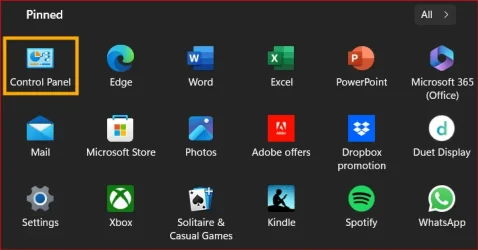
Mine still okay as follow:
That is how mine used to be. Curiously even when missing, if I searched for it and right clicked it still said it was pinned to start even though it wasn't.

A desktop shortcut created using just this was pinable and even automatically assigned the correct icon:

Code:
C:\Windows\System32\control

I can't say I've ever gone to the Start menu for Control Panel, I usually just hit 'Search' and type it, so I can't say if it was there before or not. It certainly isn't in the Apps list now. But I can make a new shortcut and pin it to Start.
Interesting. It definitely would not pin for me. I tried it several times.

I went with @Sheikh suggestion of using 'Windows Tools' which I wasn't aware even existed in that form.

Screenshot 2025-01-19 055338.webp
 

My Computer My Computer

At a glance

W11 Pro x64 ongoing Canary 29500 latest buildsIntel i58GbIntel HD Graphics
OS
W11 Pro x64 ongoing Canary 29500 latest builds
Computer type
Laptop
Manufacturer/Model
Dell 7760 Mobile Precision 17"
CPU
Intel i5
Motherboard
Unknown
Memory
8Gb
Graphics Card(s)
Intel HD Graphics
Sound Card
Realtek
Monitor(s) Displays
Internal
Hard Drives
2 x 256Gb SSD
PSU
Dell 240 watt
Mouse
Dell Premier Bluetooth
Internet Speed
50Mbps
Browser
Edge
Antivirus
Default Microsoft Security

Latest Support Threads

Back
Top Bottom