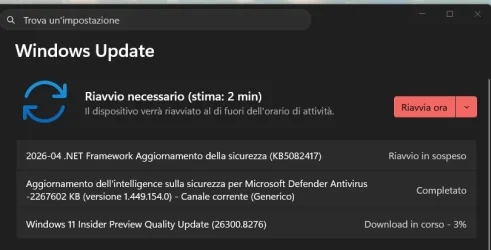
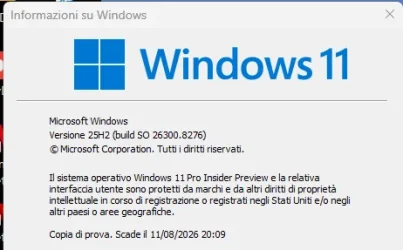
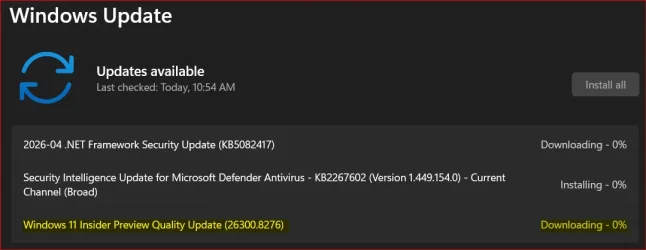
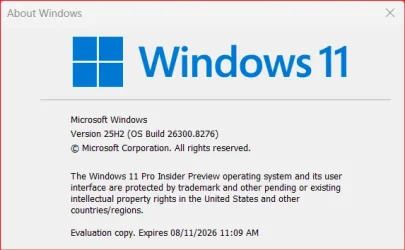
UPDATE 4/24:

 www.elevenforum.com
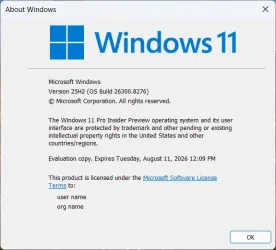
Hello Windows Insiders, today we are releasing Windows 11 Insider Preview Build 26300.8276 (KB 5083726) to the Dev Channel.
Changes in Dev Channel builds and updates are documented in two buckets: new features, and improvements (including notable fixes) that are being gradually rolled out for Insiders who have turned on the toggle to get the latest updates as they are available (via Settings > Windows Update*) and then new features, and improvements (including notable fixes) rolling out to everyone in the Dev Channel. For more information, see the Reminders section at the bottom of this blog.
 www.elevenforum.com
Windows Insider Program Team

 blogs.windows.com
Check Windows Updates
UUP Dump:
64-bit ISO download:

ARM64 ISO download:
 www.elevenforum.com
KB5083780 Windows 11 Insider Dev build 26300.8289 (25H2) - April 24
Windows Insider Blog: Source: Check Windows Updates UUP Dump: 64-bit ISO download: https://uupdump.net/selectlang.php?id=68a83d5d-1488-4519-87ef-6009eb03d1fc ARM64 ISO download: https://uupdump.net/selectlang.php?id=5dfb786b-bf4e-4832-b0be-bbab9be3efa0...
www.elevenforum.com
Windows Insider Blog:
Hello Windows Insiders, today we are releasing Windows 11 Insider Preview Build 26300.8276 (KB 5083726) to the Dev Channel.
Changes in Dev Channel builds and updates are documented in two buckets: new features, and improvements (including notable fixes) that are being gradually rolled out for Insiders who have turned on the toggle to get the latest updates as they are available (via Settings > Windows Update*) and then new features, and improvements (including notable fixes) rolling out to everyone in the Dev Channel. For more information, see the Reminders section at the bottom of this blog.
Enable or Disable Get Latest Updates as soon as available in Windows 11
This tutorial will show you how to turn on or off "Get the latest updates as soon as they are available" in Windows 11. Starting with Windows 11 build 22621.1635, Microsoft added a new "Get the latest updates as soon as they are available" toggle under Settings > Windows Update. When you turn...
www.elevenforum.com
Changes and Improvements gradually being rolled out with toggle on*
[Settings]
- Based on feedback, we’re providing clarity regarding location options in Settings > Privacy & Security > Location. When Location services is turned off, options like Default location and Allow location override are unavailable because apps and services aren’t receiving location info. To make that clearer, these options will now appear disabled (greyed out) until Location services is turned back on.

Enable or Disable Location Services in Windows 11
This tutorial will show you how to enable or disable location services for all users on your Windows 11 device. Microsoft operates a location service that helps determine the precise geographic location of your Windows device. The precise location of your device allows apps to give you...
www.elevenforum.com
- We have improved the reliability of navigating to Settings > Apps > Installed apps.
[File Explorer]
- We have updated iconography placement in the File Explorer search box to be more consistent across different PCs.

Old search box.

New search box.

Existing search box on a Copilot+ PC. - Improved File Explorer reliability.
- Improved navigation pane usage for Voice Access users.



[Windows Hello]
- Improved reliability and performance of Windows Hello fingerprint after your PC wakes from sleep.

Set up Fingerprint Recognition Sign-in for Account in Windows 11
This tutorial will show you how to set up the Windows Hello fingerprint recognition sign-in option for your account in Windows 11. Windows Hello is a more personal, more secure way to get instant access to your Windows 11 devices using a PIN, facial recognition, or fingerprint. You'll need to...
www.elevenforum.com
[Input]
- Improved performance of opening clipboard history.

Open Clipboard in Windows 11
This tutorial will show you how to open the clipboard for your account in Windows 11. When you copy content on your PC, it’s automatically copied to your clipboard for you to paste. If you turn on clipboard history, you can paste multiple items from your clipboard history, and you can also pin...
www.elevenforum.com
[Fonts]
- We’ve made some font improvements, including updating the Leelawadee UI font family for the Thai, Lao, Khmer, and Lontara scripts to help improve glyph sequencing, positioning, and rendering for these scripts.
Reminders for Windows Insiders in the Dev Channel
- Updates are based on Windows 11, version 25H2 via an enablement package (Build 26300.8276).
- Many features are rolled out using Controlled Feature Rollout technology, starting with a subset of Insiders and ramping up over time as we monitor feedback to see how they land before pushing them out to everyone in this channel.
- The desktop watermark shown at the lower right corner of the desktop is normal for Windows Insider pre-release builds.
- For Windows Insiders who want to be the first to get features gradually rolled out to you, you can turn ON the toggle to get the latest updates as they are available via Settings > Windows Update*. Over time, we will increase the rollouts of features to everyone with the toggle turned on. Should you keep this toggle off, new features will gradually be rolled out to your PC over time once they are ready.
- Features and experiences included in these builds may never get released as we try out different concepts and get feedback. Features may change over time, be removed, or replaced and never get released beyond Windows Insiders. Some of these features and experiences could show up in future Windows releases when they’re ready.
- Some features in active development we preview with Windows Insiders may not be fully localized and localization will happen over time as features are finalized. As you see issues with localization in your language, please report those issues to us via Feedback Hub.
- Check out Flight Hub for a complete look at what build is in which Insider channel.
Windows Insider Program Team
Source:
Announcing Windows 11 Insider Preview Build 26300.8276 (Dev Channel)
Hello Windows Insiders, today we are releasing Windows 11 Insider Preview Build 26300.8276 (KB 5083726) to the Dev Channel. Changes in Dev Channel builds and updates are documented in two buckets: new features, and improvements (inc
blogs.windows.com
Check Windows Updates
UUP Dump:
64-bit ISO download:
Select language for Windows 11 Insider Preview Feature Update (26300.8276) amd64
Select language for Windows 11 Insider Preview Feature Update (26300.8276) amd64 on UUP dump. UUP dump lets you download Unified Update Platform files, like Windows Insider updates, directly from Windows Update.
uupdump.net
ARM64 ISO download:
Select language for Windows 11 Insider Preview Feature Update (26300.8276) arm64
Select language for Windows 11 Insider Preview Feature Update (26300.8276) arm64 on UUP dump. UUP dump lets you download Unified Update Platform files, like Windows Insider updates, directly from Windows Update.
uupdump.net
UUP Dump - Download Windows Insider ISO
UUP Dump is the most practical and easy way to get ISO images of any Insider Windows 10 or Windows 11 version, as soon as Microsoft has released a new build. UUP Dump creates a download configuration file according to your choices, downloads necessary files directly from Microsoft servers, and...
www.elevenforum.com
Last edited: