Insider KB5050105 Windows 11 Insider Beta build 22635.4805 (23H2) - Jan. 24


UPDATE 2/03:

UPDATE 1/31:


 Windows Blogs:

Hello Windows Insiders, today we are releasing Windows 11 Insider Preview Build 22635.4805 (KB5050105) to the Beta Channel.

Changes in Beta Channel builds and updates are documented in two buckets: new features, improvements, and fixes that are being gradually rolled out for Insiders who have turned on the toggle to get the latest updates as they are available (via Settings > Windows Update*) and then new features, improvements, and fixes rolling out to everyone in the Beta Channel. For more information, see the Reminders section at the bottom of this blog post.


Changes and Improvements gradually being rolled out to the Beta Channel with toggle on*

[Snap]

We are introducing an improvement to Snap in Windows 11 aimed at driving contextual learning and discovery of the feature. Inline messaging will now appear when you accidentally invoke the Snap Bar when dragging an app to the top middle of your desktop or Snap Flyout when hovering over the Minimize or Maximize button of an app. This messaging is designed to provide guidance on snapping app windows and educating users on the keyboard shortcuts for quickly snapping app windows in the future. We are trying several variants of this experience out.


Inline messaging as seen at the top of the Snap Flyout.

Inline messaging as seen at the top of the Snap Bar.

[Input]

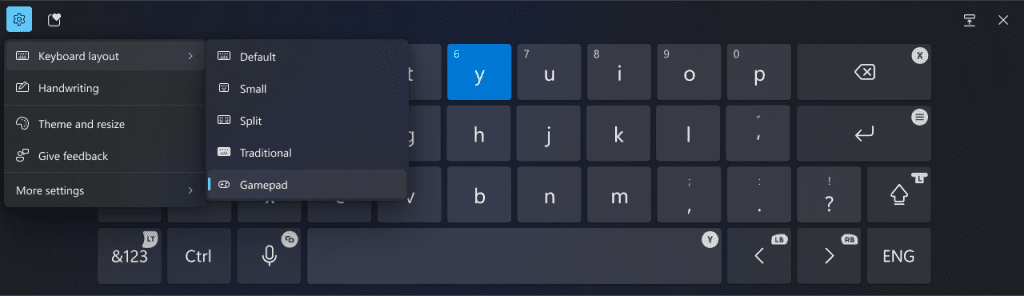
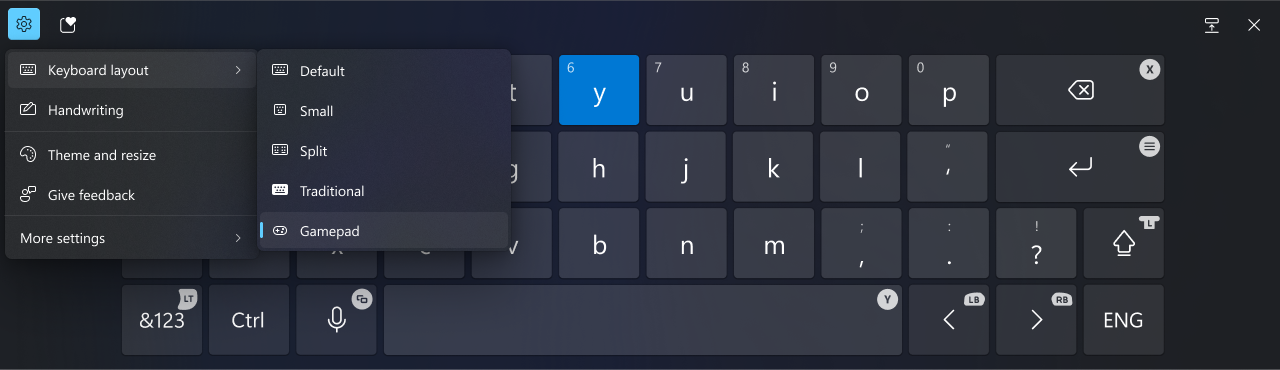
  • After being temporarily disabled to address some issues with Build 22635.4400, we are beginning to roll out a new Gamepad keyboard layout for the touch keyboard in Windows 11 again. This change introduces the ability to use your Xbox controller to navigate and type. This includes button accelerators (example: X button for backspace, Y button for spacebar) additionally the keyboard keys have been vertically aligned for better controller navigation patterns.


    New Gamepad keyboard layout for the touch keyboard in Windows 11 that supports the ability to use your Xbox controller to navigate and type.
    New Gamepad keyboard layout for the touch keyboard in Windows 11 that supports the ability to use your Xbox controller to navigate and type.
[Narrator]
  • We have added new functionalities to Narrator scan mode. Jump to list item (I’) allows you to quickly access and jump to a list item on a page or a document. Beginning and end of element (Comma (,) and Period (.)) allow you to quickly jump to the beginning or end of large tables, lists or landmarks. This is most helpful when navigating through long emails, news articles, and wiki pages. To try these new features, you need to turn on Narrator first (Win key + Ctrl + Enter), then turn scan mode ON by pressing Caps Lock + Spacebar and finally use the new shortcuts – ‘I’, ‘,’ and ‘.’. Please note that scan mode is ‘ON’ by default on most web pages (like news articles, wiki pages, etc.).

[Settings]
  • Game Pass Ultimate and PC Game Pass subscribers coming to Settings homepage will begin to see a new card for referring a PC Game Pass subscription to their friends to try PC Game Pass for free. This new card will only appear on the Settings homepage if you’re signed into your PC with your Microsoft account and meet the required eligibility criteria.


    New Settings homepage card for referring PC Game Pass to friends.
    New Settings homepage card for referring PC Game Pass to friends.

Known issues

[Start menu]

  • [NEW] We’re working on the fix for an issue causing Start menu to crash for some Insiders when interacting with the letters in the apps list.

[File Explorer]

  • If you open a File Explorer window and minimize it in this build, it may not render correctly when you restore it.
  • [NEW] We’re investigating an issue causing File Explorer to be very slow to close for some Insiders when closing using the X button. This may also impact the other title bar buttons.

[Settings]

  • The Home page of Settings may crash. If you are impacted by this, you should still be able to open specific Settings pages directly by searching for them from the taskbar.
  • There is a known issue where the two new enterprise-specific device info and accessibility preferences cards are showing up on non-managed PCs signed in with Microsoft accounts.

Reminders for Windows Insiders in the Beta Channel

  • Windows Insiders in the Beta Channel will receive updates based on Windows 11, version 23H2 via an enablement package (Build 22635.xxxx).
  • Many features in the Beta Channel are rolled out using Control Feature Rollout technology, starting with a subset of Insiders and ramping up over time as we monitor feedback to see how they land before pushing them out to everyone in this channel.
  • For Windows Insiders in the Beta Channel who want to be the first to get features gradually rolled out to you, you can turn ON the toggle to get the latest updates as they are available via Settings > Windows Update*. Over time, we will increase the rollouts of features to everyone with the toggle turned on. Should you keep this toggle off, new features will gradually be rolled out to your PC over time once they are ready.
  • Features and experiences included in these builds may never get released as we try out different concepts and get feedback. Features may change over time, be removed, or replaced and never get released beyond Windows Insiders. Some of these features and experiences could show up in future Windows releases when they’re ready.
  • Some features in active development we preview with Windows Insiders may not be fully localized and localization will happen over time as features are finalized. As you see issues with localization in your language, please report those issues to us via Feedback Hub.
  • Because the Dev and Beta Channels represent parallel development paths from our engineers, there may be cases where features and experiences show up in the Beta Channel first.
  • Check out Flight Hub for a complete look at what build is in which Insider channel.
Thanks,
Amanda & Brandon


 Source:


Check Windows Updates


UUP Dump:

64-bit ISO download:

ARM64 ISO download:

 
Last edited:

My file explorer is failing, when I right-click a file. Same with multi-select of files.
 

My Computers My Computers

  • At a glance

    Win 11 Pro 25H2 Beta 26220.8925AMD Ryzen 7 5700UCrucial 64GB DDR4 SDRAM PC4-25600AMD Radeon Vega Graphics 1.80 GHz - Adrenalin...
    OS
    Win 11 Pro 25H2 Beta 26220.8925
    Computer type
    PC/Desktop
    Manufacturer/Model
    Asus MiniPC PN51-E1
    CPU
    AMD Ryzen 7 5700U
    Motherboard
    Asus PN51-E1 - Bios Version 0505
    Memory
    Crucial 64GB DDR4 SDRAM PC4-25600
    Graphics Card(s)
    AMD Radeon Vega Graphics 1.80 GHz - Adrenalin Edition 23.9.2
    Sound Card
    USB to Sound Blaster Live (24bit External) to Firestone DAC to Event Studio Monitors
    Monitor(s) Displays
    Gigabyte 27" 165 hertz
    Screen Resolution
    2560 x 1440
    Hard Drives
    Samsung SSD 970 EVO Plus 2TB PCIE NVME
    PSU
    65 Watt
    Case
    Asus Mini
    Cooling
    Air
    Keyboard
    Logitech K810
    Mouse
    Logitech MX Master 2S
    Internet Speed
    Telstra Modem Wifi - NBN 50/18
    Browser
    Firefox
    Antivirus
    Microsoft
    Other Info
    This replaced my Linux Notebook. I've used Windows since V2, tried various Linux distros but Windows continues to win for me.
  • At a glance

    Win 11 Home 26H2 26300.8935Core i7-7700HQ @2.8 Ghz16.0 GBNVIDIA GeForce GTX 1060 (6 GB)
    Operating System
    Win 11 Home 26H2 26300.8935
    Computer type
    Laptop
    Manufacturer/Model
    Resistance
    CPU
    Core i7-7700HQ @2.8 Ghz
    Motherboard
    Resistance
    Memory
    16.0 GB
    Graphics card(s)
    NVIDIA GeForce GTX 1060 (6 GB)
    Screen Resolution
    4k
    Hard Drives
    1.8tb
My file explorer is failing, when I right-click a file. Same with multi-select of files.
Failing how? Any error message on crash in the event viewer?

This is what I get on mine when I right click on a file, mine is not failing. 🤷‍♂️
1737850225122.webp

On this machine I can get this File explorer crash if I reset feature id:54792954 which is the one that adds the labels in context menu.
The second machine works fine either way. 😵‍💫🤷‍♂️
1737851119369.webp
 
Last edited:

My Computer My Computer

At a glance

Windows 11 Pro 25H2Intel I9-9900K64GBNVIDIA RTX 2060
OS
Windows 11 Pro 25H2
Computer type
PC/Desktop
Manufacturer/Model
Dell XPS 8930
CPU
Intel I9-9900K
Memory
64GB
Graphics Card(s)
NVIDIA RTX 2060
Sound Card
NVIDIA High Definition Audio
Monitor(s) Displays
4k Samsung
Screen Resolution
3840 x 2160
Hard Drives
512GB NVMe, ADATA SU 800, 2TB HDD
Failing how? Any error message on crash in the event viewer?

This is what I get on mine when I right click on a file, mine is not failing. 🤷‍♂️
View attachment 123275

On this machine I can get this File explorer crash if I reset feature id:54792954 which is the one that adds the labels in context menu.
The second machine works fine either way. 😵‍💫🤷‍♂️
View attachment 123276
There is a crash event.
Faulting application name: Explorer.EXE, version: 10.0.22621.4805, time stamp: 0xe6e290aa
Faulting module name: FileExplorerExtensions.dll, version: 2124.34905.0.0, time stamp: 0x675db331
Exception code: 0xc0000005
Fault offset: 0x00000000000c99a7
Faulting process id: 0x0x3AF4
Faulting application start time: 0x0x1DB6F77D7226D20
Faulting application path: C:\WINDOWS\Explorer.EXE
Faulting module path: C:\WINDOWS\SystemApps\MicrosoftWindows.Client.FileExp_cw5n1h2txyewy\FileExplorerExtensions.dll
Report Id: f892e1e8-4197-45ce-bc12-abac74d70f9d
Faulting package full name:
Faulting package-relative application ID:
 

My Computers My Computers

  • At a glance

    Win 11 Pro 25H2 Beta 26220.8925AMD Ryzen 7 5700UCrucial 64GB DDR4 SDRAM PC4-25600AMD Radeon Vega Graphics 1.80 GHz - Adrenalin...
    OS
    Win 11 Pro 25H2 Beta 26220.8925
    Computer type
    PC/Desktop
    Manufacturer/Model
    Asus MiniPC PN51-E1
    CPU
    AMD Ryzen 7 5700U
    Motherboard
    Asus PN51-E1 - Bios Version 0505
    Memory
    Crucial 64GB DDR4 SDRAM PC4-25600
    Graphics Card(s)
    AMD Radeon Vega Graphics 1.80 GHz - Adrenalin Edition 23.9.2
    Sound Card
    USB to Sound Blaster Live (24bit External) to Firestone DAC to Event Studio Monitors
    Monitor(s) Displays
    Gigabyte 27" 165 hertz
    Screen Resolution
    2560 x 1440
    Hard Drives
    Samsung SSD 970 EVO Plus 2TB PCIE NVME
    PSU
    65 Watt
    Case
    Asus Mini
    Cooling
    Air
    Keyboard
    Logitech K810
    Mouse
    Logitech MX Master 2S
    Internet Speed
    Telstra Modem Wifi - NBN 50/18
    Browser
    Firefox
    Antivirus
    Microsoft
    Other Info
    This replaced my Linux Notebook. I've used Windows since V2, tried various Linux distros but Windows continues to win for me.
  • At a glance

    Win 11 Home 26H2 26300.8935Core i7-7700HQ @2.8 Ghz16.0 GBNVIDIA GeForce GTX 1060 (6 GB)
    Operating System
    Win 11 Home 26H2 26300.8935
    Computer type
    Laptop
    Manufacturer/Model
    Resistance
    CPU
    Core i7-7700HQ @2.8 Ghz
    Motherboard
    Resistance
    Memory
    16.0 GB
    Graphics card(s)
    NVIDIA GeForce GTX 1060 (6 GB)
    Screen Resolution
    4k
    Hard Drives
    1.8tb
There is a crash event.
Faulting application name: Explorer.EXE, version: 10.0.22621.4805, time stamp: 0xe6e290aa
Faulting module name: FileExplorerExtensions.dll, version: 2124.34905.0.0, time stamp: 0x675db331
Exception code: 0xc0000005
Fault offset: 0x00000000000c99a7
Faulting process id: 0x0x3AF4
Faulting application start time: 0x0x1DB6F77D7226D20
Faulting application path: C:\WINDOWS\Explorer.EXE
Faulting module path: C:\WINDOWS\SystemApps\MicrosoftWindows.Client.FileExp_cw5n1h2txyewy\FileExplorerExtensions.dll
Report Id: f892e1e8-4197-45ce-bc12-abac74d70f9d
Faulting package full name:
Faulting package-relative application ID:
Looks the same as mine above.
It only happens when the feature id:54792954 is reset or disabled.
Can you check the status on your failing machine? Are you familiar with vivetool?

vivetool /query /id:54792954
 

My Computer My Computer

At a glance

Windows 11 Pro 25H2Intel I9-9900K64GBNVIDIA RTX 2060
OS
Windows 11 Pro 25H2
Computer type
PC/Desktop
Manufacturer/Model
Dell XPS 8930
CPU
Intel I9-9900K
Memory
64GB
Graphics Card(s)
NVIDIA RTX 2060
Sound Card
NVIDIA High Definition Audio
Monitor(s) Displays
4k Samsung
Screen Resolution
3840 x 2160
Hard Drives
512GB NVMe, ADATA SU 800, 2TB HDD
Looks the same as mine above.
It only happens when the feature id:54792954 is reset or disabled.
Can you check the status on your failing machine? Are you familiar with vivetool?

vivetool /query /id:54792954
Yes, I enabled the Icon Labels feature after the latest update. I've now disabled it, so Explorer works ok. Thanks for your input.
 

My Computers My Computers

  • At a glance

    Win 11 Pro 25H2 Beta 26220.8925AMD Ryzen 7 5700UCrucial 64GB DDR4 SDRAM PC4-25600AMD Radeon Vega Graphics 1.80 GHz - Adrenalin...
    OS
    Win 11 Pro 25H2 Beta 26220.8925
    Computer type
    PC/Desktop
    Manufacturer/Model
    Asus MiniPC PN51-E1
    CPU
    AMD Ryzen 7 5700U
    Motherboard
    Asus PN51-E1 - Bios Version 0505
    Memory
    Crucial 64GB DDR4 SDRAM PC4-25600
    Graphics Card(s)
    AMD Radeon Vega Graphics 1.80 GHz - Adrenalin Edition 23.9.2
    Sound Card
    USB to Sound Blaster Live (24bit External) to Firestone DAC to Event Studio Monitors
    Monitor(s) Displays
    Gigabyte 27" 165 hertz
    Screen Resolution
    2560 x 1440
    Hard Drives
    Samsung SSD 970 EVO Plus 2TB PCIE NVME
    PSU
    65 Watt
    Case
    Asus Mini
    Cooling
    Air
    Keyboard
    Logitech K810
    Mouse
    Logitech MX Master 2S
    Internet Speed
    Telstra Modem Wifi - NBN 50/18
    Browser
    Firefox
    Antivirus
    Microsoft
    Other Info
    This replaced my Linux Notebook. I've used Windows since V2, tried various Linux distros but Windows continues to win for me.
  • At a glance

    Win 11 Home 26H2 26300.8935Core i7-7700HQ @2.8 Ghz16.0 GBNVIDIA GeForce GTX 1060 (6 GB)
    Operating System
    Win 11 Home 26H2 26300.8935
    Computer type
    Laptop
    Manufacturer/Model
    Resistance
    CPU
    Core i7-7700HQ @2.8 Ghz
    Motherboard
    Resistance
    Memory
    16.0 GB
    Graphics card(s)
    NVIDIA GeForce GTX 1060 (6 GB)
    Screen Resolution
    4k
    Hard Drives
    1.8tb
Yes, I enabled the Icon Labels feature after the latest update. I've now disabled it, so Explorer works ok. Thanks for your input.
That is weird, because one of my machines fails only when that feature is disabled. The second machine works fine either way.
I think they may have some other experimental feature that causes the bug, I cannot isolate it because there are way too many different ones between the 2 machines.
File an FBH report for your specific case, I'll file one for mine. 🤣🤣🤣🤣

 
Last edited:

My Computer My Computer

At a glance

Windows 11 Pro 25H2Intel I9-9900K64GBNVIDIA RTX 2060
OS
Windows 11 Pro 25H2
Computer type
PC/Desktop
Manufacturer/Model
Dell XPS 8930
CPU
Intel I9-9900K
Memory
64GB
Graphics Card(s)
NVIDIA RTX 2060
Sound Card
NVIDIA High Definition Audio
Monitor(s) Displays
4k Samsung
Screen Resolution
3840 x 2160
Hard Drives
512GB NVMe, ADATA SU 800, 2TB HDD

My Computer My Computer

At a glance

Windows 11 Pro 25H2Intel I9-9900K64GBNVIDIA RTX 2060
OS
Windows 11 Pro 25H2
Computer type
PC/Desktop
Manufacturer/Model
Dell XPS 8930
CPU
Intel I9-9900K
Memory
64GB
Graphics Card(s)
NVIDIA RTX 2060
Sound Card
NVIDIA High Definition Audio
Monitor(s) Displays
4k Samsung
Screen Resolution
3840 x 2160
Hard Drives
512GB NVMe, ADATA SU 800, 2TB HDD

My Computers My Computers

  • At a glance

    Win 11 Pro 25H2 Beta 26220.8925AMD Ryzen 7 5700UCrucial 64GB DDR4 SDRAM PC4-25600AMD Radeon Vega Graphics 1.80 GHz - Adrenalin...
    OS
    Win 11 Pro 25H2 Beta 26220.8925
    Computer type
    PC/Desktop
    Manufacturer/Model
    Asus MiniPC PN51-E1
    CPU
    AMD Ryzen 7 5700U
    Motherboard
    Asus PN51-E1 - Bios Version 0505
    Memory
    Crucial 64GB DDR4 SDRAM PC4-25600
    Graphics Card(s)
    AMD Radeon Vega Graphics 1.80 GHz - Adrenalin Edition 23.9.2
    Sound Card
    USB to Sound Blaster Live (24bit External) to Firestone DAC to Event Studio Monitors
    Monitor(s) Displays
    Gigabyte 27" 165 hertz
    Screen Resolution
    2560 x 1440
    Hard Drives
    Samsung SSD 970 EVO Plus 2TB PCIE NVME
    PSU
    65 Watt
    Case
    Asus Mini
    Cooling
    Air
    Keyboard
    Logitech K810
    Mouse
    Logitech MX Master 2S
    Internet Speed
    Telstra Modem Wifi - NBN 50/18
    Browser
    Firefox
    Antivirus
    Microsoft
    Other Info
    This replaced my Linux Notebook. I've used Windows since V2, tried various Linux distros but Windows continues to win for me.
  • At a glance

    Win 11 Home 26H2 26300.8935Core i7-7700HQ @2.8 Ghz16.0 GBNVIDIA GeForce GTX 1060 (6 GB)
    Operating System
    Win 11 Home 26H2 26300.8935
    Computer type
    Laptop
    Manufacturer/Model
    Resistance
    CPU
    Core i7-7700HQ @2.8 Ghz
    Motherboard
    Resistance
    Memory
    16.0 GB
    Graphics card(s)
    NVIDIA GeForce GTX 1060 (6 GB)
    Screen Resolution
    4k
    Hard Drives
    1.8tb
Yes, it is odd. I have the Taskbar Jump Lists turned off. They worked ok but get in my way a bit.
I don't know what the Taskbar Jump Lists is and how you turn it off. Could you explain?
I think I found it and disabled the jump list. There was no change on the behavior of File Explorer.
On this machine it crashes when I disable the labels on the context menu. 😝🤬😵‍💫🤷‍♂️
 
Last edited:

My Computer My Computer

At a glance

Windows 11 Pro 25H2Intel I9-9900K64GBNVIDIA RTX 2060
OS
Windows 11 Pro 25H2
Computer type
PC/Desktop
Manufacturer/Model
Dell XPS 8930
CPU
Intel I9-9900K
Memory
64GB
Graphics Card(s)
NVIDIA RTX 2060
Sound Card
NVIDIA High Definition Audio
Monitor(s) Displays
4k Samsung
Screen Resolution
3840 x 2160
Hard Drives
512GB NVMe, ADATA SU 800, 2TB HDD
I don't know what the Taskbar Jump Lists is and how you turn it off. Could you explain?
I think I found it and disabled the jump list. There was no change on the behavior of File Explorer.
On this machine it crashes when I disable the labels on the context menu. 😝🤬😵‍💫🤷‍♂️
Worth a try though :-)
 

My Computers My Computers

  • At a glance

    Win 11 Pro 25H2 Beta 26220.8925AMD Ryzen 7 5700UCrucial 64GB DDR4 SDRAM PC4-25600AMD Radeon Vega Graphics 1.80 GHz - Adrenalin...
    OS
    Win 11 Pro 25H2 Beta 26220.8925
    Computer type
    PC/Desktop
    Manufacturer/Model
    Asus MiniPC PN51-E1
    CPU
    AMD Ryzen 7 5700U
    Motherboard
    Asus PN51-E1 - Bios Version 0505
    Memory
    Crucial 64GB DDR4 SDRAM PC4-25600
    Graphics Card(s)
    AMD Radeon Vega Graphics 1.80 GHz - Adrenalin Edition 23.9.2
    Sound Card
    USB to Sound Blaster Live (24bit External) to Firestone DAC to Event Studio Monitors
    Monitor(s) Displays
    Gigabyte 27" 165 hertz
    Screen Resolution
    2560 x 1440
    Hard Drives
    Samsung SSD 970 EVO Plus 2TB PCIE NVME
    PSU
    65 Watt
    Case
    Asus Mini
    Cooling
    Air
    Keyboard
    Logitech K810
    Mouse
    Logitech MX Master 2S
    Internet Speed
    Telstra Modem Wifi - NBN 50/18
    Browser
    Firefox
    Antivirus
    Microsoft
    Other Info
    This replaced my Linux Notebook. I've used Windows since V2, tried various Linux distros but Windows continues to win for me.
  • At a glance

    Win 11 Home 26H2 26300.8935Core i7-7700HQ @2.8 Ghz16.0 GBNVIDIA GeForce GTX 1060 (6 GB)
    Operating System
    Win 11 Home 26H2 26300.8935
    Computer type
    Laptop
    Manufacturer/Model
    Resistance
    CPU
    Core i7-7700HQ @2.8 Ghz
    Motherboard
    Resistance
    Memory
    16.0 GB
    Graphics card(s)
    NVIDIA GeForce GTX 1060 (6 GB)
    Screen Resolution
    4k
    Hard Drives
    1.8tb
Worth a try though :-)
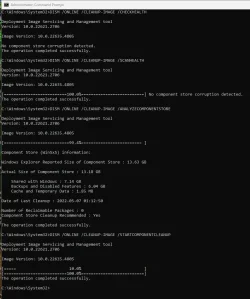
I also have a problem with DISM /ONLINE /CLEANUP-IMAGE /STARTCOMPONENTCLEANUP getting error: 6824
1737860462794.webp

I fixed it on one machine with reinstalling using the Repair Version.
I'm trying the same on this one. I hope it will work on this machine too. 😉
 

My Computer My Computer

At a glance

Windows 11 Pro 25H2Intel I9-9900K64GBNVIDIA RTX 2060
OS
Windows 11 Pro 25H2
Computer type
PC/Desktop
Manufacturer/Model
Dell XPS 8930
CPU
Intel I9-9900K
Memory
64GB
Graphics Card(s)
NVIDIA RTX 2060
Sound Card
NVIDIA High Definition Audio
Monitor(s) Displays
4k Samsung
Screen Resolution
3840 x 2160
Hard Drives
512GB NVMe, ADATA SU 800, 2TB HDD
The Repair Version Reinstall, fixed all the DISM issues on this machine too. 👍
1737862198426.webp

1737862110388.webp
 

My Computer My Computer

At a glance

Windows 11 Pro 25H2Intel I9-9900K64GBNVIDIA RTX 2060
OS
Windows 11 Pro 25H2
Computer type
PC/Desktop
Manufacturer/Model
Dell XPS 8930
CPU
Intel I9-9900K
Memory
64GB
Graphics Card(s)
NVIDIA RTX 2060
Sound Card
NVIDIA High Definition Audio
Monitor(s) Displays
4k Samsung
Screen Resolution
3840 x 2160
Hard Drives
512GB NVMe, ADATA SU 800, 2TB HDD
Hi folks
Using an ISO created by UUPDUMP and making a bootable ISO via Rufus (bog standard - none of the customized bits selected" This message is shown :
Skjámynd 2025-01-26 124414.webp

and install fails at boot on new install (not upgrade) at the OOBE stage when system won't boot.

Upgrade might work but seems destined to fail on new installs - I don't really want to muck around with secure boot settings etc.
(new not upgrade)

Anybody got this thing to install using sec boot and rufus to create the ISO. :I'm going to try it in a VM also to see what happens with sec boot enabled and disabled.

Cheers
jimbo
 

My Computer My Computer

At a glance

Windows XP,11 Linux Fedora Rawhide pre-releas...2 X Intel i7
OS
Windows XP,11 Linux Fedora Rawhide pre-release 45
Computer type
PC/Desktop
CPU
2 X Intel i7
Screen Resolution
4KUHD X 2
Does anyone who on Beta channel with unsupported PC receive this update? For the first time, i don't receive update, Windows Update keep saying that "No Available Updates"
 

My Computer My Computer

At a glance

Windows 10
OS
Windows 10
Does anyone who on Beta channel with unsupported PC receive this update? For the first time, i don't receive update, Windows Update keep saying that "No Available Updates"
Just go Here, download, unzip, run bat file it will create ISO and install it...
 

My Computer My Computer

At a glance

Windows 11Intel® Xeon® X5690 3.47GHz Six-CoreG.Skill PC3-12800 1600MHz 24GBNVIDIA GeForce GTX 1050
OS
Windows 11
Computer type
PC/Desktop
Manufacturer/Model
Asus/Custom Build
CPU
Intel® Xeon® X5690 3.47GHz Six-Core
Motherboard
Asus P6T Deluxe v2
Memory
G.Skill PC3-12800 1600MHz 24GB
Graphics Card(s)
NVIDIA GeForce GTX 1050
Sound Card
SoundMAX ADI AD2000B HD Audio
Monitor(s) Displays
Acer T232HL Touch Screen
Screen Resolution
1920 x 1080 @ 60Hz
Hard Drives
6 Crucial MX500 SSD 1TB each.
PSU
Thermaltake Toughpower Gold 850W
Case
Thermaltake Armor VA8000SWA
Cooling
Thermaltake Air Cooling System
Keyboard
Illuminated Multimedia LED Keyboard
Mouse
M16 Dual Mode Illuminated Mouse - Bluetooth / 2.4 GHz Mode
Internet Speed
800 Mbps
Browser
Edge / Opera / Vivaldi / Chrome / Firefox / Brave
Antivirus
Windows Defender Security
Worth a try though :-)
The F.E. crash problem is caused by one of the many features enabled on beta builds. Pretty hard to isolate because they added way too many. It would take too long to try one at the time.
If I disable id:48433719, which seems to be a corequisite for most of the Beta experimental features, then I don't have the crash in Explorer.exe either. 😵‍💫🤷‍♂️
 
Last edited:

My Computer My Computer

At a glance

Windows 11 Pro 25H2Intel I9-9900K64GBNVIDIA RTX 2060
OS
Windows 11 Pro 25H2
Computer type
PC/Desktop
Manufacturer/Model
Dell XPS 8930
CPU
Intel I9-9900K
Memory
64GB
Graphics Card(s)
NVIDIA RTX 2060
Sound Card
NVIDIA High Definition Audio
Monitor(s) Displays
4k Samsung
Screen Resolution
3840 x 2160
Hard Drives
512GB NVMe, ADATA SU 800, 2TB HDD
Hi folks
Still can't install new to physical hardware get Bootloader revoked issue -- 100% no problem if I install to a KVM/QEMU VM first and then clone to a real machine -- Bonkers but that's "The Beauty of Windows" isn't it !!!!

Just installed new with no extra apps added -- will re-install apps later.

Running this version of windows on the VM

Screenshot_20250127_104212.webp


Cheers
jimbo
 

My Computer My Computer

At a glance

Windows XP,11 Linux Fedora Rawhide pre-releas...2 X Intel i7
OS
Windows XP,11 Linux Fedora Rawhide pre-release 45
Computer type
PC/Desktop
CPU
2 X Intel i7
Screen Resolution
4KUHD X 2

My Computers My Computers

  • At a glance

    Windows 11 Pro for WorkstationsIntel i7-8700K 5 GHz64 GB (4x16GB) G.SKILL TridentZ RGB DDR4 3600...ASUS ROG-STRIX-GTX1080TI-O11G-GAMING (11GB GD...
    OS
    Windows 11 Pro for Workstations
    Computer type
    PC/Desktop
    Manufacturer/Model
    Custom self build
    CPU
    Intel i7-8700K 5 GHz
    Motherboard
    ASUS ROG Maximus XI Formula Z390
    Memory
    64 GB (4x16GB) G.SKILL TridentZ RGB DDR4 3600 MHz (F4-3600C18D-32GTZR)
    Graphics Card(s)
    ASUS ROG-STRIX-GTX1080TI-O11G-GAMING (11GB GDDR5X)
    Sound Card
    Integrated Digital Audio (S/PDIF)
    Monitor(s) Displays
    2 x Samsung Odyssey G75 27"
    Screen Resolution
    2560x1440
    Hard Drives
    1TB Samsung 990 PRO M.2,
    4TB Samsung 990 PRO M.2,
    TerraMaster F8 SSD Plus NAS
    PSU
    Seasonic Prime Titanium 850W
    Case
    Thermaltake Core P3 wall mounted
    Cooling
    Corsair Hydro H115i
    Keyboard
    Amazon Basics Wired Full Keyboard MD005
    Mouse
    Logitech MX Master 4
    Internet Speed
    2 Gbps Download and 100 Mbps Upload
    Browser
    Chrome and Edge
    Antivirus
    Microsoft Defender
    Other Info
    Logitech Z625 speaker system,
    Logitech BRIO 4K Pro webcam,
    HP Color LaserJet Pro MFP M477fdn,
    CyberPower CP1500PFCLCD
    Galaxy S23 Plus phone
  • At a glance

    Windows 11 ProSnapdragon X Elite (12 core) 3.42 GHz16 GB LPDDR5x-7467 MHz
    Operating System
    Windows 11 Pro
    Computer type
    Laptop
    Manufacturer/Model
    Surface Laptop 7 Copilot+ PC
    CPU
    Snapdragon X Elite (12 core) 3.42 GHz
    Memory
    16 GB LPDDR5x-7467 MHz
    Monitor(s) Displays
    15" HDR
    Screen Resolution
    2496 x 1664
    Hard Drives
    1 TB SSD
    Internet Speed
    Wi-Fi 7 and Bluetooth 5.4
    Browser
    Chrome and Edge
    Antivirus
    Microsoft Defender
Updated without issues.
Windows Recovery Environment not updated

The following all passed without any complaints:
Dism /Online /Cleanup-Image /CheckHealth
Dism /Online /Cleanup-Image /ScanHealth
Dism /Online /Cleanup-Image /RestoreHealth
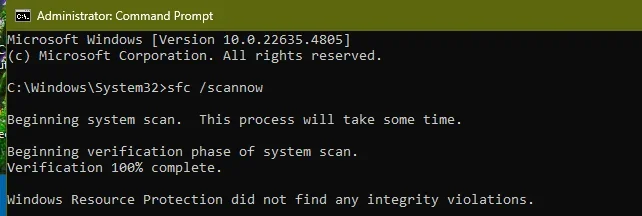
sfc /scannow
Dism /online /cleanup-image /analyzecomponentstore

However,
Dism /online /cleanup-image /startcomponentcleanup
resulted in a 6824 error and the fix was to boot into Windows Command Prompt using a USB Flash Drive and then running the following command:
DISM /Image:C:\ /cleanup-image /startcomponentcleanup
 

My Computer My Computer

At a glance

WindowsXP/7/8/8.1/10/11,Linux,Android,FreeBSD...Intel® Core™ i7-8750H 8th Gen 2.2Ghz up to 4....64GB using 2x32GB CL16 Mushkin redLine modulesIntel UHD 630 & NVIDIA GeForce GTX 1050 Ti wi...
OS
WindowsXP/7/8/8.1/10/11,Linux,Android,FreeBSD Unix
Computer type
Laptop
Manufacturer/Model
Dell XPS 15 9570
CPU
Intel® Core™ i7-8750H 8th Gen 2.2Ghz up to 4.1Ghz
Motherboard
Dell XPS 15 9570
Memory
64GB using 2x32GB CL16 Mushkin redLine modules
Graphics Card(s)
Intel UHD 630 & NVIDIA GeForce GTX 1050 Ti with 4GB DDR5
Sound Card
Realtek ALC3266-CG
Monitor(s) Displays
15.6" 4K Touch UltraHD 3840x2160 made by Sharp
Screen Resolution
3840x2160 4K UltraHD
Hard Drives
Samsung MZ-V9P4T0B/AM 990 PRO 4TB PCIe®4.0 NVMe™ M.2 SSD was Toshiba KXG60ZNV1T02 NVMe 1TB SSD
PSU
Dell XPS 15 9570
Case
Dell XPS 15 9570
Cooling
Stock
Keyboard
Stock
Mouse
SwitftPoint ProPoint
Internet Speed
Comcast/XFinity 1.44Gbps/42.5Mbps
Browser
Microsoft EDGE (Chromium based) & Google Chrome
Antivirus
Windows Defender that came with Windows
@fg2001gf11F - I got the 6824 error as well and my fix is booting into a WinPE and at the command prompt:
DISM /Image:C:\ /cleanup-image /startcomponentcleanup
the /ScratchDir:C:\Temp wasn't needed as I tried it before about 6 months ago with both /ScratchDir:C:\Temp and without it and it didn't make a difference since both worked.

On your repaired installed machine, what's the current Windows Recovery Environment version?
 

My Computer My Computer

At a glance

WindowsXP/7/8/8.1/10/11,Linux,Android,FreeBSD...Intel® Core™ i7-8750H 8th Gen 2.2Ghz up to 4....64GB using 2x32GB CL16 Mushkin redLine modulesIntel UHD 630 & NVIDIA GeForce GTX 1050 Ti wi...
OS
WindowsXP/7/8/8.1/10/11,Linux,Android,FreeBSD Unix
Computer type
Laptop
Manufacturer/Model
Dell XPS 15 9570
CPU
Intel® Core™ i7-8750H 8th Gen 2.2Ghz up to 4.1Ghz
Motherboard
Dell XPS 15 9570
Memory
64GB using 2x32GB CL16 Mushkin redLine modules
Graphics Card(s)
Intel UHD 630 & NVIDIA GeForce GTX 1050 Ti with 4GB DDR5
Sound Card
Realtek ALC3266-CG
Monitor(s) Displays
15.6" 4K Touch UltraHD 3840x2160 made by Sharp
Screen Resolution
3840x2160 4K UltraHD
Hard Drives
Samsung MZ-V9P4T0B/AM 990 PRO 4TB PCIe®4.0 NVMe™ M.2 SSD was Toshiba KXG60ZNV1T02 NVMe 1TB SSD
PSU
Dell XPS 15 9570
Case
Dell XPS 15 9570
Cooling
Stock
Keyboard
Stock
Mouse
SwitftPoint ProPoint
Internet Speed
Comcast/XFinity 1.44Gbps/42.5Mbps
Browser
Microsoft EDGE (Chromium based) & Google Chrome
Antivirus
Windows Defender that came with Windows
Back
Top Bottom