Win Update KB5051987 Windows 11 Cumulative Update build 26100.3194 (24H2) - Feb. 11


UPDATE 2/25:


 Microsoft Support:

February 11, 2025 - KB5051987 (OS Build 26100.3194)​

For information about Windows update terminology, see the article about the types of Windows updates and the monthly quality update types. For an overview of Windows 11, version 24H2, see its update history page.

Note Follow @WindowsUpdate to find out when new content is published to the Windows release health dashboard.

Important: Windows updates do not install Microsoft Store application updates. If you are an enterprise user, see Microsoft Store apps - Configuration Manager. If you are a consumer user, see Get updates for apps and games in Microsoft Store.


Highlights

  • This update addresses security issues for your Windows operating system.

Improvements

This security update includes improvements that were a part of update KB5050094 (released January 28, 2025). Below is a summary of the key issues that this update addresses when you install this KB. If there are new features, it lists them as well. The bold text within the brackets indicates the item or area of the change we are documenting.
  • This update makes miscellaneous security improvements to internal OS functionality. No additional issues were documented for this release.
If you installed earlier updates, only the new updates contained in this package will be downloaded and installed on your device.

For more information about security vulnerabilities, please refer to the Security Update Guide website and the February 2025 Security Updates.

Windows 11 servicing stack update (KB5052085)- 26100.3189​

This update makes quality improvements to the servicing stack, which is the component that installs Windows updates. Servicing stack updates (SSU) ensure that you have a robust and reliable servicing stack so that your devices can receive and install Microsoft updates. To learn more about SSUs, see Simplifying on-premises deployment of servicing stack updates.

Known issues in this update

Roblox

Symptom
We’re aware of an issue where players on Arm devices are unable to download and play Roblox from the Microsoft Store on Windows.

Workaround
Players on Arm devices can play Roblox by downloading the title directly from www.Roblox.com.

Open Secure Shell service

Symptom
Following the installation of the October 2024 security update, some customers report that the OpenSSH (Open Secure Shell) service fails to start, preventing SSH connections. The service fails with no detailed logging, and manual intervention is required to run the sshd.exe process.

This issue is affecting both enterprise, IOT, and education customers, with a limited number of devices impacted. Microsoft is investigating whether consumer customers using Home or Pro editions of Windows are affected.

Workaround
Customers can temporarily resolve the issue by updating permissions (ACLs) on the affected directories. Follow these steps:
  1. Open PowerShell as an Administrator.
  2. Update the permissions for C:\ProgramData\ssh and C:\ProgramData\ssh\logs to allow full control for SYSTEM and the Administrators group, while allowing read access for Authenticated Users. You can restrict read access to specific users or groups by modifying the permissions string if needed.

    Use the following commands to update the permissions:

    $directoryPath = "C:\ProgramData\ssh" $acl = Get-Acl -Path $directoryPath $sddlString = "O:BAD:PAI(A;OICI;FA;;;SY)(A;OICI;FA;;;BA)(A;OICI;0x1200a9;;;AU)" $securityDescriptor = New-Object System.Security.AccessControl.RawSecurityDescriptor $sddlString $acl.SetSecurityDescriptorSddlForm($securityDescriptor.GetSddlForm("All")) Set-Acl -Path $directoryPath -AclObject $acl
  3. Repeat the above steps for C:\ProgramData\ssh\logs.
Microsoft is actively investigating the issue and will provide a resolution in an upcoming Windows update. Further communications will be provided when a resolution or additional workarounds are available.

Citrix

Symptom
Devices that have certain Citrix components installed might be unable to complete installation of the January 2025 Windows security update. This issue was observed on devices with Citrix Session Recording Agent (SRA) version 2411. The 2411 version of this application was released in December 2024.

Affected devices might initially download and apply the January 2025 Windows security update correctly, such as via the Windows Update page in Settings. However, when restarting the device to complete the update installation, an error message with text similar to “Something didn’t go as planned. No need to worry – undoing changes” appears. The device will then revert to the Windows updates previously present on the device.

This issue likely affects a limited number of organizations as version 2411 of the SRA application is a new version. Home users are not expected to be affected by this issue.

Workaround
Citrix has documented this issue, including a workaround, which can be performed prior to installing the January 2025 Windows security update. For details, see Citrix’s documentation.

Microsoft is working with Citrix to address this issue and will update this documentation once a resolution is available.

How to get this update

Before you install this update

Microsoft combines the latest servicing stack update (SSU) for your operating system with the latest cumulative update (LCU). For general information about SSUs, see Servicing stack updates and Servicing Stack Updates (SSU): Frequently Asked Questions.

Install this update

To install this update, use one of the following Windows and Microsoft release channels.

AvailableNext Step
YesNone. This update will be downloaded and installed automatically from Windows Update and Microsoft Update.
YesBefore you install this update
To get the standalone package(s) for this update, go to the Microsoft Update Catalog website. This KB contains one or more MSU files that must be installed in order.


Install this update
Method 1: Install all MSU files together

Download all MSU files for KB5051987 from Microsoft Update Catalog and place them in the same folder (for example, C:/Packages). Use Deployment Image Servicing and Management (DISM.exe) to install the target update. DISM will use the folder specified in PackagePath to discover and install one or more prerequisite MSU files as needed.


Updating Windows PC
To apply this update to a running Windows PC, run the following command from an elevated Command Prompt:

DISM /Online /Add-Package /PackagePath:c:\packages\Windows11.0-KB5051987-x64.msu

Or, run the following command from an elevated Windows PowerShell prompt:
Add-WindowsPackage -Online -PackagePath "c:\packages\Windows11.0-KB5051987-x64.msu"
Updating Windows Installation media
To apply this update to Windows Installation media, see Update Windows installation media with Dynamic Update.


To add this update to a mounted image, run the following command from an elevated Command Prompt:
DISM /Image:mountdir /Add-Package /PackagePath:Windows11.0-KB5051987-x64.msu

Or, run the following command from an elevated Windows PowerShell prompt:
Add-WindowsPackage -Path "c:\offline" -PackagePath "Windows11.0-KB5051987-x64.msu" -PreventPending

If you want to remove the LCU

To remove the LCU after installing the combined SSU and LCU package, use the DISM/Remove-Package command line option with the LCU package name as the argument. You can find the package name by using this command: DISM /online /get-packages.

Running Windows Update Standalone Installer (wusa.exe) with the /uninstall switch on the combined package will not work because the combined package contains the SSU. You cannot remove the SSU from the system after installation.

File information

For a list of the files that are provided in this update, download the file information for cumulative update 5051987.

For a list of the files that are provided in the servicing stack update, download the file information for the SSU (KB5052085) - version 26100.3189.


 Source:


Check Windows Updates


UUP Dump:

64-bit ISO download:

ARM64 ISO download:

 
Last edited:
KB5051987 OS Build 26100.3194 installed with WU, fast without issues, DISM and SFC also ran OK.
On my second system (ASUS laptop) the update did not fare so well, it never made the 2nd Restart (request) during the installation process and stated as completed in both Update History and Check for Updates, but when I ran DISM Online, it hung at 63.3% with the following message after abort (with Task Manager):
The remote procedure call failed.
An error occurred closing a servicing component in the image.

Wait a few minutes and try running the command again.
SFC completed OK but that took two runs.
After I uninstalled the update, DISM Online still hung at 62.3% so I restored the system to 29 January that took only 15 minutes without issues. Then I ran Check for Updates again and this time a Restart request was flagged twice during the installation. Ran DISM Online, completed very fast and SFC found no corruption.
 
Last edited:

My Computers My Computers

  • At a glance

    Windows 11 Home 25H2 build: 26200.8973Intel(R) Core(TM) Ultra 7 258V, 2200 Mhz, 8 C...32 GB LPDDR5X (soldered)Intel(R) Arc(TM) 140V GPU (16GB)
    OS
    Windows 11 Home 25H2 build: 26200.8973
    Computer type
    Laptop
    Manufacturer/Model
    Acer Swift Edge SFE14-51T
    CPU
    Intel(R) Core(TM) Ultra 7 258V, 2200 Mhz, 8 Cores
    Motherboard
    NB.JG411.004 mainboard, manufactured by Compal.
    Memory
    32 GB LPDDR5X (soldered)
    Graphics Card(s)
    Intel(R) Arc(TM) 140V GPU (16GB)
    Sound Card
    RealTek + Intel Smart Sound
    Monitor(s) Displays
    14" OLED matte Touch
    Screen Resolution
    2880 x1800 x120Hz
    Hard Drives
    KINGSTON OM8PGP41024Q-AA, NVMe Gen4, 1TB
    PSU
    65W USB-C charger
    Case
    Magnesium aluminum alloy body
    Cooling
    1 fan
    Keyboard
    US with Backlight
    Mouse
    Precision Trackpad
    Internet Speed
    25 Mb/s 5G
    Browser
    Edge
    Antivirus
    Windows Defender
    Other Info
    BIOS Version/Date: IInsyde Corp. V1.06, 3/16/2026, Windows Hello IR camera with Facial recognition. Secure Boot 2026 KEK key installed
  • At a glance

    Windows 11 Home 25H2 build: 26200.8973Intel 12th Gen. i7 12700H, 14 cores, 2.3 GHz ...8GB LPDDR4 on board + 8GB LPDDR4 3200 MHz in ...Intel Iris Xe supports up to 4096 x 2304 @ 120Hz
    Operating System
    Windows 11 Home 25H2 build: 26200.8973
    Computer type
    Laptop
    Manufacturer/Model
    Asus Vivobook K3502Z S15 15" OLED
    CPU
    Intel 12th Gen. i7 12700H, 14 cores, 2.3 GHz (24M Cache, up to 4.7 GHz, 6P+8E cores)
    Motherboard
    Alder Lake-H, 1700-4700 MHz clock rate
    Memory
    8GB LPDDR4 on board + 8GB LPDDR4 3200 MHz in Dual Channel.
    Graphics card(s)
    Intel Iris Xe supports up to 4096 x 2304 @ 120Hz
    Sound Card
    Harman Kardon - DTS
    Monitor(s) Displays
    OLED 15.6inch 2.8K (2880 x 1620)
    Screen Resolution
    16:9 aspect ratio 0.2ms response time 120Hz refresh rate, 550nits
    Hard Drives
    512GB M.2 NVMe Gen4 PCIe 4.0 SSD, Micron_2450_MTFDKBA512TFK
    PSU
    90-Watt USB charger (Thunderbolt4)
    Case
    Metal lid, plastic case
    Cooling
    1 fan
    Keyboard
    With adjustable backlight
    Mouse
    Precision Trackpad
    Internet Speed
    ISP provides 15 mb/s WIFI LTE (4G), laptop WIFI 6 adapter.
    Browser
    Edge
    Antivirus
    Windows Defender
    Other Info
    BIOS American Megatrends International, LLC. 10.1.2.312, 13/03/2024. Network adapter: Intel Wi-Fi 6E AX211 160 MHz, Secure Boot 2026 KEK key installed
Installation was fast. DISM and SFC found no errors.
 

My Computers My Computers

  • At a glance

    windows 10 & 11AMD Ryzen 7X64GbRadeon RX 480 8Gb
    OS
    windows 10 & 11
    Computer type
    PC/Desktop
    Manufacturer/Model
    iBuyPower (special build)
    CPU
    AMD Ryzen 7X
    Motherboard
    Asus Prime x370 Pro
    Memory
    64Gb
    Graphics Card(s)
    Radeon RX 480 8Gb
    Monitor(s) Displays
    Samsung UHD 27 inch
    Screen Resolution
    UHD
    Hard Drives
    3 Samsung 1 TB SSD each; 1 Samsung PCIe M.2 at 2 TB
  • At a glance

    Windows 11 proAMD 9 5900X32 GbNvidia GeForce RTX 3080 Ti 12 GB GDDR6X
    Operating System
    Windows 11 pro
    Computer type
    PC/Desktop
    Manufacturer/Model
    IBuyPower
    CPU
    AMD 9 5900X
    Motherboard
    Asus x570 ROG Crosshair VIII Dark Hero WI-FI 6E ARGB
    Memory
    32 Gb
    Graphics card(s)
    Nvidia GeForce RTX 3080 Ti 12 GB GDDR6X
    Sound Card
    3D PREMIUM surround sound onboard
    Monitor(s) Displays
    Samsung 32 inch UHD curved monitor
    Screen Resolution
    UHD
    Hard Drives
    Samsung 980 pro 2 tb gen 4 NVMe ssd
    PSU
    850 watt consair RM850X
    Case
    Lian Li LANCOOL ONE tempered glass RGB gaming case
    Cooling
    DEEPCOOL GAMERSTORM RGB 240 mm CASTLE 240EX liquid cooler
    Keyboard
    Ares m.2 gaming keyboard
    Mouse
    Ares m.2 gaming optical mouse
    Internet Speed
    450
    Browser
    Firefox / Edge
    Antivirus
    Windows defender
    Other Info
    With all this gaming rig I am not a gamer!
Does this fix 24h2 no internet connection problem?
 

My Computers My Computers

  • At a glance

    Windows 11 Pro - 25H2AMD Ryzen 5 560032Gb Gskill Trident Neo RGBAorus Gtx 1080Ti Xtreme
    OS
    Windows 11 Pro - 25H2
    Computer type
    PC/Desktop
    CPU
    AMD Ryzen 5 5600
    Motherboard
    MSI B550 A-Pro
    Memory
    32Gb Gskill Trident Neo RGB
    Graphics Card(s)
    Aorus Gtx 1080Ti Xtreme
    Monitor(s) Displays
    Koorui 27" IPS Gaming Monitor @144hz
    Screen Resolution
    2560 X 1440
    Hard Drives
    Samsung Evo 250Gb SSD
    Western Digital Black 1Tb
    Samsung 990 Pro 2Tb Nvme
    PSU
    Corsair RM650
    Case
    CoolerMaster Case Pro 5
    Cooling
    AMD Wraith Spire
    Keyboard
    Techware Phantom+ Elite Wireless Mechanical Gaming Keyboard
    Mouse
    Logitech G304 WiIreless
    Internet Speed
    500Mbps Fiber
    Browser
    Firefox
    Antivirus
    Windows Security, Malwarebytes Free
  • At a glance

    Windows 11 Home Single Language - 25H2Intel i5 13500HX32gb Ddr5Rtx 4060 Laptop 140w
    Operating System
    Windows 11 Home Single Language - 25H2
    Computer type
    Laptop
    Manufacturer/Model
    Acer Predator Helios Neo 16
    CPU
    Intel i5 13500HX
    Motherboard
    Acer
    Memory
    32gb Ddr5
    Graphics card(s)
    Rtx 4060 Laptop 140w
    Sound Card
    Onboard
    Monitor(s) Displays
    16" IPS
    Screen Resolution
    1920 x 1200
    Hard Drives
    480gb Nvme
    Mouse
    Rakk Kaptan Wireless Mouse
    Browser
    Firefox
    Antivirus
    Windows Security
Installed without issue on a supported and unsupported device
 

My Computers My Computers

  • At a glance

    Windows 11 25H2Intel i9 14900KF64GB Corsair Vengeance RGBMSI 4090 Suprim X
    OS
    Windows 11 25H2
    Computer type
    PC/Desktop
    Manufacturer/Model
    Custom Built
    CPU
    Intel i9 14900KF
    Motherboard
    ASUS Z790 ProArt Creator WiFi
    Memory
    64GB Corsair Vengeance RGB
    Graphics Card(s)
    MSI 4090 Suprim X
    Sound Card
    Onboard
    Monitor(s) Displays
    1 x Asus 24". 1 x Asus 32"
    Screen Resolution
    1920 x 1080 & 2560 x 1440
    Hard Drives
    Multiple
    PSU
    Corsair 1200HX
    Case
    Corsair 7000D RGB
    Cooling
    Corsair H150I Capellix XT
    Keyboard
    Corsair K70 RGB PRO
    Mouse
    Corsair M55 RGB Pro
    Internet Speed
    1000Mbps
    Browser
    Edge
    Antivirus
    Windows Default
  • At a glance

    Windows 11 25H2Intel i7 6800K32GB DDR4 (Corsair)ASUS GTX 1080ti
    Operating System
    Windows 11 25H2
    Computer type
    PC/Desktop
    Manufacturer/Model
    Custom Built
    CPU
    Intel i7 6800K
    Motherboard
    ASUS Z99 Deluxe
    Memory
    32GB DDR4 (Corsair)
    Graphics card(s)
    ASUS GTX 1080ti
    Sound Card
    Onboard
    Monitor(s) Displays
    1x Viewsonic 24" 1x LG 19"
    Screen Resolution
    1920 x 1080 & 1600 x 900
    Hard Drives
    3 x SATA SSD
    PSU
    650W Gigabyte Bronze
    Case
    Coolermaster HAF-X
    Cooling
    Noctua NH-15 Chroma black
    Keyboard
    Generic RGB
    Mouse
    Microsoft Basic
    Internet Speed
    1000Mbps
    Browser
    Edge
    Antivirus
    Windows Default
Updated 5 machines.
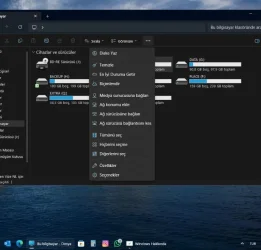
No fix for the silly bug of file explorer 3 dots context menu opening upwards.
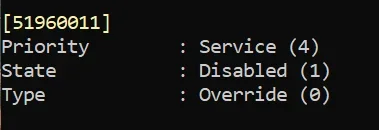
How many months now? Seems like MS is just ignoring this bug that was added by that useless experimental fix 51960011. 😂😝🤬🤷‍♂️
 

My Computer My Computer

At a glance

Windows 11 Pro 25H2Intel I9-9900K64GBNVIDIA RTX 2060
OS
Windows 11 Pro 25H2
Computer type
PC/Desktop
Manufacturer/Model
Dell XPS 8930
CPU
Intel I9-9900K
Memory
64GB
Graphics Card(s)
NVIDIA RTX 2060
Sound Card
NVIDIA High Definition Audio
Monitor(s) Displays
4k Samsung
Screen Resolution
3840 x 2160
Hard Drives
512GB NVMe, ADATA SU 800, 2TB HDD
No fix for the silly bug of file explorer 3 dots context menu opening upwards.
How many months now? Seems like MS is just ignoring this bug that was added by that useless experimental fix 51960011. 😂😝🤬🤷‍♂️
It's fixed on my machine after this update but then it won't be the same as yours. 🤷‍♂️
 

My Computer My Computer

At a glance

Windows 11 Pro 25H2 26200.8737Ryzen 5 760032 Gb DDR5 6000Hz Corsair VengeanceSapphire Pulse RX 7600
OS
Windows 11 Pro 25H2 26200.8737
Computer type
PC/Desktop
Manufacturer/Model
Home built
CPU
Ryzen 5 7600
Motherboard
Gigabyte B650M Aorus Elite AX Ice
Memory
32 Gb DDR5 6000Hz Corsair Vengeance
Graphics Card(s)
Sapphire Pulse RX 7600
Sound Card
Internal Realtek
Monitor(s) Displays
Samsung 32" Odyssey G5 G50D QHD
Screen Resolution
2560 x 1440
Hard Drives
WD Black SN 770 1Tb; SanDisk SDSSDA240G ; Seagate 2Tb HDD
PSU
MSI MAG A750GL
Case
Enermax Marbleshell MS21
Cooling
Thermaltake Peerless Assassin 120 White ARGB, 3 x 120 intake, 1 x 120 exhaust
Keyboard
Aukey KM-G12
Mouse
Razer Basilisk v3 Pro 35K
Internet Speed
1 Gb/s up & 800 Mb/s down
Browser
Brave / Edge
Antivirus
Windows / Malwarebytes
It's fixed on my machine after this update but then it won't be the same as yours. 🤷‍♂️
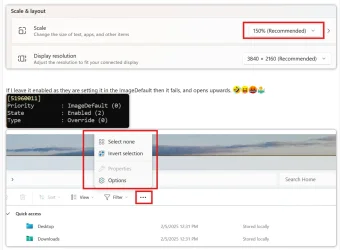
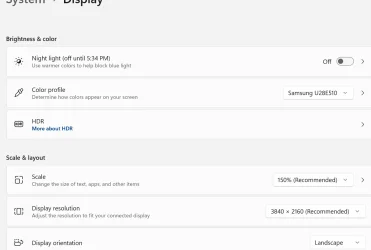
What is the Display scale on your settings?
Mine works only when I disable this feature id below, because my Display scale is 150%.
If I change it to 100%, 200%, 300% it works even it that feature ID is enabled. 🤣🤣🤣
Microsoft is just not understanding how they screwed up on this particular bug that they added in by mistake. 😝🤬🤬🤬

With this disabled it works with any Scale setting. 👌
1739345145688.webp

1739345235813.webp


1739345303052.webp


If I leave it enabled as they are setting it in the ImageDefault then it fails, and opens upwards. 🤣😝🤬🤷‍♂️
1739346390348.webp
1739346507786.webp
 
Last edited:

My Computer My Computer

At a glance

Windows 11 Pro 25H2Intel I9-9900K64GBNVIDIA RTX 2060
OS
Windows 11 Pro 25H2
Computer type
PC/Desktop
Manufacturer/Model
Dell XPS 8930
CPU
Intel I9-9900K
Memory
64GB
Graphics Card(s)
NVIDIA RTX 2060
Sound Card
NVIDIA High Definition Audio
Monitor(s) Displays
4k Samsung
Screen Resolution
3840 x 2160
Hard Drives
512GB NVMe, ADATA SU 800, 2TB HDD
Updated 5 machines.
No fix for the silly bug of file explorer 3 dots context menu opening upwards.
How many months now? Seems like MS is just ignoring this bug that was added by that useless experimental fix 51960011. 😂😝🤬🤷‍♂️
Hi.

If you see the Explorer 3-dot context menu as a bug, it bugs you. If you don't see it as a bug, it doesn't bug you. 😂

This bug has gone away for some builds now for my half-supported ( or half-unsupported, whichevere definition suits well ) system.

bug.webp
 

My Computers My Computers

  • At a glance

    Windows 11 Pro build 26200.8524Intel i7-4790Teams DDR3-1600 4x4 GBMSI Nvidia GeForce GTX 1050Ti
    OS
    Windows 11 Pro build 26200.8524
    Computer type
    PC/Desktop
    Manufacturer/Model
    Home Built
    CPU
    Intel i7-4790
    Motherboard
    Asus H97 Pro Gamer with add-on TPM1.2 module
    Memory
    Teams DDR3-1600 4x4 GB
    Graphics Card(s)
    MSI Nvidia GeForce GTX 1050Ti
    Sound Card
    Realtek ALC1150
    Monitor(s) Displays
    Dell P2425D
    Screen Resolution
    2560 by 1440 pixels
    Hard Drives
    Corsair NVMe M.2 Core XT 1000 GB (Windows 11 v.25H2); Samsung SATA Evo 870 500 GB (Windows 11 v.25H2);
    PSU
    Corsair HX850
    Case
    Gigabyte Solo 210
    Cooling
    Zalman CNPS7X Tower
    Keyboard
    Microsoft AIO Wireless (includes touchpad)
    Mouse
    HP S1000 Plus Wireless
    Internet Speed
    500 Mb fiber optic
    Browser
    Chrome; MS Edge
    Antivirus
    Windows Defender
  • At a glance

    MacOS 12 MontereyIntel Core i58 GBIntel integrated
    Operating System
    MacOS 12 Monterey
    Computer type
    Laptop
    Manufacturer/Model
    Apple Macbook Air
    CPU
    Intel Core i5
    Memory
    8 GB
    Graphics card(s)
    Intel integrated
    Screen Resolution
    1440 by 900 pixels
    Hard Drives
    128 GB
    Keyboard
    Built-in
    Mouse
    Microsoft Wireless
    Internet Speed
    802.11 ac
    Browser
    Chrome; Safari
    Antivirus
    N/A
On my desktop computer (1440p, scale 100%) the explorer "3-dots" menu is fixed. Not on my laptop though.
 

My Computers My Computers

  • At a glance

    Windows 11 Pro 25H2Intel i9-9900kCorsair Vengeance LPX 32GB (2 x 16GB)MSI Suprim X RTX 3080
    OS
    Windows 11 Pro 25H2
    Computer type
    PC/Desktop
    Manufacturer/Model
    Multi
    CPU
    Intel i9-9900k
    Motherboard
    Gigabyte Z390 Aorus Master
    Memory
    Corsair Vengeance LPX 32GB (2 x 16GB)
    Graphics Card(s)
    MSI Suprim X RTX 3080
    Sound Card
    Realtek
    Monitor(s) Displays
    Samsung LC32HGQ 144Hz
    Screen Resolution
    2560x1440
    Hard Drives
    Samsung 970 Evo Plus 1 TB
    Crucial MX100 512 GB
    Samsung 840 Pro 256 GB
    Seagate ST4000DM000-1F2168 4 TB
    PSU
    Seasonic P-860 Platinium
    Case
    Corsair Graphite 780T
    Cooling
    Noctua NH-U14S
    Keyboard
    Corsair K70 MK.2 Low profile
    Mouse
    Logitech G Pro HERO
    Internet Speed
    200 Mb/s
    Browser
    Mozilla Firefox
    Antivirus
    Windows Defender
    Other Info
    BIOS version F13a
  • At a glance

    Windows 11 Home 25H2AMD Ryzen 7 250Samsung 16GB DDR5 5600MHz PC5-44800 CL46Nvidia GeForce RTX 5060
    Operating System
    Windows 11 Home 25H2
    Computer type
    Laptop
    Manufacturer/Model
    Lenovo LOQ 15AHP10
    CPU
    AMD Ryzen 7 250
    Motherboard
    Lenovo LNVNB161216
    Memory
    Samsung 16GB DDR5 5600MHz PC5-44800 CL46
    Graphics card(s)
    Nvidia GeForce RTX 5060
    Sound Card
    Realtek
    Monitor(s) Displays
    CSOT T3 MNF601BA1-4
    Screen Resolution
    1920x1080
    Hard Drives
    Micron SSD 1 TB
    Browser
    Mozilla Firefox
    Antivirus
    Windows Defender
    Other Info
    BIOS version R8CN25WW
On my desktop computer (1440p, scale 100%) the explorer "3-dots" menu is fixed. Not on my laptop though.
On 125% it not working and 100% is too small.
 

My Computer My Computer

At a glance

26200.8037i5-11400F32GBGeforce GT-1030
OS
26200.8037
Computer type
PC/Desktop
CPU
i5-11400F
Motherboard
Gigabyte
Memory
32GB
Graphics Card(s)
Geforce GT-1030
Keyboard
Logitech K400
Mouse
Logitech M720
Internet Speed
600 Mb
Browser
Edge
Totally unable to get this to install. Reset windows update 3 times and no activity on Ethernet after over an hour /(again) stuck on 6% downloaded. No idea how to get a download to use that.

Its mandess it went up to 56% but now back to 8%.
 
Last edited:

My Computers My Computers

  • At a glance

    Windows 11AMD Ryzen 9 3900X 12-32RTX 470
    OS
    Windows 11
    Computer type
    PC/Desktop
    Manufacturer/Model
    Chilblast Photoe editer
    CPU
    AMD Ryzen 9 3900X 12-
    Motherboard
    AMD AM4 ATX
    Memory
    32
    Graphics Card(s)
    RTX 470
    Monitor(s) Displays
    Benq SW240 Dell U213
    Screen Resolution
    1920X1200
    Hard Drives
    1 Tb SSD 2 Tb SSD 2Tb Hdd
    Mouse
    logi
    Internet Speed
    500 up and down
    Browser
    Firefox
    Antivirus
    Bitdefender Total Security
  • Computer type
    Laptop
    Manufacturer/Model
    XPS 14 9440
    Browser
    Firefox
    Antivirus
    Bitdefender Total

My Computer My Computer

At a glance

Windows 11 proAMD Ryzen 7 5700XG.SKILL Ripjaws V Series (Intel XMP) DDR4 RAM...ASUS Dual GeForce RTX™ 4060 White Edition
OS
Windows 11 pro
Computer type
PC/Desktop
Manufacturer/Model
custom build
CPU
AMD Ryzen 7 5700X
Motherboard
AMD ROG STRIX B550-F
Memory
G.SKILL Ripjaws V Series (Intel XMP) DDR4 RAM 32GB (2x16GB)
Graphics Card(s)
ASUS Dual GeForce RTX™ 4060 White Edition
Sound Card
on-board
Monitor(s) Displays
SAMSUNG 32-Inch Odyssey G50D Series
Screen Resolution
2560 x 1440
Hard Drives
Samsung 990 EVO Plus 1TB, ssd INTEL SSD 730 series 240 GB, and Samsung 840 Evo ssd 500 GB.
PSU
CORSAIR - RMe Series 1000W 80 PLUS Gold Fully Modular ATX Power Supply
Case
Antec 900 Nine Hundred ATX Mid Tower Computer Gaming Case
Cooling
ID-COOLING SE-214-XT Black CPU Cooler All-Black Layout
Keyboard
Logitech 520
Mouse
Logitech 310
Browser
Google Chrome
Antivirus
Windows Defender
This seems weird. My scaling is 110% and the menu works just fine.

1739382261644.webp
 

My Computer My Computer

At a glance

Windows 11 Pro 25H2 26200.8737Ryzen 5 760032 Gb DDR5 6000Hz Corsair VengeanceSapphire Pulse RX 7600
OS
Windows 11 Pro 25H2 26200.8737
Computer type
PC/Desktop
Manufacturer/Model
Home built
CPU
Ryzen 5 7600
Motherboard
Gigabyte B650M Aorus Elite AX Ice
Memory
32 Gb DDR5 6000Hz Corsair Vengeance
Graphics Card(s)
Sapphire Pulse RX 7600
Sound Card
Internal Realtek
Monitor(s) Displays
Samsung 32" Odyssey G5 G50D QHD
Screen Resolution
2560 x 1440
Hard Drives
WD Black SN 770 1Tb; SanDisk SDSSDA240G ; Seagate 2Tb HDD
PSU
MSI MAG A750GL
Case
Enermax Marbleshell MS21
Cooling
Thermaltake Peerless Assassin 120 White ARGB, 3 x 120 intake, 1 x 120 exhaust
Keyboard
Aukey KM-G12
Mouse
Razer Basilisk v3 Pro 35K
Internet Speed
1 Gb/s up & 800 Mb/s down
Browser
Brave / Edge
Antivirus
Windows / Malwarebytes
This seems weird. My scaling is 110% and the menu works just fine.

View attachment 125188
Not weird, just broken.
It does not work for me with Scale 150% as I showed already many times before.
If I disable 51960011 then it works with any scale. 🤣🤣🤷‍♂️
 
Last edited:

My Computer My Computer

At a glance

Windows 11 Pro 25H2Intel I9-9900K64GBNVIDIA RTX 2060
OS
Windows 11 Pro 25H2
Computer type
PC/Desktop
Manufacturer/Model
Dell XPS 8930
CPU
Intel I9-9900K
Memory
64GB
Graphics Card(s)
NVIDIA RTX 2060
Sound Card
NVIDIA High Definition Audio
Monitor(s) Displays
4k Samsung
Screen Resolution
3840 x 2160
Hard Drives
512GB NVMe, ADATA SU 800, 2TB HDD
This seems weird. My scaling is 110% and the menu works just fine.
@Graugles,

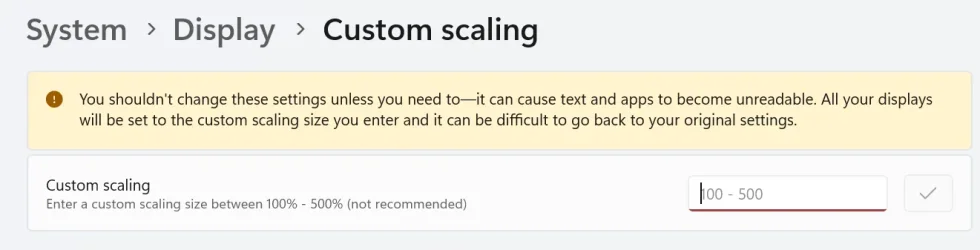
110% is not selectable in normal scaling it is a custom scale and seems to work. 😉
I use 150% which is the recommended scale for my screen and in that case it fails.

1739385410338.webp

1739386030532.webp
1739386090274.webp
 

My Computer My Computer

At a glance

Windows 11 Pro 25H2Intel I9-9900K64GBNVIDIA RTX 2060
OS
Windows 11 Pro 25H2
Computer type
PC/Desktop
Manufacturer/Model
Dell XPS 8930
CPU
Intel I9-9900K
Memory
64GB
Graphics Card(s)
NVIDIA RTX 2060
Sound Card
NVIDIA High Definition Audio
Monitor(s) Displays
4k Samsung
Screen Resolution
3840 x 2160
Hard Drives
512GB NVMe, ADATA SU 800, 2TB HDD
On my desktop computer (1440p, scale 100%) the explorer "3-dots" menu is fixed. Not on my laptop though.
Already said many times that scale of 100% works fine, try 125% or 150%. 🤣🤣
 

My Computer My Computer

At a glance

Windows 11 Pro 25H2Intel I9-9900K64GBNVIDIA RTX 2060
OS
Windows 11 Pro 25H2
Computer type
PC/Desktop
Manufacturer/Model
Dell XPS 8930
CPU
Intel I9-9900K
Memory
64GB
Graphics Card(s)
NVIDIA RTX 2060
Sound Card
NVIDIA High Definition Audio
Monitor(s) Displays
4k Samsung
Screen Resolution
3840 x 2160
Hard Drives
512GB NVMe, ADATA SU 800, 2TB HDD
Hi.

If you see the Explorer 3-dot context menu as a bug, it bugs you. If you don't see it as a bug, it doesn't bug you. 😂

This bug has gone away for some builds now for my half-supported ( or half-unsupported, whichevere definition suits well ) system.
What is your setting for the Display Scale on the machines that work and the ones that fail?
 

My Computer My Computer

At a glance

Windows 11 Pro 25H2Intel I9-9900K64GBNVIDIA RTX 2060
OS
Windows 11 Pro 25H2
Computer type
PC/Desktop
Manufacturer/Model
Dell XPS 8930
CPU
Intel I9-9900K
Memory
64GB
Graphics Card(s)
NVIDIA RTX 2060
Sound Card
NVIDIA High Definition Audio
Monitor(s) Displays
4k Samsung
Screen Resolution
3840 x 2160
Hard Drives
512GB NVMe, ADATA SU 800, 2TB HDD
1739390939650.webp
Scale has been at 150 for at least 2 years.
 

My Computers My Computers

  • At a glance

    windows 10 & 11AMD Ryzen 7X64GbRadeon RX 480 8Gb
    OS
    windows 10 & 11
    Computer type
    PC/Desktop
    Manufacturer/Model
    iBuyPower (special build)
    CPU
    AMD Ryzen 7X
    Motherboard
    Asus Prime x370 Pro
    Memory
    64Gb
    Graphics Card(s)
    Radeon RX 480 8Gb
    Monitor(s) Displays
    Samsung UHD 27 inch
    Screen Resolution
    UHD
    Hard Drives
    3 Samsung 1 TB SSD each; 1 Samsung PCIe M.2 at 2 TB
  • At a glance

    Windows 11 proAMD 9 5900X32 GbNvidia GeForce RTX 3080 Ti 12 GB GDDR6X
    Operating System
    Windows 11 pro
    Computer type
    PC/Desktop
    Manufacturer/Model
    IBuyPower
    CPU
    AMD 9 5900X
    Motherboard
    Asus x570 ROG Crosshair VIII Dark Hero WI-FI 6E ARGB
    Memory
    32 Gb
    Graphics card(s)
    Nvidia GeForce RTX 3080 Ti 12 GB GDDR6X
    Sound Card
    3D PREMIUM surround sound onboard
    Monitor(s) Displays
    Samsung 32 inch UHD curved monitor
    Screen Resolution
    UHD
    Hard Drives
    Samsung 980 pro 2 tb gen 4 NVMe ssd
    PSU
    850 watt consair RM850X
    Case
    Lian Li LANCOOL ONE tempered glass RGB gaming case
    Cooling
    DEEPCOOL GAMERSTORM RGB 240 mm CASTLE 240EX liquid cooler
    Keyboard
    Ares m.2 gaming keyboard
    Mouse
    Ares m.2 gaming optical mouse
    Internet Speed
    450
    Browser
    Firefox / Edge
    Antivirus
    Windows defender
    Other Info
    With all this gaming rig I am not a gamer!
Methinks the "..." bug should have it's own thread.... It's gettin' old....
 

My Computers My Computers

  • At a glance

    Win 11 Pro (25H2 RP)Intel(R) Core(TM) i5-9300H CPU @ 2.40GHz 2.40...32GBNvidia GeForce GTX 1650, Intel UHD 630
    OS
    Win 11 Pro (25H2 RP)
    Computer type
    Laptop
    Manufacturer/Model
    Acer AN515-54
    CPU
    Intel(R) Core(TM) i5-9300H CPU @ 2.40GHz 2.40 GHz
    Memory
    32GB
    Graphics Card(s)
    Nvidia GeForce GTX 1650, Intel UHD 630
    Monitor(s) Displays
    Acer CB272D
    Screen Resolution
    1920x1080
    Hard Drives
    256GB and 1T SSD
    Internet Speed
    500MB
    Browser
    Edge (Stable)
    Antivirus
    Microsoft Defender
  • At a glance

    Win 11 Pro (RP)Intel(R) Core(TM) Ultra 9 275HX (2.70 GHz)32GB DDR5-5600NVIDIA® GeForce RTX™ 5060 8GB
    Operating System
    Win 11 Pro (RP)
    Computer type
    Laptop
    Manufacturer/Model
    Lenovo Legion 5 16IAX10 - Type 83NX
    CPU
    Intel(R) Core(TM) Ultra 9 275HX (2.70 GHz)
    Memory
    32GB DDR5-5600
    Graphics card(s)
    NVIDIA® GeForce RTX™ 5060 8GB
    Monitor(s) Displays
    Acer CB272D
    Screen Resolution
    1920x1080 75Hz
    Hard Drives
    WD Green SN3000 (2TB)
    Samsung Portable T5 (2TB)
    Keyboard
    Logi MX Keys
    Mouse
    Logi MX Anywhere 3
    Internet Speed
    500MB
    Browser
    Edge
    Antivirus
    MS Defender
1739391759603.webp
On second computer with this build on it, the same is true for resolution/scale.
 

My Computers My Computers

  • At a glance

    windows 10 & 11AMD Ryzen 7X64GbRadeon RX 480 8Gb
    OS
    windows 10 & 11
    Computer type
    PC/Desktop
    Manufacturer/Model
    iBuyPower (special build)
    CPU
    AMD Ryzen 7X
    Motherboard
    Asus Prime x370 Pro
    Memory
    64Gb
    Graphics Card(s)
    Radeon RX 480 8Gb
    Monitor(s) Displays
    Samsung UHD 27 inch
    Screen Resolution
    UHD
    Hard Drives
    3 Samsung 1 TB SSD each; 1 Samsung PCIe M.2 at 2 TB
  • At a glance

    Windows 11 proAMD 9 5900X32 GbNvidia GeForce RTX 3080 Ti 12 GB GDDR6X
    Operating System
    Windows 11 pro
    Computer type
    PC/Desktop
    Manufacturer/Model
    IBuyPower
    CPU
    AMD 9 5900X
    Motherboard
    Asus x570 ROG Crosshair VIII Dark Hero WI-FI 6E ARGB
    Memory
    32 Gb
    Graphics card(s)
    Nvidia GeForce RTX 3080 Ti 12 GB GDDR6X
    Sound Card
    3D PREMIUM surround sound onboard
    Monitor(s) Displays
    Samsung 32 inch UHD curved monitor
    Screen Resolution
    UHD
    Hard Drives
    Samsung 980 pro 2 tb gen 4 NVMe ssd
    PSU
    850 watt consair RM850X
    Case
    Lian Li LANCOOL ONE tempered glass RGB gaming case
    Cooling
    DEEPCOOL GAMERSTORM RGB 240 mm CASTLE 240EX liquid cooler
    Keyboard
    Ares m.2 gaming keyboard
    Mouse
    Ares m.2 gaming optical mouse
    Internet Speed
    450
    Browser
    Firefox / Edge
    Antivirus
    Windows defender
    Other Info
    With all this gaming rig I am not a gamer!

Latest Support Threads

Back
Top Bottom