Win Update KB5051987 Windows 11 Cumulative Update build 26100.3194 (24H2) - Feb. 11


UPDATE 2/25:


 Microsoft Support:

February 11, 2025 - KB5051987 (OS Build 26100.3194)​

For information about Windows update terminology, see the article about the types of Windows updates and the monthly quality update types. For an overview of Windows 11, version 24H2, see its update history page.

Note Follow @WindowsUpdate to find out when new content is published to the Windows release health dashboard.

Important: Windows updates do not install Microsoft Store application updates. If you are an enterprise user, see Microsoft Store apps - Configuration Manager. If you are a consumer user, see Get updates for apps and games in Microsoft Store.


Highlights

  • This update addresses security issues for your Windows operating system.

Improvements

This security update includes improvements that were a part of update KB5050094 (released January 28, 2025). Below is a summary of the key issues that this update addresses when you install this KB. If there are new features, it lists them as well. The bold text within the brackets indicates the item or area of the change we are documenting.
  • This update makes miscellaneous security improvements to internal OS functionality. No additional issues were documented for this release.
If you installed earlier updates, only the new updates contained in this package will be downloaded and installed on your device.

For more information about security vulnerabilities, please refer to the Security Update Guide website and the February 2025 Security Updates.

Windows 11 servicing stack update (KB5052085)- 26100.3189​

This update makes quality improvements to the servicing stack, which is the component that installs Windows updates. Servicing stack updates (SSU) ensure that you have a robust and reliable servicing stack so that your devices can receive and install Microsoft updates. To learn more about SSUs, see Simplifying on-premises deployment of servicing stack updates.

Known issues in this update

Roblox

Symptom
We’re aware of an issue where players on Arm devices are unable to download and play Roblox from the Microsoft Store on Windows.

Workaround
Players on Arm devices can play Roblox by downloading the title directly from www.Roblox.com.

Open Secure Shell service

Symptom
Following the installation of the October 2024 security update, some customers report that the OpenSSH (Open Secure Shell) service fails to start, preventing SSH connections. The service fails with no detailed logging, and manual intervention is required to run the sshd.exe process.

This issue is affecting both enterprise, IOT, and education customers, with a limited number of devices impacted. Microsoft is investigating whether consumer customers using Home or Pro editions of Windows are affected.

Workaround
Customers can temporarily resolve the issue by updating permissions (ACLs) on the affected directories. Follow these steps:
  1. Open PowerShell as an Administrator.
  2. Update the permissions for C:\ProgramData\ssh and C:\ProgramData\ssh\logs to allow full control for SYSTEM and the Administrators group, while allowing read access for Authenticated Users. You can restrict read access to specific users or groups by modifying the permissions string if needed.

    Use the following commands to update the permissions:

    $directoryPath = "C:\ProgramData\ssh" $acl = Get-Acl -Path $directoryPath $sddlString = "O:BAD:PAI(A;OICI;FA;;;SY)(A;OICI;FA;;;BA)(A;OICI;0x1200a9;;;AU)" $securityDescriptor = New-Object System.Security.AccessControl.RawSecurityDescriptor $sddlString $acl.SetSecurityDescriptorSddlForm($securityDescriptor.GetSddlForm("All")) Set-Acl -Path $directoryPath -AclObject $acl
  3. Repeat the above steps for C:\ProgramData\ssh\logs.
Microsoft is actively investigating the issue and will provide a resolution in an upcoming Windows update. Further communications will be provided when a resolution or additional workarounds are available.

Citrix

Symptom
Devices that have certain Citrix components installed might be unable to complete installation of the January 2025 Windows security update. This issue was observed on devices with Citrix Session Recording Agent (SRA) version 2411. The 2411 version of this application was released in December 2024.

Affected devices might initially download and apply the January 2025 Windows security update correctly, such as via the Windows Update page in Settings. However, when restarting the device to complete the update installation, an error message with text similar to “Something didn’t go as planned. No need to worry – undoing changes” appears. The device will then revert to the Windows updates previously present on the device.

This issue likely affects a limited number of organizations as version 2411 of the SRA application is a new version. Home users are not expected to be affected by this issue.

Workaround
Citrix has documented this issue, including a workaround, which can be performed prior to installing the January 2025 Windows security update. For details, see Citrix’s documentation.

Microsoft is working with Citrix to address this issue and will update this documentation once a resolution is available.

How to get this update

Before you install this update

Microsoft combines the latest servicing stack update (SSU) for your operating system with the latest cumulative update (LCU). For general information about SSUs, see Servicing stack updates and Servicing Stack Updates (SSU): Frequently Asked Questions.

Install this update

To install this update, use one of the following Windows and Microsoft release channels.

AvailableNext Step
YesNone. This update will be downloaded and installed automatically from Windows Update and Microsoft Update.
YesBefore you install this update
To get the standalone package(s) for this update, go to the Microsoft Update Catalog website. This KB contains one or more MSU files that must be installed in order.


Install this update
Method 1: Install all MSU files together

Download all MSU files for KB5051987 from Microsoft Update Catalog and place them in the same folder (for example, C:/Packages). Use Deployment Image Servicing and Management (DISM.exe) to install the target update. DISM will use the folder specified in PackagePath to discover and install one or more prerequisite MSU files as needed.


Updating Windows PC
To apply this update to a running Windows PC, run the following command from an elevated Command Prompt:

DISM /Online /Add-Package /PackagePath:c:\packages\Windows11.0-KB5051987-x64.msu

Or, run the following command from an elevated Windows PowerShell prompt:
Add-WindowsPackage -Online -PackagePath "c:\packages\Windows11.0-KB5051987-x64.msu"
Updating Windows Installation media
To apply this update to Windows Installation media, see Update Windows installation media with Dynamic Update.


To add this update to a mounted image, run the following command from an elevated Command Prompt:
DISM /Image:mountdir /Add-Package /PackagePath:Windows11.0-KB5051987-x64.msu

Or, run the following command from an elevated Windows PowerShell prompt:
Add-WindowsPackage -Path "c:\offline" -PackagePath "Windows11.0-KB5051987-x64.msu" -PreventPending

If you want to remove the LCU

To remove the LCU after installing the combined SSU and LCU package, use the DISM/Remove-Package command line option with the LCU package name as the argument. You can find the package name by using this command: DISM /online /get-packages.

Running Windows Update Standalone Installer (wusa.exe) with the /uninstall switch on the combined package will not work because the combined package contains the SSU. You cannot remove the SSU from the system after installation.

File information

For a list of the files that are provided in this update, download the file information for cumulative update 5051987.

For a list of the files that are provided in the servicing stack update, download the file information for the SSU (KB5052085) - version 26100.3189.


 Source:


Check Windows Updates


UUP Dump:

64-bit ISO download:

ARM64 ISO download:

 
Last edited:
I'm still seeing this. Any ideas?

Screenshot 2025-02-13 175837.webp
 

My Computers My Computers

  • At a glance

    Windows 11 ProAMD Ryzen 5 5600GCorsair Vengeance LPX 16GB (2 x 8GB) 3600MHzSapphire Radeon RX 6600 XT Pulse Gaming 8GB G...
    OS
    Windows 11 Pro
    Computer type
    PC/Desktop
    CPU
    AMD Ryzen 5 5600G
    Motherboard
    MSI MAG B550M Mortar WiFi
    Memory
    Corsair Vengeance LPX 16GB (2 x 8GB) 3600MHz
    Graphics Card(s)
    Sapphire Radeon RX 6600 XT Pulse Gaming 8GB GDDR6
    Monitor(s) Displays
    iiyama ProLite B2791QSU 27” Full HD Monitor
    Screen Resolution
    2560 x 1440
    Hard Drives
    WD Black SN750 1TB NVMe SSD
    WD Black SN750 250GB NVMe SSD
    PSU
    Corsair RM 750X 80 Plus Gold Modular
    Case
    Fractal Design Define Mini C Mid Tower
    Cooling
    CPU - Be Quiet Dark Rock Slim / Case - Phanteks PH-F140MP (x2) & PH-F120MP
    Keyboard
    Logitech MX Keys S
    Mouse
    Logitech G305
    Internet Speed
    Full Fibre 150Mbps
    Browser
    Microsoft Edge
    Antivirus
    Windows Defender
  • At a glance

    Windows 11 Home
    Operating System
    Windows 11 Home
    Computer type
    Laptop
    Manufacturer/Model
    info to follow

My Computer My Computer

At a glance

Windows 11 Pro 25H2Intel I9-9900K64GBNVIDIA RTX 2060
OS
Windows 11 Pro 25H2
Computer type
PC/Desktop
Manufacturer/Model
Dell XPS 8930
CPU
Intel I9-9900K
Memory
64GB
Graphics Card(s)
NVIDIA RTX 2060
Sound Card
NVIDIA High Definition Audio
Monitor(s) Displays
4k Samsung
Screen Resolution
3840 x 2160
Hard Drives
512GB NVMe, ADATA SU 800, 2TB HDD

My Computer My Computer

At a glance

26200.8037i5-11400F32GBGeforce GT-1030
OS
26200.8037
Computer type
PC/Desktop
CPU
i5-11400F
Motherboard
Gigabyte
Memory
32GB
Graphics Card(s)
Geforce GT-1030
Keyboard
Logitech K400
Mouse
Logitech M720
Internet Speed
600 Mb
Browser
Edge
  • Haha
Reactions: DJG

My Computer My Computer

At a glance

Windows 11 Home - 26200.8246 - 25H2Ryzen 5500U
OS
Windows 11 Home - 26200.8246 - 25H2
Computer type
Laptop
Manufacturer/Model
Huawei Matebook D15 Ryzen 5500U 8GB / 512 SSD, Windows 11 Home Single Language
CPU
Ryzen 5500U
Keyboard
Logitech K380, G15
Mouse
Logi m350, Everest SM-620, Logitech G9, Lecoo WS210
Browser
Chrome (Desktop), Vivaldi (Mobile)
Antivirus
Windows Security, (Alternative Eset)

My Computer My Computer

At a glance

Windows 11 Pro x64 25H2 26200 6899Intel iT-14700F 5270MHz32GB - 2x G Skill F5-6400J3239G16ASUS Phoenix AMD Radeon RX550
OS
Windows 11 Pro x64 25H2 26200 6899
Computer type
PC/Desktop
Manufacturer/Model
Home made
CPU
Intel iT-14700F 5270MHz
Motherboard
ASUS ROG STRIX Z690-F Gaming WiFi - FW 4101
Memory
32GB - 2x G Skill F5-6400J3239G16
Graphics Card(s)
ASUS Phoenix AMD Radeon RX550
Monitor(s) Displays
Asus PA329Q
Screen Resolution
3840x2160, Custom scaling is 130.
Hard Drives
Samsung 990 PRO 512GB
4x Samsung 870 EVO 4TB @ RAID 10
PSU
Corsair HX-850i
Case
Fractal Design - Define 7 XL
Cooling
Thermalright Phantom Spirit 120 SE CPU Air Cooler, 4x Noctua NF-A12x25 Case Fans
Keyboard
Logitech MX Keys
Mouse
Logitech MX Ergo Trackball
Click My Computer ... Custom scaling is 130..
That explains why it works for you. Custom scaling is another completely different scenario.
With that 130 it works here too, but it screws up all my desktop layout. 😝😝🤬🤬
Custom scaling has also many other different disadvantages and problems. They put a nice warning on that setting. 🤣🤣

I'm using the recommended Scale of 150% for my screen, and that fails on every machine with all windows 11 24H2 Builds and also Canary. 😝🤬🤷‍♂️
The problem is caused by that useless experimental feature/fix that they enabled by default on every 24H2 Build.

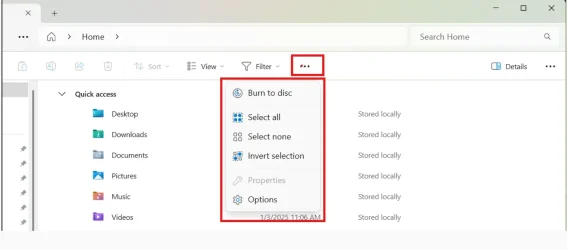
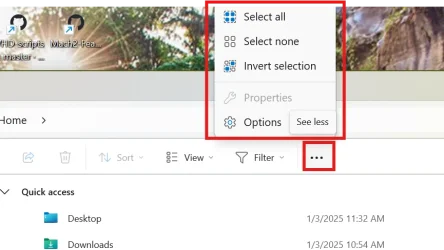
Disabling that silly useless [51960011] (FileExplorerTabLineFix), eliminates the problem with any selected Scale. 😉👍🤷‍♂️
Unfortunately, the guys at Microsoft are ignoring or just not reading all the FBH reports about this stupid bug that they added when they enabled that 51960011 experimental B.S. 😵‍💫🤬


You can see here that it works with Custom Scaling of 130.
1739493525709.webp
1739494659698.webp


With this standard recommended scale of 150%, it fails and opens upwards. 😝🤬🤬🤷‍♂️
1739494227621.webp

1739494318148.webp
 
Last edited:

My Computer My Computer

At a glance

Windows 11 Pro 25H2Intel I9-9900K64GBNVIDIA RTX 2060
OS
Windows 11 Pro 25H2
Computer type
PC/Desktop
Manufacturer/Model
Dell XPS 8930
CPU
Intel I9-9900K
Memory
64GB
Graphics Card(s)
NVIDIA RTX 2060
Sound Card
NVIDIA High Definition Audio
Monitor(s) Displays
4k Samsung
Screen Resolution
3840 x 2160
Hard Drives
512GB NVMe, ADATA SU 800, 2TB HDD
Unfortunately, the guys at Microsoft are ignoring or just not reading all the FBH reports about this stupid bug that they added when they enabled that 51960011 experimental B.S. 😵‍💫🤬

Who would have guessed that they actually do.


to be honest, that was an embarrassing issue to have
 

My Computer My Computer

At a glance

windows11 proAMD Ryzen 5 3600g.skill 4x16GBNVIDIA GeForce RTX 2070 Super
OS
windows11 pro
Computer type
PC/Desktop
Manufacturer/Model
homebrew
CPU
AMD Ryzen 5 3600
Motherboard
MSI MEG X570 UNIFY
Memory
g.skill 4x16GB
Graphics Card(s)
NVIDIA GeForce RTX 2070 Super
Who would have guessed that they actually do.


to be honest, that was an embarrassing issue to have
That is what they say in the blog, we'll see if they really fixed it. It actually never failed on that 22635.xxxx beta Builds. 🤣🤣 🤷‍♂️

In the blog for 22635.4945:
  • Fixed an issue causing the see more “…” menu in the command bar to open in the wrong direction for some resolutions.
 

My Computer My Computer

At a glance

Windows 11 Pro 25H2Intel I9-9900K64GBNVIDIA RTX 2060
OS
Windows 11 Pro 25H2
Computer type
PC/Desktop
Manufacturer/Model
Dell XPS 8930
CPU
Intel I9-9900K
Memory
64GB
Graphics Card(s)
NVIDIA RTX 2060
Sound Card
NVIDIA High Definition Audio
Monitor(s) Displays
4k Samsung
Screen Resolution
3840 x 2160
Hard Drives
512GB NVMe, ADATA SU 800, 2TB HDD
That is what they say in the blog, we'll see if they really fixed it. 🤣🤣

In the blog for 22635.4945:
  • Fixed an issue causing the see more “…” menu in the command bar to open in the wrong direction for some resolutions.
You're all in the wrong build. This is 24H2 not 23H2 blog.
 

My Computer My Computer

At a glance

Win 11 Insider Release Preview and Beta chann...i5 Core [email protected] (Unsupported for Win 11)12GBGeneric PnP Monitor (1920x1080@60Hz) Intel HD...
OS
Win 11 Insider Release Preview and Beta channels.
Computer type
Laptop
Manufacturer/Model
HP ENVY Bought: March 2017
CPU
i5 Core [email protected] (Unsupported for Win 11)
Motherboard
HP 81AD (U3E1)
Memory
12GB
Graphics Card(s)
Generic PnP Monitor (1920x1080@60Hz) Intel HD Graphics 620 (HP)
Sound Card
Conexant ISST audio
Monitor(s) Displays
Generic PnP Monitor
Screen Resolution
1536x864 pixels
Hard Drives
HGST HTS721010A9E630
PSU
Well...PSU you too!! What's this mean?
Case
HP ENVY SILVER
Cooling
A fan.
Keyboard
USA
Mouse
Logitec Anywhere 2
Internet Speed
Good enough for me! Fast!
Browser
Edge/Waterfox
Antivirus
Windows Defender
Other Info
No 'mo.
You're all in the wrong build. This is 24H2 not 23H2 blog.
I just replied to Cyanna. 🤷‍♂️

Still broken on 24H2. It was not even broken in 23H2. 😂😂
 

My Computer My Computer

At a glance

Windows 11 Pro 25H2Intel I9-9900K64GBNVIDIA RTX 2060
OS
Windows 11 Pro 25H2
Computer type
PC/Desktop
Manufacturer/Model
Dell XPS 8930
CPU
Intel I9-9900K
Memory
64GB
Graphics Card(s)
NVIDIA RTX 2060
Sound Card
NVIDIA High Definition Audio
Monitor(s) Displays
4k Samsung
Screen Resolution
3840 x 2160
Hard Drives
512GB NVMe, ADATA SU 800, 2TB HDD
I found these CFR Keys and manually enabled these "Gradual Rollout Features".
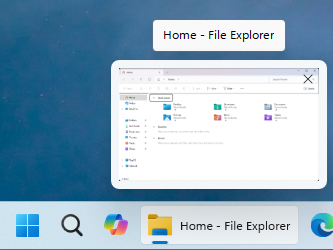
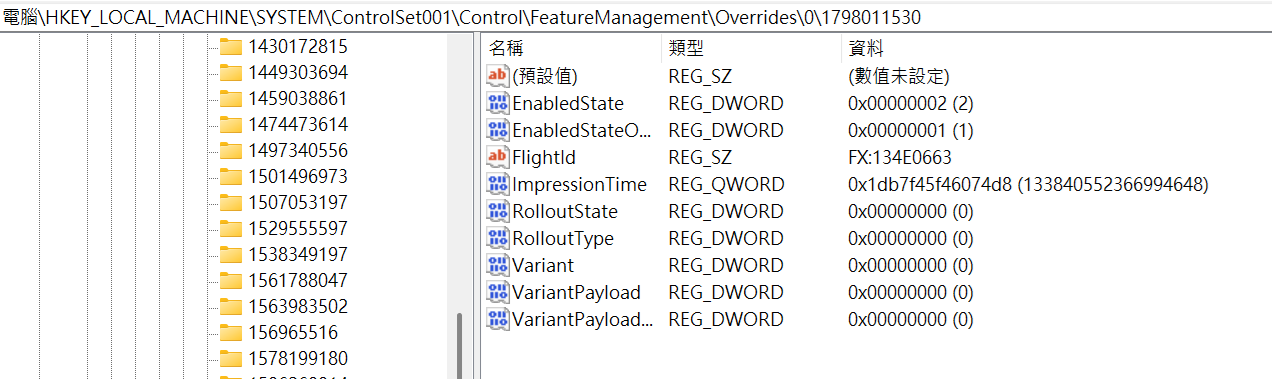
  • #CFR Key: 1798011530 > [Taskbar] New! This update improves the previews that show when your cursor hovers over apps on the taskbar. The update also improves their animations.
Disabled
tJwjNGh.png

Enabled
6FtsTM6.png


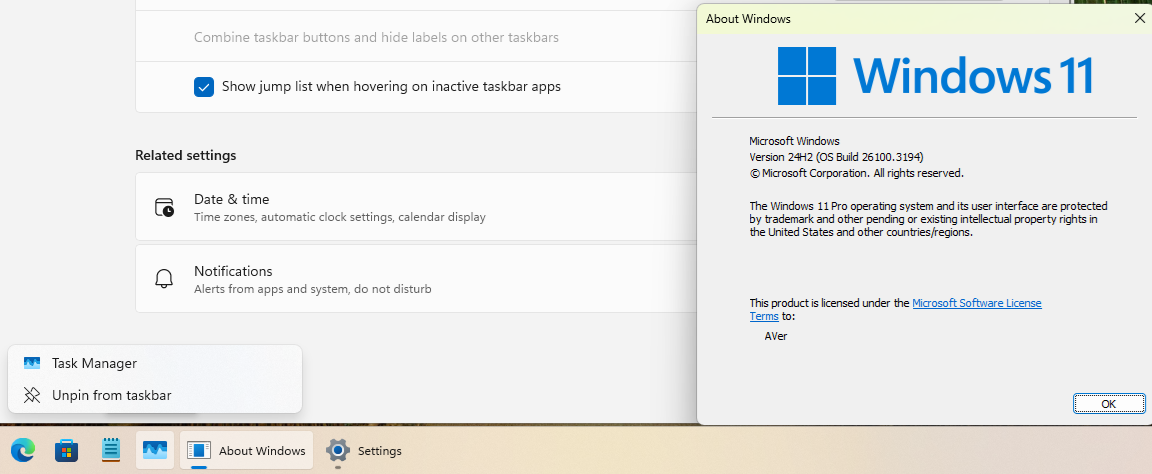
  • #CFR Key: 156965516, 1853569164, 3870238861 > [Taskbar] New! Show jump list when hovering on inactive taskbar apps.
qybvAec.png

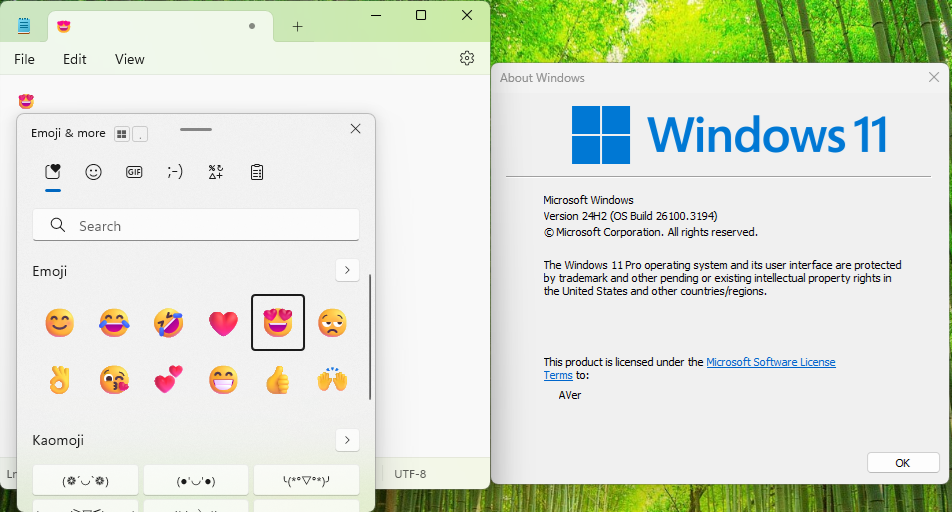
  • #CFR Key: 3058906765 > New! During text entry, type Windows logo key + . (period). The emoji keyboard will appear. Select an emoji with the mouse, or keep typing to search through the available emojis for one you like.
UaEbMD9.png
 

My Computer My Computer

At a glance

Windows 11, version 25H2 (26200)AMD Ryzen 9 9950X 16-Core ProcessorDDR5-6000 (CL36) 64.0 GBNVIDIA GeForce RTX 4090
OS
Windows 11, version 25H2 (26200)
Computer type
PC/Desktop
CPU
AMD Ryzen 9 9950X 16-Core Processor
Motherboard
ASRock B650M PG Riptide
Memory
DDR5-6000 (CL36) 64.0 GB
Graphics Card(s)
NVIDIA GeForce RTX 4090
PSU
1200W
Case
Phanteks Enthoo Pro 2
Cooling
Noctua NH-D12L
I found these CFR Keys and manually enabled these "Gradual Rollout Features".
  • #CFR Key: 1798011530 > [Taskbar] New! This update improves the previews that show when your cursor hovers over apps on the taskbar. The update also improves their animations.
Disabled
tJwjNGh.png

Enabled
6FtsTM6.png


  • #CFR Key: 156965516, 1853569164, 3870238861 > [Taskbar] New! Show jump list when hovering on inactive taskbar apps.
qybvAec.png

  • #CFR Key: 3058906765 > New! During text entry, type Windows logo key + . (period). The emoji keyboard will appear. Select an emoji with the mouse, or keep typing to search through the available emojis for one you like.
UaEbMD9.png
Hello,
Could you clarify how and where you set those #CFR keys?
 
Last edited:

My Computer My Computer

At a glance

Windows 11 Pro 25H2Intel I9-9900K64GBNVIDIA RTX 2060
OS
Windows 11 Pro 25H2
Computer type
PC/Desktop
Manufacturer/Model
Dell XPS 8930
CPU
Intel I9-9900K
Memory
64GB
Graphics Card(s)
NVIDIA RTX 2060
Sound Card
NVIDIA High Definition Audio
Monitor(s) Displays
4k Samsung
Screen Resolution
3840 x 2160
Hard Drives
512GB NVMe, ADATA SU 800, 2TB HDD
Hello,
Could you clarify how and where you set those #CFR keys?
ULFpDBS.png

  • [Taskbar] New! This update improves the previews that show when your cursor hovers over apps on the taskbar. The update also improves their animations.
[HKEY_LOCAL_MACHINE\SYSTEM\ControlSet001\Control\FeatureManagement\Overrides\0\1798011530]
"EnabledState"=dword:00000002
"EnabledStateOptions"=dword:00000001
"Variant"=dword:00000000
"VariantPayloadKind"=dword:00000000
"VariantPayload"=dword:00000000
"FlightId"="FX:134E0663"
"RolloutState"=dword:00000000
"RolloutType"=dword:00000000
"ImpressionTime"=hex(b):d8,74,60,f4,45,7f,db,01
  • [Taskbar] New! Show jump list when hovering on inactive taskbar apps.
[HKEY_LOCAL_MACHINE\SYSTEM\ControlSet001\Control\FeatureManagement\Overrides\0\156965516]
"EnabledState"=dword:00000002
"EnabledStateOptions"=dword:00000000

[HKEY_LOCAL_MACHINE\SYSTEM\ControlSet001\Control\FeatureManagement\Overrides\0\1853569164]
"EnabledState"=dword:00000002
"EnabledStateOptions"=dword:00000000

[HKEY_LOCAL_MACHINE\SYSTEM\ControlSet001\Control\FeatureManagement\Overrides\0\3870238861]
"EnabledState"=dword:00000002
"EnabledStateOptions"=dword:00000000
  • New! During text entry, type Windows logo key + . (period). The emoji keyboard will appear. Select an emoji with the mouse, or keep typing to search through the available emojis for one you like.
[HKEY_LOCAL_MACHINE\SYSTEM\ControlSet001\Control\FeatureManagement\Overrides\0\3058906765]
"EnabledState"=dword:00000002
"EnabledStateOptions"=dword:00000000
 

My Computer My Computer

At a glance

Windows 11, version 25H2 (26200)AMD Ryzen 9 9950X 16-Core ProcessorDDR5-6000 (CL36) 64.0 GBNVIDIA GeForce RTX 4090
OS
Windows 11, version 25H2 (26200)
Computer type
PC/Desktop
CPU
AMD Ryzen 9 9950X 16-Core Processor
Motherboard
ASRock B650M PG Riptide
Memory
DDR5-6000 (CL36) 64.0 GB
Graphics Card(s)
NVIDIA GeForce RTX 4090
PSU
1200W
Case
Phanteks Enthoo Pro 2
Cooling
Noctua NH-D12L
ULFpDBS.png

  • [Taskbar] New! This update improves the previews that show when your cursor hovers over apps on the taskbar. The update also improves their animations.
[HKEY_LOCAL_MACHINE\SYSTEM\ControlSet001\Control\FeatureManagement\Overrides\0\1798011530]
"EnabledState"=dword:00000002
"EnabledStateOptions"=dword:00000001
"Variant"=dword:00000000
"VariantPayloadKind"=dword:00000000
"VariantPayload"=dword:00000000
"FlightId"="FX:134E0663"
"RolloutState"=dword:00000000
"RolloutType"=dword:00000000
"ImpressionTime"=hex(b):d8,74,60,f4,45,7f,db,01
  • [Taskbar] New! Show jump list when hovering on inactive taskbar apps.
[HKEY_LOCAL_MACHINE\SYSTEM\ControlSet001\Control\FeatureManagement\Overrides\0\156965516]
"EnabledState"=dword:00000002
"EnabledStateOptions"=dword:00000000

[HKEY_LOCAL_MACHINE\SYSTEM\ControlSet001\Control\FeatureManagement\Overrides\0\1853569164]
"EnabledState"=dword:00000002
"EnabledStateOptions"=dword:00000000

[HKEY_LOCAL_MACHINE\SYSTEM\ControlSet001\Control\FeatureManagement\Overrides\0\3870238861]
"EnabledState"=dword:00000002
"EnabledStateOptions"=dword:00000000
  • New! During text entry, type Windows logo key + . (period). The emoji keyboard will appear. Select an emoji with the mouse, or keep typing to search through the available emojis for one you like.
[HKEY_LOCAL_MACHINE\SYSTEM\ControlSet001\Control\FeatureManagement\Overrides\0\3058906765]
"EnabledState"=dword:00000002
"EnabledStateOptions"=dword:00000000
Thanks.
I'll check it out. 😎
 

My Computer My Computer

At a glance

Windows 11 Pro 25H2Intel I9-9900K64GBNVIDIA RTX 2060
OS
Windows 11 Pro 25H2
Computer type
PC/Desktop
Manufacturer/Model
Dell XPS 8930
CPU
Intel I9-9900K
Memory
64GB
Graphics Card(s)
NVIDIA RTX 2060
Sound Card
NVIDIA High Definition Audio
Monitor(s) Displays
4k Samsung
Screen Resolution
3840 x 2160
Hard Drives
512GB NVMe, ADATA SU 800, 2TB HDD
@uncyler825,
Hello again,
Tried to enable one of those you suggested and got this message. 😎 How can I get permission to change?


1739615608495.webp
 

My Computer My Computer

At a glance

Windows 11 Pro 25H2Intel I9-9900K64GBNVIDIA RTX 2060
OS
Windows 11 Pro 25H2
Computer type
PC/Desktop
Manufacturer/Model
Dell XPS 8930
CPU
Intel I9-9900K
Memory
64GB
Graphics Card(s)
NVIDIA RTX 2060
Sound Card
NVIDIA High Definition Audio
Monitor(s) Displays
4k Samsung
Screen Resolution
3840 x 2160
Hard Drives
512GB NVMe, ADATA SU 800, 2TB HDD
Tried to enable one of those you suggested and got this message. 😎 How can I get permission to change?


View attachment 125447

You need TrustedInstaller (TI) permission to modify these protected registry keys. PowerRun tools can do it.


My Computer My Computer

At a glance

Windows 11, version 25H2 (26200)AMD Ryzen 9 9950X 16-Core ProcessorDDR5-6000 (CL36) 64.0 GBNVIDIA GeForce RTX 4090
OS
Windows 11, version 25H2 (26200)
Computer type
PC/Desktop
CPU
AMD Ryzen 9 9950X 16-Core Processor
Motherboard
ASRock B650M PG Riptide
Memory
DDR5-6000 (CL36) 64.0 GB
Graphics Card(s)
NVIDIA GeForce RTX 4090
PSU
1200W
Case
Phanteks Enthoo Pro 2
Cooling
Noctua NH-D12L

My Computer My Computer

At a glance

Windows 11 Pro 25H2Intel I9-9900K64GBNVIDIA RTX 2060
OS
Windows 11 Pro 25H2
Computer type
PC/Desktop
Manufacturer/Model
Dell XPS 8930
CPU
Intel I9-9900K
Memory
64GB
Graphics Card(s)
NVIDIA RTX 2060
Sound Card
NVIDIA High Definition Audio
Monitor(s) Displays
4k Samsung
Screen Resolution
3840 x 2160
Hard Drives
512GB NVMe, ADATA SU 800, 2TB HDD
Downloaded and installed and all ok so far
 

My Computer My Computer

At a glance

Windows 11 64 bitSnapdragon(R) X Elite - X1E80100 - Qualcomm(R...3982 Megabytes Usable Installed MemorySnapdragon
OS
Windows 11 64 bit
Computer type
Laptop
Manufacturer/Model
Samsung Galaxy Book4 Pro 360 5G
CPU
Snapdragon(R) X Elite - X1E80100 - Qualcomm(R) Oryon(TM
Motherboard
Samsung
Memory
3982 Megabytes Usable Installed Memory
Graphics Card(s)
Snapdragon
Sound Card
Samsung
Hard Drives
Built In
Case
Grey
Cooling
Fan
Keyboard
Built in
Mouse
None
Internet Speed
Fast
Browser
Microsoft Dev
Antivirus
Windows Defender
Other Info
Also have a Samsung watch7, Samsung 65 inch TV, and a Samsung Galaxy 25Ultra phone!

And all three of these can get windows 11 and 12 so never out of touch

Also Alexa
Also now a Windows Insider
Already said many times that scale of 100% works fine, try 125% or 150%. 🤣🤣
Yes but when the bug was reported initially I had the issue at 100% scale on my desktop.
 

My Computers My Computers

  • At a glance

    Windows 11 Pro 25H2Intel i9-9900kCorsair Vengeance LPX 32GB (2 x 16GB)MSI Suprim X RTX 3080
    OS
    Windows 11 Pro 25H2
    Computer type
    PC/Desktop
    Manufacturer/Model
    Multi
    CPU
    Intel i9-9900k
    Motherboard
    Gigabyte Z390 Aorus Master
    Memory
    Corsair Vengeance LPX 32GB (2 x 16GB)
    Graphics Card(s)
    MSI Suprim X RTX 3080
    Sound Card
    Realtek
    Monitor(s) Displays
    Samsung LC32HGQ 144Hz
    Screen Resolution
    2560x1440
    Hard Drives
    Samsung 970 Evo Plus 1 TB
    Crucial MX100 512 GB
    Samsung 840 Pro 256 GB
    Seagate ST4000DM000-1F2168 4 TB
    PSU
    Seasonic P-860 Platinium
    Case
    Corsair Graphite 780T
    Cooling
    Noctua NH-U14S
    Keyboard
    Corsair K70 MK.2 Low profile
    Mouse
    Logitech G Pro HERO
    Internet Speed
    200 Mb/s
    Browser
    Mozilla Firefox
    Antivirus
    Windows Defender
    Other Info
    BIOS version F13a
  • At a glance

    Windows 11 Home 25H2AMD Ryzen 7 250Samsung 16GB DDR5 5600MHz PC5-44800 CL46Nvidia GeForce RTX 5060
    Operating System
    Windows 11 Home 25H2
    Computer type
    Laptop
    Manufacturer/Model
    Lenovo LOQ 15AHP10
    CPU
    AMD Ryzen 7 250
    Motherboard
    Lenovo LNVNB161216
    Memory
    Samsung 16GB DDR5 5600MHz PC5-44800 CL46
    Graphics card(s)
    Nvidia GeForce RTX 5060
    Sound Card
    Realtek
    Monitor(s) Displays
    CSOT T3 MNF601BA1-4
    Screen Resolution
    1920x1080
    Hard Drives
    Micron SSD 1 TB
    Browser
    Mozilla Firefox
    Antivirus
    Windows Defender
    Other Info
    BIOS version R8CN25WW
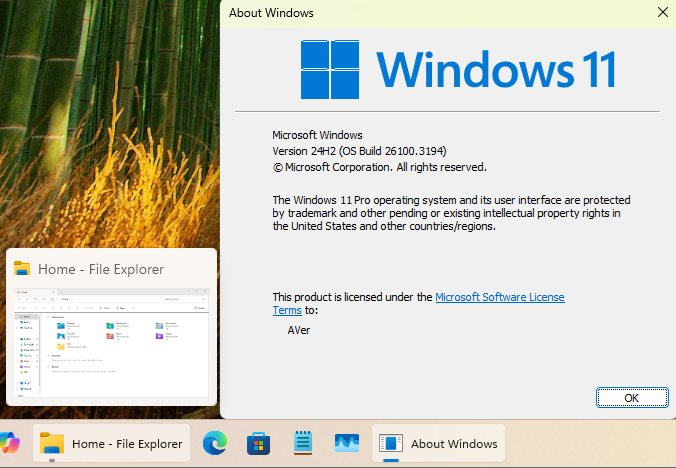
Organized the gradual rollout of features in Windows 11 24H2 Build 26100.3194.

#CFR Key: 1798011530 > [Taskbar] New! This update improves the previews that show when your cursor hovers over apps on the taskbar. The update also improves their animations.

Code:
Windows Registry Editor Version 5.00

[HKEY_LOCAL_MACHINE\SYSTEM\ControlSet001\Control\FeatureManagement\Overrides\0\1798011530]
"EnabledState"=dword:00000002
"EnabledStateOptions"=dword:00000000

#CFR Key: 156965516, 1853569164, 3870238861 > [Taskbar] New! Show jump list when hovering on inactive taskbar apps.

Code:
Windows Registry Editor Version 5.00

[HKEY_LOCAL_MACHINE\SYSTEM\ControlSet001\Control\FeatureManagement\Overrides\0\156965516]
"EnabledState"=dword:00000002
"EnabledStateOptions"=dword:00000000

[HKEY_LOCAL_MACHINE\SYSTEM\ControlSet001\Control\FeatureManagement\Overrides\0\1853569164]
"EnabledState"=dword:00000002
"EnabledStateOptions"=dword:00000000

[HKEY_LOCAL_MACHINE\SYSTEM\ControlSet001\Control\FeatureManagement\Overrides\0\3870238861]
"EnabledState"=dword:00000002
"EnabledStateOptions"=dword:00000000

#CFR Key: 1853569164, 3058906765 > New! During text entry, type Windows logo key + . (period). The emoji keyboard will appear. Select an emoji with the mouse, or keep typing to search through the available emojis for one you like.

Code:
Windows Registry Editor Version 5.00

[HKEY_LOCAL_MACHINE\SYSTEM\ControlSet001\Control\FeatureManagement\Overrides\0\1853569164]
"EnabledState"=dword:00000002
"EnabledStateOptions"=dword:00000000

[HKEY_LOCAL_MACHINE\SYSTEM\ControlSet001\Control\FeatureManagement\Overrides\0\3058906765]
"EnabledState"=dword:00000002
"EnabledStateOptions"=dword:00000000

#CFR Key: 1853569164, 3231150730 > [Taskbar] New! Show smaller taskbar icons" option in the Settings app.

Code:
Windows Registry Editor Version 5.00

[HKEY_LOCAL_MACHINE\SYSTEM\ControlSet001\Control\FeatureManagement\Overrides\0\1853569164]
"EnabledState"=dword:00000002
"EnabledStateOptions"=dword:00000000

[HKEY_LOCAL_MACHINE\SYSTEM\ControlSet001\Control\FeatureManagement\Overrides\0\3231150730]
"EnabledState"=dword:00000002
"EnabledStateOptions"=dword:00000000

#CFR Key: 1507140749, 3037514383 > [File Explorer] New! Opening new folders in a new tab instead of creating additional windows.

Code:
Windows Registry Editor Version 5.00

[HKEY_LOCAL_MACHINE\SYSTEM\ControlSet001\Control\FeatureManagement\Overrides\0\1507140749]
"EnabledState"=dword:00000002
"EnabledStateOptions"=dword:00000000

[HKEY_LOCAL_MACHINE\SYSTEM\ControlSet001\Control\FeatureManagement\Overrides\0\3037514383]
"EnabledState"=dword:00000002
"EnabledStateOptions"=dword:00000000
 
Last edited:

My Computer My Computer

At a glance

Windows 11, version 25H2 (26200)AMD Ryzen 9 9950X 16-Core ProcessorDDR5-6000 (CL36) 64.0 GBNVIDIA GeForce RTX 4090
OS
Windows 11, version 25H2 (26200)
Computer type
PC/Desktop
CPU
AMD Ryzen 9 9950X 16-Core Processor
Motherboard
ASRock B650M PG Riptide
Memory
DDR5-6000 (CL36) 64.0 GB
Graphics Card(s)
NVIDIA GeForce RTX 4090
PSU
1200W
Case
Phanteks Enthoo Pro 2
Cooling
Noctua NH-D12L

Latest Support Threads

Back
Top Bottom