UPDATE 7/28:
 www.elevenforum.com
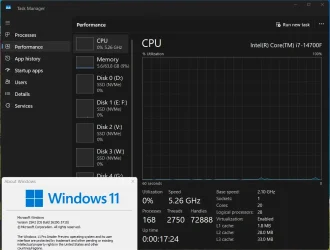
Hello Windows Insiders, today we are releasing Windows 11 Insider Preview Build 26200.5710 (KB5062676) to the Dev Channel.
Changes in Dev Channel builds and updates are documented in two buckets: new features, improvements, and fixes that are being gradually rolled out for Insiders who have turned on the toggle to get the latest updates as they are available (via Settings > Windows Update*) and then new features, improvements, and fixes rolling out to everyone in the Dev Channel. For more information, see the Reminders section at the bottom of this blog post.
 www.elevenforum.com
 www.elevenforum.com

Describe image action in Click to Do menu highlighted in a red box.

Image description dialog shown with text description of image of Brandon’s dog Kilo.

Image description dialog shown with text description of a graph.
You can learn more about using Click to Do here. You can check out frequently asked questions about rich image descriptions here.
FEEDBACK: Please file feedback in Feedback Hub (WIN + F) under Desktop Environment > Click to Do.
With this new feature that is beginning to roll out, Narrator will now generate richer image descriptions on your Copilot+ PC. Simply press Narrator key + Ctrl + D and Narrator will read out a contextual description of the image describing people, objects, colors, text, and numbers from the image. On non-Copilot+ PCs, this experience will continue to give you very basic image descriptions.
For example, for an image about stock performance, users will get the following detailed description. The image is a graph showing the stock prices of Microsoft Corporation, with the S&P 500 and NASDAQ Computer indexes. The graph shows a steady increase in Microsoft’s stock price over the period from June 18th to June 23rd.

Screenshot of Edge browser containing an image of “stock performance graph” with “Describe image” window open next to it showing the description of the image.
The window also contains regenerate, like, dislike and copy button at the bottom.

Screenshot of Edge browser with Narrator’s focus on an image of graph. There’s an info bar on top of the screen which says, “We are setting up image description feature. Keep your PC connected to internet and check back soon.” along with a “Check status” button.
To turn Narrator on, you can press “Ctrl + Windows key + Enter” on your PC or search for “Narrator” in Windows search box. When you try the image descriptions feature for the first time using Narrator Key + Ctrl + D, we download the models required for getting image descriptions. You can check the download status via Settings > Windows update.
If you are new to Narrator, you can find more information and learn about using Narrator from the complete guide to Narrator.
Also check out frequently asked questions about rich image descriptions in Narrator here.
FEEDBACK: Please file feedback in Feedback Hub (WIN + F) under Accessibility > Narrator.
Amanda & Brandon

 blogs.windows.com
Check Windows Updates
UUP Dump:
64-bit ISO download:

ARM64 ISO download:
 www.elevenforum.com
KB5062669 Windows 11 Insider Dev build 26200.5722 (25H2) - July 28
Windows Blogs: Hello Windows Insiders, today we are releasing Windows 11 Insider Preview Build 26200.5722 (KB5062669) to the Dev Channel. Changes in Dev Channel builds and updates are documented in two buckets: new features, improvements, and fixes that are being gradually rolled out for...
www.elevenforum.com
Windows Blogs:
Hello Windows Insiders, today we are releasing Windows 11 Insider Preview Build 26200.5710 (KB5062676) to the Dev Channel.
Changes in Dev Channel builds and updates are documented in two buckets: new features, improvements, and fixes that are being gradually rolled out for Insiders who have turned on the toggle to get the latest updates as they are available (via Settings > Windows Update*) and then new features, improvements, and fixes rolling out to everyone in the Dev Channel. For more information, see the Reminders section at the bottom of this blog post.
Enable or Disable Get Latest Updates as soon as available in Windows 11
This tutorial will show you how to turn on or off "Get the latest updates as soon as they are available" in Windows 11. Starting with Windows 11 build 22621.1635, Microsoft added a new "Get the latest updates as soon as they are available" toggle under Settings > Windows Update. When you turn...
www.elevenforum.com
New Copilot+ PC experiences
New describe image action in Click to Do rolling out for AMD and Intel®-powered Copilot+ PCs
We are introducing a new “describe image” action in Click to Do to get detailed descriptions of images, charts and graphs for AMD and Intel®-powered Copilot+ PCs. This feature was introduced for Snapdragon-powered Copilot+ PCs in the previous Dev Channel flight. This feature is useful to get a quick overview of the visual content. This feature is designed to improve accessibility and can be used by everyone in scenarios like getting a quick overview of a graph or a chart, generating alt text for artefacts you create, etc. When you use the action for the first time, the required models are set up, and the descriptions are generated locally on your device making sure your sensitive data stays on your PC.
Use Click to Do in Windows 11
This tutorial will show you how to use Click to Do to perform AI actions with text and images for your account on a Windows 11 Copilot+ PC. Click to Do (preview) helps you get things done faster by identifying text and images on your screen that you can take actions with. Click to Do analyzes...
www.elevenforum.com
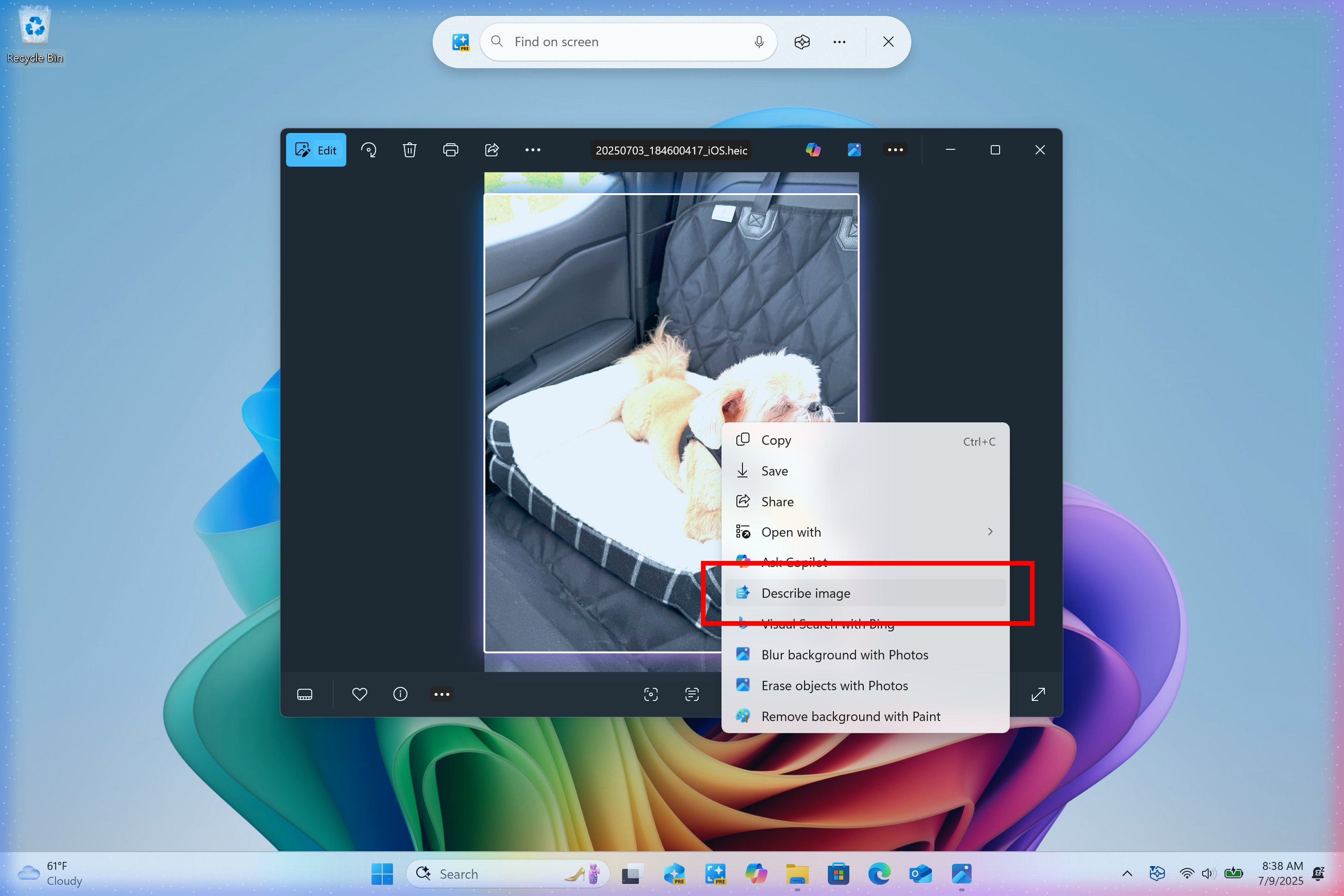
Describe image action in Click to Do menu highlighted in a red box.
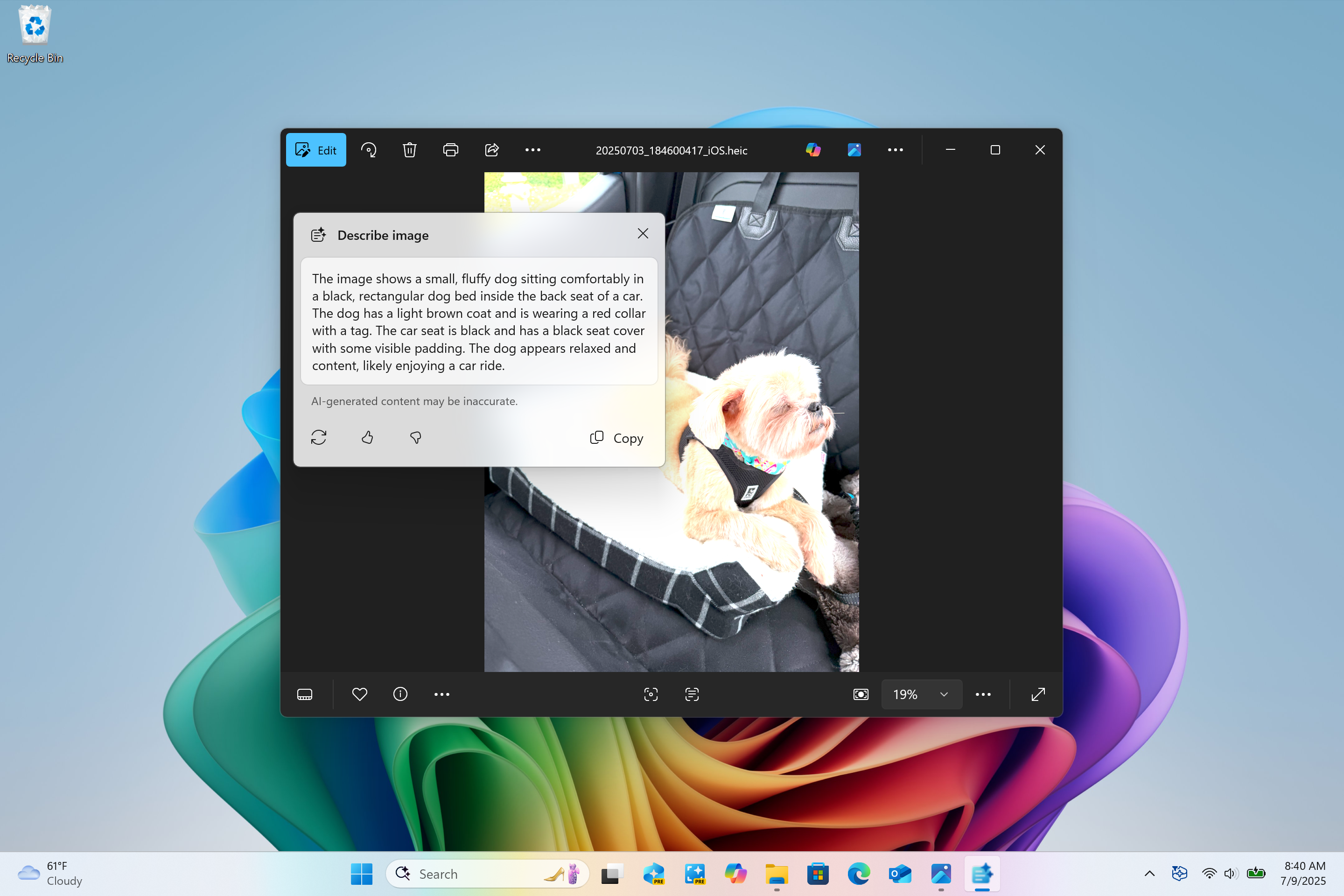
Image description dialog shown with text description of image of Brandon’s dog Kilo.
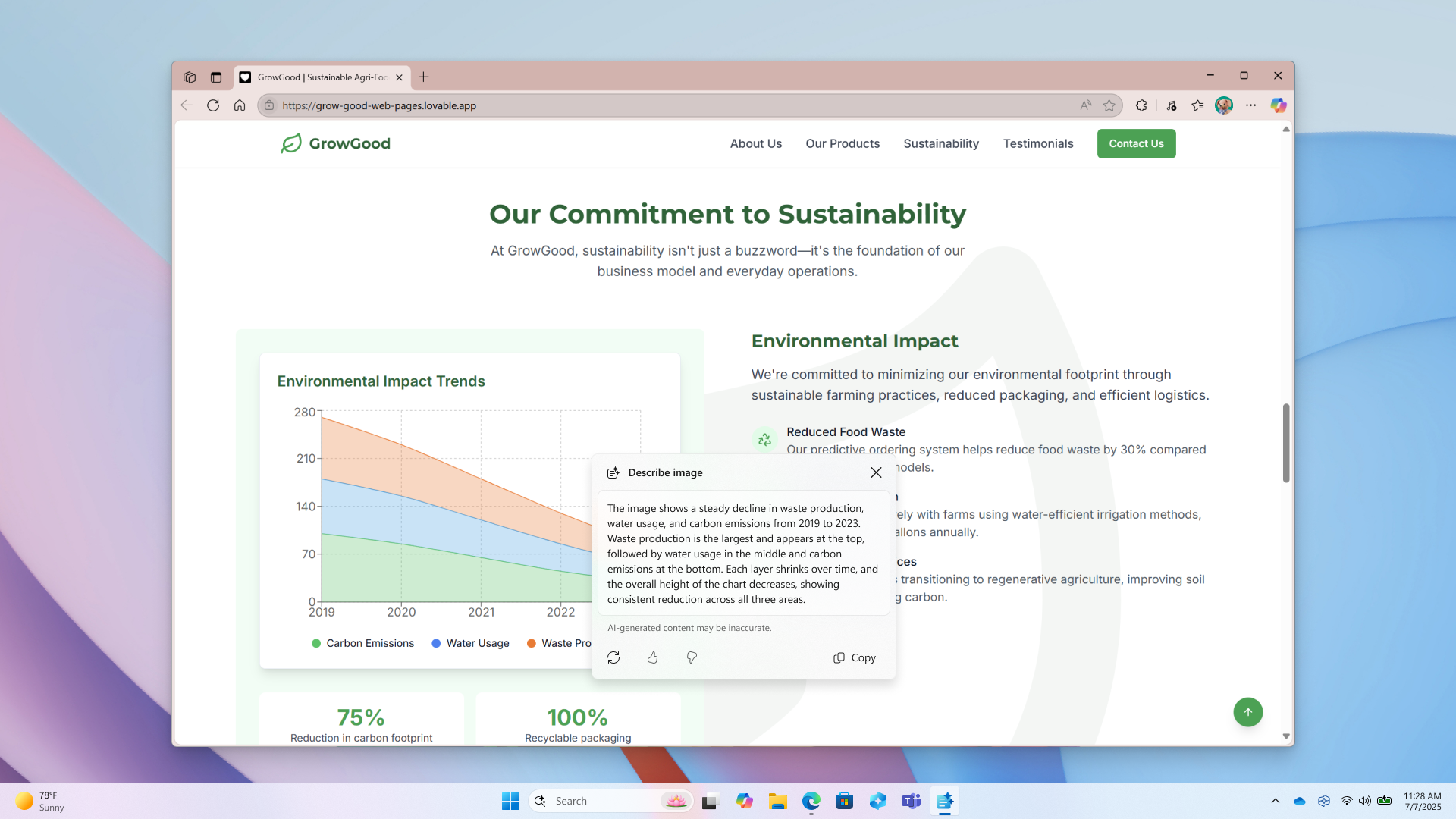
Image description dialog shown with text description of a graph.
You can learn more about using Click to Do here. You can check out frequently asked questions about rich image descriptions here.
FEEDBACK: Please file feedback in Feedback Hub (WIN + F) under Desktop Environment > Click to Do.
Making visual content more accessible with image descriptions in Narrator
We are enhancing digital accessibility with the ability to get rich, detailed descriptions of images, charts, graphs in Narrator by using the power of AI on Copilot+ PCs. In today’s digital world, images are everywhere—on websites, apps, and documents. But for blind and low-vision users, many of these visuals remain inaccessible due to missing or inadequate alt text. After beginning the rollout for this feature for Snapdragon-powered Copilot+ PCs, we are also now rolling this feature out for AMD and Intel®-powered Copilot+ PCs.With this new feature that is beginning to roll out, Narrator will now generate richer image descriptions on your Copilot+ PC. Simply press Narrator key + Ctrl + D and Narrator will read out a contextual description of the image describing people, objects, colors, text, and numbers from the image. On non-Copilot+ PCs, this experience will continue to give you very basic image descriptions.
For example, for an image about stock performance, users will get the following detailed description. The image is a graph showing the stock prices of Microsoft Corporation, with the S&P 500 and NASDAQ Computer indexes. The graph shows a steady increase in Microsoft’s stock price over the period from June 18th to June 23rd.
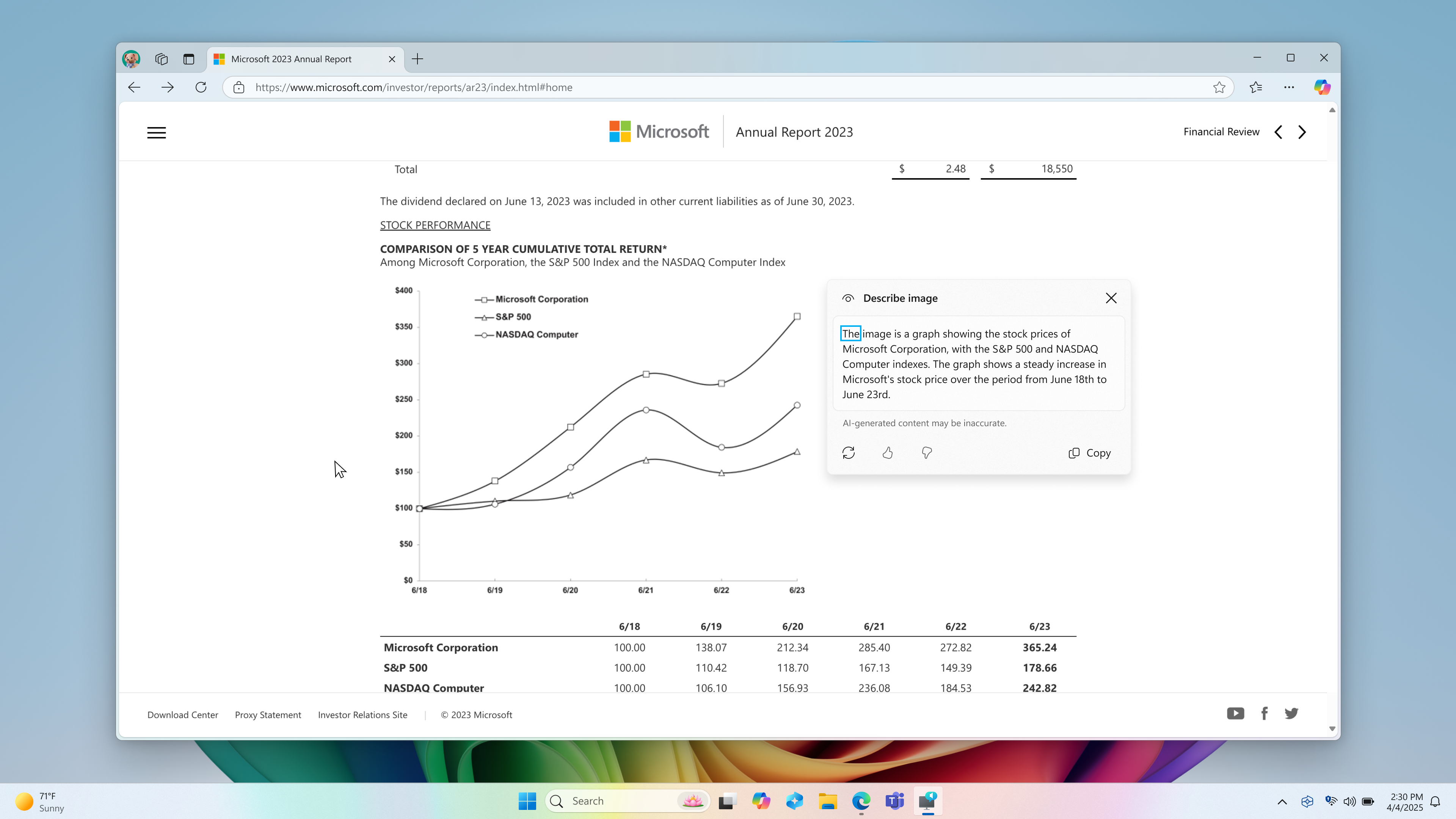
Screenshot of Edge browser containing an image of “stock performance graph” with “Describe image” window open next to it showing the description of the image.
The window also contains regenerate, like, dislike and copy button at the bottom.
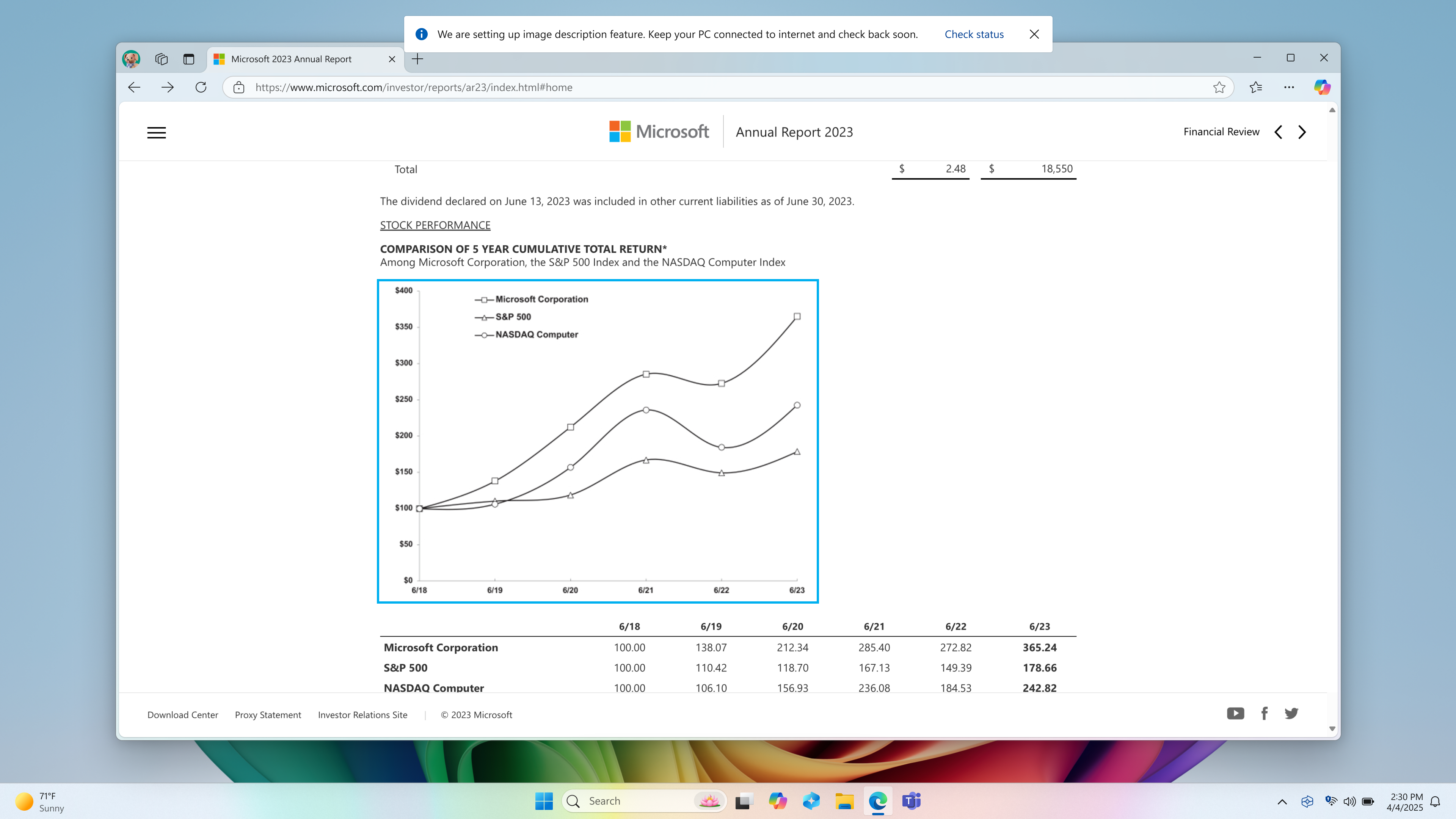
Screenshot of Edge browser with Narrator’s focus on an image of graph. There’s an info bar on top of the screen which says, “We are setting up image description feature. Keep your PC connected to internet and check back soon.” along with a “Check status” button.
To turn Narrator on, you can press “Ctrl + Windows key + Enter” on your PC or search for “Narrator” in Windows search box. When you try the image descriptions feature for the first time using Narrator Key + Ctrl + D, we download the models required for getting image descriptions. You can check the download status via Settings > Windows update.
If you are new to Narrator, you can find more information and learn about using Narrator from the complete guide to Narrator.
Also check out frequently asked questions about rich image descriptions in Narrator here.
FEEDBACK: Please file feedback in Feedback Hub (WIN + F) under Accessibility > Narrator.
Changes and Improvements gradually being rolled out to the Dev Channel with toggle on*
[General]
- As part of our commitment to improving Windows performance, logs are now collected when your PC has experienced any slow or sluggish performance. Windows Insiders are encouraged to provide feedback when experiencing PC issues related to slow or sluggish performance, allowing Feedback Hub to automatically collect these logs, which will help us root cause issues faster. Use the Desktop > System Sluggishness category when filing feedback to allow Feedback Hub to automatically pick up these logs. These logs are stored locally (%systemRoot%\Temp\DiagOutputDir\Whesvc folder) and only sent to Microsoft via Feedback Hub when feedback is submitted.
[Click to Do (Preview)]
The following changes and improvements are rolling out for Click to Do on Copilot+ PCs:- We are trying out a change that removes the search box in the top bar of Click to Do.
[Lock screen]
- We’re updating lock screen widgets experience for Windows Insiders in the Dev Channel, with widget suggestions to help you easily discover more widgets. This feature can be enabled or disabled with the “Discover widgets” toggle under Settings > Personalization > Lock screen. Please note this experience is still being refined and will change in future flights.

Enable or Disable Widget Suggestions on Lock Screen in Windows 11
This tutorial will show you how to turn on or off discover widgets for showing widget suggestions on the lock screen for your account in Windows 11. You can stay informed and efficient with dynamic updates that bring weather, finance, sports, traffic, and app notifications with widgets on your...
www.elevenforum.com
[Settings]
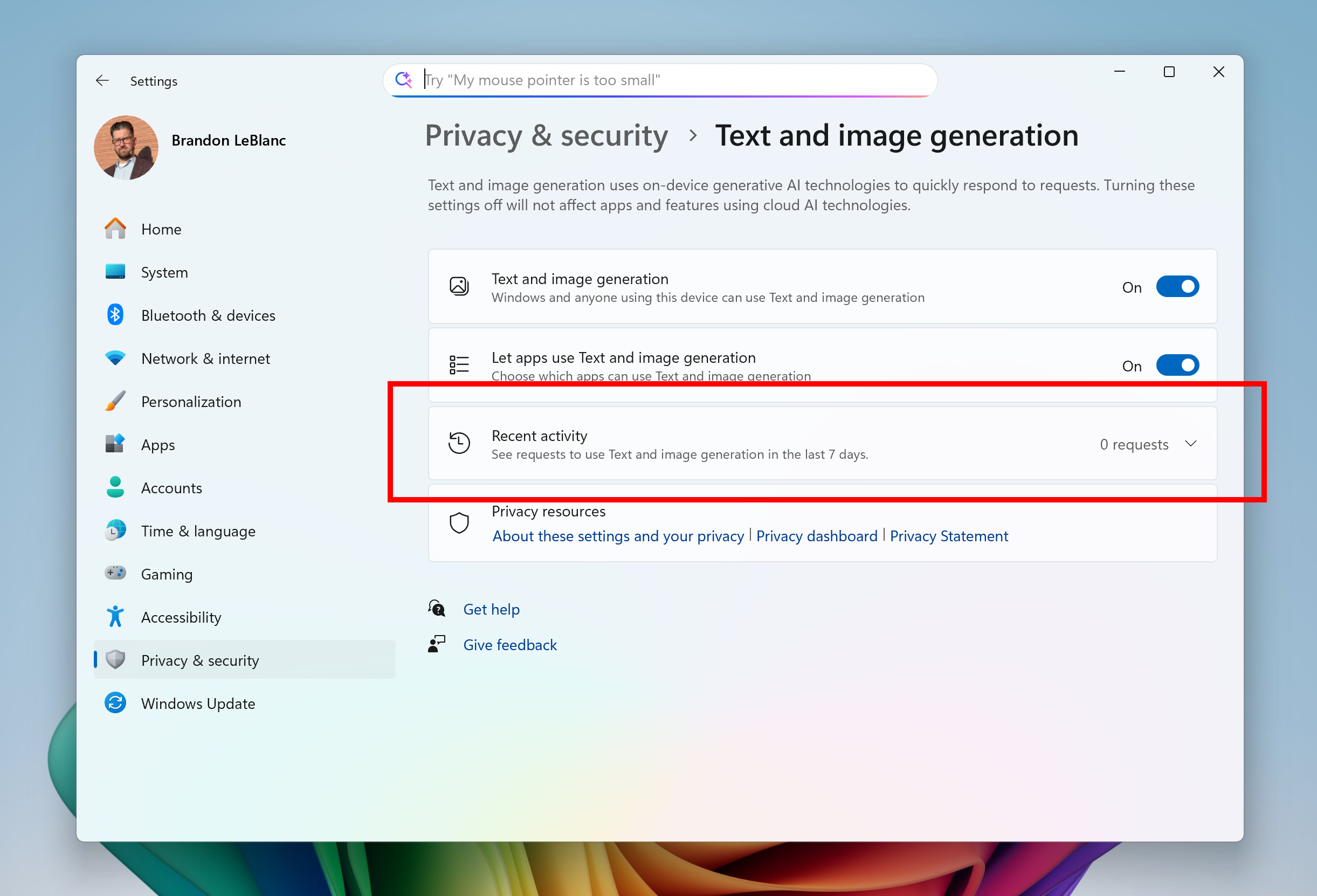
- You can now visit the Settings > Privacy & security > Text and image generation to see which third-party applications recently used generative AI models provided by Windows. This page gives you visibility into the specific apps leveraging local Windows provided generative AI models and allows you to control which apps are permitted to use them—putting you in charge of your device’s AI experience. The UI is present in this flight today, however the functionality will light up in a upcoming flight.

Enable or Disable Text and Image Generation for Apps in Windows 11
This tutorial will show you how to turn on or off text and image generation for apps using generative AI for your account or all users in Windows 11. Text and image generation uses on-device generative Al technologies to quickly respond to requests. Starting with Windows 11 build 26120.4741...
www.elevenforum.com

See Text and Image Generation Recent Activity by Apps in Windows 11
This tutorial will show you how to see recent requests by apps to use Text and image generation in the last 7 days in Windows 11. Text and image generation uses on-device generative Al technologies to quickly respond to requests. Starting with Windows 11 build 2610.5074 (24H2), you can now...
www.elevenforum.com

Text and image generation settings page with recent activity highlighted in a red box for seeing which apps use generative AI models provided by Windows.
Fixes gradually being rolled out to the Dev Channel with toggle on*
[Notification Center]
- Fixed an issue where if you’d enabled the clock in Notification Center it might result in the Notification Center content getting clipped.
[Other]
- Fixed an underlying issue with dbgcore.dll, which could lead to explorer.exe and some other apps crashing recently.
Known issues
[General]
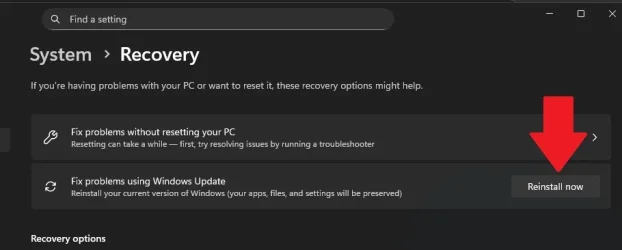
- Some Windows Insiders may experience a rollback trying to install this update with a 0x80070005 in Windows Update. We’re working on a fix for Windows Insiders impacted. If you are impacted, using Settings > System > Recovery > “Fix issues using Windows update” may resolve the issue.
- You may see multiple error pop ups about unexpected elements when opening Group Policy Editor.
[Start menu]
The following are known issues for Windows Insiders with the new Start menu:- Using touch to navigate the new Start menu may not work reliably. For example, it currently does not support the swipe-up gesture.
- Drag and drop capabilities are limited from “All” to “Pinned.”
[Live Captions]
- [NEW] Live captions may crash when attempting to use live translation on a Copilot+ PC.
[Xbox Controllers]
- Some Insiders are experiencing an issue where using their Xbox Controller via Bluetooth is causing their PC to bugcheck. Here is how to resolve the issue. Open Device Manager by searching for it via the search box on your taskbar. Once Device Manager is open, click on “View” and then “Devices by Driver”. Find the driver named “oemXXX.inf (XboxGameControllerDriver.inf)” where the “XXX” will be a specific number on your PC. Right-click on that driver and click “Uninstall”.
[Click to Do (Preview)]
The following known issues will be fixed in future updates to Windows Insiders:- Windows Insiders on AMD or Intel®-powered Copilot+ PCs may experience long wait times on the first attempt to perform intelligent text actions in Click to Do after a new build or model update.
[Input]
- The Microsoft Changjie Input method doesn’t work properly in this build – not able to select words. Reverting to the previous version of the IME in Settings should mitigate the issue while we work on a fix.
Reminders for Windows Insiders in the Dev Channel
- Windows Insiders in the Dev Channel receive updates based on Windows 11, version 25H2 via an enablement package (Build 26200.xxxx). For more information on Windows 11, version 25H2 – see this blog post.
- Many features in the Dev Channel are rolled out using Control Feature Rollout technology, starting with a subset of Insiders and ramping up over time as we monitor feedback to see how they land before pushing them out to everyone in this channel.
- For Windows Insiders in the Dev Channel who want to be the first to get features gradually rolled out to you, you can turn ON the toggle to get the latest updates as they are available via Settings > Windows Update*. Over time, we will increase the rollouts of features to everyone with the toggle turned on. Should you keep this toggle off, new features will gradually be rolled out to your PC over time once they are ready.
- Features and experiences included in these builds may never get released as we try out different concepts and get feedback. Features may change over time, be removed, or replaced and never get released beyond Windows Insiders. Some of these features and experiences could show up in future Windows releases when they’re ready.
- Some features in active development we preview with Windows Insiders may not be fully localized and localization will happen over time as features are finalized. As you see issues with localization in your language, please report those issues to us via Feedback Hub.
- Please note that some accessibility features may not work with features like Recall and Click to Do while in preview with Windows Insiders.
- Because the Dev and Beta Channels represent parallel development paths from our engineers, there may be cases where features and experiences show up in the Beta Channel first.
- Check out Flight Hub for a complete look at what build is in which Insider channel.
Amanda & Brandon
Source:
Announcing Windows 11 Insider Preview Build 26200.5710 (Dev Channel)
Hello Windows Insiders, today we are releasing Windows 11 Insider Preview Build 26200.5710 (KB5062676) to the Dev Channel. Changes in Dev Channel builds and updates are documented in two buckets: new features, impro
blogs.windows.com
Check Windows Updates
UUP Dump:
64-bit ISO download:
Select language for Windows 11 Insider Preview 10.0.26200.5710 (ge_release_upr) amd64
Select language for Windows 11 Insider Preview 10.0.26200.5710 (ge_release_upr) amd64 on UUP dump. UUP dump lets you download Unified Update Platform files, like Windows Insider updates, directly from Windows Update.
uupdump.net
ARM64 ISO download:
Select language for Windows 11 Insider Preview 10.0.26200.5710 (ge_release_upr) arm64
Select language for Windows 11 Insider Preview 10.0.26200.5710 (ge_release_upr) arm64 on UUP dump. UUP dump lets you download Unified Update Platform files, like Windows Insider updates, directly from Windows Update.
uupdump.net
UUP Dump - Download Windows Insider ISO
UUP Dump is the most practical and easy way to get ISO images of any Insider Windows 10 or Windows 11 version, as soon as Microsoft has released a new build. UUP Dump creates a download configuration file according to your choices, downloads necessary files directly from Microsoft servers, and...
www.elevenforum.com
Last edited: