Insider KB5065797 Windows 11 Insider Dev build 26220.6772 (25H2) - Oct. 6


UPDATE 10/10:


 Windows Insider Blog:

Hello Windows Insiders, today we are releasing Windows 11 Insider Preview Build 26220.6772 (KB5065797) to the Dev Channel.

Changes in Dev Channel builds and updates are documented in two buckets: new features, improvements, and fixes that are being gradually rolled out for Insiders who have turned on the toggle to get the latest updates as they are available (via Settings > Windows Update*) and then new features, improvements, and fixes rolling out to everyone in the Dev Channel. For more information, see the Reminders section at the bottom of this blog post.


New features gradually being rolled out to the Dev Channel with toggle on*

[Click to Do (Preview)]

The following changes and improvements are rolling out for Click to Do on Copilot+ PCs:

Image Object select in Click to Do:
Image Object select is designed to help you speed up your creative flow and precisely select objects within images. Just hover over your image to preview selectable areas. Once selected, you can easily copy and paste your object into other apps or use it to kick off a chat with Copilot for deeper insights or creative actions.


Image of three kittens sitting on a wooden surface with a computer context menu overlaid on the center kitten. The context menu includes options like Copy, Paste, and Properties, along with other options like “Ask Copilot”.

Image of three kittens sitting on a wooden surface with a computer context menu overlaid on the center kitten. The context menu includes options like “Copy,” “Paste,” and “Properties,” along with other options like “Ask Copilot”.

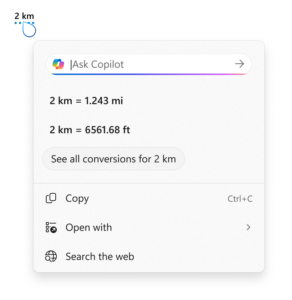
Unit conversion: We’re introducing the ability to do unit conversion in Click to Do to help you quickly access conversions for number + unit combinations displayed on screen. Currently, we primarily support conversions for length, area, volume, weight, temperature, and speed.

  • When users hover over a number + unit, a floating tooltip appears showing the conversion.
  • When users select the number + unit, the context menu opens with additional conversion options.
  • Users can also access more conversions via the Copilot app (currently supported in Microsoft Copilot. This capability is not yet available for Windows Insiders in the EEA (European Economic Area) or China.

    Screenshot showing the conversion tool for Click to Do using the example of 2 kilometers. It displays conversions to miles (1.243 mi) and feet (6561.68 ft), with options to copy, open with, or search the web.

    Screenshot showing the conversion tool for Click to Do using the example of 2 kilometers. It displays conversions to miles (1.243 mi) and feet (6561.68 ft), with options to copy, open with, or search the web.

[Windows Hello]

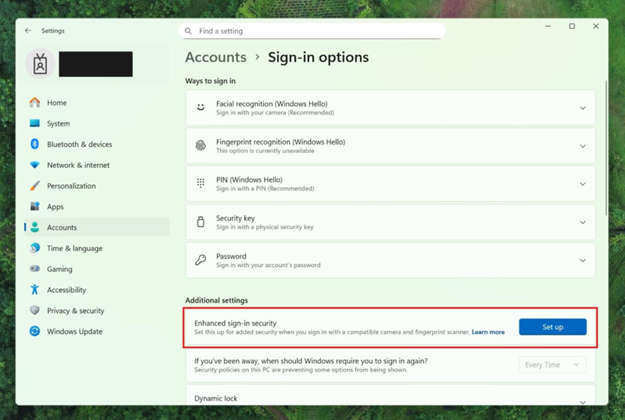
Windows Hello Enhanced Sign-in Security Now Supports Peripheral Fingerprint Sensors: Windows Hello Enhanced Sign-in Security (ESS) is expanding to support peripheral fingerprint sensors in Windows 11. Previously, ESS was only available on PCs with built-in biometric sensors, but now Windows 11 PCs, including desktops and Copilot+ PCs, can benefit from the most secure sign-in experience Windows Hello has to offer. Just plug in a supported ESS fingerprint reader, head to Settings > Accounts > Sign-in options and follow the prompts to enroll.


Settings dialog under Accounts-->Sign-in options, where Additional settings has an option outlined in red for “Enhanced sign-in security” with a button for “Set up”

Settings dialog under Accounts–>Sign-in options, where Additional settings has an option outlined in red for “Enhanced sign-in security” with a button for “Set up”

FEEDBACK: Please file feedback in Feedback Hub (WIN + F) under Security and Privacy > Windows Hello Fingerprint.

Changes and Improvements gradually being rolled out to the Dev Channel with toggle on*

[Windows Setup Experience]

  • Ability to name your default user folder in OOBE: You can now customize the name of your default user folder, “C:\User\<name>”, during set up. To do so, follow these steps:

    • On the Microsoft account sign in page, press Shift + F10 to open Command Prompt.
    • Type the following commands: cd oobe press enter and then type SetDefaultUserFolder.cmd <YourFolderName>
    • <YourFolderName> can be 16 characters max.
    • Only Unicode characters are supported and special characters will be removed
    • Proceed with MSA sign-in.
    • The custom folder name will be applied if valid.
    • If not set, Windows will automatically generate a profile folder name from your Microsoft email address.
  • Local-only commands removal: We are removing known mechanisms for creating a local account in the Windows Setup experience (OOBE). While these mechanisms were often used to bypass Microsoft account setup, they also inadvertently skip critical setup screens, potentially causing users to exit OOBE with a device that is not fully configured for use. Users will need to complete OOBE with internet and a Microsoft account, to ensure device is setup correctly.

[File Explorer]

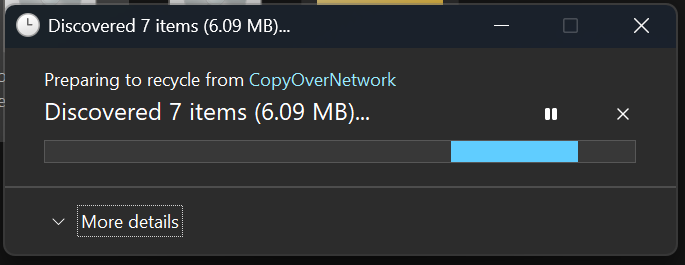
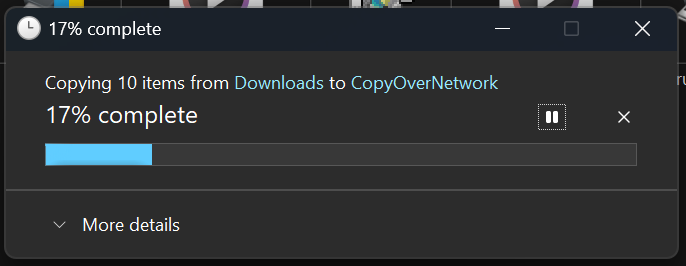
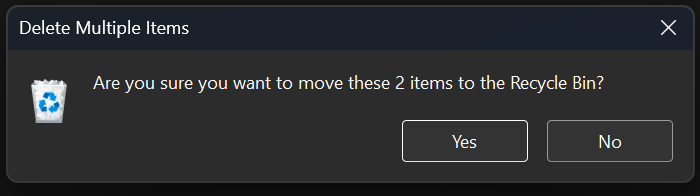
  • Dark Mode: We’ve made improvements to the dark mode experience in File Explorer starting with key actions like copy, move, and delete dialogs. You’ll now see a consistent dark mode experience in:
    • The default and expanded state for copy, move, and delete dialogs
    • Progress bars and chart views
    • Dialogs for confirming states like skip, override, and file selection
    • Multiple confirmation and error dialogs

    The new discover dialog in dark mode.

    The new discover dialog in dark mode.

    The new copy dialog in dark mode.

    The new copy dialog in dark mode.

    The new recycle bin dialog in dark mode.

    The new recycle bin dialog in dark mode.

    The new replace or skip files dialog in dark mode.

    The new replace or skip files dialog in dark mode.

Fixes gradually being rolled out to the Dev Channel with toggle on*

[General]

  • Fixed an underlying issue which caused multiple features which were rolling out to unexpectedly disappear from some Insider PCs after the previous flight.

[Taskbar & System Tray]

  • Fixed an issue after the latest updates where when “automatically hide the taskbar” was enabled sometimes you would still see the system tray peeking up while the taskbar was hidden. Also fixed an issue where it wasn’t hiding anymore when you were on the desktop with all app windows minimized.
  • Fixed a focus related issue when clicking on an app preview thumbnail which could result on it dismissing but the app window not actually coming to the foreground.

[File Explorer]

  • Fixed an issue where Encrypted File System (EFS) related dialogs in File Explorer weren’t responding to increased text scaling.

[Windows Studio Effects]

  • Fixed an issue for some classes of external webcams, where turning on “Use Windows Studio Effects” in the advanced camera setting might result in a camera preview failure. If you were impacted by this known issue in the latest builds, and turned off Windows Studio Effects inside the camera settings to workaround it, you can enable it again now.

[Settings]

  • Fixed an issue causing certain network adapters to show an incorrect link speed

[Other]

  • Fixed an issue impacting the ability to start Hyper-V virtual machines with Trusted Platform Module (TPM) on ARM64 devices.
  • Fixed an issue that could affect playback of protected content in certain Blu-ray, DVD, and digital TV apps that used Enhanced Video Rendererwith HDCP enforcement.

Known issues

[Click to Do]

  • Launching Click to Do on your primary display via right-edge gesture will result in the swipe visuals appearing on the incorrect display. The issue is being investigated.

[Lock and login screens]

  • [NEW] The touch keyboard may fail to launch on the login screen. If you encounter this, you can use the on-screen keyboard in the accessibility menu as a workaround.

[Taskbar & System Tray]

  • Our new animations on taskbar previews have been turned off temporarily because they were interfering with the ability to share a window from its preview, we will note when they’re brought back.

[Search]

  • Certain searches may show unexpected text instead of the expected results and images.

[Xbox Controllers]

  • Some Insiders are experiencing an issue where using their Xbox Controller via Bluetooth is causing their PC to bugcheck. Here is how to resolve the issue. Open Device Manager by searching for it via the search box on your taskbar. Once Device Manager is open, click on “View” and then “Devices by Driver”. Find the driver named “oemXXX.inf (XboxGameControllerDriver.inf)” where the “XXX” will be a specific number on your PC. Right-click on that driver and click “Uninstall”.

Reminders for Windows Insiders in the Dev Channel

  • Windows Insiders in the Dev Channel receive updates based on Windows 11, version 25H2 via an enablement package (Build 26220.xxxx).
  • Many features in the Dev Channel are rolled out using Controlled Feature Rollout technology, starting with a subset of Insiders and ramping up over time as we monitor feedback to see how they land before pushing them out to everyone in this channel.
  • For Windows Insiders in the Dev Channel who want to be the first to get features gradually rolled out to you, you can turn ON the toggle to get the latest updates as they are available via Settings > Windows Update*. Over time, we will increase the rollouts of features to everyone with the toggle turned on. Should you keep this toggle off, new features will gradually be rolled out to your PC over time once they are ready.
  • Features and experiences included in these builds may never get released as we try out different concepts and get feedback. Features may change over time, be removed, or replaced and never get released beyond Windows Insiders. Some of these features and experiences could show up in future Windows releases when they’re ready.
  • Some features in active development we preview with Windows Insiders may not be fully localized and localization will happen over time as features are finalized. As you see issues with localization in your language, please report those issues to us via Feedback Hub.
  • Please note that some accessibility features may not work with features like Recall and Click to Do while in preview with Windows Insiders.
  • Because the Dev and Beta Channels represent parallel development paths from our engineers, there may be cases where features and experiences show up in the Beta Channel first.
  • Check out Flight Hub for a complete look at what build is in which Insider channel.
Thanks,
Amanda


 Source:


Check Windows Updates


UUP Dump:

64-bit ISO download:

ARM64 ISO download:

 
Last edited:

My Computers

System One System Two

  • OS
    All Branches but Release
    Computer type
    Laptop
    Manufacturer/Model
    Acer Nitro ANV15-51
    CPU
    AMD Ryzen 7 7735HS 3200-4500 Mhz 8 cores x 2
    Motherboard
    Sportage_RBH
    Memory
    32 GB DDR5
    Graphics Card(s)
    Radeon Graphic / NVIDIA GeForce RTX 4060 8 GB GDDR6
    Sound Card
    AMD/Realtek(R) Audio
    Monitor(s) Displays
    Integrated Monitor (15.3"vis)
    Screen Resolution
    FHD 1920X1080 16:9 144Hz
    Hard Drives
    KINGSTON OM8SEP4512Q-AA 1TB
    Western Digital 256GB
    PSU
    19V DC 6.32 A 120 W
    Cooling
    Dual Fans
    Mouse
    MS Bluetooth
    Internet Speed
    Fiber 1GB Cox -us & 1GB Orange-fr
    Browser
    Edge Canary- Firefox Nightly-Chrome Dev-Chrome Dev
    Antivirus
    Windows Defender
  • Operating System
    Windows 11 Beta
    Computer type
    Laptop
    Manufacturer/Model
    Asus X751BP
    CPU
    AMD A9-9420
    Memory
    8 GB of DDR4
    Graphics card(s)
    AMD Radeon R5
    Screen Resolution
    1600x900
    Hard Drives
    Seagate 1 TB
@fg2001gf11F
Thanks for adding your comment.
Maybe it is this one mentioned in the blogs. 😎🤷‍♂️
This note is on both blogs for 26220.6772 and 26120.6772. The problem is common to both.

[Search]

  • Certain searches may show unexpected text instead of the expected results and images.
 
Last edited:

My Computer

System One

  • OS
    Windows 11 Pro 25H2
    Computer type
    PC/Desktop
    Manufacturer/Model
    Dell XPS 8930
    CPU
    Intel I9-9900K
    Memory
    64GB
    Graphics Card(s)
    NVIDIA RTX 2060
    Sound Card
    NVIDIA High Definition Audio
    Monitor(s) Displays
    4k Samsung
    Screen Resolution
    3840 x 2160
    Hard Drives
    512GB NVMe, ADATA SU 800, 2TB HDD
All I can say is WOW! This issue had me wrapped around my axles and I was prepping to do a clean install to fix it! I'm very disappointed in MalwareBytes, this kind of protection I do NOT need! I'm glad I was here reading the forum before my reformatting, that was going to happen today!

@gunrunnerjohn I believe as with most software Malwarebytes does not officially support running their software on Insider versions of Windows and only support official current releases of Windows hence the issue I encountered.
 

My Computers

System One System Two

  • OS
    Windows 11 Pro x 2 + Insider Dev
    Computer type
    PC/Desktop
    Manufacturer/Model
    My first abomination, I call it the Money Pit One
    CPU
    Intel Core i9 12900K @ 5.2 GHz
    Motherboard
    ASUS ROG MAXIMUS Z690 HERO
    Memory
    2 x Corsair Dominator Platinum RGB (4x16GB Total) DDR5-6200 CL36 Dual Channel Kit
    Graphics Card(s)
    EVGA GeForce RTX 3080 XC3 ULTRA GAMING 10GB GDDR6X
    Sound Card
    ROG SupremeFX ALC4082 with ESS® ES9018Q2C DAC for pinpoint positioning and dynamics
    Monitor(s) Displays
    2 x Samsung 43" HDR Neo QLED Mini-LED Tizen Smart TV (QN43QN90DAFXZC) 2024
    Screen Resolution
    1920 x 1080 @ 150 DPI & 120Hz
    Hard Drives
    2 x Samsung 980 Series - 250GB PCIe Gen3. X4 NVMe 1.4 - M.2 Internal SSD (Windows 11 Pro Dual boot)
    PSU
    Corsair HX1000i 80+ Platinum Modular Power Supply 1000W
    Case
    Phanteks Enthoo Luxe Tempered Glass Full Tower Case - Black
    Cooling
    CORSAIR iCUE H150i RGB Elite 360mm Liquid CPU Cooler
    Keyboard
    Perixx PERIBOARD-732B Wireless Mini Backlit USB Keyboard with Low Profile Keys - US Layout
    Mouse
    Logitech MX Anywhere 2S Wireless Mouse
    Internet Speed
    1000 Mbps
    Browser
    Latest Version Of Firefox & Microsoft Edge Chromium Stable
    Antivirus
    ESET Internet Security
    Other Info
    LG Electronics 14x Sata Blu-ray Disk Rewriter - WH14NS4O
    2 x OREI 4K 4x2 HDMI Matrix Switch With ARC Audio Extraction, HDR & Downscaling (UHD-402D) so I can send the output of my Cable Box, Roku, or any of my 4 computers to either of my TV's separately or simultaneously.
  • Operating System
    Windows 11 Pro x 2
    Computer type
    PC/Desktop
    Manufacturer/Model
    My second abomination, I call it the Money Pit Two
    CPU
    Intel Core i9 12900K @ 5.2 GHz
    Motherboard
    ASUS ROG STRIX Z690-F GAMING WIFI
    Memory
    2 x Vengeance RGB 32GB DDR5 6400MHz CL32 Dual Channel Kit (4x16GB Total) Black
    Graphics card(s)
    ASUS TUF Gaming GeForce RTX 3070 Ti OC Edition 8 GB GDDR6X
    Sound Card
    ROG SupremeFX ALC4082 with ESS® ES9018Q2C DAC for pinpoint positioning and dynamics
    Monitor(s) Displays
    2 x Samsung 43" HDR Neo QLED Mini-LED Tizen Smart TV (QN43QN90DAFXZC) 2024
    Screen Resolution
    1920 x 1080 @ 150 DPI & 120Hz
    Hard Drives
    2 x Samsung 980 Series - 250GB PCIe Gen3. X4 NVMe 1.4 - M.2 Internal SSD (Windows 11 Pro Dual boot)
    PSU
    Corsair AX860 - 860W Modular Power Supply
    Case
    Phanteks Enthoo Pro Tempered Glass Full Tower Case - Black
    Cooling
    CORSAIR iCUE H150i RGB Elite 360mm Liquid CPU Cooler
    Keyboard
    Perixx PERIBOARD-326 Wired Mini Backlit USB Keyboard with Low Profile Keys - US Layout
    Mouse
    Logitech MX Anywhere 2S Wireless Mouse
    Internet Speed
    1000 Mbps
    Browser
    Latest Version Of Firefox & EDGE Chromium Stable
    Antivirus
    ESET Internet Security
    Other Info
    LG Electronics 14x Sata Blu-ray Disk Rewriter - WH14NS4O
    2 x OREI 4K 4x2 HDMI Matrix Switch With ARC Audio Extraction, HDR & Downscaling (UHD-402D) so I can send the output of my Cable Box, Roku, or any of my 4 computers to either of my TV's separately or simultaneously.
@gunrunnerjohn I believe as with most software Malwarebytes does not officially support running their software on Insider versions of Windows and only support official current releases of Windows hence the issue I encountered.
They may get their wish. :LOL:
 

My Computers

System One System Two

  • OS
    Win 11 Pro 25H2, Build 26200.8524
    Computer type
    PC/Desktop
    Manufacturer/Model
    Home Brew
    CPU
    Intel Core i5 14500
    Motherboard
    Gigabyte B760M G P WIFI
    Memory
    64GB DDR4
    Graphics Card(s)
    GeForce RTX 4060
    Sound Card
    Chipset Realtek
    Monitor(s) Displays
    LG 45" Ultragear, Acer 24" 1080p
    Screen Resolution
    5120x1440, 1920x1080
    Hard Drives
    Crucial P310 2TB 2280 PCIe Gen4 3D NAND NVMe M.2 SSD (O/S)
    Silicon Power 2TB US75 NVMe PCIe Gen4 M.2 2280 SSD (backup)
    Crucial BX500 2TB 3D NAND (2nd backup)
    Seagate 4TB Ironwolf, rotating HDD archive files
    External off-line backup Drives: 2 NVMe 4TB drives in external enclosures
    PSU
    Thermaltake Toughpower GF3 750W
    Case
    LIAN LI LANCOOL 216 E-ATX PC Case
    Cooling
    Lots of fans!
    Keyboard
    Microsoft Comfort Curve 2000
    Mouse
    Logitech G305
    Internet Speed
    Verizon FiOS 1GB
    Browser
    Firefox
    Antivirus
    Malware Bytes & Windows Defender Security
  • Operating System
    Win 11 Pro 25H2, Build 26200.8524
    Computer type
    PC/Desktop
    Manufacturer/Model
    Home Brew
    CPU
    Intel Core i5 14400
    Motherboard
    Gigabyte B760M DS3H AX
    Memory
    32GB DDR5
    Graphics card(s)
    Intel 700 Embedded GPU
    Sound Card
    Realtek Embedded
    Monitor(s) Displays
    27" HP 1080p
    Screen Resolution
    1920x1080
    Hard Drives
    Crucial P310 2TB 2280 PCIe Gen4 eD NAND PCIe SSD
    Samsung EVO 990 2TB NVMe Gen4 SSD
    Samsung 2TB SATA SSD
    PSU
    Thermaltake Smart BM3 650W
    Case
    Okinos Micro ATX Case
    Cooling
    Fans
    Keyboard
    Microsoft Comfort Curve 2000
    Mouse
    Logitech G305
    Internet Speed
    Verizon FiOS 1GB
    Browser
    Firefox
    Antivirus
    Malware Bytes & Windows Defender Security
Maybe it is this one mentioned in the blogs.
This note is on both blogs for 26220.6772 and 26120.6772. The problem is common to both.

[Search]

  • Certain searches may show unexpected text instead of the expected results and images.
I guess it is. Good thing they already are aware of it.
It should be fixed within the next 12-14 months then.
 

My Computers

System One System Two

  • OS
    All Branches but Release
    Computer type
    Laptop
    Manufacturer/Model
    Acer Nitro ANV15-51
    CPU
    AMD Ryzen 7 7735HS 3200-4500 Mhz 8 cores x 2
    Motherboard
    Sportage_RBH
    Memory
    32 GB DDR5
    Graphics Card(s)
    Radeon Graphic / NVIDIA GeForce RTX 4060 8 GB GDDR6
    Sound Card
    AMD/Realtek(R) Audio
    Monitor(s) Displays
    Integrated Monitor (15.3"vis)
    Screen Resolution
    FHD 1920X1080 16:9 144Hz
    Hard Drives
    KINGSTON OM8SEP4512Q-AA 1TB
    Western Digital 256GB
    PSU
    19V DC 6.32 A 120 W
    Cooling
    Dual Fans
    Mouse
    MS Bluetooth
    Internet Speed
    Fiber 1GB Cox -us & 1GB Orange-fr
    Browser
    Edge Canary- Firefox Nightly-Chrome Dev-Chrome Dev
    Antivirus
    Windows Defender
  • Operating System
    Windows 11 Beta
    Computer type
    Laptop
    Manufacturer/Model
    Asus X751BP
    CPU
    AMD A9-9420
    Memory
    8 GB of DDR4
    Graphics card(s)
    AMD Radeon R5
    Screen Resolution
    1600x900
    Hard Drives
    Seagate 1 TB
I don't recall the last time I used Windows Search. There are so many better 3rd party products that I've just never felt the need.
 

My Computers

System One System Two

  • OS
    Win 11 Pro 25H2, Build 26200.8524
    Computer type
    PC/Desktop
    Manufacturer/Model
    Home Brew
    CPU
    Intel Core i5 14500
    Motherboard
    Gigabyte B760M G P WIFI
    Memory
    64GB DDR4
    Graphics Card(s)
    GeForce RTX 4060
    Sound Card
    Chipset Realtek
    Monitor(s) Displays
    LG 45" Ultragear, Acer 24" 1080p
    Screen Resolution
    5120x1440, 1920x1080
    Hard Drives
    Crucial P310 2TB 2280 PCIe Gen4 3D NAND NVMe M.2 SSD (O/S)
    Silicon Power 2TB US75 NVMe PCIe Gen4 M.2 2280 SSD (backup)
    Crucial BX500 2TB 3D NAND (2nd backup)
    Seagate 4TB Ironwolf, rotating HDD archive files
    External off-line backup Drives: 2 NVMe 4TB drives in external enclosures
    PSU
    Thermaltake Toughpower GF3 750W
    Case
    LIAN LI LANCOOL 216 E-ATX PC Case
    Cooling
    Lots of fans!
    Keyboard
    Microsoft Comfort Curve 2000
    Mouse
    Logitech G305
    Internet Speed
    Verizon FiOS 1GB
    Browser
    Firefox
    Antivirus
    Malware Bytes & Windows Defender Security
  • Operating System
    Win 11 Pro 25H2, Build 26200.8524
    Computer type
    PC/Desktop
    Manufacturer/Model
    Home Brew
    CPU
    Intel Core i5 14400
    Motherboard
    Gigabyte B760M DS3H AX
    Memory
    32GB DDR5
    Graphics card(s)
    Intel 700 Embedded GPU
    Sound Card
    Realtek Embedded
    Monitor(s) Displays
    27" HP 1080p
    Screen Resolution
    1920x1080
    Hard Drives
    Crucial P310 2TB 2280 PCIe Gen4 eD NAND PCIe SSD
    Samsung EVO 990 2TB NVMe Gen4 SSD
    Samsung 2TB SATA SSD
    PSU
    Thermaltake Smart BM3 650W
    Case
    Okinos Micro ATX Case
    Cooling
    Fans
    Keyboard
    Microsoft Comfort Curve 2000
    Mouse
    Logitech G305
    Internet Speed
    Verizon FiOS 1GB
    Browser
    Firefox
    Antivirus
    Malware Bytes & Windows Defender Security
Also, I just contacted Microsoft, and they stated this release is part of the enablement package which I got because I checked off get releases as soon as available, and it was not part of the insiders program.
Based on what I read about the release, It seems highly unlikely that Build 26220.6772 should have been installed on my three Windows computers. The representative was chatting with me for about 20 minutes, and most of the time she was just giving me answers that did not relate to the question I was asking. She just may have given me that answer to terminate the chat.

To verify I left the Windows Release Preview last week, I went back and tried to remove access again and got this message:
"This email address is not registered as a Windows Insider."
 
Last edited:

My Computer

System One

  • OS
    Windows 11 Pro
    Computer type
    PC/Desktop
    Manufacturer/Model
    Self Built
    CPU
    AMD Ryzen 9 7950X
    Motherboard
    ROG STRIX X870E-E GAMING WIFi
    Memory
    32 GB DDR5
    Graphics Card(s)
    XFX RX 7900XT
    Monitor(s) Displays
    LG 32GK850F-B 32 Inch UltraGear™ QHD
    Browser
    Firefox
We're very sorry that you have encountered an issue with Malwarebytes.

This is only happening to those on Windows Insider Preview edition. Malwarebytes Engineering and Microsoft are both working to resolve this.

You can disable the Exploit Protection module to bypass this issue until resolved.


The Windows Insider Program allows users to test pre-release versions of Windows and provide direct feedback to Microsoft engineers to help shape future updates.

Participants choose a specific channel (Canary, Dev, Beta, or Release Preview) to receive builds of varying stability and feature completeness.

Expect to encounter bugs and potential instability, as this is pre-release software, but you'll also get to see new features before the public.


Thank you for your patience while we work on resolving the issue.
 

My Computer

System One

  • OS
    Windows 10
    Computer type
    PC/Desktop
    Manufacturer/Model
    MSI Custom build
    CPU
    Intel i9-9900K
    Motherboard
    MSI MPG Z390 Gaming Edge AC
    Memory
    64GB
    Graphics Card(s)
    EVGA GeForce GTX 1070 TI
    Internet Speed
    1 Gbps
    Browser
    Firefox
    Antivirus
    Malwarebytes
How does this affect the OS?
This is all they say in the blog for both Beta and Dev builds. 🤷‍♂️

[Search]

  • Certain searches may show unexpected text instead of the expected results and images.
 

My Computer

System One

  • OS
    Windows 11 Pro 25H2
    Computer type
    PC/Desktop
    Manufacturer/Model
    Dell XPS 8930
    CPU
    Intel I9-9900K
    Memory
    64GB
    Graphics Card(s)
    NVIDIA RTX 2060
    Sound Card
    NVIDIA High Definition Audio
    Monitor(s) Displays
    4k Samsung
    Screen Resolution
    3840 x 2160
    Hard Drives
    512GB NVMe, ADATA SU 800, 2TB HDD
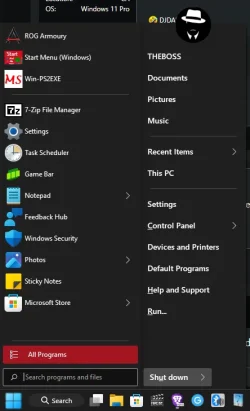
Start menu back to 24H2 small style in 10.0.26220.5770, weird.
 

My Computer

System One

  • OS
    Windows 11 Pro 24H2 26120.2130
    Computer type
    Laptop
    Manufacturer/Model
    Lenovo ZHAOYANG K49
    CPU
    Intel(R) Core(TM) i5-3230M CPU @ 2.60GHz 2.60 GHz
    Memory
    12.0 GB (11.5 GB usable)
    Graphics Card(s)
    NVIDIA NVS 5400M and Intel HD 4000
    Hard Drives
    SAMSUNG SSD PM830 mSATA 32GB
    WDC WD10JPVX-22JC3T0(1.0TB)
    Browser
    Chrome
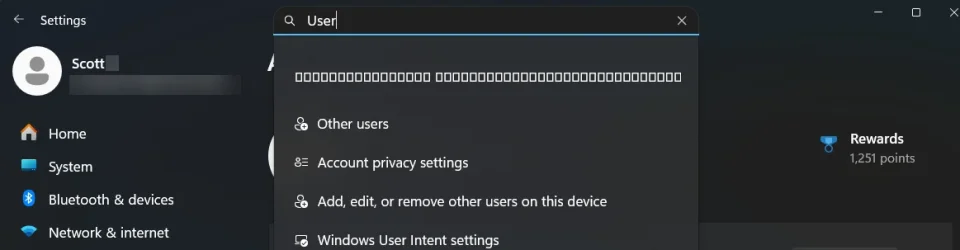
any one else got this bug when searching User in the settings on the latest DEV build?

Yes, but only in Settings search. Start menu search is okay.

1759984789680.webp
 

My Computers

System One System Two

  • OS
    Win 11 Pro 25H2 26200.8524
    Computer type
    PC/Desktop
    Manufacturer/Model
    Self Built
    CPU
    Intel® Core™ i7-14700K
    Motherboard
    ASUS TUF Z690-PLUS WIFI BIOS 4505 11/29/25
    Memory
    G.SKILL Ripjaws S5 Series 64GB (2 x 32GB) DDR5
    Graphics Card(s)
    ASUS GeForce RTX 4070 Super 12GB
    Sound Card
    Sound Blaster AE-5 Plus
    Monitor(s) Displays
    ASUS TUF Gaming 27" 2K HDR Gaming
    Screen Resolution
    2560 x 1440
    Hard Drives
    Samsung 990 Pro 1TB NVMe (Win 11 25H2)
    SK hynix P41 500GB NVMe 25H2 DEV/Games
    SK hynix P41 2TB NVMe (x3)
    Crucial P3 Plus 4TB
    PSU
    Corsair RM850x Shift
    Case
    Antec Dark Phantom DP502 FLUX
    Cooling
    Corsair Nautilus 360 RS AIO
    Keyboard
    Logitech MK 320
    Mouse
    Razer Basilisk V3
    Internet Speed
    350Mbs
    Browser
    Firefox
    Antivirus
    Winows Security
    Other Info
    MR 8.1 Home

    System 3 Specs
    Win 11 Pro 25H2 26200.8524
    ASUS PRIME Z370-P II BIOS 3004 7/12/21
    Intel Core i7-8700 CPU @ 3.20GHz
    32GB DDR4 RAM (4x8)
    iGPU Intel UHD Graphics 630
  • Operating System
    Win 11 Pro 25H2 26200.8524
    Computer type
    PC/Desktop
    Manufacturer/Model
    Self Built
    CPU
    Intel Core i7-11700F
    Motherboard
    Asus TUF Gaming Z590 Plus WiFi (BIOS 2803)
    Memory
    64 GB DDR4
    Graphics card(s)
    MSI GeForce RTX 3060 Ventus 2X 12GB
    Sound Card
    SoundBlaster Audigy Fx V2
    Monitor(s) Displays
    Samsung F27T350
    Screen Resolution
    1920x1080
    Hard Drives
    Samsung 980 Pro 1TB
    Samsung 970 EVO Plus 2TB
    Samsung 870 EVO 500GB SSD
    PSU
    Corsair HX750
    Case
    Cougar MX330-G Window
    Cooling
    Thermalright Frozen Edge 240 Black AIO
    Internet Speed
    350Mbps
    Browser
    Firefox
    Antivirus
    Windows Security

My Computer

System One

  • OS
    Windows 11 Pro 25H2
    Computer type
    PC/Desktop
    Manufacturer/Model
    Dell XPS 8930
    CPU
    Intel I9-9900K
    Memory
    64GB
    Graphics Card(s)
    NVIDIA RTX 2060
    Sound Card
    NVIDIA High Definition Audio
    Monitor(s) Displays
    4k Samsung
    Screen Resolution
    3840 x 2160
    Hard Drives
    512GB NVMe, ADATA SU 800, 2TB HDD
Never needed and never cared about Start menu , I use Open-Shell and it is working beautifully well. Been using it since 22H2 :lmao: I hate A/B testing's on start menu, I like my start menu to be consistent! Which a major thing on our daily usage life.
1760053027785.webp
 

My Computer

System One

  • OS
    Win11 Insider[Always the latest Dev/Beta releases]
    Computer type
    Laptop
    Manufacturer/Model
    Asus TUF Gaming FA506IU Laptop
    CPU
    AMD Ryzen 7 4800H with Radeon Graphics
    Motherboard
    AMD K17.6 FCH, AMD K17.6 IMC
    Memory
    G.SKILL [Samsung Die] DRR4 - 3200Mhz CL18 (18-19-19-36) - 32GB(16GBx2)
    Graphics Card(s)
    nVidia GTX 1660ti GDDR6 6GB(90W) 2.02Ghz Core & +548Mhz Mem-OC'ed [VBIOS Unlocked]
    Sound Card
    Realtek ALC256 @ AMD K17.6
    Monitor(s) Displays
    LM156LF-2F03 144HZ with Adaptive SYNC
    Screen Resolution
    1920x1080 - 144Hz
    Hard Drives
    WDC PC SN530 SDBPNPZ-256G-1002 + SHGP31-500GM-2 + ST1000LM035-1RK172 + Samsung SSD 870 QVO 1TB 1000.2 GB
    PSU
    ASUS Power Brick 180W
    Case
    Laptop Case with Dual Fan
    Cooling
    Dual Fans Design with Self-Cleaning Cooling
    Keyboard
    Asus Aura RGB with Overstroke technology
    Mouse
    ROG SICA Gaming Mouse
    Internet Speed
    100Mbps FiberOptic [100 Mbps Down - 50 Mbps Up]
    Browser
    Chrome/Firefox/Tor
    Antivirus
    Symantec Endpoint Protection with Windows Defender (Active Mode) + Custom DNS Server
    Other Info
    CPU with -15 Curve Optimizer all cores and -50 Cure optimizer on iGPU
    BCLK OC to 101.6Mhz
    Benchmark Scores:-
    CineBench R23 Single core:- 1290 points
    CineBench R23 Multi core:- 11111 points
I am on windows 11 Insider Program and just installed KB5065797, KB5056862 after the update windows rebooted and it got to the welcome picture but neither my mouse or keyboard would work. So I couldn't enter my pin. In the ASUS bios the mouse and keyboard work. I tried Safe Mode with Networking and the pin box was there but the keyboard and mouse still wouldn't work. I restarted 3 times and windows went into the recovery screen but it couldn't find a fix. So I uninstalled the latest quality update. Windows rebooted fine and started working. But windows automatically downloaded the update and restarted and I got the exact same problem. So the next time I went through the whole thing I immediately went in and paused updates for a week. It seems to me like its a USB controller issue or something as nothing USB related would work at all. Should I wait to see if Microsoft comes out with an update fix?
 

My Computer

System One

  • OS
    Windows 11
    Computer type
    PC/Desktop
    Manufacturer/Model
    Asus
    CPU
    AMD Ryzen 7 1700 Eight-Core Processor, 3000 M
    Motherboard
    Asus PRIME X370-PRO
    Memory
    TeamGroup-UD4-3000 32.0 GB
    Graphics Card(s)
    Nvidia GeForce GTX 1060 3GB
    Monitor(s) Displays
    Asus AUS24C2
    Screen Resolution
    1920x1080
    Keyboard
    Cherry
    Mouse
    Keychron M6 Wireless
 

My Computers

System One System Two

  • OS
    Windows 11 Pro for Workstations
    Computer type
    PC/Desktop
    Manufacturer/Model
    Custom self build
    CPU
    Intel i7-8700K 5 GHz
    Motherboard
    ASUS ROG Maximus XI Formula Z390
    Memory
    64 GB (4x16GB) G.SKILL TridentZ RGB DDR4 3600 MHz (F4-3600C18D-32GTZR)
    Graphics Card(s)
    ASUS ROG-STRIX-GTX1080TI-O11G-GAMING (11GB GDDR5X)
    Sound Card
    Integrated Digital Audio (S/PDIF)
    Monitor(s) Displays
    2 x Samsung Odyssey G75 27"
    Screen Resolution
    2560x1440
    Hard Drives
    1TB Samsung 990 PRO M.2,
    4TB Samsung 990 PRO M.2,
    TerraMaster F8 SSD Plus NAS
    PSU
    Seasonic Prime Titanium 850W
    Case
    Thermaltake Core P3 wall mounted
    Cooling
    Corsair Hydro H115i
    Keyboard
    Amazon Basics Wired Full Keyboard MD005
    Mouse
    Logitech MX Master 4
    Internet Speed
    2 Gbps Download and 100 Mbps Upload
    Browser
    Chrome and Edge
    Antivirus
    Microsoft Defender
    Other Info
    Logitech Z625 speaker system,
    Logitech BRIO 4K Pro webcam,
    HP Color LaserJet Pro MFP M477fdn,
    CyberPower CP1500PFCLCD
    Galaxy S23 Plus phone
  • Operating System
    Windows 11 Pro
    Computer type
    Laptop
    Manufacturer/Model
    Surface Laptop 7 Copilot+ PC
    CPU
    Snapdragon X Elite (12 core) 3.42 GHz
    Memory
    16 GB LPDDR5x-7467 MHz
    Monitor(s) Displays
    15" HDR
    Screen Resolution
    2496 x 1664
    Hard Drives
    1 TB SSD
    Internet Speed
    Wi-Fi 7 and Bluetooth 5.4
    Browser
    Chrome and Edge
    Antivirus
    Microsoft Defender
I don't recall the last time I used Windows Search. There are so many better 3rd party products that I've just never felt the need.
Please can you suggest the alternatives?
 

My Computer

System One

  • OS
    Windows 11
    Computer type
    PC/Desktop
    Manufacturer/Model
    PCSpecialist
    CPU
    Intel(R) Core(TM) i7-1070
    Motherboard
    TUF GAMING B460-PLUS
    Memory
    32 GBytes DDR4-2667 (1333 MHz)
    Graphics Card(s)
    NVIDIA GeForce GT 1030
    Sound Card
    ONBOARD 6 CHANNEL (5.1) HIGH DEF AUDIO (AS STANDARD)
    Monitor(s) Displays
    Samsung U32J590UQU
    Screen Resolution
    4k
    Hard Drives
    SYSTEM Win 10 237.22GB SSD Disk 0 238.47GB M2 (mobo)
    DATA Data 931.41GB HD 2.5" Disk 1 931.51GB SATA3
    BACKUPS Backups 2TB HD 3.5" Disk 2 2TB SATA3
    PSU
    CORSAIR 550W CV SERIES™ CV-550 POWER SUPPLY
    Case
    PCS 3601 CASE
    Cooling
    CoolerMaster Hyper 212 (120mm) Fan CPU Cooler Black Edition
    Internet Speed
    57/18 Mbps
    Browser
    Vivaldi
    Antivirus
    Kaspersky Total Security
Never needed and never cared about Start menu , I use Open-Shell and it is working beautifully well. Been using it since 22H2 :lmao: I hate A/B testing's on start menu, I like my start menu to be consistent! Which a major thing on our daily usage life.
View attachment 148377
I have the new start menu in 26100.6725.
 

My Computer

System One

  • OS
    26200.8037
    Computer type
    PC/Desktop
    CPU
    i5-11400F
    Motherboard
    Gigabyte
    Memory
    32GB
    Graphics Card(s)
    Geforce GT-1030
    Keyboard
    Logitech K400
    Mouse
    Logitech M720
    Internet Speed
    600 Mb
    Browser
    Edge
I did a search using Gemini as to why I got switched from the preview channel to the developer channel without changing my choice:

Here is an explanation of what happened:

Build 26200.6718 is a Release Preview build. In mid-September 2025, Microsoft released Windows 11 Build 26200.6718 (via KB5065789) to Insiders in the Release Preview Channel. The Release Preview Channel typically receives more stable, pre-release versions of Windows that are very close to a public release.
Build 26220.6772 is a Dev Channel build. Around October 6, 2025, Microsoft announced Windows 11 Insider Preview Build 26220.6772 for the Dev Channel. The Dev Channel is for engineers to test new ideas and features, so these builds are less stable and often carry a higher build number than Release Preview builds.
An automatic upgrade occurred. Even without manually changing your Insider settings, the Windows Update service can move a user to a different Insider channel based on internal configurations set by Microsoft. Your system was likely upgraded from the Release Preview build (26200) to the newer Dev Channel build (26220) as part of this process. The .xxxx number represents a servicing update applied to that specific build. So your system moved from a Release Preview base (26200) to a Dev Channel base (26220) and received the corresponding cumulative update (.6772).

Why this happens
This type of channel change is part of the normal flow for some Insider Program members. Windows Insiders in the Dev Channel receive updates based on Windows 11 version 25H2, and features are often rolled out gradually to a subset of Insiders before reaching everyone in the channel. Your system was in a state where it was directed to receive this next major Dev build, automatically placing it in the newer channel.
 

My Computer

System One

  • OS
    Windows 11 Pro
    Computer type
    PC/Desktop
    Manufacturer/Model
    Self Built
    CPU
    AMD Ryzen 9 7950X
    Motherboard
    ROG STRIX X870E-E GAMING WIFi
    Memory
    32 GB DDR5
    Graphics Card(s)
    XFX RX 7900XT
    Monitor(s) Displays
    LG 32GK850F-B 32 Inch UltraGear™ QHD
    Browser
    Firefox
To be honest, most of the features in the Dev or Beta channels are included in the public version. In the public version, these features are in an inactive and dormant state. You can even manually activate these features in the public version (Like ViVetool or CFR Registry keys).
 

My Computer

System One

  • OS
    Windows 11, version 25H2 (26200)
    Computer type
    PC/Desktop
    CPU
    AMD Ryzen 9 9950X 16-Core Processor
    Motherboard
    ASRock B650M PG Riptide
    Memory
    DDR5-6000 (CL36) 64.0 GB
    Graphics Card(s)
    NVIDIA GeForce RTX 4090
    PSU
    1200W
    Case
    Phanteks Enthoo Pro 2
    Cooling
    Noctua NH-D12L

Latest Support Threads

Back
Top Bottom