UPDATE 10/24:
 www.elevenforum.com
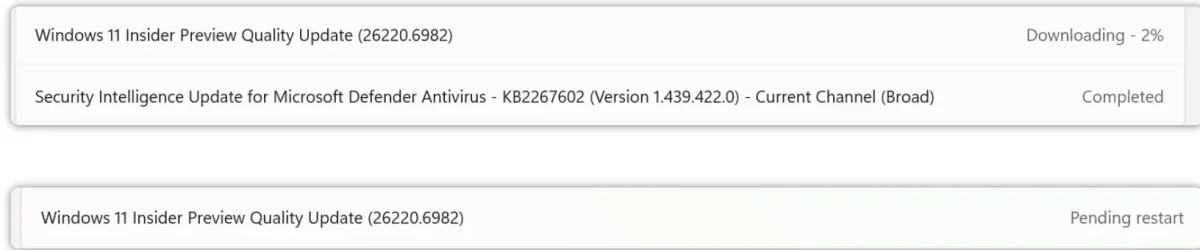
Hello Windows Insiders, today we are releasing Windows 11 Insider Preview Build 26220.6972 (KB5067106) to the Dev Channel.
Changes in Dev Channel builds and updates are documented in two buckets: new features, improvements, and fixes that are being gradually rolled out for Insiders who have turned on the toggle to get the latest updates as they are available (via Settings > Windows Update*) and then new features, improvements, and fixes rolling out to everyone in the Dev Channel. For more information, see the Reminders section at the bottom of this blog post.
 www.elevenforum.com
Amanda

 blogs.windows.com
Check Windows Updates
UUP Dump:
64-bit ISO download:

ARM64 ISO download:
 www.elevenforum.com
KB5067109 Windows 11 Insider Dev build 26220.6982 (25H2) - Oct. 24
Windows Insider Blog: Source: https://blogs.windows.com/windows-insider/2025/10/24/announcing-windows-11-insider-preview-build-26220-6982-dev-channel/ Check Windows Updates UUP Dump: 64-bit ISO download: https://uupdump.net/selectlang.php?id=7e17aee6-e15e-4a54-991c-6cf95ecb2991 ARM64...
www.elevenforum.com
Windows Insider Blog:
Hello Windows Insiders, today we are releasing Windows 11 Insider Preview Build 26220.6972 (KB5067106) to the Dev Channel.
Changes in Dev Channel builds and updates are documented in two buckets: new features, improvements, and fixes that are being gradually rolled out for Insiders who have turned on the toggle to get the latest updates as they are available (via Settings > Windows Update*) and then new features, improvements, and fixes rolling out to everyone in the Dev Channel. For more information, see the Reminders section at the bottom of this blog post.
Enable or Disable Get Latest Updates as soon as available in Windows 11
This tutorial will show you how to turn on or off "Get the latest updates as soon as they are available" in Windows 11. Starting with Windows 11 build 22621.1635, Microsoft added a new "Get the latest updates as soon as they are available" toggle under Settings > Windows Update. When you turn...
www.elevenforum.com
New features gradually being rolled out to the Dev Channel with toggle on*
[Mobile Device Settings]
- You can now directly add and manage your mobile devices from Settings on your Windows PC by navigating to “Mobile Devices” under the Bluetooth & Devices section. This page allows you to view your mobile devices, add new mobile devices, and manage features such as using your device as a connected camera or accessing your device’s files in File Explorer.

Enable or Disable Allow PC to Access your Mobile Devices in Windows 11
This tutorial will show you how to turn on or off "Allow this PC to access content and capabilities from your mobile devices" for your Microsoft account in Windows 11. Now you can link and manage your mobile devices directly from your PC. This link between your Android device and PC provides...
www.elevenforum.com
Link Android Mobile Device to Microsoft Account on Windows 11 PC
This tutorial will show you how to add (link) Android phone mobile device to your Microsoft account to manage on a Windows 11 PC. Now you can link and manage your mobile devices directly from your PC. This link between your Android device and PC provides instant access to your mobile device...
www.elevenforum.com
Enable or Disable Mobile Devices in Windows 11
This tutorial will show you how to enable or disable Android mobile devices you added to manage for your account in Windows 11. You can link and manage your mobile devices directly from your PC. This link between your Android device and PC provides instant access to your mobile device with just...
www.elevenforum.com
Enable or Disable Use Camera from Android Mobile Devices in Windows 11
This tutorial will show you how to turn on or off the ability to use your Android phone or tablet camera in any video application for your account in Windows 11. You can use your Android phone or tablet camera in any video application on your Windows 11 PC. With this feature, you’ll be able to...
www.elevenforum.com
Enable or Disable Android Phone Access in File Explorer in Windows 11
This tutorial will show you how to turn on or off access to your Android phone mobile device in File Explorer for your account in Windows 11. If you turn on Allow this PC to access your mobile devices, you will be able to link and manage your mobile devices directly from your PC. This link...
www.elevenforum.com
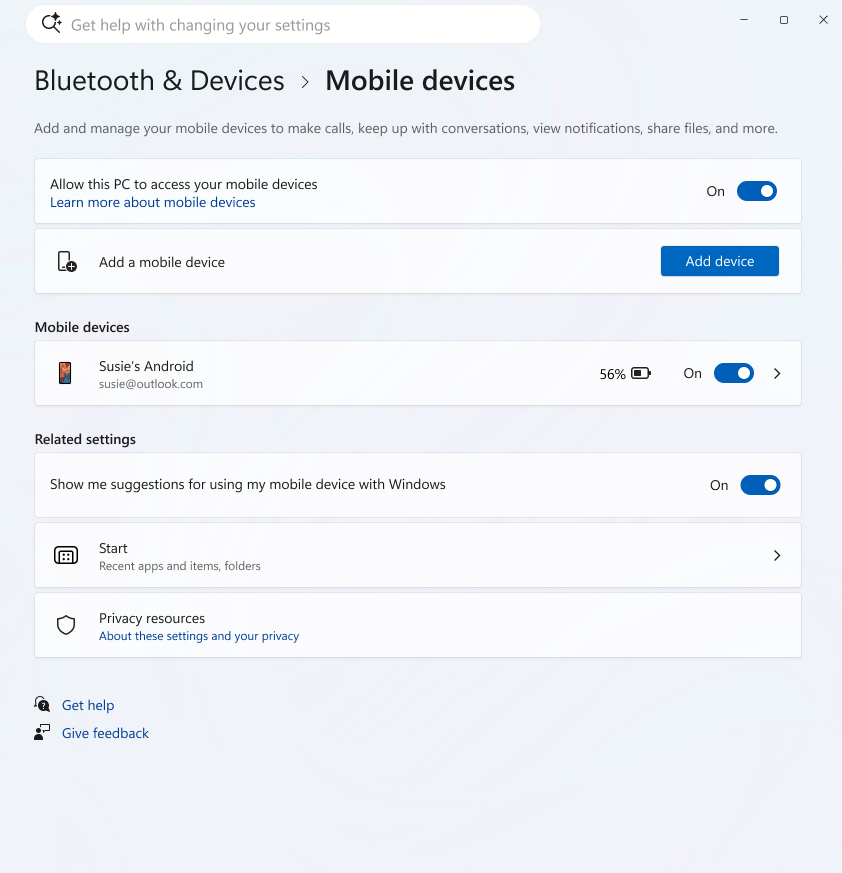
New settings page under Bluetooth & Devices to manage and add connected mobile devices.

Changes and Improvements gradually being rolled out to the Beta Channel with toggle on*
[Accounts]
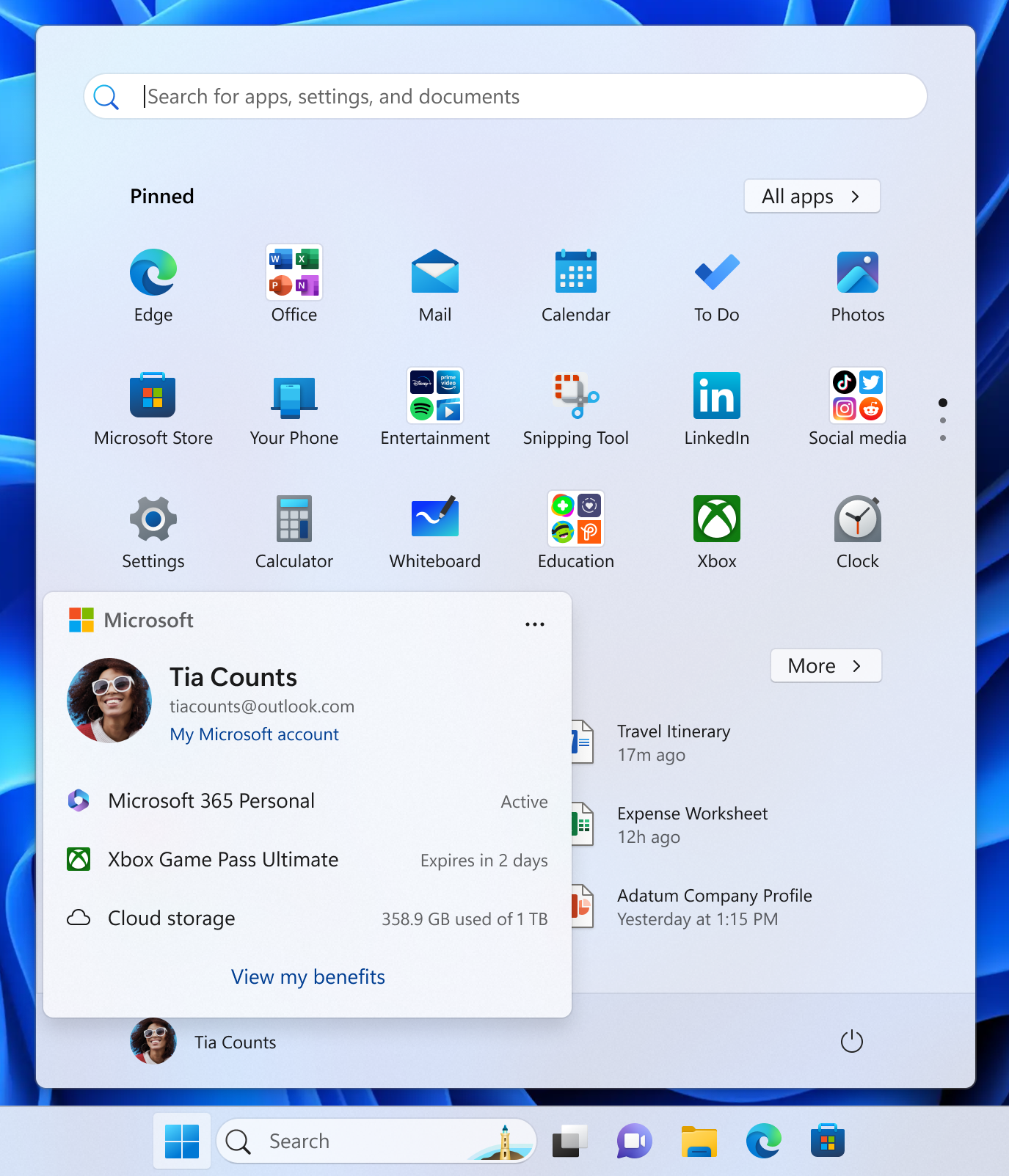
- We’ve added a new entry point in the account control on the Start menu that takes you directly to the benefits page on https://account.microsoft.com/, making it easier to explore and manage the benefits that come with your Microsoft account.
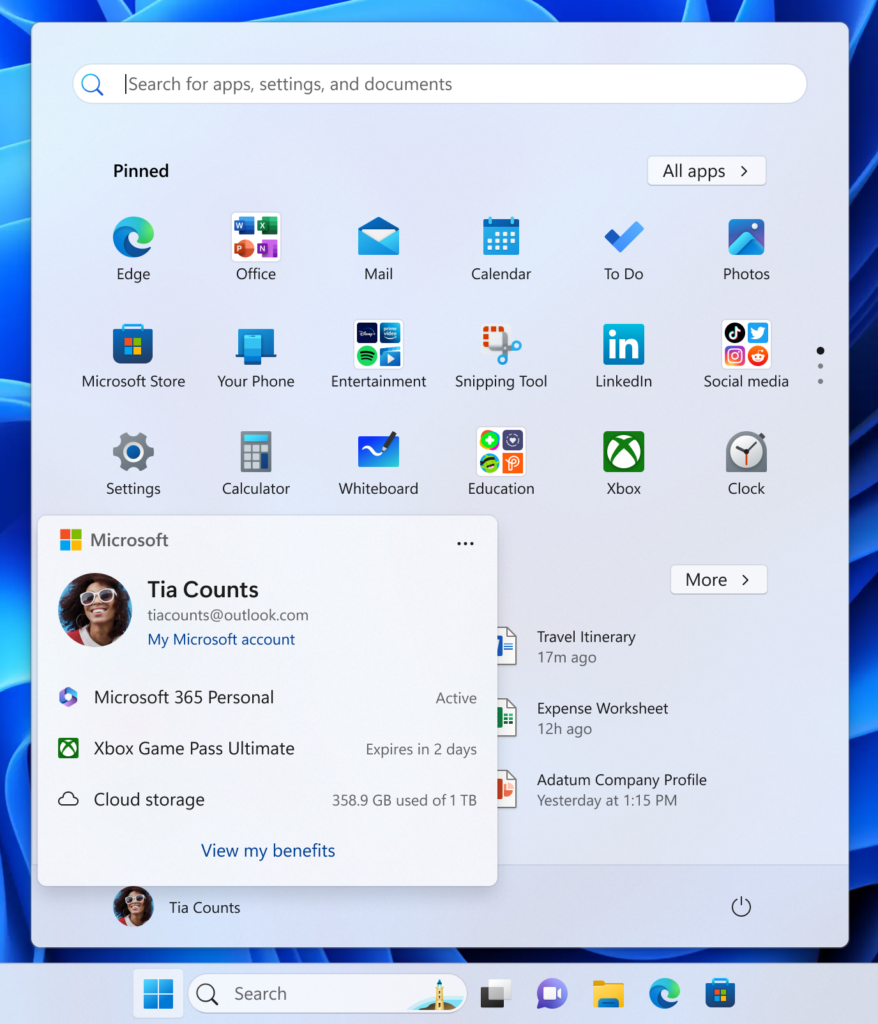
Account control in the Start menu has an option to “View my benefits” to take you directly to the benefits page on account.microsoft.com.
[Game Pass]
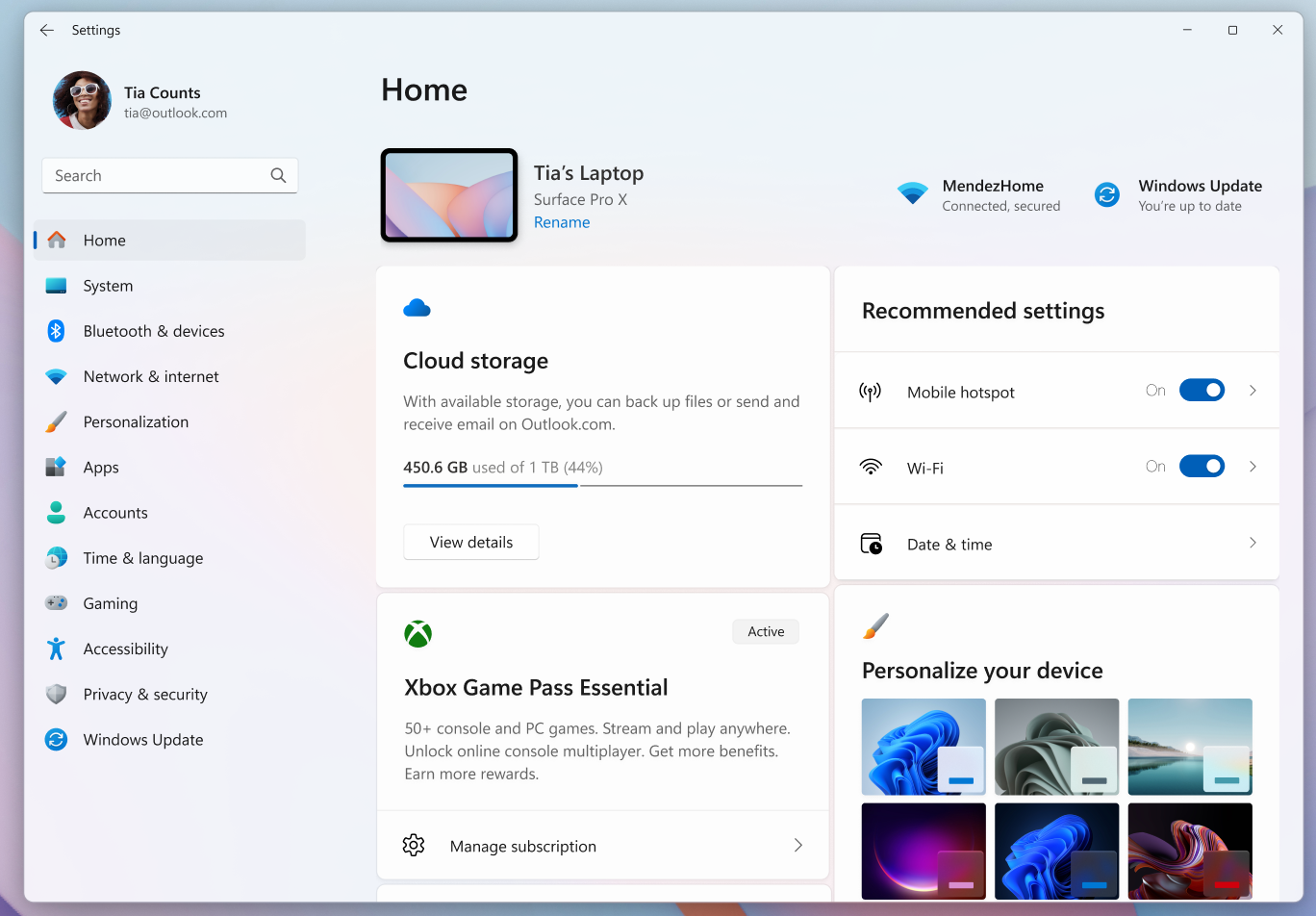
- In this build we have modified references to Game Pass plans in Settings to reflect updated branding and benefits.
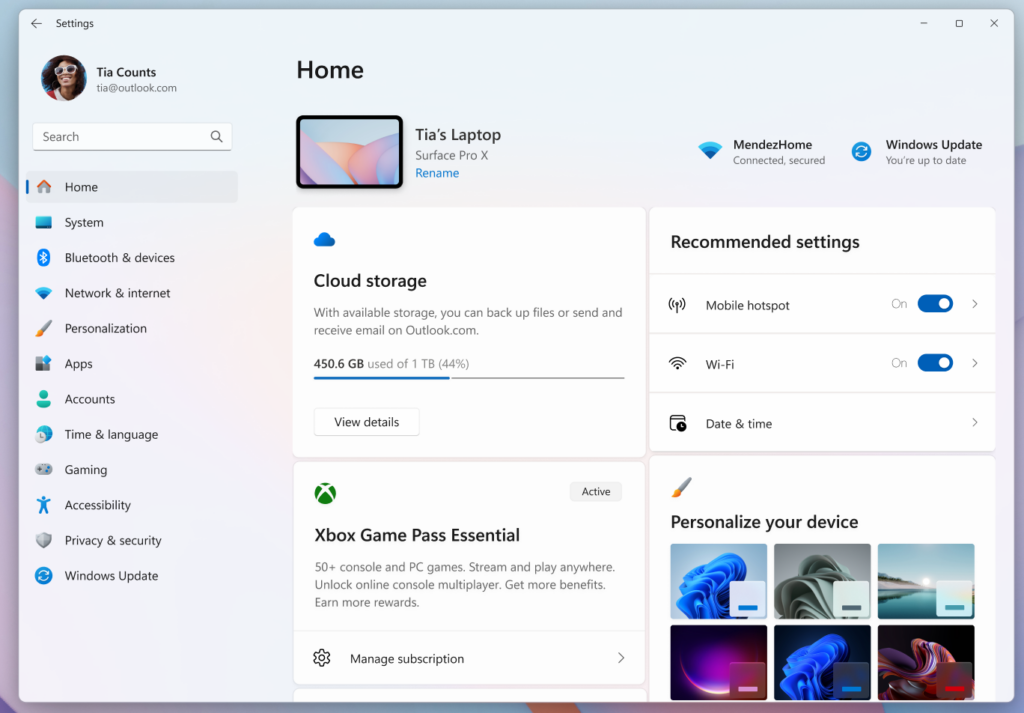
Settings Home page reflects new Game Pass branding and benefits.
[File Explorer]
- We’re continuing to make improvements to the dark mode experience in File Explorer. You will now see a consistent dark mode experience in the Folder Options dialog.
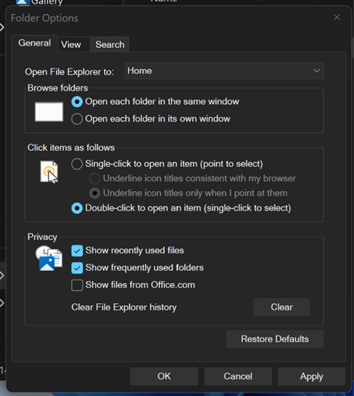
Updates to the Folder Options dialog in dark mode.
[Drag Tray]
- We’ve added the ability to turn Drag Tray on/off from Settings->System->Nearby sharing.

Enable or Disable Drop Tray in Windows 11
This tutorial will show you how to enable or disable the Drag/Drop Tray feature for your account in Windows 11. Starting with Windows 11 build 26100.4202 (24H2) and build 22631.5413 (23H2), sharing files in Windows is getting a lot easier and quicker with the Drag Tray feature. When you start...
www.elevenforum.com
Fixes gradually being rolled out to the Dev Channel with toggle on*
[File Explorer]
- Fixed an issue which could cause File Explorer to show a Catastrophic Error (0x8000FFFF) when extracting large (1.5gb+) archive files.
- Fixed an issue which could cause an old white toolbar to randomly appear in File Explorer sometimes.
[Display and Graphics]
- Fixed a recent issue which was causing some videos and games to be unexpectedly red.
- Fixed an issue where apps and browsers could have partially stuck onscreen content when other maximized / full screen apps were updating in the background. This may have been noticeable particularly when trying to scroll the window content, as only some parts would update.
- We’ve improved the performance when apps query monitors for their full list of supported modes. When this happens could lead to a momentary stutter on very high-resolution monitors, and this work should help prevent and reduce stuttering in these scenarios.
[Windows Update]
- Fixed an issue which could lead to updates failing to install with error 0x800f0983.
[Other]
- Fixed a hang which could impact Outlook in recent builds, where if prompted for your credentials, you wouldn’t be able to bring the pop up to the foreground and it would go unresponsive.
- Fixed an issue which was causing Remote Credential Guard scenarios between the latest Windows 11 builds and Server 2022 (and below) to fail.
- Fixed an issue which could cause the print preview screen to stop responding in Chromium-based browsers.
Known issues
[General]
- [NEW] Text actions that use Phi Silica in Click to Do and Recall will not work correctly on this build. A fix is on the way.
[Taskbar & System Tray]
- Our new animations on taskbar previews have been turned off temporarily because they were interfering with the ability to share a window from its preview, we will note when they’re brought back.
- [NEW] We’re investigating an issue which is causing the Start menu to not open for some Insiders on click, although it will open if you press the Windows key. It’s believed this issue may also potentially impact the notification center (which you can open with WIN + N).
[File Explorer]
- Copy progress might flash when clicking more or less details in dark mode version of the copy dialog.
- Scrollbar and footer are missing and showing a white block instead when text is scaled in dark mode version of the copy dialog.
[Search]
- Some Insiders are experiencing an issue where using their Xbox Controller via Bluetooth is causing their PC to bugcheck. Here is how to resolve the issue. Open Device Manager by searching for it via the search box on your taskbar. Once Device Manager is open, click on “View” and then “Devices by Driver”. Find the driver named “oemXXX.inf (XboxGameControllerDriver.inf)” where the “XXX” will be a specific number on your PC. Right-click on that driver and click “Uninstall”.
Reminders for Windows Insiders in the Dev Channel
- Windows Insiders in the Dev Channel receive updates based on Windows 11, version 25H2 via an enablement package (Build 26220.xxxx).
- Many features in the Dev Channel are rolled out using Controlled Feature Rollout technology, starting with a subset of Insiders and ramping up over time as we monitor feedback to see how they land before pushing them out to everyone in this channel.
- For Windows Insiders in the Dev Channel who want to be the first to get features gradually rolled out to you, you can turn ON the toggle to get the latest updates as they are available via Settings > Windows Update*. Over time, we will increase the rollouts of features to everyone with the toggle turned on. Should you keep this toggle off, new features will gradually be rolled out to your PC over time once they are ready.
- Features and experiences included in these builds may never get released as we try out different concepts and get feedback. Features may change over time, be removed, or replaced and never get released beyond Windows Insiders. Some of these features and experiences could show up in future Windows releases when they’re ready.
- Some features in active development we preview with Windows Insiders may not be fully localized and localization will happen over time as features are finalized. As you see issues with localization in your language, please report those issues to us via Feedback Hub.
- Please note that some accessibility features may not work with features like Recall and Click to Do while in preview with Windows Insiders.
- Because the Dev and Beta Channels represent parallel development paths from our engineers, there may be cases where features and experiences show up in the Beta Channel first.
- Check out Flight Hub for a complete look at what build is in which Insider channel.
Amanda
Source:
Announcing Windows 11 Insider Preview Build 26220.6972 (Dev Channel)
Hello Windows Insiders, today we are releasing Windows 11 Insider Preview Build 26220.6972 (KB5067106) to the Dev Channel. Changes in Dev Channel builds and updates are documented in two buckets: new features, impro
blogs.windows.com
Check Windows Updates
UUP Dump:
64-bit ISO download:
Select language for Windows 11 Insider Preview Feature Update (26220.6972) amd64
Select language for Windows 11 Insider Preview Feature Update (26220.6972) amd64 on UUP dump. UUP dump lets you download Unified Update Platform files, like Windows Insider updates, directly from Windows Update.
uupdump.net
ARM64 ISO download:
Select language for Windows 11 Insider Preview Feature Update (26220.6972) arm64
Select language for Windows 11 Insider Preview Feature Update (26220.6972) arm64 on UUP dump. UUP dump lets you download Unified Update Platform files, like Windows Insider updates, directly from Windows Update.
uupdump.net
UUP Dump - Download Windows Insider ISO
UUP Dump is the most practical and easy way to get ISO images of any Insider Windows 10 or Windows 11 version, as soon as Microsoft has released a new build. UUP Dump creates a download configuration file according to your choices, downloads necessary files directly from Microsoft servers, and...
www.elevenforum.com
Last edited: