Insider KB5072046 Windows 11 Insider Dev and Beta build 26220.7535 (25H2) - Jan. 9


UPDATE 1/21:

UPDATE 1/16:


 Windows Insider Blog:

Hello Windows Insiders, today we are releasing Windows 11 Insider Preview Build 26220.7535 (KB5072046) to the Dev & Beta Channels.

As a reminder, we are offering the same builds to both the Dev & Beta Channels on Windows 11, version 25H2.

If you are an Insider in the Dev Channel, you now have a window to switch from the Dev Channel to the Beta Channel if you would like. This window is soon closing.

Important: Once we move Dev Channel forward to a higher build number, the opportunity to switch between these channels will close until a future opportunity becomes available.

Note: Insiders who previously had trouble switching channels should be able to do so now.


Changes in Dev & Beta Channel builds and updates are documented in two buckets: new features, improvements, and fixes that are being gradually rolled out for Insiders who have turned on the toggle to get the latest updates as they are available (via Settings > Windows Update*) and then new features, improvements, and fixes rolling out to everyone in the Dev & Beta Channels. For more information, see the Reminders section at the bottom of this blog.


New features gradually being rolled out with toggle on*

Bringing Copilot-powered image descriptions to Narrator​

Last year, we introduced rich image descriptions in Narrator on Copilot+ PCs—making it possible for blind and low-vision users to hear detailed, AI-generated descriptions of images, charts, and graphs.

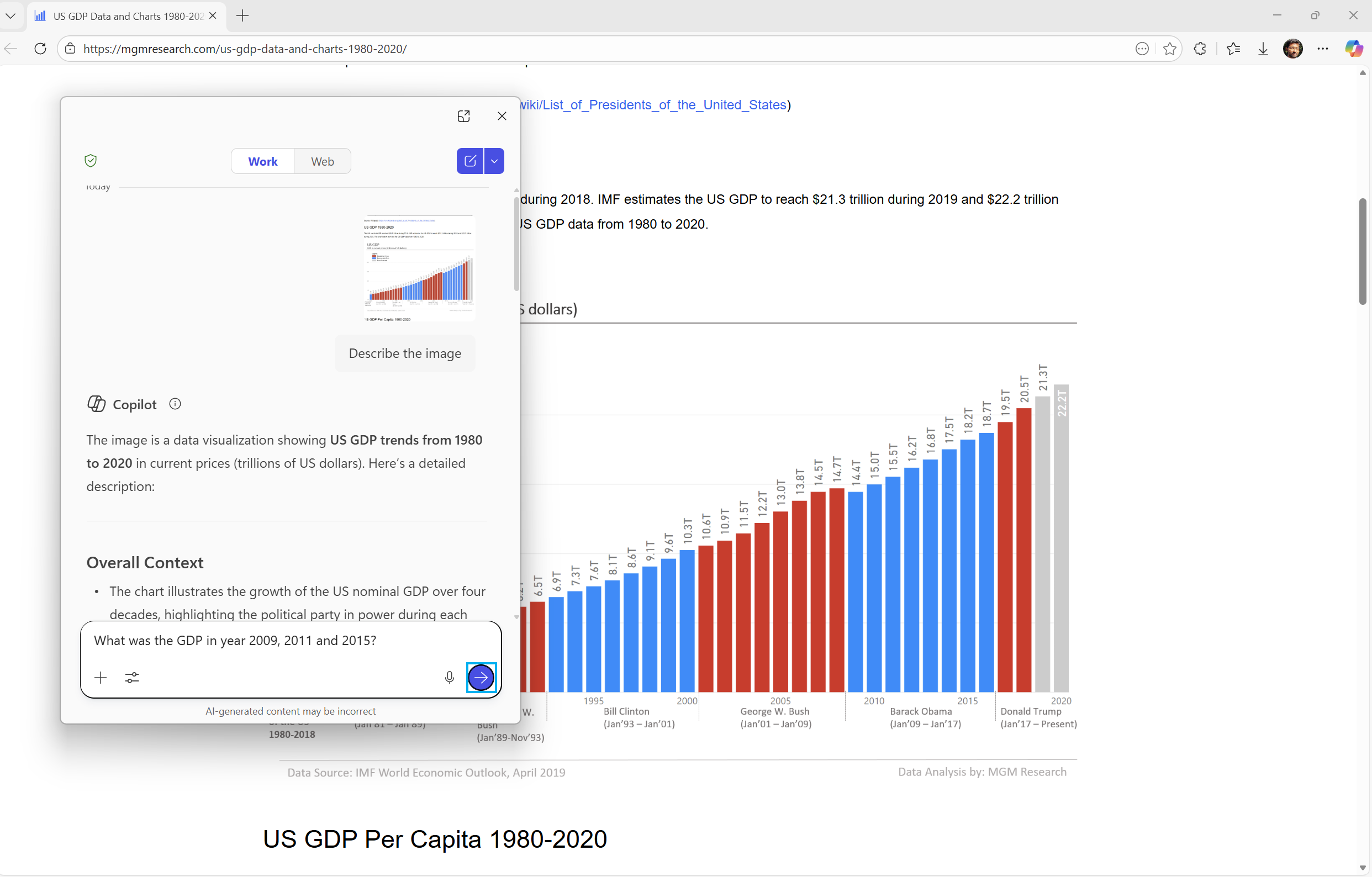
Narrator can now work with Copilot on all Windows 11 devices to further understand images and visual elements on your screen. You can press Narrator key + Ctrl + D to describe the focused image or press Narrator key + Ctrl + S to describe the full screen. Copilot opens with the image ready, allowing you to enter your own prompt and generate a description tailored to what you want to know. Importantly, the image is only shared after you choose to describe it. You remain in control at every step. When you want more detail or follow-up insights, simply select Ask Copilot to continue exploring.

This feature is not available in the European Economic Area (EEA).


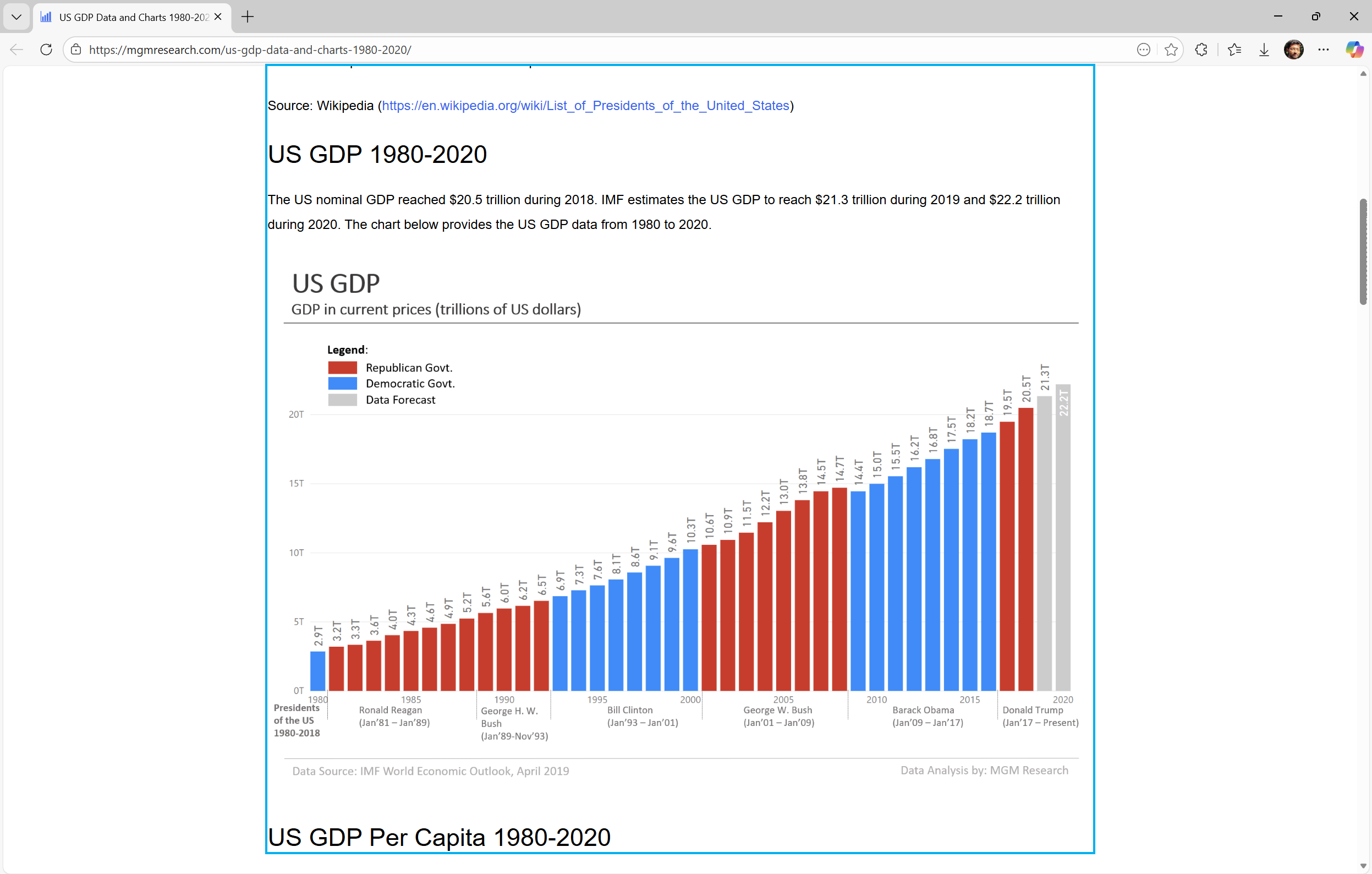
Use Narrator with Copilot to explore trends, labels, and key changes in images and visual elements (example-US GDP growth over several decades).

Explore and ask questions about the images and visual elements using your own words such as details, trends, and summaries.

FEEDBACK: Please file feedback in Feedback Hub (WIN + F) under Accessibility > Narrator.

Uninstalling Microsoft Copilot App on managed devices​

Admins can now uninstall Microsoft Copilot for a user in a targeted way by enabling a new policy titled RemoveMicrosoftCopilotApp. It will apply for devices/users that meet the below conditions:
  • Microsoft 365 Copilot and Microsoft Copilot are both installed
  • The Microsoft Copilot app was not installed by the user
  • The Microsoft Copilot app was not launched in the last 28 days
If this policy is enabled, the Microsoft Copilot app will be uninstalled, once. Users can still re-install if they choose to. This policy is available on Enterprise, Pro, and EDU SKUs.

To enable this policy, open the Group policy editor and go to: User Configuration -> Administrative Templates -> Windows AI -> Remove Microsoft Copilot App.


FEEDBACK: Please share your feedback in Feedback Hub (WIN + F) under Desktop Environment > Taskbar.

Changes and Improvements gradually being rolled out with toggle on*

[For Developers]​

  • We’re excited to share an enhancement to the Cross Device Resume capability that we announced earlier. Until now, app developers could integrate with Resume using a solution based on the Link to Windows app. We’ve now introduced an additional integration path leveraging the Windows Notification System (WNS). This additional option expands the scope of users to whom you can offer Resume capability, while delivering the same seamless experience on Windows. We invite developers to explore onboarding with this new capability alongside the existing integration method. Together, these options help maximize continuity across devices. Use WNS Notifications to implement Cross Device Resume (XDR) – Windows apps | Microsoft Learn.

[Windows Spotlight]​

  • The Windows Spotlight icon is getting refreshed. The new icon flight was started in late December for a small set of Insiders.


    Old Windows Spotlight icon on the desktop.
    Old Windows Spotlight icon on the desktop.

    New Windows Spotlight icon on the desktop.
    New Windows Spotlight icon on the desktop.
Fixes gradually being rolled out with toggle on*

[Start menu]

  • Fixed an issue where the edge of the warning dialog shown when shutting down your PC while other users were still signed in was truncated by the edge of the Start menu.

[File Explorer]

  • Fixed an issue which was causing explorer.exe to crash for some Insiders when invoking the context menu on the desktop recently.

[Input]

  • Fixed an issue which could lead to a black flash when using a pen to ink in Snipping Tool.

[Print]

  • Fixed an issue which could lead to two print dialogs appearing when you opened print instead of just one.
  • Fixed the color of the close button the print dialog to be consistent with other windows.
  • Fixed an issue where the text on the Printers and Scanners page in Settings could become truncated and unreadable.

[Windows Update]

  • Fixed an issue which could lead to the Windows Update settings page hanging when loading.

Known issues

[Xbox full screen experience for PC]

  • Some apps may behave unexpectedly when using FSE, particularly those that expect to be locked to a given size or launch additional windows.

[Taskbar & System Tray]

  • We’re working on the fix for an issue which is causing the Start menu to not open for some Insiders on click, although it will open if you press the Windows key. This issue may also potentially impact the notification center (which you can open with WIN + N) and quick settings (WIN + A).
  • We’re investigating an issue where for some Insiders apps aren’t showing in the system tray when they should be.
  • We’re working on the fix for an issue in the latest builds where, when the taskbar is set to autohide, it might invoke before interacting with the bottom of the screen, blocking the use of apps in that area.

[Settings]

  • [NEW] We’re working on the fix for an issue causing Settings to crash when interacting with audio devices.

[Bluetooth]

  • We’re working on the fix for an issue causing Bluetooth device battery level to not show for some Insiders.

[Click to Do]

  • We’re investigating an issue where the Microsoft 365 Copilot prompt box on selected images does not function if the Microsoft 365 Copilot app is not running.

Reminders for Windows Insiders in the Dev & Beta Channels

  • Updates are based on Windows 11, version 25H2 via an enablement package (Build 26220.xxxx).
  • Many features are rolled out using Controlled Feature Rollout technology, starting with a subset of Insiders and ramping up over time as we monitor feedback to see how they land before pushing them out to everyone in this channel.
  • For Windows Insiders who want to be the first to get features gradually rolled out to you, you can turn ON the toggle to get the latest updates as they are available via Settings > Windows Update*. Over time, we will increase the rollouts of features to everyone with the toggle turned on. Should you keep this toggle off, new features will gradually be rolled out to your PC over time once they are ready.
  • Features and experiences included in these builds may never get released as we try out different concepts and get feedback. Features may change over time, be removed, or replaced and never get released beyond Windows Insiders. Some of these features and experiences could show up in future Windows releases when they’re ready.
  • Some features in active development we preview with Windows Insiders may not be fully localized and localization will happen over time as features are finalized. As you see issues with localization in your language, please report those issues to us via Feedback Hub.
  • Check out Flight Hub for a complete look at what build is in which Insider channel.
Thanks,
Windows Insider Program Team


 Source:


Check Windows Updates


UUP Dump:

64-bit ISO download:

ARM64 ISO download:

 
Last edited:
Got it.
 

My Computer

System One

  • OS
    Win 11 Insider Release Preview and Beta channels.
    Computer type
    Laptop
    Manufacturer/Model
    HP ENVY Bought: March 2017
    CPU
    i5 Core [email protected] (Unsupported for Win 11)
    Motherboard
    HP 81AD (U3E1)
    Memory
    12GB
    Graphics Card(s)
    Generic PnP Monitor (1920x1080@60Hz) Intel HD Graphics 620 (HP)
    Sound Card
    Conexant ISST audio
    Monitor(s) Displays
    Generic PnP Monitor
    Screen Resolution
    1536x864 pixels
    Hard Drives
    HGST HTS721010A9E630
    PSU
    Well...PSU you too!! What's this mean?
    Case
    HP ENVY SILVER
    Cooling
    A fan.
    Keyboard
    USA
    Mouse
    Logitec Anywhere 2
    Internet Speed
    Good enough for me! Fast!
    Browser
    Edge/Waterfox
    Antivirus
    Windows Defender
    Other Info
    No 'mo.
KB5072046.webp
 

My Computers

System One System Two

  • OS
    Windows 11 Pro for Workstations
    Computer type
    PC/Desktop
    Manufacturer/Model
    Custom self build
    CPU
    Intel i7-8700K 5 GHz
    Motherboard
    ASUS ROG Maximus XI Formula Z390
    Memory
    64 GB (4x16GB) G.SKILL TridentZ RGB DDR4 3600 MHz (F4-3600C18D-32GTZR)
    Graphics Card(s)
    ASUS ROG-STRIX-GTX1080TI-O11G-GAMING (11GB GDDR5X)
    Sound Card
    Integrated Digital Audio (S/PDIF)
    Monitor(s) Displays
    2 x Samsung Odyssey G75 27"
    Screen Resolution
    2560x1440
    Hard Drives
    1TB Samsung 990 PRO M.2,
    4TB Samsung 990 PRO M.2,
    TerraMaster F8 SSD Plus NAS
    PSU
    Seasonic Prime Titanium 850W
    Case
    Thermaltake Core P3 wall mounted
    Cooling
    Corsair Hydro H115i
    Keyboard
    Amazon Basics Wired Full Keyboard MD005
    Mouse
    Logitech MX Master 4
    Internet Speed
    2 Gbps Download and 100 Mbps Upload
    Browser
    Chrome and Edge
    Antivirus
    Microsoft Defender
    Other Info
    Logitech Z625 speaker system,
    Logitech BRIO 4K Pro webcam,
    HP Color LaserJet Pro MFP M477fdn,
    CyberPower CP1500PFCLCD
    Galaxy S23 Plus phone
  • Operating System
    Windows 11 Pro
    Computer type
    Laptop
    Manufacturer/Model
    Surface Laptop 7 Copilot+ PC
    CPU
    Snapdragon X Elite (12 core) 3.42 GHz
    Memory
    16 GB LPDDR5x-7467 MHz
    Monitor(s) Displays
    15" HDR
    Screen Resolution
    2496 x 1664
    Hard Drives
    1 TB SSD
    Internet Speed
    Wi-Fi 7 and Bluetooth 5.4
    Browser
    Chrome and Edge
    Antivirus
    Microsoft Defender
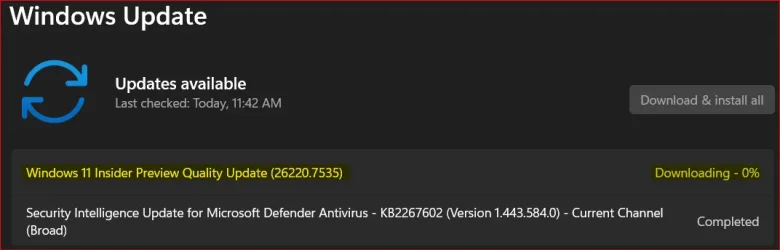
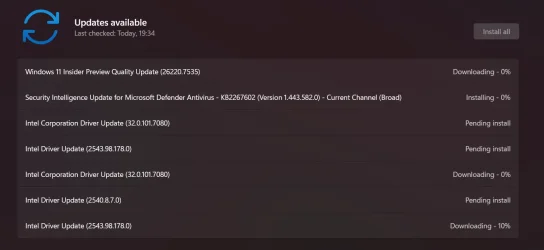
Downloading and installing.

1767982684986.webp

1767982712896.webp

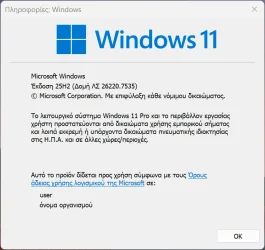
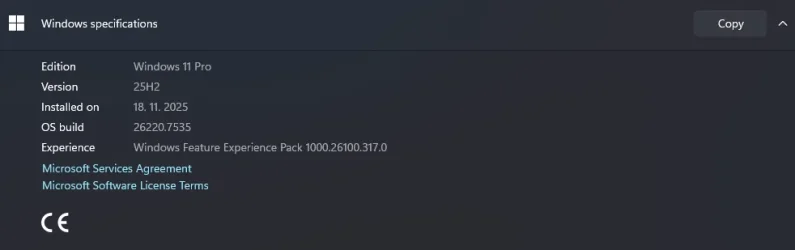
Done:

Edition Windows 11 Pro
Version 25H2
Installed on ‎10/‎31/‎2025
OS build 26220.7535
Experience Windows Feature Experience Pack 1000.26100.317.0

Updated, Beta and Dev machines.
 
Last edited:

My Computer

System One

  • OS
    Windows 11 Pro 25H2
    Computer type
    PC/Desktop
    Manufacturer/Model
    Dell XPS 8930
    CPU
    Intel I9-9900K
    Memory
    64GB
    Graphics Card(s)
    NVIDIA RTX 2060
    Sound Card
    NVIDIA High Definition Audio
    Monitor(s) Displays
    4k Samsung
    Screen Resolution
    3840 x 2160
    Hard Drives
    512GB NVMe, ADATA SU 800, 2TB HDD
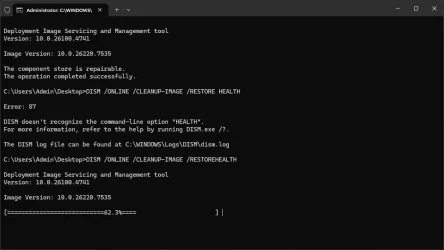
Got it and doing DISM repairs as I wait at 62.3% right now.
 

My Computers

System One System Two

  • OS
    Windows 11 25H2
    Computer type
    Laptop
    Manufacturer/Model
    Alienware 18 Area-51
    CPU
    Intel Core Ultra 9 275HX (24-Core)
    Motherboard
    Alienware
    Memory
    64GB DDR5 6400MT/s
    Graphics Card(s)
    NVIDIA GeForce RTX 5080 and Intel UHD Graphics
    Sound Card
    Onboard, Realtek high-performance Audio chips (ALC3329 & ALC1708))
    Monitor(s) Displays
    300HZ 18-inch QHD 500 nit Comfort View+
    Screen Resolution
    2560 x 1600
    Hard Drives
    2TB NVMe M.2 PCIe Gen 5 SSD
    Case
    Magnesium Alloy
    Cooling
    Advanced Cryo-Tech Quad-Fan Cooling system & large vapor chamber
    Keyboard
    Cherry MX ultra low profile mechanical keyboard with per key AlienFX RGB lighting
    Mouse
    Logitech MX Master 4
    Browser
    Vivaldi (main), Firefox, Chrome, Edge
    Antivirus
    MS Defender and Malwarebytes Free
  • Operating System
    Windows 11 25H2
    Computer type
    Laptop
    Manufacturer/Model
    Microsoft Surface Laptop 7
    CPU
    Qualcomm Snapdragon X Elite (12 Core) ARM based CPU
    Motherboard
    Microsoft Corp.
    Memory
    16GB LPDDR5
    Graphics card(s)
    Qualcomm Adreno X1-85
    Sound Card
    Omnisonic speakers with Dolby Atmos spatial sound
    Monitor(s) Displays
    120 Hz 13.8-inch 600 nit PixelSense Flow touchscreen
    Screen Resolution
    2304x1536
    Hard Drives
    1TB NVMe Gen 4 SSD
    Case
    Anodized Aluminum
    Cooling
    Traditional active cooling fan system
    Keyboard
    Mechanical QWERTY, backlit when in use
    Mouse
    Logitech MX Master 4 and Surface Arc Mouse
    Browser
    Vivaldi (main), Firefox, Chrome, Edge
    Antivirus
    MS Defender and Malwarebytes Free
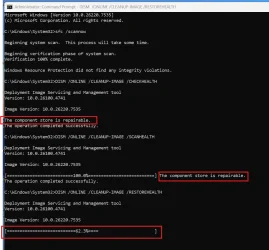
These BTH files keep popping up after every update, on SFC /SCANNOW.
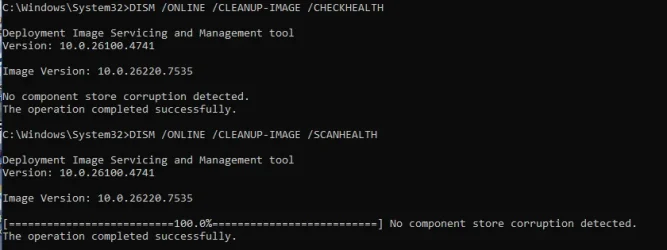
Luckily no problems on DISM this time on one machine but repairing on 2 other machines.
Inconsistent results again. 😵‍💫🤷‍♂️

1767986429106.webp
1st machine:
1767986649763.webp

2nd machine. 😵‍💫🤷‍♂️
1767987140796.webp


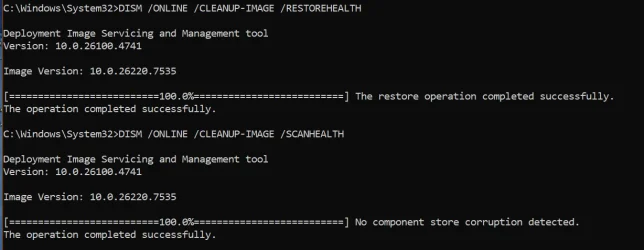
Finally completed /RESTOREHEALTH on one machine.
Pretty frustrating!
1767988510794.webp
 
Last edited:

My Computer

System One

  • OS
    Windows 11 Pro 25H2
    Computer type
    PC/Desktop
    Manufacturer/Model
    Dell XPS 8930
    CPU
    Intel I9-9900K
    Memory
    64GB
    Graphics Card(s)
    NVIDIA RTX 2060
    Sound Card
    NVIDIA High Definition Audio
    Monitor(s) Displays
    4k Samsung
    Screen Resolution
    3840 x 2160
    Hard Drives
    512GB NVMe, ADATA SU 800, 2TB HDD
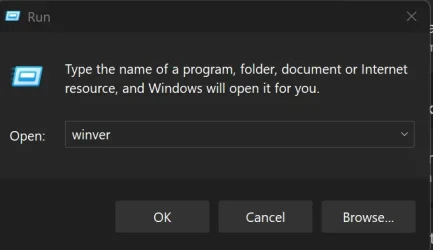
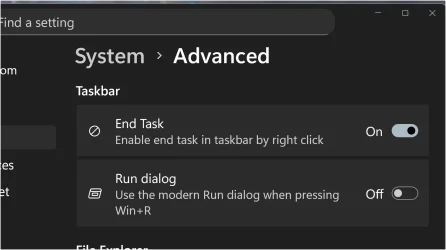
Run command not working in W + X menu . Can open in task manager.
Have rebooted once so will try Dism/SFC

EDIT:

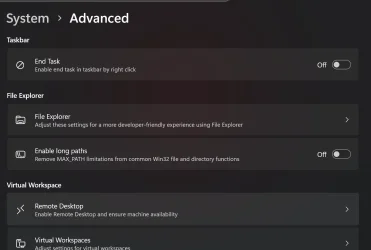
Turning Run dialogue to off in Settings - system - advanced worked.
 
Last edited:

My Computers

System One System Two

  • OS
    Win 11 Pro
    Computer type
    Laptop
    Manufacturer/Model
    ASUS Vivobook
    CPU
    AMD Ryzen™ 7 7730U
    Motherboard
    M1605YA
    Memory
    24GB Dual-Channel DDR4 @ 1596MHz (22-22-22-52)
    Graphics Card(s)
    512MB ATI AMD Radeon Graphics (ASUStek Computer Inc)
    Monitor(s) Displays
    Generic PnP Monitor (1920x1200@60Hz) - P1 PLUS (1920x1080@59Hz)
    Screen Resolution
    1920 X 1200
    Hard Drives
    953GB Western Digital WD
    PSU
    45 Watts
    Mouse
    Lenovo Bluetooth.
    Internet Speed
    500 Mbps
    Browser
    Edge
    Antivirus
    Defender
  • Operating System
    Windows 11
    Computer type
    Laptop
    Manufacturer/Model
    ACER NITRO
    CPU
    AMD Ryzen 7 5800H / 3.2 GHz
    Motherboard
    CZ Scala_CAS (FP6)
    Memory
    32 GB DDR4 SDRAM 3200 MHz
    Graphics card(s)
    NVIDIA GeForce RTX 3060 6 GB GDDR6 SDRAM
    Sound Card
    Realtek Audio. NVIDIA High Definition Audio
    Monitor(s) Displays
    15.6" LED backlight 1920 x 1080 (Full HD) 144 Hz
    Screen Resolution
    1920 x 1080 (Full HD)
    Hard Drives
    Samsung 970 Evo Plus 2TB NVMe M.2
    PSU
    180 Watt, 19.5 V
    Mouse
    Lenovo Bluetooth
    Internet Speed
    500 Mbps
    Browser
    Edge
    Antivirus
    Defender
Done:

2026-01-09 21_29_07-Πληροφορίες_ Windows.webp
 

My Computer

System One

  • OS
    Windows 10
    Computer type
    Laptop
    Manufacturer/Model
    Lenovo Yoga 7 Pro
    CPU
    Ultra Core Ultra 9 185H
    Motherboard
    Lenovo
    Memory
    32GB
    Graphics Card(s)
    Intel Arc
Getting now...

1767987911156.webp
 

My Computer

System One

  • OS
    Windows 11
    Computer type
    PC/Desktop
    Manufacturer/Model
    Asus/Custom Build
    CPU
    Intel® Xeon® X5690 3.47GHz Six-Core
    Motherboard
    Asus P6T Deluxe v2
    Memory
    G.Skill PC3-12800 1600MHz 24GB
    Graphics Card(s)
    NVIDIA GeForce GTX 1050
    Sound Card
    SoundMAX ADI AD2000B HD Audio
    Monitor(s) Displays
    Acer T232HL Touch Screen
    Screen Resolution
    1920 x 1080 @ 60Hz
    Hard Drives
    6 Crucial MX500 SSD 1TB each.
    PSU
    Thermaltake Toughpower Gold 850W
    Case
    Thermaltake Armor VA8000SWA
    Cooling
    Thermaltake Air Cooling System
    Keyboard
    Illuminated Multimedia LED Keyboard
    Mouse
    M16 Dual Mode Illuminated Mouse - Bluetooth / 2.4 GHz Mode
    Internet Speed
    800 Mbps
    Browser
    Edge / Opera / Vivaldi / Chrome / Firefox / Brave
    Antivirus
    Windows Defender Security
Done along with a load more...

Screenshot 2026-01-09 193535.webp
 

My Computer

System One

  • OS
    W11 Pro x64 ongoing Canary 29500 latest builds
    Computer type
    Laptop
    Manufacturer/Model
    Dell 7760 Mobile Precision 17"
    CPU
    Intel i5
    Motherboard
    Unknown
    Memory
    8Gb
    Graphics Card(s)
    Intel HD Graphics
    Sound Card
    Realtek
    Monitor(s) Displays
    Internal
    Hard Drives
    2 x 256Gb SSD
    PSU
    Dell 240 watt
    Mouse
    Dell Premier Bluetooth
    Internet Speed
    50Mbps
    Browser
    Edge
    Antivirus
    Default Microsoft Security
Run command not working in W + X menu . Can open in task manager.
Have rebooted once so will try Dism/SFC

EDIT:

Turning Run dialogue to off in Settings - system - advanced worked.
Sure enough, it broke the Run Dialog box from the menu. Were you using the original Run dialog box or the new one? I had the new one in dark mode enabled. Don't want to bother resetting it though if it's still broke on the old Run box as well.

Edit: turning off the new switch in settings restores the old Run dialog box which still works.
 

My Computers

System One System Two

  • OS
    Windows 11 25H2
    Computer type
    Laptop
    Manufacturer/Model
    Alienware 18 Area-51
    CPU
    Intel Core Ultra 9 275HX (24-Core)
    Motherboard
    Alienware
    Memory
    64GB DDR5 6400MT/s
    Graphics Card(s)
    NVIDIA GeForce RTX 5080 and Intel UHD Graphics
    Sound Card
    Onboard, Realtek high-performance Audio chips (ALC3329 & ALC1708))
    Monitor(s) Displays
    300HZ 18-inch QHD 500 nit Comfort View+
    Screen Resolution
    2560 x 1600
    Hard Drives
    2TB NVMe M.2 PCIe Gen 5 SSD
    Case
    Magnesium Alloy
    Cooling
    Advanced Cryo-Tech Quad-Fan Cooling system & large vapor chamber
    Keyboard
    Cherry MX ultra low profile mechanical keyboard with per key AlienFX RGB lighting
    Mouse
    Logitech MX Master 4
    Browser
    Vivaldi (main), Firefox, Chrome, Edge
    Antivirus
    MS Defender and Malwarebytes Free
  • Operating System
    Windows 11 25H2
    Computer type
    Laptop
    Manufacturer/Model
    Microsoft Surface Laptop 7
    CPU
    Qualcomm Snapdragon X Elite (12 Core) ARM based CPU
    Motherboard
    Microsoft Corp.
    Memory
    16GB LPDDR5
    Graphics card(s)
    Qualcomm Adreno X1-85
    Sound Card
    Omnisonic speakers with Dolby Atmos spatial sound
    Monitor(s) Displays
    120 Hz 13.8-inch 600 nit PixelSense Flow touchscreen
    Screen Resolution
    2304x1536
    Hard Drives
    1TB NVMe Gen 4 SSD
    Case
    Anodized Aluminum
    Cooling
    Traditional active cooling fan system
    Keyboard
    Mechanical QWERTY, backlit when in use
    Mouse
    Logitech MX Master 4 and Surface Arc Mouse
    Browser
    Vivaldi (main), Firefox, Chrome, Edge
    Antivirus
    MS Defender and Malwarebytes Free
Done here...

1767989383893.webp

No complains... yet!
 

My Computer

System One

  • OS
    Windows 11
    Computer type
    PC/Desktop
    Manufacturer/Model
    Asus/Custom Build
    CPU
    Intel® Xeon® X5690 3.47GHz Six-Core
    Motherboard
    Asus P6T Deluxe v2
    Memory
    G.Skill PC3-12800 1600MHz 24GB
    Graphics Card(s)
    NVIDIA GeForce GTX 1050
    Sound Card
    SoundMAX ADI AD2000B HD Audio
    Monitor(s) Displays
    Acer T232HL Touch Screen
    Screen Resolution
    1920 x 1080 @ 60Hz
    Hard Drives
    6 Crucial MX500 SSD 1TB each.
    PSU
    Thermaltake Toughpower Gold 850W
    Case
    Thermaltake Armor VA8000SWA
    Cooling
    Thermaltake Air Cooling System
    Keyboard
    Illuminated Multimedia LED Keyboard
    Mouse
    M16 Dual Mode Illuminated Mouse - Bluetooth / 2.4 GHz Mode
    Internet Speed
    800 Mbps
    Browser
    Edge / Opera / Vivaldi / Chrome / Firefox / Brave
    Antivirus
    Windows Defender Security
Sure enough, it broke the Run Dialog box from the menu. Were you using the original Run dialog box or the new one? I had the new one in dark mode enabled. Don't want to bother resetting it though if it's still broke on the old Run box as well.

Edit: turning off the new switch in settings restores the old Run dialog box which still works.
Yes I disabled the vivetool setting , vivetool.exe /disable /id:57156807,57259990,58527096,58381341, so the settings disappear in windows setting and back to normal.

Snipaste_2026-01-09_20-08-07.webp

Snipaste_2026-01-09_20-09-43.webp
 

My Computers

System One System Two

  • OS
    Win 11 Pro
    Computer type
    Laptop
    Manufacturer/Model
    ASUS Vivobook
    CPU
    AMD Ryzen™ 7 7730U
    Motherboard
    M1605YA
    Memory
    24GB Dual-Channel DDR4 @ 1596MHz (22-22-22-52)
    Graphics Card(s)
    512MB ATI AMD Radeon Graphics (ASUStek Computer Inc)
    Monitor(s) Displays
    Generic PnP Monitor (1920x1200@60Hz) - P1 PLUS (1920x1080@59Hz)
    Screen Resolution
    1920 X 1200
    Hard Drives
    953GB Western Digital WD
    PSU
    45 Watts
    Mouse
    Lenovo Bluetooth.
    Internet Speed
    500 Mbps
    Browser
    Edge
    Antivirus
    Defender
  • Operating System
    Windows 11
    Computer type
    Laptop
    Manufacturer/Model
    ACER NITRO
    CPU
    AMD Ryzen 7 5800H / 3.2 GHz
    Motherboard
    CZ Scala_CAS (FP6)
    Memory
    32 GB DDR4 SDRAM 3200 MHz
    Graphics card(s)
    NVIDIA GeForce RTX 3060 6 GB GDDR6 SDRAM
    Sound Card
    Realtek Audio. NVIDIA High Definition Audio
    Monitor(s) Displays
    15.6" LED backlight 1920 x 1080 (Full HD) 144 Hz
    Screen Resolution
    1920 x 1080 (Full HD)
    Hard Drives
    Samsung 970 Evo Plus 2TB NVMe M.2
    PSU
    180 Watt, 19.5 V
    Mouse
    Lenovo Bluetooth
    Internet Speed
    500 Mbps
    Browser
    Edge
    Antivirus
    Defender
Sure enough, it broke the Run Dialog box from the menu. Were you using the original Run dialog box or the new one? I had the new one in dark mode enabled. Don't want to bother resetting it though if it's still broke on the old Run box as well.

Edit: turning off the new switch in settings restores the old Run dialog box which still works.
Could you show with a screenshot where the new switch is? I don't see it. 🤷‍♂️
 

My Computer

System One

  • OS
    Windows 11 Pro 25H2
    Computer type
    PC/Desktop
    Manufacturer/Model
    Dell XPS 8930
    CPU
    Intel I9-9900K
    Memory
    64GB
    Graphics Card(s)
    NVIDIA RTX 2060
    Sound Card
    NVIDIA High Definition Audio
    Monitor(s) Displays
    4k Samsung
    Screen Resolution
    3840 x 2160
    Hard Drives
    512GB NVMe, ADATA SU 800, 2TB HDD

My Computers

System One System Two

  • OS
    Windows 11 25H2
    Computer type
    Laptop
    Manufacturer/Model
    Alienware 18 Area-51
    CPU
    Intel Core Ultra 9 275HX (24-Core)
    Motherboard
    Alienware
    Memory
    64GB DDR5 6400MT/s
    Graphics Card(s)
    NVIDIA GeForce RTX 5080 and Intel UHD Graphics
    Sound Card
    Onboard, Realtek high-performance Audio chips (ALC3329 & ALC1708))
    Monitor(s) Displays
    300HZ 18-inch QHD 500 nit Comfort View+
    Screen Resolution
    2560 x 1600
    Hard Drives
    2TB NVMe M.2 PCIe Gen 5 SSD
    Case
    Magnesium Alloy
    Cooling
    Advanced Cryo-Tech Quad-Fan Cooling system & large vapor chamber
    Keyboard
    Cherry MX ultra low profile mechanical keyboard with per key AlienFX RGB lighting
    Mouse
    Logitech MX Master 4
    Browser
    Vivaldi (main), Firefox, Chrome, Edge
    Antivirus
    MS Defender and Malwarebytes Free
  • Operating System
    Windows 11 25H2
    Computer type
    Laptop
    Manufacturer/Model
    Microsoft Surface Laptop 7
    CPU
    Qualcomm Snapdragon X Elite (12 Core) ARM based CPU
    Motherboard
    Microsoft Corp.
    Memory
    16GB LPDDR5
    Graphics card(s)
    Qualcomm Adreno X1-85
    Sound Card
    Omnisonic speakers with Dolby Atmos spatial sound
    Monitor(s) Displays
    120 Hz 13.8-inch 600 nit PixelSense Flow touchscreen
    Screen Resolution
    2304x1536
    Hard Drives
    1TB NVMe Gen 4 SSD
    Case
    Anodized Aluminum
    Cooling
    Traditional active cooling fan system
    Keyboard
    Mechanical QWERTY, backlit when in use
    Mouse
    Logitech MX Master 4 and Surface Arc Mouse
    Browser
    Vivaldi (main), Firefox, Chrome, Edge
    Antivirus
    MS Defender and Malwarebytes Free
Got it folks. So far ok, but still no new run dialog or old one in dark mode.... Also still having issue with flyouts on taskbar notification icons mentioned here: Flyout issue but that could be AllStartBack issue. Still not sure. But issue with explorer when you are in any folders and you disconnect USB drive, explorer jumps into Desktop folder. Anyways:

installed:
Screenshot 2026-01-09 203946.webp

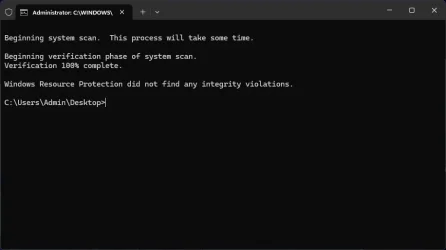
SFC scan:
Screenshot 2026-01-09 210136.webp

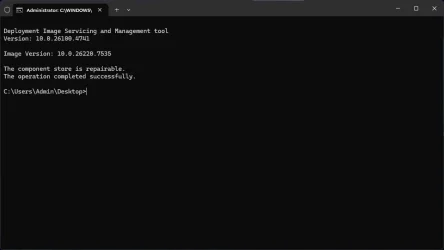
Healthcheck:
Screenshot 2026-01-09 210213.webp

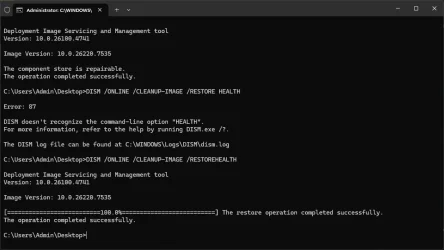
Doing Repair but been stuck on 62.3% for about 30mins now.
Screenshot 2026-01-09 212535.webp

Will post update on any issues, after DISM Restore Health.

UPDATE:
Screenshot 2026-01-09 213653.webp


After DISM restore health still same issues, new run dialog does not work. When enabled pressing WIN+R or running from WIN+X does nothing. When disabled, old one works. Still same issue with flyouts. Still same issue with ejecting drive.

What is MS doing? They had 3 weeks to fix it and nothing was fixed even tho a lot of reports has been made on feedback hub since last dev/beta build.
 
Last edited:

My Computer

System One

  • OS
    Win 11 Pro Insider Beta (26220.8370), Kali Linux
    Computer type
    Laptop
    Manufacturer/Model
    HP Victus 15
    CPU
    AMD Ryzen 5 5600H
    Memory
    16GB (2x8GB) Dual Channel
    Graphics Card(s)
    Nvidia RTX 3050
    Monitor(s) Displays
    1080p IPS 144Hz (Laptop Screen) + 3x 1080p 60Hz screens
    Screen Resolution
    4x 1920x1080 monitors
    Hard Drives
    M.2 NVMe 512GB Samsung - PCIe 4.0x4 - Main system drive

    USB-A and USB-C M.2 NVMe Enclosure with NVMe SSSTC 256GB - NVM Express 1.3 - Ventoy with all install files and all ISO images i use.

    USB External SSD Kingston XS100 1TB - USB 3.2 Gen 2 - WindowsToGo (Clone of my existing Sytem), and all games I play.

    USB External SSHD Seagate FireCuda 2TB - USB 3.0 - For Macrium system images, data, photos, stays always safe at home
    PSU
    200W
    Cooling
    Zalman ZM-NC3 Cooling pad
    Keyboard
    Dell KM7120W
    Mouse
    Dell KM7120W
    Internet Speed
    1Gb/s down / 500Mb/s up
    Browser
    Chrome
    Antivirus
    Windows Defender
Also still having issue with flyouts on taskbar notification icons mentioned here: Flyout issue but that could be AllStartBack issue.

That would be my guess as I've never seen that issue before.
 

My Computers

System One System Two

  • OS
    Windows 11 25H2
    Computer type
    Laptop
    Manufacturer/Model
    Alienware 18 Area-51
    CPU
    Intel Core Ultra 9 275HX (24-Core)
    Motherboard
    Alienware
    Memory
    64GB DDR5 6400MT/s
    Graphics Card(s)
    NVIDIA GeForce RTX 5080 and Intel UHD Graphics
    Sound Card
    Onboard, Realtek high-performance Audio chips (ALC3329 & ALC1708))
    Monitor(s) Displays
    300HZ 18-inch QHD 500 nit Comfort View+
    Screen Resolution
    2560 x 1600
    Hard Drives
    2TB NVMe M.2 PCIe Gen 5 SSD
    Case
    Magnesium Alloy
    Cooling
    Advanced Cryo-Tech Quad-Fan Cooling system & large vapor chamber
    Keyboard
    Cherry MX ultra low profile mechanical keyboard with per key AlienFX RGB lighting
    Mouse
    Logitech MX Master 4
    Browser
    Vivaldi (main), Firefox, Chrome, Edge
    Antivirus
    MS Defender and Malwarebytes Free
  • Operating System
    Windows 11 25H2
    Computer type
    Laptop
    Manufacturer/Model
    Microsoft Surface Laptop 7
    CPU
    Qualcomm Snapdragon X Elite (12 Core) ARM based CPU
    Motherboard
    Microsoft Corp.
    Memory
    16GB LPDDR5
    Graphics card(s)
    Qualcomm Adreno X1-85
    Sound Card
    Omnisonic speakers with Dolby Atmos spatial sound
    Monitor(s) Displays
    120 Hz 13.8-inch 600 nit PixelSense Flow touchscreen
    Screen Resolution
    2304x1536
    Hard Drives
    1TB NVMe Gen 4 SSD
    Case
    Anodized Aluminum
    Cooling
    Traditional active cooling fan system
    Keyboard
    Mechanical QWERTY, backlit when in use
    Mouse
    Logitech MX Master 4 and Surface Arc Mouse
    Browser
    Vivaldi (main), Firefox, Chrome, Edge
    Antivirus
    MS Defender and Malwarebytes Free
That would be my guess as I've never seen that issue before.
But pressing WIN + A woks and also Win + N for notifications. Quoted from this release notes in known issues:

[Taskbar & System Tray]

  • We’re working on the fix for an issue which is causing the Start menu to not open for some Insiders on click, although it will open if you press the Windows key. This issue may also potentially impact the notification center (which you can open with WIN + N) and quick settings (WIN + A).
  • We’re investigating an issue where for some Insiders apps aren’t showing in the system tray when they should be.
  • We’re working on the fix for an issue in the latest builds where, when the taskbar is set to autohide, it might invoke before interacting with the bottom of the screen, blocking the use of apps in that area.
 

My Computer

System One

  • OS
    Win 11 Pro Insider Beta (26220.8370), Kali Linux
    Computer type
    Laptop
    Manufacturer/Model
    HP Victus 15
    CPU
    AMD Ryzen 5 5600H
    Memory
    16GB (2x8GB) Dual Channel
    Graphics Card(s)
    Nvidia RTX 3050
    Monitor(s) Displays
    1080p IPS 144Hz (Laptop Screen) + 3x 1080p 60Hz screens
    Screen Resolution
    4x 1920x1080 monitors
    Hard Drives
    M.2 NVMe 512GB Samsung - PCIe 4.0x4 - Main system drive

    USB-A and USB-C M.2 NVMe Enclosure with NVMe SSSTC 256GB - NVM Express 1.3 - Ventoy with all install files and all ISO images i use.

    USB External SSD Kingston XS100 1TB - USB 3.2 Gen 2 - WindowsToGo (Clone of my existing Sytem), and all games I play.

    USB External SSHD Seagate FireCuda 2TB - USB 3.0 - For Macrium system images, data, photos, stays always safe at home
    PSU
    200W
    Cooling
    Zalman ZM-NC3 Cooling pad
    Keyboard
    Dell KM7120W
    Mouse
    Dell KM7120W
    Internet Speed
    1Gb/s down / 500Mb/s up
    Browser
    Chrome
    Antivirus
    Windows Defender

My Computer

System One

  • OS
    Windows 11 Pro 25H2
    Computer type
    PC/Desktop
    Manufacturer/Model
    Dell XPS 8930
    CPU
    Intel I9-9900K
    Memory
    64GB
    Graphics Card(s)
    NVIDIA RTX 2060
    Sound Card
    NVIDIA High Definition Audio
    Monitor(s) Displays
    4k Samsung
    Screen Resolution
    3840 x 2160
    Hard Drives
    512GB NVMe, ADATA SU 800, 2TB HDD
Thanks, but I don't have that switch for modern Run dialog.
Must be another experimental feature not enabled on my machines. 🤷‍♂️
Oh, I thought you were having the issue with the new Run dialog we were. There is a vivetool code to enable it if you want but since it is now broken you probably don't want to do that.
 

My Computers

System One System Two

  • OS
    Windows 11 25H2
    Computer type
    Laptop
    Manufacturer/Model
    Alienware 18 Area-51
    CPU
    Intel Core Ultra 9 275HX (24-Core)
    Motherboard
    Alienware
    Memory
    64GB DDR5 6400MT/s
    Graphics Card(s)
    NVIDIA GeForce RTX 5080 and Intel UHD Graphics
    Sound Card
    Onboard, Realtek high-performance Audio chips (ALC3329 & ALC1708))
    Monitor(s) Displays
    300HZ 18-inch QHD 500 nit Comfort View+
    Screen Resolution
    2560 x 1600
    Hard Drives
    2TB NVMe M.2 PCIe Gen 5 SSD
    Case
    Magnesium Alloy
    Cooling
    Advanced Cryo-Tech Quad-Fan Cooling system & large vapor chamber
    Keyboard
    Cherry MX ultra low profile mechanical keyboard with per key AlienFX RGB lighting
    Mouse
    Logitech MX Master 4
    Browser
    Vivaldi (main), Firefox, Chrome, Edge
    Antivirus
    MS Defender and Malwarebytes Free
  • Operating System
    Windows 11 25H2
    Computer type
    Laptop
    Manufacturer/Model
    Microsoft Surface Laptop 7
    CPU
    Qualcomm Snapdragon X Elite (12 Core) ARM based CPU
    Motherboard
    Microsoft Corp.
    Memory
    16GB LPDDR5
    Graphics card(s)
    Qualcomm Adreno X1-85
    Sound Card
    Omnisonic speakers with Dolby Atmos spatial sound
    Monitor(s) Displays
    120 Hz 13.8-inch 600 nit PixelSense Flow touchscreen
    Screen Resolution
    2304x1536
    Hard Drives
    1TB NVMe Gen 4 SSD
    Case
    Anodized Aluminum
    Cooling
    Traditional active cooling fan system
    Keyboard
    Mechanical QWERTY, backlit when in use
    Mouse
    Logitech MX Master 4 and Surface Arc Mouse
    Browser
    Vivaldi (main), Firefox, Chrome, Edge
    Antivirus
    MS Defender and Malwarebytes Free
Back
Top Bottom