Insider KB5074157 Windows 11 Insider Dev build 26220.7653 (25H2) - Jan. 21


UPDATE 1/27:


 Windows Insider Blog:

Hello Windows Insiders, today we are releasing Windows 11 Insider Preview Build 26220.7653 (KB5074157) to the Dev Channel which is the same build as the January 16th Windows 11 Insider Preview Build 26220.7653 (Beta Channel) release.

If you are an Insider in the Dev Channel, you now have a window to switch from the Dev Channel to the Beta Channel if you would like. This window is soon closing.

Important: Once we move Dev Channel forward to a higher build number, the opportunity to switch between these channels will close until a future opportunity becomes available.


Changes in Dev Channel builds and updates are documented in two buckets: new features, improvements, and fixes that are being gradually rolled out for Insiders who have turned on the toggle to get the latest updates as they are available (via Settings > Windows Update*) and then new features, improvements, and fixes rolling out to everyone in the Dev Channel. For more information, see the Reminders section at the bottom of this blog post.


Changes and Improvements gradually being rolled out with toggle on*

[Account Settings]

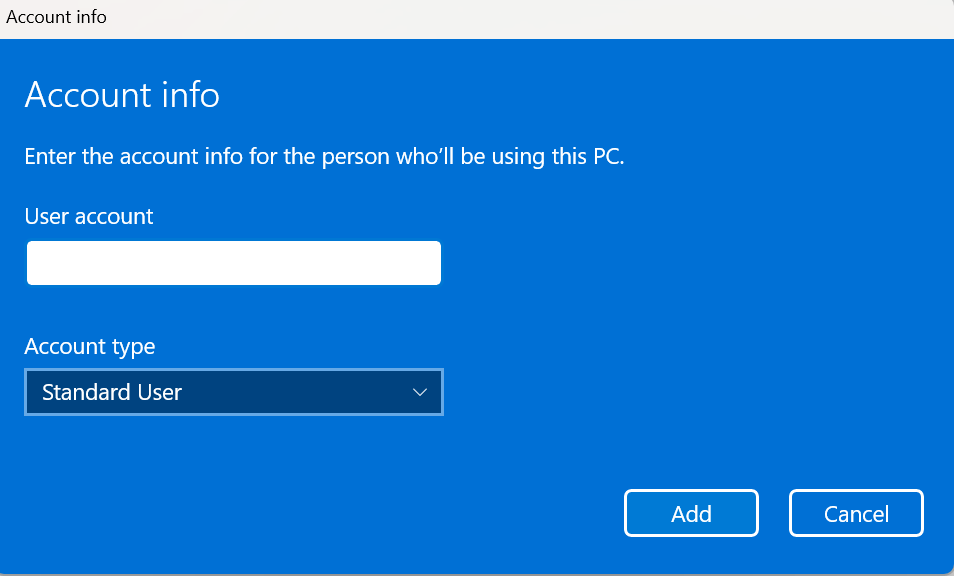
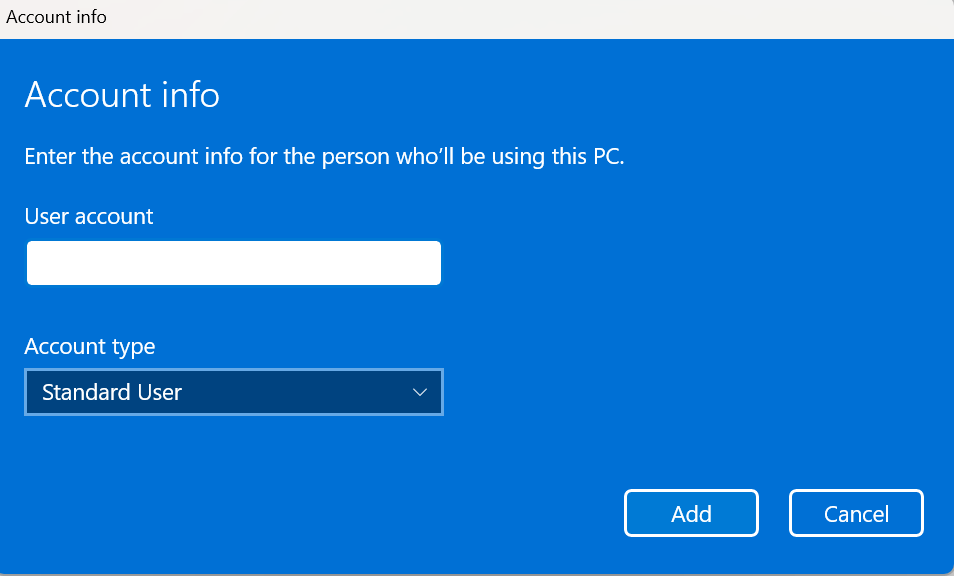
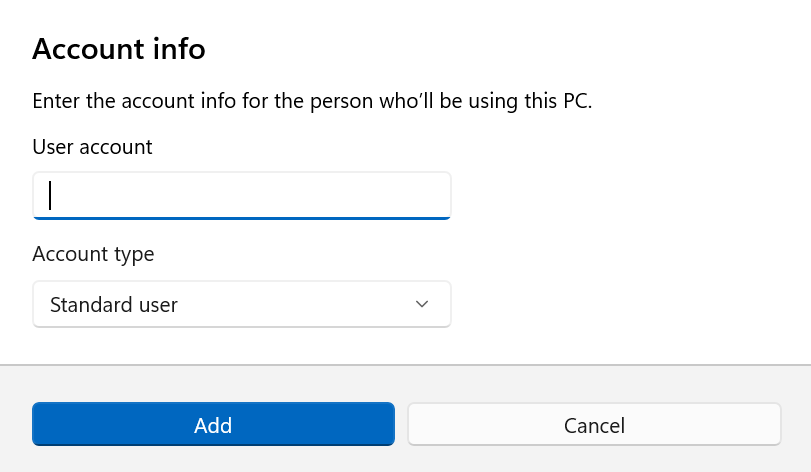
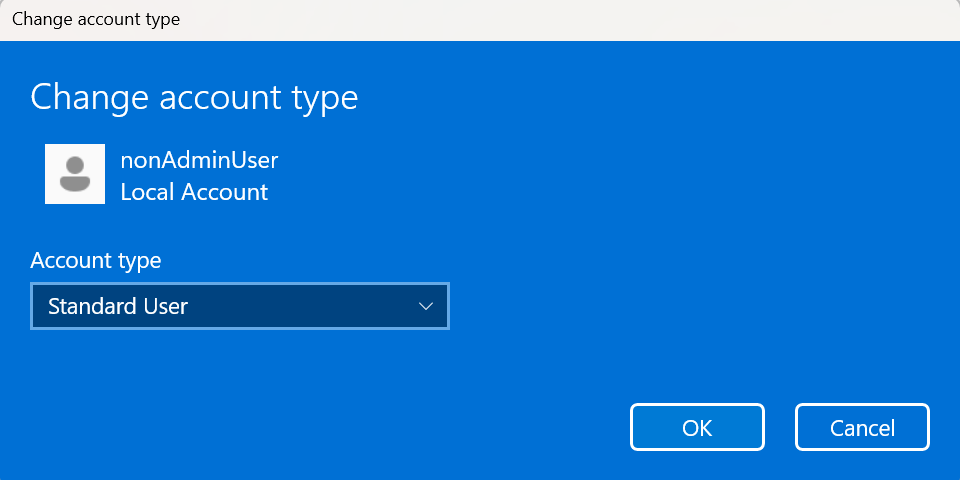
We’re updating the design of dialogs in “Accounts > Other Users” based on modern WinUI framework with support for dark mode:

Old 'Add account' dialog user experience for work or school users.
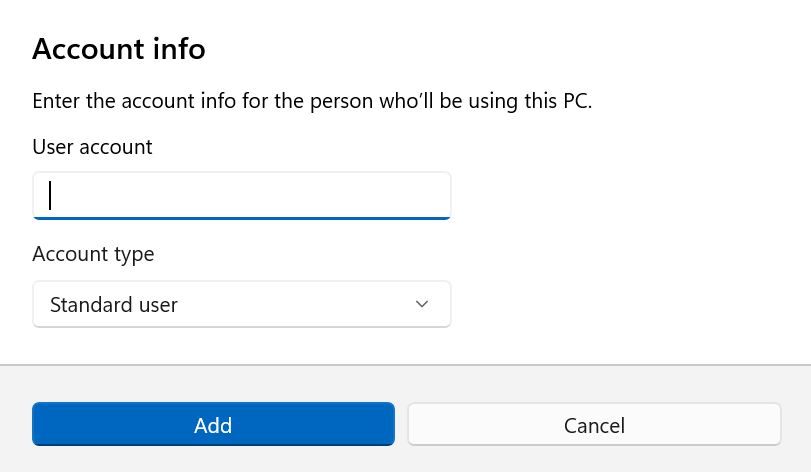
Old ‘Add account’ dialog user experience for work or school users.

New 'Add account' dialog user experience for work or school users.
New ‘Add account’ dialog user experience for work or school users.

Please note that the visibility of the above dialog option depends on whether a domain joined work or school account is configured on the device.
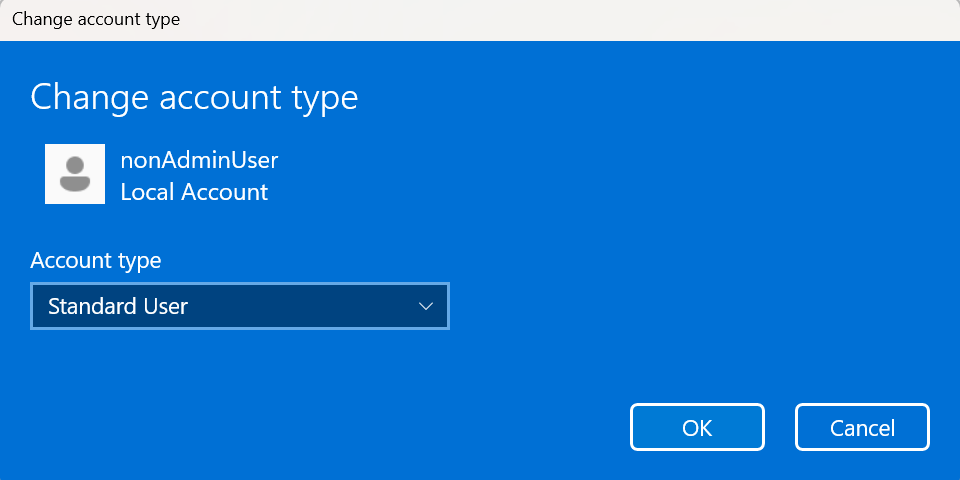
Old 'Change account type' dialog user experience for other users present on the device.
Old ‘Change account type’ dialog user experience for other users present on the device.
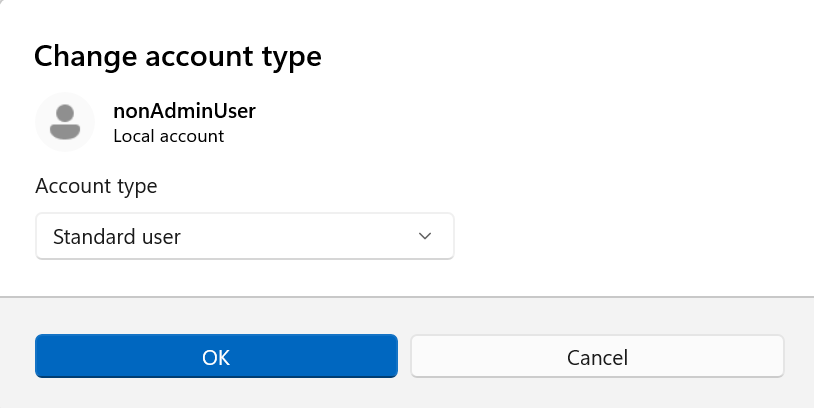
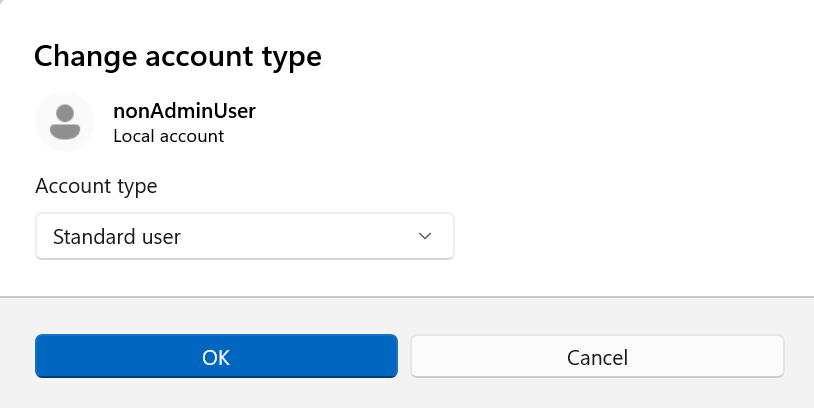
New 'Change account type' dialog user experience for other users present on the device.
New ‘Change account type’ dialog user experience for other users present on the device.

Feedback: Please share your feedback in Feedback Hub (WIN + F) under “Settings -> User Profile Account Settings.

[Click to Do]

  • The Copilot prompt suggestions in Click to Do will now load instantly. This change is not yet rolling out to Windows Insiders in the EEA (European Economic Area) or China.

[Desktop Background]

  • You can now set .webp images for your desktop background in Settings > Personalization > Desktop Background.

Fixes gradually being rolled out with toggle on*

[Taskbar and System Tray]

  • Fixed an issue in the latest builds where, when the taskbar was set to autohide, it might invoke before interacting with the bottom of the screen, blocking the use of apps in that area.
  • Fixed a recent issue which was causing the Start menu, notification center, and quick settings to not open on click sometimes, although using the keyboard shortcuts for each of these still worked.

[Start menu]

  • Fixed a memory leak when opening the Start menu, which could lead to performance issues over time.
  • Fixed an issue for Arabic and Hebrew users, where Start menu was opening on the wrong side of the screen when the taskbar icons weren’t centered.
  • Fixed an issue where if you opened a folder of pinned apps in Start menu and tried to pan it with touch, it would dismiss Start menu.

[Bluetooth]

  • Fixed an issue causing Bluetooth device battery level to not show for some Insiders after the latest builds, even though the devices supported it.

[Xbox full screen experience for PC]

  • This build fixes some unexpected app and game behavior when using FSE. We’re continuing to validate scenarios and as such keeping the known issue active for now. Thank you Insiders that have been sharing feedback!

[Login and Lock Screens]

  • Fixed an issue which could cause the password icon to appear blank on the login screen.

[Settings]

  • Fixed an issue causing Settings to crash when interacting with audio devices in the last two builds.
  • Fixed an issue where the keyboard character repeat delay in Settings > Bluetooth & Devices > Keyboard was backwards from how it was set in the backend.

[Other]

  • Fixed a few issues with clipped text in msinfo32 when using a high display scaling.
  • Fixed an issue impacting some Insiders where clicking on .appinstaller files to install MSIX packages was unexpectedly failing with an invalid argument error.
  • Fixed an underlying issue which was causing Notepad to not display an underscore in text with certain fonts when your display was set to 125%.
  • Fixed an underlying issue which could cause explorer.exe to hang when first logging into your PC, if certain apps were configured as startup apps. This could make the taskbar not appear.

Known issues

[Xbox full screen experience for PC]

  • Some apps may behave unexpectedly when using FSE, particularly those that expect to be locked to a given size or launch additional windows.

[Taskbar & System Tray]

  • We’re investigating an issue where for some Insiders apps aren’t showing in the system tray when they should be.

[Display & Graphics]

  • [NEW] We’re working on the fix for an issue causing secondary monitors to not display correctly and show black screens after the latest updates for a small number of Insiders.

[Click to Do]

  • We’re working on the fix for an issue where the Microsoft 365 Copilot prompt box on selected images does not function if the Microsoft 365 Copilot app is not running.

Reminders for Windows Insiders in the Dev Channel

  • Updates are based on Windows 11, version 25H2 via an enablement package (Build 26220.xxxx).
  • Many features are rolled out using Controlled Feature Rollout technology, starting with a subset of Insiders and ramping up over time as we monitor feedback to see how they land before pushing them out to everyone in this channel.
  • For Windows Insiders who want to be the first to get features gradually rolled out to you, you can turn ON the toggle to get the latest updates as they are available via Settings > Windows Update*. Over time, we will increase the rollouts of features to everyone with the toggle turned on. Should you keep this toggle off, new features will gradually be rolled out to your PC over time once they are ready.
  • Features and experiences included in these builds may never get released as we try out different concepts and get feedback. Features may change over time, be removed, or replaced and never get released beyond Windows Insiders. Some of these features and experiences could show up in future Windows releases when they’re ready.
  • Some features in active development we preview with Windows Insiders may not be fully localized and localization will happen over time as features are finalized. As you see issues with localization in your language, please report those issues to us via Feedback Hub.
  • Check out Flight Hub for a complete look at what build is in which Insider channel.
Thanks,
Windows Insider Program Team


 Source:


Check Windows Updates


UUP Dump:

64-bit ISO download:

ARM64 ISO download:

 
Last edited:
  • Like
Reactions: OAT
I didn't touch a thing. Mine did it all on its own.
I think it depends on the machines and the UEFI BIOS update they have.
I had to do mine manually.
 

My Computer

System One

  • OS
    Windows 11 Pro 25H2
    Computer type
    PC/Desktop
    Manufacturer/Model
    Dell XPS 8930
    CPU
    Intel I9-9900K
    Memory
    64GB
    Graphics Card(s)
    NVIDIA RTX 2060
    Sound Card
    NVIDIA High Definition Audio
    Monitor(s) Displays
    4k Samsung
    Screen Resolution
    3840 x 2160
    Hard Drives
    512GB NVMe, ADATA SU 800, 2TB HDD

My Computers

System One System Two

  • OS
    Windows 11 Home
    Computer type
    Laptop
    Manufacturer/Model
    Acer Aspire 3 A315-23-R9VY
    CPU
    AMD Athlon Silver 3050U
    Memory
    8GB
    Graphics Card(s)
    Radeon Graphics
    Monitor(s) Displays
    laptop screen
    Screen Resolution
    1366x768 native resolution, up to 2560x1440 with Radeon Virtual Super Resolution
    Hard Drives
    1TB Samsung EVO 870 SSD (from April 2026: 250GB EVO 850)
    Internet Speed
    150 Mbps
    Browser
    Edge, Firefox
    Antivirus
    Defender
    Other Info
    fully 'Windows 11 ready' laptop. Windows 10 C: partition migrated from my old unsupported 'main machine' then upgraded to 11. A test migration ran Insider builds for 2 months. When 11 was released on 5th October 2021 it was re-imaged back to 10 and was offered the upgrade in Windows Update on 20th October. Windows Update offered the 22H2 Feature Update on 20th September 2022. It got the 23H2 Feature Update on 4th November 2023 through Windows Update, 24H2 on 3rd October 2024 through Windows Update by setting the Target Release Version for 24H2, and 25H2 on 30th September 2025 through Windows Update by setting the Target Release Version for 25H2.

    UPDATE - 11 April 2026: due to mechanical deterioration this PC has been retired from active duty. The OS with all software and files has been migrated to my System Seven below to carry on as my general purpose 'main machine'.

    My SYSTEM THREE is a Dell Latitude 5410, i7-10610U, 32GB RAM, 512GB NVMe ssd, supported device running Windows 11 Pro.

    My SYSTEM FOUR is a 2-in-1 convertible Lenovo Yoga 11e 20DA, Celeron N2930, 8GB RAM, 256GB ssd. Unsupported device: currently running Win10 Pro, plus Win11 Pro RTM and Insider Dev, Beta, and RP 24H2 as native boot vhdx.

    My SYSTEM FIVE is a Dell Latitude 3190 2-in-1, Pentium Silver N5030, 8GB RAM, 1TB NVMe ssd, supported device running Windows 11 Pro, plus Insider Beta, Dev, and Canary builds (and a few others) as a native boot .vhdx.

    My SYSTEM SIX is a Dell Latitude 5550, Core Ultra 7 165H, 64GB RAM, 1TB NVMe SSD, supported device, Windows 11 Pro 24H2, Hyper-V host machine. Updated to 25H2 on 30th September 2025.

    My SYSTEM SEVEN is a Lenovo Thinkpad T580, Intel Core i7-8650U, 16GB RAM, 512GB NVMe SSD + 2nd 512GB NVMe SSD, a supported device for Windows 11. This is my current general purpose 'main machine'. The installed Windows 11 Home from my System One has been migrated to this machine.
  • Operating System
    Windows 11 Pro
    Computer type
    Laptop
    Manufacturer/Model
    Dell Latitude E4310
    CPU
    Intel® Core™ i5-520M
    Motherboard
    0T6M8G
    Memory
    8GB
    Graphics card(s)
    (integrated graphics) Intel HD Graphics
    Screen Resolution
    1366x768
    Hard Drives
    500GB Crucial MX500 SSD
    Browser
    Firefox, Edge
    Antivirus
    Defender
    Other Info
    unsupported machine: Legacy bios, MBR, TPM 1.2, upgraded from W10 to W11 using W10/W11 hybrid install media workaround. In-place upgrade to 22H2 using ISO and a workaround. Feature Update to 23H2 by manually installing the Enablement Package. In-place upgrade to 24H2 using hybrid 23H2/24H2 install media. Upgraded to 25H2 by Enablement Package. Also running Insider Dev, and Canary builds and Windows 10 as native boot .vhdx.

    My SYSTEM THREE is a Dell Latitude 5410, i7-10610U, 32GB RAM, 512GB NVMe ssd, supported device running Windows 11 Pro.

    My SYSTEM FOUR is a 2-in-1 convertible Lenovo Yoga 11e 20DA, Celeron N2930, 8GB RAM, 256GB ssd. Unsupported device: currently running Win10 Pro, plus Win11 Pro RTM and Insider Dev, Beta, and RP 24H2 as native boot vhdx.

    My SYSTEM FIVE is a Dell Latitude 3190 2-in-1, Pentium Silver N5030, 8GB RAM, 1TB NVMe ssd, supported device running Windows 11 Pro, plus Insider Beta, Dev, and Canary builds (and a few others) as a native boot .vhdx.

    My SYSTEM SIX is a Dell Latitude 5550, Core Ultra 7 165H, 64GB RAM, 1TB NVMe SSD, supported device, Windows 11 Pro 24H2, Hyper-V host machine. Updated to 25H2 on 30th September 2025.

    My SYSTEM SEVEN is a Lenovo Thinkpad T580, Intel Core i7-8650U, 16GB RAM, 512GB NVMe SSD + 2nd 512GB NVMe SSD, a supported device for Windows 11. This is my current general purpose 'main machine'. The installed Windows 11 Home from my System One has been migrated to this machine.
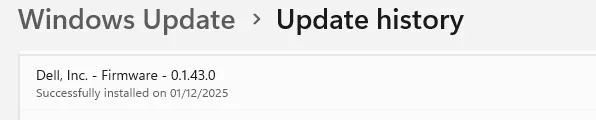
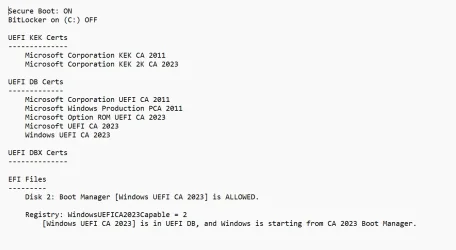
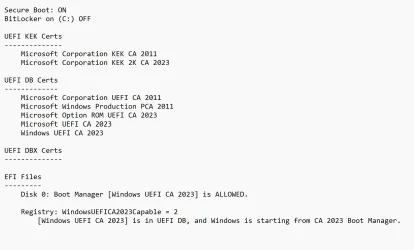
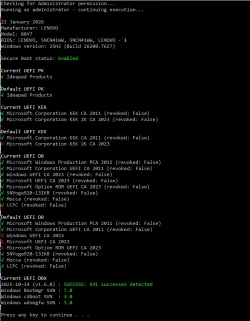
The system is a Dell Latitude 3190 2-in-1. Dell have been releasing BIOS updates for it with 2023 certificates since September 2025. Mine got its first BIOS with the new certificates through Windows Update at the beginning of December 2025.

View attachment 160796

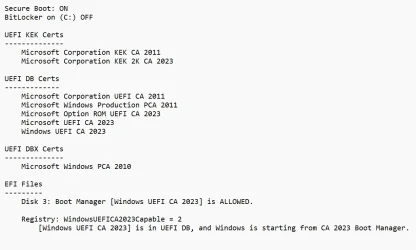
View attachment 160799View attachment 160795
Dell Latitude 3190 and 3190 2-in-1 System BIOS | Driver Details | Dell US
Different story with Dell XPS 8930 and DELL XPS 8940.
I think they were on the Dell list of the machines that were not getting CA 2023 updates.
Last update for Dell XPS 8940 was released on April 03, 2025. Dell XPS 8930 BIOS is even older, Nov 21, 2023
Maybe they'll change their mind if more users start complaining, but I would not bet on it. 🤷‍♂️


1769128182447.webp

1769128232457.webp

1769130188665.webp
 
Last edited:

My Computer

System One

  • OS
    Windows 11 Pro 25H2
    Computer type
    PC/Desktop
    Manufacturer/Model
    Dell XPS 8930
    CPU
    Intel I9-9900K
    Memory
    64GB
    Graphics Card(s)
    NVIDIA RTX 2060
    Sound Card
    NVIDIA High Definition Audio
    Monitor(s) Displays
    4k Samsung
    Screen Resolution
    3840 x 2160
    Hard Drives
    512GB NVMe, ADATA SU 800, 2TB HDD
Different story with Dell XPS 8930 and DELL XPS 8940.
I think they were on the Dell list of the machines that were not getting CA 2023 updates.
While the XPS 8950 and XPS 8960 are on the list. Keep checking, you may get lucky....

Note: All Dell Client BIOSes released after January 01, 2026 will contain the 2023 Secure Boot Certificates and will not be added to the list below.


The following platforms contain the new certificates:

Note: Dell updates these tables monthly, as additional computers are added.


...then again, maybe not :(

If your system shipped before 2020, or it is in the following list, there is no plan for BIOS updates with the 2023 certificates included.
 

My Computers

System One System Two

  • OS
    Windows 11 Home
    Computer type
    Laptop
    Manufacturer/Model
    Acer Aspire 3 A315-23-R9VY
    CPU
    AMD Athlon Silver 3050U
    Memory
    8GB
    Graphics Card(s)
    Radeon Graphics
    Monitor(s) Displays
    laptop screen
    Screen Resolution
    1366x768 native resolution, up to 2560x1440 with Radeon Virtual Super Resolution
    Hard Drives
    1TB Samsung EVO 870 SSD (from April 2026: 250GB EVO 850)
    Internet Speed
    150 Mbps
    Browser
    Edge, Firefox
    Antivirus
    Defender
    Other Info
    fully 'Windows 11 ready' laptop. Windows 10 C: partition migrated from my old unsupported 'main machine' then upgraded to 11. A test migration ran Insider builds for 2 months. When 11 was released on 5th October 2021 it was re-imaged back to 10 and was offered the upgrade in Windows Update on 20th October. Windows Update offered the 22H2 Feature Update on 20th September 2022. It got the 23H2 Feature Update on 4th November 2023 through Windows Update, 24H2 on 3rd October 2024 through Windows Update by setting the Target Release Version for 24H2, and 25H2 on 30th September 2025 through Windows Update by setting the Target Release Version for 25H2.

    UPDATE - 11 April 2026: due to mechanical deterioration this PC has been retired from active duty. The OS with all software and files has been migrated to my System Seven below to carry on as my general purpose 'main machine'.

    My SYSTEM THREE is a Dell Latitude 5410, i7-10610U, 32GB RAM, 512GB NVMe ssd, supported device running Windows 11 Pro.

    My SYSTEM FOUR is a 2-in-1 convertible Lenovo Yoga 11e 20DA, Celeron N2930, 8GB RAM, 256GB ssd. Unsupported device: currently running Win10 Pro, plus Win11 Pro RTM and Insider Dev, Beta, and RP 24H2 as native boot vhdx.

    My SYSTEM FIVE is a Dell Latitude 3190 2-in-1, Pentium Silver N5030, 8GB RAM, 1TB NVMe ssd, supported device running Windows 11 Pro, plus Insider Beta, Dev, and Canary builds (and a few others) as a native boot .vhdx.

    My SYSTEM SIX is a Dell Latitude 5550, Core Ultra 7 165H, 64GB RAM, 1TB NVMe SSD, supported device, Windows 11 Pro 24H2, Hyper-V host machine. Updated to 25H2 on 30th September 2025.

    My SYSTEM SEVEN is a Lenovo Thinkpad T580, Intel Core i7-8650U, 16GB RAM, 512GB NVMe SSD + 2nd 512GB NVMe SSD, a supported device for Windows 11. This is my current general purpose 'main machine'. The installed Windows 11 Home from my System One has been migrated to this machine.
  • Operating System
    Windows 11 Pro
    Computer type
    Laptop
    Manufacturer/Model
    Dell Latitude E4310
    CPU
    Intel® Core™ i5-520M
    Motherboard
    0T6M8G
    Memory
    8GB
    Graphics card(s)
    (integrated graphics) Intel HD Graphics
    Screen Resolution
    1366x768
    Hard Drives
    500GB Crucial MX500 SSD
    Browser
    Firefox, Edge
    Antivirus
    Defender
    Other Info
    unsupported machine: Legacy bios, MBR, TPM 1.2, upgraded from W10 to W11 using W10/W11 hybrid install media workaround. In-place upgrade to 22H2 using ISO and a workaround. Feature Update to 23H2 by manually installing the Enablement Package. In-place upgrade to 24H2 using hybrid 23H2/24H2 install media. Upgraded to 25H2 by Enablement Package. Also running Insider Dev, and Canary builds and Windows 10 as native boot .vhdx.

    My SYSTEM THREE is a Dell Latitude 5410, i7-10610U, 32GB RAM, 512GB NVMe ssd, supported device running Windows 11 Pro.

    My SYSTEM FOUR is a 2-in-1 convertible Lenovo Yoga 11e 20DA, Celeron N2930, 8GB RAM, 256GB ssd. Unsupported device: currently running Win10 Pro, plus Win11 Pro RTM and Insider Dev, Beta, and RP 24H2 as native boot vhdx.

    My SYSTEM FIVE is a Dell Latitude 3190 2-in-1, Pentium Silver N5030, 8GB RAM, 1TB NVMe ssd, supported device running Windows 11 Pro, plus Insider Beta, Dev, and Canary builds (and a few others) as a native boot .vhdx.

    My SYSTEM SIX is a Dell Latitude 5550, Core Ultra 7 165H, 64GB RAM, 1TB NVMe SSD, supported device, Windows 11 Pro 24H2, Hyper-V host machine. Updated to 25H2 on 30th September 2025.

    My SYSTEM SEVEN is a Lenovo Thinkpad T580, Intel Core i7-8650U, 16GB RAM, 512GB NVMe SSD + 2nd 512GB NVMe SSD, a supported device for Windows 11. This is my current general purpose 'main machine'. The installed Windows 11 Home from my System One has been migrated to this machine.
Last edited:

My Computer

System One

  • OS
    Windows 11 Pro 25H2
    Computer type
    PC/Desktop
    Manufacturer/Model
    Dell XPS 8930
    CPU
    Intel I9-9900K
    Memory
    64GB
    Graphics Card(s)
    NVIDIA RTX 2060
    Sound Card
    NVIDIA High Definition Audio
    Monitor(s) Displays
    4k Samsung
    Screen Resolution
    3840 x 2160
    Hard Drives
    512GB NVMe, ADATA SU 800, 2TB HDD
The resume button was present in settings, personalization, and taskbar with version 26220.7535, but disappeared during this update 26220.7653.
Do you have any information?

I no longer have access to ViveTool since this update; access is denied.
 

My Computer

System One

  • OS
    Windows 11 Pro 25H2
    Computer type
    Laptop
I've never bothered with Secure boot -- why on earth you need it on domestic computers is a mystery to me -- domestic machines are decently protected with current versions of Windows defender -- other problems arise from being susceptible / victims of scams and / or giving out too much personal info over social media etc.

You can install Windows without secure boot .

For businesses and other corporate networked machines then this could be important -- but for home machines -- why make things more complex when they don't really add anything of value.

I feel the same about bitlocker too. If you need data encryption for specific data just store the stuff off line or on a secure cloud account. Again why on earth make things more complicated for yourselves when the end result doesn't really add anything other than aggro if things go wrong / need to be repaired / data recovered etc. Windows is complex enough for most without making it even more so.


Cheers
jimbo
 

My Computer

System One

  • OS
    Windows XP,11 Linux Fedora Rawhide pre-release 45
    Computer type
    PC/Desktop
    CPU
    2 X Intel i7
    Screen Resolution
    4KUHD X 2
Hello, I wanted to download an iso with this build of Windows 11, version 25H2 (26200.7634 via uup but after creating the image it shows a completely different build why can't I create this iso image of Windows 11 25H2 (26200.7634?
 

My Computer

System One

  • OS
    Windows 11
    Computer type
    PC/Desktop
    CPU
    Intel Core i7-9700F, 4500 MHz
    Motherboard
    ASRock B365M-HDV
    Memory
    16 GB DDR4
    Graphics Card(s)
    GeForce GTX 1070 (8 GB)
    Sound Card
    Realtek ALC887 @ Intel Kaby Point PCH - High Definition Audio
    Monitor(s) Displays
    Samsung 32 cale
    Screen Resolution
    1680 x 1050
    Hard Drives
    Dysk nr 1 - Patriot Burst (B5950791083400100449) [894 GB] D: E:
    Dysk nr 2 - SAMSUNG MZVLB256HBHQ-000L2 (0025_3889_91CB_C6D1.) [238 GB] C: F: G:
    Keyboard
    roccat
Hello, I wanted to download an iso with this build of Windows 11, version 25H2 (26200.7634 via uup but after creating the image it shows a completely different build why can't I create this iso image of Windows 11 25H2 (26200.7634?
The same thing. The 1st time was 26200.1742, the 2nd time was 26200.7628.
 

My Computer

System One

  • OS
    Windows 11 Stable, Beta, Dev, Canary
    Computer type
    PC/Desktop
    Manufacturer/Model
    Micro-Star International Co., Ltd. MS-7D54
    CPU
    AMD Ryzen 9 PRO 5950X
    Motherboard
    MSI MAG X570S Tomahawk Max WiFi (MS-7D54) (2 PCI-E x1, 2 PCI-E x16, 2 M.2, 4 DDR4 DIMM, Audio, Video, 2.5GbE LAN, WiFi)
    Memory
    128 Gb
    Graphics Card(s)
    Intel(R) Arc(TM) A380 Graphics (2 ГБ)
    Sound Card
    Устройство с поддержкой High Definition Audio
    Monitor(s) Displays
    HP X34 [34" LCD] (6CM1300J5J) {2021}
    Screen Resolution
    3440x1440
    Hard Drives
    KINGSTON SFYRD2000G (2000 ГБ, PCI-E 4.0 x4)
    PSU
    Be Quiet! Dark Rock Pro 4
    Case
    Cooler Master HAF XB EVO
    Internet Speed
    1000 Mb/s
    Browser
    Chrome
    Antivirus
    Windows Defender

My Computer

System One

  • OS
    Windows 11
    Computer type
    PC/Desktop
    CPU
    Intel Core i7-9700F, 4500 MHz
    Motherboard
    ASRock B365M-HDV
    Memory
    16 GB DDR4
    Graphics Card(s)
    GeForce GTX 1070 (8 GB)
    Sound Card
    Realtek ALC887 @ Intel Kaby Point PCH - High Definition Audio
    Monitor(s) Displays
    Samsung 32 cale
    Screen Resolution
    1680 x 1050
    Hard Drives
    Dysk nr 1 - Patriot Burst (B5950791083400100449) [894 GB] D: E:
    Dysk nr 2 - SAMSUNG MZVLB256HBHQ-000L2 (0025_3889_91CB_C6D1.) [238 GB] C: F: G:
    Keyboard
    roccat
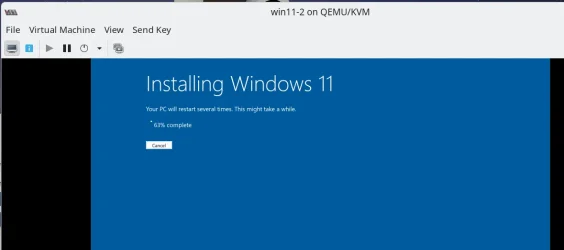
This update isn't offered so far on a VM I installed on a Linux host with KVM/QEMU == I suspect because I had Virtio as the disk I/O subsystem (very much quicker) rather than SATA Windows probably got its knickers in a twist.

Updating from the ISO from UUPDUMP though seems to be OK so far. Using a spare HP laptop for this.

Screenshot_20260127_105653.webp
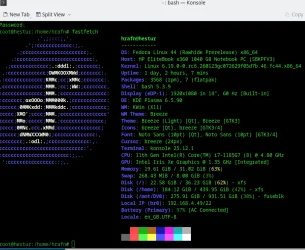
Host machine :

Screenshot_20260127_105911.webp

Note 16 GB RAM dedicated to the running Windows VM so the Host is only using around 3-4GB !!!! -- Another plus for Linux Hosts when running Windows VM's - far better than Vbox or Vmware and far more flexible than Hyper-V (good too BTW).

Cheers
jimbo
 

My Computer

System One

  • OS
    Windows XP,11 Linux Fedora Rawhide pre-release 45
    Computer type
    PC/Desktop
    CPU
    2 X Intel i7
    Screen Resolution
    4KUHD X 2
 

My Computers

System One System Two

  • OS
    Windows 11 Pro for Workstations
    Computer type
    PC/Desktop
    Manufacturer/Model
    Custom self build
    CPU
    Intel i7-8700K 5 GHz
    Motherboard
    ASUS ROG Maximus XI Formula Z390
    Memory
    64 GB (4x16GB) G.SKILL TridentZ RGB DDR4 3600 MHz (F4-3600C18D-32GTZR)
    Graphics Card(s)
    ASUS ROG-STRIX-GTX1080TI-O11G-GAMING (11GB GDDR5X)
    Sound Card
    Integrated Digital Audio (S/PDIF)
    Monitor(s) Displays
    2 x Samsung Odyssey G75 27"
    Screen Resolution
    2560x1440
    Hard Drives
    1TB Samsung 990 PRO M.2,
    4TB Samsung 990 PRO M.2,
    TerraMaster F8 SSD Plus NAS
    PSU
    Seasonic Prime Titanium 850W
    Case
    Thermaltake Core P3 wall mounted
    Cooling
    Corsair Hydro H115i
    Keyboard
    Amazon Basics Wired Full Keyboard MD005
    Mouse
    Logitech MX Master 4
    Internet Speed
    2 Gbps Download and 100 Mbps Upload
    Browser
    Chrome and Edge
    Antivirus
    Microsoft Defender
    Other Info
    Logitech Z625 speaker system,
    Logitech BRIO 4K Pro webcam,
    HP Color LaserJet Pro MFP M477fdn,
    CyberPower CP1500PFCLCD
    Galaxy S23 Plus phone
  • Operating System
    Windows 11 Pro
    Computer type
    Laptop
    Manufacturer/Model
    Surface Laptop 7 Copilot+ PC
    CPU
    Snapdragon X Elite (12 core) 3.42 GHz
    Memory
    16 GB LPDDR5x-7467 MHz
    Monitor(s) Displays
    15" HDR
    Screen Resolution
    2496 x 1664
    Hard Drives
    1 TB SSD
    Internet Speed
    Wi-Fi 7 and Bluetooth 5.4
    Browser
    Chrome and Edge
    Antivirus
    Microsoft Defender
Back
Top Bottom