UPDATE 3/13:
 www.elevenforum.com
Hello Windows Insiders, today we are releasing Windows 11 Insider Preview Build 26220.7961 (KB 5079382) to the Beta Channel.
Changes in Beta Channel builds and updates are documented in two buckets: new features, and improvements (including notable fixes) that are being gradually rolled out for Insiders who have turned on the toggle to get the latest updates as they are available (via Settings > Windows Update*) and then new features, and improvements (including notable fixes) rolling out to everyone in the Beta Channel. For more information, see the Reminders section at the bottom of this blog post.
 www.elevenforum.com
 www.elevenforum.com
 www.elevenforum.com
Windows Insider Program Team

 blogs.windows.com
Check Windows Updates
UUP Dump:
64-bit ISO download:

ARM64 ISO download:
 www.elevenforum.com
KB5079458 Windows 11 Insider Beta build 26220.8062 (25H2) - March 13
Windows Insider Blog: Source: https://blogs.windows.com/windows-insider/2026/03/13/announcing-windows-11-insider-preview-build-26220-8062-beta-channel/ Check Windows Updates UUP Dump: 64-bit ISO download: https://uupdump.net/selectlang.php?id=b529caa1-a907-4a01-b123-7e42cfc5e9bf ARM64...
www.elevenforum.com
Windows Insider Blog:
Hello Windows Insiders, today we are releasing Windows 11 Insider Preview Build 26220.7961 (KB 5079382) to the Beta Channel.
Changes in Beta Channel builds and updates are documented in two buckets: new features, and improvements (including notable fixes) that are being gradually rolled out for Insiders who have turned on the toggle to get the latest updates as they are available (via Settings > Windows Update*) and then new features, and improvements (including notable fixes) rolling out to everyone in the Beta Channel. For more information, see the Reminders section at the bottom of this blog post.
Enable or Disable Get Latest Updates as soon as available in Windows 11
This tutorial will show you how to turn on or off "Get the latest updates as soon as they are available" in Windows 11. Starting with Windows 11 build 22621.1635, Microsoft added a new "Get the latest updates as soon as they are available" toggle under Settings > Windows Update. When you turn...
www.elevenforum.com
New features gradually being rolled out with toggle on*
[Administrator Protection]
Administrator protection is being re-enabled and aims to protect free floating admin rights for administrator users, allowing them to still perform all admin functions with just-in-time admin privileges. This feature is OFF by default and can be enabled via OMA-URI in Intune or via group policy.
Enable or Disable Administrator Protection for Admin Approval Mode in Windows 11
This tutorial will show you how to enable or disable Administrator Protection for admin approval mode elevations in Windows 11. Starting with Windows 11 build 26100.9278 (24H2), build 26200.9278 (25H2), and build 2800.3086 (26H1), Administrator protection aims to protect free-floating admin...
www.elevenforum.com
Changes and Improvements gradually being rolled out with toggle on*
[Sharing]
Based on feedback we’re making some refinements to drag tray, using a smaller peek view to reduce accidental invocation and make it easier to dismiss when interacting near the top of the screen.
Enable or Disable Drop Tray in Windows 11
This tutorial will show you how to enable or disable the Drag/Drop Tray feature for your account in Windows 11. Starting with Windows 11 build 26100.4202 (24H2) and build 22631.5413 (23H2), sharing files in Windows is getting a lot easier and quicker with the Drag Tray feature. When you start...
www.elevenforum.com
[File Explorer]
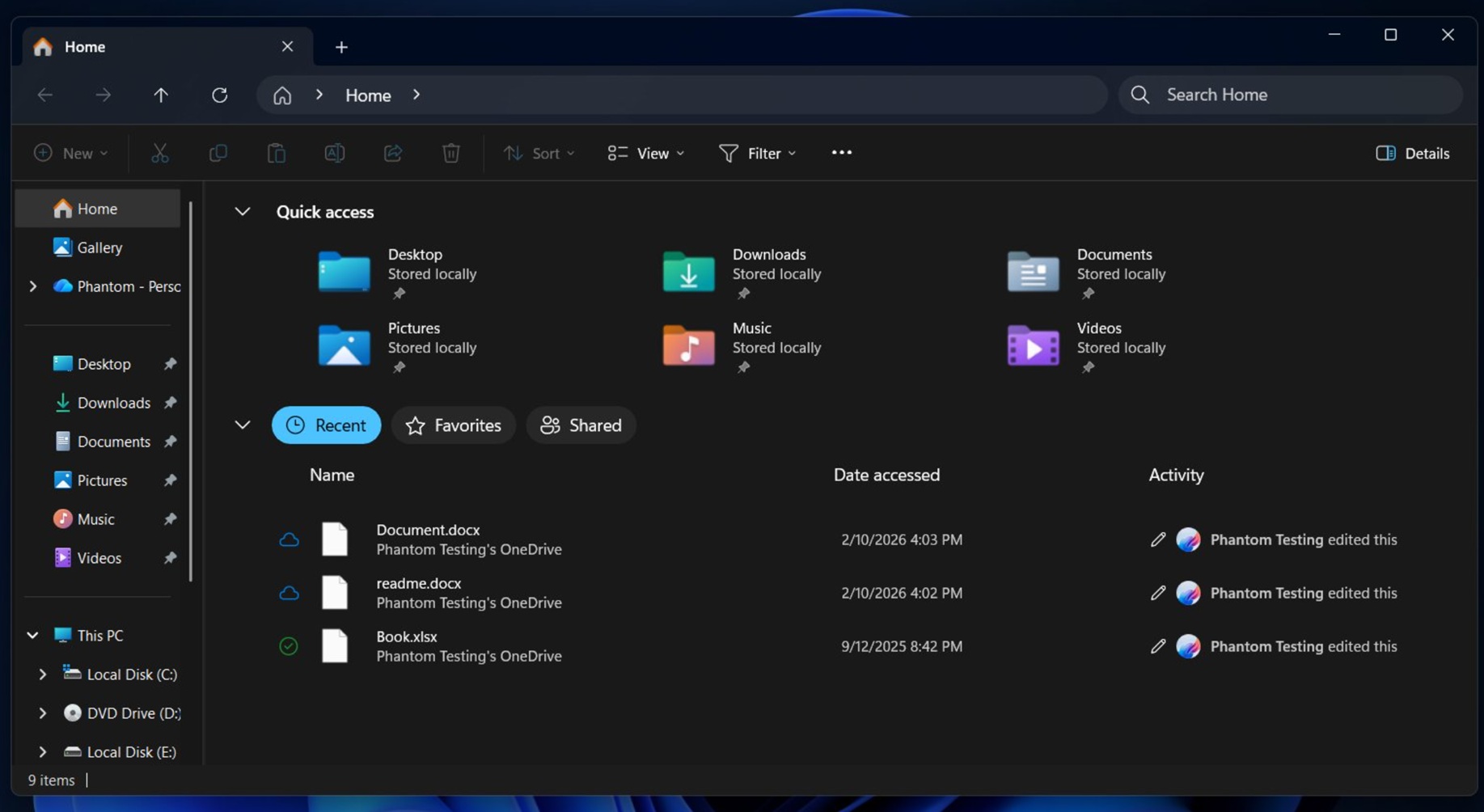
- You can now use voice typing (Windows key plus H) when renaming files in File Explorer.

Rename File in Windows 11
This tutorial will show you different ways to rename a file to what you want in Window 11. A file name can't contain any of the following characters: \ / : * ? " < > | If you rename more than one file at the same time, the name of each file will be the same and numbered in order like: new file...
www.elevenforum.com
- Removed white flash when launching new File Explorer windows or tabs when File Explorer was set to open to This PC. Also removed white flashes when resizing elements of File Explorer.
- Improved reliability of unblocking files downloaded from the internet in order to preview them in File Explorer.

Unblock File Downloaded from Internet in Windows 11
This tutorial will show you different ways on how to unblock files downloaded from the Internet depending on how they were blocked in Windows 11. When you download files from the Internet, Windows 11 shows you a security warning every time you try to open it by default. Some file types are...
www.elevenforum.com
Reminders for Windows Insiders in the Beta Channel
- Updates are based on Windows 11, version 25H2 via an enablement package (Build 26220.7961).
- Many features are rolled out using Controlled Feature Rollout technology, starting with a subset of Insiders and ramping up over time as we monitor feedback to see how they land before pushing them out to everyone in this channel.
- The desktop watermark shown at the lower right corner of the desktop is normal for Windows Insider pre-release builds.
- For Windows Insiders who want to be the first to get features gradually rolled out to you, you can turn ON the toggle to get the latest updates as they are available via Settings > Windows Update*. Over time, we will increase the rollouts of features to everyone with the toggle turned on. Should you keep this toggle off, new features will gradually be rolled out to your PC over time once they are ready.
- Features and experiences included in these builds may never get released as we try out different concepts and get feedback. Features may change over time, be removed, or replaced and never get released beyond Windows Insiders. Some of these features and experiences could show up in future Windows releases when they’re ready.
- Some features in active development we preview with Windows Insiders may not be fully localized and localization will happen over time as features are finalized. As you see issues with localization in your language, please report those issues to us via Feedback Hub.
- Check out Flight Hub for a complete look at what build is in which Insider channel.
Windows Insider Program Team
Source:
Announcing Windows 11 Insider Preview Build 26220.7961 (Beta Channel)
Hello Windows Insiders, today we are releasing Windows 11 Insider Preview Build 26220.7961 (KB 5079382) to the Beta Channel. Changes in Beta Channel builds and updates are documented in two buckets: new features, and improvements (i
blogs.windows.com
Check Windows Updates
UUP Dump:
64-bit ISO download:
Select language for Windows 11 Insider Preview Feature Update (26220.7961) amd64
Select language for Windows 11 Insider Preview Feature Update (26220.7961) amd64 on UUP dump. UUP dump lets you download Unified Update Platform files, like Windows Insider updates, directly from Windows Update.
uupdump.net
ARM64 ISO download:
Select language for Windows 11 Insider Preview Feature Update (26220.7961) arm64
Select language for Windows 11 Insider Preview Feature Update (26220.7961) arm64 on UUP dump. UUP dump lets you download Unified Update Platform files, like Windows Insider updates, directly from Windows Update.
uupdump.net
UUP Dump - Download Windows Insider ISO
UUP Dump is the most practical and easy way to get ISO images of any Insider Windows 10 or Windows 11 version, as soon as Microsoft has released a new build. UUP Dump creates a download configuration file according to your choices, downloads necessary files directly from Microsoft servers, and...
www.elevenforum.com
Last edited: