UPDATE 5/01/2026:

 www.elevenforum.com
As a reminder, these release notes apply to those who are in the Dev Channel. As we begin the transition to the new Windows Insider Program, all new build release notes will be labeled under the new channel names, even though Insiders in the Dev Channel may not yet find themselves having transitioned to Experimental. See the Windows Insider Blog for more details.
 www.elevenforum.com
 www.elevenforum.com
 www.elevenforum.com
 www.elevenforum.com
 www.elevenforum.com
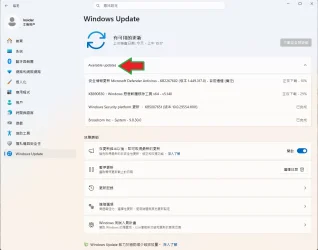
Check Windows Updates
ISO from Microsoft:
 www.elevenforum.com
UUP Dump:
64-bit ISO download:

ARM64 ISO download:
 www.elevenforum.com
Windows 11 Insider Experimental (25H2) build 26300.8346 - May 1
Windows Insider Blog: Source: https://learn.microsoft.com/en-us/windows-insider/release-notes/experimental/preview-build-26300-8346 Check Windows Updates UUP Dump: 64-bit ISO download: https://uupdump.net/selectlang.php?id=0d249bb2-7b19-440e-827e-185744242996 ARM64 ISO download...
www.elevenforum.com
Windows Insider Blog:
As a reminder, these release notes apply to those who are in the Dev Channel. As we begin the transition to the new Windows Insider Program, all new build release notes will be labeled under the new channel names, even though Insiders in the Dev Channel may not yet find themselves having transitioned to Experimental. See the Windows Insider Blog for more details.
Windows Insiders moving to Experimental and Beta on Windows 11
Windows Insider Program Blog: Hello Windows Insiders, Today is the day we’re beginning to move to the new Experimental and Beta channels as announced earlier this month. As a reminder, most Insiders, those who are in the Dev and Beta channels today will transition to the new channels over time...
www.elevenforum.com
Enable or Disable Get Latest Updates as soon as available in Windows 11
This tutorial will show you how to turn on or off "Get the latest updates as soon as they are available" in Windows 11. Starting with Windows 11 build 22621.1635, Microsoft added a new "Get the latest updates as soon as they are available" toggle under Settings > Windows Update. When you turn...
www.elevenforum.com
Changes and Improvements gradually being rolled out
[Windows Insider Program channel movement]
As announced in the Windows Insider Blog, we will begin moving users in the Dev Channel to the new Experimental channel. This will be a phased roll out and Insiders who do not see the new experience on their device but want to, can enable the experience under Settings > Windows Update > Windows Insider Program > Feature flags.
Enable or Disable Hidden Feature Flags in Windows 11
This tutorial will show you how to enable or disable hidden experimental feature flags in Windows 11. ViVeTool is an open source tool that can be used to enable hidden features that are part of controlled feature roll-outs or A/B testing in Insider builds of Windows 11. Starting with Windows...
www.elevenforum.com
[Windows Update]
We’re introducing new capabilities to enhance security and improve user control over the Windows update experience. This includes:- Ability to skip updates immediately during the out of box experience (OOBE)
- Extend update pauses as many times as you need
- Always available options to shutdown and restart with updating
- More insight on available updates to make more informed installation decisions
Windows Update experience just got updated in Windows 11
Windows Insider Program Blog: Hey Windows Insiders, Today, we’re excited to share some improvements to the Windows Update experience that are now starting to roll out. These improvements are the direct result of your feedback. We are continually reading the feedback submitted about the Windows...
www.elevenforum.com
[Print Drivers]
- The Internet Protocol Print driver (prnms012) has new hardware IDs (HWIDs) in preparation for upcoming changes in printer driver ranking order. See our third-party driver deprecation timeline: End of Servicing Plan for Third-Party Printer Drivers on Windows - Windows drivers | Microsoft Learn..
[Start menu]
- Improved detection of clicks at the leftmost edge of the taskbar to invoke start menu when the taskbar icons are set to left aligned.
[Other]
- Removed unexpected error that was showing when opening Group Policy Editor in the last couple Insider flights.
- We’re updated Times New Roman to improve support for combining diacritical marks across the Greek and Cyrillic Unicode ranges. If you notice any positioning issues with these diacritical marks, please let us know by filing feedback under Desktop Environment > Font Installation and Preview in the Feedback Hub – preferably with details about the specific Unicode character, and a screenshot highlighting the expected position.
Known issues
[Feature flags]- Insiders who use Feature flags to enable the new WIP experience may see the feature state incorrectly marked as current, however changing state and applying changes will work as expected.
Enable or Disable Hidden Feature Flags in Windows 11
This tutorial will show you how to enable or disable hidden experimental feature flags in Windows 11. ViVeTool is an open source tool that can be used to enable hidden features that are part of controlled feature roll-outs or A/B testing in Insider builds of Windows 11. Starting with Windows...
www.elevenforum.com
Reminders for Windows Insiders in the Dev Channel (Soon transitioning to Experimental)
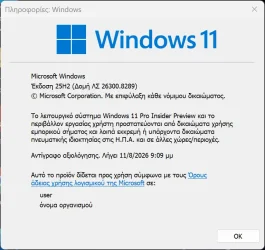
- Updates are based on Windows 11, version 25H2 via an enablement package (Build 26300.8288).
- Many features are rolled out using Controlled Feature Rollout technology, starting with a subset of Insiders and ramping up over time as we monitor feedback to see how they land before pushing them out to everyone in this channel.
- The desktop watermark shown at the lower right corner of the desktop is normal for Windows Insider pre-release builds.
- For Windows Insiders who want to be the first to get features gradually rolled out to you, you can turn ON the toggle to get the latest updates as they are available via Settings > Windows Update*. Users can also use the Feature flags settings page to enable certain features. Over time, we will increase the rollouts of features to everyone with the toggle turned on. Should you keep this toggle off, new features will gradually be rolled out to your PC over time once they are ready.
- Features and experiences included in these builds may never get released as we try out different concepts and get feedback. Features may change over time, be removed, or replaced and never get released beyond Windows Insiders. Some of these features and experiences could show up in future Windows releases when they’re ready.
- Some features in active development we preview with Windows Insiders may not be fully localized and localization will happen over time as features are finalized. As you see issues with localization in your language, please report those issues to us via Feedback Hub.
- Check out Flight Hub for a complete look at what build is in which Insider channel.
Source:
Experimental Preview Build 26300.8289 - Windows Insider Program
Release notes for Experimental Preview Build 26300.8289
learn.microsoft.com
Windows Insiders moving to Experimental and Beta on Windows 11
Windows Insider Program Blog: Hello Windows Insiders, Today is the day we’re beginning to move to the new Experimental and Beta channels as announced earlier this month. As a reminder, most Insiders, those who are in the Dev and Beta channels today will transition to the new channels over time...
www.elevenforum.com
Check Windows Updates
ISO from Microsoft:
Download Official Windows 11 ISO file from Microsoft
This tutorial will show you how to download an official Windows Server or Windows 11 64-bit or ARM64 ISO file from Microsoft. Microsoft provides ISO files for Windows Server and Windows 11 to download. You can use these ISO files to clean install or in-place upgrade Windows 11. The Flight Hub...
www.elevenforum.com
UUP Dump:
64-bit ISO download:
Select language for Windows 11 Insider Preview Feature Update (26300.8289) amd64
Select language for Windows 11 Insider Preview Feature Update (26300.8289) amd64 on UUP dump. UUP dump lets you download Unified Update Platform files, like Windows Insider updates, directly from Windows Update.
uupdump.net
ARM64 ISO download:
Select language for Windows 11 Insider Preview Feature Update (26300.8289) arm64
Select language for Windows 11 Insider Preview Feature Update (26300.8289) arm64 on UUP dump. UUP dump lets you download Unified Update Platform files, like Windows Insider updates, directly from Windows Update.
uupdump.net
UUP Dump - Download Windows Insider ISO
UUP Dump is the most practical and easy way to get ISO images of any Insider Windows 10 or Windows 11 version, as soon as Microsoft has released a new build. UUP Dump creates a download configuration file according to your choices, downloads necessary files directly from Microsoft servers, and...
www.elevenforum.com
Last edited: