Insider KB5089417 Windows 11 Insider Beta (25H2) build 26220.8370 - May 8


UPDATE 5/15:


 Windows Insider Blog:

As a reminder, Insiders in the Beta Channel have not yet begun moving to the new Beta experience. See the Windows Insider Blog for more details.


Changes and improvements gradually being rolled out with toggle on

[EDU]​

Free upgrade path to Windows 11 Pro Education for K-12

Windows Insiders in K–12 education environments can now experience a seamless upgrade path from Windows 11 Home to Windows 11 Pro Education edition—at no additional cost. This enables educational organizations to procure Windows 11 Home devices, upgrade them to Windows 11 Pro Education, and bring devices under school management.

Instructions:
  • Sign in to the device using a local account
  • Launch an elevated Command Prompt and initiate the upgrade by running Clipupgrade.exe
  • Sign in with your K–12 organization account to validate eligibility
  • The device prepares the upgrade and completes after a restart
Please note: This upgrade is one-way only. Reverting to Windows Home is not supported without a clean OS reinstall.

Feedback: Share your thoughts in Feedback Hub (WIN + F) under Windows Installation.

[Administrator Protection]​

  • Improved reliability of Japanese IME usage when Administrator Protection is enabled.

[Other]​

  • Fixed a WPN hang in the previous flight, which was leading to notification issues and certain apps hanging on launch.
  • Improved reliability of loading desktop app icon shortcuts.

Reminders for Windows Insiders in the Beta Channel (Soon transitioning to the new Beta experience)

  • Updates are based on Windows 11, version 25H2 via an enablement package (Build 26220.8340).
  • Many features are rolled out using Controlled Feature Rollout technology, starting with a subset of Insiders and ramping up over time as we monitor feedback to see how they land before pushing them out to everyone in this channel.
  • The desktop watermark shown at the lower right corner of the desktop is normal for Windows Insider pre-release builds.
  • For Windows Insiders who want to be the first to get features gradually rolled out to you, you can turn ON the toggle to get the latest updates as they are available via Settings > Windows Update*. Users can also use the Feature flags settings page to enable certain features. Over time, we will increase the rollouts of features to everyone with the toggle turned on. Should you keep this toggle off, new features will gradually be rolled out to your PC over time once they are ready.
  • Features and experiences included in these builds may never get released as we try out different concepts and get feedback. Features may change over time, be removed, or replaced and never get released beyond Windows Insiders. Some of these features and experiences could show up in future Windows releases when they’re ready.
  • Some features in active development we preview with Windows Insiders may not be fully localized and localization will happen over time as features are finalized. As you see issues with localization in your language, please report those issues to us via Feedback Hub.
  • Check out Flight Hub for a complete look at what build is in which Insider channel.


 Source:


Check Windows Updates


ISO from Microsoft:



UUP Dump:

64-bit ISO download:

ARM64 ISO download:

 
Last edited:
  • Like
Reactions: OAT
From everything I've read the CPU burst are so brief that it's not enough to generate heat or cause any wear and tear on the CPU's. They are doing what they were designed for. Course this may be a subject of debate. It's also my understanding that Mac PC's and Android phones already use this technology and MS is just playing catch up.
Thats exactly my opinion too. Should have been like that from first release of win 11. Whats the point having decent cpu, if such a simple task cant utilize the CPU?
 

My Computer

System One

  • OS
    Win 11 Pro Insider Beta (26220.8370), Kali Linux
    Computer type
    Laptop
    Manufacturer/Model
    HP Victus 15
    CPU
    AMD Ryzen 5 5600H
    Memory
    16GB (2x8GB) Dual Channel
    Graphics Card(s)
    Nvidia RTX 3050
    Monitor(s) Displays
    1080p IPS 144Hz (Laptop Screen) + 3x 1080p 60Hz screens
    Screen Resolution
    4x 1920x1080 monitors
    Hard Drives
    M.2 NVMe 512GB Samsung - PCIe 4.0x4 - Main system drive

    USB-A and USB-C M.2 NVMe Enclosure with NVMe SSSTC 256GB - NVM Express 1.3 - Ventoy with all install files and all ISO images i use.

    USB External SSD Kingston XS100 1TB - USB 3.2 Gen 2 - WindowsToGo (Clone of my existing Sytem), and all games I play.

    USB External SSHD Seagate FireCuda 2TB - USB 3.0 - For Macrium system images, data, photos, stays always safe at home
    PSU
    200W
    Cooling
    Zalman ZM-NC3 Cooling pad
    Keyboard
    Dell KM7120W
    Mouse
    Dell KM7120W
    Internet Speed
    1Gb/s down / 500Mb/s up
    Browser
    Chrome
    Antivirus
    Windows Defender
Thats exactly my opinion too. Should have been like that from first release of win 11. Whats the point having decent cpu, if such a simple task cant utilize the CPU?
Yup, how often does someone burnout a CPU? Might as well put it to use and get your moneys worth, same goes for that RAM. CPU's are designed to operate under 100% load for extended periods and most users replace their computer in 5-7 years due to obsolescence long before a CPU failure would be a concern.
 

My Computers

System One System Two

  • OS
    Windows 11 25H2
    Computer type
    Laptop
    Manufacturer/Model
    Alienware 18 Area-51
    CPU
    Intel Core Ultra 9 275HX (24-Core)
    Motherboard
    Alienware
    Memory
    64GB DDR5 6400MT/s
    Graphics Card(s)
    NVIDIA GeForce RTX 5080 and Intel UHD Graphics
    Sound Card
    Onboard, Realtek high-performance Audio chips (ALC3329 & ALC1708))
    Monitor(s) Displays
    300HZ 18-inch QHD 500 nit Comfort View+
    Screen Resolution
    2560 x 1600
    Hard Drives
    2TB NVMe M.2 PCIe Gen 5 SSD
    Case
    Magnesium Alloy
    Cooling
    Advanced Cryo-Tech Quad-Fan Cooling system & large vapor chamber
    Keyboard
    Cherry MX ultra low profile mechanical keyboard with per key AlienFX RGB lighting
    Mouse
    Logitech MX Master 4
    Browser
    Vivaldi (main), Firefox, Chrome, Edge
    Antivirus
    MS Defender and Malwarebytes Free
  • Operating System
    Windows 11 25H2
    Computer type
    Laptop
    Manufacturer/Model
    Microsoft Surface Laptop 7
    CPU
    Qualcomm Snapdragon X Elite (12 Core) ARM based CPU
    Motherboard
    Microsoft Corp.
    Memory
    16GB LPDDR5
    Graphics card(s)
    Qualcomm Adreno X1-85
    Sound Card
    Omnisonic speakers with Dolby Atmos spatial sound
    Monitor(s) Displays
    120 Hz 13.8-inch 600 nit PixelSense Flow touchscreen
    Screen Resolution
    2304x1536
    Hard Drives
    1TB NVMe Gen 4 SSD
    Case
    Anodized Aluminum
    Cooling
    Traditional active cooling fan system
    Keyboard
    Mechanical QWERTY, backlit when in use
    Mouse
    Logitech MX Master 4 and Surface Arc Mouse
    Browser
    Vivaldi (main), Firefox, Chrome, Edge
    Antivirus
    MS Defender and Malwarebytes Free
Those are all fair assessments.

I just enabled the two ID's and rebooted, but I'm not sure I can tell any difference.
 

My Computer

System One

  • OS
    Windows 11 Pro 25H2
    Computer type
    PC/Desktop
    Manufacturer/Model
    Skytech / Central Computers
    CPU
    AMD Ryzen 9 9950X3D 16-Core Processor
    Motherboard
    Gigabyte X870E AORUS PRO ICE
    Memory
    64GB Corsair DDR5 RAM @ 6000 MT/s
    Graphics Card(s)
    ASUS TUF Gaming GeForce RTX 4090 OC Edition 24GB GDDR6X
    Sound Card
    Sound Blaster Audigy Fx V2
    Monitor(s) Displays
    Sony SDMU27M90 (DP HDR), Acer KA272, ASUS VG328QA1A
    Screen Resolution
    3840x2160 HDR
    Hard Drives
    Samsung SSD 990 PRO 4TB, Samsung SSD 860 EVO 1TB, Seagate ST8000DM004-2CX88 8TB
    Case
    Fractal Meshify 2
    Cooling
    Arctic Freezer III 360mm
Those are all fair assessments.

I just enabled the two ID's and rebooted, but I'm not sure I can tell any difference.

If your hardware is high-end, you may not be able to perceive the difference. This difference is most noticeable on lower-performance PCs.
 

My Computer

System One

  • OS
    Windows 11, version 25H2 (26200)
    Computer type
    PC/Desktop
    CPU
    AMD Ryzen 9 9950X 16-Core Processor
    Motherboard
    ASRock B650M PG Riptide
    Memory
    DDR5-6000 (CL36) 64.0 GB
    Graphics Card(s)
    NVIDIA GeForce RTX 4090
    PSU
    1200W
    Case
    Phanteks Enthoo Pro 2
    Cooling
    Noctua NH-D12L
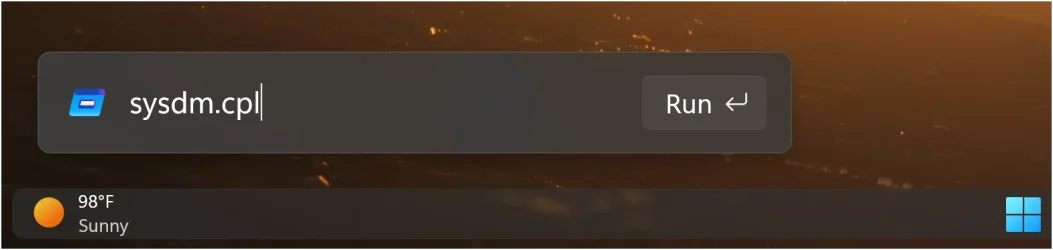
Just an odd observation after re-enabling low latency mode on my beta machine it disabled my new run dialog box so I'm back to the old style dialog box. Guess I'll have to decide which I want to keep on it.
 

Attachments

  • Screenshot 2026-05-08 165426.webp
    Screenshot 2026-05-08 165426.webp
    14.2 KB · Views: 3

My Computers

System One System Two

  • OS
    Windows 11 25H2
    Computer type
    Laptop
    Manufacturer/Model
    Alienware 18 Area-51
    CPU
    Intel Core Ultra 9 275HX (24-Core)
    Motherboard
    Alienware
    Memory
    64GB DDR5 6400MT/s
    Graphics Card(s)
    NVIDIA GeForce RTX 5080 and Intel UHD Graphics
    Sound Card
    Onboard, Realtek high-performance Audio chips (ALC3329 & ALC1708))
    Monitor(s) Displays
    300HZ 18-inch QHD 500 nit Comfort View+
    Screen Resolution
    2560 x 1600
    Hard Drives
    2TB NVMe M.2 PCIe Gen 5 SSD
    Case
    Magnesium Alloy
    Cooling
    Advanced Cryo-Tech Quad-Fan Cooling system & large vapor chamber
    Keyboard
    Cherry MX ultra low profile mechanical keyboard with per key AlienFX RGB lighting
    Mouse
    Logitech MX Master 4
    Browser
    Vivaldi (main), Firefox, Chrome, Edge
    Antivirus
    MS Defender and Malwarebytes Free
  • Operating System
    Windows 11 25H2
    Computer type
    Laptop
    Manufacturer/Model
    Microsoft Surface Laptop 7
    CPU
    Qualcomm Snapdragon X Elite (12 Core) ARM based CPU
    Motherboard
    Microsoft Corp.
    Memory
    16GB LPDDR5
    Graphics card(s)
    Qualcomm Adreno X1-85
    Sound Card
    Omnisonic speakers with Dolby Atmos spatial sound
    Monitor(s) Displays
    120 Hz 13.8-inch 600 nit PixelSense Flow touchscreen
    Screen Resolution
    2304x1536
    Hard Drives
    1TB NVMe Gen 4 SSD
    Case
    Anodized Aluminum
    Cooling
    Traditional active cooling fan system
    Keyboard
    Mechanical QWERTY, backlit when in use
    Mouse
    Logitech MX Master 4 and Surface Arc Mouse
    Browser
    Vivaldi (main), Firefox, Chrome, Edge
    Antivirus
    MS Defender and Malwarebytes Free
Never mind, it looks like Microsoft pulled the new run dialog box and switch again even if you use the four vivetool codes.
 

My Computers

System One System Two

  • OS
    Windows 11 25H2
    Computer type
    Laptop
    Manufacturer/Model
    Alienware 18 Area-51
    CPU
    Intel Core Ultra 9 275HX (24-Core)
    Motherboard
    Alienware
    Memory
    64GB DDR5 6400MT/s
    Graphics Card(s)
    NVIDIA GeForce RTX 5080 and Intel UHD Graphics
    Sound Card
    Onboard, Realtek high-performance Audio chips (ALC3329 & ALC1708))
    Monitor(s) Displays
    300HZ 18-inch QHD 500 nit Comfort View+
    Screen Resolution
    2560 x 1600
    Hard Drives
    2TB NVMe M.2 PCIe Gen 5 SSD
    Case
    Magnesium Alloy
    Cooling
    Advanced Cryo-Tech Quad-Fan Cooling system & large vapor chamber
    Keyboard
    Cherry MX ultra low profile mechanical keyboard with per key AlienFX RGB lighting
    Mouse
    Logitech MX Master 4
    Browser
    Vivaldi (main), Firefox, Chrome, Edge
    Antivirus
    MS Defender and Malwarebytes Free
  • Operating System
    Windows 11 25H2
    Computer type
    Laptop
    Manufacturer/Model
    Microsoft Surface Laptop 7
    CPU
    Qualcomm Snapdragon X Elite (12 Core) ARM based CPU
    Motherboard
    Microsoft Corp.
    Memory
    16GB LPDDR5
    Graphics card(s)
    Qualcomm Adreno X1-85
    Sound Card
    Omnisonic speakers with Dolby Atmos spatial sound
    Monitor(s) Displays
    120 Hz 13.8-inch 600 nit PixelSense Flow touchscreen
    Screen Resolution
    2304x1536
    Hard Drives
    1TB NVMe Gen 4 SSD
    Case
    Anodized Aluminum
    Cooling
    Traditional active cooling fan system
    Keyboard
    Mechanical QWERTY, backlit when in use
    Mouse
    Logitech MX Master 4 and Surface Arc Mouse
    Browser
    Vivaldi (main), Firefox, Chrome, Edge
    Antivirus
    MS Defender and Malwarebytes Free
Never mind, it looks like Microsoft pulled the new run dialog box and switch again even if you use the four vivetool codes.
I've still got New Run.
 

My Computer

System One

  • OS
    Windows 11 Pro 25H2
    Computer type
    PC/Desktop
    Manufacturer/Model
    Skytech / Central Computers
    CPU
    AMD Ryzen 9 9950X3D 16-Core Processor
    Motherboard
    Gigabyte X870E AORUS PRO ICE
    Memory
    64GB Corsair DDR5 RAM @ 6000 MT/s
    Graphics Card(s)
    ASUS TUF Gaming GeForce RTX 4090 OC Edition 24GB GDDR6X
    Sound Card
    Sound Blaster Audigy Fx V2
    Monitor(s) Displays
    Sony SDMU27M90 (DP HDR), Acer KA272, ASUS VG328QA1A
    Screen Resolution
    3840x2160 HDR
    Hard Drives
    Samsung SSD 990 PRO 4TB, Samsung SSD 860 EVO 1TB, Seagate ST8000DM004-2CX88 8TB
    Case
    Fractal Meshify 2
    Cooling
    Arctic Freezer III 360mm
I've still got New Run.
You may not for long though but we'll see. It all just suddenly disappeared after a reboot for me and can't be re-enabled.
 

My Computers

System One System Two

  • OS
    Windows 11 25H2
    Computer type
    Laptop
    Manufacturer/Model
    Alienware 18 Area-51
    CPU
    Intel Core Ultra 9 275HX (24-Core)
    Motherboard
    Alienware
    Memory
    64GB DDR5 6400MT/s
    Graphics Card(s)
    NVIDIA GeForce RTX 5080 and Intel UHD Graphics
    Sound Card
    Onboard, Realtek high-performance Audio chips (ALC3329 & ALC1708))
    Monitor(s) Displays
    300HZ 18-inch QHD 500 nit Comfort View+
    Screen Resolution
    2560 x 1600
    Hard Drives
    2TB NVMe M.2 PCIe Gen 5 SSD
    Case
    Magnesium Alloy
    Cooling
    Advanced Cryo-Tech Quad-Fan Cooling system & large vapor chamber
    Keyboard
    Cherry MX ultra low profile mechanical keyboard with per key AlienFX RGB lighting
    Mouse
    Logitech MX Master 4
    Browser
    Vivaldi (main), Firefox, Chrome, Edge
    Antivirus
    MS Defender and Malwarebytes Free
  • Operating System
    Windows 11 25H2
    Computer type
    Laptop
    Manufacturer/Model
    Microsoft Surface Laptop 7
    CPU
    Qualcomm Snapdragon X Elite (12 Core) ARM based CPU
    Motherboard
    Microsoft Corp.
    Memory
    16GB LPDDR5
    Graphics card(s)
    Qualcomm Adreno X1-85
    Sound Card
    Omnisonic speakers with Dolby Atmos spatial sound
    Monitor(s) Displays
    120 Hz 13.8-inch 600 nit PixelSense Flow touchscreen
    Screen Resolution
    2304x1536
    Hard Drives
    1TB NVMe Gen 4 SSD
    Case
    Anodized Aluminum
    Cooling
    Traditional active cooling fan system
    Keyboard
    Mechanical QWERTY, backlit when in use
    Mouse
    Logitech MX Master 4 and Surface Arc Mouse
    Browser
    Vivaldi (main), Firefox, Chrome, Edge
    Antivirus
    MS Defender and Malwarebytes Free
You may not for long though but we'll see. It all just suddenly disappeared after a reboot for me and can't be re-enabled.
Eh, oh well. It needs some working on anyway.
 

My Computer

System One

  • OS
    Windows 11 Pro 25H2
    Computer type
    PC/Desktop
    Manufacturer/Model
    Skytech / Central Computers
    CPU
    AMD Ryzen 9 9950X3D 16-Core Processor
    Motherboard
    Gigabyte X870E AORUS PRO ICE
    Memory
    64GB Corsair DDR5 RAM @ 6000 MT/s
    Graphics Card(s)
    ASUS TUF Gaming GeForce RTX 4090 OC Edition 24GB GDDR6X
    Sound Card
    Sound Blaster Audigy Fx V2
    Monitor(s) Displays
    Sony SDMU27M90 (DP HDR), Acer KA272, ASUS VG328QA1A
    Screen Resolution
    3840x2160 HDR
    Hard Drives
    Samsung SSD 990 PRO 4TB, Samsung SSD 860 EVO 1TB, Seagate ST8000DM004-2CX88 8TB
    Case
    Fractal Meshify 2
    Cooling
    Arctic Freezer III 360mm
I'm having a major sound issue with 26220.8370. It is automatically muting my sound. I can adjust the slider and I get the "bong" sounds but then windows immediately mutes the audio. In looking at the sound settings the volume is set to -2147483648. I uninstalled the update, but then of course windows just reinstalled it again. Quite frustrating. I've tried all the wound settings and driver review and updates. Nothing is working.
 

My Computer

System One

  • OS
    Windows 11
    Computer type
    PC/Desktop
    CPU
    Ryzen 9 5900x
    Motherboard
    Asus B550-f gaming
    Memory
    32 gb DDR 4
    Graphics Card(s)
    Nvidia 5070 ti
    Sound Card
    Steelseries Arctis Nova Pro
Just an odd observation after re-enabling low latency mode on my beta machine it disabled my new run dialog box so I'm back to the old style dialog box. Guess I'll have to decide which I want to keep on it.
U seem to have a wierd issues with this build. 🤔. For me, even after enabling low latency, my new run dialog still works fine.
 

My Computer

System One

  • OS
    Win 11 Pro Insider Beta (26220.8370), Kali Linux
    Computer type
    Laptop
    Manufacturer/Model
    HP Victus 15
    CPU
    AMD Ryzen 5 5600H
    Memory
    16GB (2x8GB) Dual Channel
    Graphics Card(s)
    Nvidia RTX 3050
    Monitor(s) Displays
    1080p IPS 144Hz (Laptop Screen) + 3x 1080p 60Hz screens
    Screen Resolution
    4x 1920x1080 monitors
    Hard Drives
    M.2 NVMe 512GB Samsung - PCIe 4.0x4 - Main system drive

    USB-A and USB-C M.2 NVMe Enclosure with NVMe SSSTC 256GB - NVM Express 1.3 - Ventoy with all install files and all ISO images i use.

    USB External SSD Kingston XS100 1TB - USB 3.2 Gen 2 - WindowsToGo (Clone of my existing Sytem), and all games I play.

    USB External SSHD Seagate FireCuda 2TB - USB 3.0 - For Macrium system images, data, photos, stays always safe at home
    PSU
    200W
    Cooling
    Zalman ZM-NC3 Cooling pad
    Keyboard
    Dell KM7120W
    Mouse
    Dell KM7120W
    Internet Speed
    1Gb/s down / 500Mb/s up
    Browser
    Chrome
    Antivirus
    Windows Defender
Those are all fair assessments.

I just enabled the two ID's and rebooted, but I'm not sure I can tell any difference.
Yeah with your 9950x3d beast u probably wont see any difference. But on my laptop with 5600H the difference is noticable.
 

My Computer

System One

  • OS
    Win 11 Pro Insider Beta (26220.8370), Kali Linux
    Computer type
    Laptop
    Manufacturer/Model
    HP Victus 15
    CPU
    AMD Ryzen 5 5600H
    Memory
    16GB (2x8GB) Dual Channel
    Graphics Card(s)
    Nvidia RTX 3050
    Monitor(s) Displays
    1080p IPS 144Hz (Laptop Screen) + 3x 1080p 60Hz screens
    Screen Resolution
    4x 1920x1080 monitors
    Hard Drives
    M.2 NVMe 512GB Samsung - PCIe 4.0x4 - Main system drive

    USB-A and USB-C M.2 NVMe Enclosure with NVMe SSSTC 256GB - NVM Express 1.3 - Ventoy with all install files and all ISO images i use.

    USB External SSD Kingston XS100 1TB - USB 3.2 Gen 2 - WindowsToGo (Clone of my existing Sytem), and all games I play.

    USB External SSHD Seagate FireCuda 2TB - USB 3.0 - For Macrium system images, data, photos, stays always safe at home
    PSU
    200W
    Cooling
    Zalman ZM-NC3 Cooling pad
    Keyboard
    Dell KM7120W
    Mouse
    Dell KM7120W
    Internet Speed
    1Gb/s down / 500Mb/s up
    Browser
    Chrome
    Antivirus
    Windows Defender
26220.8370 Installed without difficulty. In keeping with the thread topics so far, CPUs will not "burn out" using a lower-latency boot mode for Windows...;) (That sounds like the usual Apple anti-Windows propaganda...;)) If the CPU isn't designed to run at those latencies, then regardless of what the software asks for it will not do it because it can't--all this means is that Microsoft is trying to get better boot-to-full-desktop speeds in Windows. It seems to be working as I have a lot of desktop short-cuts, and from the first time I booted with this build I noticed that the usual "refresh" of the shortcut icons went much faster than it has been doing for quite some time, now! If that continues I will be very pleased.

EDIT: After looking into this a bit more, I've rarely seen a performance feature explained as poorly as this one, and so no wonder it's been so widely misunderstood. It's really a matter of Microsoft simply using the CPU in its Windows software more efficiently--that is, getting more of the performance your CPU is designed to deliver out of it when running Windows. People expect the CPU and GPU to max out when running their games for hours at a time, because that is what CPUs and GPUs are designed to do! Running the CPU or GPU a max performance is not doing anything weird or strange to the CPU or GPU--it is simply utilizing the top performance of the CPU/GPU that users expect to see when they buy them. Running games and benchmarks that max out the performance of your CPU or GPU is what people expect. It's no different with Windows. People calling this "brute force" and so on, as if it's somehow "odd" or unusual, don't know what they are talking about...;) Obviously. It's just Windows using your CPU more efficiently at certain times. That's all there is to it. Ho-hum. I'm glad to see it!...;)

(Wanted to add: I tried the new Administrator mode since all I had to do was enable it from Account Protection, and it worked. However, it refused to allow immediate sign-in access after the desktop had fully booted, as I had to enter my password again for two separate files, and after I did that I got a bizarre warning about Edge--which I don't use--and then I was in, no further problems. I am going to reboot again to see if the initial improvement to latencies at boot and the Admin mode behave as advertised.)

EDIT: I have turned off this newer Admin mode because I don't like it. It throws up prompts asking for my password which UAC never does--not even prompts! I have reverted to my original settings, accordingly. I think it is a nice touch for people who want more control over their security than the standard Administrator modes provide, however. I just don't need it.

If things change in subsequent reboots I'll add the info here. Done..;)
 
Last edited:

My Computer

System One

  • OS
    Win11 Release Beta channel
    Computer type
    PC/Desktop
    Manufacturer/Model
    a cherry-picked assembly
    CPU
    AMD R7 7800X3D
    Motherboard
    MSI x870 Tomahawk Wi-Fi, 8-layer, 2 oz copper, server PCB
    Memory
    GSkill 2x16GB @ 6400MT/s
    Graphics Card(s)
    XFX 9070 XT SWIFT tri-fan (PCIe5.0)
    Sound Card
    Creative Labs G8 USB External Sound device, Gaming DAC, Sound Card & Earphone AMP.. HIGHLY RECOMMENDED, btw. Totally changed my opinion of external USB sound. I like!...;)
    Monitor(s) Displays
    Philips 43" Momentum DisplayHDR 1000-certified
    Screen Resolution
    3840x2160
    Hard Drives
    *Boot: Samsung 980 Pro 2 TB NVMe (PCIe4x4)
    *Samsung 980 EVO NVMe 500GB (PCIe 4x4)
    *Kingston SNV3S2000G 2TB NVMe (PCIe4x4)
    *Samsung 960 EVO 250GB NVMe(PCIe3x2)
    *8TB Toshiba x300 HDD
    *ST4000DM004 S3 4TB HDD
    PSU
    Gigabyte 850W Gold, Rev 2
    Case
    Lian Li Lancool 217, white, with wood trim, very nice looking--tired of black, 5-fans standard
    Cooling
    Air coutesy Lian Li
    Keyboard
    Cherry MX 2.0S RGB
    Mouse
    Razer Basilisk V3 24k DPI
    Internet Speed
    ~950Mbps down and up!
    Browser
    Firefox x64 DE
    Antivirus
    Defender
    Other Info
    Great New system. Exceeds my expectations by quite a bit, btw. I love the USB G8 SoundBlaster, it's quite an improvement over the G6!
26220.8370 Installed without difficulty. In keeping with the thread topics so far, CPUs will not "burn out" using a lower-latency boot mode for Windows...;) (That sounds like the usual Apple anti-Windows propaganda...;)) If the CPU isn't designed to run at those latencies, then regardless of what the software asks for it will not do it because it can't--all this means is that Microsoft is trying to get better boot-to-full-desktop speeds in Windows. It seems to be working as I have a lot of desktop short-cuts, and from the first time I booted with this build I noticed that the usual "refresh" of the shortcut icons went much faster than it has been doing for quite some time, now! If that continues I will be very pleased.

EDIT: After looking into this a bit more, I've rarely seen a performance feature explained as poorly as this one, and so no wonder it's been so widely misunderstood. It's really a matter of Microsoft simply using the CPU in its Windows software more efficiently--that is, getting more of the performance your CPU is designed to deliver out of it when running Windows. People expect the CPU and GPU to max out when running their games for hours at a time, because that is what CPUs and GPUs are designed to do! Running the CPU or GPU a max performance is not doing anything weird or strange to the CPU or GPU--it is simply utilizing the top performance of the CPU/GPU that users expect to see when they buy them. Running games and benchmarks that max out the performance of your CPU or GPU is what people expect. It's no different with Windows. People calling this "brute force" and so on, as if it's somehow "odd" or unusual, don't know what they are talking about...;) Obviously. It's just Windows using your CPU more efficiently at certain times. That's all there is to it. Ho-hum. I'm glad to see it!...;)

(Wanted to add: I tried the new Administrator mode since all I had to do was enable it from Account Protection, and it worked. However, it refused to allow immediate sign-in access after the desktop had fully booted, as I had to enter my password again for two separate files, and after I did that I got a bizarre warning about Edge--which I don't use--and then I was in, no further problems. I am going to reboot again to see if the initial improvement to latencies at boot and the Admin mode behave as advertised.)

EDIT: I have turned off this newer Admin mode because I don't like it. It throws up prompts asking for my password which UAC never does--not even prompts! I have reverted to my original settings, accordingly. I think it is a nice touch for people who want more control over their security than the standard Administrator modes provide, however. I just don't need it.

If things change in subsequent reboots I'll add the info here. Done..;)
Really well said and explained. 👍 Its something what microsoft should have done to start with win 11, and not adding it after years and bragging about it to make massive confusion among users who dont really understand how it works. They should have said "improved load times of explorer and boot times" and force enable it for everyone. Now they just put wood into the fire for windows haters... They only made it worse for them self, and not explaining whats really going on.
 

My Computer

System One

  • OS
    Win 11 Pro Insider Beta (26220.8370), Kali Linux
    Computer type
    Laptop
    Manufacturer/Model
    HP Victus 15
    CPU
    AMD Ryzen 5 5600H
    Memory
    16GB (2x8GB) Dual Channel
    Graphics Card(s)
    Nvidia RTX 3050
    Monitor(s) Displays
    1080p IPS 144Hz (Laptop Screen) + 3x 1080p 60Hz screens
    Screen Resolution
    4x 1920x1080 monitors
    Hard Drives
    M.2 NVMe 512GB Samsung - PCIe 4.0x4 - Main system drive

    USB-A and USB-C M.2 NVMe Enclosure with NVMe SSSTC 256GB - NVM Express 1.3 - Ventoy with all install files and all ISO images i use.

    USB External SSD Kingston XS100 1TB - USB 3.2 Gen 2 - WindowsToGo (Clone of my existing Sytem), and all games I play.

    USB External SSHD Seagate FireCuda 2TB - USB 3.0 - For Macrium system images, data, photos, stays always safe at home
    PSU
    200W
    Cooling
    Zalman ZM-NC3 Cooling pad
    Keyboard
    Dell KM7120W
    Mouse
    Dell KM7120W
    Internet Speed
    1Gb/s down / 500Mb/s up
    Browser
    Chrome
    Antivirus
    Windows Defender
U seem to have a wierd issues with this build. 🤔. For me, even after enabling low latency, my new run dialog still works fine.
This is per Co-Pilot so won't swear to it's accuracy but:

What happened on​

On 26220.8370, Microsoft removed the entire Run‑dialog feature bundle from the OS payload:

What was removed:​

  • The four feature IDs (57156807, 57259990, 58527096, 58381341)
  • The XAML host for the modern Run dialog
  • The Settings page hook that shows the toggle
  • The shell activation handler for Win+R that routed to the new UI


  • This means:
    • ViVeTool cannot re‑enable it
    • The Settings toggle cannot reappear
    • Win+R must fall back to the classic dialog
    • Even if you previously enabled it, the feature disappears after updating to 26220.8370 because the binaries are gone
  • This is not a rollout issue — it’s a payload removal.
 

My Computers

System One System Two

  • OS
    Windows 11 25H2
    Computer type
    Laptop
    Manufacturer/Model
    Alienware 18 Area-51
    CPU
    Intel Core Ultra 9 275HX (24-Core)
    Motherboard
    Alienware
    Memory
    64GB DDR5 6400MT/s
    Graphics Card(s)
    NVIDIA GeForce RTX 5080 and Intel UHD Graphics
    Sound Card
    Onboard, Realtek high-performance Audio chips (ALC3329 & ALC1708))
    Monitor(s) Displays
    300HZ 18-inch QHD 500 nit Comfort View+
    Screen Resolution
    2560 x 1600
    Hard Drives
    2TB NVMe M.2 PCIe Gen 5 SSD
    Case
    Magnesium Alloy
    Cooling
    Advanced Cryo-Tech Quad-Fan Cooling system & large vapor chamber
    Keyboard
    Cherry MX ultra low profile mechanical keyboard with per key AlienFX RGB lighting
    Mouse
    Logitech MX Master 4
    Browser
    Vivaldi (main), Firefox, Chrome, Edge
    Antivirus
    MS Defender and Malwarebytes Free
  • Operating System
    Windows 11 25H2
    Computer type
    Laptop
    Manufacturer/Model
    Microsoft Surface Laptop 7
    CPU
    Qualcomm Snapdragon X Elite (12 Core) ARM based CPU
    Motherboard
    Microsoft Corp.
    Memory
    16GB LPDDR5
    Graphics card(s)
    Qualcomm Adreno X1-85
    Sound Card
    Omnisonic speakers with Dolby Atmos spatial sound
    Monitor(s) Displays
    120 Hz 13.8-inch 600 nit PixelSense Flow touchscreen
    Screen Resolution
    2304x1536
    Hard Drives
    1TB NVMe Gen 4 SSD
    Case
    Anodized Aluminum
    Cooling
    Traditional active cooling fan system
    Keyboard
    Mechanical QWERTY, backlit when in use
    Mouse
    Logitech MX Master 4 and Surface Arc Mouse
    Browser
    Vivaldi (main), Firefox, Chrome, Edge
    Antivirus
    MS Defender and Malwarebytes Free
This is per Co-Pilot so won't swear to it's accuracy but:

What happened on​

On 26220.8370, Microsoft removed the entire Run‑dialog feature bundle from the OS payload:

What was removed:​

  • The four feature IDs (57156807, 57259990, 58527096, 58381341)
  • The XAML host for the modern Run dialog
  • The Settings page hook that shows the toggle
  • The shell activation handler for Win+R that routed to the new UI


  • This means:
    • ViVeTool cannot re‑enable it
    • The Settings toggle cannot reappear
    • Win+R must fall back to the classic dialog
    • Even if you previously enabled it, the feature disappears after updating to 26220.8370 because the binaries are gone
  • This is not a rollout issue — it’s a payload removal.
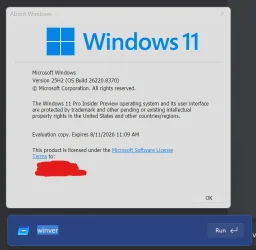
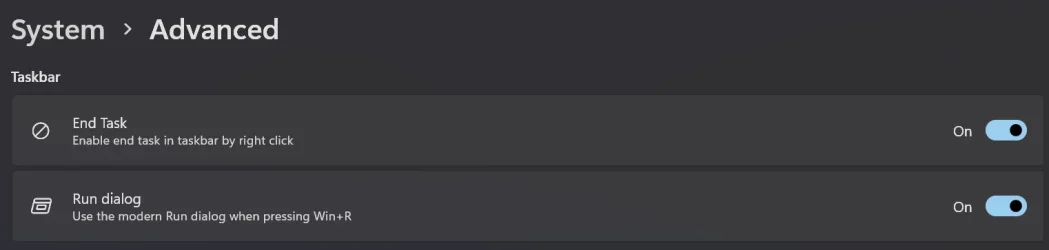
That's not accurate as I still have New/Modern Run and it's survived multiple reboots since installing .8370.

Copilot sucks.

1778468778686.webp
1778468852083.webp
 

My Computer

System One

  • OS
    Windows 11 Pro 25H2
    Computer type
    PC/Desktop
    Manufacturer/Model
    Skytech / Central Computers
    CPU
    AMD Ryzen 9 9950X3D 16-Core Processor
    Motherboard
    Gigabyte X870E AORUS PRO ICE
    Memory
    64GB Corsair DDR5 RAM @ 6000 MT/s
    Graphics Card(s)
    ASUS TUF Gaming GeForce RTX 4090 OC Edition 24GB GDDR6X
    Sound Card
    Sound Blaster Audigy Fx V2
    Monitor(s) Displays
    Sony SDMU27M90 (DP HDR), Acer KA272, ASUS VG328QA1A
    Screen Resolution
    3840x2160 HDR
    Hard Drives
    Samsung SSD 990 PRO 4TB, Samsung SSD 860 EVO 1TB, Seagate ST8000DM004-2CX88 8TB
    Case
    Fractal Meshify 2
    Cooling
    Arctic Freezer III 360mm
That's not accurate as I still have New/Modern Run and it's survived multiple reboots since installing .8370.

Copilot sucks.

View attachment 171136
View attachment 171137
Couldn't say, it might be getting pulled in stages. I just know it completely disappeared on my machine and the vivetool codes can't re-enable it now. That's the only explanation I could find.

Someone on the Dev build in the tutorial thread for this mod also mentioned he couldn't enable it with the four vivetool codes as well.
 
Last edited:

My Computers

System One System Two

  • OS
    Windows 11 25H2
    Computer type
    Laptop
    Manufacturer/Model
    Alienware 18 Area-51
    CPU
    Intel Core Ultra 9 275HX (24-Core)
    Motherboard
    Alienware
    Memory
    64GB DDR5 6400MT/s
    Graphics Card(s)
    NVIDIA GeForce RTX 5080 and Intel UHD Graphics
    Sound Card
    Onboard, Realtek high-performance Audio chips (ALC3329 & ALC1708))
    Monitor(s) Displays
    300HZ 18-inch QHD 500 nit Comfort View+
    Screen Resolution
    2560 x 1600
    Hard Drives
    2TB NVMe M.2 PCIe Gen 5 SSD
    Case
    Magnesium Alloy
    Cooling
    Advanced Cryo-Tech Quad-Fan Cooling system & large vapor chamber
    Keyboard
    Cherry MX ultra low profile mechanical keyboard with per key AlienFX RGB lighting
    Mouse
    Logitech MX Master 4
    Browser
    Vivaldi (main), Firefox, Chrome, Edge
    Antivirus
    MS Defender and Malwarebytes Free
  • Operating System
    Windows 11 25H2
    Computer type
    Laptop
    Manufacturer/Model
    Microsoft Surface Laptop 7
    CPU
    Qualcomm Snapdragon X Elite (12 Core) ARM based CPU
    Motherboard
    Microsoft Corp.
    Memory
    16GB LPDDR5
    Graphics card(s)
    Qualcomm Adreno X1-85
    Sound Card
    Omnisonic speakers with Dolby Atmos spatial sound
    Monitor(s) Displays
    120 Hz 13.8-inch 600 nit PixelSense Flow touchscreen
    Screen Resolution
    2304x1536
    Hard Drives
    1TB NVMe Gen 4 SSD
    Case
    Anodized Aluminum
    Cooling
    Traditional active cooling fan system
    Keyboard
    Mechanical QWERTY, backlit when in use
    Mouse
    Logitech MX Master 4 and Surface Arc Mouse
    Browser
    Vivaldi (main), Firefox, Chrome, Edge
    Antivirus
    MS Defender and Malwarebytes Free
Couldn't say, it might be getting pulled in stages. I just know it completely disappeared on my machine and the vivetool codes can't re-enable it now. That's the only explanation I could find.

Someone on the Dev build in the tutorial thread for this mod also mentioned he couldn't enable it with the four vivetool codes as well.
Same with me. I still have new Run and also toggle for it after multiple reboots. I also still have it on my WinToGo USB drive.
 

My Computer

System One

  • OS
    Win 11 Pro Insider Beta (26220.8370), Kali Linux
    Computer type
    Laptop
    Manufacturer/Model
    HP Victus 15
    CPU
    AMD Ryzen 5 5600H
    Memory
    16GB (2x8GB) Dual Channel
    Graphics Card(s)
    Nvidia RTX 3050
    Monitor(s) Displays
    1080p IPS 144Hz (Laptop Screen) + 3x 1080p 60Hz screens
    Screen Resolution
    4x 1920x1080 monitors
    Hard Drives
    M.2 NVMe 512GB Samsung - PCIe 4.0x4 - Main system drive

    USB-A and USB-C M.2 NVMe Enclosure with NVMe SSSTC 256GB - NVM Express 1.3 - Ventoy with all install files and all ISO images i use.

    USB External SSD Kingston XS100 1TB - USB 3.2 Gen 2 - WindowsToGo (Clone of my existing Sytem), and all games I play.

    USB External SSHD Seagate FireCuda 2TB - USB 3.0 - For Macrium system images, data, photos, stays always safe at home
    PSU
    200W
    Cooling
    Zalman ZM-NC3 Cooling pad
    Keyboard
    Dell KM7120W
    Mouse
    Dell KM7120W
    Internet Speed
    1Gb/s down / 500Mb/s up
    Browser
    Chrome
    Antivirus
    Windows Defender
EDIT: After looking into this a bit more, I've rarely seen a performance feature explained as poorly as this one, and so no wonder it's been so widely misunderstood. It's really a matter of Microsoft simply using the CPU in its Windows software more efficiently--that is, getting more of the performance your CPU is designed to deliver out of it when running Windows. People expect the CPU and GPU to max out when running their games for hours at a time, because that is what CPUs and GPUs are designed to do! Running the CPU or GPU a max performance is not doing anything weird or strange to the CPU or GPU--it is simply utilizing the top performance of the CPU/GPU that users expect to see when they buy them. Running games and benchmarks that max out the performance of your CPU or GPU is what people expect. It's no different with Windows. People calling this "brute force" and so on, as if it's somehow "odd" or unusual, don't know what they are talking about...;) Obviously. It's just Windows using your CPU more efficiently at certain times. That's all there is to it. Ho-hum. I'm glad to see it!...;)
Now, Microsoft VP Scott Hanselman has taken to X to respond to the trolls, explaining how and why this new Low Latency Profile feature is actually standard practice and overall beneficial to end users. "All modern operating systems do this, including macOS and Linux. It's not "cheating"; this is how modern systems make apps feel fast: they temporarily boost the CPU speed and prioritize interactive tasks to reduce latency."


My Computers

System One System Two

  • OS
    Windows 11 25H2
    Computer type
    Laptop
    Manufacturer/Model
    Alienware 18 Area-51
    CPU
    Intel Core Ultra 9 275HX (24-Core)
    Motherboard
    Alienware
    Memory
    64GB DDR5 6400MT/s
    Graphics Card(s)
    NVIDIA GeForce RTX 5080 and Intel UHD Graphics
    Sound Card
    Onboard, Realtek high-performance Audio chips (ALC3329 & ALC1708))
    Monitor(s) Displays
    300HZ 18-inch QHD 500 nit Comfort View+
    Screen Resolution
    2560 x 1600
    Hard Drives
    2TB NVMe M.2 PCIe Gen 5 SSD
    Case
    Magnesium Alloy
    Cooling
    Advanced Cryo-Tech Quad-Fan Cooling system & large vapor chamber
    Keyboard
    Cherry MX ultra low profile mechanical keyboard with per key AlienFX RGB lighting
    Mouse
    Logitech MX Master 4
    Browser
    Vivaldi (main), Firefox, Chrome, Edge
    Antivirus
    MS Defender and Malwarebytes Free
  • Operating System
    Windows 11 25H2
    Computer type
    Laptop
    Manufacturer/Model
    Microsoft Surface Laptop 7
    CPU
    Qualcomm Snapdragon X Elite (12 Core) ARM based CPU
    Motherboard
    Microsoft Corp.
    Memory
    16GB LPDDR5
    Graphics card(s)
    Qualcomm Adreno X1-85
    Sound Card
    Omnisonic speakers with Dolby Atmos spatial sound
    Monitor(s) Displays
    120 Hz 13.8-inch 600 nit PixelSense Flow touchscreen
    Screen Resolution
    2304x1536
    Hard Drives
    1TB NVMe Gen 4 SSD
    Case
    Anodized Aluminum
    Cooling
    Traditional active cooling fan system
    Keyboard
    Mechanical QWERTY, backlit when in use
    Mouse
    Logitech MX Master 4 and Surface Arc Mouse
    Browser
    Vivaldi (main), Firefox, Chrome, Edge
    Antivirus
    MS Defender and Malwarebytes Free
Now, Microsoft VP Scott Hanselman has taken to X to respond to the trolls, explaining how and why this new Low Latency Profile feature is actually standard practice and overall beneficial to end users. "All modern operating systems do this, including macOS and Linux. It's not "cheating"; this is how modern systems make apps feel fast: they temporarily boost the CPU speed and prioritize interactive tasks to reduce latency."

Taking to Twitter to respond to trolls never ends well, since that's the majority of its userbase now...
 

My Computer

System One

  • OS
    Windows 11 Pro 25H2
    Computer type
    PC/Desktop
    Manufacturer/Model
    Skytech / Central Computers
    CPU
    AMD Ryzen 9 9950X3D 16-Core Processor
    Motherboard
    Gigabyte X870E AORUS PRO ICE
    Memory
    64GB Corsair DDR5 RAM @ 6000 MT/s
    Graphics Card(s)
    ASUS TUF Gaming GeForce RTX 4090 OC Edition 24GB GDDR6X
    Sound Card
    Sound Blaster Audigy Fx V2
    Monitor(s) Displays
    Sony SDMU27M90 (DP HDR), Acer KA272, ASUS VG328QA1A
    Screen Resolution
    3840x2160 HDR
    Hard Drives
    Samsung SSD 990 PRO 4TB, Samsung SSD 860 EVO 1TB, Seagate ST8000DM004-2CX88 8TB
    Case
    Fractal Meshify 2
    Cooling
    Arctic Freezer III 360mm
Back
Top Bottom