Win Update KB5089549 Windows 11 Cumulative Update build 26100.8457 (24H2) and 26200.8457 (25H2) - May 12


UPDATE 5/26:


 Microsoft Support:

May 12, 2026 - KB5089549 (OS Builds 26200.8457 and 26100.8457)​

This cumulative update for Windows 11, version 25H2 and 24H2 (KB5089549) includes the latest security fixes and improvements, along with non-security updates from last month's optional preview release.

Visit the Windows release health dashboard for the latest status on this release.


Announcements and messages

This section provides key notifications related to this release, including announcements, change logs, and end-of-support notices.

Windows Secure Boot certificate expiration​

Important: Secure Boot certificates used by most Windows devices are set to expire starting in June 2026. This might affect the ability of certain personal and business devices to boot securely if not updated in time. To avoid disruption, we recommend reviewing the guidance and taking action to update certificates in advance. For details and preparation steps, see Windows Secure Boot certificate expiration and CA updates.


Change log​

Change date​
Change description​
May 29, 2026Known issue updated: Added resolution for "May 2026 security update fails to install with error 0x800f0922".
May 15, 2026Know issue added: "May 2026 security update fails to install with error 0x800f0922"
May 13, 2026
  • Added Secure Boot release note: This update adds a new SecureBoot folder under C:\Windows on eligible devices.
  • Added Daylight saving time (DST) update.

Improvements

This update includes new features and quality improvements that were part of the following update:
This update addresses security vulnerabilities documented in the following guide:
The following summary outlines key quality improvements addressed by this update. The bold text within the brackets indicates the item or area of the change.
  • [Secure Boot]
    • With this update, Windows quality updates include additional high confidence device targeting data, increasing coverage of devices eligible to automatically receive new Secure Boot certificates. Devices receive the new certificates only after demonstrating sufficient successful update signals, maintaining a controlled and phased rollout.
    • This update adds a new SecureBoot folder under C:\Windows on eligible devices. The folder contains example scripts intended for organizations with IT professionals who actively manage updates across their device fleet. These scripts can be used to detect Secure Boot certificate update status and automate deployment via a safe rollout mechanism in an Active Directory environment. For more information, see Sample Secure Boot E2E Automation Guide.
  • [Boot manager servicing update]
    • This update improves startup reliability after boot file updates, so devices start normally without entering BitLocker recovery.
    • (Known issue) Fixed: This update addresses an issue where some devices might enter BitLocker Recovery after updating boot files on systems with certain Trusted Platform Module (TPM) validation settings, including invalid PCR7 (Platform Configuration Register 7) configurations. This might occur after installing the April 2026 security update (KB5083769).
  • [Connectivity] This update improves the reliability of Simple Service Discovery Protocol (SSDP) notifications to help prevent the service from becoming unresponsive.
  • [Daylight saving time (DST)] This update supports the 2023 DST change for the Arab Republic of Egypt.
If you've already installed previous updates, your device will download and install only the new updates included in this package.

AI Components​

This release updates the following AI components:

AI Component​
Version​
Image Search1.2604.515.0
Content Extraction1.2604.515.0
Semantic Analysis1.2604.515.0
Settings Model1.2604.515.0

Windows 11 servicing stack update (KB5092762)- 26100.8456

This update makes quality improvements to the servicing stack, which is the component that installs Windows updates. Servicing stack updates (SSU) ensure that you have a robust and reliable servicing stack so that your devices can receive and install Microsoft updates. To learn more about SSUs, see Simplifying on-premises deployment of servicing stack updates.


Known issues in this update

Symptoms

After you install this update (KB5089549), some devices might fail to complete installation with error code 0x800f0922. This issue occurs on devices that have limited free space on the EFI System Partition (ESP), especially if it has 10 MB or less available.

What you might experience on affected devices:
  • The update installs successfully during the initial phases.
  • The installation fails during the restart phase at approximately 35–36% completion.
  • Windows then rolls back the update.
  • You may see the message:
    “Something didn’t go as planned. Undoing changes.”
  • The installation fails with error code 0x800f0922.
As a result of this issue, you might see log entries similar to the following in C:\Windows\Logs\CBS\CBS.log, indicating insufficient free space on the EFI System Partition:
  • SpaceCheck: Insufficient free space
  • ServicingBootFiles failed. Error = 0x70
  • SpaceCheck: <value> used by third-party/OEM files outside of Microsoft boot directories
Workaround

This issue is addressed in KB5089573.

How to get this update

Before you install this update

Microsoft combines the latest servicing stack update (SSU) for your operating system with the latest cumulative update (LCU). For general information about SSUs, see Servicing stack updates.

Install this update

To install this update, use one of the following Windows and Microsoft release channels.

Available​
Next Step​
Included
This update downloads and installs automatically from Windows Update and Microsoft Update.
Included
To install this release from the Microsoft Update Catalog, select the option that matches your device architecture (arm64 or x64), and then follow the instructions.

If you want to remove this update

Before you decide to remove this update, see Understanding the risks: Why you should not uninstall security updates.

To remove the LCU after installing the combined SSU and LCU package, use the DISM/Remove-Package command line option with the LCU package name as the argument. You can find the package name by using this command: DISM /online /get-packages.

Running Windows Update Standalone Installer (wusa.exe) with the /uninstall switch on the combined package will not work because the combined package contains the SSU. You cannot remove the SSU from the system after installation.

File information

For a list of the files provided in this update, download the file information for cumulative update 5089549.

For a list of the files provided in the servicing stack update, download the file information for the SSU (KB5092762) - version 26100.8456.


 Source:


Check Windows Updates


ISO from Microsoft:



UUP Dump:

64-bit ISO download:

ARM64 ISO download:

 
Last edited:
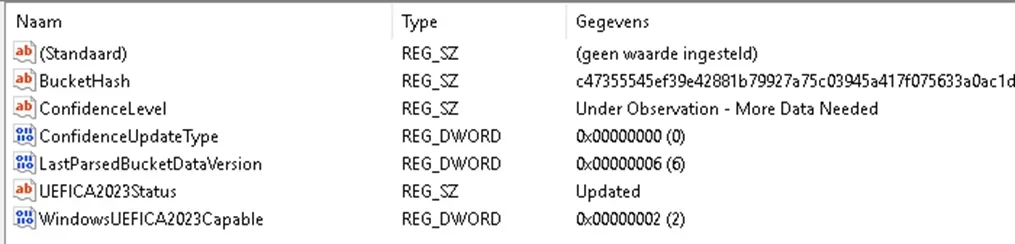
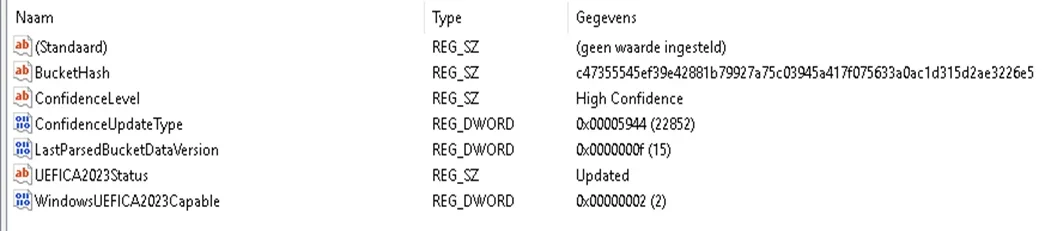
With this update build 262000.8457 I checked the Register and below is an overview regarding SecureBoot confidence device targeting data before en after: Computer\HKEY_LOCAL_MACHINE\SYSTEM\CurrentControlSet\Control\SecureBoot\Servicing
before:
ConfidenceLevel - Under Observation-More Data Needed
ConfideceUpdateType -(0)
1778671730314.webp
After update build 262000.8457:
ConfidenceLevel - High Confidence
ConfideceUpdateType -(22852)
1778671848462.webp
 

My Computer

System One

  • OS
    Windows 11 Home x64 Version 25H2 Build 26200.8457
    Computer type
    Laptop
    Manufacturer/Model
    ASUSTeK COMPUTER INC./N751JX
    CPU
    Intel® Core™ i7-4750HQ CPU @ 2.00GHz
    Motherboard
    ASUSTeK Computer INC., BIOS version AMI N751JX.211
    Memory
    16 GB
    Graphics Card(s)
    Intel® Iris™ Pro Graphics 5200
    Sound Card
    Realtek High Definition Audio
    Internet Speed
    250 Mbps
    Antivirus
    Safe Online (F-Secure)
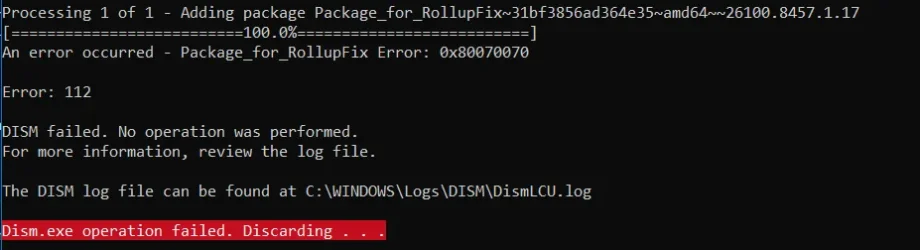
Hello, I can't create an ISO image of Windows 11 25H2 26100.8457 build, I get this error, what should I do?Zrzut ekranu 2026-05-07 152930.webp
 

My Computer

System One

  • OS
    Windows 11
    Computer type
    PC/Desktop
    CPU
    Intel Core i7-9700F, 4500 MHz
    Motherboard
    ASRock B365M-HDV
    Memory
    16 GB DDR4
    Graphics Card(s)
    GeForce GTX 1070 (8 GB)
    Sound Card
    Realtek ALC887 @ Intel Kaby Point PCH - High Definition Audio
    Monitor(s) Displays
    Samsung 32 cale
    Screen Resolution
    1680 x 1050
    Hard Drives
    Dysk nr 1 - Patriot Burst (B5950791083400100449) [894 GB] D: E:
    Dysk nr 2 - SAMSUNG MZVLB256HBHQ-000L2 (0025_3889_91CB_C6D1.) [238 GB] C: F: G:
    Keyboard
    roccat
New pre-release of Open-Shell Menu 4.4.198 arrived yesterday. Among the notes are "Fix open/save file dialog getting stuck after Windows 11 update". I didn't use this dialog after update to 26200.8457 in the last stable 4.4.196, but apparently some people may have problems.
 

My Computer

System One

  • OS
    Windows 11 Pro 25H2
    Computer type
    Laptop
    Manufacturer/Model
    Lenovo Legion 5-15ARH05
    CPU
    AMD Rysen 5 4600H
    Memory
    32 GB (2 x 16 GB Samsung SO-DIMM DDR4-3200)
    Graphics Card(s)
    GeForce GTX 1650 Ti, 4 GB GDDR6
    Screen Resolution
    1920x1080
    Hard Drives
    SSD M.2 512 GB SAMSUNG MZALQ512; SSD M.2 1 TB Seagate FireCuda 530
    Mouse
    Logitech M650L in Bluetooth mode
I don't need that secureboot bullcrap. It's OFF here and STAYS OFF here!
Off here too forever also tpm is near the sun too. Updated last night and the white flash still there in dark mode file explorer when I open new new tab in it.
Also where is that fullscreen app selection setting, I have that only xbox mode setting here. Windows 11 LTSC 24H2 here.
 

My Computer

System One

  • OS
    Windows 11
With this update build 262000.8457 I checked the Register and below is an overview regarding SecureBoot confidence device targeting data before en after: Computer\HKEY_LOCAL_MACHINE\SYSTEM\CurrentControlSet\Control\SecureBoot\Servicing
before:
ConfidenceLevel - Under Observation-More Data Needed
ConfideceUpdateType -(0)
View attachment 171394
After update build 262000.8457:
ConfidenceLevel - High Confidence
ConfideceUpdateType -(22852)
View attachment 171395
My HP ENVY Confidence Level also changed to High Confidence after this update.
 

My Computer

System One

  • OS
    Windows 11 25H2 Home
    Computer type
    Laptop
    Manufacturer/Model
    HP ENVY Laptop 17m-ch1xxx
    CPU
    11th Generation Intel Core i7
    Memory
    12GB
    Monitor(s) Displays
    17.3” FHD Display
Updated successfully, and took way less time than 8328 to boot. Two restarts, at the regularly-scheduled 30% and 100%.

Interestingly, my manually-updated rig is now also showing high confidence in TPM-WMI event 1808.
 

My Computer

System One

  • OS
    Windows 11 Pro 25H2
    Computer type
    PC/Desktop
    Manufacturer/Model
    custom
    CPU
    AMD Ryzen 9 3950X
    Motherboard
    ASUS ROG Strix X570-E (first gen)
    Memory
    64 GB DDR4-3600 CL18 (2x32 GB)
    Graphics Card(s)
    MSI Ventus RTX 2060 Super
    Sound Card
    Audient iD4 Mk.I
    Monitor(s) Displays
    2x AOC 24G1 / 1x XP-Pen Artist Pro 16 Gen 2 2.5K
    Screen Resolution
    1080p / 2560x1600
    Hard Drives
    1TB WD/SanDisk SN850X (main) / 2TB Sabrent Rocket 4 / 6TB WD MyBook EE
    PSU
    Corsair RM850X 850W Gold (2019)
    Case
    Lian-Li O11-D
    Cooling
    EKWB EK-AIO 360 RGB
    Keyboard
    wooting Two HE fullsize
    Mouse
    some old mouse from an older PC
    Internet Speed
    Gigabit symmetric (fibre); Bell Fibe
    Browser
    Firefox
    Antivirus
    ol' reliable Windows Defender
    Other Info
    Other peripherals:

    - Shure SM7B (Mexico)
    - AKG K 240 Studio (calibrated flat)
    - PDP FaceOff wired Switch gamepad
Secure Boot will still work. If the OEM is not offering a BIOS update to enable receiving a new secure boot certificate, you will remain on the one that came with the last BIOS version. It will protect you as it always does, even if you're not going to be moved to the new secure boot certificate.
 

My Computers

System One System Two

  • OS
    Windows 11 Education For 25H2
    Computer type
    Laptop
    Manufacturer/Model
    HP ZBook G2
    CPU
    Intel® Core i7 5500u
    Motherboard
    HP
    Memory
    8 GB
    Graphics Card(s)
    Intel HD Family Graphics 5500 AMD Firepro 4150M
    Sound Card
    Realtek High Audio
    Hard Drives
    1 TB SSD
    Mouse
    HP USB Mouse
    Antivirus
    Windows Defender
  • Operating System
    Windows 11 Pro For Workstations 25H2
    Computer type
    Laptop
    Manufacturer/Model
    HP Zbook G4
    CPU
    Xeon 1535m v6
    Motherboard
    HP
    Memory
    32 GB
    Graphics card(s)
    AMD Quadro Pro 4100
    Sound Card
    Bang and Olufson Audio
    Hard Drives
    1TB SSD
    Mouse
    HP USB Mouse
    Antivirus
    Windows Defender
Secure boot protects your OS from unauthorised software and malware. That's why it should always be kept turned on.
 

My Computers

System One System Two

  • OS
    Windows 11 Education For 25H2
    Computer type
    Laptop
    Manufacturer/Model
    HP ZBook G2
    CPU
    Intel® Core i7 5500u
    Motherboard
    HP
    Memory
    8 GB
    Graphics Card(s)
    Intel HD Family Graphics 5500 AMD Firepro 4150M
    Sound Card
    Realtek High Audio
    Hard Drives
    1 TB SSD
    Mouse
    HP USB Mouse
    Antivirus
    Windows Defender
  • Operating System
    Windows 11 Pro For Workstations 25H2
    Computer type
    Laptop
    Manufacturer/Model
    HP Zbook G4
    CPU
    Xeon 1535m v6
    Motherboard
    HP
    Memory
    32 GB
    Graphics card(s)
    AMD Quadro Pro 4100
    Sound Card
    Bang and Olufson Audio
    Hard Drives
    1TB SSD
    Mouse
    HP USB Mouse
    Antivirus
    Windows Defender
I don't think Secure Boot is a tool that truly enhances security, not much more than a personal alarm bought on Amazon, but it does offer unnecessary drawbacks that aren't mandatory or essential. I prefer having a boot system with diverse compatibility and options without being limited to a single system that doesn't recognize the variety of USB drives and the boot systems they contain.

In any case, based on past experiences, I've never believed in anything that's presented and promoted as security.
 

My Computer

System One

  • OS
    Windows 11 25H2 of UPP
    Computer type
    PC/Desktop
    Manufacturer/Model
    Wallapop
    CPU
    Intel Core i5-7600 3.5GHz
    Motherboard
    MSI Z270 GAMING M3
    Memory
    64 Gb Crucial Ballistix 3200MHz
    Graphics Card(s)
    MSI GeForce GTX 1050 Ti
    Monitor(s) Displays
    GL2450HT 24"
    Screen Resolution
    1920 x 1080 pixels
    Hard Drives
    Kingston A250 SSD
Secure boot is useful. TPM is not unless you need to manage encrypted data.
 

My Computers

System One System Two

  • OS
    Windows 11 Education For 25H2
    Computer type
    Laptop
    Manufacturer/Model
    HP ZBook G2
    CPU
    Intel® Core i7 5500u
    Motherboard
    HP
    Memory
    8 GB
    Graphics Card(s)
    Intel HD Family Graphics 5500 AMD Firepro 4150M
    Sound Card
    Realtek High Audio
    Hard Drives
    1 TB SSD
    Mouse
    HP USB Mouse
    Antivirus
    Windows Defender
  • Operating System
    Windows 11 Pro For Workstations 25H2
    Computer type
    Laptop
    Manufacturer/Model
    HP Zbook G4
    CPU
    Xeon 1535m v6
    Motherboard
    HP
    Memory
    32 GB
    Graphics card(s)
    AMD Quadro Pro 4100
    Sound Card
    Bang and Olufson Audio
    Hard Drives
    1TB SSD
    Mouse
    HP USB Mouse
    Antivirus
    Windows Defender
I had this issuie a few times with Updates, then using the batch file listed in this tutorial fixes the issue

Sure I will take a look... Thanks!
 

My Computer

System One

  • OS
    Windows 11
    Computer type
    PC/Desktop
    Manufacturer/Model
    Asus/Custom Build
    CPU
    Intel® Xeon® X5690 3.47GHz Six-Core
    Motherboard
    Asus P6T Deluxe v2
    Memory
    G.Skill PC3-12800 1600MHz 24GB
    Graphics Card(s)
    NVIDIA GeForce GTX 1050
    Sound Card
    SoundMAX ADI AD2000B HD Audio
    Monitor(s) Displays
    Acer T232HL Touch Screen
    Screen Resolution
    1920 x 1080 @ 60Hz
    Hard Drives
    6 Crucial MX500 SSD 1TB each.
    PSU
    Thermaltake Toughpower Gold 850W
    Case
    Thermaltake Armor VA8000SWA
    Cooling
    Thermaltake Air Cooling System
    Keyboard
    Illuminated Multimedia LED Keyboard
    Mouse
    M16 Dual Mode Illuminated Mouse - Bluetooth / 2.4 GHz Mode
    Internet Speed
    800 Mbps
    Browser
    Edge / Opera / Vivaldi / Chrome / Firefox / Brave
    Antivirus
    Windows Defender Security
I have not seen that issue.
I updated 2 machines in insider R.P. and 4 on public build without that problem.
It just found the update and installed it one time. 🤷‍♂️
This did happened to me a while ago and since, all updates has good but this decided to be different.
In the end all end-up after second download/install.
 

My Computer

System One

  • OS
    Windows 11
    Computer type
    PC/Desktop
    Manufacturer/Model
    Asus/Custom Build
    CPU
    Intel® Xeon® X5690 3.47GHz Six-Core
    Motherboard
    Asus P6T Deluxe v2
    Memory
    G.Skill PC3-12800 1600MHz 24GB
    Graphics Card(s)
    NVIDIA GeForce GTX 1050
    Sound Card
    SoundMAX ADI AD2000B HD Audio
    Monitor(s) Displays
    Acer T232HL Touch Screen
    Screen Resolution
    1920 x 1080 @ 60Hz
    Hard Drives
    6 Crucial MX500 SSD 1TB each.
    PSU
    Thermaltake Toughpower Gold 850W
    Case
    Thermaltake Armor VA8000SWA
    Cooling
    Thermaltake Air Cooling System
    Keyboard
    Illuminated Multimedia LED Keyboard
    Mouse
    M16 Dual Mode Illuminated Mouse - Bluetooth / 2.4 GHz Mode
    Internet Speed
    800 Mbps
    Browser
    Edge / Opera / Vivaldi / Chrome / Firefox / Brave
    Antivirus
    Windows Defender Security
Strange , after this latest update , all my external HDDs got different letters ..........
So, HDD(M) went to HDD(I) , etc
Had to repair in the diskmanagement........... 🛠️
btw; never seen before !

Maybe next update with all my external HDDs on........??
 

My Computer

System One

  • OS
    Windows11 Pro 25H2
    Computer type
    PC/Desktop
    Manufacturer/Model
    Asus
    CPU
    i7
    Motherboard
    z97k
    Memory
    32GB
    Graphics Card(s)
    nVidia
    Sound Card
    Realtek
    Hard Drives
    3
    Cooling
    air
    Browser
    Edge
    Antivirus
    ESET
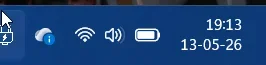
I have an issue with this update on my laptop (didn't check on my desktop PC)

If I click on the battery, volume or Wi-Fi icon in the taskbar, nothing happens. I already rebooted and it still doesn't work. Any idea?

1778692459172.webp
 
Last edited:

My Computers

System One System Two

  • OS
    Windows 11 Pro 24H2
    Computer type
    PC/Desktop
    Manufacturer/Model
    Multi
    CPU
    Intel i9-9900k
    Motherboard
    Gigabyte Z390 Aorus Master
    Memory
    Corsair Vengeance LPX 32GB (2 x 16GB)
    Graphics Card(s)
    Gigabyte RTX 2080Ti Gaming OC
    Monitor(s) Displays
    Samsung LC32HGQ
    Screen Resolution
    WQHD
    Hard Drives
    Samsung 970 Evo Plus 1 TB
    Crucial MX100 512 GB
    Samsung 840 Pro 256 GB
    Seagate ST4000DM000-1F2168 4 TB
    PSU
    Seasonic P-860 Platinium
    Case
    Corsair Graphite 780T
    Cooling
    Noctua NH-U14S
    Keyboard
    Corsair K70 MK.2 Low profile
    Mouse
    Logitech G Pro HERO
    Internet Speed
    200 Mb/s
    Browser
    Mozilla Firefox
    Antivirus
    Windows Defender
    Other Info
    BIOS version F11
  • Operating System
    Windows 11 Home 24H2
    Computer type
    Laptop
    Manufacturer/Model
    Clevo W650KJ1
    CPU
    Intel i5 7500
    Motherboard
    Clevo W65KK/KJ1
    Memory
    2×8 Go Corsair Vengeance 2400Mhz DDR4
    Graphics card(s)
    Nvidia GeForce GTX 1050
    Sound Card
    Integrated
    Screen Resolution
    1920x1080
    Hard Drives
    Samsung 850 Evo M.2 SATA 250 GB
    Seagate ST1000LM035 1 TB
    Browser
    Mozilla Firefox
    Antivirus
    Windows Defender
    Other Info
    Replaced original Wi-Fi card by an Intel® Wireless-AC 9260
    BIOS version 1.05.13
I have an issue with this update on my laptop (didn't check on my PC)

If I click on the battery, volume or Wi-Fi icon in the taskbar, nothing happens. I already rebooted and it still doesn't work. Any idea?

View attachment 171417
I havn't problem with system tray icons. I have PC. Laptops become weak when installing new versions of Windows, because it have more and more features and the system become heavy.
 

My Computer

System One

  • OS
    26200.8037
    Computer type
    PC/Desktop
    CPU
    i5-11400F
    Motherboard
    Gigabyte
    Memory
    32GB
    Graphics Card(s)
    Geforce GT-1030
    Keyboard
    Logitech K400
    Mouse
    Logitech M720
    Internet Speed
    600 Mb
    Browser
    Edge
Strange , after this latest update , all my external HDDs got different letters ..........
So, HDD(M) went to HDD(I) , etc
Had to repair in the diskmanagement........... 🛠️
btw; never seen before !

Maybe next update with all my external HDDs on........??
I can't imagine how that happened. I checked on both of my commonly used systems, no such issue for my external disks.
 

My Computers

System One System Two

  • OS
    Win 11 Pro 25H2, Build 26200.8524
    Computer type
    PC/Desktop
    Manufacturer/Model
    Home Brew
    CPU
    Intel Core i5 14500
    Motherboard
    Gigabyte B760M G P WIFI
    Memory
    64GB DDR4
    Graphics Card(s)
    GeForce RTX 4060
    Sound Card
    Chipset Realtek
    Monitor(s) Displays
    LG 45" Ultragear, Acer 24" 1080p
    Screen Resolution
    5120x1440, 1920x1080
    Hard Drives
    Crucial P310 2TB 2280 PCIe Gen4 3D NAND NVMe M.2 SSD (O/S)
    Silicon Power 2TB US75 NVMe PCIe Gen4 M.2 2280 SSD (backup)
    Crucial BX500 2TB 3D NAND (2nd backup)
    Seagate 4TB Ironwolf, rotating HDD archive files
    External off-line backup Drives: 2 NVMe 4TB drives in external enclosures
    PSU
    Thermaltake Toughpower GF3 750W
    Case
    LIAN LI LANCOOL 216 E-ATX PC Case
    Cooling
    Lots of fans!
    Keyboard
    Microsoft Comfort Curve 2000
    Mouse
    Logitech G305
    Internet Speed
    Verizon FiOS 1GB
    Browser
    Firefox
    Antivirus
    Malware Bytes & Windows Defender Security
  • Operating System
    Win 11 Pro 25H2, Build 26200.8524
    Computer type
    PC/Desktop
    Manufacturer/Model
    Home Brew
    CPU
    Intel Core i5 14400
    Motherboard
    Gigabyte B760M DS3H AX
    Memory
    32GB DDR5
    Graphics card(s)
    Intel 700 Embedded GPU
    Sound Card
    Realtek Embedded
    Monitor(s) Displays
    27" HP 1080p
    Screen Resolution
    1920x1080
    Hard Drives
    Crucial P310 2TB 2280 PCIe Gen4 eD NAND PCIe SSD
    Samsung EVO 990 2TB NVMe Gen4 SSD
    Samsung 2TB SATA SSD
    PSU
    Thermaltake Smart BM3 650W
    Case
    Okinos Micro ATX Case
    Cooling
    Fans
    Keyboard
    Microsoft Comfort Curve 2000
    Mouse
    Logitech G305
    Internet Speed
    Verizon FiOS 1GB
    Browser
    Firefox
    Antivirus
    Malware Bytes & Windows Defender Security
I don't know whats happening but anytime i open CMD without admin permissions, it freezes up and I have to force it to stop. doing it with admin perms allows it to boot-up safely and run commands

What is going on?
 

My Computer

System One

  • OS
    Windows 11
    Computer type
    Laptop
    Manufacturer/Model
    HP
    Memory
    15GB RAM
    Hard Drives
    SSD 1TB
    Browser
    Chrome
How many times does Microsoft needs to keep Improving/Repairing/Updating Secure Boot? Seems like the last several or more updates they are always updating Secure Boot..

I just found out about this update because many of my clients are complaining that the update installed and restarted on their computers. We supposedly blocked all updates from installing in Windows 11 on these computers. All I am heairng is they want to try Linux as they are completely fed up and tired of these Microsoft problems.

I am not sure if there are any new features or supposedly more gradnual rollout never-to-be-seen features.

Microsoft has stated numerous times lately that they are minimizing the number of restarts and automatic restarts during updates. Nothing in any of these updates.

One change I noticed is the old Start menu is back again:

View attachment 171301

I wonder how long this will take to switch back to the big awful Start menu again.
only happens to some. imo.
 

My Computer

System One

  • OS
    windows 11pro
    Computer type
    PC/Desktop
Installed. No hits, no strikes, no errors.
 

My Computer

System One

  • OS
    windows 11pro
    Computer type
    PC/Desktop
Back
Top Bottom