Win Update KB5089549 Windows 11 Cumulative Update build 26100.8457 (24H2) and 26200.8457 (25H2) - May 12


UPDATE 5/26:


 Microsoft Support:

May 12, 2026 - KB5089549 (OS Builds 26200.8457 and 26100.8457)​

This cumulative update for Windows 11, version 25H2 and 24H2 (KB5089549) includes the latest security fixes and improvements, along with non-security updates from last month's optional preview release.

Visit the Windows release health dashboard for the latest status on this release.


Announcements and messages

This section provides key notifications related to this release, including announcements, change logs, and end-of-support notices.

Windows Secure Boot certificate expiration​

Important: Secure Boot certificates used by most Windows devices are set to expire starting in June 2026. This might affect the ability of certain personal and business devices to boot securely if not updated in time. To avoid disruption, we recommend reviewing the guidance and taking action to update certificates in advance. For details and preparation steps, see Windows Secure Boot certificate expiration and CA updates.


Change log​

Change date​
Change description​
May 29, 2026Known issue updated: Added resolution for "May 2026 security update fails to install with error 0x800f0922".
May 15, 2026Know issue added: "May 2026 security update fails to install with error 0x800f0922"
May 13, 2026
  • Added Secure Boot release note: This update adds a new SecureBoot folder under C:\Windows on eligible devices.
  • Added Daylight saving time (DST) update.

Improvements

This update includes new features and quality improvements that were part of the following update:
This update addresses security vulnerabilities documented in the following guide:
The following summary outlines key quality improvements addressed by this update. The bold text within the brackets indicates the item or area of the change.
  • [Secure Boot]
    • With this update, Windows quality updates include additional high confidence device targeting data, increasing coverage of devices eligible to automatically receive new Secure Boot certificates. Devices receive the new certificates only after demonstrating sufficient successful update signals, maintaining a controlled and phased rollout.
    • This update adds a new SecureBoot folder under C:\Windows on eligible devices. The folder contains example scripts intended for organizations with IT professionals who actively manage updates across their device fleet. These scripts can be used to detect Secure Boot certificate update status and automate deployment via a safe rollout mechanism in an Active Directory environment. For more information, see Sample Secure Boot E2E Automation Guide.
  • [Boot manager servicing update]
    • This update improves startup reliability after boot file updates, so devices start normally without entering BitLocker recovery.
    • (Known issue) Fixed: This update addresses an issue where some devices might enter BitLocker Recovery after updating boot files on systems with certain Trusted Platform Module (TPM) validation settings, including invalid PCR7 (Platform Configuration Register 7) configurations. This might occur after installing the April 2026 security update (KB5083769).
  • [Connectivity] This update improves the reliability of Simple Service Discovery Protocol (SSDP) notifications to help prevent the service from becoming unresponsive.
  • [Daylight saving time (DST)] This update supports the 2023 DST change for the Arab Republic of Egypt.
If you've already installed previous updates, your device will download and install only the new updates included in this package.

AI Components​

This release updates the following AI components:

AI Component​
Version​
Image Search1.2604.515.0
Content Extraction1.2604.515.0
Semantic Analysis1.2604.515.0
Settings Model1.2604.515.0

Windows 11 servicing stack update (KB5092762)- 26100.8456

This update makes quality improvements to the servicing stack, which is the component that installs Windows updates. Servicing stack updates (SSU) ensure that you have a robust and reliable servicing stack so that your devices can receive and install Microsoft updates. To learn more about SSUs, see Simplifying on-premises deployment of servicing stack updates.


Known issues in this update

Symptoms

After you install this update (KB5089549), some devices might fail to complete installation with error code 0x800f0922. This issue occurs on devices that have limited free space on the EFI System Partition (ESP), especially if it has 10 MB or less available.

What you might experience on affected devices:
  • The update installs successfully during the initial phases.
  • The installation fails during the restart phase at approximately 35–36% completion.
  • Windows then rolls back the update.
  • You may see the message:
    “Something didn’t go as planned. Undoing changes.”
  • The installation fails with error code 0x800f0922.
As a result of this issue, you might see log entries similar to the following in C:\Windows\Logs\CBS\CBS.log, indicating insufficient free space on the EFI System Partition:
  • SpaceCheck: Insufficient free space
  • ServicingBootFiles failed. Error = 0x70
  • SpaceCheck: <value> used by third-party/OEM files outside of Microsoft boot directories
Workaround

This issue is addressed in KB5089573.

How to get this update

Before you install this update

Microsoft combines the latest servicing stack update (SSU) for your operating system with the latest cumulative update (LCU). For general information about SSUs, see Servicing stack updates.

Install this update

To install this update, use one of the following Windows and Microsoft release channels.

Available​
Next Step​
Included
This update downloads and installs automatically from Windows Update and Microsoft Update.
Included
To install this release from the Microsoft Update Catalog, select the option that matches your device architecture (arm64 or x64), and then follow the instructions.

If you want to remove this update

Before you decide to remove this update, see Understanding the risks: Why you should not uninstall security updates.

To remove the LCU after installing the combined SSU and LCU package, use the DISM/Remove-Package command line option with the LCU package name as the argument. You can find the package name by using this command: DISM /online /get-packages.

Running Windows Update Standalone Installer (wusa.exe) with the /uninstall switch on the combined package will not work because the combined package contains the SSU. You cannot remove the SSU from the system after installation.

File information

For a list of the files provided in this update, download the file information for cumulative update 5089549.

For a list of the files provided in the servicing stack update, download the file information for the SSU (KB5092762) - version 26100.8456.


 Source:


Check Windows Updates


ISO from Microsoft:



UUP Dump:

64-bit ISO download:

ARM64 ISO download:

 
Last edited:
if you are an office insider don't forget to update the office apps from word, go to account, click update. done.
 

My Computer

System One

  • OS
    windows 11pro
    Computer type
    PC/Desktop

Change log​

Change date​
Change description​
May 13, 2026
  • Added Secure Boot release note: This update adds a new SecureBoot folder under C:\Windows on eligible devices.
  • Added Daylight saving time (DST) update.
 

My Computers

System One System Two

  • OS
    Windows 11 Pro for Workstations
    Computer type
    PC/Desktop
    Manufacturer/Model
    Custom self build
    CPU
    Intel i7-8700K 5 GHz
    Motherboard
    ASUS ROG Maximus XI Formula Z390
    Memory
    64 GB (4x16GB) G.SKILL TridentZ RGB DDR4 3600 MHz (F4-3600C18D-32GTZR)
    Graphics Card(s)
    ASUS ROG-STRIX-GTX1080TI-O11G-GAMING (11GB GDDR5X)
    Sound Card
    Integrated Digital Audio (S/PDIF)
    Monitor(s) Displays
    2 x Samsung Odyssey G75 27"
    Screen Resolution
    2560x1440
    Hard Drives
    1TB Samsung 990 PRO M.2,
    4TB Samsung 990 PRO M.2,
    TerraMaster F8 SSD Plus NAS
    PSU
    Seasonic Prime Titanium 850W
    Case
    Thermaltake Core P3 wall mounted
    Cooling
    Corsair Hydro H115i
    Keyboard
    Amazon Basics Wired Full Keyboard MD005
    Mouse
    Logitech MX Master 4
    Internet Speed
    2 Gbps Download and 100 Mbps Upload
    Browser
    Chrome and Edge
    Antivirus
    Microsoft Defender
    Other Info
    Logitech Z625 speaker system,
    Logitech BRIO 4K Pro webcam,
    HP Color LaserJet Pro MFP M477fdn,
    CyberPower CP1500PFCLCD
    Galaxy S23 Plus phone
  • Operating System
    Windows 11 Pro
    Computer type
    Laptop
    Manufacturer/Model
    Surface Laptop 7 Copilot+ PC
    CPU
    Snapdragon X Elite (12 core) 3.42 GHz
    Memory
    16 GB LPDDR5x-7467 MHz
    Monitor(s) Displays
    15" HDR
    Screen Resolution
    2496 x 1664
    Hard Drives
    1 TB SSD
    Internet Speed
    Wi-Fi 7 and Bluetooth 5.4
    Browser
    Chrome and Edge
    Antivirus
    Microsoft Defender
Now. You can simply use these scripts.

Enables the task status on local machine.
Code:
powershell.exe -NoProfile -ExecutionPolicy Bypass -File "%SystemRoot%\SecureBoot\ExampleRolloutScripts\Enable-SecureBootUpdateTask.ps1"

Checks the task on local machines.
Code:
powershell.exe -NoProfile -ExecutionPolicy Bypass -File "%SystemRoot%\SecureBoot\ExampleRolloutScripts\Enable-SecureBootUpdateTask.ps1" check

Checks the task on remote machines.
Code:
powershell.exe -NoProfile -ExecutionPolicy Bypass -File "%SystemRoot%\SecureBoot\ExampleRolloutScripts\Enable-SecureBootUpdateTask.ps1" check -ComputerName "Your PC1", "Your PC2"

Enables the task if disabled. Prompts to create if missing.
Code:
powershell.exe -NoProfile -ExecutionPolicy Bypass -File "%SystemRoot%\SecureBoot\ExampleRolloutScripts\Enable-SecureBootUpdateTask.ps1" enable

Creates the task if it was deleted, then checks its status.
Code:
powershell.exe -NoProfile -ExecutionPolicy Bypass -File "%SystemRoot%\SecureBoot\ExampleRolloutScripts\Enable-SecureBootUpdateTask.ps1" create

Detects Secure Boot certificate update status for fleet-wide monitoring.
Code:
powershell.exe -NoProfile -ExecutionPolicy Bypass -File "%SystemRoot%\SecureBoot\ExampleRolloutScripts\Detect-SecureBootCertUpdateStatus.ps1"

螢幕擷取畫面 2026-05-14 083428.webp
 

My Computer

System One

  • OS
    Windows 11, version 25H2 (26200)
    Computer type
    PC/Desktop
    CPU
    AMD Ryzen 9 9950X 16-Core Processor
    Motherboard
    ASRock B650M PG Riptide
    Memory
    DDR5-6000 (CL36) 64.0 GB
    Graphics Card(s)
    NVIDIA GeForce RTX 4090
    PSU
    1200W
    Case
    Phanteks Enthoo Pro 2
    Cooling
    Noctua NH-D12L

Change log​

Change date​
Change description​
May 13, 2026
  • Added Secure Boot release note: This update adds a new SecureBoot folder under C:\Windows on eligible devices.
  • Added Daylight saving time (DST) update.
Noticed that folder, (y)
 

My Computers

System One System Two

  • OS
    Windows 11 Pro x64
    Computer type
    PC/Desktop
    Manufacturer/Model
    📷🔈🎧 🪛 DIY Photoshop/Audio/Game/tinker
    CPU
    i9 14900K P/E 5.8/4.5 GHz, cache 5.0 GHz
    Motherboard
    Asus ROG Maximus Z790 Dark Hero
    Memory
    🐏 96GB (2x48) G.skill Ripjaws 6800 MT/s
    Graphics Card(s)
    Asus ROG Strix 4070 Ti OC
    Sound Card
    🔊Bowers & Wilkins 606 S3 speakers; Audiolabs 7000a integrated amp; RSL 10S Mk2 sub; Creative Pebble Pro Minimilist
    Monitor(s) Displays
    🖥️🖥️ Eizo CG2730 ColorEdge, ViewSonic VP2768
    Screen Resolution
    🖥️🖥️ 2560 x 1440p x 2
    Hard Drives
    💾 WDC SN850X 4TB nvme, SN850 1TB nvme, SK-Hynix 2 TB P41 nvme,. Sabrent USB-C DS-SC5B 5-bay docking station: 6TB WDC Black, 6TB Ironwolf Pro; 2x 2TB WDC Black HDD
    PSU
    ⚡️ 850W Seasonic Vertex PX-850 ATX 3.0/PCI-E 5.0
    Case
    Fractal Design North XL Mesh, Black Walnut
    Cooling
    ❄️ EK Nucleus black 360 AIO w/Phanteks T30-120 fans, 2 Noctua NF-A14 Chromax case fan, 1 T30-120 fan cooling memory
    Keyboard
    ⌨️ Keychron Q3 Max TKL with custom GMK Redsuns Red Samuri keycaps, TX Stabs
    Mouse
    🖱️ Logitech G305 wireless gaming
    Internet Speed
    ⬇️ 500 Mb/s ⬆️ 12 Mb/s
    Browser
    🔥🦊 Firefox
    Antivirus
    🦺 Defender, Macrium Reflect X 🏆
    Other Info
    Phangkey Amaterasu V2 Desk Mat
  • Computer type
    Laptop
    Manufacturer/Model
    💻 Apple 13" Macbook Pro 2020 (m1)
    CPU
    Apple M1
    Screen Resolution
    2560x1600
    Browser
    Firefox

Change log​

Change date​
Change description​
May 13, 2026
  • Added Secure Boot release note: This update adds a new SecureBoot folder under C:\Windows on eligible devices.
  • Added Daylight saving time (DST) update.
Thanks for the heads-up.

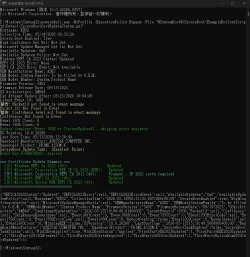
I used Detect-SecureBootCertUpdateStatus.ps1 and got this result (in txt form):

Code:
Hostname: PHANTOM2
Collection Time: 05/14/2026 07:47:00
Secure Boot Enabled: True
High Confidence Opt Out: Not Set
Microsoft Update Managed Opt In: Not Set
Available Updates: 0x0
Available Updates Policy: Not Set
Windows UEFI CA 2023 Status: Updated
UEFI CA 2023 Error: None
UEFI CA 2023 Error Event: Not Available
OEM Manufacturer Name: ASUS
OEM Model System Family: ASUS MB
OEM Model Number: All Series
Firmware Version: 2503
Firmware Release Date: 02/26/2016
OS Architecture: AMD64
Can Attempt Update After: 09/17/2025 17:46:36
Latest Event ID: 1808
Bucket ID: 9b5832c37549a8e3601a4de7c18e1672a33e2d3365bf74827500fd0d07489106
Confidence: High Confidence
Event 1801 Count: 0
Event 1808 Count: 50
Update complete (Event 1808 or Status=Updated) - skipping error analysis
OS Version: 10.0.26200
Last Boot Time: 05/14/2026 07:36:26
Baseboard Manufacturer: ASUSTeK COMPUTER INC.
Baseboard Product: H97-PRO GAMER
SecureBoot Update Task: Ready (Enabled: True)
WinCS Key F33E0C8E002: Applied

=== Certificate Update Summary ===
  [1P] Windows UEFI CA 2023 (db):                   Updated
  [1P] Microsoft Corporation KEK 2K CA 2023 (KEK):   Updated
  [3P] Microsoft Corporation UEFI CA 2011 (db):      Present - 3P 2023 certs required
  [3P] Microsoft UEFI CA 2023 (db):                  Updated
  [3P] Microsoft Option ROM UEFI CA 2023 (db):       Updated
===================================

{"UEFICA2023Status":"Updated","UEFICA2023Error":null,"UEFICA2023ErrorEvent":null,"AvailableUpdates":"0x0","AvailableUpdatesPolicy":null,"Hostname":"PHANTOM2","CollectionTime":"2026-05-14T07:47:00.0690849+03:00","SecureBootEnabled":true,"HighConfidenceOptOut":null,"MicrosoftUpdateManagedOptIn":null,"OEMManufacturerName":"ASUS","OEMModelSystemFamily":"ASUS MB","OEMModelNumber":"All Series","FirmwareVersion":"2503","FirmwareReleaseDate":"02/26/2016","OSArchitecture":"AMD64","CanAttemptUpdateAfter":"2025-09-17T17:46:36.5830000Z","LatestEventId":1808,"BucketId":"9b5832c37549a8e3601a4de7c18e1672a33e2d3365bf74827500fd0d07489106","Confidence":"High Confidence","SkipReasonKnownIssue":null,"Event1801Count":0,"Event1808Count":50,"Event1795Count":0,"Event1795ErrorCode":null,"Event1796Count":0,"Event1796ErrorCode":null,"Event1800Count":0,"RebootPending":false,"Event1802Count":0,"KnownIssueId":null,"Event1803Count":0,"MissingKEK":false,"OSVersion":"10.0.26200","LastBootTime":"2026-05-14T07:36:26.5000000+03:00","BaseBoardManufacturer":"ASUSTeK COMPUTER INC.","BaseBoardProduct":"H97-PRO GAMER","SecureBootTaskEnabled":true,"SecureBootTaskStatus":"Ready","WinCSKeyApplied":true,"WinCSKeyStatus":"Applied","FirstPartyDB2023Updated":1,"FirstPartyKEK2023Updated":1,"ThirdParty2011CAPresent":1,"ThirdParty2023CertsRequired":1,"ThirdParty2023CertUpdated":1,"ThirdPartyOptionRom2023CertUpdated":1}

EDiT: This Microsoft's script does not check and output the presence of SVN and its data in UEFI firmware.
 
Last edited by a moderator:

My Computers

System One System Two

  • OS
    Windows 11 Pro build 26200.8524
    Computer type
    PC/Desktop
    Manufacturer/Model
    Home Built
    CPU
    Intel i7-4790
    Motherboard
    Asus H97 Pro Gamer with add-on TPM1.2 module
    Memory
    Teams DDR3-1600 4x4 GB
    Graphics Card(s)
    MSI Nvidia GeForce GTX 1050Ti
    Sound Card
    Realtek ALC1150
    Monitor(s) Displays
    Dell P2425D
    Screen Resolution
    2560 by 1440 pixels
    Hard Drives
    Corsair NVMe M.2 Core XT 1000 GB (Windows 11 v.25H2); Samsung SATA Evo 870 500 GB (Windows 11 v.25H2);
    PSU
    Corsair HX850
    Case
    Gigabyte Solo 210
    Cooling
    Zalman CNPS7X Tower
    Keyboard
    Microsoft AIO Wireless (includes touchpad)
    Mouse
    HP S1000 Plus Wireless
    Internet Speed
    500 Mb fiber optic
    Browser
    Chrome; MS Edge
    Antivirus
    Windows Defender
  • Operating System
    MacOS 12 Monterey
    Computer type
    Laptop
    Manufacturer/Model
    Apple Macbook Air
    CPU
    Intel Core i5
    Memory
    8 GB
    Graphics card(s)
    Intel integrated
    Screen Resolution
    1440 by 900 pixels
    Hard Drives
    128 GB
    Keyboard
    Built-in
    Mouse
    Microsoft Wireless
    Internet Speed
    802.11 ac
    Browser
    Chrome; Safari
    Antivirus
    N/A
Installed without issues on both my laptops, have now a new folder in C:\Windows\SecureBoot with 7 Example Rollout scripts. DISM and SFC ran OK. Meanwhile Spotlight is updating my Background Wallpaper again.
 

My Computers

System One System Two

  • OS
    Windows 11 Home 25H2 build: 26200.8524
    Computer type
    Laptop
    Manufacturer/Model
    Acer Swift A.I SF14-51T
    CPU
    Intel(R) Core(TM) Ultra 7 258V, 2200 Mhz, 8 Cores
    Motherboard
    Icefish_LNV, Version V1.15
    Memory
    32 GB LPDDR5X (soldered)
    Graphics Card(s)
    Intel(R) Arc(TM) 140V GPU (16GB)
    Sound Card
    RealTek + Intel Smart Sound
    Monitor(s) Displays
    14" IPS WUXGA
    Screen Resolution
    1920x1200x60Hz
    Hard Drives
    Micron_2550_MTFDKBA1T0TGE, NVMe Gen4, 1TB
    PSU
    45W USB-C GaN charger
    Case
    Full aluminum body
    Cooling
    1 fan
    Keyboard
    US with Backlight
    Mouse
    Precision Trackpad
    Internet Speed
    25 Mb/s 5G
    Browser
    Edge
    Antivirus
    Windows Defender
    Other Info
    BIOS Version/Date Insyde Corp. V1.15, 8/28/2025, Windows Hello IR camera with Facial recognition. Secure Boot 2026 KEK key installed
  • Operating System
    Windows 11 Home 25H2 build: 26200.8524
    Computer type
    Laptop
    Manufacturer/Model
    Asus Vivobook K3502Z S15 15" OLED
    CPU
    Intel 12th Gen. i7 12700H, 14 cores, 2.3 GHz (24M Cache, up to 4.7 GHz, 6P+8E cores)
    Motherboard
    Alder Lake-H, 1700-4700 MHz clock rate
    Memory
    8GB LPDDR4 on board + 8GB LPDDR4 3200 MHz in Dual Channel.
    Graphics card(s)
    Intel Iris Xe supports up to 4096 x 2304 @ 120Hz
    Sound Card
    Harman Kardon - DTS
    Monitor(s) Displays
    OLED 15.6inch 2.8K (2880 x 1620)
    Screen Resolution
    16:9 aspect ratio 0.2ms response time 120Hz refresh rate, 550nits
    Hard Drives
    512GB M.2 NVMe Gen4 PCIe 4.0 SSD, Micron_2450_MTFDKBA512TFK
    PSU
    90-Watt USB charger (Thunderbolt4)
    Case
    Metal lid, plastic case
    Cooling
    1 fan
    Keyboard
    With adjustable backlight
    Mouse
    Precision Trackpad
    Internet Speed
    ISP provides 15 mb/s WIFI LTE (4G), laptop WIFI 6 adapter.
    Browser
    Edge
    Antivirus
    Windows Defender
    Other Info
    BIOS American Megatrends International, LLC. 10.1.2.312, 13/03/2024. Network adapter: Intel Wi-Fi 6E AX211 160 MHz, Secure Boot 2026 KEK key installed
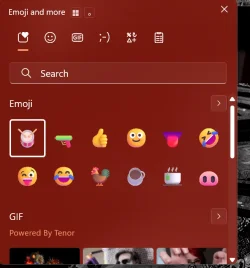
They robbed me of the ability to search in emojis :/

View attachment 171347
@xomuz I had that problem too(I checked after reading your post).
I did a good search in internet, and found that you need to restart explorer and it will reappear.
Note it is still there after a shutdown and later boot, also.

Screenshot 2026-05-14 144113.webp
 

My Computer

System One

  • OS
    Win10 Pro, Win10 Pro N, Win10 Home, Windows 8.1 Pro, Ubuntu
    Computer type
    PC/Desktop
    Manufacturer/Model
    ۞ΞЖ†ԘΜΞ۞
    CPU
    Intel Core i9 9900K
    Motherboard
    ASUS ROG Maximus X Hero
    Memory
    32 GB Quad Kit, G.Skill Trident Z RGB Series schwarz, DDR4-3866, 18-19-19-39-2T
    Graphics Card(s)
    ASUS GeForce RTX 3090 ROG Strix O24G, 24576 MB GDDR6X
    Sound Card
    (1) HD Webcam C270 (2) NVIDIA High Definition Audio (3) Realtek High Definition Audio
    Monitor(s) Displays
    BenQ BL2711U(4K) and a hp 27vx(1080p)
    Hard Drives
    C: Samsung 960 EVO NVMe M.2 SSD
    E: & O: Libraries & OneDrive-> Samsung 850 EVO 1TB
    D: Hyper-V VM's -> Samsung PM951 Client M.2 512Gb SSD
    G: System Images -> Samsung 860 Pro 2TB
    PSU
    Corsair HX1000i High Performance ATX Power Supply 80+ Platinum
    Case
    Phanteks Enthoo Pro TG
    Cooling
    Thermaltake Floe Riing RGB TT Premium-Edition 360mm and 2x120 Phantek& Halo front, and 1x140 Phanteks
    Keyboard
    Trust GTX THURA
    Mouse
    Trust GTX 148
    Internet Speed
    25+/5+ (+usually faster)
    Browser
    Edge; Chrome;
    Antivirus
    Windows Defender of course & Malwarebytes Anti-Exploit as an added layer between browser & OS
    Other Info
    Router: FRITZ!Box 7590 AX V2
    Sound system: SHARP HT-SBW460 Dolby Atmos Soundbar
    Webcam: Logitech BRIO ULTRA HD PRO WEBCAM 4K webcam with HDR
Thanks for the heads-up.

I used Detect-SecureBootCertUpdateStatus.ps1 and got this result (in txt form):

Hostname: PHANTOM2
Collection Time: 05/14/2026 07:47:00
Secure Boot Enabled: True
High Confidence Opt Out: Not Set
Microsoft Update Managed Opt In: Not Set
Available Updates: 0x0
Available Updates Policy: Not Set
Windows UEFI CA 2023 Status: Updated
UEFI CA 2023 Error: None
UEFI CA 2023 Error Event: Not Available
OEM Manufacturer Name: ASUS
OEM Model System Family: ASUS MB
OEM Model Number: All Series
Firmware Version: 2503
Firmware Release Date: 02/26/2016
OS Architecture: AMD64
Can Attempt Update After: 09/17/2025 17:46:36
Latest Event ID: 1808
Bucket ID: 9b5832c37549a8e3601a4de7c18e1672a33e2d3365bf74827500fd0d07489106
Confidence: High Confidence
Event 1801 Count: 0
Event 1808 Count: 50
Update complete (Event 1808 or Status=Updated) - skipping error analysis
OS Version: 10.0.26200
Last Boot Time: 05/14/2026 07:36:26
Baseboard Manufacturer: ASUSTeK COMPUTER INC.
Baseboard Product: H97-PRO GAMER
SecureBoot Update Task: Ready (Enabled: True)
WinCS Key F33E0C8E002: Applied

=== Certificate Update Summary ===
[1P] Windows UEFI CA 2023 (db): Updated
[1P] Microsoft Corporation KEK 2K CA 2023 (KEK): Updated
[3P] Microsoft Corporation UEFI CA 2011 (db): Present - 3P 2023 certs required
[3P] Microsoft UEFI CA 2023 (db): Updated
[3P] Microsoft Option ROM UEFI CA 2023 (db): Updated
===================================
The script gathers all of the known Secure Boot servicing reg keys (nothing new), telemetry data (PC model and BIOS version), and a summary of Event ID's. It's primarily intended for IT admins to create their own tools on top of the collected data.

What's funny, is the Microsoft Option ROM is officially considered optional (MS doesn't require OEM's to push it out), but Windows wants it to pass certification. This fact is confirmed by the Windows Security Center. If you don't have the Option ROM, it's not called out specifically but you don't get the fully compliant message.
 

My Computer

System One

  • OS
    Windows 7
Installed but spent ages trying to fix Dism. RestoreHealth would fail with "unable to find files". Tried local source, restricting to Windows Update nothing worked so in the end did an In Place Upgrade which was a battle in itself. Finding an ISO which didn't want to wipe my apps (option greyed out) was difficult. Made the latest ISO from UUP Dump but no option to keep apps just personal files. Eventually downloaded ISO from Windows Download Page which still has the option to keep files and apps and after upgrade no more Dism errors. So did a backup.
 

My Computers

System One System Two

  • OS
    Solus Plasma
    Computer type
    PC/Desktop
    Manufacturer/Model
    Novatech BB90014
    CPU
    Intel Core i5 9400F
    Motherboard
    Gigabyte H310M S2H 2
    Memory
    Corsair 32 gb Vengeance
    Graphics Card(s)
    Nvidia GT1030
    Sound Card
    On board Realtek
    Monitor(s) Displays
    Dell 2412M Sharpscreen
    Screen Resolution
    1920x1080
    Hard Drives
    Corsair MP510 NvME 1tb
    Crucial MX500 500gb
    WD 2.5Tb
    Hitachi Deskstar 500
    PSU
    Novatech 800W
    Case
    Novatech
    Cooling
    3 x front fans, 1 rear
    Keyboard
    Logitech G11
    Mouse
    Logitech G203
    Internet Speed
    1000/110 Mbps
    Browser
    Vivaldi
    Antivirus
    ClamTK
  • Operating System
    win 11 Pro
    Computer type
    Laptop
    Manufacturer/Model
    HP
    CPU
    Intel i5
    Motherboard
    HP Intel
    Memory
    8gb Hynix
    Graphics card(s)
    Intel
    Sound Card
    Realtek
    Monitor(s) Displays
    HP
    Screen Resolution
    1920x1081
    Hard Drives
    Samsung 256
    PSU
    HP
    Case
    HP
    Cooling
    Single fan
    Keyboard
    HP
    Internet Speed
    80/20
    Browser
    Firefox
    Antivirus
    Win Defender
Eventually downloaded ISO from Windows Download Page which still has the option to keep files and apps and after upgrade no more Dism errors. So did a backup.
You definitely have to get the exact ISO match if you just want to do a repair install and let it keep all your apps and settings. If you don't see that option for keep apps and settings you have the wrong one. 😉
 

My Computers

System One System Two

  • OS
    Windows 11 25H2
    Computer type
    Laptop
    Manufacturer/Model
    Alienware 18 Area-51
    CPU
    Intel Core Ultra 9 275HX (24-Core)
    Motherboard
    Alienware
    Memory
    64GB DDR5 6400MT/s
    Graphics Card(s)
    NVIDIA GeForce RTX 5080 and Intel UHD Graphics
    Sound Card
    Onboard, Realtek high-performance Audio chips (ALC3329 & ALC1708))
    Monitor(s) Displays
    300HZ 18-inch QHD 500 nit Comfort View+
    Screen Resolution
    2560 x 1600
    Hard Drives
    2TB NVMe M.2 PCIe Gen 5 SSD
    Case
    Magnesium Alloy
    Cooling
    Advanced Cryo-Tech Quad-Fan Cooling system & large vapor chamber
    Keyboard
    Cherry MX ultra low profile mechanical keyboard with per key AlienFX RGB lighting
    Mouse
    Logitech MX Master 4
    Browser
    Vivaldi (main), Firefox, Chrome, Edge
    Antivirus
    MS Defender and Malwarebytes Free
  • Operating System
    Windows 11 25H2
    Computer type
    Laptop
    Manufacturer/Model
    Microsoft Surface Laptop 7
    CPU
    Qualcomm Snapdragon X Elite (12 Core) ARM based CPU
    Motherboard
    Microsoft Corp.
    Memory
    16GB LPDDR5
    Graphics card(s)
    Qualcomm Adreno X1-85
    Sound Card
    Omnisonic speakers with Dolby Atmos spatial sound
    Monitor(s) Displays
    120 Hz 13.8-inch 600 nit PixelSense Flow touchscreen
    Screen Resolution
    2304x1536
    Hard Drives
    1TB NVMe Gen 4 SSD
    Case
    Anodized Aluminum
    Cooling
    Traditional active cooling fan system
    Keyboard
    Mechanical QWERTY, backlit when in use
    Mouse
    Logitech MX Master 4 and Surface Arc Mouse
    Browser
    Vivaldi (main), Firefox, Chrome, Edge
    Antivirus
    MS Defender and Malwarebytes Free
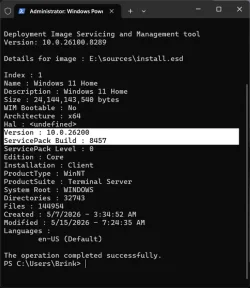
Windows 11 version 25H2 build 26200.8457 now available to download as ISO or USB with MCT.


26200.8457.webp
 

My Computers

System One System Two

  • OS
    Windows 11 Pro for Workstations
    Computer type
    PC/Desktop
    Manufacturer/Model
    Custom self build
    CPU
    Intel i7-8700K 5 GHz
    Motherboard
    ASUS ROG Maximus XI Formula Z390
    Memory
    64 GB (4x16GB) G.SKILL TridentZ RGB DDR4 3600 MHz (F4-3600C18D-32GTZR)
    Graphics Card(s)
    ASUS ROG-STRIX-GTX1080TI-O11G-GAMING (11GB GDDR5X)
    Sound Card
    Integrated Digital Audio (S/PDIF)
    Monitor(s) Displays
    2 x Samsung Odyssey G75 27"
    Screen Resolution
    2560x1440
    Hard Drives
    1TB Samsung 990 PRO M.2,
    4TB Samsung 990 PRO M.2,
    TerraMaster F8 SSD Plus NAS
    PSU
    Seasonic Prime Titanium 850W
    Case
    Thermaltake Core P3 wall mounted
    Cooling
    Corsair Hydro H115i
    Keyboard
    Amazon Basics Wired Full Keyboard MD005
    Mouse
    Logitech MX Master 4
    Internet Speed
    2 Gbps Download and 100 Mbps Upload
    Browser
    Chrome and Edge
    Antivirus
    Microsoft Defender
    Other Info
    Logitech Z625 speaker system,
    Logitech BRIO 4K Pro webcam,
    HP Color LaserJet Pro MFP M477fdn,
    CyberPower CP1500PFCLCD
    Galaxy S23 Plus phone
  • Operating System
    Windows 11 Pro
    Computer type
    Laptop
    Manufacturer/Model
    Surface Laptop 7 Copilot+ PC
    CPU
    Snapdragon X Elite (12 core) 3.42 GHz
    Memory
    16 GB LPDDR5x-7467 MHz
    Monitor(s) Displays
    15" HDR
    Screen Resolution
    2496 x 1664
    Hard Drives
    1 TB SSD
    Internet Speed
    Wi-Fi 7 and Bluetooth 5.4
    Browser
    Chrome and Edge
    Antivirus
    Microsoft Defender
I have the ISO on an other disk , cant find the version , after opening the ISO ................. 🛠️
I guess after using the MCT , you will get latest Win11-version....
 

My Computer

System One

  • OS
    Windows11 Pro 25H2
    Computer type
    PC/Desktop
    Manufacturer/Model
    Asus
    CPU
    i7
    Motherboard
    z97k
    Memory
    32GB
    Graphics Card(s)
    nVidia
    Sound Card
    Realtek
    Hard Drives
    3
    Cooling
    air
    Browser
    Edge
    Antivirus
    ESET
Windows 11 version 25H2 build 26200.8457 now available to download as ISO or USB with MCT.


View attachment 171581

Latest MCT created USB installation media 26200.8457 cannot get to Command Prompt.


My Computer

System One

  • OS
    Windows 11 Pro 25H2
    Computer type
    PC/Desktop
    Manufacturer/Model
    Dell XPS 8930
    CPU
    Intel I9-9900K
    Memory
    64GB
    Graphics Card(s)
    NVIDIA RTX 2060
    Sound Card
    NVIDIA High Definition Audio
    Monitor(s) Displays
    4k Samsung
    Screen Resolution
    3840 x 2160
    Hard Drives
    512GB NVMe, ADATA SU 800, 2TB HDD
Last edited:

My Computer

System One

  • OS
    Windows 11 Pro 25H2
    Computer type
    PC/Desktop
    Manufacturer/Model
    Dell XPS 8930
    CPU
    Intel I9-9900K
    Memory
    64GB
    Graphics Card(s)
    NVIDIA RTX 2060
    Sound Card
    NVIDIA High Definition Audio
    Monitor(s) Displays
    4k Samsung
    Screen Resolution
    3840 x 2160
    Hard Drives
    512GB NVMe, ADATA SU 800, 2TB HDD
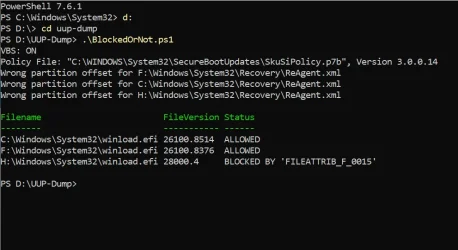
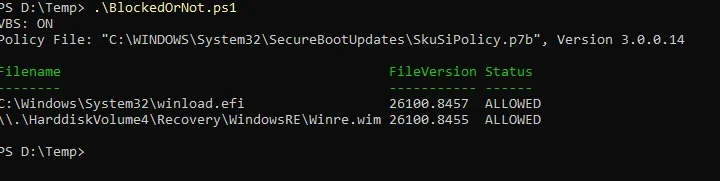
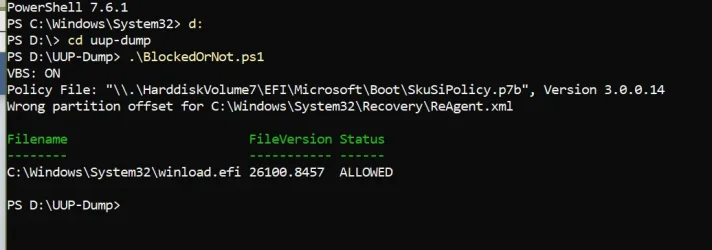
The WinRE location thing appears broken, I should probably add an option to scan an extracted boot.wim from a folder.
 

My Computer

System One

  • OS
    Windows 7
For me this update turned into a update from H*LL. Last night I finally got around to restarting my computer. It took over two and a half hours only be greeted with a rollback that took hours. I'm not sure of the time because I had to get some sleep. Tonight I gave it another try. The process didn't take long but it failed again. I tried it a third time and this time it installed without any problems. So far I haven't noticed any problems.
 

My Computers

System One System Two

  • OS
    Windows 11 Pro 25H2
    Computer type
    PC/Desktop
    Manufacturer/Model
    PowerSpec B746
    CPU
    Intel Core i7-10700K
    Motherboard
    ASRock Z490 Phantom Gaming 4/ax
    Memory
    16GB (8GB PC4-19200 DDR4 SDRAM x2)
    Graphics Card(s)
    NVIDIA GeForce GTX 1050 TI
    Sound Card
    Realtek Audio
    Monitor(s) Displays
    #1. LG ULTRAWIDE 34" #2. AOC Q32G2WG3 32"
    Screen Resolution
    #1. 3440 X 1440 #2. 1920 x 1080
    Hard Drives
    NVMe WDC WDS100T2B0C-00PXH0 1TB
    Samsung SSD 860 EVO 1TB
    PSU
    750 Watts (62.5A)
    Case
    PowerSpec/Lian Li ATX 205
    Keyboard
    Logitech K270
    Mouse
    Logitech M185
    Browser
    Microsoft Edge and Firefox
    Antivirus
    Webroot SecureAnywhere CE 26.1
  • Operating System
    Windows 11 Canary Channel
    Computer type
    PC/Desktop
    Manufacturer/Model
    PowerSpec G156
    CPU
    Intel Core i5-8400 CPU @ 2.80GHz
    Motherboard
    AsusTeK Prime B360M-A
    Memory
    16 MB DDR 4-2666
    Monitor(s) Displays
    23" Speptre HDMI 75Hz
    Screen Resolution
    1920x1080
    Hard Drives
    Samsung 970 EVO 500GB NVMe
    Keyboard
    Logitek K270
    Mouse
    Logitek M185
    Browser
    Firefox, Edge and Edge Canary
    Antivirus
    Windows Defender

My Computers

System One System Two

  • OS
    Windows 11 Pro for Workstations
    Computer type
    PC/Desktop
    Manufacturer/Model
    Custom self build
    CPU
    Intel i7-8700K 5 GHz
    Motherboard
    ASUS ROG Maximus XI Formula Z390
    Memory
    64 GB (4x16GB) G.SKILL TridentZ RGB DDR4 3600 MHz (F4-3600C18D-32GTZR)
    Graphics Card(s)
    ASUS ROG-STRIX-GTX1080TI-O11G-GAMING (11GB GDDR5X)
    Sound Card
    Integrated Digital Audio (S/PDIF)
    Monitor(s) Displays
    2 x Samsung Odyssey G75 27"
    Screen Resolution
    2560x1440
    Hard Drives
    1TB Samsung 990 PRO M.2,
    4TB Samsung 990 PRO M.2,
    TerraMaster F8 SSD Plus NAS
    PSU
    Seasonic Prime Titanium 850W
    Case
    Thermaltake Core P3 wall mounted
    Cooling
    Corsair Hydro H115i
    Keyboard
    Amazon Basics Wired Full Keyboard MD005
    Mouse
    Logitech MX Master 4
    Internet Speed
    2 Gbps Download and 100 Mbps Upload
    Browser
    Chrome and Edge
    Antivirus
    Microsoft Defender
    Other Info
    Logitech Z625 speaker system,
    Logitech BRIO 4K Pro webcam,
    HP Color LaserJet Pro MFP M477fdn,
    CyberPower CP1500PFCLCD
    Galaxy S23 Plus phone
  • Operating System
    Windows 11 Pro
    Computer type
    Laptop
    Manufacturer/Model
    Surface Laptop 7 Copilot+ PC
    CPU
    Snapdragon X Elite (12 core) 3.42 GHz
    Memory
    16 GB LPDDR5x-7467 MHz
    Monitor(s) Displays
    15" HDR
    Screen Resolution
    2496 x 1664
    Hard Drives
    1 TB SSD
    Internet Speed
    Wi-Fi 7 and Bluetooth 5.4
    Browser
    Chrome and Edge
    Antivirus
    Microsoft Defender
I seem to be stuck in slow wifi mode. Someone mentioned checking to see if an Intel networking service was installed, but I can't remember the details nor where I found it.
 

My Computer

System One

  • OS
    Windows 11 Pro 25H2 (26200.8457)
    Computer type
    PC/Desktop
    Manufacturer/Model
    Pre-built
    CPU
    AMD Ryzen 7 7800X3D
    Motherboard
    MSI Pro B650-VC WiFi
    Memory
    32gb Team Group (T-Force) DDR5-6000
    Graphics Card(s)
    Zotac nVidia GeForce RTX 4070 SUPER - 12gb
    Sound Card
    Sound BlasterX G6
    Monitor(s) Displays
    Koorui G2421V and ViewSonic VX2453
    Screen Resolution
    P:2560x1440 S:1920x1080
    Hard Drives
    WD Blue SN5000 - 500gb NVME
    WD Blue SN580 - 2TB NVME
    Seagate 4TB HDD - ST4000VN008-2DR166
    Keyboard
    Mountain Everest
    Mouse
    Logitech G502 Hero
    Internet Speed
    T-Mobile Home Internet
    Browser
    Firefox
    Other Info
    QNAP TS-469 Pro NAS
    TP-Link W7200 (2 unit mesh network)
    Elgato Streamdeck
Windows 11 version 25H2 build 26200.8457 now available to download as ISO or USB with MCT.


View attachment 171581
I downloaded MCT and then the ISO for GB, it is the 26200.8457 version and has "Keep Apps and Files" available if anyone was curious. :)
 

My Computers

System One System Two

  • OS
    Solus Plasma
    Computer type
    PC/Desktop
    Manufacturer/Model
    Novatech BB90014
    CPU
    Intel Core i5 9400F
    Motherboard
    Gigabyte H310M S2H 2
    Memory
    Corsair 32 gb Vengeance
    Graphics Card(s)
    Nvidia GT1030
    Sound Card
    On board Realtek
    Monitor(s) Displays
    Dell 2412M Sharpscreen
    Screen Resolution
    1920x1080
    Hard Drives
    Corsair MP510 NvME 1tb
    Crucial MX500 500gb
    WD 2.5Tb
    Hitachi Deskstar 500
    PSU
    Novatech 800W
    Case
    Novatech
    Cooling
    3 x front fans, 1 rear
    Keyboard
    Logitech G11
    Mouse
    Logitech G203
    Internet Speed
    1000/110 Mbps
    Browser
    Vivaldi
    Antivirus
    ClamTK
  • Operating System
    win 11 Pro
    Computer type
    Laptop
    Manufacturer/Model
    HP
    CPU
    Intel i5
    Motherboard
    HP Intel
    Memory
    8gb Hynix
    Graphics card(s)
    Intel
    Sound Card
    Realtek
    Monitor(s) Displays
    HP
    Screen Resolution
    1920x1081
    Hard Drives
    Samsung 256
    PSU
    HP
    Case
    HP
    Cooling
    Single fan
    Keyboard
    HP
    Internet Speed
    80/20
    Browser
    Firefox
    Antivirus
    Win Defender
Back
Top Bottom